

Does Instagram Notify When You Screen Record Stories and Messages

Oct 24, 2026 • Filed to: Virtual Location Solutions • Proven solutions
 TL;DR:
Instagram does not notify creators when you screen record their Stories, Reels, posts, or standard direct messages, but it sends an instant in-chat alert if you capture disappearing photos, videos, or Vanish Mode conversations.
● Screen recording public content is generally permitted for personal reference, but capturing temporary private media or sharing copyrighted recordings without consent carries significant privacy and legal risks.
● Users wanting to manage their location-based content reach can connect their iOS or Android device to a computer and use Teleport Mode in Dr.Fone - Virtual Location to instantly alter their GPS coordinates without rooting or jailbreaking.
Ask AI for a summary
 ChatGPT
 Perplexity
 Gemini
 Claude
 Grok
Grok
A popular influencer once shared a private Instagram story meant only for close friends. Hours later, the clip appeared outside that circle. Trust broke instantly. Questions followed. Who recorded it? Did Instagram warn anyone? Situations like this are more common than people admit. Privacy on social apps feels fragile. One silent action can change relationships and reputations. That is why the question does instagram notify screen recording matters so much today. Many users believe alerts appear every time. Others think Instagram sees nothing at all. Both ideas are partly wrong.
This article aims to provide clear, current answers. It explains does instagram notify when you screen record different content types. Stories, messages, reels, and private media are all covered. The goal is clarity, confidence, and informed use.
- Part 1. Does Instagram notify of screen recording?
- Part 2. Does Instagram always detect screen recording?
- Part 3. Can someone know if you're screen recording?
- Part 4. Is it legal to screen record on Instagram?
- Part 5. Instagram Screen Record Notifications

- Bonus Tip. How to change your Instagram location with Dr.Fone - Virtual Location
Part 1. Does Instagram notify of screen recording?
Many users worry about being exposed while screen recording. This concern is about alerts. The key question here is simple. Will the other person know? Does Instagram notify when screen recording depends on the type of content being recorded?
Instagram stays silent for most content. If you screen record stories, reels, posts, or profiles, the creator does not receive any notification. There is no alert message icon or warning.
Notifications appear only in private message situations where content is meant to disappear. When someone records a disappearing photo or video sent in a direct message, Instagram informs the sender in the chat. This alert appears instantly and clearly.
Vanish mode works the same way. If a screen recording occurs, both users are notified to maintain trust.
So, if you are asking, does Instagram notify when you screen record a story or reel, the answer is no. Notifications are limited to private disappearing media only.
Part 2. Does Instagram always detect screen recording?
This question focuses on detection, not alerts. Detection means whether Instagram can even see the recording action. The answer is no. Instagram does not constantly monitor screen recording activity. Does Instagram notify that screen recording only applies when detection exists?
Does Instagram Notify If You Screen Record Stories?
Instagram can detect recording only inside features designed to vanish. One-time photos, one-time videos, and vanish mode messages fall into this category. These features are built with system-level checks that trigger detection.
For all other content, Instagram has no active detection. Stories, reels, posts, profiles,s and video calls are not tracked. Screen recording these remains invisible to the app.
This means Instagram does not always know when recording happens. Detection is selective and limited to temporary private content.
So, when asking, does Instagram notify when you screen record public or shared content? The reason alerts do not appear is simple. Instagram does not detect it in the first place.
Part 3. Can someone know if you're screen recording?
When people inquire whether someone can tell if you are screen recording on Instagram, they mean if the other party can learn that you recorded their content. The short and not-entirely-satisfying answer is this: in most cases, nobody knows, but there are a few exceptions where Instagram does share that information. This reality is backed by up-to-date guidance on how Instagram’s notification system works.
Does It Notify When You Screen Record Someone's Instagram
When Someone Can Know
Instagram protects only some private content. After someone sends you a disappearing photo or video in direct messages and you “watch” the content, if you screen-record or take a screenshot of that content, the sender will be notified through a notification within the chat. The same rule goes for when content is sent while in Vanish Mode: disappearing messages are made for privacy, so if you take a screenshot of the message, Instagram will alert the sender.
This means yes, the sender can know and will know if you record that type of content. The alert appears clearly in their direct message thread as soon as the recording happens.
Part 4. Is it legal to screen record on Instagram?
Screen recording on Instagram is not automatically illegal. The law cares about context, not the action itself. What matters is what you record and what you do with it after. This is where many users misunderstand the rules while asking does instagram notify screen recording and assuming legality depends on alerts. It does not.
When Screen Recording Is Generally Allowed
These situations are usually legal when the recording is for personal use and not shared publicly.
- Public stories shared openly
- Feed posts and reels are visible to everyone
- Your own stories, posts, or reels
- Content used for private reference or backup
Instagram does not restrict recording in these cases. The creator is not notified. Legal issues typically do not apply unless the content is reused improperly.
This video demonstrates how to screen record an Instagram story:
Can You Screen Record Stories On Instagram (2025) - Quick Fix
When Screen Recording Becomes a Legal Risk
Problems begin when recording crosses privacy or ownership boundaries.
- Disappearing photos or videos in direct messages
- Vanish mode conversations
- Private chats are meant only for the recipient
- Content shared with an expectation of privacy
Recording this type of content can violate privacy laws. Instagram also alerts the sender when this happens. Sharing such recordings without consent increases legal exposure.
Copyright and Ownership Rules You Must Respect
Screen recording does not transfer ownership. Recording content does not give the right to reuse it.
|
Action |
Legal Risk |
| Recording copyrighted music or videos | High |
| Reposting someone else’s original content | High |
| Sharing private recordings publicly | Very high |
| Using recordings for harassment | Illegal in many regions |
Part 5. Instagram Screen Record Notifications
Instagram does not treat all content the same. Its notification system follows a simple logic. Only some actions matter. Most do not. This is why confusion exists around does instagram notify screen recording.
Where Instagram Stays Completely Silent
For most content, Instagram does nothing. No alert. No warning. No trace. You can screen record or screenshot:
- Stories
- Feed posts
- Reels
- Public profiles
- Regular direct message chats
In these cases, the original user never knows. Instagram allows viewing and saving of this content.
Where Instagram Sends a Clear Alert
Notifications appear only for content designed to vanish. These alerts protect privacy. Instagram notifies the sender when you record or screenshot:
- One-time view photos in DMs
- One-time view videos in DMs
- Messages shared in Vanish Mode
The alert shows inside the chat thread. It appears instantly. The person recording does not see it.
Quick Snapshot for Easy Recall
|
Content Type |
Screen Record Notification |
| Stories | No |
| Posts | No |
| Reels | No |
| Regular DMs | No |
| Disappearing DMs | Yes |
| Vanish Mode | Yes |
Bonus Tip: How to change your Instagram location with Dr.Fone - Virtual Location
Privacy on Instagram is not only about screen recording. Location also plays a role in how content is viewed and suggested. After understanding does instagram notify screen recording, many users look for more control over what Instagram shows about them. Location data affects explore results, ads, and reach. This is where a virtual location tool becomes useful.
Dr.Fone - Virtual Location by Wondershare is built to securely alter a phone's GPS location. It is available for Android and iOS. Instagram then reads the new position Author's Bio: When you move the location, Instagram now reads the decision where you made and not the actual location. This helps users manage privacy test content reach or avoid location-based exposure.
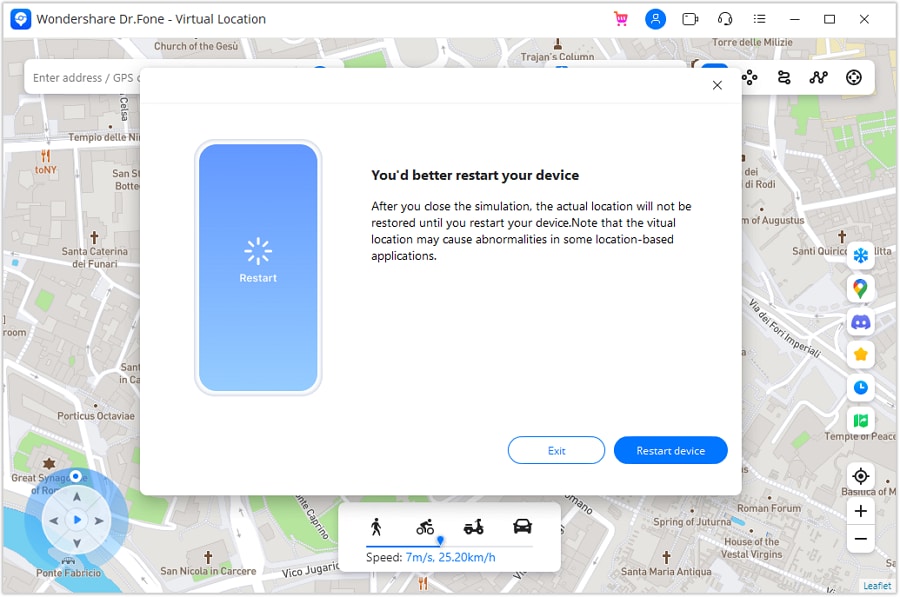
The tool uses a feature called Teleport Mode. This mode allows instant location change without jailbreaking or rooting the device. The process is simple and controlled from a computer.

Dr.Fone - Virtual Location
1-Click to Change Your Instagram Location
- Teleport from one location to another across the world from the comfort of your home.
- With just a few selections on your computer, you can make members of your circle believe you’re anywhere you want.
- Stimulate and imitate movement and set the speed and stops you take along the way.
- Compatible with both iOS and Android systems.
- Work with location-based apps, like Pokemon Go, Snapchat, Instagram, Facebook, etc.


Below is a clear step-by-step guide based on how the tool works.
Step-by-Step Guide to Change Instagram Location Using Dr.Fone
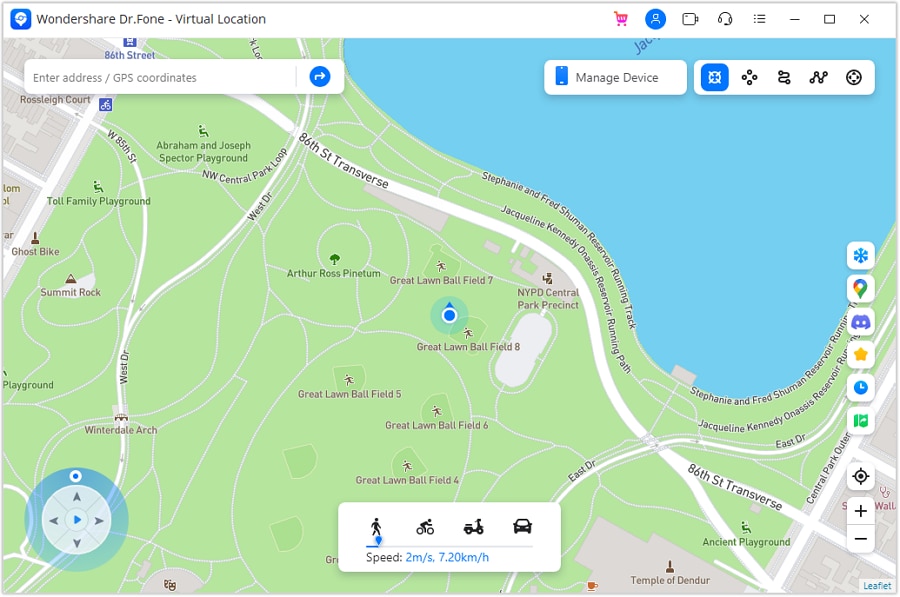
Step 1. Connect Your Phone and Open Teleport Mode
Install Dr.Fone on your computer and connect your smartphone using a cable. Open the Virtual Location feature. From the top area, select Teleport Mode. This mode lets you jump to any location instantly.
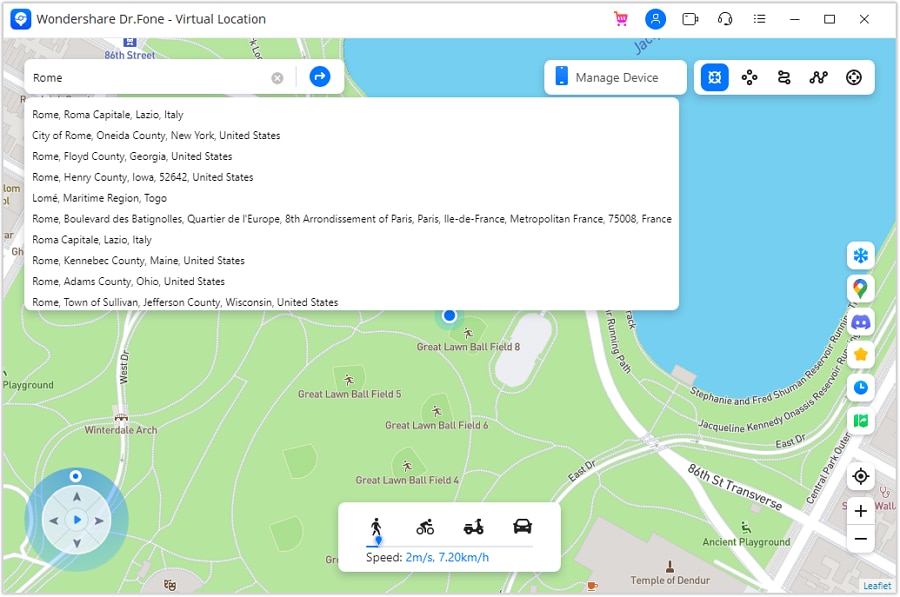
Step 2. Choose the Location You Want to Show
A map appears on the screen. Use the search bar to enter the city or place you want. Hit enter, and the map will shift there. If the map is not centred on the current position, select to centre it.
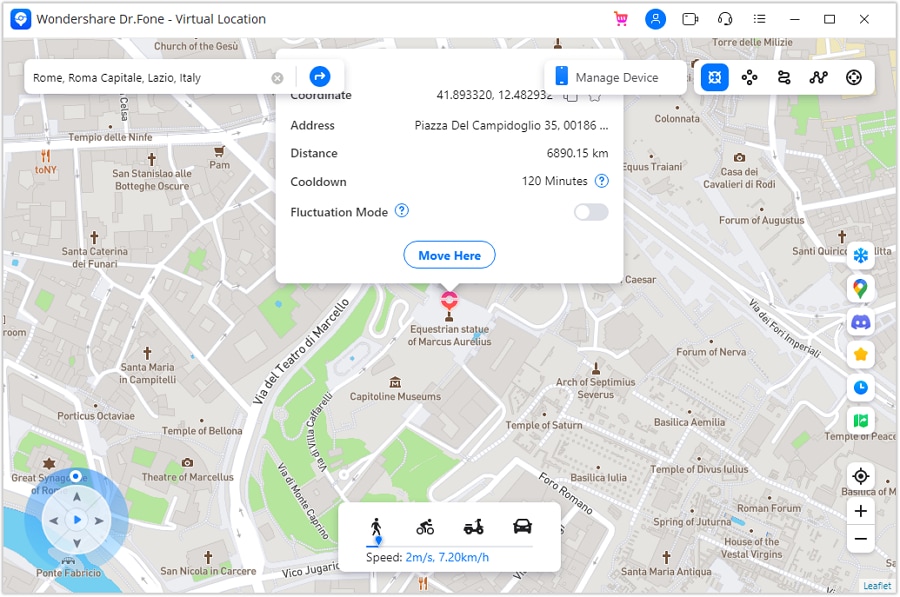
Step 3. Confirm the New Location
Once the target location is visible on the map, review it carefully. If it looks correct, select the option to move there. This confirms the teleport action.
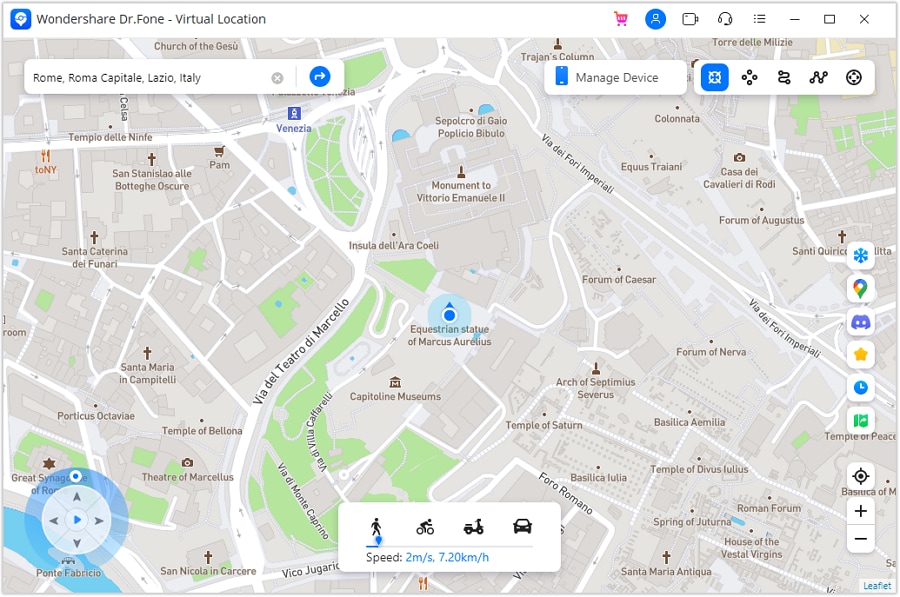
Step 4. Location Changes on the Computer Instantly
The map updates right away. Your phone GPS is now set to the new location. This change happens in real time and does not require restarting the device.
Step 5. Verify the Location on Your Phone
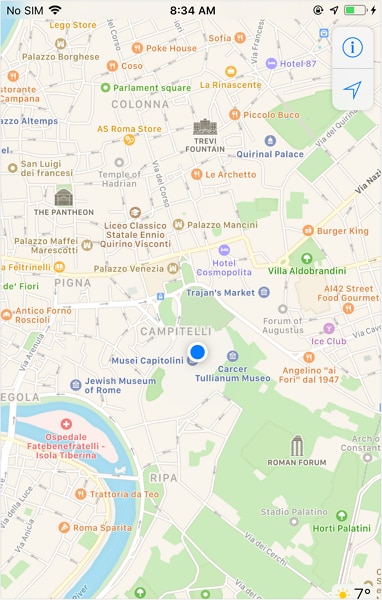
Open the Maps app on your smartphone. The displayed location should match the one selected on the computer. Instagram will now read this new location when opened.
Conclusion
Does Instagram notify screen recording only in specific private cases? Stories, posts, reels, and profiles can be recorded without alerts. Disappearing private messages cannot. This design protects privacy while keeping public content flexible. Screen recording itself is not the risk. Misuse is. Location also influences how Instagram treats an account, often without notice. Managing that signal can improve visibility. For users who want that flexibility, Dr.Fone Virtual Location blends naturally into a privacy-aware approach, helping maintain control without changing everyday Instagram use.
 safe & secure
4,624,541 people have downloaded it
You Might Also Like

Virtual Location
- Change iOS Location
- 1. Best iOS Location Changers
- 2. Fake iPhone GPS Location
- 3. Change iPhone Home Address
- 4. Change iPad Weather Location
- 5. Track a Cell Phone Location
- 6. iPhone GPS not Working
- 7. iPhone “No Location Found”
- 8. iPhone “Location Not Available”
- 9. iTools Alternatives
- 10. DoPokeGo++ Alternatives
- 11. 3uTools Alternatives
- 12. Foneazy MockGo Alternatives
- 13. "No Location Found" Vs."Location Not Available"
- Change Android Location
- 1. Best Android Fake GPS Apps
- 2. Free Android Location Spoofers
- 3. Fake Android GPS Location
- 4. Android Location Settings
- 5. Fake GPS No Root
- 6. Fake GPS on Huawei
- 7. Fake GPS without Mock Location
- Hide GPS Location
- 1. Stop Sharing Location without Notifying
- 2. Fake Location on Find My Friends
- 3. Stop Google Tracking Your Location
- 4. Fake Location on Google Maps
- 5. Spoof Location on Life360
- 6. Turn Off Life 360 Without Knowing
- 7. Stop Life360 from Tracking You
- 8. Life360 Circle: Tips & Tricks
- 9. Track Location by Mobile Number
- 10. How Do I Know If My Phone Is Being Monitored
- 11. Can Life360 Track You When Your Phone is Off
- Fake GPS on Games
- 1. Play Pokémon Go Without Moving
- 2. Celebrate National Pokémon Day
- 3. Fake GPS on Mobile Legends
- 4. Spoof Ingress Prime Location
- 5. Spoof Location on Jurassic World Alive
- Fake Location on Social Apps
- 1. Fake Location on Whatsapp
- 2. Fake Location on Facebook
- 3. Fake Location on Telegram
- 4. Fake Location on Tiktok
- 5. Does Your Snap Score Increase with Chats
- 6. Fake Location on Snapchat
- 7. Add Location Filters on Snapchat
- 8. Change Location on Twitter
- 9. Change Instagram Business Location
- 10. Change Instagram Region/Country
- 11. Stop mSpy from Spying You
- 12. Change Location On Linkedin
- Fake Location on Dating Apps
- 1. Fake Hinge GPS
- 2. Top Funny Hinge Prompts
- 3. Apps Like Tinder
- 4. Enjoy Tinder Gold
- 5. Fake Tinder GPS
- 6.Tinder Keeps Crashing
- 7. Find People on Tinder
- 8. Use Grindr on a PC
- 9. Grindr Web app explained
- 10. Fake Grindr GPS
- 11. Grindr Unable to Refresh
- 12. Fake Bumble GPS
- 13. Bumble Snooze Mode Guide
- 14. Tinder vs Bumble vs Hinge
- Get Around Geo-blocking
- 1. Hola Fake GPS Alternative
- 2. Change Netflix Location
- 3. Bypass MLB TV
- 4. Change Location on YouTube TV
- 5. Change Play Store Country
- 6. Change Facebook Marketplace Location
- Followers & Unfollowers Trackers
- Location & Social Apps Tips
- 1. How to Share Live Location on Snapchat
- 2. Best Mobile Number Tracker
- 3. Best Private IG Viewer Tools
- 4. View a Private Instagram Account
- 5. Screenshot on Instagram Without Them Knowing
- 6. Does Instagram Notify When You Screenshot
- 7. Find Out If Someone Screenshots Your Instagram Story
- 8. Does Instagram Notify When You Screen Record
- 9. Fix iPhone Location Not Updating
- 10. Does Snapchat Show Who Viewed Your Profile
- ● Teleport GPS location to anywhere
- ● Play AR games without moving
- ● Spoof Location on the popular Apps
- Free Download Free Download Free Download


 > How-to > Virtual Location Solutions > Does Instagram Notify When You Screen Record Stories and Messages
James Davis
staff Editor