

Does Snapchat Show Who Viewed Your Profile? Full Guide 2026

Oct 24, 2026 • Filed to: Virtual Location Solutions • Proven solutions
 TL;DR:
Snapchat does not show who views your profile on either private or public accounts, keeping all profile visits completely anonymous by design.
● The app only tracks direct engagement, allowing you to see the usernames of story viewers and indicating story rewatches with an eye icon, though it never reveals exactly who rewatched the content.
● Location views on Snap Map remain entirely private; you cannot see who checks your location even with a Snapchat Plus subscription, as the premium tier only adds a real-time chat peeking indicator.
● Users wanting to hide their real Snap Map location can override their GPS using Dr.Fone - Virtual Location, a tool that works with both iOS and Android devices without requiring a jailbreak or root access.
Ask AI for a summary
 ChatGPT
 Perplexity
 Gemini
 Claude
 Grok
Grok
A friend views your story within minutes. Later that night, you tap their Bitmoji and pause. A quiet question follows. Did they see that? Snapchat feels private, but moments like this create doubt. The app shows views in some places and stays silent in others. That silence leads many users to search Does Snapchat show who viewed your profile hoping for a clear answer. The truth is more specific than rumors suggest. Some actions leave traces. Others leave none.
This article explains what Snapchat really tracks, what it never reveals, and how profile views differ from stories and location. The aim is simple. Give you clear facts so you know what others can see and what stays yours alone.
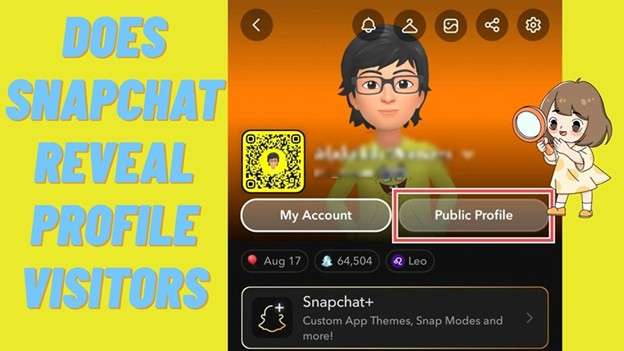

Part 1. Does Snapchat Show Who Viewed Your Profile
Most Snapchat users feel intrigued by who views their profile, especially after they have posted content that goes beyond just friends. The question seems straightforward, but on Snapchat, users are sharply limited in what they can see. Understanding those limits helps avoid confusion.
1.1 What Snapchat Means by A Profile
Every Snapchat profile can be private or public. A public profile enables your stories and snaps to be seen by more people, even folks who are not your followers on Snapchat. These profiles are frequently employed to gain exposure, promote networking, or establish a public footprint.
However, profiles are designed for reach, not tracking.
Part 2. Can You See Who Viewed Your Profile
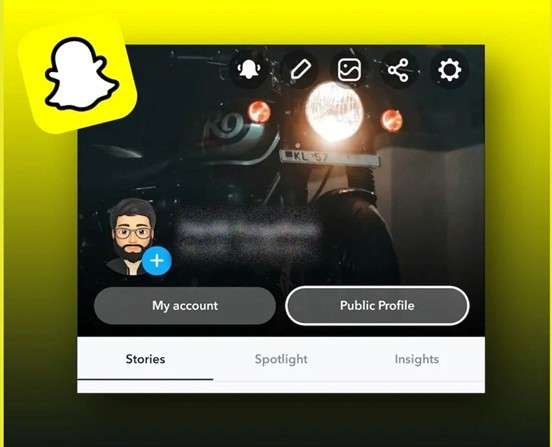
The outright answer to does Snapchat show who viewed your profile is a no – Snapchat DOES NOT share that information. Snapchat is different from other platforms in that it does not reveal profile traffic. Even on public accounts, profile visits are not revealed. There is no counter, no alert, and no username list tied to profile views.
2.1 What Snapchat Shows Instead
Snapchat is open about story engagement. When you post a story, swipe up to see who has viewed it. There are usernames scrolling in the viewer list; you see the same views over and over.
This applies to both private and public stories and is often mistaken for profile tracking. Snap Map works differently. Friends can see your location update if you share your location. This doesn’t confirm profile views, but it does indicate that someone is interested in your activity. Even here, can you see who viewed your location with Snapchat Plus remains a no.
Another indirect sign appears when someone adds you as a friend after finding your account. This may happen after they visit your profile, but Snapchat never confirms that step.
2.2 How to See Who Views Your Stories on Snapchat
Snapchat does not show who opens your profile, but it does show who watches your stories. This is the most reliable way to see who is interacting with your content.
Why Story Views Matter
Story views are treated as direct engagement on Snapchat. When someone watches your story, their username becomes visible to you. This helps you understand who is paying attention to your posts, even though profile visits stay private.
Steps To Check Story Viewers on Snapchat
Here’s how to find out who has viewed your story:
Step 1. Open Snapchat
Open Snapchat on your phone.
Step 2. Go to Your Profile
Tap your Bitmoji or profile icon in the top left.
Step 3. Open Your Story
Tap the story you want to check in the My Stories section.
Step 4. Swipe Up
As the story is playing, swipe up on your screen. You’ll be able to view a list of usernames that watched the story.
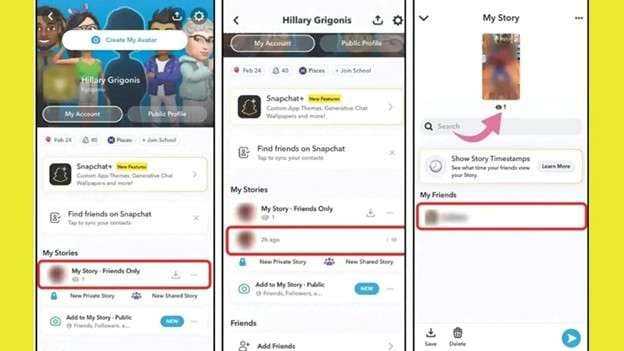
This list of viewers relates to story views only. It doesn’t show the profiles visited. If someone looks at your profile first and then views one of your stories, that story view is the thing being shown.
Why Story Views and Profile Views Are Different
Story views count as direct engagement. Profile views do not.
Watching a story shows active interest. Opening a profile does not. Because of this difference, Snapchat displays story viewers but never shows profile viewers.
These two features are not connected.
2.3 Why Snapchat Keeps Profile Views Private
Snapchat is built around low-pressure use. Showing profile viewers could encourage stalking or create discomfort. By hiding profile visits, Snapchat allows users to browse freely without leaving a visible trace. This design supports the app’s focus on casual interaction rather than analytics.
Public Profiles and Analytics Limits
Public profiles offer insights, but only at a broad level. Creators can see story views, engagement actions, subscriber growth, and general audience data. However, even here, Snapchat does not reveal the total number of profile visits or the number of individual viewers. The information stays aggregated and anonymous.
How To Know Who Is Interested in Your Content
Even without profile viewer data, Snapchat still shows signs of engagement. Story replies, comments, and likes reveal usernames. When someone interacts this way, you can see who they are and respond directly. This offers insight into active interest without exposing silent viewers.
Part 3. How to See Who Stalks Your Snapchat
Snapchat does not provide a feature that reveals who stalks your account. There is no tool that shows who keeps checking your profile or quietly following your activity. Anyone searching does Snapchat show who viewed your profile should know that Snapchat does not label or track stalkers.
- Check Story Viewers for Patterns: Snapchat displays up to 200 viewers. If the same usernames appear repeatedly across different stories, it may suggest ongoing attention. This shows engagement, not confirmation of stalking.
- Notice Story Rewatches: Snapchat may display an eye icon on your story. This means one or more users watched the story again. This means interest was higher than usual. It does not show who replyed it. Rewatches suggest attention, not tracking.
- Understand Snap Map Visibility: Snap Map can create confusion if Ghost Mode is off. Your location updates when the app opens
- Friends can see where you are, but you cannot see who checks your location. Even with Snapchat Plus, can you see who viewed your location? With Snapchat Plus, it's still no.
- Snapchat Plus and Chat Peeking: Snapchat Plus adds a chat indicator. This feature shows when someone is viewing your open conversation in real time. It does not apply to profiles, stories, or Snap Map. It only reflects active chat presence.
Tip: Reduce Attention with Privacy Settings
If engagement feels uncomfortable, Snapchat settings offer control. You can set stories to ''My Friends''. Remove specific viewers. Enable Ghost Mode and then limit location sharing. These options help reduce visibility without blocking contacts.
Part 4. Change Snapchat Location Safely with Dr Fone Virtual Location
The last sections made one thing clear. Snapchat keeps profile activity quiet, and even if you can see who viewed your location with snapchat plus is still a no. So if location privacy is your real concern, the best fix is control, not guessing.
Dr.Fone - Virtual Location is built for that. It changes your phone's GPS location without a jailbreak or root access. It also supports modern iOS and Android versions and works with location-based apps, including Snapchat. This tool is useful when Snap Map feels too exposed.
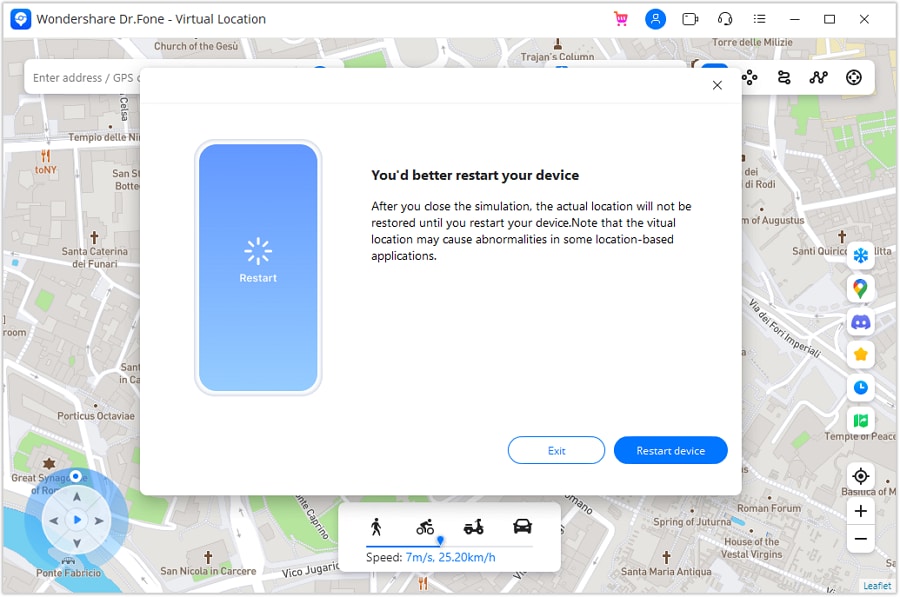
Key strengths that matter here
- One click teleport to any place
- Route simulation, if you want movement to look natural
- Works with Snapchat and other location apps
- No jailbreak or root required

Dr.Fone - Virtual Location
1-Click Location Changer for both iOS and Android
- Teleport from one location to another across the world from the comfort of your home.
- With just a few selections on your computer, you can make members of your circle believe you’re anywhere you want.
- Stimulate and imitate movement and set the speed and stops you take along the way.
- Compatible with both iOS and Android systems.
- Work with location-based apps, like Pokemon Go, Snapchat, Instagram, Facebook, etc.


Step-by-Step Guide to Change Your Location With Teleport Mode
Step 1. Connect Your Phone And Open Teleport Mode
Install Dr.Fone on your computer. Connect your phone with a cable. Open the Virtual Location tool. Choose Teleport Mode from the top area. This mode is made for instant location switching.
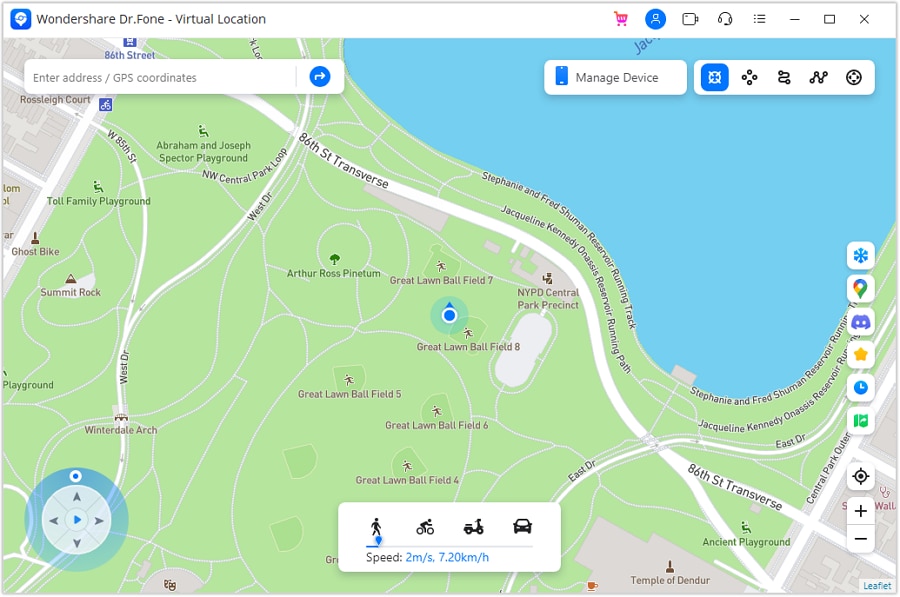
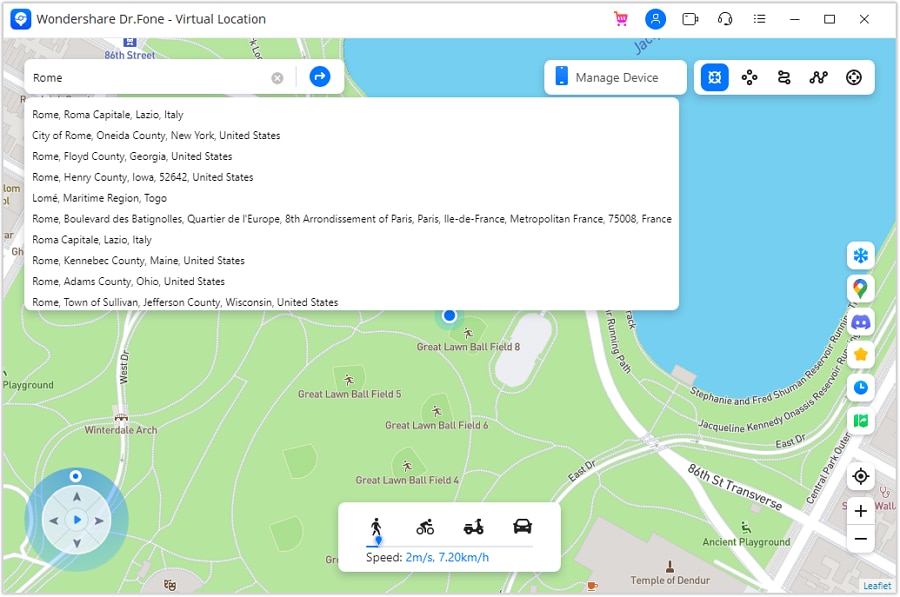
Step 2. Search The Place You Want
A map will load on your screen. Use the search bar to type a city or place. Press Enter. The map jumps to that spot. If the map is off your current point, use the center option to refocus.
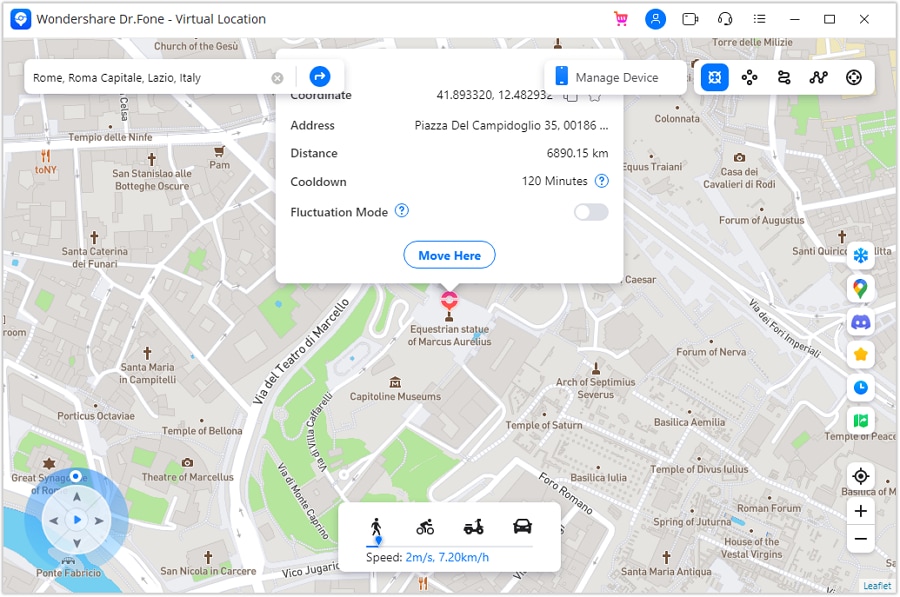
Step 3. Confirm the New Spot
Check the pin position carefully. When it looks right, choose the move option to set that place as your new GPS point. This confirms the teleport.
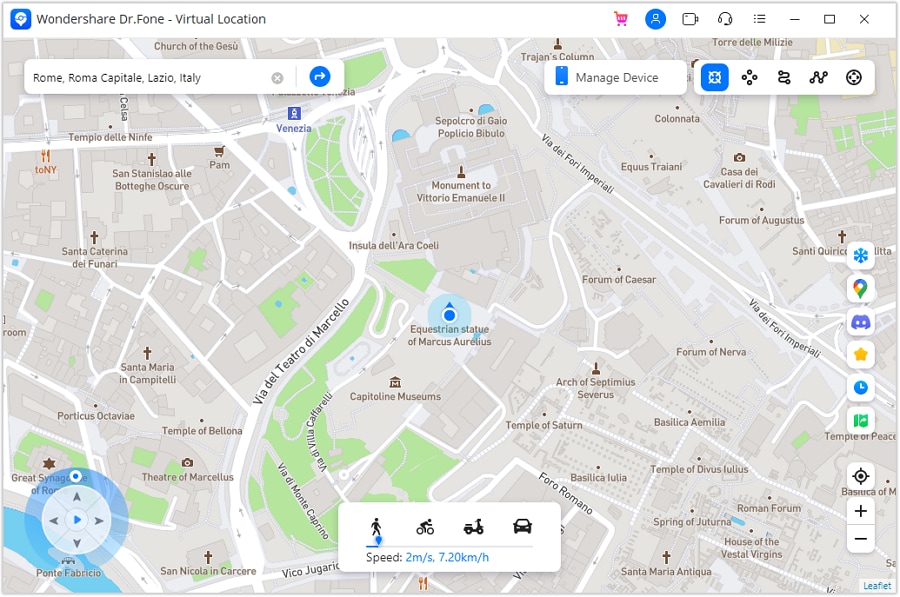
Step 4. See the Location Update Right Away
The map changes immediately. Your phone's GPS now matches the selected place. This happens in real time and usually does not require a phone restart.
Step 5. Verify on Your Phone Before Opening Snapchat
Open Apple Maps or Google Maps on your phone. Confirm the location matches what you picked. Now open Snapchat. Snap Map and other location features will read the new GPS position from your phone.
Conclusion
Snapchat leaves very little room for guessing once its rules are clear. Does Snapchat show who viewed your profile remains a firm no, and that applies to private and public accounts alike. Only stories, replies, and visible interactions create signals, while profile visits stay silent by design. The same pattern applies to location features, where you can see who viewed your location with Snapchat Plus, which still leads to the same answer.
For users who feel exposed on Snap Map, shifting the focus from tracking to control often brings relief. Tools such as Dr.Fone - Virtual Location fit naturally into that approach, allowing location changes without altering how Snapchat works. With these boundaries understood, using Snapchat becomes calmer, clearer, and far more intentional.
 safe & secure
4,624,541 people have downloaded it
You Might Also Like

Virtual Location
- Change iOS Location
- 1. Best iOS Location Changers
- 2. Fake iPhone GPS Location
- 3. Change iPhone Home Address
- 4. Change iPad Weather Location
- 5. Track a Cell Phone Location
- 6. iPhone GPS not Working
- 7. iPhone “No Location Found”
- 8. iPhone “Location Not Available”
- 9. iTools Alternatives
- 10. DoPokeGo++ Alternatives
- 11. 3uTools Alternatives
- 12. Foneazy MockGo Alternatives
- 13. "No Location Found" Vs."Location Not Available"
- Change Android Location
- 1. Best Android Fake GPS Apps
- 2. Free Android Location Spoofers
- 3. Fake Android GPS Location
- 4. Android Location Settings
- 5. Fake GPS No Root
- 6. Fake GPS on Huawei
- 7. Fake GPS without Mock Location
- Hide GPS Location
- 1. Stop Sharing Location without Notifying
- 2. Fake Location on Find My Friends
- 3. Stop Google Tracking Your Location
- 4. Fake Location on Google Maps
- 5. Spoof Location on Life360
- 6. Turn Off Life 360 Without Knowing
- 7. Stop Life360 from Tracking You
- 8. Life360 Circle: Tips & Tricks
- 9. Track Location by Mobile Number
- 10. How Do I Know If My Phone Is Being Monitored
- 11. Can Life360 Track You When Your Phone is Off
- Fake GPS on Games
- 1. Play Pokémon Go Without Moving
- 2. Celebrate National Pokémon Day
- 3. Fake GPS on Mobile Legends
- 4. Spoof Ingress Prime Location
- 5. Spoof Location on Jurassic World Alive
- Fake Location on Social Apps
- 1. Fake Location on Whatsapp
- 2. Fake Location on Facebook
- 3. Fake Location on Telegram
- 4. Fake Location on Tiktok
- 5. Does Your Snap Score Increase with Chats
- 6. Fake Location on Snapchat
- 7. Add Location Filters on Snapchat
- 8. Change Location on Twitter
- 9. Change Instagram Business Location
- 10. Change Instagram Region/Country
- 11. Stop mSpy from Spying You
- 12. Change Location On Linkedin
- Fake Location on Dating Apps
- 1. Fake Hinge GPS
- 2. Top Funny Hinge Prompts
- 3. Apps Like Tinder
- 4. Enjoy Tinder Gold
- 5. Fake Tinder GPS
- 6.Tinder Keeps Crashing
- 7. Find People on Tinder
- 8. Use Grindr on a PC
- 9. Grindr Web app explained
- 10. Fake Grindr GPS
- 11. Grindr Unable to Refresh
- 12. Fake Bumble GPS
- 13. Bumble Snooze Mode Guide
- 14. Tinder vs Bumble vs Hinge
- Get Around Geo-blocking
- 1. Hola Fake GPS Alternative
- 2. Change Netflix Location
- 3. Bypass MLB TV
- 4. Change Location on YouTube TV
- 5. Change Play Store Country
- 6. Change Facebook Marketplace Location
- Followers & Unfollowers Trackers
- Location & Social Apps Tips
- 1. How to Share Live Location on Snapchat
- 2. Best Mobile Number Tracker
- 3. Best Private IG Viewer Tools
- 4. View a Private Instagram Account
- 5. Screenshot on Instagram Without Them Knowing
- 6. Does Instagram Notify When You Screenshot
- 7. Find Out If Someone Screenshots Your Instagram Story
- 8. Does Instagram Notify When You Screen Record
- 9. Fix iPhone Location Not Updating
- 10. Does Snapchat Show Who Viewed Your Profile
- ● Teleport GPS location to anywhere
- ● Play AR games without moving
- ● Spoof Location on the popular Apps
- Free Download Free Download Free Download




Alice MJ
staff Editor