

3 Free Methods to Track a Cell Phone Location for Free: Step-by-Step Tutorial

Sep 23, 2026 • Filed to: Virtual Location Solutions • Proven solutions
 TL;DR:
You can track a cell phone's location for free using native OS tools like Find My iPhone and Google Find Hub, third-party family locators, or live-sharing features in Google Maps and WhatsApp, provided the target device is powered on with an active network connection and location services enabled.
● Native tracking requires you to sign in with the device's main Apple ID or Google account, while tools like WhatsApp and Google Maps require the phone's owner to manually authorize live location sharing for a set duration, such as 15 minutes to 8 hours.
● Free family locator apps offer distinct safety utilities—such as Life360's crash detection and FamiSafe's geofencing boundary alerts—but typically restrict extended data, like a 30-day location history, to premium paid tiers.
● If you need to mask your exact whereabouts, Dr.Fone - Virtual Location can spoof your GPS coordinates and simulate movement routes on devices running up to Android 16 and iOS 26 for location-based apps like Pokémon GO and Snapchat.
Ask AI for a summary
 ChatGPT
 Perplexity
 Gemini
 Claude
 Grok
Grok
If you want to track a cell phone's location, know that you don't always need paid tools or complex steps. Fortunately, many free methods on Android and iPhone can show a device’s last known spot or its live movements with safe features. Therefore, if you are on the hunt for those ways to track a cell phone location for free, this guide offers you detailed assistance.
This ultimate guide shows three free ways to track a cell phone location without stress, confusion, or special skills. Each method comes with clear steps, simple words, and quick actions you can follow on any device.
- Part 1. Can You Track a Cell Phone Location for Free?
- Part 2. Track Mobile Phone Location Free: Fast and Reliable Ways Explained
- Way 1: Free Built-In Tracking Services
- Way 2: Family Locator & Safety Apps
- Way 3: Other Free Apps & Solutions
- Part 3. Bonus Tip: Hide Your Real Phone Location Efficiently Using Dr.Fone – Virtual Location

- Part 4. Responsible Tracking: Legal and Ethical Guidelines for Cell Phone Location
Part 1. Can You Track a Cell Phone Location for Free?
As you track phone location for free, it's better to get an idea of whether it's actually possible. According to sources, you can trace a cell phone's location for free via the tools that come with the phone. Both Android and iPhone offer maps that show the last known place of the device. These tools work once you sign in with the phone’s main account and stay safe for normal use.
Other than that, you can also use tracking apps, which you will get to know about in this guide. This, as long as the phone has a network connection and the main account stays active, you can trace its location quickly and easily.
Understanding How Free Phone Tracking Works
Having the doubts clear to track mobile phone location free, let’s see how monitoring works on Android and iOS devices. Free phone trace tools rely on built-in maps and account data, and each phone sends small bits of location data to its main cloud service. Hence, this data is updated on a map once the device stays online and Android uses a Google account, while iPhone uses an Apple ID.
When you sign in to the same account on another device, the map shows the phone’s last spot or live spot. These tools use GPS, Wi‑Fi, and cell towers to note the phone’s place. Plus, no paid app or deep tech skill plays a role here, so the whole process stays safe and easy.
Free Tracker Apps and Platforms
Other than built-in apps, third-party solutions also follow the same pattern, but need their app on the phone and clear permission from the owner. Moreover, these apps may offer extra tools like past location records, zone alerts, and family safety options.
Limits and Requirements
- The device must have location services on and be powered on or recently used.
- You must sign in with the same Apple ID or Google account to access location data.
- The device must be connected or able to share location via a network; otherwise, only the last known spot appears, or nothing shows.
Part 2. Track Mobile Phone Location Free: Fast and Reliable Ways Explained
To locate a phone location for free, this section offers you 3 simple solutions that you can seamlessly try. Adhere to the listed sub-solution and determine if built or third-party apps prove to be handy for you.
Way 1: Free Built-In Tracking Services
1. Find My iPhone (iOS)
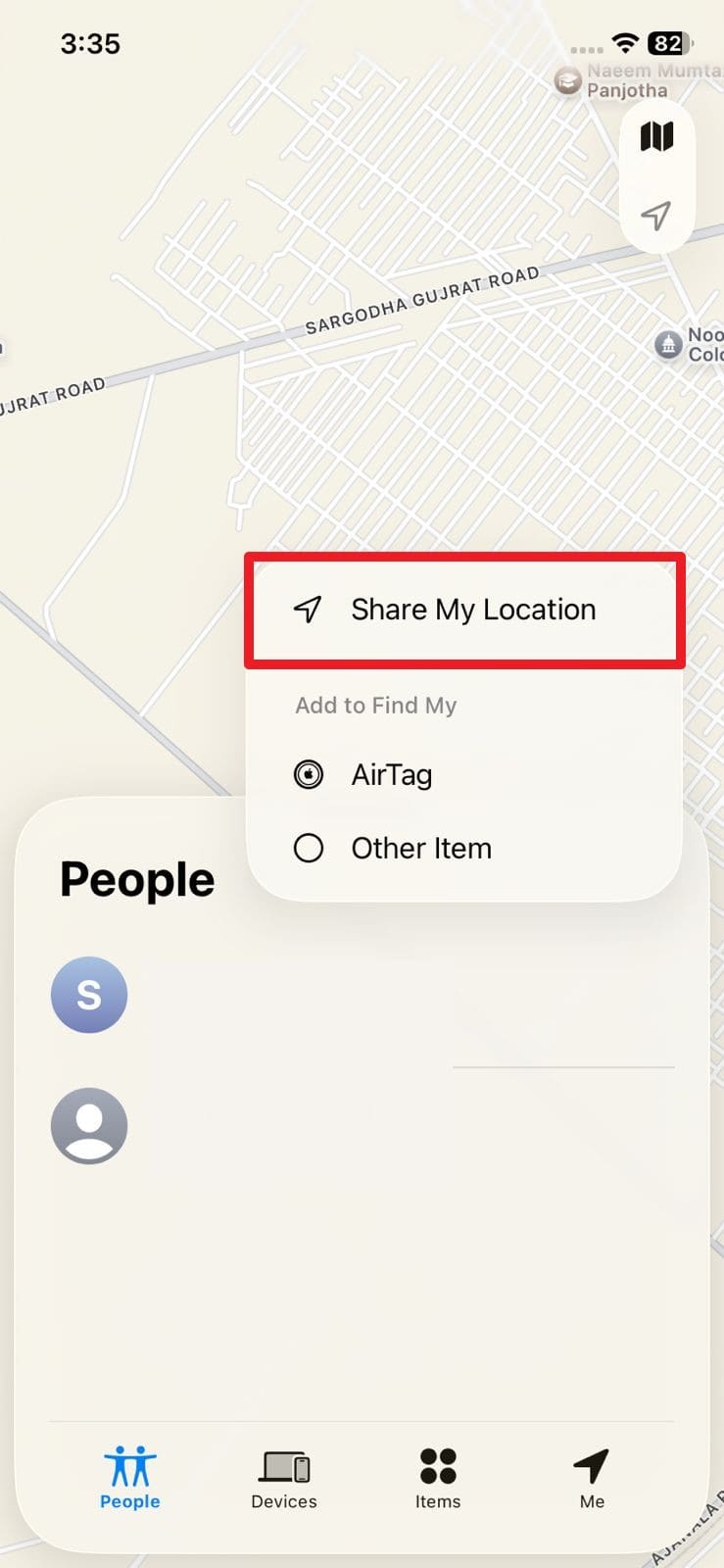
Find My iPhone is one of the best free ways to locate your iPhone because it is built into iOS and works with your Apple ID. One can see your device on a map from another Apple device or iCloud.com without extra apps or subscriptions, as you share. Additionally, Find My provides strong security through Activation Lock, which makes it an easy option to try via the given guide:
Step 1. On the Find My app, head to the “People” tab and tap the “+” icon to select the “Share My Location” option.
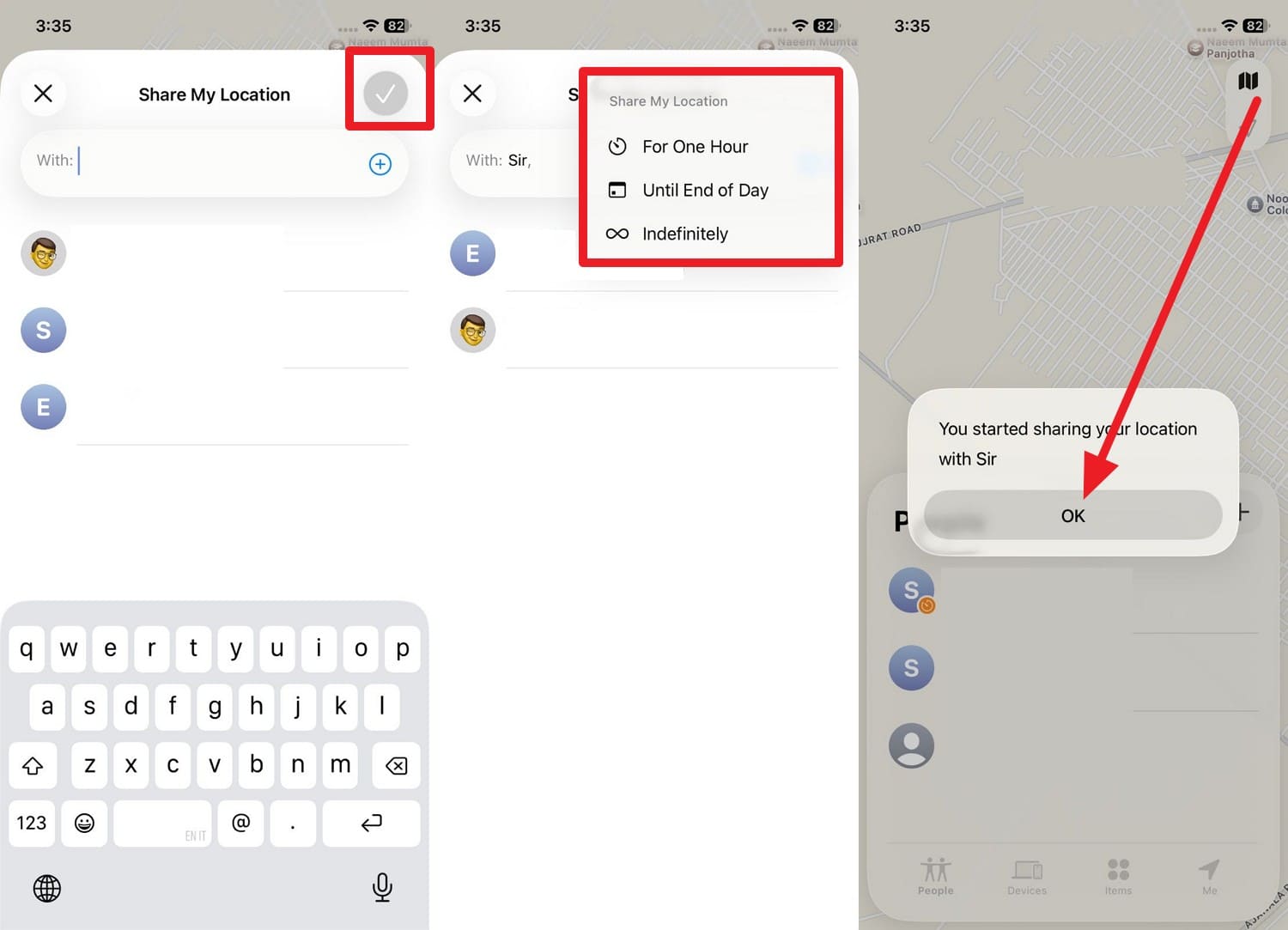
Step 2. After that, select a contact and tap the “Tick” icon to set the duration. Here, the app will send you an alert. Press the “OK" button on the pop-up that appears.
2. Find Hub (Android)
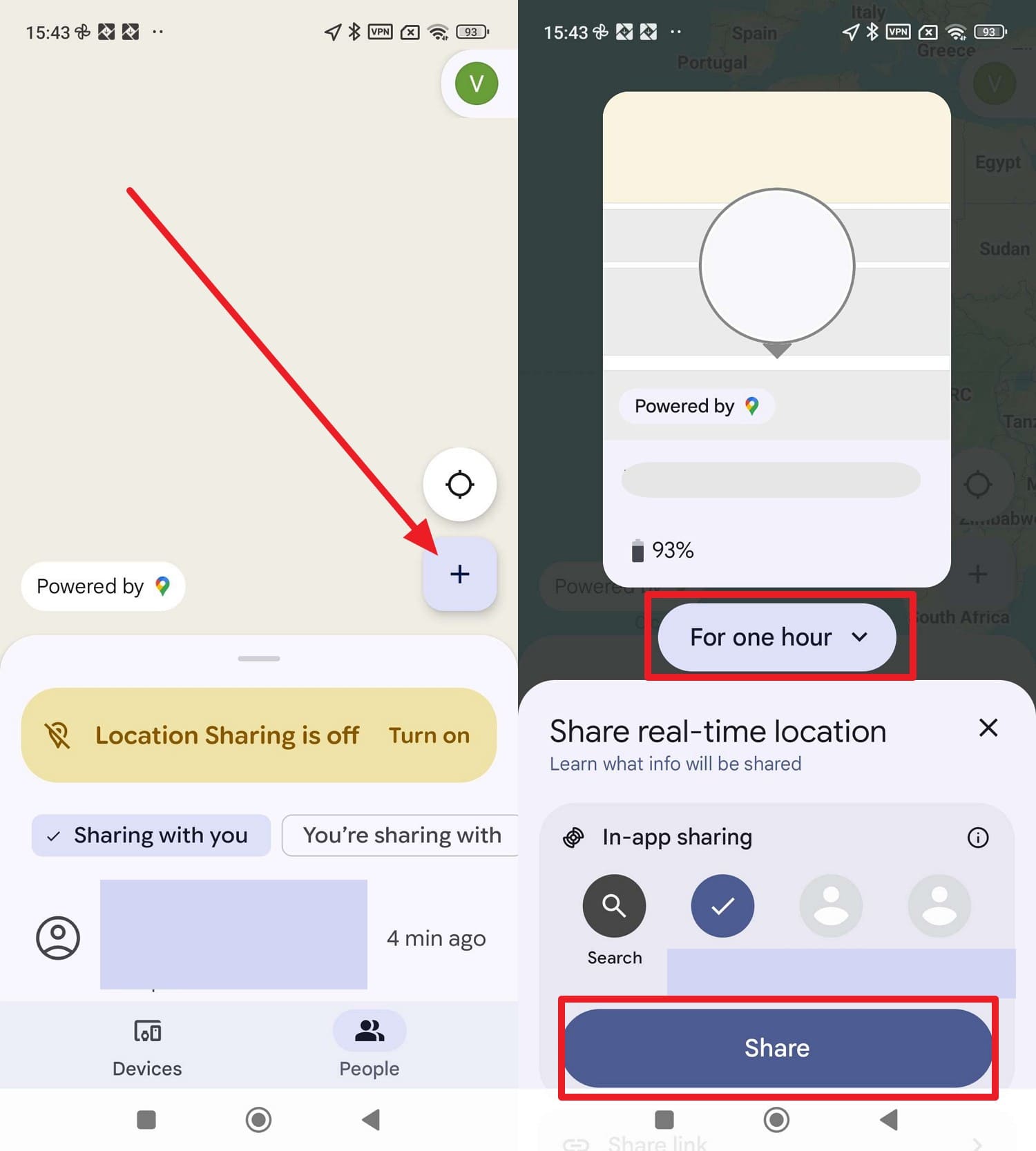
To locate a cell phone location free on Android, Google Find My Hub is the safest free way to locate an Android phone you own. It is built into most Android phones, tied to your Google account, and designed for lost device recovery. Plus, one can see your phone location on a map from any browser or from the app on another device, as illustrated in the guide below:
Instructions. In the "People" tab, tap the "+" icon, then choose the contact in the "In-App Sharing" section. After that, determine how many hours you want to share your location, then press the "Share" button.
Way 2: Family Locator & Safety Apps
Other than native tracking solutions, users can also rely on family locators to locate a phone for free, and some options are mentioned below:
1. Life360 (Android | iOS)
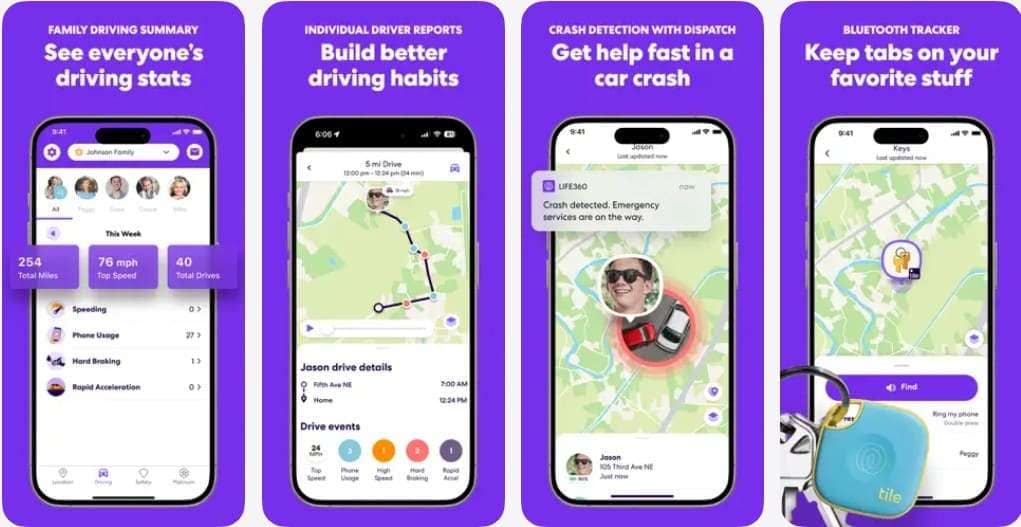
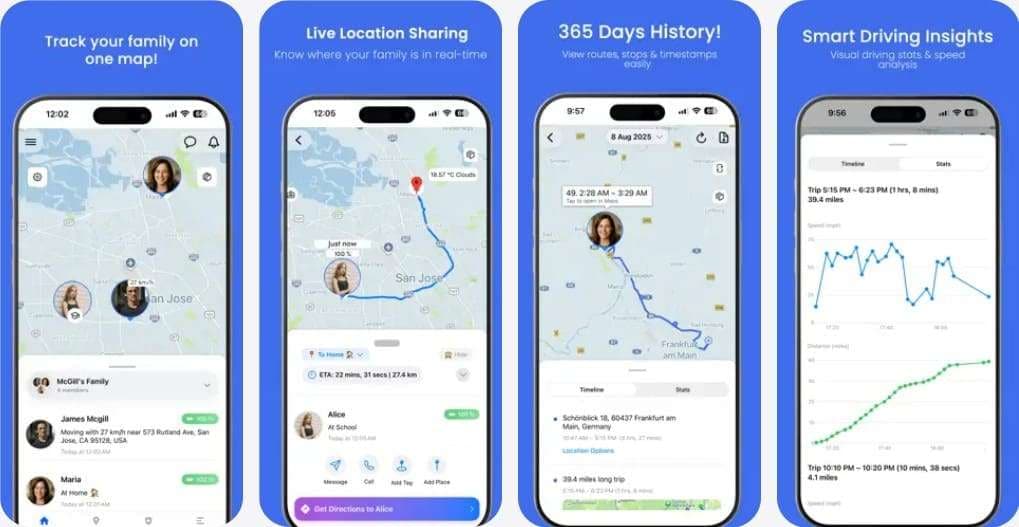
With 66 million active users, it's the foremost app to stay connected since it allows you to share family location on private maps. Additionally, guardians can access location history and receive instant notifications about battery or connection issues. One can also use it for crash detection and to fetch driving safety insights on their kids. Plus, the applications also enable parents to set SOS alerts with precise location sharing in emergencies.
2. Glympse (Android | iOS)
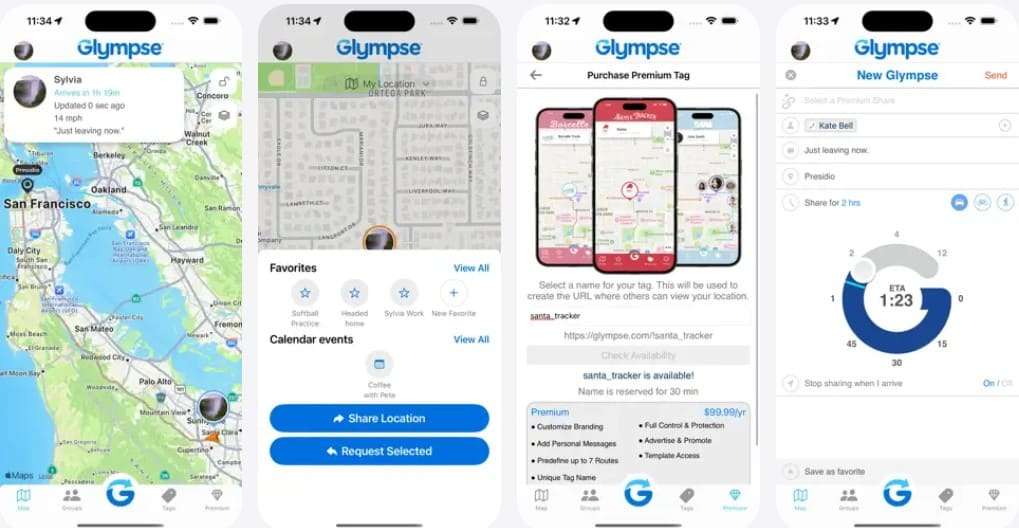
Among many free cell phone locators, Glympse allows you to temporarily share your location with your spouse, peers, and guardians. For added privacy, users can create groups and invite members to share an area in a secure environment. Additionally, it allows one to save contacts in favorites to limit the need to scroll every time. Plus, premium users can customize the location-sharing experience by changing the logo, colors, links, etc.
3. GeoZilla (Android | iOS)
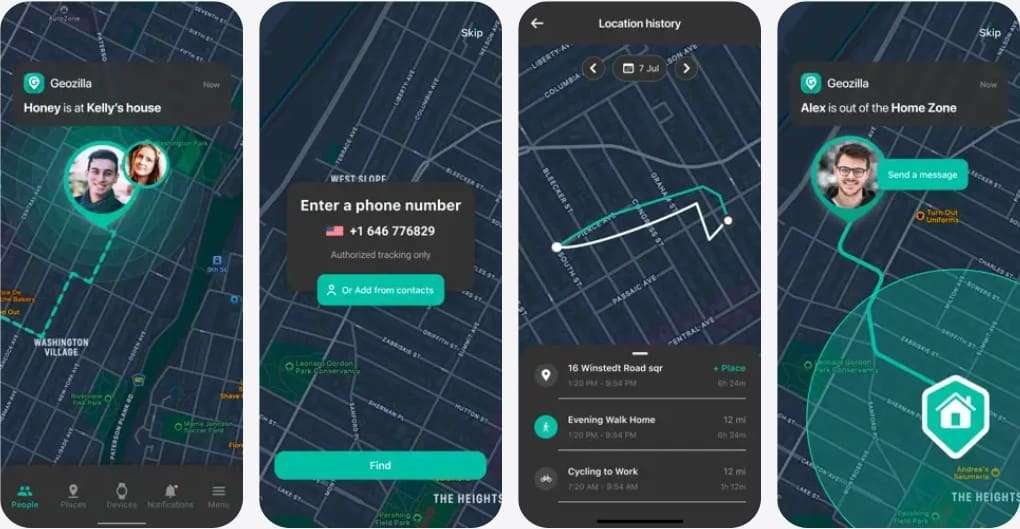
To track location by number for free, GeoZilla is another solution for Android and iOS users that allows trusted members to see your live location. Additionally, guardians can fetch the location history and view timelines to monitor your movements. Unlike other family locators, it enables one to set up a geofence location to receive instant alerts when kids leave the area.
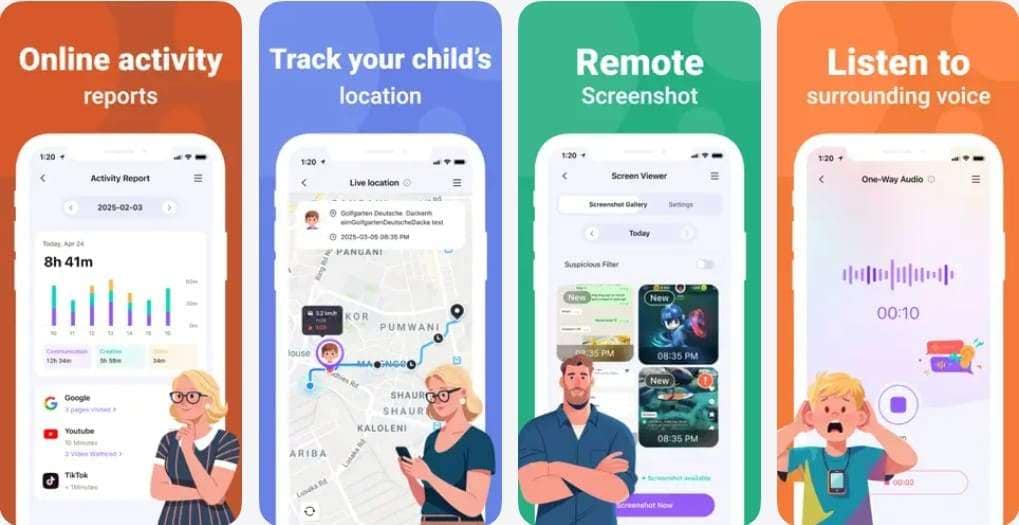
4. FamiSafe (Android | iOS)
Renowned as a versatile parental control app, FamiSafe is a reliable solution to track cell phone live location because of its Real Time Location Tracking feature. This app is accessible on Android, iOS, and desktop and enables users to check others' GPS locations in real time. Users can also set a Geofence location, and the app sends alerts when kids leave the area.
5. Family Nest (Android | iOS)
To track a mobile number location for free, use Family Nest, which allows parents to track their child’s live location in real time with high GPS accuracy. Additionally, the app enables one to create private nests where they can add kids and organize tracking. One can also receive entry and exit alerts as their kids leave safe zones and monitor the route patterns.
Way 3: Other Free Apps & Solutions
1. Google Maps Location Sharing
Other than using any family free cellphone locators, Google Maps Location Sharing is a free solution. You can use it to share and see real-time locations on Android and iPhone, as long as everyone gives permission. Besides, you can pick specific Google accounts or phone numbers and set the duration from a few minutes to unlimited. You can stop or change sharing at any time, once shared via the given guide:
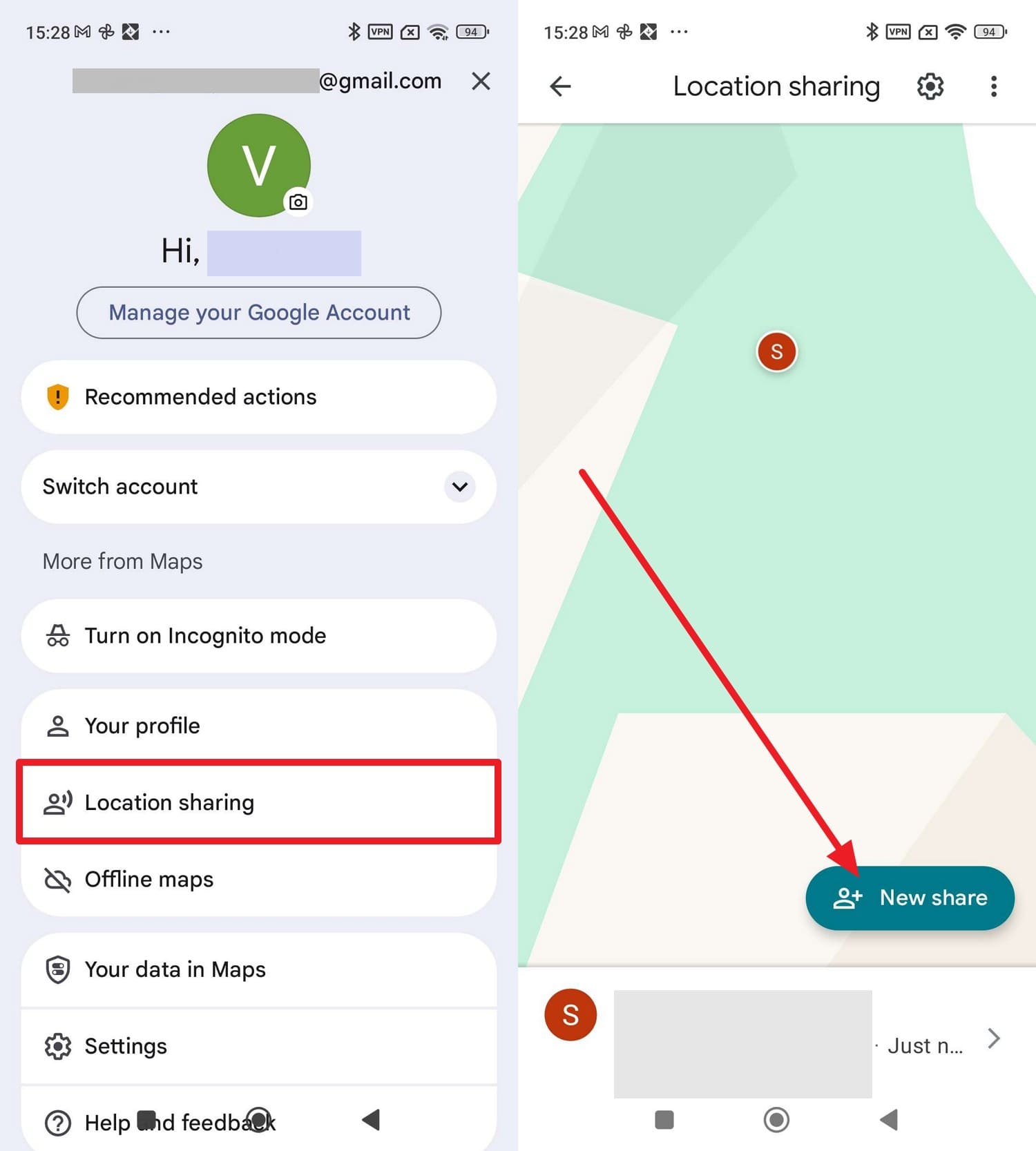
For Android
Step 1. From Google Maps’ profile settings, pick the “Location Sharing” option and choose the “New Share” option to select the desired person from the suggestions tab.
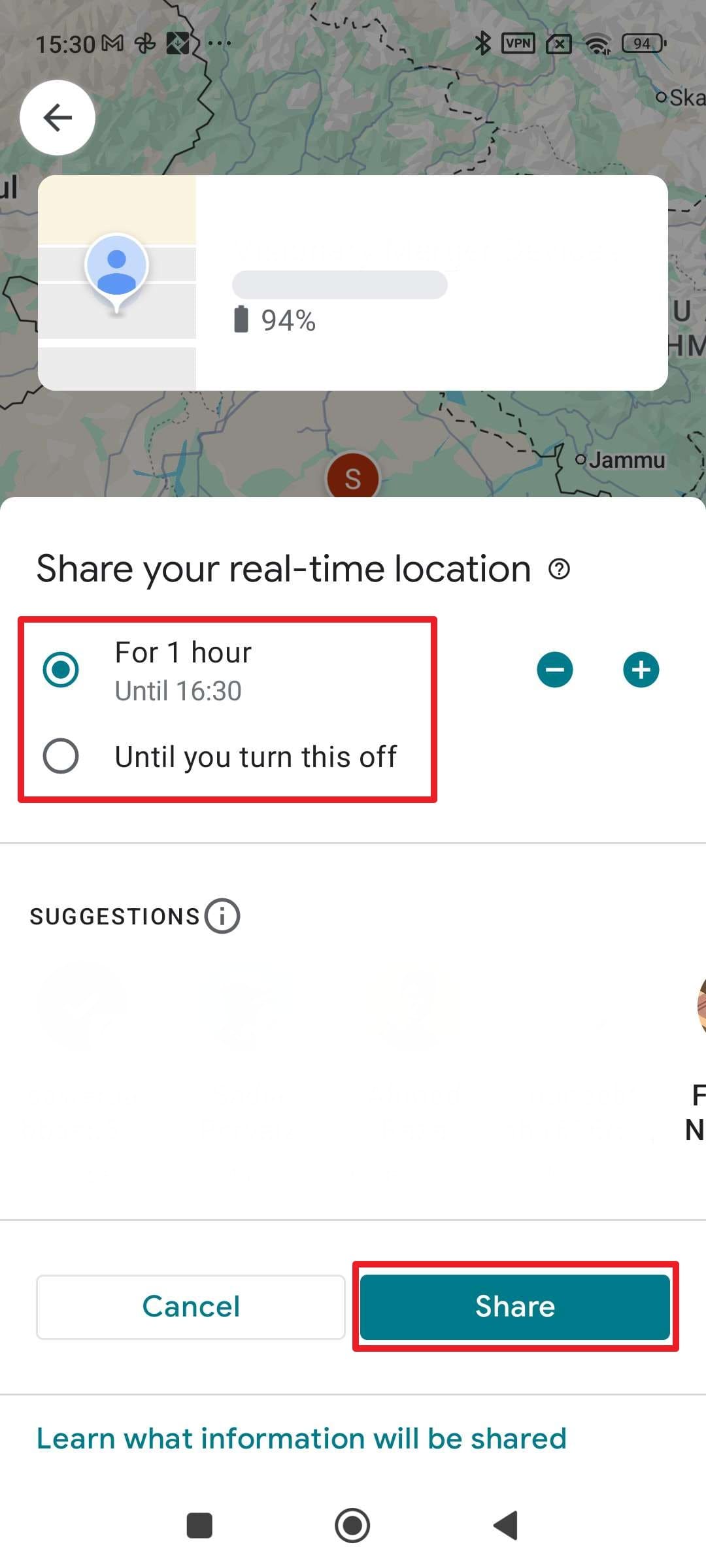
Step 2. Here, choose the duration to share your location, or select the “Until You Turn This Off” option, then press “Share.”
For iPhone
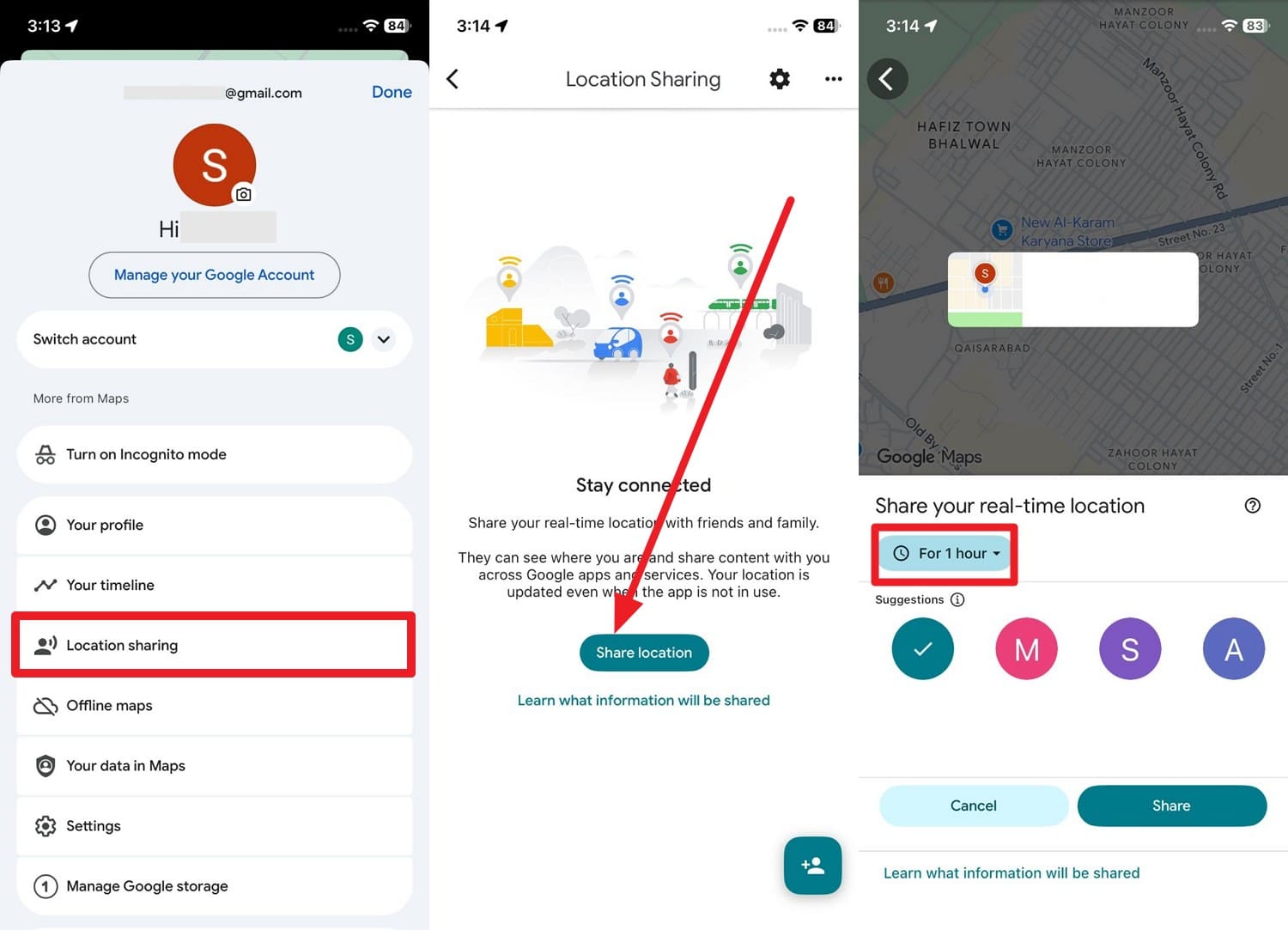
Step 1. On Google Maps, press the “Profile” icon at the top right corner and choose the "Location Sharing” option from the given menu. After that, press the “Share Location” option to confirm and determine the time to share the location by selecting the “For 1 Hour” menu.
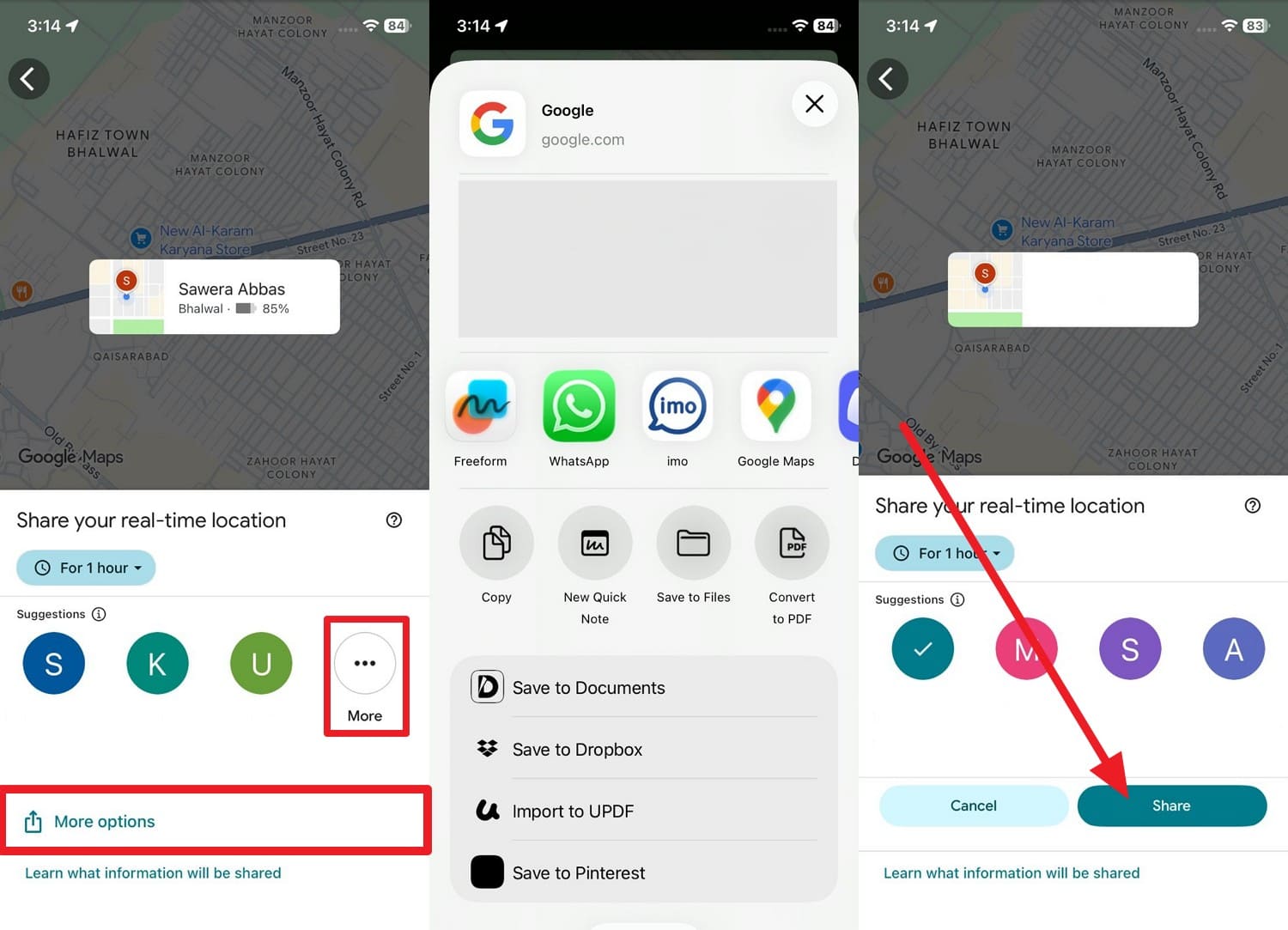
Step 2. Once done, select “More” or “More Options” to choose how you want to share your location. If you opt for the “More Options," pick between WhatsApp and other sharing platforms. On the contrary, choose the given mails besides the "More" option and press the "Share" option to conclude.
2. WhatsApp Live Location
To track mobile number location for free, WhatsApp Live Location works on Android and iPhone without extra apps or subscriptions. Additionally, you can share your location in individual or group chats, and the map updates your position so others can see where you are. One can choose how long to share, such as 15 minutes, 1 hour, or 8 hours, as illustrated in the given guide:
On Android
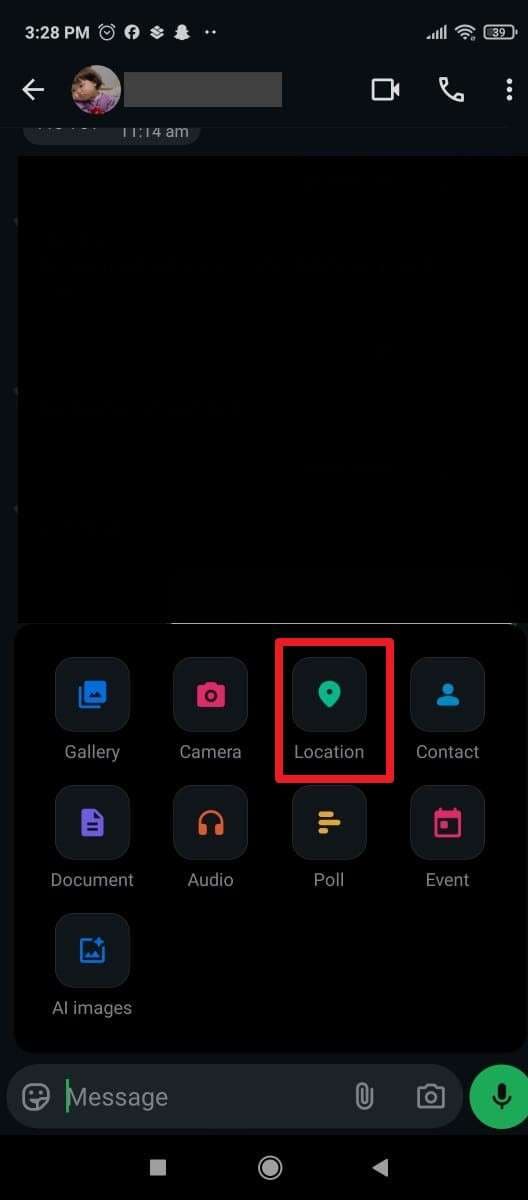
Step 1. On a certain chat, tap the “Attach File” icon beside the textbox to choose the “Location” option.
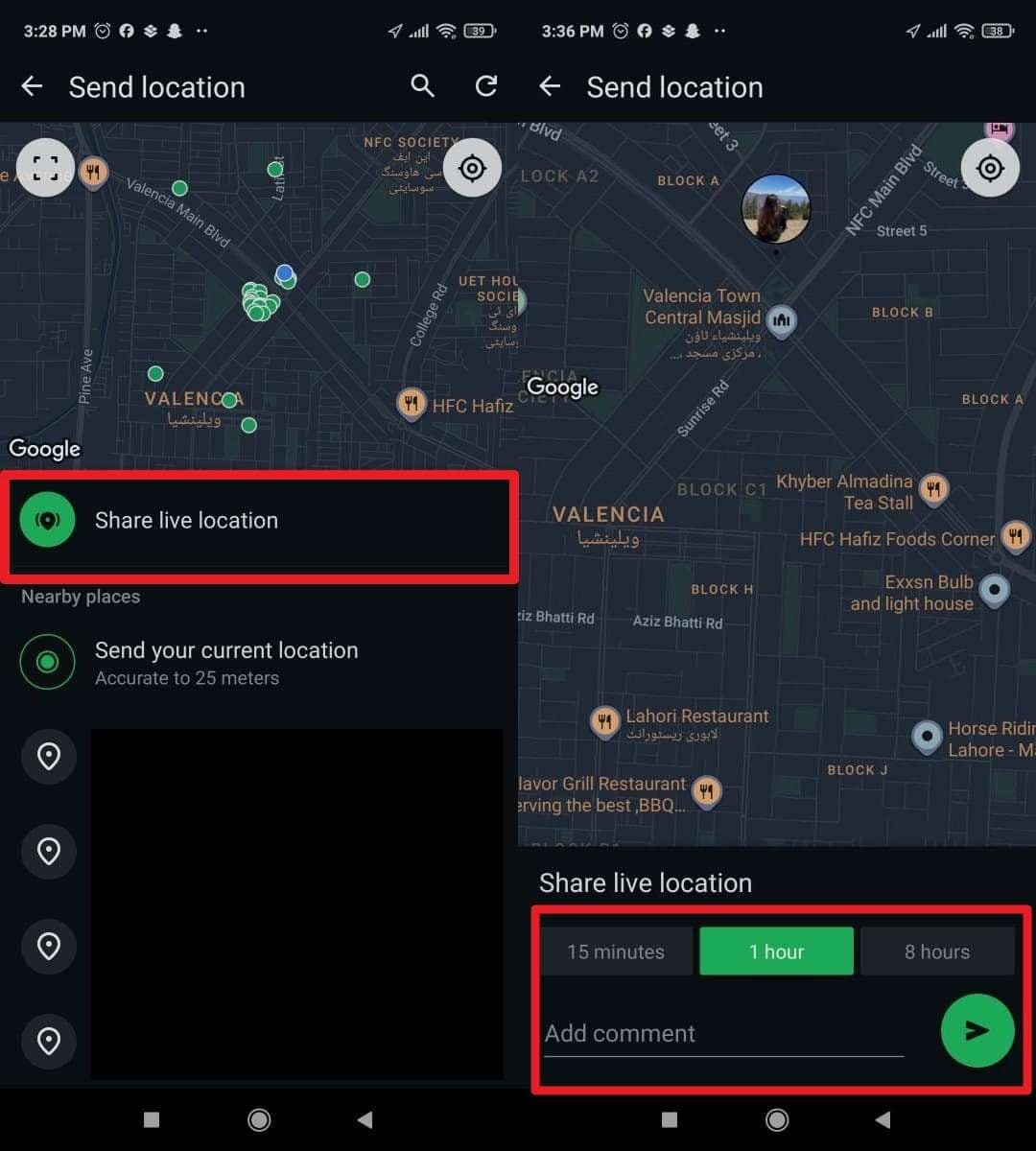
Step 2. Now, press the “Share Live Location” option, choose the duration, and press the “Send” icon.
On iOS
Step 1. Press the “+” icon next to the textbox and choose the “Location” option to pick the “Share Live Location” option.
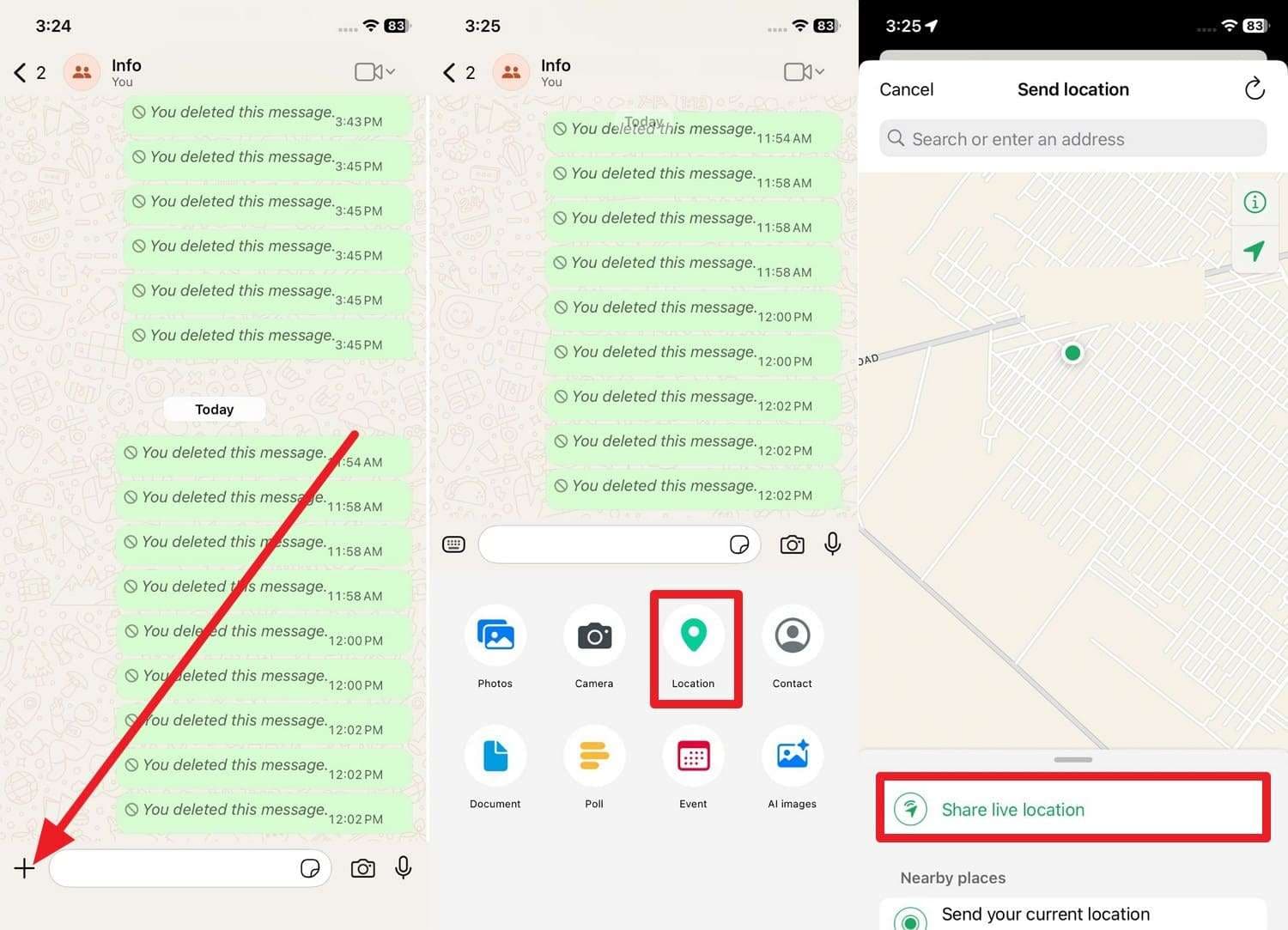
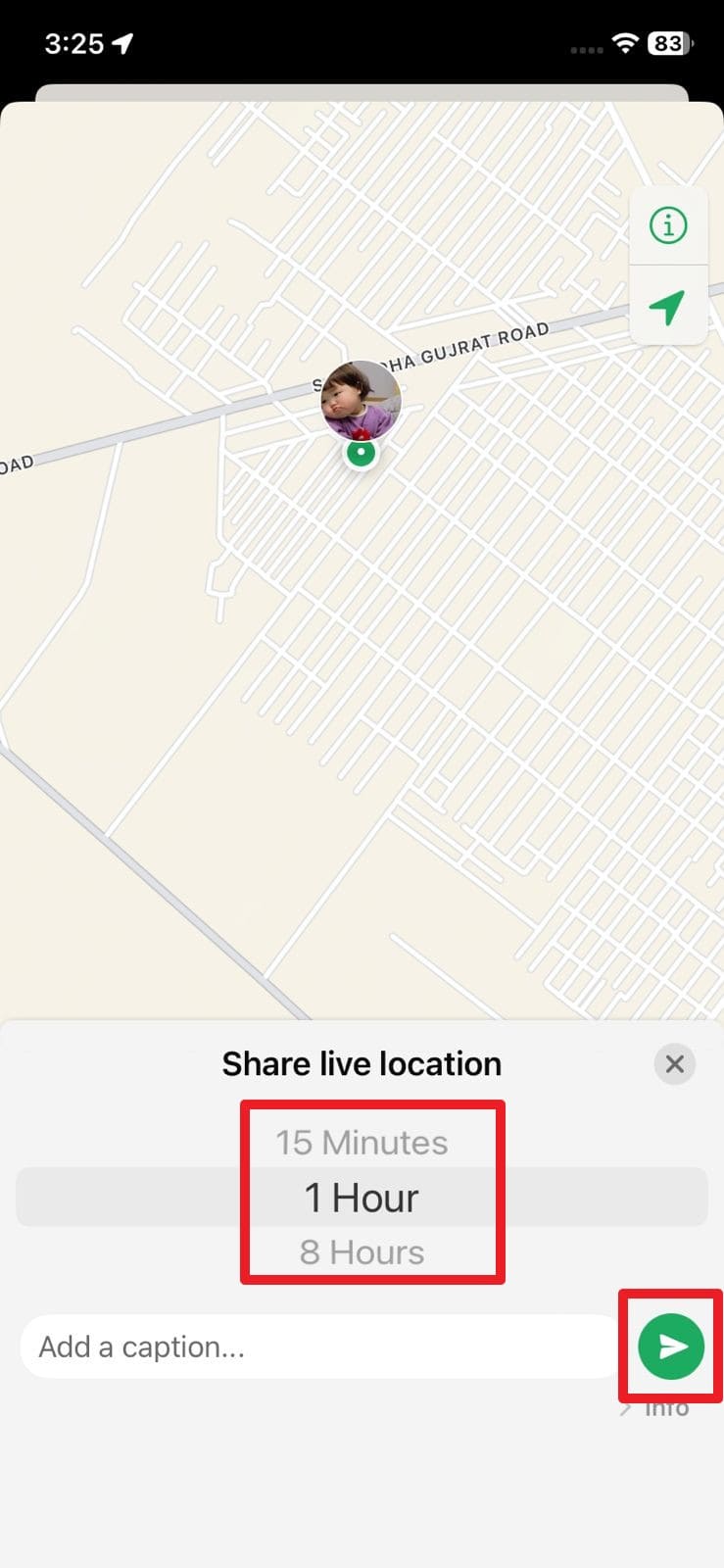
Step 2. After that, select a duration of 15 minutes to 8 hours, then hit the “Send” icon.
Bonus Tip: Hide Your Real Phone Location Efficiently Using Dr.Fone – Virtual Location
Now that you know how to find a phone number's location for free, there may come a time when you don’t want someone to see your exact location. In those instances, the best option is to fake your location with the Dr.Fone - Virtual Location. Being compatible with the latest Android 16 and iOS 26, this app allows you to simulate GPS location, and the Joystick makes the experience fun.
Additionally, the app can work with location-based apps like Pokémon GO, Snapchat, and Instagram, which makes Dr.Fone versatile. When teleporting the location, users can choose from a one-stop route to a multi-stop route, or also opt for the Jump Teleport Mode option. Plus, users can zoom in and zoom out on maps to precisely pick the location they tend to fake.

Dr.Fone - Virtual Location
1-Click Location Changer for both iOS and Android
- Teleport from one location to another across the world from the comfort of your home.
- With just a few selections on your computer, you can make members of your circle believe you’re anywhere you want.
- Stimulate and imitate movement and set the speed and stops you take along the way.
- Compatible with both iOS and Android systems.
- Work with location-based apps, like Pokemon Go, Snapchat, Instagram, Facebook, etc.


Ultimate Guide | Fake Your Location with Dr.Fone to Create an Illusion
While learning how to track cell phone location by number, play tricks, and fake your location with Dr.Fone via the given guide:
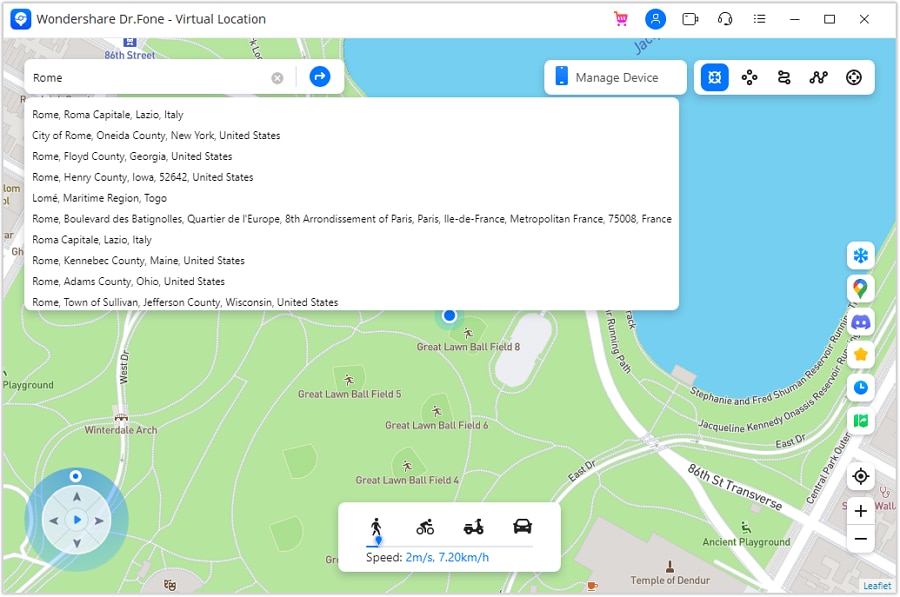
Step 1. Access the Virtual Location Tool & Choose to Teleport
Start to enable the "Teleport" mode on the main interface by pressing the "Box" icon, and then look for the fake location on the map.
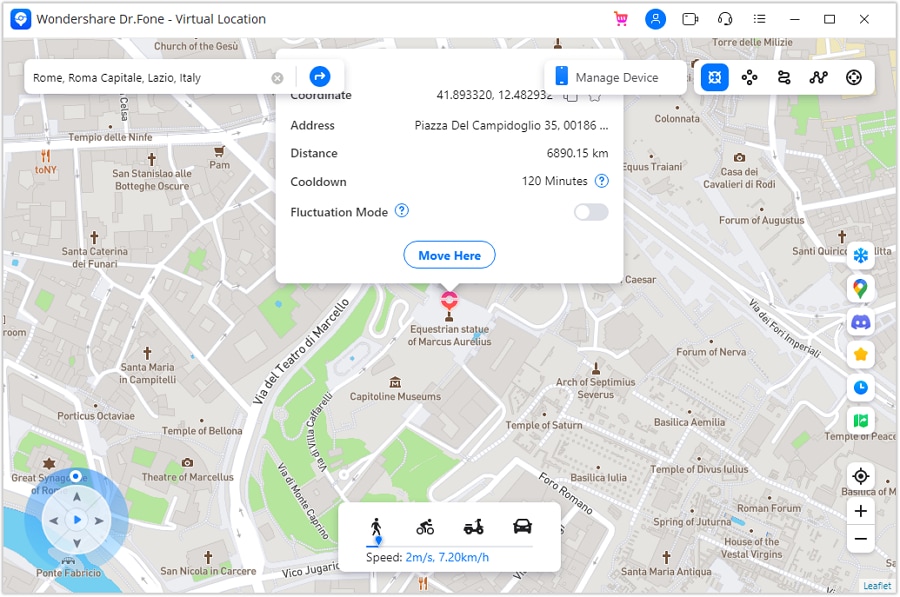
Step 2. Mark the Area & Press the Move Here Option
Zoom in and out to ensure it, then choose the “Move Here” option to simulate the location, which you can confirm in the Maps app on your phone.
 safe & secure
4,624,541 people have downloaded it
Part 4. Responsible Tracking: Legal & Ethical Guidelines for Cell Phone Location
As you ought to know how to track cell phone location free on Google Maps or on any app, ensure to follow the listed ethical guidelines:
|
Guideline |
Description |
| Consent Required | Always obtain informed consent before tracking someone’s phone location. |
| Lawful Purpose | Use tracking only for a legitimate reason, such as locating your device, monitoring a child, or tracking with mutual agreement. |
| Minimum Data Collection | Collect only the essential location information required for the task and avoid storing extra data. |
| Transparency | Clearly explain how the location details will be collected, used, shared, and how long they will be kept. |
| Security Safeguards | Protect the collected location information from unauthorized access by using strong security practices. |
Conclusion
To wrap up, this article has explained all the essential ways to track a cell phone location for free, so choose the method that fits your needs. You can also play safe tricks to limit others from tracking your location and use the Dr.Fone - Virtual Location tool to fake it when needed. This helps you stay in control of your privacy while still using location services conveniently.
safe & secure4,624,541 people have downloaded it
FAQs
 Q1. Is it legal to track a cell phone location for free?Q2. Is it possible to track a phone after it’s turned off?Q3. Will tracking a phone reveal my private data?
You Might Also Like

Virtual Location
- Change iOS Location
- 1. Best iOS Location Changers
- 2. Fake iPhone GPS Location
- 3. Change iPhone Home Address
- 4. Change iPad Weather Location
- 5. Track a Cell Phone Location
- 6. iPhone GPS not Working
- 7. iPhone “No Location Found”
- 8. iPhone “Location Not Available”
- 9. iTools Alternatives
- 10. DoPokeGo++ Alternatives
- 11. 3uTools Alternatives
- 12. Foneazy MockGo Alternatives
- 13. "No Location Found" Vs."Location Not Available"
- Change Android Location
- 1. Best Android Fake GPS Apps
- 2. Free Android Location Spoofers
- 3. Fake Android GPS Location
- 4. Android Location Settings
- 5. Fake GPS No Root
- 6. Fake GPS on Huawei
- 7. Fake GPS without Mock Location
- Hide GPS Location
- 1. Stop Sharing Location without Notifying
- 2. Fake Location on Find My Friends
- 3. Stop Google Tracking Your Location
- 4. Fake Location on Google Maps
- 5. Spoof Location on Life360
- 6. Turn Off Life 360 Without Knowing
- 7. Stop Life360 from Tracking You
- 8. Life360 Circle: Tips & Tricks
- 9. Track Location by Mobile Number
- 10. How Do I Know If My Phone Is Being Monitored
- 11. Can Life360 Track You When Your Phone is Off
- Fake GPS on Games
- 1. Play Pokémon Go Without Moving
- 2. Celebrate National Pokémon Day
- 3. Fake GPS on Mobile Legends
- 4. Spoof Ingress Prime Location
- 5. Spoof Location on Jurassic World Alive
- Fake Location on Social Apps
- 1. Fake Location on Whatsapp
- 2. Fake Location on Facebook
- 3. Fake Location on Telegram
- 4. Fake Location on Tiktok
- 5. Does Your Snap Score Increase with Chats
- 6. Fake Location on Snapchat
- 7. Add Location Filters on Snapchat
- 8. Change Location on Twitter
- 9. Change Instagram Business Location
- 10. Change Instagram Region/Country
- 11. Stop mSpy from Spying You
- 12. Change Location On Linkedin
- Fake Location on Dating Apps
- 1. Fake Hinge GPS
- 2. Top Funny Hinge Prompts
- 3. Apps Like Tinder
- 4. Enjoy Tinder Gold
- 5. Fake Tinder GPS
- 6.Tinder Keeps Crashing
- 7. Find People on Tinder
- 8. Use Grindr on a PC
- 9. Grindr Web app explained
- 10. Fake Grindr GPS
- 11. Grindr Unable to Refresh
- 12. Fake Bumble GPS
- 13. Bumble Snooze Mode Guide
- 14. Tinder vs Bumble vs Hinge
- Get Around Geo-blocking
- 1. Hola Fake GPS Alternative
- 2. Change Netflix Location
- 3. Bypass MLB TV
- 4. Change Location on YouTube TV
- 5. Change Play Store Country
- 6. Change Facebook Marketplace Location
- Followers & Unfollowers Trackers
- Location & Social Apps Tips
- 1. How to Share Live Location on Snapchat
- 2. Best Mobile Number Tracker
- 3. Best Private IG Viewer Tools
- 4. View a Private Instagram Account
- 5. Screenshot on Instagram Without Them Knowing
- 6. Does Instagram Notify When You Screenshot
- 7. Find Out If Someone Screenshots Your Instagram Story
- 8. Does Instagram Notify When You Screen Record
- 9. Fix iPhone Location Not Updating
- 10. Does Snapchat Show Who Viewed Your Profile
- ● Teleport GPS location to anywhere
- ● Play AR games without moving
- ● Spoof Location on the popular Apps
- Free Download Free Download Free Download


 > How-to > Virtual Location Solutions > 3 Free Methods to Track a Cell Phone Location for Free: Step-by-Step Tutorial
Alice MJ
staff Editor