

Does Your Snap Score Increase with Chats? The Complete Truth

Sep 04, 2026 • Filed to: Virtual Location Solutions • Proven solutions
 TL;DR:
No, sending text messages, voice notes, or stickers in Snapchat chats will not increase your Snap Score; you only earn points by sending unique photo or video Snaps, opening received Snaps, and posting Stories.
● Photos attached inside the text chat window do not count toward your total, and sending a single camera Snap to a group only awards one point rather than multiplying by the number of recipients.
● Score display updates are processed in delayed batches rather than in real time, though Snapchat+ subscribers receive a multiplier that doubles points when exchanging Snaps with other active subscribers.
● Your overall score will never decrease even if you take an extended break from the app, and passive actions like watching other users' Stories will not contribute any points.
Ask AI for a summary
 ChatGPT
 Perplexity
 Gemini
 Claude
 Grok
Grok
No, your snap score doesn’t increase with simple chatting. Only photo and video Snaps count toward your number. With text messages, you get zero points. No matter how many you send.
Your Snap Score rises when you send unique Snaps, open received Snaps, and post Stories. Each action adds roughly one point. Snapchat keeps the exact formula secret. However, one thing is for sure: texting your friends all day won't move that number.
Wondering how to use Snapchat on PC to snap faster? That's a different story. Learn what actually works to increase your snap score.

Part 1. What Is Snap Score and Why Does It Matter?
Your Snap Score is basically a popularity number. It shows how active you are on Snapchat. A higher number means you use the app frequently.
You can find this snap score under your username on your profile page. You'll see two numbers after tapping on it. The left side shows Snaps sent, and the right side shows Snaps received.
The Official Formula from Snapchat
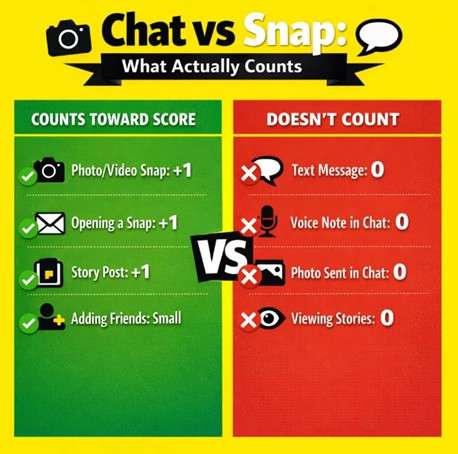
Snapchat admits the score combines Snaps sent, Snaps received, Stories posted, and a couple of other factors. Although some factors are not confirmed, users have tested this obsessively. Here's what actually counts:
|
Action |
Points Earned |
Confirmed? |
| Sending a Snap | +1 point | Yes |
| Opening a Snap | +1 point | Yes |
| Posting a Story | +1 point | Yes |
| Sending a chat message | 0 points | Yes |
| Adding a friend | Small boost | Likely |
| Returning after the break | +6 points | User reported |
Does Your Snap Score Decrease?
The good news is that your score never goes down. It only increases, as Snapchat confirms this officially. Even if you take a break for six months, your number stays put. If you notice a drop, that's a display glitch. Refresh the app or wait a few hours.
Part 2. Why Chats Don't Count Toward Snap Score?
Sometimes, people get confused about whether chats increase snap score or not. The confusion makes sense. People chat and snap at the same time. When their score rises, they assume the chat caused it.
Snapchat was built around visual content, such as photos and videos. Text messaging is just a bonus feature they added later. The scoring system rewards the core behavior they want, which is more Snaps.
The Chat vs. Snap Breakdown
Here's exactly what happens with different message types:
Text Messages in Chat
After sending simple chat messages, you will get zero points. Even if you send 1,000 texts to your best friend, your score won't budge. This includes emojis, stickers, and voice notes in the chat window.
Photos Sent in Chat
Photos sent through the chat window don't count. Only photos taken and sent as a Snap (using the camera button) count.
Group Chat Snaps
If you send a Snap to a group of 10 people, it doesn't give you 10 points. You get one point for the single action. The system doesn't multiply for group sends.
Part 3. What Adds 2 Points to a Snap Score?
Some people notice their score jumps by 2 sometimes. It leaves them wondering why this happens. The answer is they did two things before the score refreshed.
- Sent a Snap (+1)
- Opened one (+1)
The display updated after both actions. So you saw +2 instead of +1 twice.
Score Updates Aren't Real-Time
Most of the time, Snapchat doesn't refresh your score instantly. It batches updates. Sometimes it takes minutes, and other times it can also take hours. If you're active, multiple actions stack before the number changes.
Snapchat+ Multiplier Effect
Snapchat+ subscribers get a special perk. The Snapscore Multiplier doubles points when you exchange Snaps with other Snapchat+ users. Both people need the subscription, which explains the larger jumps some users see.
To get a better idea of how Snapchat scoring works, see the table:
|
Score Jump |
Likely Reason |
Common? |
| +1 | Single snap sent or received | Very common |
| +2 | Sent + opened (batched update) | Very common |
| +6 | First snap after a long break | Occasional |
| +10 or more | Heavy activity before refresh | Occasional |
| Doubled | Snapchat+ Multiplier active | Subscribers only |
Part 4. How to Make Your Snap Score Go Up Fast?
You can boost your score pretty fast, but it just takes consistent effort. When you're having trouble with the app, check out how to fix Snapchat when it stops working first.
1. Send Photo and Video Snaps
Every unique Snap you send earns a point. When you send 100 Snaps to different friends, it will give you 100 points. However, sending the same Snap to multiple people will only give you a single point. So, you need to create fresh content and avoid spamming the same image.
2. Open Every Snap You Receive
You should avoid letting Snaps pile up in your inbox. Each one you open adds a point. If you have 50 unopened Snaps, that's 50 points waiting. So, regularly clear your inbox daily to increase the snap score.
3. Post Stories Regularly
To rapidly increase your score, Snapchat recommends posting 20 to 40 Snaps to Public Stories daily. If you feel this is too much, even one Story per day helps. Each post adds to your score. Learn how to save your Stories so you don't lose your best content.
4. Maintain Snap Streaks
Streaks force daily activity, which will eventually lead to a higher snap score. You and a friend send Snaps every 24 hours. This consistency builds points steadily. Plus, Snapchat might give bonus points for streak milestones.
5. Add More Friends
More friends mean more snapping opportunities. For this, you can use Quick Add or sync your contacts. The bigger your network, the more engagement you get. Check out how to recover Snapchat data if you've lost your friend connections.
How Many Snaps for Specific Score Goals?
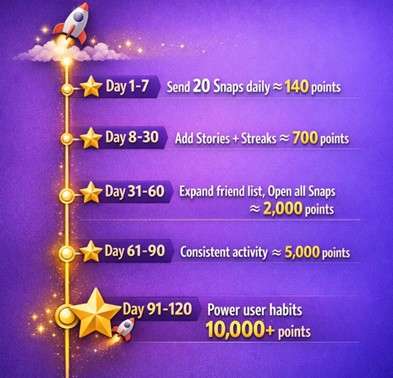
Assumes you're sending unique Snaps and opening received ones. Here's a rough estimate of how to reach your target snap score.
|
Score Goal |
Estimated Snaps Needed |
Time (At 50/day) |
| 300 points | 150 sent + 150 received | 1 week |
| 1,000 points | 500 exchanges + Stories | 3 weeks |
| 10,000 points | 5,000 exchanges + Stories | 3 to 4 months |
| 100,000 points | 50,000 exchanges | 2-3 years |
Part 5. Common Snap Score Myths Busted
The internet loves spreading misinformation. Let's clear up the biggest myths.
Myth: Watching Stories Increases Your Score
False. Posting Stories adds points. However, watching them doesn't add to your score. You can binge-watch everyone's Stories all day. Your number won't change.
Myth: Third-Party Apps Can Boost Your Score
Scam alert. Websites promising to increase your score are lying. They can't modify Snapchat's system. At best, they take your money. At worst, they steal your account credentials. So, we recommend you never risk your Snapchat account.
Myth: High Scores Unlock Features
Not really. Snapchat used to have trophies tied to scores. They removed most of that. Your score is basically bragging rights now. All in all, nothing functional unlocks at specific numbers.
Bonus. Change Your Snapchat Location for More Engagement
Changing your location on Snapchat gives you access to different geofilters and local Stories. This can actually increase engagement, which indirectly helps your score. Learn how to change your Snapchat location with the help of Dr.Fone - Virtual Location.
It has tools like Virtual Location that let you spoof your GPS without jailbreaking. You can appear in Tokyo, Paris, or anywhere else. Friends see your Snaps from exotic locations, so they will likely engage more. More engagement means more Snaps back and forth.

Dr.Fone - Virtual Location
1-Click Location Changer for both iOS and Android
- Teleport from one location to another across the world from the comfort of your home.
- With just a few selections on your computer, you can make members of your circle believe you’re anywhere you want.
- Stimulate and imitate movement and set the speed and stops you take along the way.
- Compatible with both iOS and Android systems.
- Work with location-based apps, like Pokemon Go, Snapchat, Instagram, Facebook, etc.


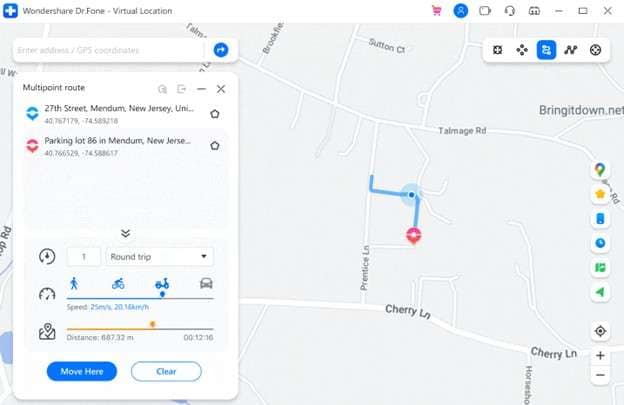
You can also use this to manage your location settings on Snapchat for privacy. Ghost Mode hides you from Snap Map. But if you want fun filters from other cities, location spoofing is the way.
 safe & secure
4,624,541 people have downloaded it
The Bottom Line
Chats don't boost your score, only Snaps do. So, you need to send more photos and videos to increase your snap score. For this, users can even open what they receive and post daily Stories.
If you want to save Snaps without the sender knowing, there are tools for that. With Dr.Fone, you can optimize your Snapchat experience and even change location for more engagement.
safe & secure4,624,541 people have downloaded it
Frequently Asked Questions
 Q1. How many messages for a 1 Snap score?Q2. Why did my Snap Score go up when I didn't send anything?Q3. Can someone see if you check their Snap Score?Q4. What's considered a high Snap Score?Q5. Does your Snap Score update in real time?
You Might Also Like
Virtual Location
- Change iOS Location
- 1. Best iOS Location Changers
- 2. Fake iPhone GPS Location
- 3. Change iPhone Home Address
- 4. Change iPad Weather Location
- 5. Track a Cell Phone Location
- 6. iPhone GPS not Working
- 7. iPhone “No Location Found”
- 8. iPhone “Location Not Available”
- 9. iTools Alternatives
- 10. DoPokeGo++ Alternatives
- 11. 3uTools Alternatives
- 12. Foneazy MockGo Alternatives
- 13. "No Location Found" Vs."Location Not Available"
- Change Android Location
- 1. Best Android Fake GPS Apps
- 2. Free Android Location Spoofers
- 3. Fake Android GPS Location
- 4. Android Location Settings
- 5. Fake GPS No Root
- 6. Fake GPS on Huawei
- 7. Fake GPS without Mock Location
- Hide GPS Location
- 1. Stop Sharing Location without Notifying
- 2. Fake Location on Find My Friends
- 3. Stop Google Tracking Your Location
- 4. Fake Location on Google Maps
- 5. Spoof Location on Life360
- 6. Turn Off Life 360 Without Knowing
- 7. Stop Life360 from Tracking You
- 8. Life360 Circle: Tips & Tricks
- 9. Track Location by Mobile Number
- 10. How Do I Know If My Phone Is Being Monitored
- 11. Can Life360 Track You When Your Phone is Off
- Fake GPS on Games
- 1. Play Pokémon Go Without Moving
- 2. Celebrate National Pokémon Day
- 3. Fake GPS on Mobile Legends
- 4. Spoof Ingress Prime Location
- 5. Spoof Location on Jurassic World Alive
- Fake Location on Social Apps
- 1. Fake Location on Whatsapp
- 2. Fake Location on Facebook
- 3. Fake Location on Telegram
- 4. Fake Location on Tiktok
- 5. Does Your Snap Score Increase with Chats
- 6. Fake Location on Snapchat
- 7. Add Location Filters on Snapchat
- 8. Change Location on Twitter
- 9. Change Instagram Business Location
- 10. Change Instagram Region/Country
- 11. Stop mSpy from Spying You
- 12. Change Location On Linkedin
- Fake Location on Dating Apps
- 1. Fake Hinge GPS
- 2. Top Funny Hinge Prompts
- 3. Apps Like Tinder
- 4. Enjoy Tinder Gold
- 5. Fake Tinder GPS
- 6.Tinder Keeps Crashing
- 7. Find People on Tinder
- 8. Use Grindr on a PC
- 9. Grindr Web app explained
- 10. Fake Grindr GPS
- 11. Grindr Unable to Refresh
- 12. Fake Bumble GPS
- 13. Bumble Snooze Mode Guide
- 14. Tinder vs Bumble vs Hinge
- Get Around Geo-blocking
- 1. Hola Fake GPS Alternative
- 2. Change Netflix Location
- 3. Bypass MLB TV
- 4. Change Location on YouTube TV
- 5. Change Play Store Country
- 6. Change Facebook Marketplace Location
- Followers & Unfollowers Trackers
- Location & Social Apps Tips
- 1. How to Share Live Location on Snapchat
- 2. Best Mobile Number Tracker
- 3. Best Private IG Viewer Tools
- 4. View a Private Instagram Account
- 5. Screenshot on Instagram Without Them Knowing
- 6. Does Instagram Notify When You Screenshot
- 7. Find Out If Someone Screenshots Your Instagram Story
- 8. Does Instagram Notify When You Screen Record
- 9. Fix iPhone Location Not Updating
- 10. Does Snapchat Show Who Viewed Your Profile
- ● Teleport GPS location to anywhere
- ● Play AR games without moving
- ● Spoof Location on the popular Apps
- Free Download Free Download Free Download


 > How-to > Virtual Location Solutions > Does Your Snap Score Increase with Chats? The Complete Truth
James Davis
staff Editor