

How to Track Location by Mobile Number (Free & Realistic Ways)

Sep 23, 2026 • Filed to: Virtual Location Solutions • Proven solutions
 TL;DR:
Tracking a phone's live GPS location using strictly a mobile number for free is highly unrealistic and exposes users to privacy risks, requiring you to rely on legitimate, consent-based accounts or services.
● Native systems like Apple's Find My and Google's Find Hub provide precise GPS mapping but strictly require prior account linking and enabled location settings, whereas Carrier Family Locator Services demand enrolled lines.
● Unverified third-party tools advertising free, number-only tracking bypass user consent and frequently result in stolen personal data, hidden subscription fees, or fake visual locations.
● To securely spoof GPS coordinates for privacy or AR gaming, Dr.Fone - Virtual Location allows you to simulate movement on up to 5 simultaneous iOS devices without a jailbreak, explicitly supporting Android 16 and iOS 26.
Ask AI for a summary
 ChatGPT
 Perplexity
 Gemini
 Claude
 Grok
Grok
A lot of people want to find someone or keep family members safe today. Sometimes, you may need help when a phone is lost or someone stops responding suddenly. In such moments, location tracking by mobile number seems like an easy and quick solution.
Many online tools claim they can trace a number's exact spot in seconds. Yet, not all of them give accurate or safe results. This guide explains real ways to trace phones with consent and stay within legal limits. It also shows innovative and secure options to protect your privacy while using tracking tools.
- Part 1. Is “Track by Number Only” Really Possible for Free?
- Part 2. Legitimate Methods to Track a Phone Using Their Number (With Consent)
- Method 1. Carrier Family Locator Services
- Method 2. Native Device Tracking (Account-Based)
- Method 3. Messaging and Safety Apps
- Method 4. Emergency Location Services (E911)
- Part 3. Use Dr.Fone to Spoof Your Location Safely – Virtual Location (For Privacy & Fun)

- Part 4. Why Real “Free GPS Phone Tracker by Number” Is Rare (and Risky)
Part 1. Is “Track by Number Only” Really Possible for Free?
Yes, number-only tracking seems possible, but it depends on what you expect. Sometimes, it means finding the owner's details, not live GPS, through online lookup services. However, carriers and apps rarely share precise GPS data without proper permission first.
Mobile carriers and safety tools might locate phones, but access is tightly controlled. People seeking location tracking with phone numbers should understand these limits before trusting such tools.
Part 2. Legitimate Methods to Track a Phone Using Their Number (With Consent)
Several quick and effortless solutions are available that help provide clear ways to track a phone. So, this part covers the 4 methods to find the location of the mobile number only with clear consent:
Method 1. Carrier Family Locator Services
Carrier family locator services, like Verizon and Sprint, let account owners view enrolled lines on a live map. They use carrier network data and GPS to show accurate movement for linked devices. Users can also check short location history through a simple dashboard on a phone or a computer.
In addition, alerts notify the account owner when selected devices enter or leave chosen places. These services are not cell phone tracking by number free, because enrollment is required. Some also help find a powered-on lost phone within the carrier’s coverage area.
Method 2. Native Device Tracking (Account-Based)
Native device tracking also works through native services like Apple’s Find My and Google’s Find Hub. These services link to personal accounts and show the device’s live location on a map with GPS accuracy. They also allow remote actions like ringing or locking the device if lost. Yet, this secure system is a reliable GPS locator by cell phone number, limited to devices connected to your account earlier.
1. Find My iPhone
It lets users locate, lock, or erase Apple devices linked to their Apple ID. However, Find My requires enabling the feature in device settings with Location Services on. You can track lost devices via another Apple device or a web browser using the same Apple ID.
Besides, Find My iPhone allows you to share your location with other Apple users. So, go through the following steps to find out how you can track your device:
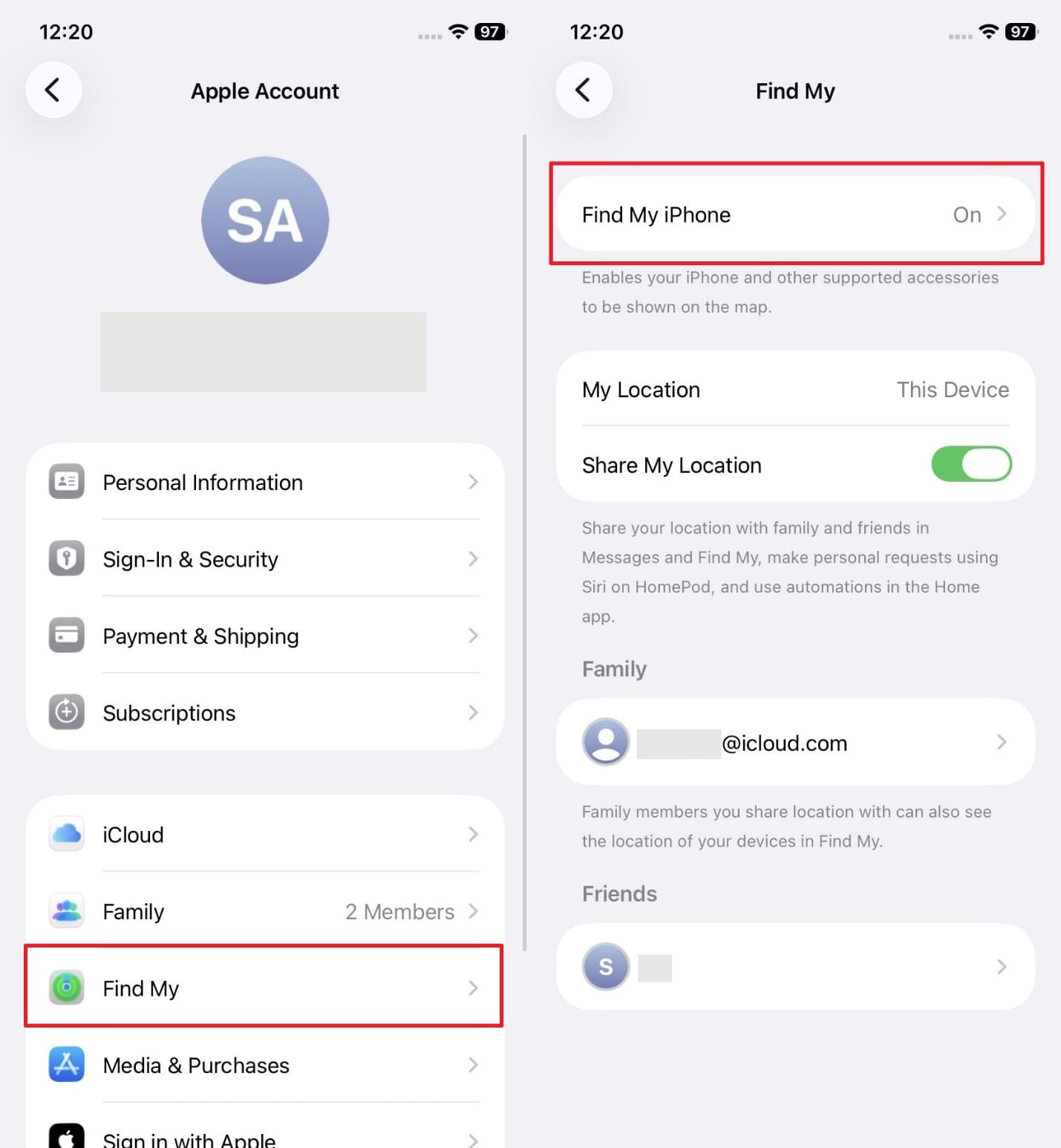
Step 1. Access the “Settings” app to go to the “Apple Account” section and tap “Find My.” Afterward, head to “Find My iPhone” and toggle it on.
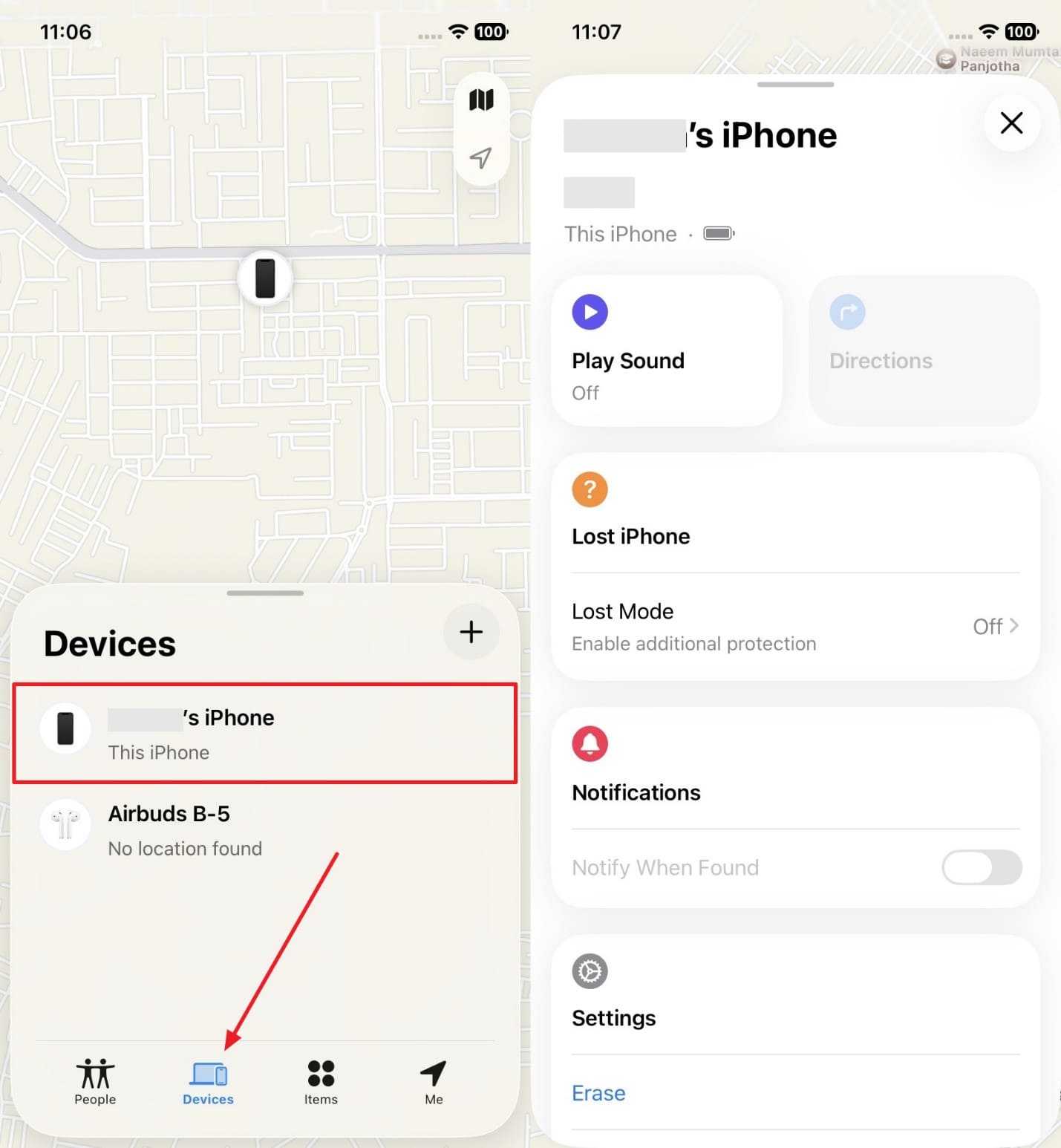
Step 2. On another Apple Device, access the “Find My” app with the same account and head to the “Devices” tab. Then, tap your connected device, and you will be able to track its location.
2. Find Hub (Android)
Google’s Find Hub lets you locate linked Android devices through your Google account. It helps users ring, lock, or erase a connected phone using simple remote commands. Some people try to track a phone's GPS by phone number, but this tool needs account access.
Like Find My iPhone, you can also share your location with other people in this app. In addition, it works only when Find My Device is enabled, and the device stays online. Anyhow, let’s explore how this feature works:
Step 1. Navigate to the “Password & Security” section from your device settings and tap “Find Hub.” On the following screen, enable the “Allow Device to Be Located” toggle.
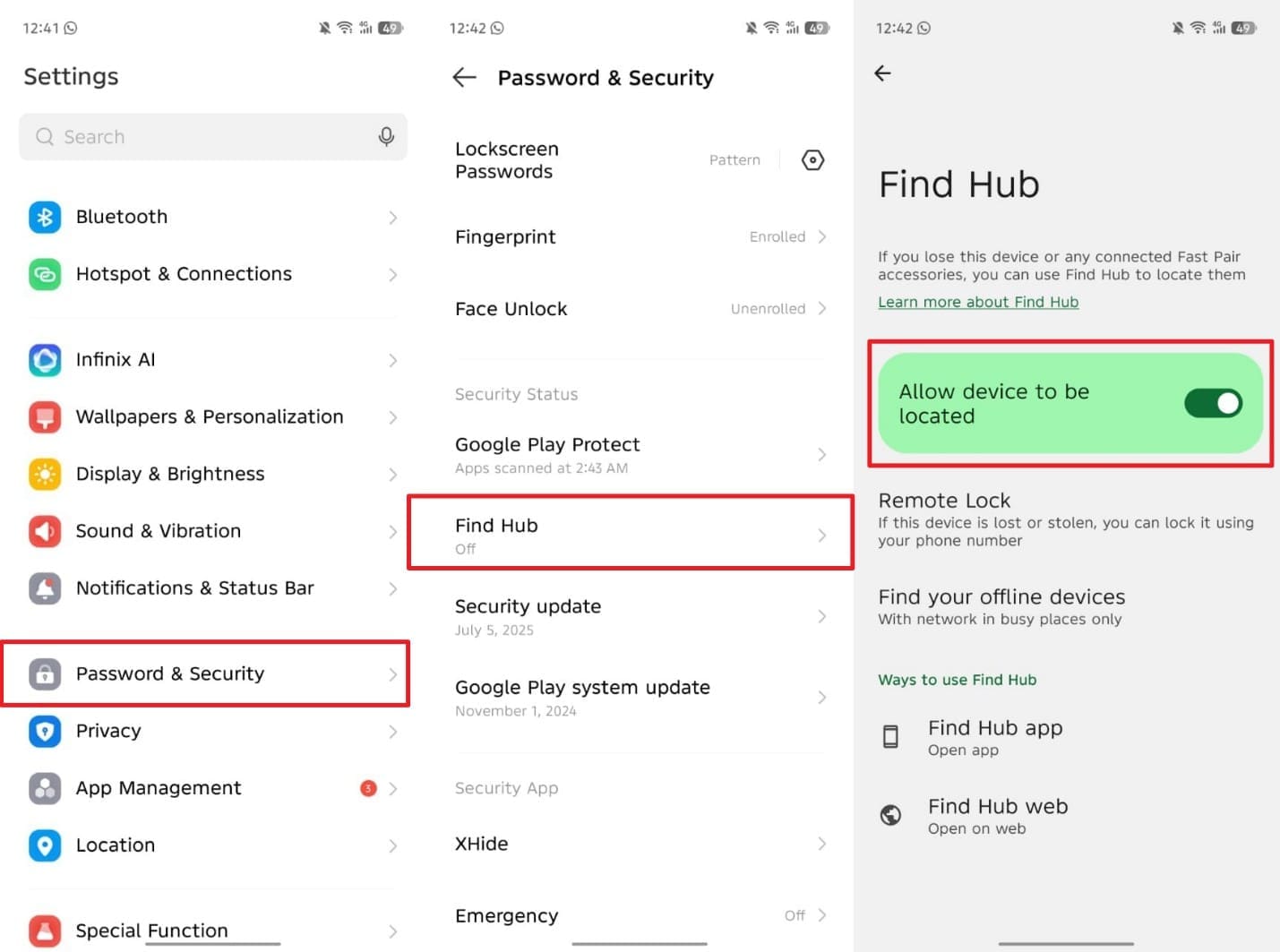
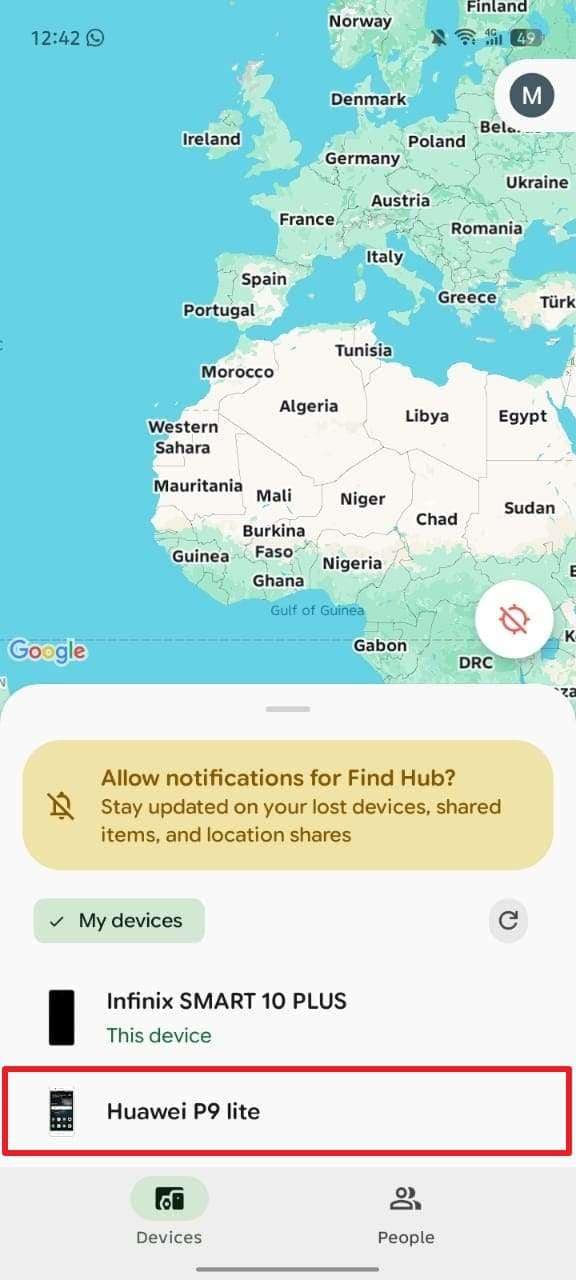
Step 2. On another Android, either go to the “Google’s Find Hub” site or open its app with the same account. You will then be able to access the added device and track its location.
Method 3. Messaging and Safety Apps
Messaging and safety apps also enable users to share live locations with trusted contacts. WhatsApp and Google Maps provide live map updates for friends or family members. Besides, parental apps like FamiSafe track children’s movement and send alerts for unusual activities. Tools like mSpy also offer monitoring with consent, including geofencing and location history features.
These solutions act as a reliable live location tracker by mobile number with proper permission. They ensure safe and controlled tracking without exposing devices to unknown external risks. So, take guidance from the given steps to share and track any device location via WhatsApp:
For iPhone
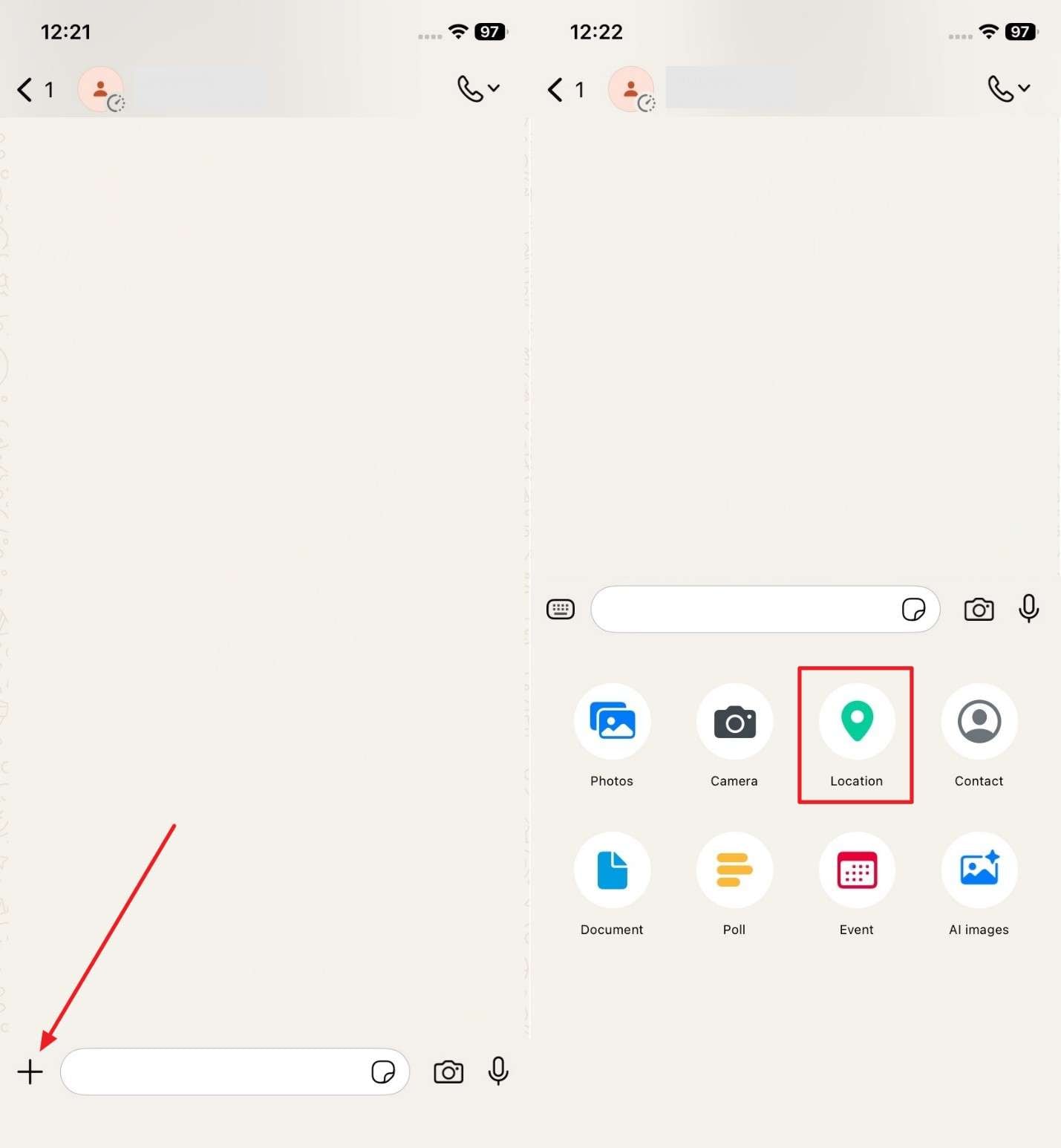
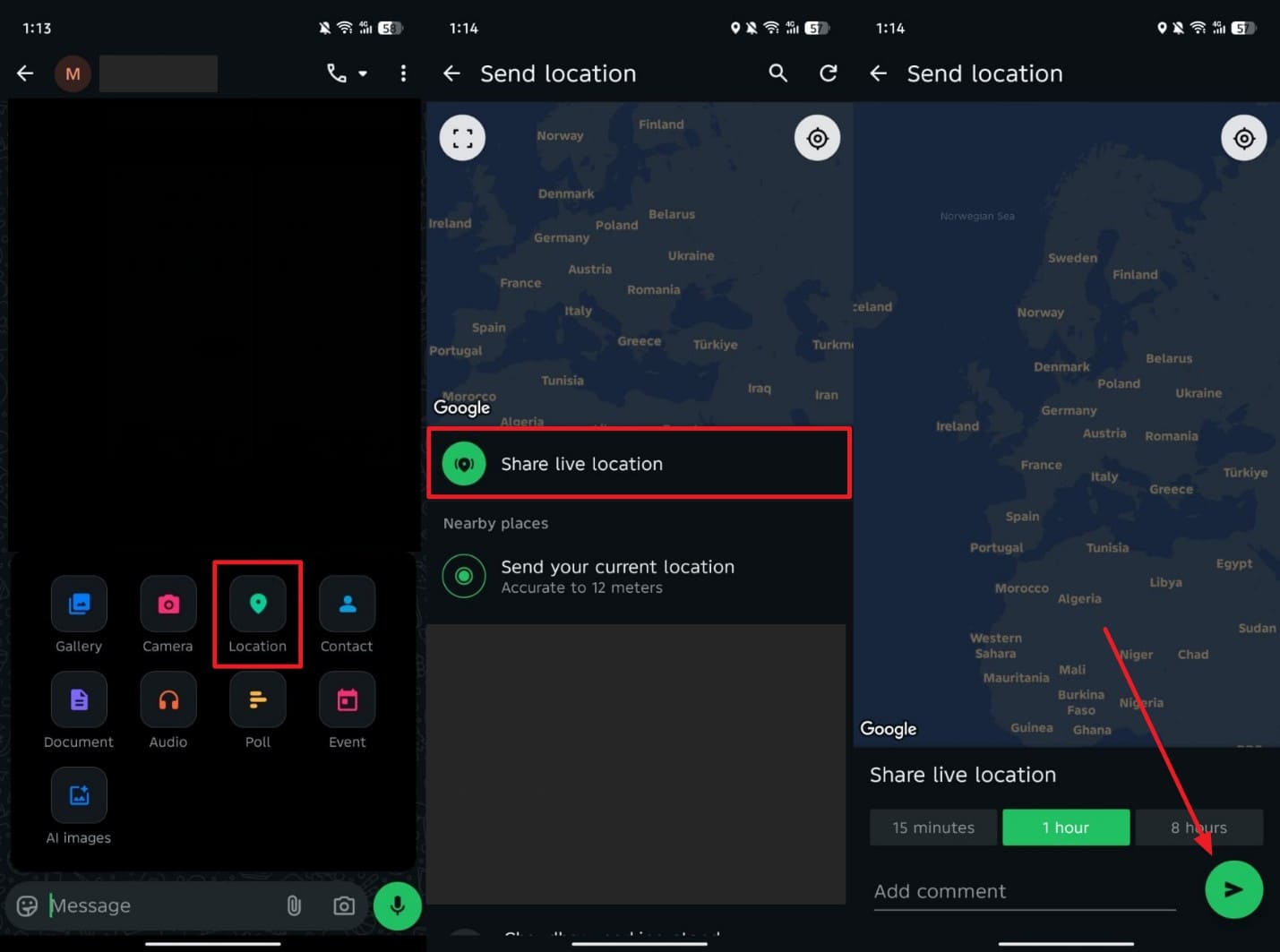
Step 1. Upon accessing the individual chat, tap the “+” button and opt for the “Location” option.
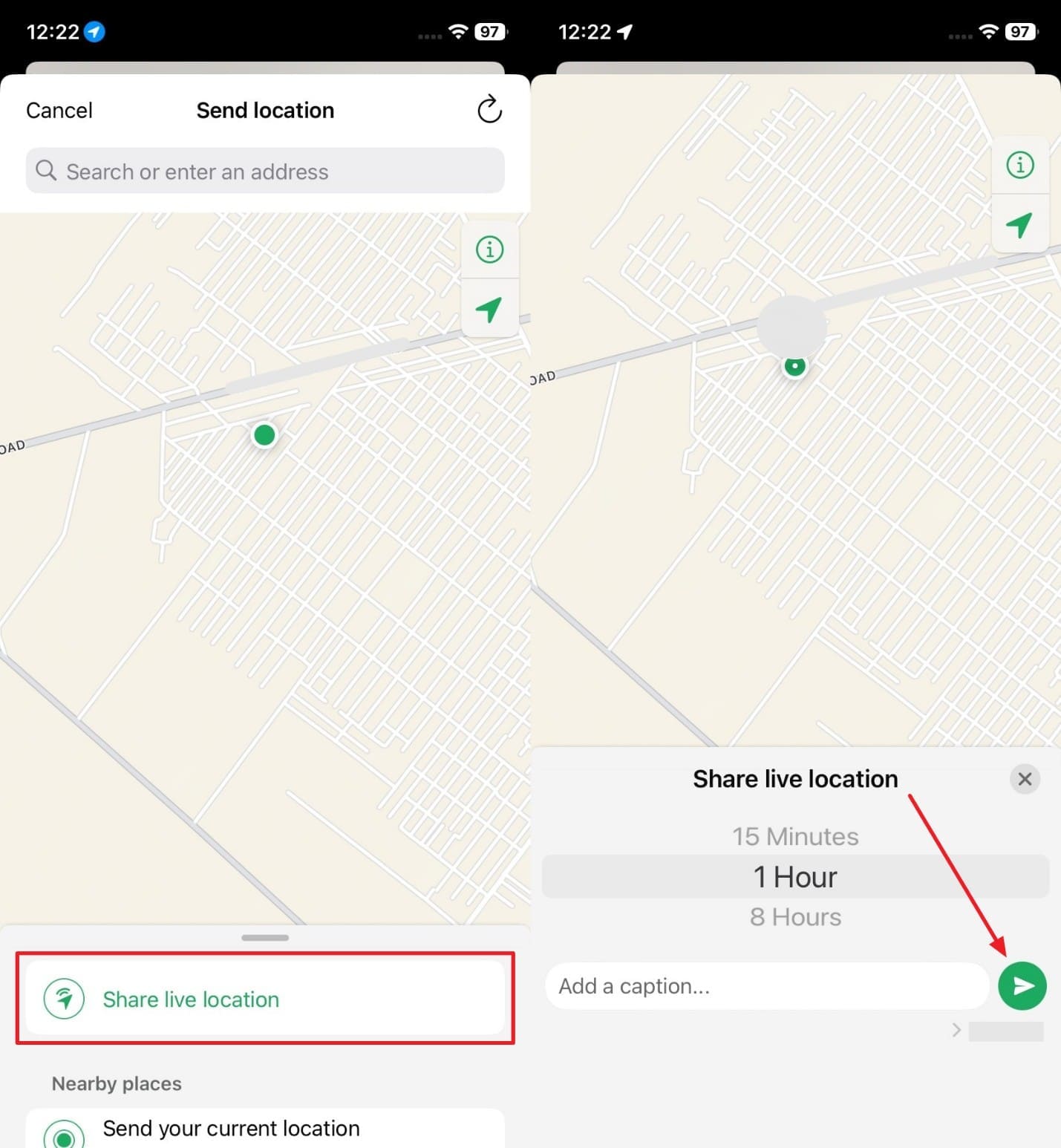
Step 2. As you see a menu, tap “Share Live Location” and select your preferred live period before pressing “Send.”
For Android
Instruction. When you reach the specific chat screen, tap the “Attachment” icon to select “Location.” Here, press “Share Live Location,” opt for your desired time, and hit the “Send” button.
Method 4. Emergency Location Services (E911)
Emergency Location Services, or E911, sends the caller’s location automatically to emergency responders. They find the GPS location by phone number using cell towers and Wi-Fi data. The area is usually accurate enough to give street or building info. This helps dispatchers send police or medical help quickly without relying on the caller's directions. It only works in emergencies and does not share location with others.
Bonus Tip. Use Dr.Fone to Spoof Your Location Safely – Virtual Location (For Privacy & Fun)
When you want privacy or fun alongside tracking a phone's location using a cell number, a safe location‑spoofing tool is an ideal choice. To address this need, Dr.Fone - Virtual Location is the perfect tool. It supports Android 16 and iOS 26 with a 1-Click Location Changer to teleport GPS anywhere. The joystick feature simulates flexible GPS movement, ideal for AR games. Moreover, multi-stop and one-stop routes let you create automated travel paths.
You can also import or export GPX route files and save favorite locations for quick reuse. With no jailbreak needed, it controls up to 5 iOS devices simultaneously. The cooldown timer prevents frequent location changes for safety. Plus, Dr.Fone works well with apps like Pokémon GO and Google Maps for safe location spoofing. Apart from that, customized speed settings let you move like walking or driving naturally.

Dr.Fone - Virtual Location
1-Click Location Changer for both iOS and Android
- Teleport from one location to another across the world from the comfort of your home.
- With just a few selections on your computer, you can make members of your circle believe you’re anywhere you want.
- Stimulate and imitate movement and set the speed and stops you take along the way.
- Compatible with both iOS and Android systems.
- Work with location-based apps, like Pokemon Go, Snapchat, Instagram, Facebook, etc.


Guide to Use Dr.Fone – Virtual Location to Spoof Your Location Safely
You can go through the given guide to use this virtual location tool for location spoofing on your Android or iOS smartphone:
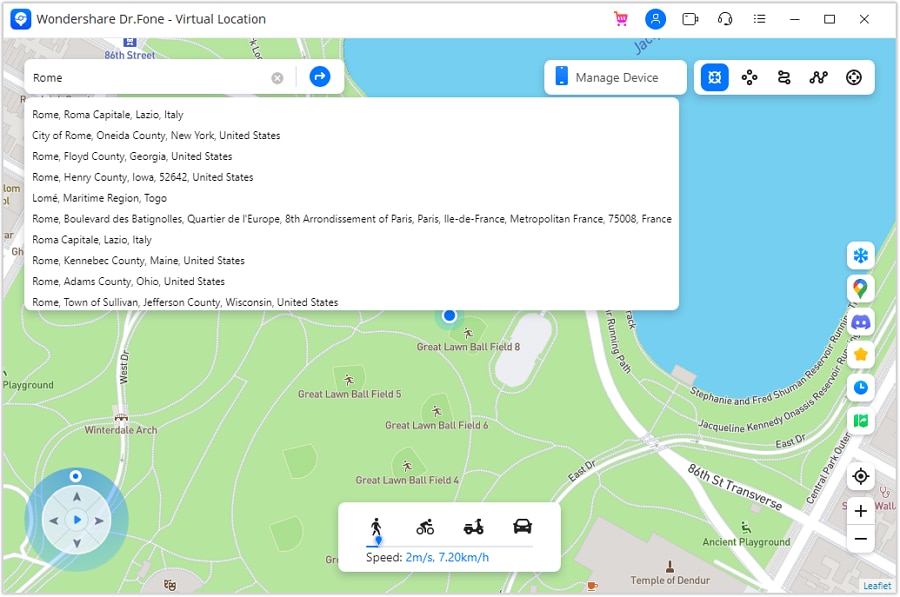
Step 1. Enable Teleport Mode & Search a Location
Connect your device to the computer and select the “Teleport Mode” icon in the top-right corner. Use the search bar to type your target location and press “Enter” to load it on the map.
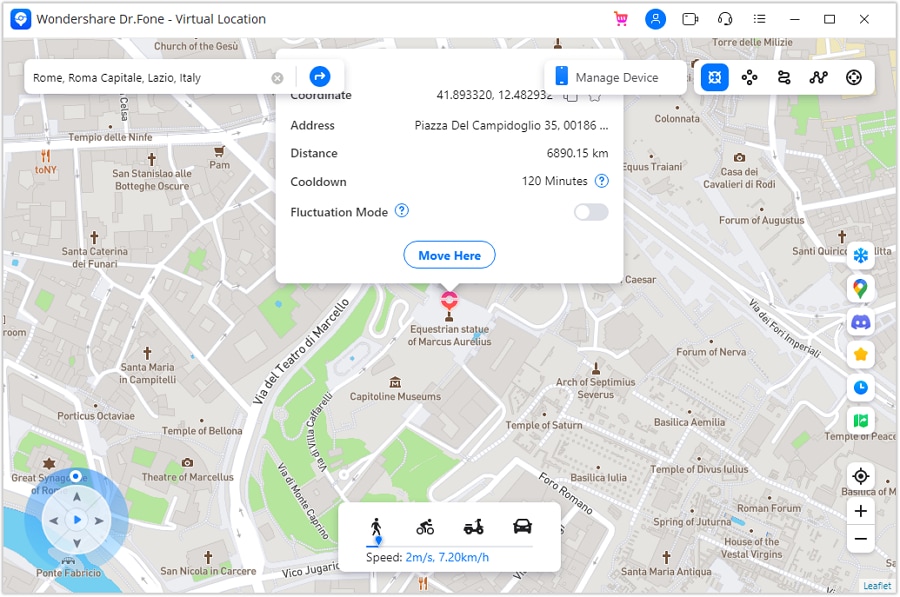
Step 2. Confirm the Teleport Destination
Once the map centers on your selected area, click “Move Here” to apply the change.
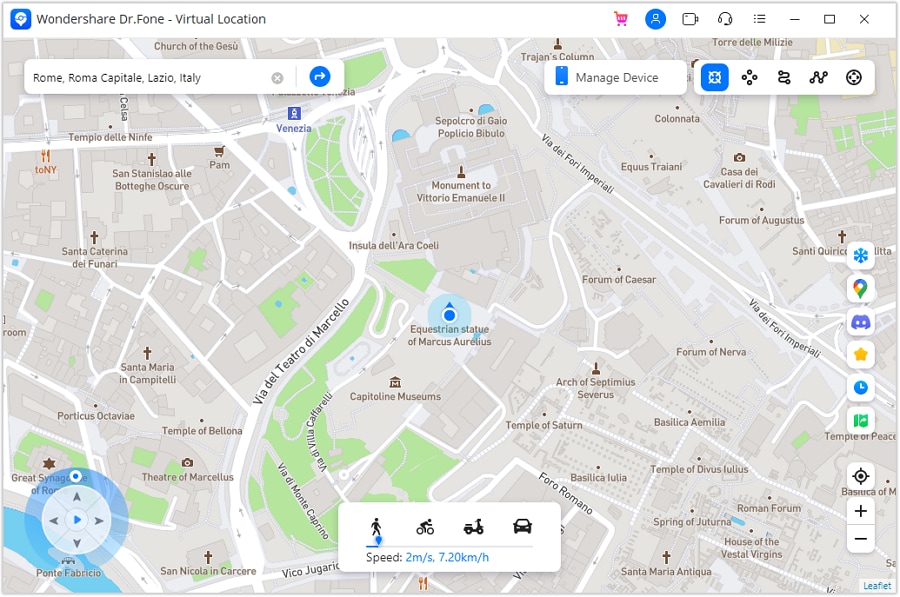
Step 3. Verify Location on Your Smartphone
Open your phone's map application to check that your location matches the new virtual spot. The computer and mobile device should now display the exact location accurately without errors.
Part 3. Why Real “Free GPS Phone Tracker by Number” Is Rare (and Risky)
Real free GPS phone trackers by number are extremely rare and mostly unreliable. Most tools claiming this feature can compromise privacy or deliver fake results. Below are a few key reasons why a real GPS location tracker by phone number is uncommon:
- Fake Apps: Many apps claim to track work, only to display fake locations visually. They cannot access real GPS signals and mislead users intentionally for downloads.
- Privacy Risk: Unauthorized trackers collect personal data without consent, risking identity theft. Users unknowingly expose sensitive details when using such unverified tracking apps.
- Legal Issues: Tracking someone without permission can violate strict privacy and local laws. Using these apps might result in fines or severe legal consequences quickly.
- Data Theft: Some websites steal contact lists, call logs, or GPS coordinates secretly. These platforms misuse information, compromising the user and the tracked person.
- Hidden Costs: Many “free” tools request subscriptions or in-app purchases for real features. Users often pay without getting the legitimate tracking functions as advertised.
Conclusion
In conclusion, real location tracking by mobile number works only with consent and proper tools. Although some free trackers work, they usually give fake results and pose privacy risks. Users need to be cautious when choosing tracking tools to avoid scams. Besides, for added fun or privacy, you can safely spoof your location with Dr.Fone – Virtual Location. It helps control device location realistically while protecting your personal data.
 safe & secure
4,624,541 people have downloaded it
FAQs
 Q1. How accurate is carrier-based location tracking?Q2. Does Emergency Location Service work internationally?Q3. Can I spoof my device’s location safely?
You Might Also Like

Virtual Location
- Change iOS Location
- 1. Best iOS Location Changers
- 2. Fake iPhone GPS Location
- 3. Change iPhone Home Address
- 4. Change iPad Weather Location
- 5. Track a Cell Phone Location
- 6. iPhone GPS not Working
- 7. iPhone “No Location Found”
- 8. iPhone “Location Not Available”
- 9. iTools Alternatives
- 10. DoPokeGo++ Alternatives
- 11. 3uTools Alternatives
- 12. Foneazy MockGo Alternatives
- 13. "No Location Found" Vs."Location Not Available"
- Change Android Location
- 1. Best Android Fake GPS Apps
- 2. Free Android Location Spoofers
- 3. Fake Android GPS Location
- 4. Android Location Settings
- 5. Fake GPS No Root
- 6. Fake GPS on Huawei
- 7. Fake GPS without Mock Location
- Hide GPS Location
- 1. Stop Sharing Location without Notifying
- 2. Fake Location on Find My Friends
- 3. Stop Google Tracking Your Location
- 4. Fake Location on Google Maps
- 5. Spoof Location on Life360
- 6. Turn Off Life 360 Without Knowing
- 7. Stop Life360 from Tracking You
- 8. Life360 Circle: Tips & Tricks
- 9. Track Location by Mobile Number
- 10. How Do I Know If My Phone Is Being Monitored
- 11. Can Life360 Track You When Your Phone is Off
- Fake GPS on Games
- 1. Play Pokémon Go Without Moving
- 2. Celebrate National Pokémon Day
- 3. Fake GPS on Mobile Legends
- 4. Spoof Ingress Prime Location
- 5. Spoof Location on Jurassic World Alive
- Fake Location on Social Apps
- 1. Fake Location on Whatsapp
- 2. Fake Location on Facebook
- 3. Fake Location on Telegram
- 4. Fake Location on Tiktok
- 5. Does Your Snap Score Increase with Chats
- 6. Fake Location on Snapchat
- 7. Add Location Filters on Snapchat
- 8. Change Location on Twitter
- 9. Change Instagram Business Location
- 10. Change Instagram Region/Country
- 11. Stop mSpy from Spying You
- 12. Change Location On Linkedin
- Fake Location on Dating Apps
- 1. Fake Hinge GPS
- 2. Top Funny Hinge Prompts
- 3. Apps Like Tinder
- 4. Enjoy Tinder Gold
- 5. Fake Tinder GPS
- 6.Tinder Keeps Crashing
- 7. Find People on Tinder
- 8. Use Grindr on a PC
- 9. Grindr Web app explained
- 10. Fake Grindr GPS
- 11. Grindr Unable to Refresh
- 12. Fake Bumble GPS
- 13. Bumble Snooze Mode Guide
- 14. Tinder vs Bumble vs Hinge
- Get Around Geo-blocking
- 1. Hola Fake GPS Alternative
- 2. Change Netflix Location
- 3. Bypass MLB TV
- 4. Change Location on YouTube TV
- 5. Change Play Store Country
- 6. Change Facebook Marketplace Location
- Followers & Unfollowers Trackers
- Location & Social Apps Tips
- 1. How to Share Live Location on Snapchat
- 2. Best Mobile Number Tracker
- 3. Best Private IG Viewer Tools
- 4. View a Private Instagram Account
- 5. Screenshot on Instagram Without Them Knowing
- 6. Does Instagram Notify When You Screenshot
- 7. Find Out If Someone Screenshots Your Instagram Story
- 8. Does Instagram Notify When You Screen Record
- 9. Fix iPhone Location Not Updating
- 10. Does Snapchat Show Who Viewed Your Profile
- ● Teleport GPS location to anywhere
- ● Play AR games without moving
- ● Spoof Location on the popular Apps
- Free Download Free Download Free Download


 > How-to > Virtual Location Solutions > How to Track Location by Mobile Number (Free & Realistic Ways)
Daisy Raines
staff Editor