

Detect Spyware: How Do I Know If My Phone Is Being Monitored or Tapped?

Sep 23, 2026 • Filed to: Virtual Location Solutions • Proven solutions
 TL;DR:
Unexplained battery drain, sudden data spikes, and random camera or microphone indicators are the primary signs of hidden phone monitoring, requiring immediate audits of your app permissions and device admin settings.
● Dialing *#21# or *#62# reveals if your calls and network activities are being secretly forwarded, while dialing ##002# instantly disables all active forwarding settings across your device.
● Spyware often disguises itself within device admin apps under generic names like System Service, or it can monitor your messages and location without local app installation by accessing unsecured Google or Apple cloud accounts.
● You can spoof your real-time coordinates to block unwanted GPS tracking using Dr.Fone - Virtual Location, a computer-operated simulation tool compatible with systems up to Android 16 and iOS 26.
Ask AI for a summary
 ChatGPT
 Perplexity
 Gemini
 Claude
 Grok
Grok
As phone use grows in daily life, many people worry about hidden tracking today. Strange behavior on your device can create fear and confusion very quickly. You may ask, how do I know if my phone is being tracked, especially when alerts or drains appear suddenly. Understanding these clues helps protect privacy and personal safety. So, this guide explains clear signs that help you understand possible monitoring.


Part 1. Can You Tell If Someone Is Tracking Your Phone?
Yes, warning signs and simple checks can help you tell if someone is tracking your phone. These signs are not always exact, but they still guide you well. Unexpected battery drains or random alerts point toward hidden background activity. Strange performance changes may also raise concern during everyday phone use. So, combining these checks gives a clearer picture of possible monitoring attempts.

Is There a Code to Check If Your Phone Is Being Monitored?
Some special codes can show details about call forwarding or network activity. Codes like *#21# or *#62# reveal forwarding settings linked to suspicious behavior. In contrast, using ##002# can disable all forwarding and restore standard communication settings. These codes offer clues, but they cannot confirm complete monitoring on any device. Knowing them supports learning how to know if my phone is being tracked today.
Common Signs Your Phone Might Be Tracked or Monitored
There are several everyday signs that can hint at hidden tracking on your device. Understanding these clues from the given table helps you react early before any serious issues appear:
|
Sign |
What It Usually Means |
| Rapid Battery Drain | Background apps may be running without your knowledge. |
| Device Heating When Idle | Hidden tools could be active even when you are not using them. |
| Sudden Data Spikes | Data may be uploaded silently to unknown servers. |
| Random Screen Activity | Unusual pop-ups or actions can signal remote access attempts. |
| Slow Performance | Spyware often uses system resources and slows down your phone. |
| Strange Noises During Calls | Interference may occur due to call forwarding or monitoring. |
| Unknown Apps Installed | Suspicious apps may have been added without permission. |
| Camera or Mic Activating | Indicators appear when sensors are used without your action. |
| Unexpected Settings Changes | Features like GPS or Bluetooth may turn on automatically. |
Part 2. How to Spot a Tracker on Your Phone: Step-by-Step Guide
Multiple factors help you check your device and understand how trackers may affect your privacy. Following this guide makes learning how to tell if your phone is being tracked easier:
1. Watch for Warning Signs
Watch for warning signs, as unusual battery drain or device heat often indicate background tracking. Strange freezes or repeated reboots can show hidden tools forcing constant system activity. Unexpected data spikes may expose silent uploads that help confirm how to check if the phone is tapped. Moreover, camera or mic indicators appearing randomly often signal secret recording attempts running quietly.

2. Check Installed Apps
You can also check installed apps to identify hidden trackers disguised as system names. Scrolling through your whole list reveals unfamiliar entries that indicate unauthorized monitoring. Opening suspicious apps shows permissions granting camera, microphone, location, and notification access. Besides, enabling system views uncovers disguised components holding elevated privileges linked to tracking.
3. Review App Permissions
Reviewing app permissions exposes apps demanding sensitive access beyond their stated purpose. This process highlights unusual camera, microphone, or location requests used by trackers. It helps you understand how to tell if your phone is tapped.
In addition, permission reviews reveal insecure apps showing broad access that mismatches their features. Therefore, limiting or removing suspicious permissions restricts collected data and weakens tracking attempts.

4. Inspect Privacy Indicators (iPhone/Android)
Privacy indicators show when apps access your camera or microphone without permission. Even when you expect no activity, these alerts highlight active sensor use. iPhone and Android instantly display dots or icons identifying the accessing app. Quick menus also help you confirm which app triggered each microphone alert. Moreover, repeated unexplained indicators suggest hidden monitoring software requiring fast checks and removal.
5. Monitor Battery and Data Usage
Monitoring battery and data usage can reveal hidden spyware constantly running in the background. Unexplained battery drains or sudden spikes in data may indicate tracking. By reviewing app-specific power and data use, you can spot suspicious apps. Learning how to check if your phone is tapped helps you act before personal information leaks.

6. Examine Device Admin Apps
You can also check device admin apps to reveal hidden trackers that require exceptional control. These apps can silently lock, wipe, or monitor your phone. Unknown entries like “System Service” or “Update Service” may indicate spying. You can safely deactivate such suspicious apps before uninstalling them. This step prevents trackers from reactivating or hiding, effectively protecting privacy.
7. Use Tracker Detection Features
Many phones now include built-in tracker detection features for extra security. These tools scan apps and system processes, highlighting unusual activity instantly. Using them helps you understand how to know if there is spyware on your phone without technical expertise. They provide alerts, detailed logs, and guidance to remove suspicious software.

8. Remove Suspicious Software
Removing suspicious software also helps you clear harmful apps that may track your activity. This step lets you delete unknown tools that quietly run without your awareness. It enables you to stop hidden programs that collect data or change necessary settings. So, careful removal prevents these apps from restarting or hiding again on your device.
9. Consult Security Apps
Apart from the above, security apps also offer powerful tools to find and stop hidden spying software on phones. They scan for suspicious programs, alert users, and help remove threats. Some apps even block spyware from using your camera or microphone without permission. Using them also teaches you how to check if your phone is tapped safely.

Part 3. Prevent Tracking: How to Protect Your Phone and Data
Beyond some checks, you can also protect your device from being tracked by applying some settings. So, this part shares 8 easy tips to keep your phone and data safe from spying:
1. Turn Off Location Services
This solution reduces apps that track your movements without clear permission. It also helps limit silent tools that monitor your daily routes and activities. Plus, disabling location access gives you more control and protects your private information. While learning how to find out if your phone is tapped, follow the given steps below:
For iPhone: Head to the “Privacy & Security” section to access “Location Services” and toggle it off.

For Android: To initiate, tap the “Location” settings section and disable the “Use Location” toggle.

2. Limit App Permissions
It basically controls what features apps can use on your phone. This solution can protect privacy by preventing access to more apps than necessary. You can allow apps to use the microphone or location only when required. This is an easy measure to minimize spying and data leakages. Go through the following steps to perform this task:
For iPhone: Access the “Apps” section from the settings and choose your desired app. Afterward, disable any app permissions like “Microphone” or “Camera” by turning off the toggle.

For Android: Upon accessing the “App Management” section, select your preferred app. Here, tap “Permission” and opt for “Not Allowed” for unnecessary permissions.

3. Use a VPN & Secure Networks
You can also use a VPN and secure networks to hide your online activity from prying eyes. This method changes your online address to keep your location private and data safe. It even encrypts data and protects connections on public or home Wi-Fi networks easily. This approach also helps you learn how to know if someone is tracking your phone.
4. Keep Your Device Updated
It is also recommended to keep your device updated to stop spyware from working. Latest updates basically install the latest security patches and fix vulnerabilities quickly. This practice also helps you understand how to know if someone is tracking your phone. Moreover, regular updates improve performance while strengthening protection against spyware access attempts. Review the given guide to update your device software:
For iPhone: When you access settings, head to the “General” section and tap “Software Updates.” In case your device shows an update, press the “Update Now” button.

For Android: You need to access the “Software Update” settings and then select “Update and Install.” On the following screen, hit the “Install Now” button when you see it.

5. Disable Ad and App Tracking
Disabling ad and app tracking stops apps from collecting your personal usage information. It prevents marketers and hidden tools from following your online behavior across devices. This helps in telling if someone is monitoring your phone by cutting tracking links. Thus, adhere to the steps below to disable app tracking on your phone:
For iPhone: As you head to the “Privacy & Security” section, tap “Tracking” and disable “Allow Apps to Request to Track.”

For Android: Start by accessing the “Privacy” section and going to the “Ads” option, tap “Delete Advertising ID.”

6. Protect Accounts with Strong Passwords
Other than that, using tough passwords also prevents unauthorized access and safeguards information. Thus, you should use unique combinations of letters and symbols to avoid hackers. This step reduces risks from spyware or monitoring tools trying to steal personal information. Strong passwords also strengthen overall security and make it harder for anyone to control your accounts.
7. Turn Off Bluetooth & NFC When Not Used
Users should also disable Bluetooth and NFC to stop wireless spying when they don't need them. It blocks hackers from connecting without your okay. This saves battery and keeps connections safe from unknown devices. It's a key part of how to tell if someone tracking your phone by cutting sneaky entry points. Let’s explore how you can disable these features:
For iPhone: Swipe down from the top right corner and press the “Bluetooth” icon. When the options expand, tap “Bluetooth” to turn it off.

For Android: Access the “Quick Settings” panel from the top of the screen and tap “Bluetooth” or “NFC” to disable it.

8. Use Private Browsers or Incognito Mode
Private browsers and incognito modes stop saving your web history on the phone. They clear cookies and data after each session ends quickly. This keeps browsing private from others using your device. While exploring how to tell if your phone is tapped, go through the steps to use private browsing:
For iPhone: As you open “Safari,” tap the “Two Overlapping Squares” icon and opt for “Private” to access it.

For Android: Upon launching “Chrome,” tap the “Three Dots” icon and choose “New Incognito Tab.”

Pro Tip. How Can You Keep Your GPS Private? Try Dr.Fone - Virtual Location
Keeping your GPS private is essential to stop unwanted tracking and spying on your phone. Many apps quietly collect your movements, making people worry about hidden monitoring. It also helps you understand and protect yourself if someone is spying on your phone. In such a case, Dr.Fone - Virtual Location offers simple tools that safeguard your GPS details. Besides, it supports the latest Android 16 and iOS 26 versions to ensure compatibility.
This dedicated app allows you to simulate GPS movement along routes you draw, adding extra control. In addition, the joystick feature lets you flexibly manage GPS movement, perfect for augmented reality games like Pokémon GO. You can even set multi-stop routes or jump teleport modes for realistic GPS simulation. The tool even imports and exports GPX files, so your favorite routes are easy to manage.

Dr.Fone - Virtual Location
1-Click Location Changer for both iOS and Android
- Teleport from one location to another across the world from the comfort of your home.
- With just a few selections on your computer, you can make members of your circle believe you’re anywhere you want.
- Stimulate and imitate movement and set the speed and stops you take along the way.
- Compatible with both iOS and Android systems.
- Work with location-based apps, like Pokemon Go, Snapchat, Instagram, Facebook, etc.


Guide to Keep Your GPS Private by Using Dr.Fone - Virtual Location
You can go through the steps below to use this dedicated location changer tool to hide your real GPS location:
Step 1. Search for a New Fake Location
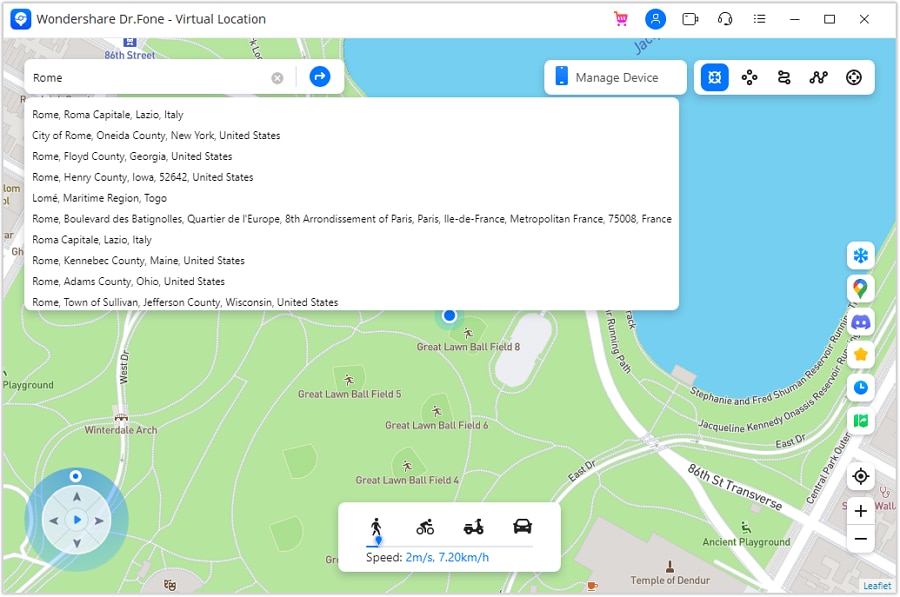
Upon connecting your device, click the “Teleport Mode” icon in the top-right section of the toolbar. Subsequently, input the name of the place you want to move to in the search bar and press “Enter.”
Step 2. Apply and Confirm the Selected Spot
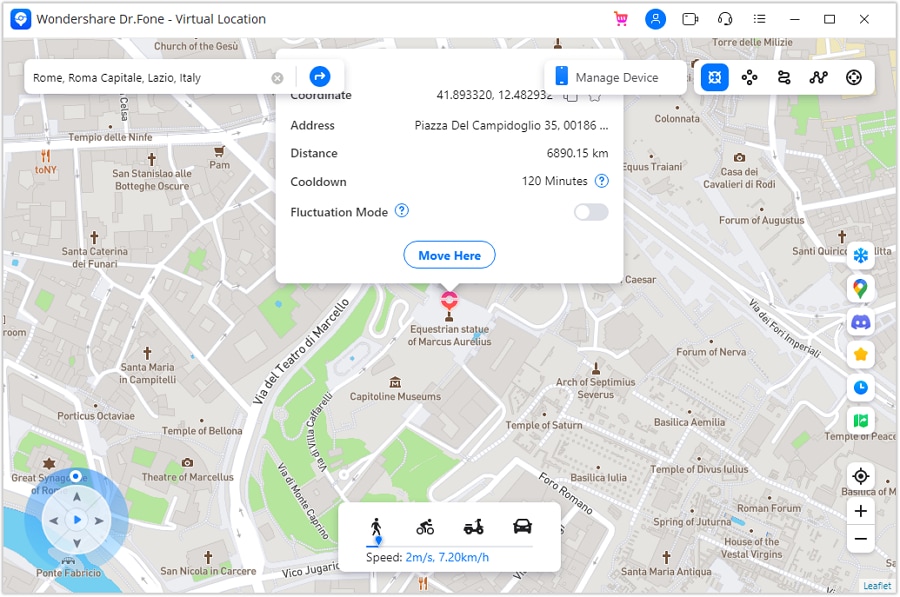
Once the map zooms into your chosen area, click “Move Here” to finalize the teleport.
Step 3. Check the Updated Location on Both Devices
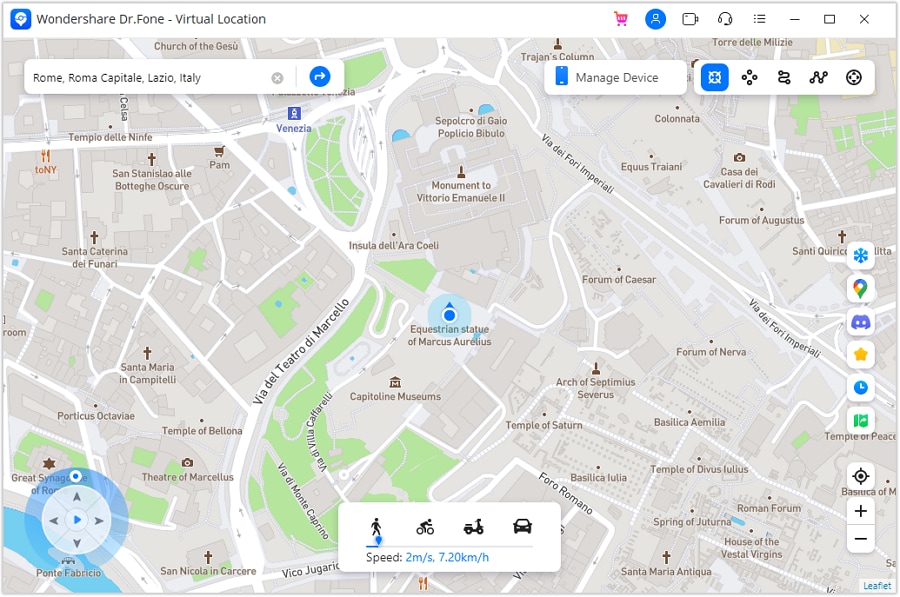
Following this, your virtual position updates immediately. Now, open your phone’s maps app to confirm the new location matches what you see on your computer.
Conclusion
To sum up, understanding the signs helps you answer how to know if your phone is being tracked with more confidence. This guide has shown clear ways to spot and stop phone tracking threats effectively. Also, staying alert to odd behavior keeps your device secure during daily use. On the other hand, for GPS privacy, try Dr.Fone – Virtual Location, a tool that helps keep your GPS private and secure.
 safe & secure
4,624,541 people have downloaded it
FAQs
 Q1. Can spyware track my phone without installing apps?Q2. Can someone track my phone through my Google or Apple account?Q3. Can spoofing my GPS help reduce unwanted monitoring attempts?
You Might Also Like

Virtual Location
- Change iOS Location
- 1. Best iOS Location Changers
- 2. Fake iPhone GPS Location
- 3. Change iPhone Home Address
- 4. Change iPad Weather Location
- 5. Track a Cell Phone Location
- 6. iPhone GPS not Working
- 7. iPhone “No Location Found”
- 8. iPhone “Location Not Available”
- 9. iTools Alternatives
- 10. DoPokeGo++ Alternatives
- 11. 3uTools Alternatives
- 12. Foneazy MockGo Alternatives
- 13. "No Location Found" Vs."Location Not Available"
- Change Android Location
- 1. Best Android Fake GPS Apps
- 2. Free Android Location Spoofers
- 3. Fake Android GPS Location
- 4. Android Location Settings
- 5. Fake GPS No Root
- 6. Fake GPS on Huawei
- 7. Fake GPS without Mock Location
- Hide GPS Location
- 1. Stop Sharing Location without Notifying
- 2. Fake Location on Find My Friends
- 3. Stop Google Tracking Your Location
- 4. Fake Location on Google Maps
- 5. Spoof Location on Life360
- 6. Turn Off Life 360 Without Knowing
- 7. Stop Life360 from Tracking You
- 8. Life360 Circle: Tips & Tricks
- 9. Track Location by Mobile Number
- 10. How Do I Know If My Phone Is Being Monitored
- 11. Can Life360 Track You When Your Phone is Off
- Fake GPS on Games
- 1. Play Pokémon Go Without Moving
- 2. Celebrate National Pokémon Day
- 3. Fake GPS on Mobile Legends
- 4. Spoof Ingress Prime Location
- 5. Spoof Location on Jurassic World Alive
- Fake Location on Social Apps
- 1. Fake Location on Whatsapp
- 2. Fake Location on Facebook
- 3. Fake Location on Telegram
- 4. Fake Location on Tiktok
- 5. Does Your Snap Score Increase with Chats
- 6. Fake Location on Snapchat
- 7. Add Location Filters on Snapchat
- 8. Change Location on Twitter
- 9. Change Instagram Business Location
- 10. Change Instagram Region/Country
- 11. Stop mSpy from Spying You
- 12. Change Location On Linkedin
- Fake Location on Dating Apps
- 1. Fake Hinge GPS
- 2. Top Funny Hinge Prompts
- 3. Apps Like Tinder
- 4. Enjoy Tinder Gold
- 5. Fake Tinder GPS
- 6.Tinder Keeps Crashing
- 7. Find People on Tinder
- 8. Use Grindr on a PC
- 9. Grindr Web app explained
- 10. Fake Grindr GPS
- 11. Grindr Unable to Refresh
- 12. Fake Bumble GPS
- 13. Bumble Snooze Mode Guide
- 14. Tinder vs Bumble vs Hinge
- Get Around Geo-blocking
- 1. Hola Fake GPS Alternative
- 2. Change Netflix Location
- 3. Bypass MLB TV
- 4. Change Location on YouTube TV
- 5. Change Play Store Country
- 6. Change Facebook Marketplace Location
- Followers & Unfollowers Trackers
- Location & Social Apps Tips
- 1. How to Share Live Location on Snapchat
- 2. Best Mobile Number Tracker
- 3. Best Private IG Viewer Tools
- 4. View a Private Instagram Account
- 5. Screenshot on Instagram Without Them Knowing
- 6. Does Instagram Notify When You Screenshot
- 7. Find Out If Someone Screenshots Your Instagram Story
- 8. Does Instagram Notify When You Screen Record
- 9. Fix iPhone Location Not Updating
- 10. Does Snapchat Show Who Viewed Your Profile
- ● Teleport GPS location to anywhere
- ● Play AR games without moving
- ● Spoof Location on the popular Apps
- Free Download Free Download Free Download


 > How-to > Virtual Location Solutions > Detect Spyware: How Do I Know If My Phone Is Being Monitored or Tapped?
James Davis
staff Editor