

Stuck on Locked to Owner? A Clear Guide to iOS 18 iCloud Unlock

Oct 10, 2026 • Filed to: Screen Lock Removal • Proven solutions
 TL;DR:
Bypassing the iOS 18 "Locked to Owner" Activation Lock requires removing the device from the linked iCloud account, submitting original proof of purchase to Apple Support, or using a dedicated bypass tool like Dr.Fone - Screen Unlock (iOS) when account credentials are lost.
● Official removal is permanently effective only if you or the previous owner can access the linked Apple ID via iCloud.com or Find My to disconnect the device.
● Standard resets, recovery mode wipes, and Finder or iTunes restores will only erase user data and cannot remove the Activation Lock, causing the device to loop back to the same Apple ID prompt during setup.
● When credentials are unrecoverable, Dr.Fone - Screen Unlock (iOS) provides a computer-based bypass compatible with hardware up to the iPhone 17 lineup and iOS 26 / iPadOS 26, but it cannot be used if the device is reported lost, stolen, or under MDM control.
Ask AI for a summary
 ChatGPT
 Perplexity
 Gemini
 Claude
 Grok
Grok
You reset the phone expecting the normal setup flow, language, region, Wi-Fi, then everything stops. Instead of continuing, the screen asks for an Apple ID, and setup will not move forward without it.
On iOS 18, this block appears at a specific point during activation. An Apple ID prompt shows up and refuses to clear, which is often when users realise the device is still tied to an older account. At that stage, iCloud unlock on iOS 18 is no longer as simple as erasing the phone again. The screen remains in place, waiting for credentials that may no longer exist.
This usually happens with devices that have been left unused for years. With newer updates, attempts to bypass iOS 18 fail because the lock is enforced during activation, not stored on the device itself.
- Part 1. Can iCloud Activation Lock Be Unlocked on iOS 18?
- Part 2. How to unlock Activation Lock on iOS 18 using legitimate paths that actually work
- Method 1: Remove the Device from iCloud Using the Apple ID
- Method 2: Ask the Previous Owner to Remove It Remotely
- Method 3: Restore with Finder or iTunes (Erase Only)
- Method 4: Apple Support (Proof Required)
- Method 5: Use Dr.Fone – Screen Unlock (iOS) When Account Access Is Gone

- Part 3. Comparison: Choosing the Right iOS 18 iCloud Unlock Path
Part 1. Can iCloud Activation Lock Be Unlocked on iOS 18?
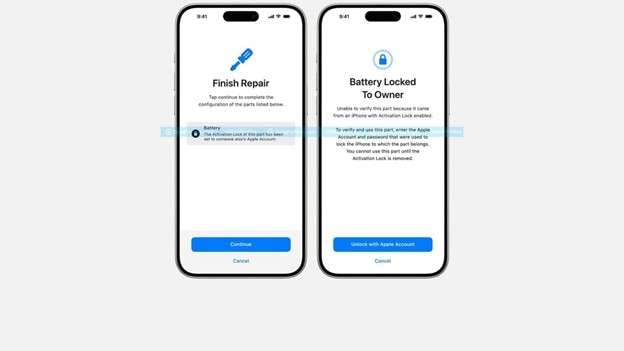
That “iPhone Locked to Owner” page isn’t a local password problem. It’s Activation Lock, tied to Apple’s servers through Find My. Apple even flags it plainly on devices protected by Activation Lock. Apple Support
So before you try anything, separate the layers:
- Screen passcode: stops you from opening the phone when it’s already set up.
- Apple ID sign-in: blocks you from using iCloud services inside Settings.
- Activation Lock (“Locked to Owner”): blocks setup after erase/restore, even if the device is completely wiped. Apple Support
That last one is why people keep searching for unlock iCloud iOS 18 after a reset and still end up stuck.
When it’s possible
- You know the Apple Account email/phone number and can complete recovery/2FA.
- The previous owner is reachable and willing to remove the device from their account.
- You have valid proof of purchase, and Apple approves an unlock request.
When it’s not
- The device is linked to someone else’s account, and they won’t remove it.
- The device is under MDM/school/company ownership, and you’re not the admin.
- The device is reported lost/stolen (Apple generally won’t help unlock it in that case. Apple’s own guidance warns against taking ownership of used devices that show Activation Lock.
🔓 Tips: Stuck on iCloud Activation Lock and can’t access your iPhone or iPad? Dr.Fone Online Unlock - iCloud Unlock helps you check eligibility and unlock online.
- Works for iPhone XR → 17 Pro Max and iPads from 2019 onward.
- Compatible with iOS versions 18.6–26.1 (except 18.7.3).
- Built for hard-to-unlock A12 chip iPhones, with high success.
- Get results in 1-60 seconds—or get a full refund.
🚀Take the quickest path back to your device—unlock iCloud online now.
 safe & secure
Part 2. How to unlock Activation Lock on iOS 18 using legitimate paths that actually work
Not every method works in every situation. Some remove the lock entirely. Others only erase the phone and still require the Apple ID afterward. The sections below explain each option clearly, including when it helps and when it doesn’t.
Method 1: Remove the Device from iCloud Using the Apple ID
If you can still access the Apple ID linked to the phone, this is the cleanest path.
Steps:
- Open a browser and sign in to iCloud.com
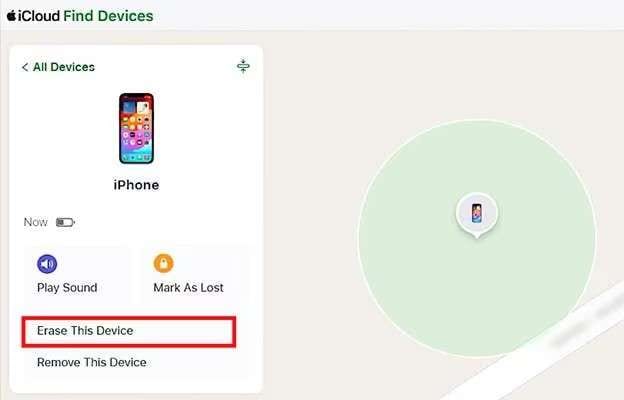
- Go to Find Devices
- Select the iPhone or iPad from the list
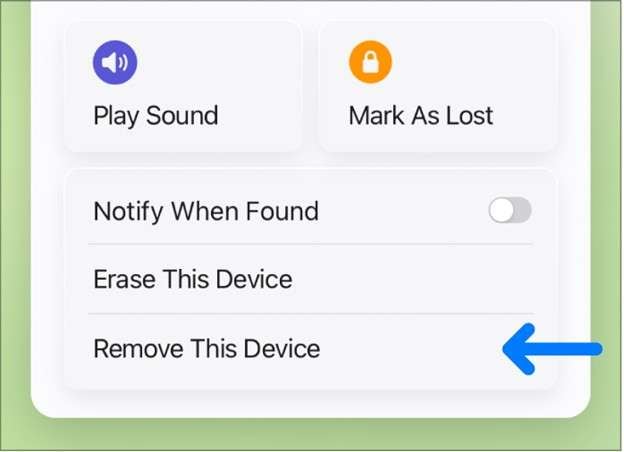
- Choose Remove from Account
Once the device is removed, the next setup attempt will no longer request the old Apple ID. This works even if the phone is not physically with you.
This method fully resolves iCloud unlock on iOS 18 when credentials are available.
Method 2: Ask the Previous Owner to Remove It Remotely
For second-hand devices, this is common.
The previous owner doesn’t need the phone. They only need to:
- Sign in to their Apple ID
- Open Find My
- Remove the device from their account
After that, the phone can be set up normally.
If you bought a used phone and want to bypass iOS 18 searches, this step alone solves most legitimate cases.
Method 3: Restore with Finder or iTunes (Erase Only)
This is useful for removing a screen passcode, not ownership.
Steps:
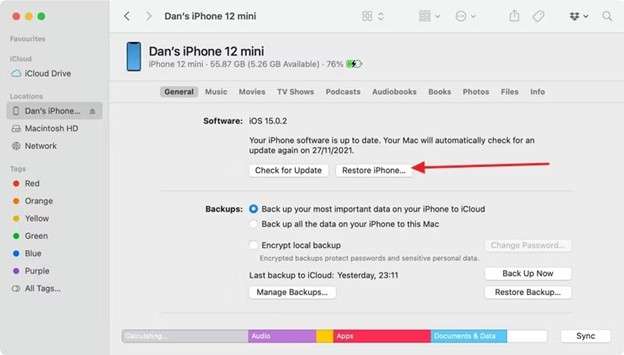
- Connect the device to a computer
- Enter recovery mode
- Choose Restore
The phone will erase and reinstall iOS 18. During setup, Activation Lock will still appear if Find My was enabled.
This explains why many iCloud iOS 18 unlock attempts loop back to the same screen.
Method 4: Apple Support (Proof Required)
In rare cases, Apple may remove Activation Lock if you can prove ownership.
This requires:
- Original purchase receipt
- Matching serial or IMEI
- Review by Apple Support
Approval is not guaranteed, but it’s the only official route when credentials are gone.
Method 5: Use Dr.Fone – Screen Unlock (iOS) When Account Access Is Gone
When the Apple ID can’t be reached, the usual options narrow fast. Apple’s own flow for Activation Lock is built around signing in with the linked account, or getting support help with proof of purchase.
That’s the point where some people stop trying to “reset again” and start looking for a tool that focuses on the lock itself. Dr.Fone - Screen Unlock (iOS) is one of the better-known desktop options for this situation because it’s built around removing locks on iPhone and iPad rather than just reinstalling iOS. It also lists support for the iPhone 17 lineup and iOS 26 / iPadOS 26.

Dr.Fone - Screen Unlock (iOS)
Unlock iPhone/iPad Lock Screen Without Hassle.
- Simple, click-through, process.
- Remove screen passcodes, Face ID, Touch ID and Apple ID with ease.
- Bypass iCloud Activation Locks without Password.
- Bypass MDM and screen time without data loss.
- Supports the latest iOS version fully!



Step-by-Step: Removing Activation Lock with Dr.Fone
Step 1. Open the Screen Unlock tool
Install the latest Dr.Fone on your Windows or Mac computer, launch it, then go to Toolbox → Screen Unlock → iOS to enter the unlock section.

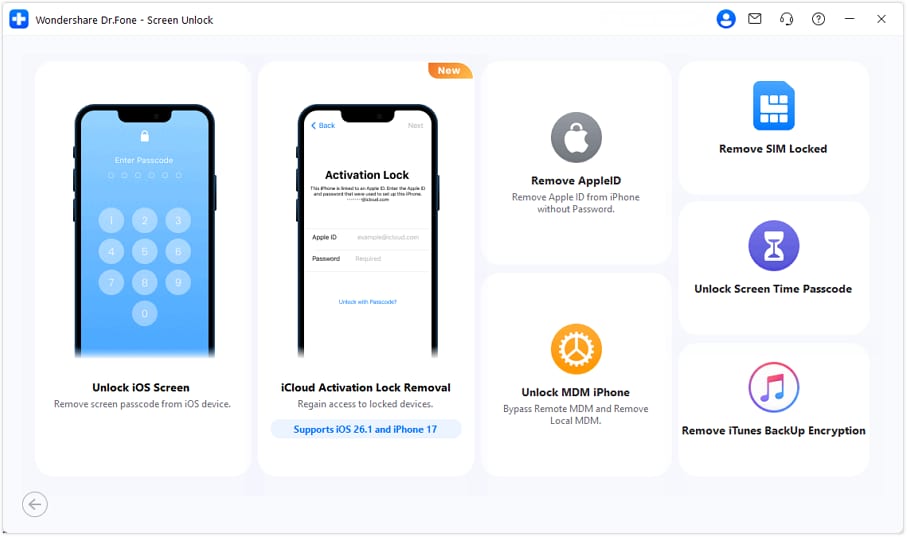
Step 2. Pick the Activation Lock removal option
On the next screen, choose iCloud Activation Lock Removal (the wording can be slightly different, but it will clearly mention Activation Lock / iCloud).
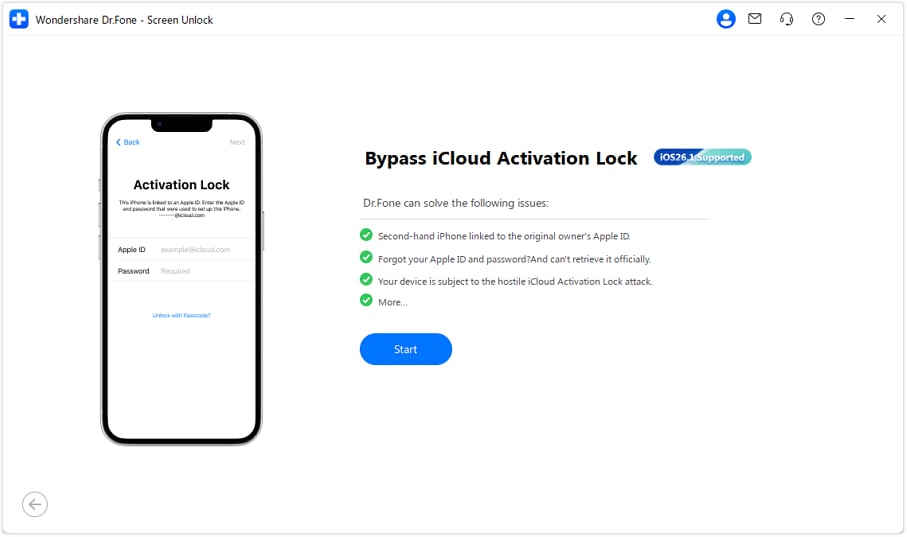
Step 3. Start the process
You’ll be taken to a new window. Click Start to begin the Activation Lock bypass flow.
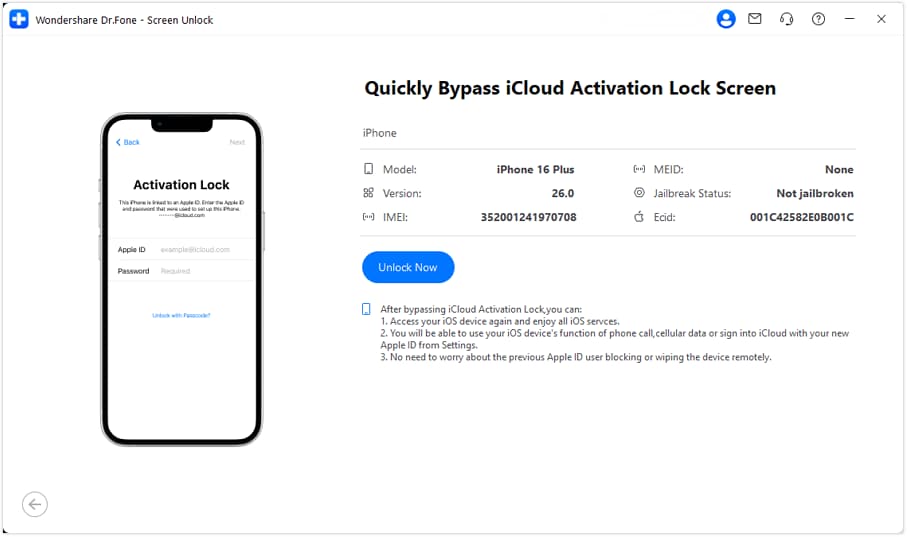
Step 4. Connect the device and confirm the details
Plug your iPhone/iPad into the computer with a USB cable. Once it’s detected, the tool will show device information (model/system). Check that it matches your device, then click Unlock Now.
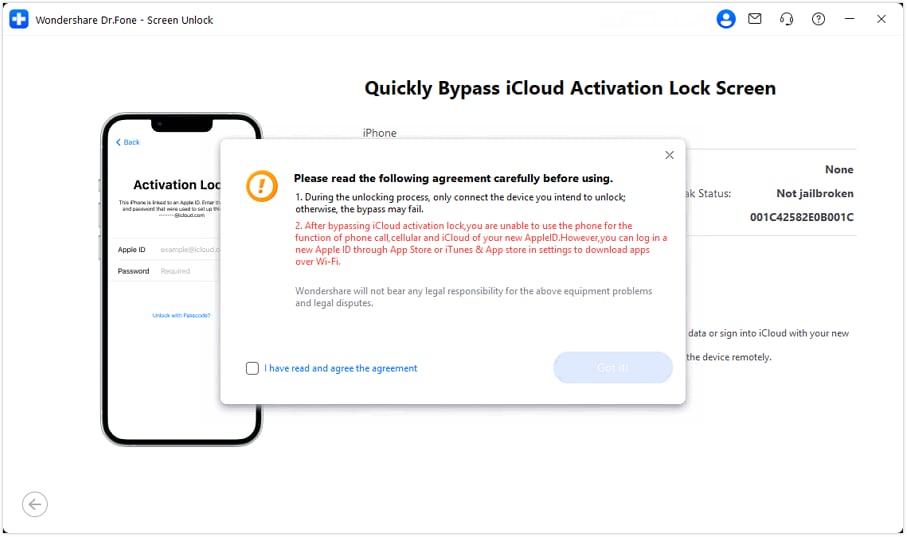
Step 5. Read the notice and agree
A warning/notice screen will appear with important notes. Read it, tick the agreement checkbox (like “I have read and agree…”), then press Got It! to continue.
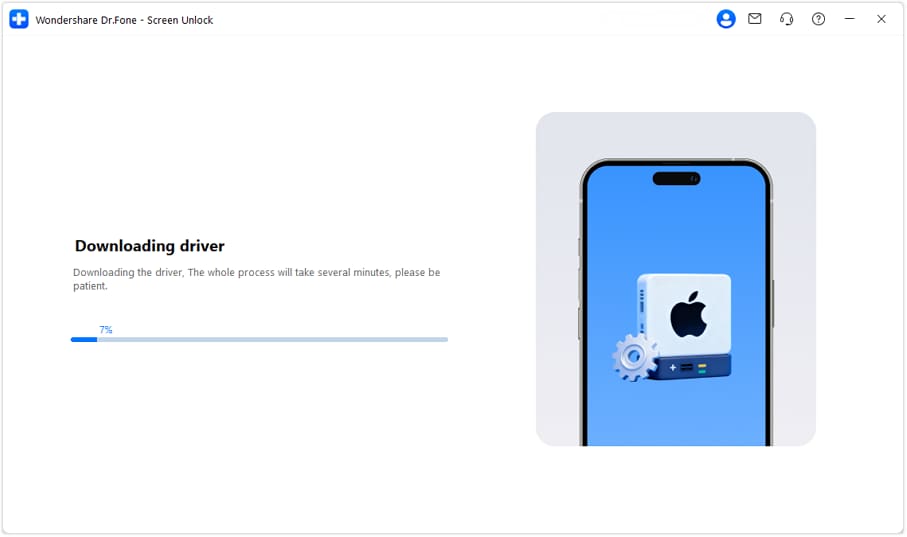
Step 6. Wait while the driver installs
Dr.Fone will automatically download and install the required driver for your device. Keep the phone connected and let it finish.
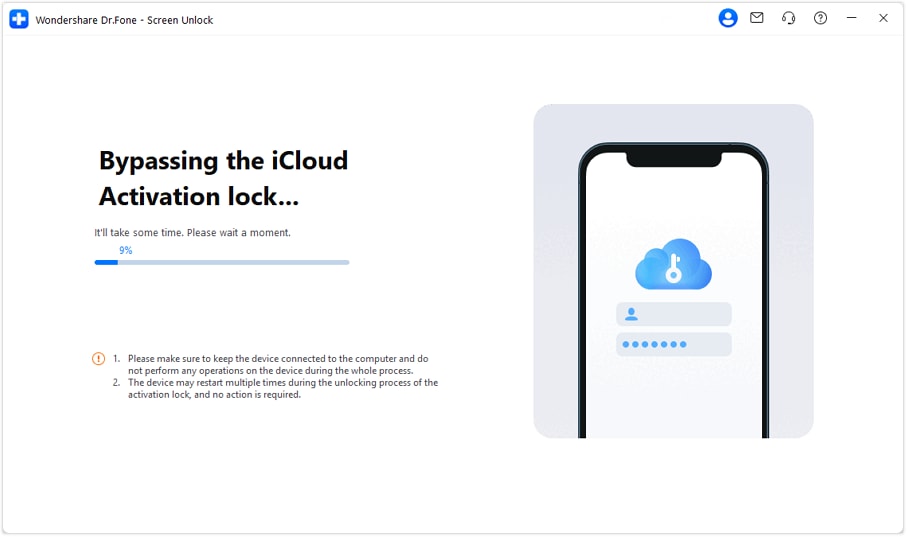
Step 7. Let the bypass run (don’t touch the device)
You’ll see the progress on screen. Keep the iPhone/iPad plugged in the whole time, and avoid using it while the bypass is running.
Step 8. Finish and continue the setup
When it completes, you’ll get a success message. After the final reboot, you should be able to enter the device normally and move forward with setup.

Where it fits: when you want to unlock iOS 18 because a restore didn’t change anything, and the phone still shows “Locked to Owner” during setup.
If the device is reported lost/stolen, or you don’t have permission to use it. Activation Lock exists specifically to block that.
Features:
Rather than listing everything the software does, these are the parts that are relevant specifically to iOS 18 iCloud unlock situations:
- Handles Activation Lock and Apple ID removal, not just data wipes
- Supports newer hardware, including iPhone 17 models
- Compatible with recent system versions, including iOS 26 / iPadOS 26
- Provides device-specific instructions instead of generic recovery steps
Part 3. Comparison: Choosing the Right iOS 18 iCloud Unlock Path
By the time people reach this point, the confusion is about which one actually fits the situation. Most failed attempts happen because the wrong tool is used for the wrong lock state.
|
Method |
What It Changes |
What Stays the Same |
Setup Effort |
End Result |
| Dr.Fone – Screen Unlock (iOS) | Removes the Apple ID association that blocks setup | Hardware ownership status remains unchanged | Medium (computer + guided steps) | The device can complete the setup and be used again |
| Remove from iCloud (Apple ID access) | Clears Activation Lock at the account level | Nothing persists from the old owner | Low (browser-based) | Clean setup with full Apple services |
| Previous Owner Remote Removal | Deletes the device from another person’s account | Device history remains intact | Low (owner action only) | Normal setup without restrictions |
| Finder / iTunes Restore | Reinstalls iOS system files | Activation Lock still checks Apple’s servers | Medium (computer + recovery mode) | Phone resets but stops again at setup |
| Apple Support (Proof Review) | Removes lock after ownership validation | Apple controls the approval outcome | High (documentation + wait) | Full unlock if approved |
| On-Device Reset (Settings) | Erases user data and settings | Apple ID link remains | Very low | Useful only when no Activation Lock exists |
| Recovery Mode Reset | Forces a system wipe | Ownership check still applies | Medium (manual steps) | Same Activation Lock screen appears |
Part 4. Conclusion
Activation Lock on iOS 18 is not random, and it isn’t caused by repeated resets. It appears during setup because Apple checks ownership at activation, not on the device itself. Once that’s clear, the path forward becomes practical instead of frustrating. If the linked Apple ID or previous owner is available, removal is usually clean and permanent. When those options are gone, restoring them only repeats the same result.
In that gap, Dr.Fone – Screen Unlock is designed to address Activation Lock directly. It offers a structured way to move past the block during iOS 18 iCloud unlock, especially on newer devices and recent system versions.
safe & secure4,624,541 people have downloaded it


iPhone Unlock
- Access Locked iPhone
- 1. Reset Locked iPhone Without iTunes
- 2. Erase Locked iPhone
- 3. Get Into Locked iPhone
- 4. Factory Reset Locked iPhone
- 5. Reset Locked iPhone
- 6. iPhone Is Disabled
- 7. Fix iPhone Unavailable Issue
- 8. Forgot Locked Notes Password
- 9. Unlock Total Wireless Phone
- 10. Review of doctorSIM Unlock
- iPhone Lock Screen
- 1. Lock Apps on iPhone
- 2. Bypass iPhone Passcode
- 3. Unlock Disabled iPhone Without PC
- 4. Disable One More Minute Screen Time
- 5. Unlock iPhone Passcode Screen
- 6. Reset iPhone Password
- 7. Disable iOS Call Recording Notification
- 8. Remove Carrier Lock/SIM Restrictions
- 9. Get iMei Number on Locked iPhone
- 10. Add a New Face ID
- 11. iPhone Passcode Expired Pop-Up
- 12. Control Display Rotation
- 13. Fix iPhone is Disabled Connect to iTunes
- 14. Fix Turn Passcode Off Greyed Out
- 15. Get iPhone out of Demo Mode
- 16. Unlock Unresponsive Screen
- 17. iPhone Ask for Passcode After Reset
- Remove iCloud Lock
- 1. Unlock an iPhone 7 Plus iCloud
- 2. iOS 18 iCloud Unlock
- 3. iOS 26 iCloud Unlock
- 4. Crack iCloud-Locked iPhones to Sell
- 5. Jailbreak iCloud Locked iPhone
- 6. What To Do If You Bought A Locked iPhone?
- 7. Fix iPhone Unavailable No Erase Option
- 8. Find iCloud Email Address on Apple Device
- 9. Broque Ramdisk iCloud Bypass
- Unlock Apple ID
- 1. Remove Payment Method on iPhone
- 2. Create a New Apple ID Account
- 3. Change Apple ID on iPad
- 4. Change Your Apple ID Password
- 5. Apple ID Not Active
- 6. Fix Wrong Apple ID Issue on iPhone
- 7. Fix This Person Is Not Active
- 8. New iCloud Terms and Conditions
- 9. Fix Apple ID Account Unavailable
- 10.Find Apple ID by IMEI
- 11. Unlink 2 iPhones with the Same Apple ID
- 12. Reset Password at appleid.apple.com
- 13. App Store Keep Asking for Password
- 14. Find Apple ID Password No Reset
- 15. Trusted Devices List Not Available
- Remove SIM Lock
- 1. Unlock iPhone Using Unlock Chip
- 2. Unlock iPhone for Free
- 3. Unlock iPhone Online
- 4. Factory Unlock iPhone
- 5. SIM Unlock iPhone
- 6. Unlock AT&T iPhone
- 7. Unlock iPhone with IMEI Code
- 8. Unlock iPhone without SIM Card
- 9. Unlock Cricket iPhone
- 10. Unlock iPhone with/without SIM Card
- 11. Unlock T-Mobile iPhone
- 12. Unlock Verizon iPhone
- 13. iPhone IMEI Checker
- 14. Unlock Xfinity iPhone
- 15. Unlock iPhone From The Carrier
- 16. Turbo SIM iPhone
- 17. Get the Sprint Unlock Codes
- 18. Unlock a Sprint Phone
- 19. Fix When iPhone Says No Sim
- Unlock iPhone MDM
- 1. Remove MDM from iPhone
- 2. Remote Management on iPhone
- 3. MDM VS MAM
- 4. Top MDM Bypass Tools
- 5. IoT Device Management
- 6. Unified Endpoint Management
- 7. Enterprise Mobility Management
- 8. Top 10 Proxy Websites
- 9. Hindilinks4u Alternatives
- Unlock Screen Time Passcode
- 1. Reset Screen Time Passcode
- 2. Turn Off Screen Time without Passcode
- 3. Screen Time Passcode Not Working
- 4. Disable Parental Controls
- 5. Bypass Screen Time on iPhone Without Password
- 6. Delete Screen Time History on iPhone
- 7. Turn Off Downtime on iPhone
- 8. Download Age Restricted Videos
- MDM Unblock Games/Websites
- 1. Basketball Stars Game Unblocked
- 2. Play Getaway Shootout Unblocked
- 3. Play Build Now GG Unblocked
- 4. BitLife Unblocked
- 5. 10 Best Unblocked Anime Websites
- 6. Best Unblocked Game Websites
- 7. 1v1 LOL Unblocked
- 8. Get Poly Track Unblocked
- 9. Music Websites Unblocked
- 10. Spotify Unblocked
- 11. Interstellar Proxy Review
- Unlock Apple Watch
- Unlock iPod Touch
- ● Manage/transfer/recover data
- ● Unlock screen/activate/FRP lock
- ● Fix most iOS and Android issues
- Free Download Free Download Free Download




Alice MJ
staff Editor