
How iCloud Activation Lock Works on iOS 26

Oct 10, 2026 • Filed to: Screen Lock Removal • Proven solutions
 TL;DR:
Bypassing the iCloud Activation Lock on iOS 26 requires either official account authorization, Apple review with purchase proof, or a setup-level bypass tool like Dr.Fone – Screen Unlock (iOS) when original account access is permanently lost.
● Standard device restores through Finder or iTunes cannot remove the lock on iOS 26, making official resolution strictly dependent on original Apple ID credentials, a remote release by the previous owner, or valid purchase receipts.
● Dr.Fone – Screen Unlock (iOS) bypasses the lock during the setup phase for hardware up to the iPhone 17 series on iOS 26 or iPadOS 26, using a computer-based workflow that requires a cable connection and involves multiple expected device reboots.
● Bypassing Activation Lock on newer systems from iOS 17.0.1 to 26.1 utilizes an automated local process, whereas older devices running iOS 12 through 16.7.11 require manual entry into Recovery or DFU Mode and potentially a jailbreak step.
Ask AI for a summary
 ChatGPT
 Perplexity
 Gemini
 Claude
 Grok
Grok
A device running iOS 26 can look fully restored and still refuse to move past setup. The screen accepts language and region, connects to Wi-Fi, and then asks for an Apple ID that was previously used on the phone. At that point, nothing else matters. The setup cannot continue. That’s when people start searching for iOS 26 iCloud unlock.
The lock doesn’t behave like a passcode or a local setting, which is why many early attempts at unlocking iCloud iOS 26 miss the mark. Sometimes the original Apple ID can still be reached. Sometimes it can’t. Let's break through the lock and take back control.
- Part 1: Why Restoring iOS 26 Doesn’t Remove iCloud Lock
- Part 2: Methods to Unlock iCloud Activation Lock on iOS 26
- Method 1: Clearing the device from the original Apple account
- Method 2: Having the previous owner remove it remotely
- Method 3: Regaining access to the Apple account itself
- Method 4: Apple review with proof of purchase
- Method 5: Restoring or updating with Finder / iTunes
- Method 6: Removing iCloud Activation Lock When Account Access Is No Longer Available

Part 1. Why Restoring iOS 26 Doesn’t Remove iCloud Lock
On iOS 26 iCloud unlock cases, restoring the device is no longer enough. The system can reinstall successfully and still stop during setup with an iCloud unlock iOS 26 screen.
This happens because Activation Lock is checked at activation, not during restore. If the device is still linked to an Apple ID, setup will not continue.
Devices that were reset, passed down, or erased remotely often keep an old account association. On iOS 26, this link is enforced more strictly, which is why many users encounter iPhone locked to owner bypassing iOS 26 situations even after multiple restores.
At this point, the real question is not how many times the phone was reset, but who can authorise the release.
🔓 Tips: Stuck on iCloud Activation Lock and can’t access your iPhone or iPad? Dr.Fone Online Unlock - iCloud Unlock helps you check eligibility and unlock online.
- Works for iPhone XR → 17 Pro Max and iPads from 2019 onward.
- Compatible with iOS versions 18.6–26.1 (except 18.7.3).
- Built for hard-to-unlock A12 chip iPhones, with high success.
- Get results in 1-60 seconds—or get a full refund.
🚀Take the quickest path back to your device—unlock iCloud online now.
 safe & secure
Part 2. Methods to Unlock iCloud Activation Lock on iOS 26
There is no single method that fits every case. What works depends on where authorization can still come from.
Method 1: Clearing the device from the original Apple account
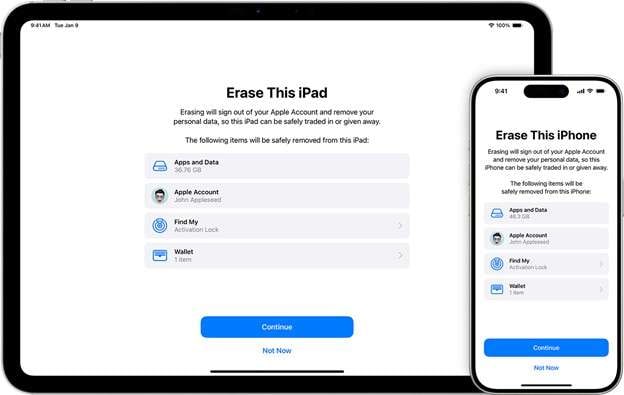
This option works when the Apple account tied to the device is still accessible. It is often the most direct form of iOS 26 iCloud unlock because the phone itself doesn’t need to be present. Once the device is removed from the account, Activation Lock stops appearing during setup, and the phone behaves like a new device. Nothing technical happens on the phone until the account releases it.
Method 2: Having the previous owner remove it remotely
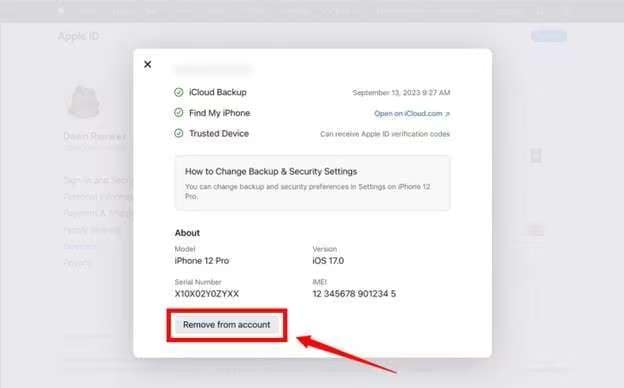
This is common with second-hand phones. The device was erased before being sold or gifted, but it was never removed from the original owner’s account. The lock remains even though the phone looks reset, which is why many users search for iPhone locked to owner bypass iOS 26 solutions. The fix happens entirely on the owner’s side through their account.
Method 3: Regaining access to the Apple account itself
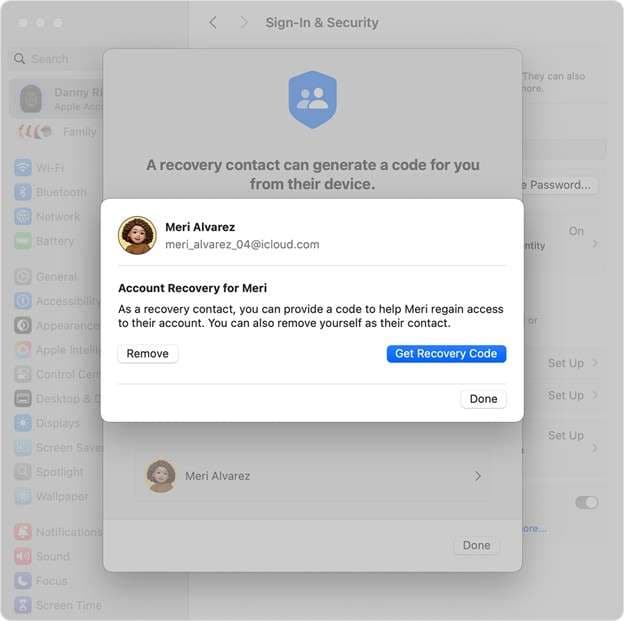
Sometimes the account isn’t lost, just inaccessible. Old phone numbers, inactive emails, or forgotten passwords block sign-in. Account recovery restores access first, then the device can be released normally. This keeps everything within Apple’s system.
Method 4: Apple review with proof of purchase
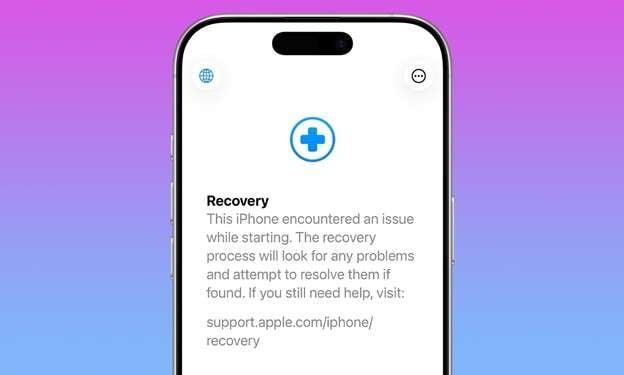
When neither the account nor the owner can be reached, Apple may remove Activation Lock manually as part of an iOS 26 iCloud Unlock request. This depends on documentation. Apple checks whether the device can be reasonably linked back to you as the owner before approving anything.
Method 5: Restoring or updating with Finder / iTunes
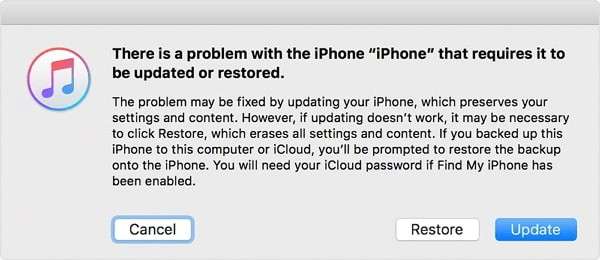
This approach erases data and reinstalls iOS. It’s effective for clearing a forgotten screen passcode or fixing software issues, but it doesn’t address ownership. On iOS 26, the lock simply reappears during setup if Find My was enabled.
Method 6: Removing iCloud Activation Lock When Account Access Is No Longer Available
When account-based options are no longer workable, some users turn to tools designed to deal directly with Activation Lock behavior, rather than repeating erase or restore cycles that lead back to the same screen.
Dr.Fone – Screen Unlock (iOS) is one of the options. It runs locally on a computer and is designed to deal with Activation Lock at setup. It supports a wide range of devices, including the iPhone 17 series and systems up to iOS 26 / iPadOS 26, which makes it relevant for newer hardware where older workarounds no longer apply.
The steps can differ slightly based on the iPhone model and iOS version.
How the Activation Lock bypass process works on newer iOS versions (iOS / iPadOS 17.0.1–26.1)
Step 1. Launch the unlock environment
After installing Dr.Fone on a Mac or Windows system, open the toolbox and select the iOS screen unlock section. This opens the module that handles account- and setup-level locks.

Step 2. Choose the Activation Lock removal path
From the available options, select the function related to iCloud Activation Lock. This ensures the process targets the setup block rather than screen passcodes or data erasure.
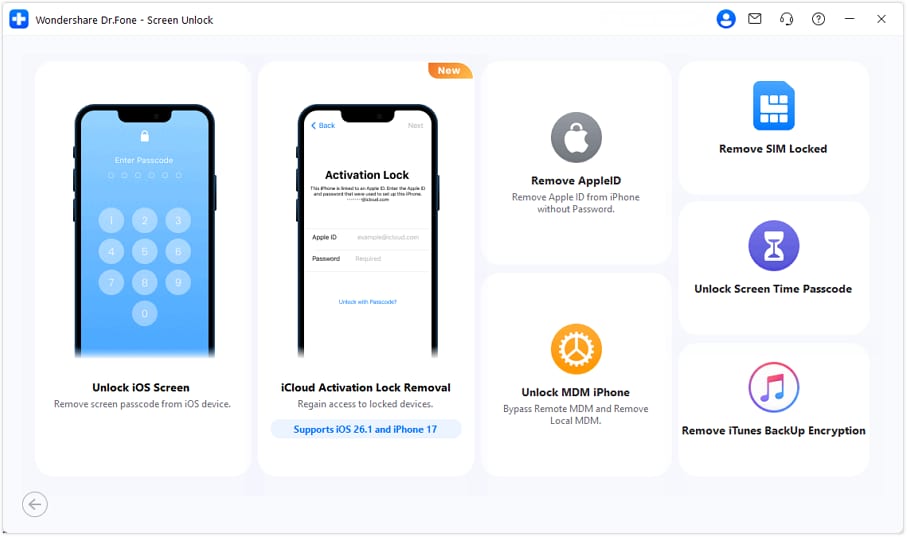
Step 3. Prepare the device for the process
The tool will ask you to begin the unlock process and guide you through the setup needed for your device.
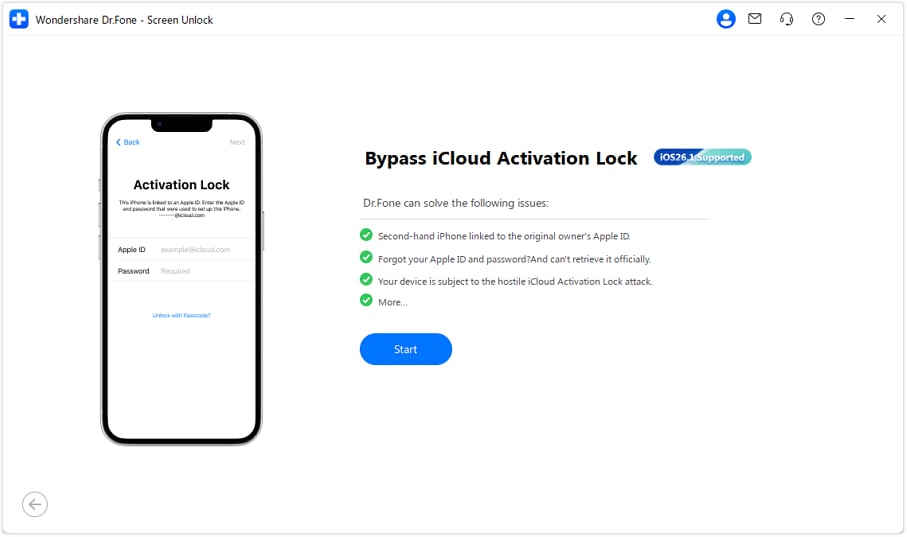
Step 4. Connect and verify the device
Connect your iPhone or iPad using a cable. The software will detect the model and iOS version, then ask you to confirm the details before moving forward.
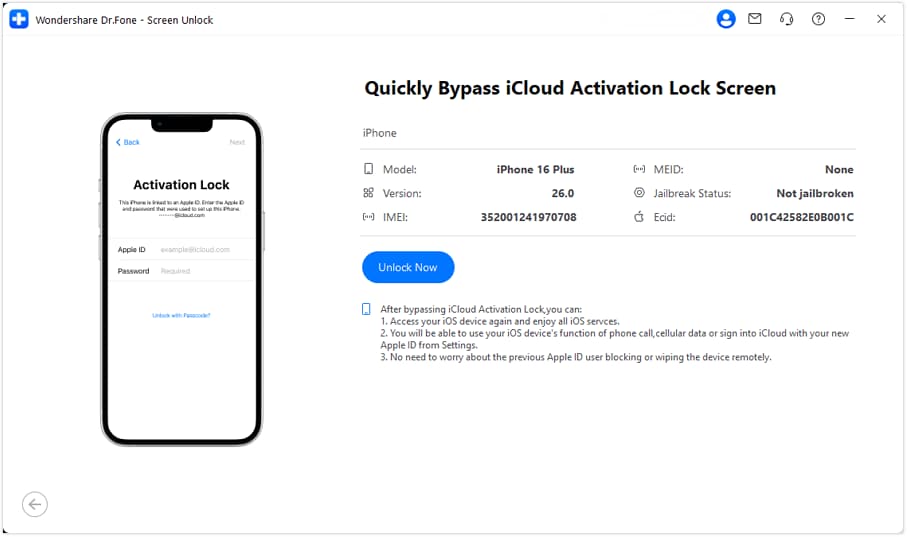
Step 5. Confirm the process conditions
Before the bypass begins, an information screen outlines what the process does and any limitations that may apply. After acknowledging this, the tool continues automatically.
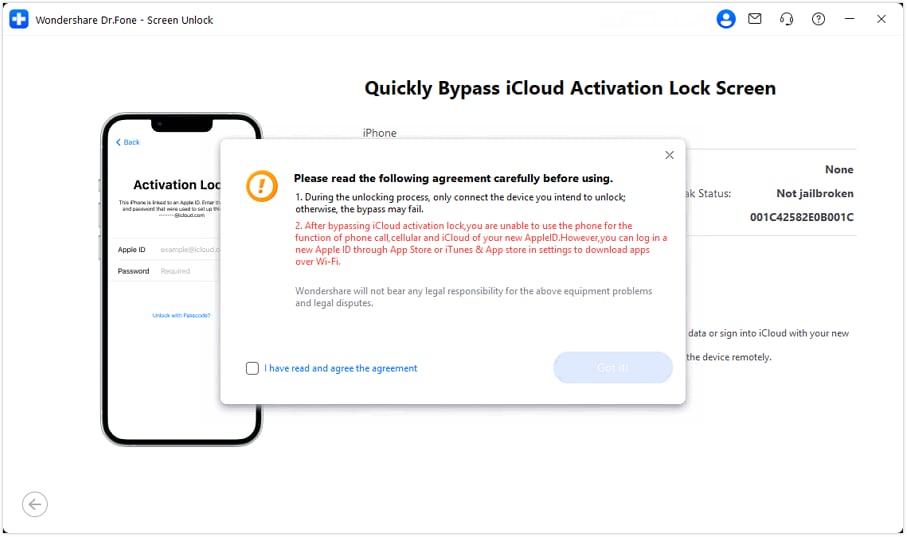
Step 6. System preparation and driver setup
Required components are installed in the background. This step doesn’t require manual input and may take a few minutes depending on the system.
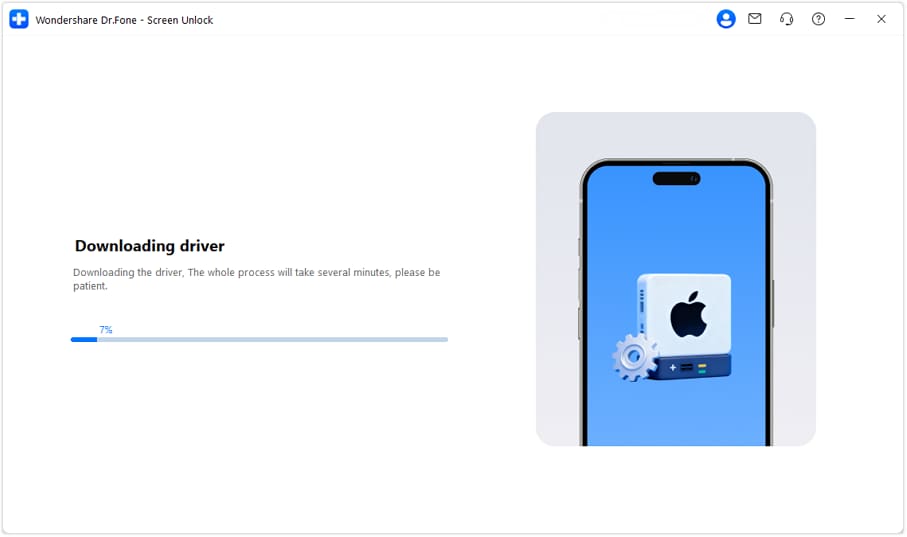
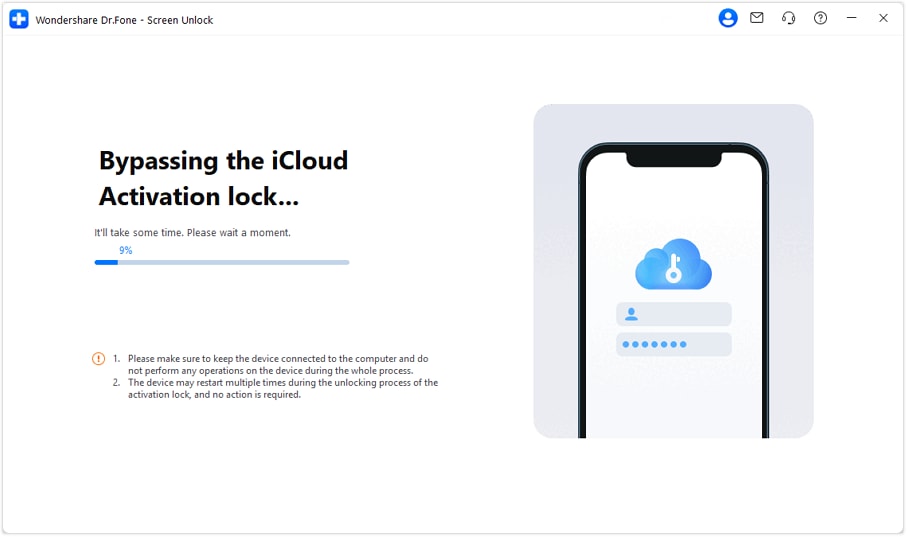
Step 7. Activation Lock removal in progress
The bypass runs while the device remains connected. During this stage, the device may restart more than once. These reboots are expected and part of the workflow.
Step 8. Completion and setup access
Once finished, the device restarts and proceeds past the “Locked to Owner” screen. Set up can then continue using a new Apple ID.

How the process differs on older iOS versions
For devices running iOS 15–16.7.11 or iOS 12–14.8.1, the underlying steps are the same, but they are not identical. Older systems may require Recovery Mode or DFU Mode entry, and in some cases, a jailbreak step is involved. The software shows the right instructions based on your model and system.
The key distinction is that newer devices running recent systems (including iOS 26) follow a streamlined, local workflow, while older devices rely on legacy handling methods.
Part 3. Conclusion
On iOS 26, Activation Lock works differently than many expect. A restore can finish, updates can install, and the device can still stop at setup. That’s why repeated resets rarely help with iOS 26 iCloud Unlock issues. The solution depends on access, not trial and error. Apple ID release, owner cooperation, or verified purchase remain the cleanest paths.
When none of those are available, tools that address the setup-level lock directly offer a practical alternative. In that space, Dr.Fone – Screen Unlock (iOS) fits into the workflow by supporting newer devices and current systems, including unlock iCloud iOS 26, without relying on outdated workarounds.
safe & secure4,624,541 people have downloaded it


iPhone Unlock
- Access Locked iPhone
- 1. Reset Locked iPhone Without iTunes
- 2. Erase Locked iPhone
- 3. Get Into Locked iPhone
- 4. Factory Reset Locked iPhone
- 5. Reset Locked iPhone
- 6. iPhone Is Disabled
- 7. Fix iPhone Unavailable Issue
- 8. Forgot Locked Notes Password
- 9. Unlock Total Wireless Phone
- 10. Review of doctorSIM Unlock
- iPhone Lock Screen
- 1. Lock Apps on iPhone
- 2. Bypass iPhone Passcode
- 3. Unlock Disabled iPhone Without PC
- 4. Disable One More Minute Screen Time
- 5. Unlock iPhone Passcode Screen
- 6. Reset iPhone Password
- 7. Disable iOS Call Recording Notification
- 8. Remove Carrier Lock/SIM Restrictions
- 9. Get iMei Number on Locked iPhone
- 10. Add a New Face ID
- 11. iPhone Passcode Expired Pop-Up
- 12. Control Display Rotation
- 13. Fix iPhone is Disabled Connect to iTunes
- 14. Fix Turn Passcode Off Greyed Out
- 15. Get iPhone out of Demo Mode
- 16. Unlock Unresponsive Screen
- 17. iPhone Ask for Passcode After Reset
- Remove iCloud Lock
- 1. Unlock an iPhone 7 Plus iCloud
- 2. iOS 18 iCloud Unlock
- 3. iOS 26 iCloud Unlock
- 4. Crack iCloud-Locked iPhones to Sell
- 5. Jailbreak iCloud Locked iPhone
- 6. What To Do If You Bought A Locked iPhone?
- 7. Fix iPhone Unavailable No Erase Option
- 8. Find iCloud Email Address on Apple Device
- 9. Broque Ramdisk iCloud Bypass
- Unlock Apple ID
- 1. Remove Payment Method on iPhone
- 2. Create a New Apple ID Account
- 3. Change Apple ID on iPad
- 4. Change Your Apple ID Password
- 5. Apple ID Not Active
- 6. Fix Wrong Apple ID Issue on iPhone
- 7. Fix This Person Is Not Active
- 8. New iCloud Terms and Conditions
- 9. Fix Apple ID Account Unavailable
- 10.Find Apple ID by IMEI
- 11. Unlink 2 iPhones with the Same Apple ID
- 12. Reset Password at appleid.apple.com
- 13. App Store Keep Asking for Password
- 14. Find Apple ID Password No Reset
- 15. Trusted Devices List Not Available
- Remove SIM Lock
- 1. Unlock iPhone Using Unlock Chip
- 2. Unlock iPhone for Free
- 3. Unlock iPhone Online
- 4. Factory Unlock iPhone
- 5. SIM Unlock iPhone
- 6. Unlock AT&T iPhone
- 7. Unlock iPhone with IMEI Code
- 8. Unlock iPhone without SIM Card
- 9. Unlock Cricket iPhone
- 10. Unlock iPhone with/without SIM Card
- 11. Unlock T-Mobile iPhone
- 12. Unlock Verizon iPhone
- 13. iPhone IMEI Checker
- 14. Unlock Xfinity iPhone
- 15. Unlock iPhone From The Carrier
- 16. Turbo SIM iPhone
- 17. Get the Sprint Unlock Codes
- 18. Unlock a Sprint Phone
- 19. Fix When iPhone Says No Sim
- Unlock iPhone MDM
- 1. Remove MDM from iPhone
- 2. Remote Management on iPhone
- 3. MDM VS MAM
- 4. Top MDM Bypass Tools
- 5. IoT Device Management
- 6. Unified Endpoint Management
- 7. Enterprise Mobility Management
- 8. Top 10 Proxy Websites
- 9. Hindilinks4u Alternatives
- Unlock Screen Time Passcode
- 1. Reset Screen Time Passcode
- 2. Turn Off Screen Time without Passcode
- 3. Screen Time Passcode Not Working
- 4. Disable Parental Controls
- 5. Bypass Screen Time on iPhone Without Password
- 6. Delete Screen Time History on iPhone
- 7. Turn Off Downtime on iPhone
- 8. Download Age Restricted Videos
- MDM Unblock Games/Websites
- 1. Basketball Stars Game Unblocked
- 2. Play Getaway Shootout Unblocked
- 3. Play Build Now GG Unblocked
- 4. BitLife Unblocked
- 5. 10 Best Unblocked Anime Websites
- 6. Best Unblocked Game Websites
- 7. 1v1 LOL Unblocked
- 8. Get Poly Track Unblocked
- 9. Music Websites Unblocked
- 10. Spotify Unblocked
- 11. Interstellar Proxy Review
- Unlock Apple Watch
- Unlock iPod Touch
- ● Manage/transfer/recover data
- ● Unlock screen/activate/FRP lock
- ● Fix most iOS and Android issues
- Free Download Free Download Free Download




James Davis
staff Editor