

Interstellar Proxy Review: Complete Guide To Features, Benefits, and Limits

Oct 10, 2026 • Filed to: Screen Lock Removal • Proven solutions
 TL;DR:
Interstellar proxy operates as a browser-based web proxy that bypasses basic network filters to load blocked websites and games without installation, though it lacks the end-to-end encryption of a full VPN.
● Standard usage requires only a modern web browser and 2GB of RAM on Windows, macOS, Linux, or ChromeOS, while self-hosting deployments demand a server equipped with Git, npm, and Node.js version 16.0.0 minimum, with 18 LTS recommended.
● The service routes only browser traffic using standard HTTPS rather than device-wide encryption, leaving it vulnerable to deep network inspection and highly unsuitable for sensitive tasks like online banking or confidential logins.
● For hardware-level access barriers, Wondershare Dr.Fone - Screen Unlock (iOS) removes 4-digit and 6-digit passcodes, Face ID, Touch ID, Apple ID, and MDM profiles by placing the connected device into Recovery or DFU mode via a Windows or Mac computer.
Ask AI for a summary
 ChatGPT
 Perplexity
 Gemini
 Claude
 Grok
Grok
A classroom in Beijing can block TikTok and YouTube by default. A university network in Cairo may stop gaming sites from loading. Now, network constraints are determining how millions use the Web for their studies, work, or recreation. Proxies are still one of the most common ways to get around these restrictions. Interstellar proxy services have grown in popularity because they help bypass geo-blocks and access restricted content via remote servers rather than direct connections (Multilogin data, 2026).
Many users hunt for interstellar proxy links or try interstellar proxy free mirrors to unlock sites when default access fails. An interstellar unblocker proxy that runs in a browser and redirects the web traffic so blocked pages appear open. This article will tell you how these tools work, what they can do for and to you, and how to use them wisely.

- Part 1: How does Interstellar proxy work?
- Part 2: What are the benefits of using an Interstellar proxy?
- Part 3: What are the limitations of the Interstellar proxy?
- Part 4: What are the system requirements for the Interstellar proxy?
- Part 5: How to use the Interstellar proxy?
- Bonus Tip: Unlock Your iPhone or iPad with Dr.Fone

Part 1. How does Interstellar proxy work?
Interstellar proxy operates as a browser-based web proxy. It does not require installation. So, when you type a website address in the proxy interface while browsing, it is not the request that goes directly to that site. The proxy server just retrieves the content for you and shows it in its own window.
This method hides your direct IP from the destination website. It also helps bypass basic school or workplace filters that block domains at the network level. Many users access it through active interstellar proxy links shared online.

Core Working Mechanism
- You open a working interstellar proxy free mirror.
- You type the blocked website address.
- The proxy server connects to that site on your behalf.
- The page loads inside the proxy environment.
Because the traffic is routed through another server, network restrictions often fail to detect the final destination.
Part 2. What are the benefits of using an Interstellar proxy?
Using an interstellar proxy can make restricted browsing easier and faster. It is built for quick access without a complex setup. Below are the main benefits users report.
- Bypass Network Restrictions
The interstellar unblocker proxy helps open blocked websites, games, and apps within seconds. It works well against common school or office filters. - Smooth Speed Performance
Designed for light and steady browsing. Pages load quickly. Browser games run with minimal lag on a stable internet. - IP Masking for Basic Privacy
Your direct IP address is hidden from the target site. This adds a layer of browsing privacy, though it is not full device encryption. - Access to Games and Web Apps
Many interstellar proxy free mirrors include built-in shortcuts to popular browser games and online tools. - Simple Multitasking
The internal tab system lets you switch between pages inside one window. No need to open many browser tabs. - Clean User Interface
The layout is neat and easy to understand. New users can navigate without confusion. - Inspect Element Option
Some versions allow users to view and adjust webpage code within the proxy frame. - Theme Customization
Certain builds support visual themes. Users can change background styles for a personalized look. - Multiple Server Locations
Some active interstellar proxy links connect through different regions, which may help bypass additional geo blocks.
Part 3. What are the limitations of the Interstellar proxy?
Before relying on an interstellar proxy, it is important to understand what it cannot do.
- Not a Full VPN
The interstellar unblocker proxy only routes browser traffic through its server. It does not protect your entire device connection. - Limited Encryption
Most interstellar proxy free mirrors do not provide end-to-end encryption. They rely mainly on standard HTTPS. This is not the same as VPN level security. - Weak Against Advanced Monitoring
Proxies are not designed to resist deep network inspection or advanced surveillance systems. - Unstable Mirrors
Active interstellar proxy links can go offline or get blocked. Reliability depends on the host. - Not Ideal for Sensitive Tasks
Banking, private logins, or confidential work should not be done through public proxy servers. - Performance Limits
Heavy streaming and large downloads may slow down due to shared server load. - Better With Extra Protection
For stronger privacy, users often combine a VPN with a proxy. Adding a firewall or antivirus software improves overall security. - CDN Can Improve Speed
In broader web setups, Content Delivery Networks help distribute content faster. A proxy alone does not offer that level of performance optimization.
Part 4. What are the system requirements for the Interstellar proxy?
System requirements depend on how you use the interstellar proxy.
A- For Regular Users (Browser Access)
If you are using public interstellar proxy links, the requirements are minimal:
- Modern web browser (Chrome, Edge, Firefox, Brave)
- JavaScript enabled
- Stable internet connection
- Basic device RAM (2GB or more recommended)
- Works on Windows, macOS, Linux, ChromeOS
No installation is required for standard interstellar proxy free usage.
B- For Self-Hosting or Deploying an Interstellar Proxy
If you want to host your own interstellar unblocker proxy, you need server-level setup:
- Git is installed on the server
- Node.js installed
- npm (Node package manager) installed
- Access to a server capable of running Node.js applications
Node Version Requirement
- Minimum Node.js version 16.0.0
- Some dependencies require Node.js 18.0.0 or higher
- Recommended version: Node.js 18 LTS
Part 5. How to use the Interstellar proxy?
Using an interstellar proxy does not require software installation. Most people access it through browser-based services. Setup is quick and simple.
- Step 1. Choose a Working Mirror
Search for trusted interstellar proxy links. Pick a reliable mirror that loads correctly. Some sites list multiple servers and regions. A few also provide direct link tools for blocked websites. - Step 2. Open the Proxy Interface
Visit the selected interstellar proxy free site. You will see a search or URL bar on the homepage. - Step 3. Enter the Website Address
Type the full URL of the blocked site into the proxy bar. Click connect or go. The proxy server will request the page for you and display it inside its own window. - Step 4. Select a Server Region
Many versions of the interstellar unblocker proxy allow region selection. You may choose servers in the US, UK, India, or other countries. This helps access geo-restricted content. - Step 5. Browse Without Direct Restrictions
Once connected, the site loads via the proxy. You can read content, use web apps, or access games as if browsing from that region.
Bonus Tip. Unlock Your iPhone or iPad with DrFone Screen Unlock iOS
Web access is one type of restriction. Device lock is another. A blocked screen can stop you even before you open a browser or use interstellar proxy tools. If an iPhone or iPad has been locked because of a forgotten passcode, disabled screen, or management profile restriction, browsing is no longer possible.
Dr.Fone - Screen Unlock (iOS) is a software for computers and desktops from the renowned house of Wondershare. It is designed to remove screen passcodes, Apple ID locks in supported cases, and MDM restrictions. The tool supports recent iOS versions and works with most modern iPhone and iPad models.
Key Features:
- Remove 4-digit and 6-digit passcodes
- Unlock Face ID and Touch ID-locked screens
- Bypass MDM profile without credentials
- Support for the latest iOS firmware versions
- Guided recovery and DFU mode instructions

Dr.Fone - Screen Unlock (iOS)
Unlock iPhone/iPad Lock Screen Without Hassle.
- Simple, click-through, process.
- Remove screen passcodes, Face ID, Touch ID, and Apple ID with ease.
- Bypass iCloud Activation Locks without Password.
- Bypass MDM and screen time without data loss.
- Supports the latest iOS version fully!



- Step 1. Install And Open The Tool
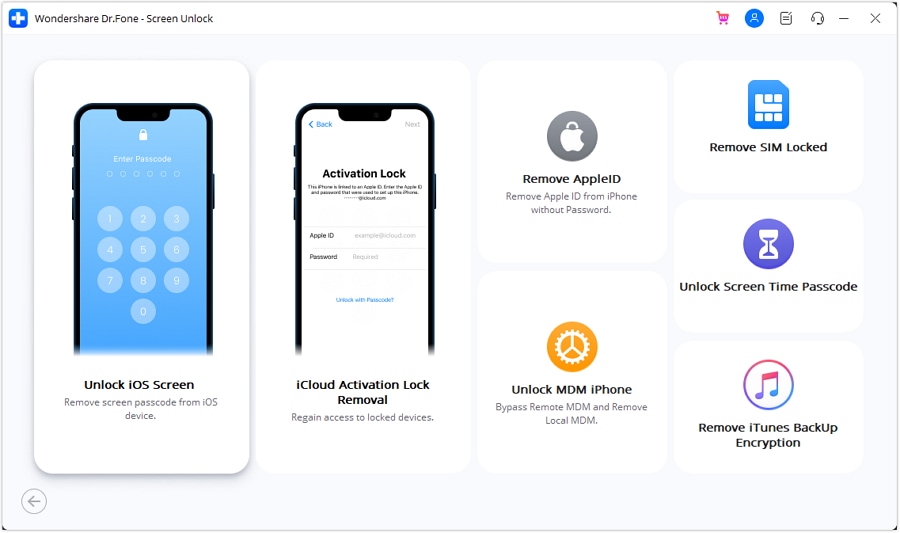
Download and install Wondershare DrFone on a Windows or Mac computer. Open the program. Go to Toolbox. Select Screen Unlock. Then choose iOS.
- Step 2. Connect the device and start
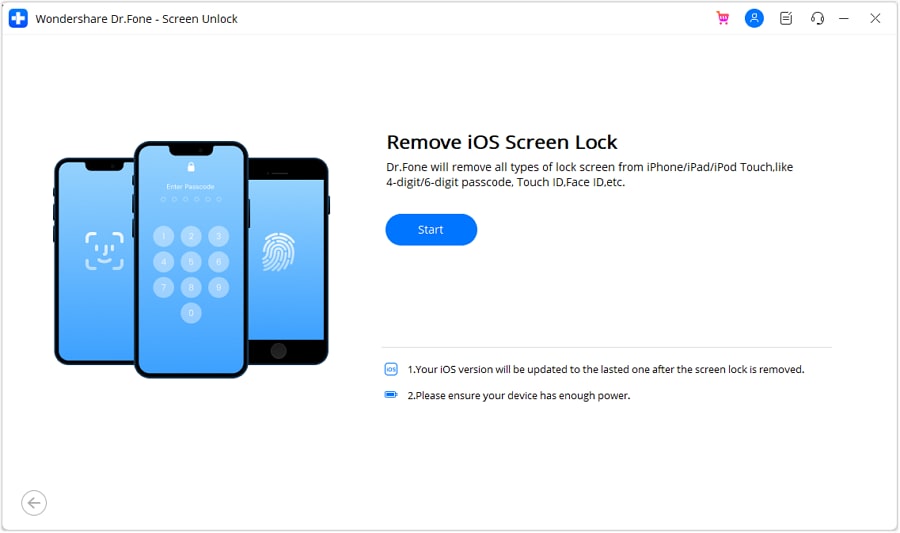
Connect your iPhone or iPad using a USB cable. Choose Unlock iOS Screen. Click Start to begin. Make sure the device's battery is fully charged.
- Step 3. Enter Recovery Or DFU Mode
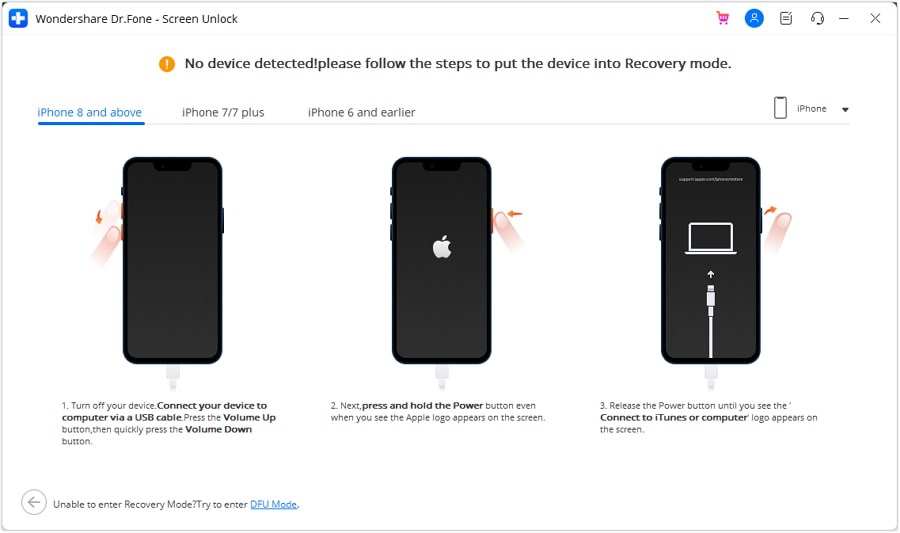
Follow the on-screen guide to put the device into Recovery Mode. If that fails, switch to DFU Mode using the instructions provided inside the tool.
- Step 4. Confirm Device Details And Download Firmware
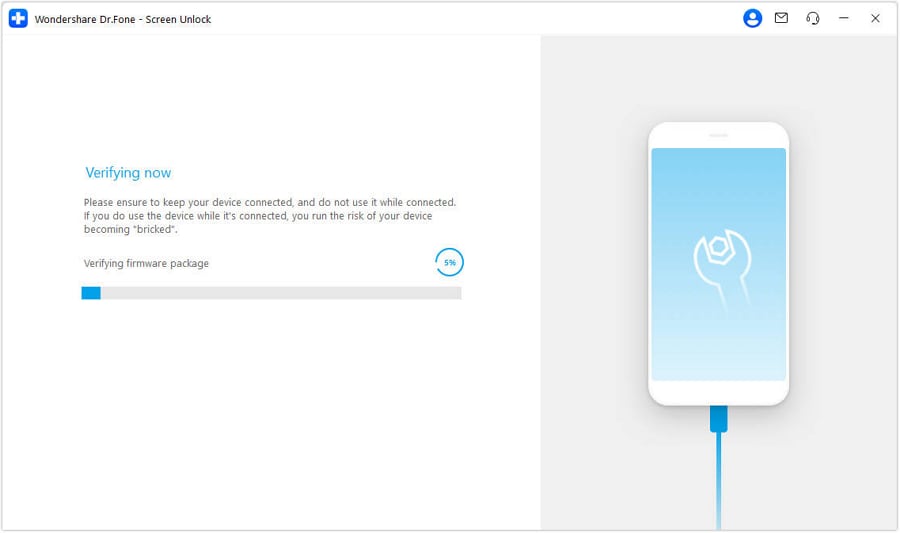
The software automatically detects your device model. Confirm the model and iOS version. The system will download the required firmware package. If needed, you can manually download it using the provided link.
- Step 5. Unlock and Complete
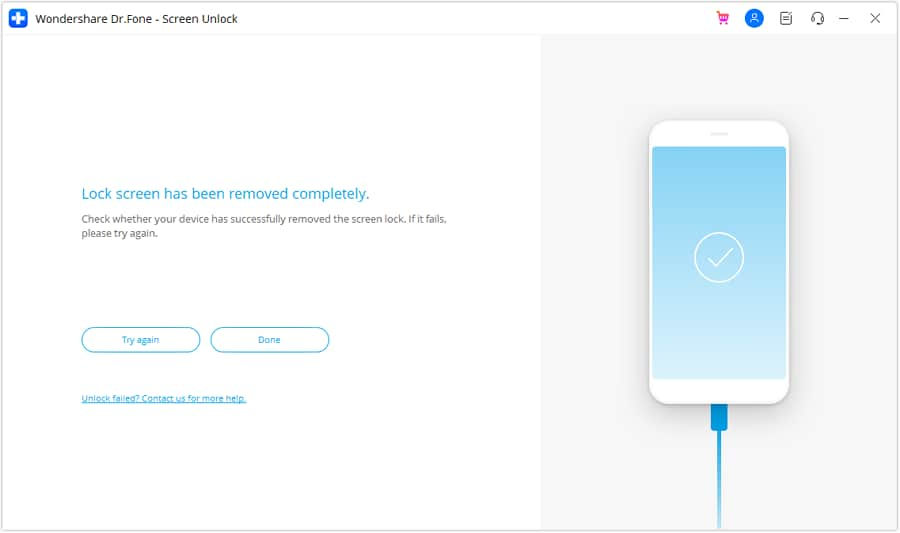
After firmware verification, click Unlock Now. Confirm the process when prompted.
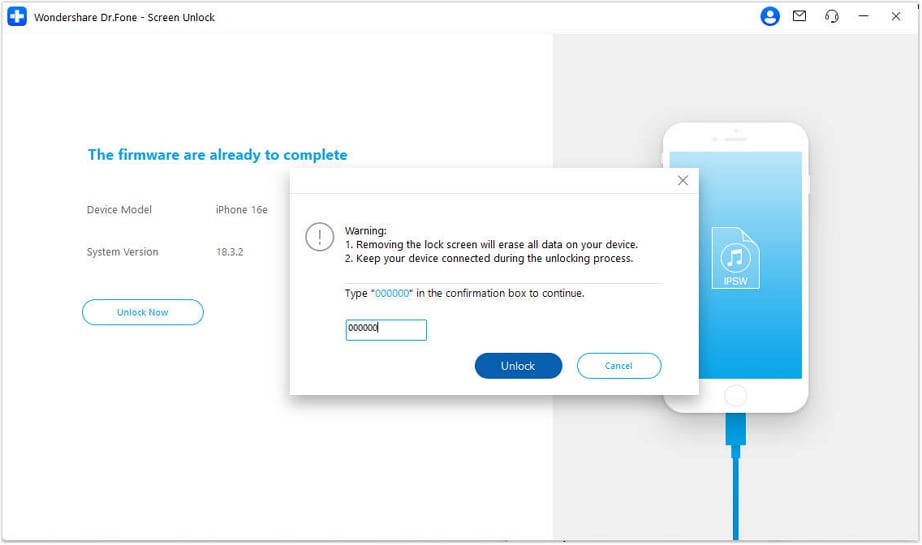
Keep the device connected until completion. Once finished, the device restarts without the previous screen lock.
Conclusion
Network filters are now part of daily digital life. From classrooms to public WiFi, access is often limited. This review showed how an interstellar proxy works at the browser level to bypass simple blocks through remote routing. It delivers quick setup, smooth browsing, and easy multitasking through active interstellar proxy links. At the same time, it has clear limits. It is not a VPN and is not built for sensitive tasks. Used with awareness, it effectively addresses short-term access barriers. When restrictions move from websites to locked devices, Dr.Fone - Screen Unlock (iOS) helps restore control safely and efficiently.
 safe & secure
4,624,541 people have downloaded it


iPhone Unlock
- Access Locked iPhone
- 1. Reset Locked iPhone Without iTunes
- 2. Erase Locked iPhone
- 3. Get Into Locked iPhone
- 4. Factory Reset Locked iPhone
- 5. Reset Locked iPhone
- 6. iPhone Is Disabled
- 7. Fix iPhone Unavailable Issue
- 8. Forgot Locked Notes Password
- 9. Unlock Total Wireless Phone
- 10. Review of doctorSIM Unlock
- iPhone Lock Screen
- 1. Lock Apps on iPhone
- 2. Bypass iPhone Passcode
- 3. Unlock Disabled iPhone Without PC
- 4. Disable One More Minute Screen Time
- 5. Unlock iPhone Passcode Screen
- 6. Reset iPhone Password
- 7. Disable iOS Call Recording Notification
- 8. Remove Carrier Lock/SIM Restrictions
- 9. Get iMei Number on Locked iPhone
- 10. Add a New Face ID
- 11. iPhone Passcode Expired Pop-Up
- 12. Control Display Rotation
- 13. Fix iPhone is Disabled Connect to iTunes
- 14. Fix Turn Passcode Off Greyed Out
- 15. Get iPhone out of Demo Mode
- 16. Unlock Unresponsive Screen
- 17. iPhone Ask for Passcode After Reset
- Remove iCloud Lock
- 1. Unlock an iPhone 7 Plus iCloud
- 2. iOS 18 iCloud Unlock
- 3. iOS 26 iCloud Unlock
- 4. Crack iCloud-Locked iPhones to Sell
- 5. Jailbreak iCloud Locked iPhone
- 6. What To Do If You Bought A Locked iPhone?
- 7. Fix iPhone Unavailable No Erase Option
- 8. Find iCloud Email Address on Apple Device
- 9. Broque Ramdisk iCloud Bypass
- Unlock Apple ID
- 1. Remove Payment Method on iPhone
- 2. Create a New Apple ID Account
- 3. Change Apple ID on iPad
- 4. Change Your Apple ID Password
- 5. Apple ID Not Active
- 6. Fix Wrong Apple ID Issue on iPhone
- 7. Fix This Person Is Not Active
- 8. New iCloud Terms and Conditions
- 9. Fix Apple ID Account Unavailable
- 10.Find Apple ID by IMEI
- 11. Unlink 2 iPhones with the Same Apple ID
- 12. Reset Password at appleid.apple.com
- 13. App Store Keep Asking for Password
- 14. Find Apple ID Password No Reset
- 15. Trusted Devices List Not Available
- Remove SIM Lock
- 1. Unlock iPhone Using Unlock Chip
- 2. Unlock iPhone for Free
- 3. Unlock iPhone Online
- 4. Factory Unlock iPhone
- 5. SIM Unlock iPhone
- 6. Unlock AT&T iPhone
- 7. Unlock iPhone with IMEI Code
- 8. Unlock iPhone without SIM Card
- 9. Unlock Cricket iPhone
- 10. Unlock iPhone with/without SIM Card
- 11. Unlock T-Mobile iPhone
- 12. Unlock Verizon iPhone
- 13. iPhone IMEI Checker
- 14. Unlock Xfinity iPhone
- 15. Unlock iPhone From The Carrier
- 16. Turbo SIM iPhone
- 17. Get the Sprint Unlock Codes
- 18. Unlock a Sprint Phone
- 19. Fix When iPhone Says No Sim
- Unlock iPhone MDM
- 1. Remove MDM from iPhone
- 2. Remote Management on iPhone
- 3. MDM VS MAM
- 4. Top MDM Bypass Tools
- 5. IoT Device Management
- 6. Unified Endpoint Management
- 7. Enterprise Mobility Management
- 8. Top 10 Proxy Websites
- 9. Hindilinks4u Alternatives
- Unlock Screen Time Passcode
- 1. Reset Screen Time Passcode
- 2. Turn Off Screen Time without Passcode
- 3. Screen Time Passcode Not Working
- 4. Disable Parental Controls
- 5. Bypass Screen Time on iPhone Without Password
- 6. Delete Screen Time History on iPhone
- 7. Turn Off Downtime on iPhone
- 8. Download Age Restricted Videos
- MDM Unblock Games/Websites
- 1. Basketball Stars Game Unblocked
- 2. Play Getaway Shootout Unblocked
- 3. Play Build Now GG Unblocked
- 4. BitLife Unblocked
- 5. 10 Best Unblocked Anime Websites
- 6. Best Unblocked Game Websites
- 7. 1v1 LOL Unblocked
- 8. Get Poly Track Unblocked
- 9. Music Websites Unblocked
- 10. Spotify Unblocked
- 11. Interstellar Proxy Review
- Unlock Apple Watch
- Unlock iPod Touch
- ● Manage/transfer/recover data
- ● Unlock screen/activate/FRP lock
- ● Fix most iOS and Android issues
- Free Download Free Download Free Download

 > How-to > Screen Lock Removal > Interstellar Proxy Review: Complete Guide To Features, Benefits, and Limits
James Davis
staff Editor