
Master Code to Unlock Any Phone: Facts, Risks, and Real Unlock Solutions

Oct 24, 2026 • Filed to: Screen Lock Removal • Proven solutions
 TL;DR:
There is no universal master code to unlock modern phones, as current security systems block dial-code bypasses, and legacy codes only trigger full factory resets on specific older Android models.
● Legacy dialer codes like *#*#7780#*#* or *2767*3855# cannot bypass device encryption or Google account locks, and using them will instantly erase all local data without an undo option.
● Built-in alternatives like Google Find My Device or hardware-button factory resets will remove forgotten lock screens but wipe all user data and may trigger Factory Reset Protection (FRP) requiring the original account login.
● To bypass lock screens and FRP without original credentials, Dr.Fone - Screen Unlock (Android) offers dedicated removal solutions for over 2000 device models, including support for Android 16 and the Samsung S25.
Ask AI for a summary
 ChatGPT
 Perplexity
 Gemini
 Claude
 Grok
Grok
Know that a locked phone can stop work, calls, and access at the worst time. As a result, many people search online for a “master code” that can unlock any phone in seconds. This thought is simple, yet things are not in that manner because most phones do not have a secret code that unlocks all devices.
Therefore, this guide explains the truth about master code to unlock any phone, the real risks behind such claims, and what actually works today. You will learn safe and legal unlock options like Dr.Fone, and how to avoid scams that promise instant access but cause serious problems.

Part 1. Is There a Master Code to Unlock Any Phone? (Truth Check)
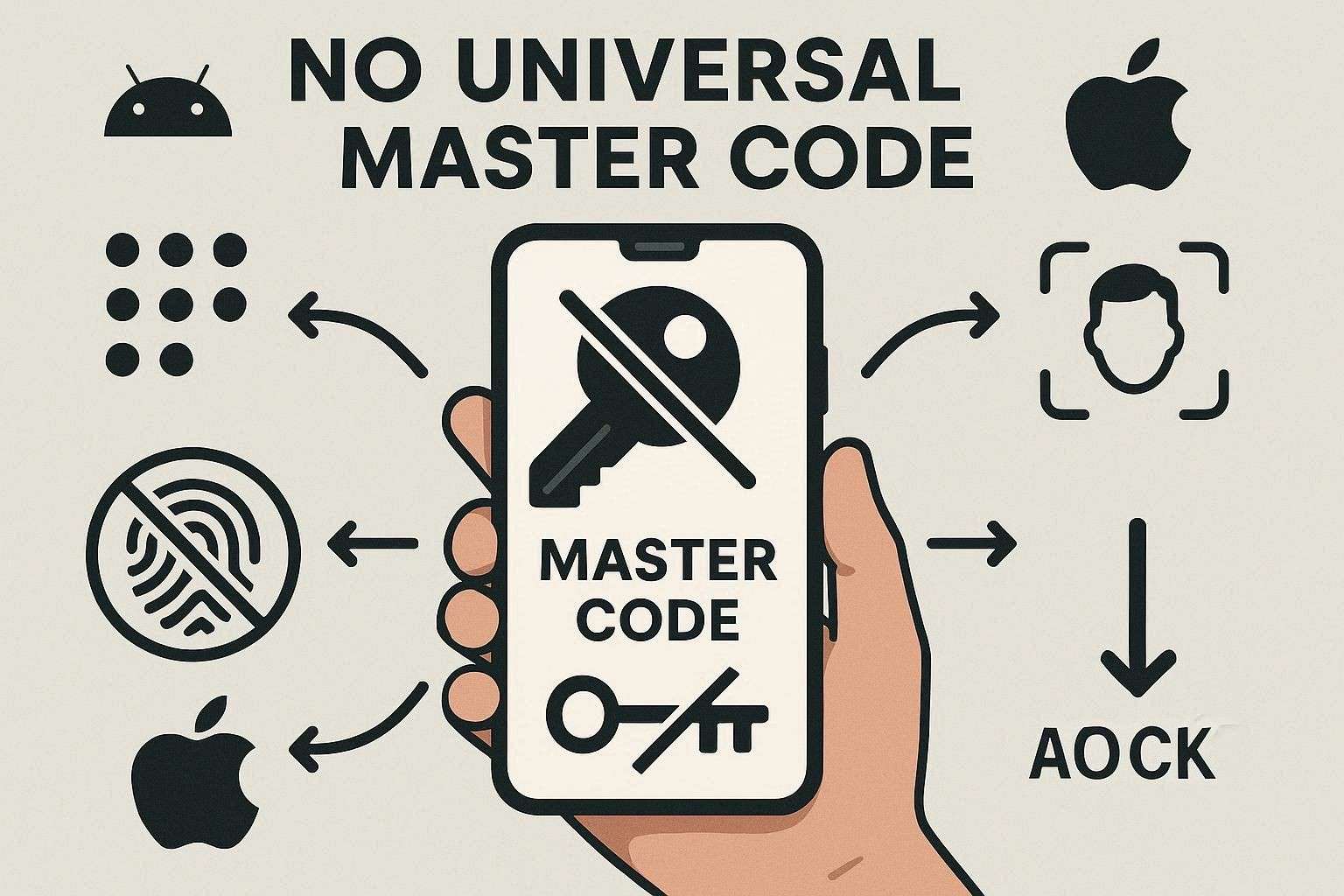
There is no universal master code to unlock any phone password, and this idea is a modern myth. Different phone brands and carriers use separate security systems, so a single code cannot work across all devices. Moreover, modern iPhone and Android phones rely on strong protections such as PINs, facial recognition, fingerprint locks, and account verification, which prevent unlocking through simple dial codes.
Part 2. What Is the Master Code to Unlock Android Phones?
For Android, there is no universal master code that unlocks phones, and modern devices fully block such methods. Codes found online, like “*#*#7780#*#*” or “*2767*3855#,” only work on some old Android models and usually start a full factory reset that erases photos, apps, and messages. Hence, these codes do not bypass modern security features like device encryption or Google account lock.
Part 3. How to Use a Master Reset Code (With Limitations)?
If you still want to use the master reset code for Samsung or any older Android brand, here are the simple steps:
Step 1. As you open the Phone app to the dial pad, enter the exact reset code for your brand, as given below:
|
Model |
Codes |
| Samsung | *#*#7780#*#* |
| OPPO | *2767*3855# *#*#7780#*#* (If first one fails) |
| LG | 2945#*# or 1809#*101# *#*#7780#*#* (If first one fails) |
| Sony Xperia | *#*#7378423#*#* |
| Nokia | *#7370# |
| Huawei | *#7370# |
Step 2. If a confirmation appears, read it and continue only if you accept a full reset and data loss. Wait for the device to reboot and finish; do not stop the process.
Note: They only work on some older Android models and usually perform a full factory reset, erasing photos, apps, and messages.
Master Codes: Benefits and Hidden Dangers Explained
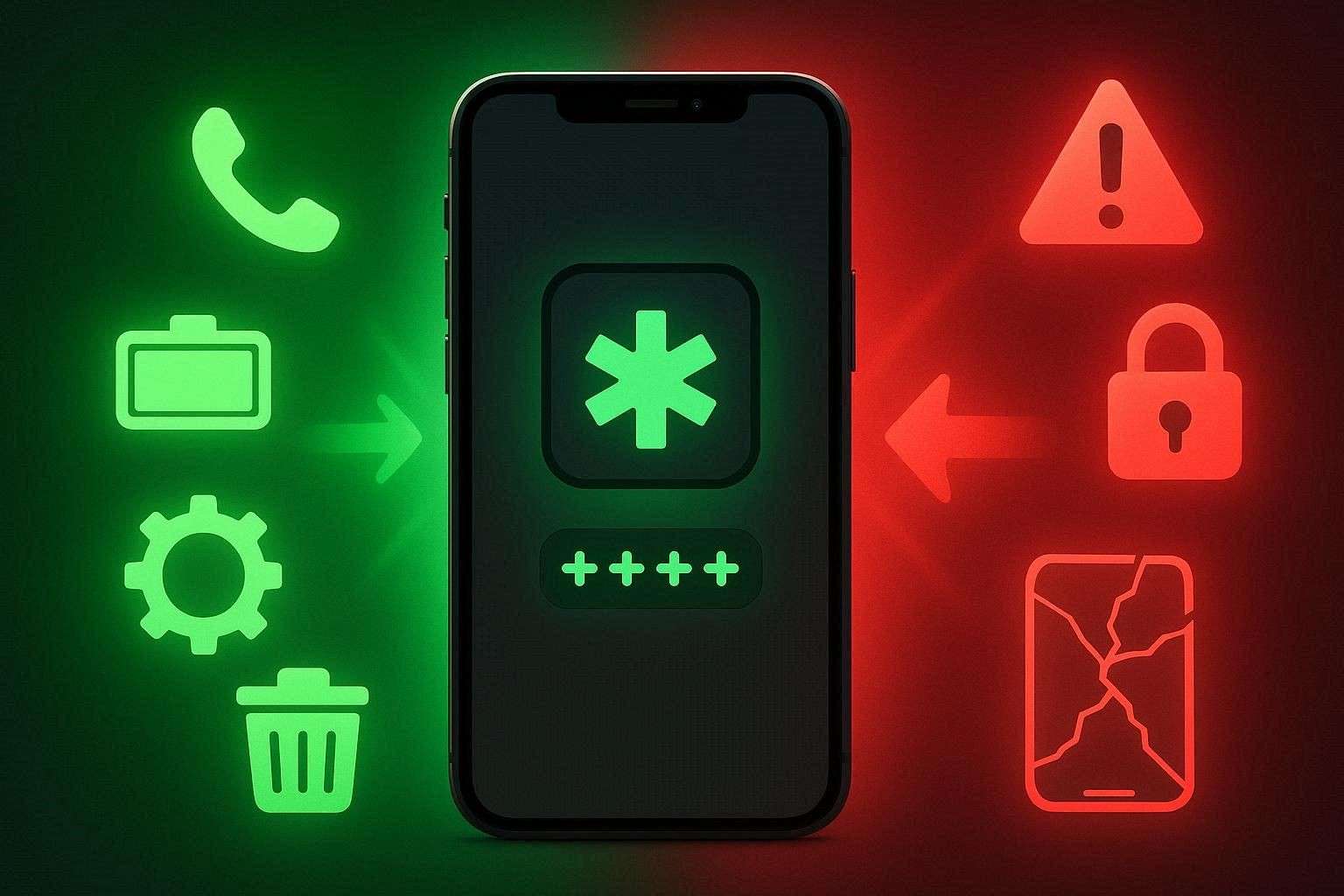
Though there is no master code to unlock any Android phone, there are factory reset claims; review their possible perks and pitfalls:
Part 4. How to Unlock an Android Phone Without a Master Code?
Other than hard reset claims, if you seek secure ways rather than master code to unlock any phone pattern, adhere to this section. Here, you will get to know 3 simple and working solutions to unlock the Android device.
Best Method: Dr.Fone – Screen Unlock (Android)
Dr.Fone - Screen Unlock (Android) is a preferred choice to safely unlock the phone with 100% success rate. The best aspect is that this tool can unlock multiple lock types, like Pattern, PIN, Password, Fingerprint & Face Lock. Not just that, one can also bypass FRP on Android 16 and Samsung S25 devices. Besides, it supports major Android brands, including Samsung, Huawei, Xiaomi, and OPPO, etc.
Since all these aspects make this tool a versatile option, its use is seamless, and the phone is unlocked in 3 simple steps. Hence, with support for 30 brands and 2000+ Android phones and tablets, Dr.Fone also requires no learning curve. With fully guided steps, you can easily access specific modes and get updated solutions for the latest brands each week.

Dr.Fone - Screen Unlock (Android)
Unlock an Android Phone Without a Master Code and Solve Your Screen Locks
- Completely unlinked from the previous Google account, it won’t be traced or blocked by it anymore.
- Remove all Android screen locks (PIN/pattern/fingerprints/face ID) in minutes.
- Compatible with various Android models.
- Provide specific removal solutions to promise success rate.


Guide to Unlock the Screen of Any Android Model with Dr.Fone
Rather than using a false master code to unlock an Android phone, here is how Dr.Fone can help you:
Step 1. Access the Screen Unlock Tool for Android
As you choose the “Screen Unlock” tool for Android after connecting the device, pick the “Unlock Android Screen” option to continue.

Step 2. Pick the Android Model to enter a certain mode
Tap your Android model from the list, and the tool will direct you to a specific mode. This process can vary depending on the model type you choose in the tool, so wait for it to finish.

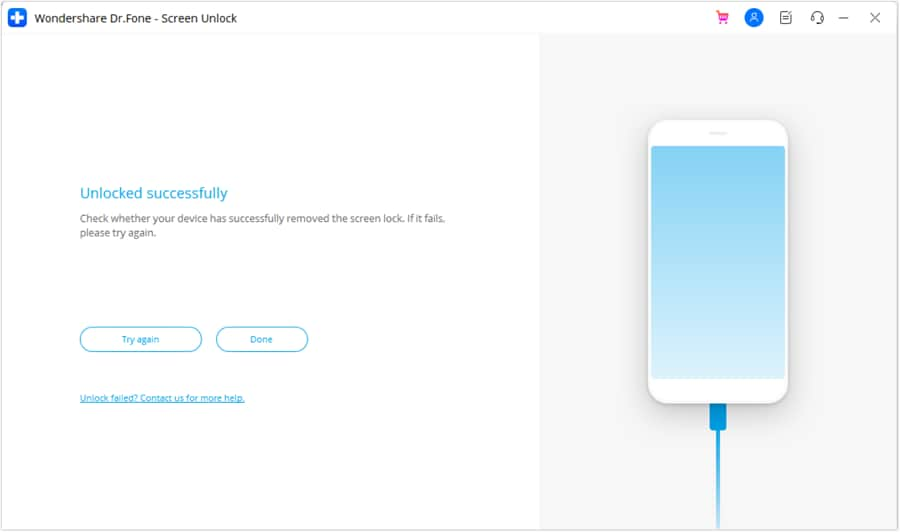
Step 3. Wait for the Process to End and Choose Done
Once done, click the “Done” button to see if it's unlocked, or choose “Try Again.”
 safe & secure
4,624,541 people have downloaded it
Alternative Built-In Methods
To unlock the Android password without the master code, you can also try the 2 listed methods. However, these options have limits and may trigger Factory Reset Protection (FRP), which can require the original Google account to access the device again.
Method 1: Find My Device (Google)
This is a safe way to remove a forgotten lock screen without risky master codes, but it wipes all data. This official Google tool works from any browser or another phone if the locked device is online and signed in. Hence, the Erase command deletes apps, messages, accounts, and personal files, keeping your information private. You do not need secret codes or special menus, and it is further guided below:
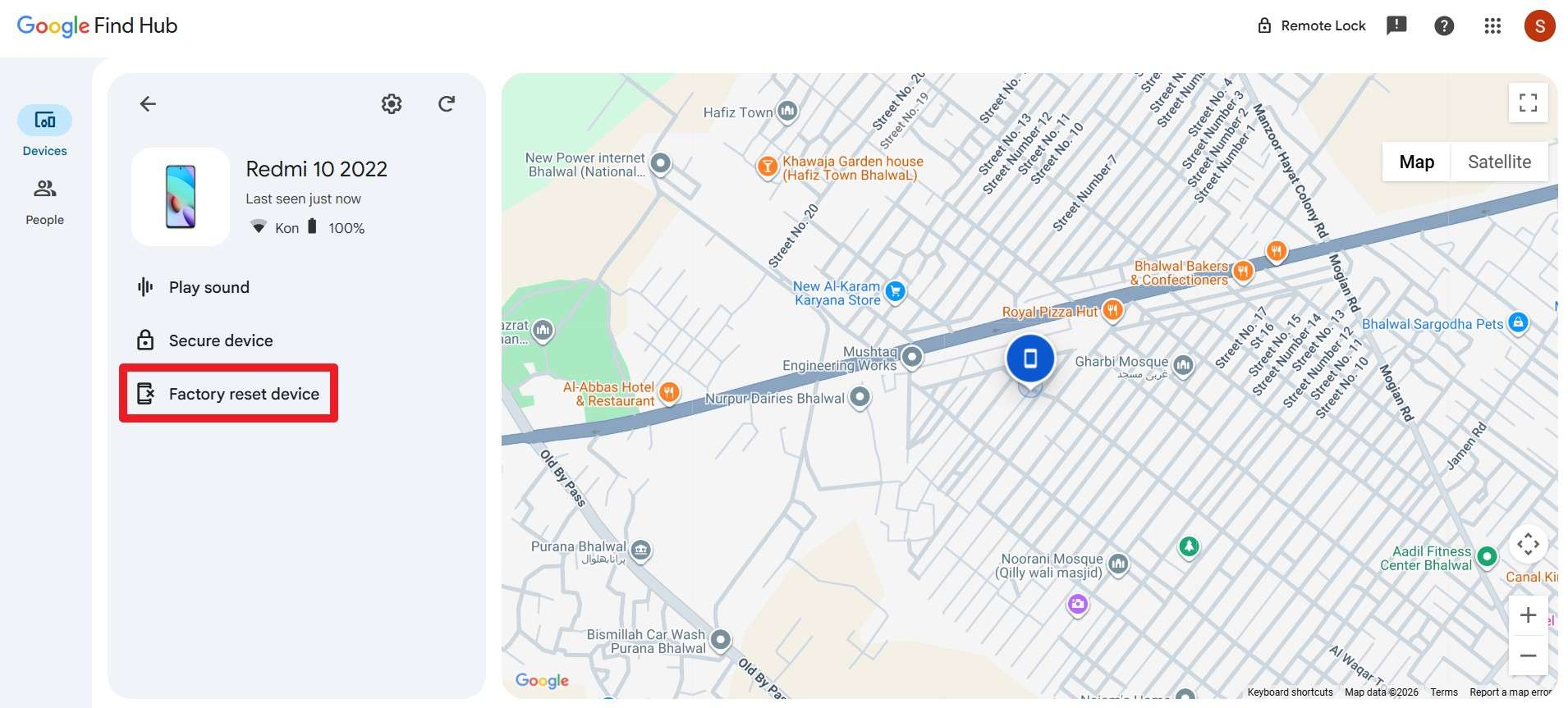
Step 1. On the Find Hub site, select the Android mode you want to erase, then choose the “Factory Reset Device” option.
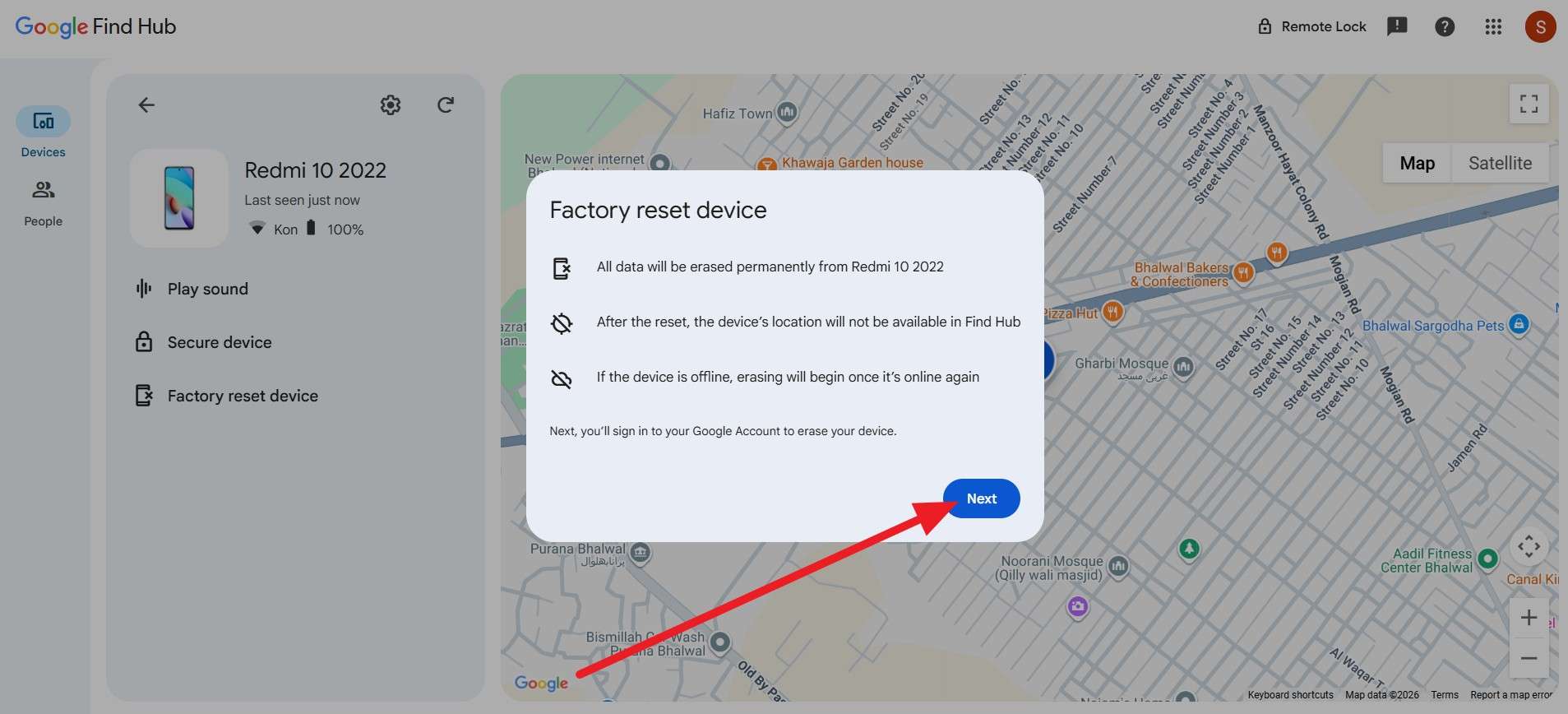
Step 2. After that, press the “Next” button on the pop-up and follow the onscreen instructions.
Method 2: Factory Reset
To bypass the screen lock on Android, this solution becomes handy when you forget the password, but it wipes all data. This method reliably removes the lock screen so you can set a new PIN, pattern, or password. Hence, you can reset from recovery mode with hardware buttons even if Settings are inaccessible. Since it also protects privacy when the phone is reused or sold, here is how you can perform it:
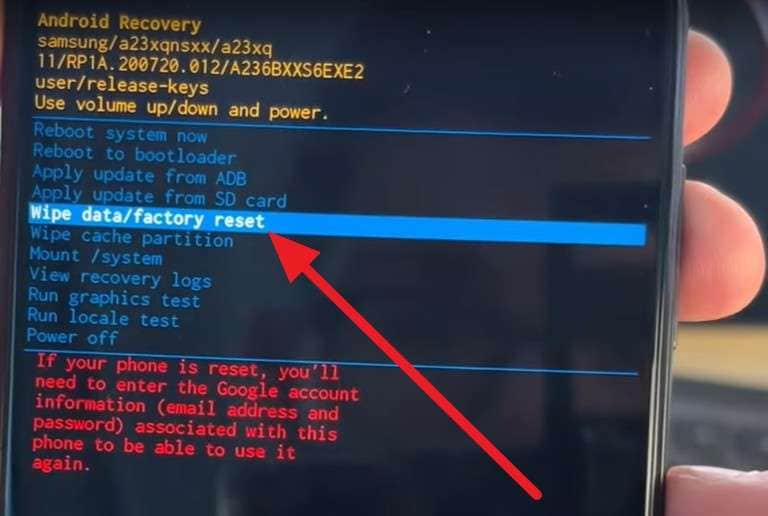
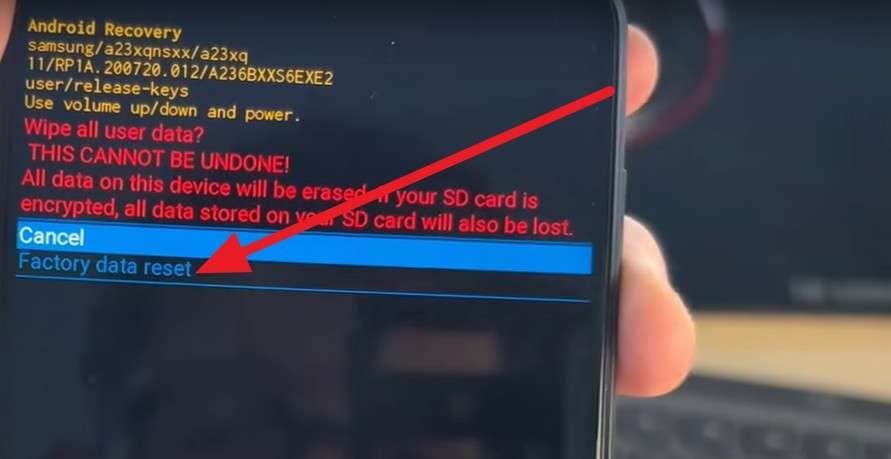
Step 1. With the phone powered off, press the “Power” and “Volume Up” buttons together. Then select the “Wipe Data/Factory Reset” option using the “Volume” key, then confirm it with the “Power” button in Recovery mode.
Step 2. After that, choose the “Factory Data Reset” option on the new interface and choose the “Power” button to confirm.
Conclusion
To conclude, this guide explained the reality about the master code to unlock any phone and debunked the myths. Also, some claim rest codes have been introduced, mainly used on older versions, if you seek to use them. However, if you want a reliable option to unlock any type of Android lock, Dr.Fone - Screen Unlock (Android) is recommended, as it supports 30 brands and 2000+ Android phones and tablets.
safe & secure4,624,541 people have downloaded it
FAQs
 Q1. Why do websites claim master codes work?Q2. What is the safest alternative to master code?Q3. Can master codes bypass Google or Apple account locks?


Android Unlock
- Android Password Lock
- 1. Reset Lock Screen Password
- 2. Ways to Unlock Android Phone
- 3. Unlock Wi-Fi Networks
- 4. Reset Gmail Password on Android
- 5. Unlock Android Phone Password
- 6. Unlock Android Without Password
- 7. Emergency Call Bypass
- 8. Enable USB Debugging
- 9. Unlock Asus Phone
- 10. Unlock Asus Bootloader
- Android Pattern Lock
- Android Pin/Fingerprint Lock
- 1. Unlock Android Fingerprint Lock
- 2. Recover a Locked Device
- 3. Remove Screen Lock PIN
- 4. Enable or Disable Screen Lock PIN
- 5. Pixel 7 Fingerprint Not Working
- Android Screen Lock
- 1. Android Lock Screen Wallpapers
- 2. Lock Screen Settings
- 3. Customize Lock Screen Widgets
- 4. Apps to Reinvent Your Android
- 5. Lock Screen Wallpaper on Android
- 6. Unlock Android with Broken Screen
- 7. Unlock Google Find My Device Without Problems
- 8. Forgot Voicemail Password on Android
- 9. Unlock SafeSearch on Google
- Android Screen Unlock
- 1. Android Device Manager Unlock
- 2. Unlocking Android Phone Screen
- 3. Bypass Android Face Lock
- 4. Bypass Android Lock Screen
- 5. Bypass Lock Screen By Emergency Call
- 6. Remove Synced Google Account
- 7. Unlock Android without Data Loss
- 8. Unlock Phone without Google Account
- 9. Unlock Android phone
- 10. Reset a Locked Android Phone
- 11. Unlock Doogee Phones
- 12. Best 10 Unlock Apps For Android
- 13. Remove Gmail Account
- 14. Unlock 30/30 Attempts Remaining
- 15. OEM Unlock Missing
- 16. Change Lock Screen Clock
- 17. OEM Unlocking on Android
- 18.Bypass Knox Enrollment Service
- 19. Unlock Google Pixel 6a, 6 or 7
- 20. Best Alternative to MCT Bypass Tool
- 21. Best Way to Unlock Your ZTE Phone
- Android SIM Unlock
- 1. Easily Unlock Android SIM
- 2. 5 Android Unlock Software
- 3. Carrier Unlock Phone to Use SIM
- 4. Change Android Imei without Root
- 5. How to Change SIM PIN on Android
- 6. Best Unlocked Android Phones
- Android Unlock Code
- 1. Lock Apps to Protect Information
- 2. Unlock Secret Features on Phone
- 3. Android SIM Unlock Code Generator
- 4. Ways to Sim Unlock Phone
- 5. Remove Sim Lock without Code
- 6. Updated Android Factory Reset Code
- Google FRP Bypass
- 1. Bypass Google Account Verification
- 2. Bypass Google FRP Lock On Phones
- 3. Bypass Google Pixel FRP
- 4. Huawei Bypass FRP Tools for PC
- 5. Direct Open FRP MobileTech
- 6. Bypass Samsung S24 FRP Lock
- 7. EDL Cable Unlock FRP
- 8. Unlock OnePlus Nord FRP
- 9. Tecno FRP Bypass
- 10. Remove Infinix FRP Lock
- 11. FRP Itel Lock Removal
- 12. Itel A23 FRP Bypass Easy Guide
- 13. Itel A16 FRP Bypass
- 14. Remove Google FRP Using Online Tools
- Unlock Bricked Phone
- 1. Restore Bricked Mobile Phone
- 2. Fix Motorola Bricked Phone
- 3. Fix Bricked Redmi Note
- 4. Unbrick Oneplus Easily
- 5. Unbrick Xiaomi Phone
- 6. Unbrick Huawei Phone
- 7. Unbrick Poco X3
- 8. Software to Unbrick Samsung
- 9. Unbrick 3DS
- 10. Unbrick PSP
- Android Unlock Tools
- 1. Griffin Unlocker Tool Review
- 2. BMB Unlock Tool Review
- 3. Android Multi Tools Review
- 4. Best Bootloader Unlock APKs
- 5. Top 5 Micromax FRP Tools
- 6. Pangu FRP Bypass
- 7. Google Account Manager APK FRP Review
- 8. D&G Password Unlocker Review
- 9. Android Multi Tools Review
- 10. Easy Samsung FRP Tool Review
- 11.Samfw FRP Tool
- Android MDM
- ● Manage/transfer/recover data
- ● Unlock screen/activate/FRP lock
- ● Fix most iOS and Android issues
- Free Download Free Download Free Download

 > How-to > Screen Lock Removal > Master Code to Unlock Any Phone: Facts, Risks, and Real Unlock Solutions
James Davis
staff Editor