
Download the latest version | Secure & verified
Samsung S25 FRP Bypass on Android 16: Step-by-Step (Snapdragon/Exynos/MTK)

Oct 10, 2026 • Filed to: Screen Lock Removal • Proven solutions
 TL;DR:
Legitimate owners locked out by Google verification can bypass Factory Reset Protection on the latest devices using either the desktop-based Dr.Fone - Screen Unlock (Android) for broad chipset compatibility or the cloud-based Dr.Fone Online Unlock specifically for Samsung models.
● The desktop software requires a PC and USB cable, unlocking Android 16 devices, including the Samsung S25 and S24, across MediaTek, Qualcomm, and Exynos chipsets in approximately two to three minutes using AI-powered setup recommendations.
● The cloud-based Dr.Fone Online Unlock is tailored for Samsung users running Android 15, Android 16, or Android 17, removing the FRP lock remotely across the A, M, F, S, Z, Fold, and Flip series using only the device IMEI or SN.
● Both methods are strictly limited to personal use for devices you legally own or have explicit authorization to manage, as bypassing FRP on unauthorized devices violates the intended security design of the operating system.
Ask AI for a summary
 ChatGPT
 Perplexity
 Gemini
 Claude
 Grok
Grok
Dr.Fone – Screen Unlock (Android) removes Google FRP from Samsung Galaxy S25, S25+, S25 Ultra and S24 devices running Android 16. It works across Snapdragon, Exynos and MediaTek chipsets and typically completes in 2–3 minutes.
If you’re searching for Android 16 FRP bypass or Samsung S25 FRP bypass, chances are you’re facing Google’s Factory Reset Protection (FRP) screen after a reset. Maybe you forgot the Google account previously synced to the device, bought a second-hand phone, or performed a factory reset without removing the account first. FRP is designed to prevent unauthorized access—but for legitimate owners, it can become a frustrating roadblock.
The good news: Dr.Fone - Screen Unlock (Android) now brings a new generation of FRP unlocking that’s built for Android 16, optimized for speed, and designed for beginners—plus it’s now AI-Powered for smarter guidance. For Samsung users who prefer an online solution, Dr.Fone Online Unlock also provides Samsung FRP Removal for Android 15, Android 16, and Android 17, covering Samsung A/M/F/S/Z/Fold/Flip series models.
- Part 1. What Is FRP (Factory Reset Protection) and Why Does It Lock You Out?
- Part 2. Why "Android 16 FRP Bypass" Is Getting Harder (And Why Tools Matter)
- Part 3. Dr.Fone’s New FRP Unlock Highlights (Built for Android 16)
- Part 4. How to Bypass FRP on Android 16 (Including Samsung S25) with Dr.Fone
- Part 5. Remove Samsung FRP Online with Dr.Fone Online Unlock

- Part 6. Samsung S25 FRP Bypass: Why Dr.Fone Is a Strong Choice
- Part 7. Use Cases: Who Needs an Android 16 FRP Bypass Tool?
Part 1. What Is FRP (Factory Reset Protection) and Why Does It Lock You Out?
FRP (Factory Reset Protection) is an Android security feature that triggers after an “untrusted” factory reset. When FRP is enabled, the phone requires the previously synced Google account to finish setup, even if you have the device in hand. That’s why people often look for an FRP bypass when they legitimately can’t access the linked credentials.
Common scenarios include:
- Forgot Google account or password
- Bought a used Android phone still linked to the previous owner
- Reset the device before removing the Google account
- Received a second-hand phone as a gift and can’t complete the setup
Part 2. Why "Android 16 FRP Bypass" Is Getting Harder (And Why Tools Matter)
With newer Android versions, FRP bypass methods shared online can be unreliable, device-specific, or patched quickly. Many “free” tricks depend on loopholes that stop working after security updates, and some unofficial APK-based methods can introduce serious risks. That’s why a dedicated solution that’s continuously updated for the newest Android versions can be a safer, more predictable approach for legitimate users.
For Samsung users, this matters even more. Newer Samsung models and Android systems may require different FRP removal paths. A tool that supports both desktop-based unlocking and online Samsung FRP removal gives users more flexibility when they are locked out after a factory reset.
Part 3. Dr.Fone’s New FRP Unlock Highlights (Built for Android 16)
1) Beginner-friendly: simple steps, no special cable, unlock in two to three minutes
Dr.Fone’s newest FRP removal flow is designed so that even first-time users can follow it quickly—without complicated preparation. In typical workflows, users only need to connect the phone and follow on-screen prompts.
2) Chipset-agnostic for Android 16: MTK, Qualcomm, and Samsung chips
When people search for Android 16 FRP bypass, they often worry whether their device platform is supported. Dr.Fone’s FRP removal is positioned to work across different chipsets—as long as the device is running Android 16—including:
- MediaTek (MTK)
- Qualcomm Snapdragon
- Samsung in-house chips (Exynos line)
3) Supports Samsung’s latest flagships: Galaxy S24 and S25
If your main target keyword is Samsung S25 FRP bypass, compatibility is everything. Dr.Fone’s unlock coverage explicitly mentions Samsung S25 support — this is a strong trust-builder for conversion.
4) AI-Powered: smarter recommendations, less guesswork
The product now includes AI-Powered enhancements, introducing intelligent recommendations so users can more easily choose the right path, such as device/OS selection and guided flow. This reduces trial-and-error and makes the experience more beginner-friendly.
5) Online Samsung FRP Removal for Android 15/16/17
For users who want an online Samsung FRP removal option, Dr.Fone Online Unlock now supports Samsung FRP Removal for Android 15, Android 16, and Android 17. It covers Samsung A/M/F/S/Z/Fold/Flip series models and provides a guided online unlocking process with professional technical assistance when needed.
Part 4. How to Bypass FRP on Android 16 (Including Samsung S25) with Dr.Fone
Below is a simplified, user-friendly walkthrough for the desktop Dr.Fone FRP unlock solution.
What you need
- A Windows or Mac computer
- A USB cable
- Dr.Fone - Screen Unlock (Android) installed

Dr.Fone - Screen Unlock (Android)
The Best Android 16 and Samsung S25 FRP Bypass Tool
- Completely unlinked from the previous Google account, it won’t be traced or blocked by it anymore.
- Remove all Android screen locks (PIN/pattern/fingerprints/face ID) in minutes.
- Compatible with various Android models.
- Provide specific removal solutions to promise success rate.


Step-by-step (simple version)
Step 1. Launch Dr.Fone and open Screen Unlock
Open Wondershare Dr.Fone on your computer and go to Screen Unlock.

Step 2. Choose Android → Remove Google FRP Lock
Select Android, then pick Remove Google FRP Lock to start the FRP bypass workflow.

Step 3. Select Samsung or your Android brand and follow the on-screen guidance
Choose Samsung and proceed. Dr.Fone will guide you through the remaining steps with on-screen instructions until the FRP lock is removed.
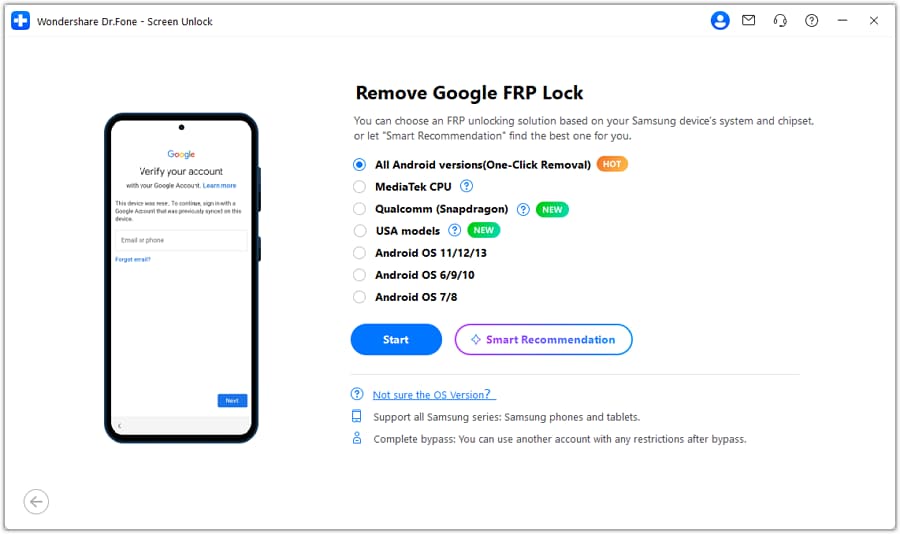
To help readers understand what the process looks like visually, the official guide shows the key selection screens, such as “Remove Google FRP Lock” and the option to choose Samsung.
Part 5. Remove Samsung FRP Online with Dr.Fone Online Unlock
If you are using a Samsung device and want an online FRP removal solution, Dr.Fone Online Unlock provides a dedicated Samsung FRP Removal function for Android 15, Android 16, and Android 17. It supports Samsung A/M/F/S/Z/Fold/Flip series phones and tablets, making it a useful option for users locked at Google verification after a reset.
Dr.Fone Online Unlock
Online Samsung FRP Removal for Android 15/16/17
- Remove Google FRP Lock for all Samsung models and systems.
- Support Samsung FRP Removal for Android 15, Android 16, and Android 17.
- Cover Samsung A/M/F/S/Z/Fold/Flip series models.
- Simple operation and fast speed.
- Full refund if unlocking fails.
- Available for devices around the world, with more than 2M users worldwide.
- Professional technical personnel guidance and assistance.
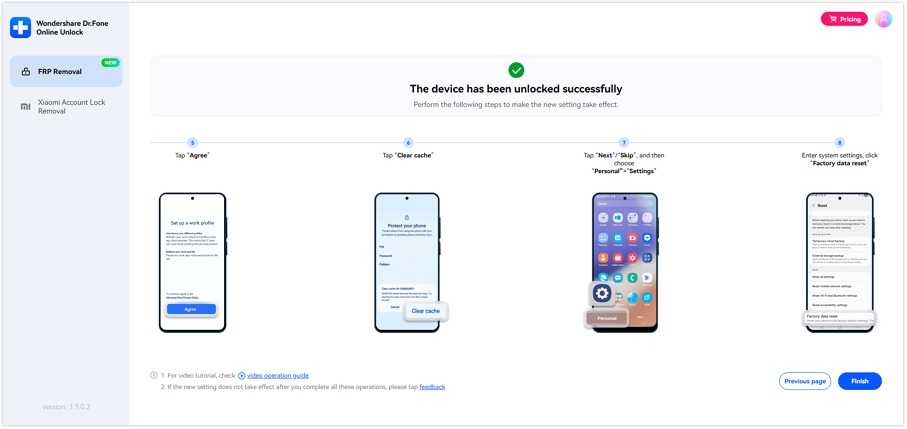
How to remove Samsung FRP online
Step 1. Visit Dr.Fone Online Unlock and select FRP Removal
Open your browser, go to the official Dr.Fone Online Unlock platform, and log in to your Online Dashboard. From the main interface, click “FRP Removal” to begin the online Samsung FRP removal process.
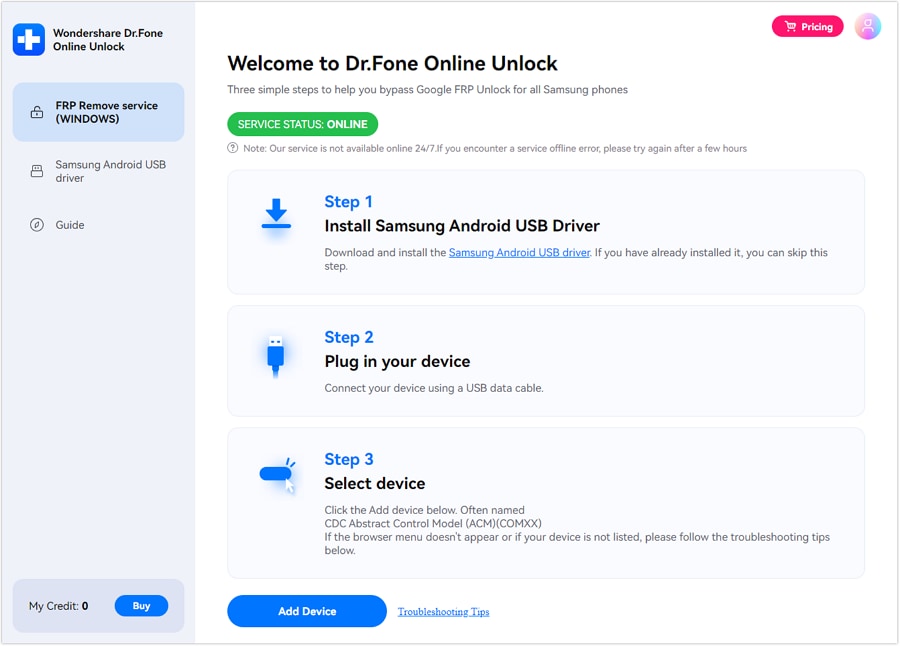
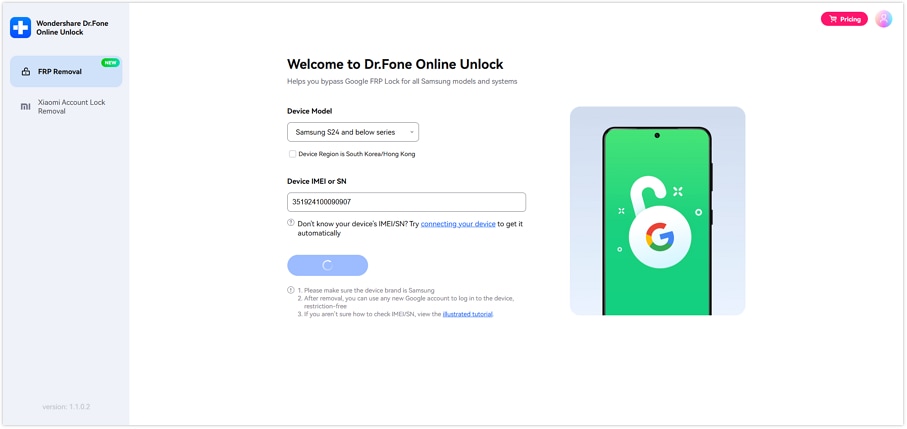
Step 2. Select the Samsung device mode and enter IMEI or SN
Choose the correct device mode, then enter your device’s IMEI or SN so the system can identify it correctly. You can find the IMEI/SN by dialing *#06#, checking the original packaging, inspecting the device label or SIM tray, or connecting the device to your computer for automatic detection.
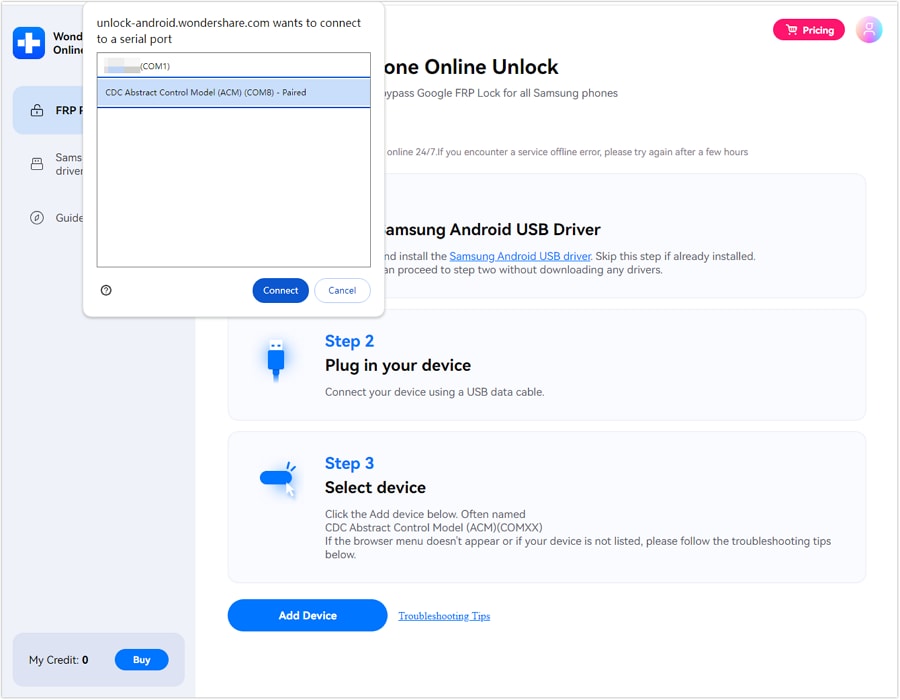
Step 3. Click Unlock to start the cloud-based FRP removal
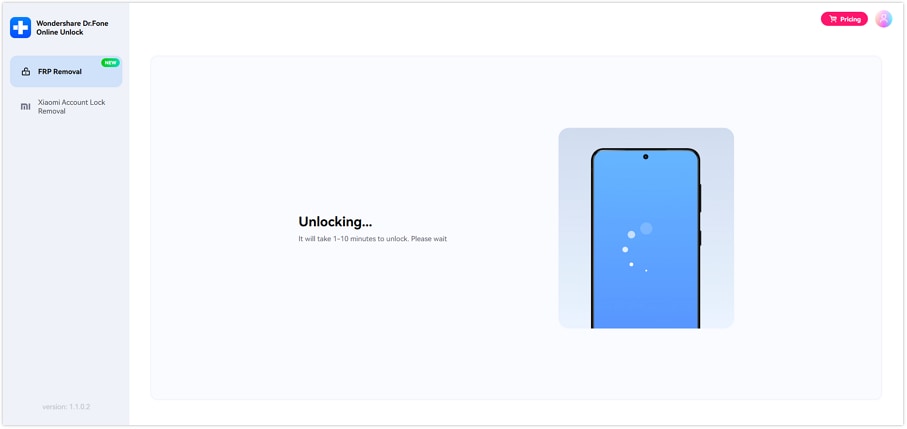
After confirming the device information, click “Unlock”. The Samsung FRP removal process will proceed online through the cloud-based workflow, with no complicated manual steps required.
Step 4. Complete the device activation
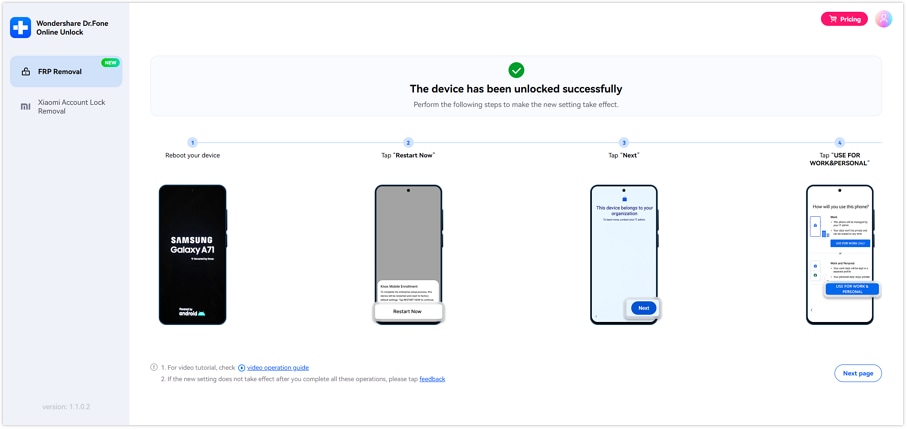
Once the FRP lock has been successfully removed, follow the on-screen instructions to activate your Samsung phone or tablet and complete the setup process.
Part 6. Samsung S25 FRP Bypass: Why Dr.Fone Is a Strong Choice
When someone specifically searches for Samsung S25 FRP bypass, they usually want three things:
- It works on the newest model
- It doesn’t require advanced tools
- It’s fast enough to be practical
Dr.Fone’s positioning checks these boxes: it lists Samsung S25 as supported and also highlights FRP bypass coverage, including the latest Android versions up to Android 16.
For users who need a Samsung-focused online option, Dr.Fone Online Unlock further expands the product support with Samsung FRP Removal for Android 15, Android 16, and Android 17. It covers Samsung A/M/F/S/Z/Fold/Flip series models, making it a practical choice for newer Samsung devices that are locked at Google verification.
Part 7. Use Cases: Who Needs an Android 16 FRP Bypass Tool?
Dr.Fone is commonly used for legitimate, real-life situations such as:
- You reset your phone but forgot the linked Google credentials
- You bought a used Samsung device, and the previous owner didn’t remove the account
- A device was gifted to you, but it is still locked to someone else’s Google account
- You’re locked at Google verification after a factory reset, and need access again
- You need an online Samsung FRP removal solution for Android 15, Android 16, or Android 17
Final Thoughts: The Fastest Way to Handle Android 16 FRP in 2026
If you’re stuck at Google verification and searching for Android 16 FRP bypass or Samsung S25 FRP bypass, the key is choosing a solution that’s designed for new Android versions, works across chipsets, and doesn’t require complicated hardware.
With Dr.Fone’s newest FRP unlocking highlights—2–3 minute beginner workflow, Android 16 chipset-agnostic support, Samsung S24/S25 compatibility, and AI-Powered smart recommendations—it’s positioned as a practical, modern FRP unlock option for legitimate owners who need access back quickly.
For Samsung users, Dr.Fone Online Unlock adds another flexible choice: online Samsung FRP Removal for Android 15, Android 16, and Android 17, covering Samsung A/M/F/S/Z/Fold/Flip series devices with simple operation, fast speed, refund support if unlocking fails, and professional technical assistance.
 safe & secure
4,624,541 people have downloaded it
FAQs
 Q1. Is FRP bypass legal?Q2. Does Dr.Fone support Android 16?Q3. Does it support Samsung S25?Q4. What Samsung models does Dr.Fone Online Unlock support for FRP Removal?


Samsung Unlock
- Samsung Code
- 1. Samsung Unlock Code List
- 2. Samsung Reset Code List
- 3. Samsung Secret Code List
- 4. Check Screen Using Secret Codes
- 5. Samsung Unlock Code Generators
- 6. Free Samsung Unlock Code
- 7. Free Samsung Unlock Code Generators
- 8. Samsung Galaxy S2 Unlock Code
- Samsung A Series FRP Bypass
- 1. Samsung A01 FRP Bypass
- 2. Samsung A01 Core FRP Bypass
- 3. Samsung A02/A02s FRP Bypass
- 4. Samsung A2 Core FRP Bypass
- 5. Samsung A10/A10s FRP Bypass
- 6. Samsung A11 FRP Bypass
- 7. Samsung A12 FRP Bypass
- 8. Samsung A20/A20S FRP Bypass
- 9. Samsung A14 FRP Bypass
- 10. Samsung A30/30s FRP Bypass
- 11. Samsung A50 FRP Bypass
- 12. Samsung A51 FRP Bypass
- Samsung J Series FRP Bypass
- 1. Samsung J2 FRP Bypass
- 2. Samsung J4 FRP Bypass
- 3. Samsung J5 Prime FRP Bypass
- 4. Samsung J6 FRP Bypass
- 5. Samsung J7 FRP Bypass
- 6. Samsung J7 Prime FRP Bypass
- 7. Samsung J250 FRP Bypass
- Samsung S Series FRP Bypass
- 1. Samsung S7 FRP Bypass
- 2. Samsung S22 FRP Bypass
- 3. Bypass Samsung S24 FRP Lock
- 4. Samsung S25 FRP Bypass
- 5. Samsung S26 FRP Bypass
- Samsung FRP Bypass for Others
- 1. Samsung M01 FRP Bypass
- 2. Samsung M11 FRP Bypass
- 3. Samsung G532F FRP Bypass
- 4. Samsung G531F/G531H FRP Bypass
- 5. Samsung Google Verification Bypass
- 6. HushSMS APK FRP Unlock
- 7. Samsung Android 11 FRP Bypass
- 8. Samsung FRP Bypass Without PC
- Samsung Factory/Hard Reset
- 1. Reboot Samsung
- 2. Hard Reset Samsung
- 3. Reset Locked Samsung Phone
- 4. Reset Samsung Tablet
- 5. Reset Samsung Without Password
- 6. Reset Samsung Account Password
- 7. Reset Samsung Galaxy S3
- 8. Reset Samsung Galaxy S4
- 9. Reset Samsung Galaxy S5
- 10. Reset Samsung Galaxy S9/S10
- 11. Reset Samsung Galaxy J5/J7
- 12. Reset Samsung A12
- 13. Factory Reset Samsung Tablet
- Samsung S Series Screen Unlock
- 1. Samsung S2 Screen Unlock
- 2. Samsung S3 Screen Unlock
- 3. Samsung S4 Screen Unlock
- 4. Samsung S5 Screen Unlock
- 5. Samsung S6 Screen Unlock
- 6. Samsung S7/S8 Screen Unlock
- 7. Samsung S20 Screen Unlock
- 8. Samsung S22 Ultra Screen Unlock
- 9. Unlock Samsung S25
- Samsung Screen Unlock
- 1. Best Samsung Unlock Software
- 2. Forgot Samsung Galaxy Password
- 3. Bypass Samsung Lock Screen PIN
- 4. Unlock Samsung Galaxy Phones
- 5. Unlock Bootloader on Samsung
- 6. Unlock Home Screen Layout
- 7. Unlock Samsung Password
- 8. Remove Google Account
- 9. MDM Remove Tools
- 10. Remove Samsung MDM Lock
- 11. Samsung Reactivation Lock
- Samsung SIM Unlock
- ● Manage/transfer/recover data
- ● Unlock screen/activate/FRP lock
- ● Fix most iOS and Android issues
- Free Download Free Download Free Download

 > How-to > Screen Lock Removal > Samsung S25 FRP Bypass on Android 16: Step-by-Step (Snapdragon/Exynos/MTK)
Alice MJ
staff Editor