



 TL;DR:
Which options fit which age?
- For ages 13–16: Yubo, Kik, Bumble For Friends, and BeFriend do not meet the age requirement. MyLOL describes a 13–17 teen community for eligible members, with friendship rather than dating as its role.
- For age 17: BeFriend meets its stated minimum-age threshold, but also requires users to be able to form a binding contract. That is not unconditional permission or a reason to ignore local requirements.
- For ages 18–19: Bumble For Friends is for platonic friendship, Yubo is social discovery, and Kik is messaging. Meeting the age rule does not make them equivalent dating options.
- For parents setting boundaries: Use family controls for remote family management. Dr.Fone App Lock provides local iPhone lock/hide and scheduled restrictions; it does not inspect conversations or determine who is trustworthy.
Ask AI for a summary
 ChatGPT
 Perplexity
 Gemini
 Claude
 Grok
Grok
Dating apps for teens need an age-specific answer, not one list for everyone aged 13 to 19. Yubo, Kik, and Bumble For Friends require users to be at least 18. MyLOL describes a separate teen social community generally for ages 13–17, subject to country eligibility. BeFriend's terms set a minimum of 17 and additional eligibility conditions. Friendship services are not interchangeable with dating services.
Choosing between dating apps for teenagers starts with two questions: is your teen eligible, and does the service offer the kind of connection they want? Compare the eight platforms below by age rules, friendship or messaging features, and contact risks. Age eligibility is a starting point, not a safety certification.
In this Article

Part 1: Why Teens Use Dating Apps
- Teens look for connections beyond school and their local area.
- Many enjoy chatting with peers who share similar hobbies or backgrounds.
- Apps offer a chance to join communities where teens can feel understood.
Relatable scenario: Imagine a 16-year-old who loves photography and wants friends with the same interests. Late-night conversations start interfering with sleep and homework. The useful questions are not only "Which app?" but also "Who can contact you?" and "When will you put the phone away?"
Match the response to the need. A school photography club or library activity provides a shared-interest starting point without opening a stranger-discovery account. If an online community is being considered, discuss age eligibility and contact boundaries together. Listen without shaming a teen who is looking for belonging, including around identity or sexuality.
Dating, friendship, and anonymous chat are different jobs. Dating services facilitate romantic connections; friendship services focus on platonic connections; messaging and chat rooms provide communication rather than necessarily matching people. An app-store content rating describes content suitability, not the account age rule or the identity of people a user will encounter.
Part 2: 8 Dating Apps for Teens and Social Platforms Compared
For someone under 18, Yubo, Kik, and Bumble For Friends are not eligible options. MyLOL's teen community and BeFriend have different age requirements and focus on social connections rather than romantic matching. Start with the age rule, then compare how people connect, who can contact your teen, and what personal information they may share.
| Platform | Age rule or identity boundary | What it actually offers | Decision for a family |
|---|---|---|---|
| Spotafriend | An installed app's developer and terms are needed to determine eligibility | spotafriend.co now contains unrelated gambling content | Do not download from that domain; identify the developer of any existing installation |
| Yubo | 18+ since November 1, 2025 | Adult social discovery | Not eligible under 18; not a minor-friendly alternative to dating apps |
| MyLOL | Teen community generally 13–17; country eligibility applies; separate adult community | Profiles, music, groups, and chat | A friendship option to discuss for eligible teens, not a ranked dating recommendation |
| Kik | 18+ in current terms | Messaging and group communication | Not eligible under 18; messaging is not romantic matching |
| Whisper | Eligibility depends on the specific app and developer, not the name alone | whisper.sh now identifies a music label, not a social app | Match the installed app to its developer before using its account or reporting rules |
| Bumble BFF / Bumble For Friends | 18+ | Platonic friendship | A friendship option for eligible adults aged 18–19, not for minors or romantic matching |
| TeenChat | Identity depends on the domain; teen-chat.org describes ages 13–19 | The identified example is a chat-room website, not an app-matching service | A stated audience is not proof of age separation or moderation performance |
| BeFriend | 17+ plus contract and other eligibility conditions | Friend discovery, chat/video, and interest communities | Not for ages 13–16; friendship purpose, not a blanket teen dating option |
Dating apps for under 18: what changes at 13, 16, 17, and 18?
Ages 13–16: Do not choose Yubo, Kik, Bumble For Friends, or BeFriend: their stated minimum ages exclude this group. MyLOL describes a teen community generally for 13–17-year-olds, but country rules and any required parental authorization still determine registration eligibility. It is a social/friendship community, not permission to use adult dating services.
Age 17: MyLOL's teen age band and BeFriend's minimum-age threshold overlap at 17. Their environments and conditions differ: MyLOL describes separate teen/adult communities; BeFriend requires the ability to form a binding contract in addition to being at least 17. Turning 17 alone does not mean a person meets all of BeFriend's eligibility conditions.
Ages 18–19: The 18+ minimum no longer excludes this age group from Yubo, Kik, or Bumble For Friends. Choose by task: friendship on Bumble For Friends, social discovery on Yubo, or messaging on Kik. None of these descriptions establishes a guaranteed-safe romantic match.
For a parent searching for dating apps for 16 year olds, the practical answer is to exclude the four services above that require 17 or 18, then discuss whether an eligible friendship community or an offline interest group meets the actual need. Never enter a false birth date; neither parental oversight nor an age filter overrides account terms.
App Reviews: Specific Differences and Limits
If you find an unfamiliar app on your teen's phone, its developer and account rules matter more than its name or icon. Use the differences below to decide whether it fits your teen's age and social needs.
1. Spotafriend: Avoid the Unrelated Download Domain
The spotafriend.co address now serves unrelated gambling content, not a teen friendship service. Do not use it to obtain an app. If Spotafriend is already installed on your teen's phone, identify its developer through the app's store listing before deciding which account rules apply.
For your family: Do not create an account until the app's developer and age requirements are clear. Avoid third-party APK links as a substitute for identifying the service.
2. Yubo: Adult Social Discovery, 18+

Yubo requires users to be at least 18, effective November 1, 2025. It is a social-discovery service for young adults, so a 14-, 16-, or 17-year-old cannot use it under that rule. See Yubo's announcement of the age-policy change.
For your family: Exclude Yubo for a minor. An eligible 18- or 19-year-old should assess its social-discovery role rather than expect a dedicated dating or family-control tool.
3. MyLOL: Separate Teen and Adult Social Communities

MyLOL's current terms describe Teen MyLOL as generally for eligible members aged 13–17 and Adult MyLOL as 18+. Country availability, age requirements, and any required parental authorization still apply. Its social features include customizable profiles, music, groups, photos, and chat.
For your family: This is a more relevant discussion than an adult-only app when an eligible 13–17-year-old wants an interest-based social community. Keep that discussion about friendship, contact boundaries, and reporting; do not interpret the teen label as guaranteed safety.
4. Kik: Messaging, with an 18+ Account Rule

Kik's Terms of Service, updated February 5, 2025, require users to be at least 18. Kik provides communication, including private and group interactions; it is not an under-18 dating alternative.
For your family: Do not approve Kik for someone under 18. If an underage account already exists, discuss it without blame and use Kik's account/support route rather than changing the birth date to keep it.
5. Whisper: Check Which App Is on the Phone

If your teen has an app called Whisper, do not use whisper.sh to find its social-app rules: that domain now belongs to a music label. Match the installed app's developer to its app-store listing, then use the linked terms and support details. Apps with the same name can have different operators and age requirements.
For your family: If the developer or account rules are unclear, pause new sign-ups and personal-information sharing. For unwanted contact on an existing account, use its block/report controls and involve a trusted adult.
6. Bumble BFF / Bumble For Friends: Friendship Only, 18+

The Bumble For Friends Community Guidelines require members to be at least 18 and specify platonic friendship. An age filter cannot make a 17-year-old eligible, and friendship intent does not remove the minimum-age rule.
For your family: Among the names here, this is the clearly defined platonic option to discuss with an eligible 18- or 19-year-old. It is not a "safer teen mode" for a younger child.
7. TeenChat: A Name Is Not a Unique Operator

"TeenChat" alone does not identify one service. For example, the Teen-Chat.org homepage describes free chat rooms for ages 13–19, with forums and a blog. That is the website's stated audience, not proof that it is the same operator as another TeenChat app or that all participants are teens.
For your family: The stated 13–19 audience includes both minors and adults. Before allowing access, agree on private-message and personal-information boundaries. Do not apply this website's age statement to a different app with a similar name.
8. BeFriend: Identified Friendship App, Minimum 17

The US BeFriend listing identifies ORBITECH PTE. LTD. and links to befriend.cc. Its terms say users must be at least 17, be able to form a binding contract, and meet the other eligibility conditions. They describe a friendship service, not matchmaking.
For your family: An eligible older teen seeking friends may find interest communities more relevant than anonymous posting. Assess nearby discovery and off-app social sharing before enabling them. Do not reuse the old "13–19" age range or treat the store's free-access wording as proof that no paid terms can apply.
Part 3: Non-Negotiable Safety Tips for Teens and Parents
Eligibility answers who may register. A family plan answers how to handle contact, privacy, device access, and problems. Decide those boundaries before a difficult conversation occurs.
Tips for Parents
- Start with the goal: Ask whether your teen wants friends, dating, shared interests, or support. Explain the specific age or contact concern instead of blaming them for wanting connection.
- Set a contact rule: Agree what to do about messages from unknown people, invitations to private channels, requests for photos, and location sharing. Make "I need help" possible without an automatic punishment.
- Make the schedule concrete: Agree which apps are unavailable during homework or sleep and when you will review the agreement. A fixed schedule is different from a cumulative daily usage allowance.
- Choose the appropriate control: For family-device management, use a family-control setup rather than treating a local privacy lock as a remote parent dashboard. See the control comparison below.
Safety Rules for Teens
- Keep your address, school, routine, phone number, and live location private. Photos can reveal uniforms, street signs, or other location clues.
- Do not send money, gift cards, passwords, identity documents, or intimate images to an online contact. Pressure to keep secrets or move quickly to private channels is a reason to stop and get help.
- A profile photo, video call, shared hobby, or claimed age does not establish trustworthiness. Block/report unwanted contact rather than trying to prove the person is genuine.
- Do not arrange a meeting with an online stranger on your own. Involve a trusted adult first; if identity or circumstances are uncertain, do not meet. A public place alone is not a safety guarantee.
If Someone Pressures, Threatens, or Blackmails a Teen
- Stop responding; do not pay or send more images. Tell a trusted adult promptly. The young person is not to blame for someone else's threats.
- Keep useful non-explicit reporting details when safe: usernames, profile links, dates, and threat messages. Do not download, copy, or forward sexual images of a child as evidence. Report the account and block further contact.
- Use a specialist reporting route: In the US, report suspected child sexual exploitation to the NCMEC CyberTipline. Call 911 for immediate danger.
For an intimate image of yourself taken before you turned 18, NCMEC's Take It Down can help limit sharing on participating services. It cannot guarantee removal everywhere. Do not download or share an image to submit it; the submission guidance directs people without access to the original device to CyberTipline assistance.
Apple Family Controls or Dr.Fone App Lock?
| Your task | Appropriate route | Important boundary |
|---|---|---|
| Manage a child's device from a parent's device | Apple family-control guidance | Requires the applicable Family Sharing setup; controls and menus vary by OS, age, and region |
| Apply agreed local lock/hide restrictions on an iPhone | Dr.Fone App Lock walkthrough | iOS 16+; configured on that iPhone, not a remote family dashboard |
| Choose which apps are unavailable during a time window | App Lock Restrict Time | A start/end schedule, not a running daily allowance |
| Respond to threats or suspected exploitation | Support and reporting steps | Neither app restriction nor hiding resolves the underlying harmful contact |
A Walkthrough with Dr.Fone App Lock
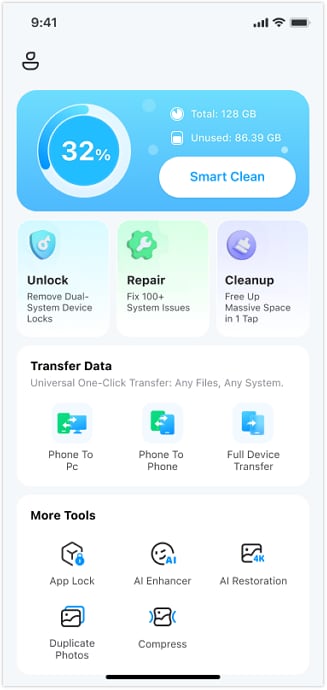
Dr.Fone App Lock for iPhone can support an agreed local app-access plan with lock/hide groups, scheduled windows, and location conditions. It does not inspect chats, identify predators, or prevent grooming. Face ID or a PIN protects access to the App Lock tool, not a separate password for every selected app.
Dr.Fone App - App Lock (iOS)
Local iPhone App Groups: Lock, Hide, and Schedule Access
- Organize selected apps into groups for lock/hide controls.
- Use a time window or the iPhone's location as a restriction condition.
- Protect the App Lock tool with Face ID or a PIN.
- Requires iOS 16 or later; review the current App Store and in-app plan before purchase.

Before you begin: Install Dr.Fone on the iPhone being managed, confirm iOS 16+ compatibility and the applicable plan, and agree on restrictions with the device user. Follow any permissions/setup prompts. These steps condense the official App Lock guide; they do not configure remote parental supervision.
01of 04Create an app group
Open Dr.Fone, tap App Lock, and acknowledge the beginner tips. Tap Please add a group first, then Select apps. Name the group if helpful, select the apps, and tap Save.

02of 04Choose locking or hiding
For locking, use the app-group card control until the blue Blocked state appears. For hiding, select Private Mode on Edit a group and tap Save; the group then shows Hidden. Choose the outcome you agreed on: unavailable access and disappearing icons are different.

03of 04Set a time window or location condition
For a schedule, choose Restrict Time, set the start and end, and choose repeat days. This is not a cumulative daily-use timer.

For a location condition instead, choose Restrict Zone, long-press the map to place its center, choose an available diameter, and save. The guide describes selected apps as hidden inside the zone and visible outside it. The condition uses this iPhone's location; it is not remote tracking of a child.

04of 04Protect the tool and verify the result
Open the App Lock settings and configure Face ID or a PIN for access to the tool. Test a selected app under the intended condition, then confirm you can restore it: tap the group's blue Blocked or Hidden control to remove that mode. Select None to remove a time/zone condition when no longer wanted. Do not assume a group is configured correctly without checking the result.

Conclusion
Dating apps for teens cannot be assessed as one 13–19 category. Under 18, exclude the services whose terms require adulthood. MyLOL's teen community and BeFriend's 17+ threshold describe different friendship environments and eligibility conditions, not equivalent dating recommendations. For eligible 18- and 19-year-olds, choose by the service's actual purpose.
Keep the conversation open, agree on contact and device boundaries, and use the reporting route when a problem arises. If local iPhone lock/hide restrictions fit that agreement, Dr.Fone App Lock for iOS provides the workflow above. Choose family controls for remote family management instead.
FAQ
What are the best dating apps for teens?
The first filter is your teen's age and whether they want friendship, messaging, or dating. Yubo, Kik, and Bumble For Friends require users to be at least 18. MyLOL describes a separate teen social community generally for eligible ages 13–17; BeFriend starts at 17 with additional conditions. For an eligible 18- or 19-year-old seeking platonic friends, Bumble For Friends has that specific purpose. Eligibility and purpose narrow the choice; they do not certify safety.
Are there safe and free dating apps for teens?
A free download does not establish suitability or a guaranteed-safe community. MyLOL's terms discuss subscriptions, while BeFriend's store description uses free-access language and its policies also address purchases. Do not interpret "free" as proof that every feature is free or that a minor is eligible. Neither platform's safety claims substitute for contact boundaries and a reporting plan.
What age is appropriate for dating apps?
Use each service's account rule, not a blanket minimum of 13. The examples here include 18+ services, BeFriend's minimum of 17 plus other eligibility conditions, and MyLOL's generally 13–17 teen community subject to country rules. A content rating or a parent's permission cannot override a higher account-age requirement.
Can parents set limits on dating apps?
Yes. For family-device management, use the appropriate family controls and an agreed plan. For local iPhone lock/hide restrictions, Dr.Fone App Lock supports selected groups and time windows on iOS 16+. A scheduled window is different from a cumulative daily screen-time allowance, and App Lock is not a remote family dashboard.
How does Dr.Fone App Lock help, and what can it not do?
It can support local app-access boundaries through lock/hide groups and time or location conditions. Face ID or a PIN protects the App Lock tool. It does not inspect messages, verify other users, prevent grooming, or guarantee a teenager's safety. Use support/reporting for harmful contact, not a device restriction alone.













Daisy Raines
staff Editor
Generally rated4.5(105participated)