Effortlessly manage data through preview, delete, export, etc.

 100% Security Verified | No Subscription Required | No Malware

 :
: 
 ChatGPT
 Perplexity
 Gemini
 Claude
 Grok
Grok
As you browse through your iPhone's photo library, you've likely encountered numerous copies of the same image. These duplicate photos accumulate over time, consuming precious storage and potentially slowing down your device's performance. A cluttered gallery makes it challenging to find your most cherished memories and essential pictures. This is where a duplicate photo finder becomes an indispensable tool.
These applications are designed to meticulously scan your photo library, using sophisticated algorithms to identify identical or visually similar images based on factors like metadata, file size, and visual patterns. An effective image duplicate finder simplifies the task of organizing your photos, enabling you to delete redundant copies with ease and maintain a streamlined, clutter-free library. This is particularly beneficial for users with large photo collections or those struggling with limited device storage. This guide will explore the 10 best duplicate picture finder apps for 2026, helping you optimize your storage and keep your photo collection perfectly organized.
In this article
- Part 1. What Are the Core Functions of Duplicate Photo Finder Apps?
- Part 2. The 10 Best Duplicate Photo Finder and Cleaner Apps for iPhone
- 1. Dr.Fone App - Smart Clean (iOS)
- 2. Cleanup: Phone Storage Cleaner
- 3. Remo Duplicate Photos Remover
- 4. Cleaner Guru: Cleaning App
- 5. Clean-up App - Phone Cleaner
- 6. Cleaner: Phone Clean-up Storage
- 7. Phone Cleaner: Clean Up Storage
- 8. Ultra Cleaner - Storage Cleaner
- 9. Genie - Phone Storage Cleaner
- 10. HyperClean - Phone Cleaner
Part 1. What Are the Core Functions of Duplicate Photo Finder Apps?
Before diving into our top picks, it's essential to understand the capabilities of duplicate picture finder apps. Recognizing their core functions will help you appreciate how these tools can dramatically streamline your photo management workflow and enhance your device's performance.
Pinpoint Exact Duplicates: At their core, these applications deploy advanced algorithms to detect photos that are 100% identical. By precisely identifying these exact matches, they empower you to instantly remove redundant files and declutter your library without risk.

Locate Visually Similar Photos: Beyond exact copies, a powerful photo dupe finder can also identify near-duplicates. This includes burst shots, slightly edited versions of the same photo, or images taken seconds apart. This functionality allows you to review similar images side-by-side and keep only the best shot.
Streamline Your Photo Library: By systematically removing unnecessary duplicates and similar shots, these apps help you curate a cleaner, more organized photo collection. A well-organized library makes it significantly easier and faster to locate the specific memories you're looking for.
Instantly Reclaim Storage Space: One of the most significant benefits is freeing up storage. Image duplicate finders analyze your photo library and clearly show how much space is being wasted on redundant files. Deleting them can reclaim gigabytes of storage, which is especially crucial for devices with limited capacity.
Accelerate Cleanup with Batch Deletion: Manually deleting hundreds of photos is a tedious task. Most high-quality cleaner apps allow you to select and delete duplicates in bulk, saving you considerable time and effort. This feature is a game-changer for users with extensive photo libraries.
Part 2. The 10 Best Duplicate Photo Finder and Cleaner Apps for iPhone
Now that we've established the value of a reliable duplicate pic finder, let's explore the top 10 applications available for this task. These tools are specifically designed to simplify photo management, helping you reclaim valuable storage and maintain an orderly gallery. Review the detailed descriptions below to select the app that best suits your needs.
1. Dr.Fone App - Smart Clean (iOS)
A cluttered photo gallery is a common frustration for iPhone users, consuming storage and making it difficult to navigate memories. The Dr.Fone App - Smart Clean (iOS) provides a robust and intelligent solution to this problem. Its Smart Clean feature acts as a powerful duplicate photo cleaner, meticulously organizing your gallery to ensure your device remains efficient and tidy.
The Smart Clean feature utilizes advanced algorithms to scan your device for duplicate photos, similar images, large videos, and other unnecessary media. It presents these files in organized categories, giving you the flexibility to manually review, select, or deselect items for removal. Beyond photos, it offers a comprehensive contacts cleaner to merge duplicate entries and remove incomplete information.
Furthermore, its calendar cleaning tool helps you remove expired events and overdue schedules, allowing for single or batch cleanups to keep your agenda organized. These integrated features make the Dr.Fone App a complete photo cleaner app for managing your iPhone's storage and boosting its overall performance.
How to Use the Smart Clean Feature in the Dr.Fone App:
-
Step 1 Install the App and Access Smart Clean
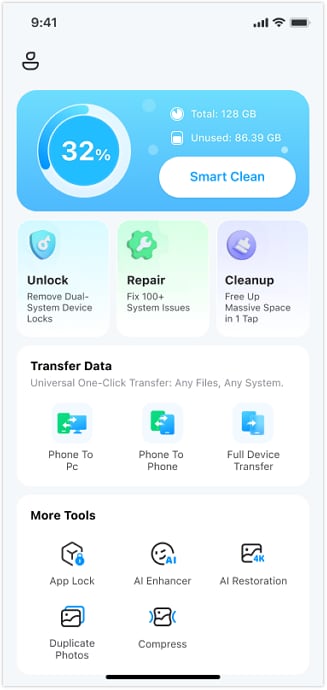
Begin by downloading and installing the Dr.Fone App – Smart Clean (iOS) from the App Store. Launch the application to access its main interface and tap on the "Smart Clean" feature to start the process.
-
Step 2 Initiate the Photo Scan
After selecting "Smart Clean," choose the "Photos" option from the menu. Tap the "Next" button to grant the Dr.Fone App permission to access your photo gallery and begin scanning for duplicates and other clutter.

-
Step 3 Grant Access and Select Items
A prompt will appear asking for gallery access. Press “Allow” or “Allow Full Access” to proceed. Once the scan is complete, the app will display various categories. Select the “Duplicate Photos” section to view the identified copies.

-
Step 4 Review and Clean Your Gallery
The app will display all duplicate photos it found. You can review the results and manually "Select" the images you wish to remove. Once you're ready, tap the "Clean" button at the bottom of the screen and confirm by tapping "Delete" to permanently remove them from your iPhone.

| Feature | Specification |
|---|---|
| Rating | 4.7 out of 5 |
| Compatibility | Requires iOS 13.0 or later |
| Pricing | Starts from $7.99 to $34.99 |
2. Cleanup: Phone Storage Cleaner
Cleanup is a highly effective free duplicate photo finder tool that scans your gallery and presents a clear list of duplicate images. It intelligently suggests the best version among a set of duplicates, making your decision easier. The app allows you to review all findings and perform bulk deletions of similar photos, ensuring your device's storage is optimized efficiently.

- Organizes duplicate data from largest to smallest to speed up cleaning.
- Functions entirely offline, without needing an internet connection.
- Full access to all cleaning features requires a premium subscription.
| Feature | Specification |
|---|---|
| Rating | 4.7 out of 5 |
| Compatibility | Requires iOS 14.0 or later |
| Pricing | Starts from $3.99 to $29.99 |
3. Remo Duplicate Photos Remover
Remo is a specialized tool engineered to locate and delete duplicate photos from your gallery with high precision. This duplicate image remover employs smart algorithms to scan your library for both identical and near-identical images. It provides a convenient preview option before deletion, giving you full control over the cleanup process. You can also inspect the metadata of each image to help decide whether to keep or remove it.

- Features a very user-friendly interface that is easy for beginners to navigate.
- The simple drag-and-drop functionality speeds up the removal process.
- The scanning process can be slow, especially with very large photo libraries.
| Feature | Specification |
|---|---|
| Rating | 4.6 out of 5 |
| Compatibility | Requires iOS 9.0 or later |
| Pricing | Free |
4. Cleaner Guru: Cleaning App
Cleaner Guru stands out as the best duplicate photo remover app for users who want granular control. It allows you to filter images by date, making it easy to target specific periods for cleanup. With just a few taps, you can merge similar photos or delete redundant ones, ensuring a seamless gallery organization experience. It also includes additional tools for clearing junk files and improving overall phone performance.

- Available in multiple languages, making it accessible to a diverse user base.
- Includes a secure folder to safeguard your personal and private photos.
- The free version is ad-supported, which can lead to frequent interruptions.
| Feature | Specification |
|---|---|
| Rating | 4.6 out of 5 |
| Compatibility | Requires iOS 16.0 or later |
| Pricing | Starts from $6.99 to $49.99 |
5. Clean-up App - Phone Cleaner
This dedicated duplicate photo finder is engineered to maximize your phone's storage by identifying and removing unnecessary or similar images. Its automated scanning feature efficiently detects redundant files, saving you time, while its intuitive layout ensures a straightforward cleanup experience. A notable feature is its ability to compress large videos into smaller sizes, helping you save even more space on your device.

- Allows users to organize contacts by merging duplicate entries.
- Offers a passcode feature to protect your data and enhance security.
- Advanced features like the custom charging screen are locked behind the premium subscription.
| Feature | Specification |
|---|---|
| Rating | 4.4 out of 5 |
| Compatibility | Requires iOS 15.0 or later |
| Pricing | Starts from $3.99 to $49.99 |
6. Cleaner: Phone Clean-up Storage
This app offers a holistic approach to managing your iPhone's storage, with a key focus on decluttering your gallery. As a free duplicate photo finder, it allows users to review duplicates and decide what to delete, helping to maintain a tidy library. It also intelligently recognizes and suggests deleting blurry images for better gallery management. Additionally, the tool can clean up expired calendar events and unwanted reminders.

- Provides home screen widgets to monitor storage status and performance.
- Automatically backs up your contacts to prevent accidental data loss.
- Some users have reported slow processing speeds, which can hinder the cleanup workflow.
| Feature | Specification |
|---|---|
| Rating | 4.3 out of 5 |
| Compatibility | Requires iOS 13.0 or later |
| Pricing | Starts from $4.99 to $59.99 |
7. Phone Cleaner: Clean Up Storage
Phone Cleaner's primary function is to scan your photo library for duplicates, allowing for rapid deletion to reclaim storage space. It scans both your local iPhone and iCloud galleries for a comprehensive cleanup. Beyond photo management, this duplicate image remover offers a secure space with password protection for your private files and even includes a feature for resizing images.

- This free duplicate photo cleaner is great for users needing a simple, effective solution.
- An intuitive swipe-to-delete feature makes clearing a messy gallery fast and easy.
- The free version of the tool imposes limitations on the size of files that can be cleaned.
| Feature | Specification |
|---|---|
| Rating | 4.6 out of 5 |
| Compatibility | Requires iOS 12.0 or later |
| Pricing | Starts from $3.99 to $39.99 |
8. Ultra Cleaner - Storage Cleaner
Ultra Cleaner is focused on decluttering your phone by identifying large files and duplicate photos that take up the most storage. It effectively scans for live photos, burst shots, and large videos, suggesting them for deletion to free up space. This duplicate photo cleaner supports batch deletion, enabling you to clean multiple files simultaneously. You can also manage your calendar by eliminating old events.

- Adds widgets to your iPhone home screen for easy monitoring of storage and device health.
- Merges duplicate contacts and organizes the address book for better contact management.
- The free version lacks advanced features like deep cleaning for system cache and hidden files.
| Feature | Specification |
|---|---|
| Rating | 4.4 out of 5 |
| Compatibility | Requires iOS 12.1 or later |
| Pricing | Starts from $6.99 to $49.99 |
9. Genie - Phone Storage Cleaner
Genie offers a unique set of features, including video compression that reduces file sizes without a noticeable loss in quality. Its 'swipe to clean' interface for photos allows users to quickly manage their library by swiping left to delete and right to keep. This image duplicate finder also helps organize other files and provides a speaker cleaner tool to improve sound quality, offering a well-rounded cleanup experience.

- Integrates AI technology to enhance images and create portraits or avatars.
- Features a secret space to protect private data from unauthorized access.
- The app does not offer a dedicated feature to clean up junk mail attachments in its free version.
| Feature | Specification |
|---|---|
| Rating | 4.7 out of 5 |
| Compatibility | Requires iOS 13.0 or later |
| Pricing | Starts from $7.99 to $39.99 |
10.HyperClean - Phone Cleaner
HyperClean is a free duplicate photo cleaner that helps you manage and free up gallery space by deleting duplicate pictures. After scanning, it lets users choose between keeping the best or an average image from the detected duplicates. It also boasts a one-click AI Clean-up feature for rapid device optimization and includes a tool to test your internet connection speed.

- Offers comprehensive tools for managing and cleaning contact data as well.
- Allows users to compress videos to save space and enhance the cleanup experience.
- The powerful AI Clean-up feature is not available in the free version of the app.
| Feature | Specification |
|---|---|
| Rating | 4.5 out of 5 |
| Compatibility | Requires iOS 12.0 or later |
| Pricing | Starts from $4.99 to $34.99 |
Conclusion
In summary, integrating a duplicate photo finder app into your digital routine is the most effective way to organize your iPhone's gallery and reclaim storage. Throughout this guide, we've explored ten of the best tools available, each offering unique features and advantages for tackling photo clutter.
While many options provide excellent results, the Dr.Fone App with its Smart Clean feature stands out as a comprehensive and powerful solution. Its advanced capabilities extend beyond photos to contacts and calendars, making it the most reliable and efficient option for total device management. Download the Dr.Fone App today to experience a cleaner, faster, and more organized iPhone with just a few taps.


FAQ
-
1. How do these apps find duplicate photos on my iPhone?
Most duplicate photo finder apps scan your entire gallery using sophisticated algorithms. They compare image data such as file size, creation date, and visual content to identify photos that are either identical (exact duplicates) or very similar (like burst shots or slightly edited versions). You can then review and delete them. -
2. Can't I just use Google Photos or iCloud to find duplicates?
While services like Google Photos and iCloud are excellent for storage and organization, they do not have dedicated, user-facing features to automatically detect and delete duplicate images. For precise and efficient duplicate removal, third-party apps like the ones listed in this article are specifically designed for the task and are highly recommended. -
3. Are duplicate photo finder apps safe to use on my iPhone?
Generally, yes, as long as you download them from trusted sources like the official Apple App Store. Reputable apps prioritize your privacy and will always ask for permission before accessing your photo library. It's always a good practice to check user reviews and privacy policies before installing any new application. -
4. Will deleting duplicate photos also remove them from my iCloud?
Yes, if you have iCloud Photos enabled. When you delete a photo from your iPhone's library, it is also deleted from your iCloud Photos and any other devices synced to that same Apple ID. The apps simply facilitate the deletion from your device's primary library; the syncing is handled by Apple's ecosystem.
 Add Wondershare Dr.Fone as a preferred source on Google