

Vivo Y15a Specifications, Price, and Features

Oct 10, 2026 • Filed to: Screen Lock Removal • Proven solutions
 TL;DR:
The Vivo Y15a is an entry-level Android 11 smartphone best suited for budget-conscious users prioritizing a 5000 mAh battery life over processing power, fast charging, or storage space.
● The Mediatek Helio P35 chipset, 4GB of RAM, and limited 64GB storage restrict the device to light everyday tasks, meaning it will struggle with heavy games like Genshin Impact or playing 60fps videos at any resolution.
● Hardware compromises include a slow 10W microUSB 2.0 charging port, a 720x1600 IPS LCD display, and no NFC support, though it retains practical features like a 3.5mm audio jack, dual SIM slots, and 5W reverse wired charging.
● If you purchase the device second-hand and encounter a Google account lock, you can bypass the restriction without previous credentials using Dr.Fone - Screen Unlock (Android), which supports FRP removal for Vivo models running Android 10, 11, or 12.
Ask AI for a summary
 ChatGPT
 Perplexity
 Gemini
 Claude
 Grok
Grok
Vivo Y15a sits in the low-cost smartphone bracket. But it gives you a generous battery life, HD+ cameras, and a fingerprint reader. These basics alone give it strong value for price-conscious buyers. But like all cheap handsets, it carries its share of compromises.
So, can it truly be trusted as your daily driver?
This guide will help you find an answer! You’ll find the exact specs, market price, and key features of Vivo Y15a. We will also tell you which points make it worth buying and which do not.
If you're ready to buy, don't forget to verify your device's authenticity. Check out our simple steps for the Vivo warranty check online to ensure you're getting genuine coverage. By the end, you will have clear facts to judge if it really deserves your money.

Part 1. Vivo Y15a Specifications
Go through the following table to learn about Vivo Y 15a specs.
|
Category |
Sub-category |
Spec |
| Network | Technology | GSM / LTE / HSPA |
| Launch | Announced | November 15, 2021 |
| Released | November 15, 2021 | |
| Body | Dimensions | 6.46 × 2.96 × 0.33 in |
| Weight | 179 g | |
| Build | Glass front, plastic frame, plastic back | |
| SIM | Dual Nano SIMs | |
| Display | Type | IPS LCD |
| Size | 6.51 inches | |
| Resolution | 720×1600 pixels | |
| Touch | Capacitive multi-touch | |
| Platform | OS | Funtouch 11.1 Android 11 |
| Chipset | Mediatek Helio P35 | |
| CPU | Octa-core (4 × 2.3 GHz Cortex-A53 & 4 × 1.8 GHz Cortex-A53) | |
| GPU | PowerVR GE8320 | |
| Memory | Card slot | Dedicated slot for microSDXC |
| RAM | 4GB (+1GB Extended) | |
| Storage | 64GB | |
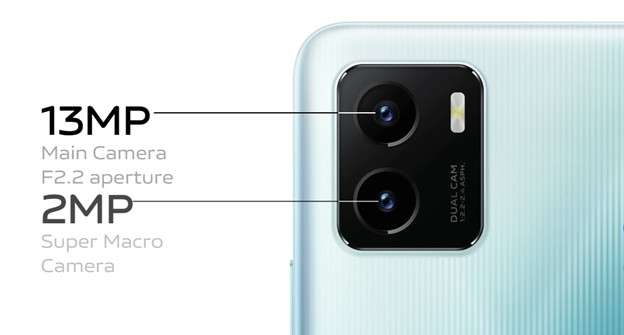
| Main Camera | Dual | 13 MP (27mm wide, f/2.2) and auxiliary lens |
| Features | LED flash, panorama | |
| Video | 1080p @ 30fps | |
| Selfie Camera | Single | 8 MP (f/2.0) |
| Video | 1080p (30fps) | |
| Sound | Loudspeaker 3.5mm jack |
|
| Communications | WLAN | Wi-Fi 2.4GHz / 5GHz Wi-Fi Direct |
| Bluetooth | 5.0, A2DP, LE | |
| Positioning | GPS GALILEO GLONASS BDS |
|
| Radio | FM radio | |
| NFC | No | |
| USB | microUSB 2.0 OTG |
|
| Features | Sensors | Fingerprint Proximity Accelerometer Compass |
| Battery | Type | 5000 mAh, Lithium-ion |
| Charging | 10W wired, 5W reverse wired | |
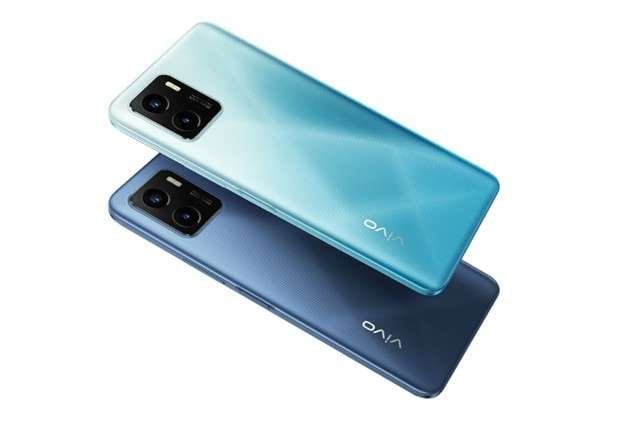
| Miscellaneous | Colors | Wave Green, Mystic Blue |
| Models | V2134 |
Before we deep dive, here is a quick fact:
Vivo devices come with a built-in file manager to let you access your media files, but also store them in the cloud. Definitely check out Vivo File Manager!
Part 2. Vivo Y15a Price
The official price of Vivo Y15a varies by country and taxes. Below, I’ve listed the estimated cost for a few regions:
- USA: Around 160 USD
- Europe: About 140 EUR
- Philippines: 6,999 PHP
- Malaysia: 599 MYR
Part 3. Vivo Y15a Key Features
Vivo Y 15a comes with decent features for an entry-level smartphone. Below, you’ll find a complete rundown of what it offers.
3.1. Design and Build Quality
The Vivo Y15a uses a light plastic frame. Its polycarbonate back has clear ridges. So, it offers a firm grip. The glossy panel at the back gives it a premium feel. Most buttons on the hardware are placed on the side for quick reach. This includes the fingerprint sensor. Moreover, the screen has slim bezels on the sides. So, you get plenty of room to watch videos and read comfortably. In addition, the IPS LCD gives you sharp colors with good balance.
3.2. Performance and Software
The chipset and GPU in the Vivo Y15a are decent enough to handle various tasks at a time. You can load multiple apps without facing any lag. As for gaming, the phone is suitable for less power-intensive apps. Moreover, the PowerVR GE8320 GPU provides a good graphics score for gameplay.
As for the software, Android 11 gives you a familiar user interface. You can navigate it easily. The software comes with essential Android apps too. It includes phone, contacts, messages, clock, calculator, and more. The system removes all extra bloatware. Overall, the device gives you a solid speed and a seamless feel.
3.3. Camera Capabilities
Vivo Y 15a has dual cameras. A 13MP sensor captures sharp color and detail. This setup works for people, landscapes, and close shots. Also, the phone performs well in brightly lit environments. But in the dark, you may notice grain. But the LED flashlight and a built-in night mode can help you tackle it and produce better pictures.
The camera app packs many modes - Portrait, HDR, Panorama, and Pro. So, you can always experiment with new styles. AI scene recognition is a plus. It automatically adjusts settings to lock on the main subject. For video, a 1080p rate gives clear clips for use on large screens like a computer or laptop.
3.4. Battery Life and Charging
The hallmark of this phone is its long battery life. A 5000 mAh pack stays active for more than a full day. Moderate to heavy social media use does not affect it much. Also, the phone is designed to work on tasks with as little energy as possible. The battery optimization features further add to the phone’s battery life.
Moreover, the 10W charging is gentle on the battery. But it can be slower compared to modern mobile phones. In addition to battery health, the phone has a reverse charging feature. This means you can use it to recharge another device using a wire.
Part 4. Vivo Y15a Pros and Cons
Vivo Y15a offers some great features. But is it really the smartphone you need? Here’s a list of its pros and cons to help you decide.
Part 5. Bonus Tip: Bypass FRP Lock on Vivo Y15a with Dr.Fone - Screen Unlock (Android)
Like all modern Android phones, Vivo Y15a comes with an FRP lock. To bypass it, you must sign in with the linked Google account. But if you have a second-hand device, it will be tied to the past owner’s account. So, how do you bypass FRP without their account details?
Don’t worry! Dr.Fone - Screen Unlock (Android) gives you a quick fix. It completely clears the past owner’s Google account. You don’t need to know the password or username. After removal, you can quickly add your own account to the device.
Even better, it can bypass FRP on all Vivo models with Android 10, 11, or 12. It works with many other Android brands too – Samsung, OPPO, Realme, Huawei, and more.
Besides FRP, Dr.Fone also helps you unlock screen locks. These can be PIN, pattern, fingerprint, or face lock. Overall, it’s a complete toolkit to help you keep your handset in control.
Dr.Fone - Screen Unlock (Android)
A Powerful Tool for Removing FRP on Android Devices
- Remove FRP lock on Samsung, Xiaomi, Redmi, Oppo, Realme, Vivo, Motorola, Lenovo, Huawei, Micromax, ZTE, and OnePlus phones without password or Google account.
- Bypass Google FRP account on all Samsung Phones and Tablets.
- 100% success rate for FRP bypass on Samsung Snapdragon devices.

- Bypass Google account verification after factory reset.
- No tech knowledge required, Simple, click-through, process.


Steps to Bypass FRP Lock with Dr.Fone - Screen Unlock (Android)
Step 1. Download and install Wondershare Dr.Fone on your computer. Launch it and go to “Toolbox.” Then, select the “Screen Unlock” mode.

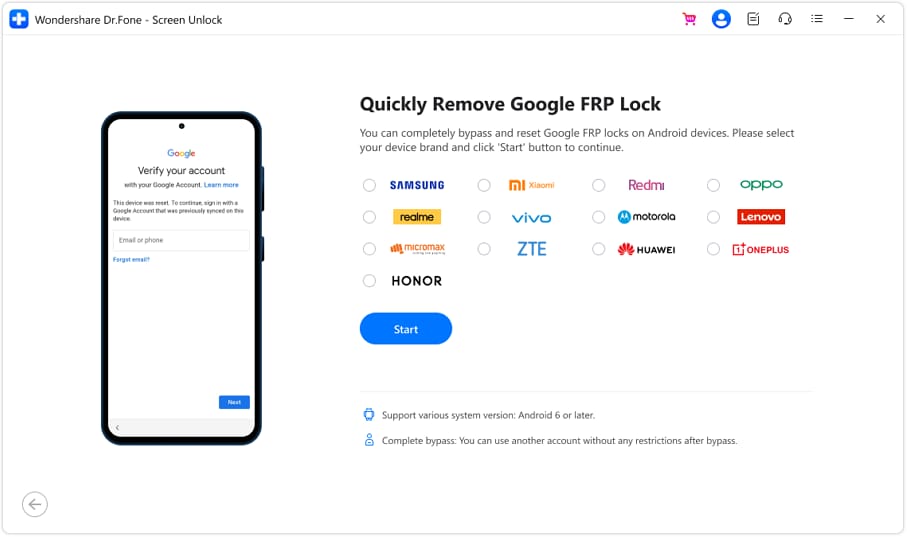
Step 2. Select “Android” as the operating system of your device. Then, choose “Remove Google FRP Lock” from the next screen.

Step 3. You will see a list of brand names. Select your phone’s company from here. Then, click “Start” to proceed.
Step 4. Dr.Fone will show a series of guided steps. Follow these to reach the FRP lock screen on your handset. Once you get there, click “Send Notification” from the Dr.Fone interface. Then, click “OK.”

Step 5. Follow the steps outlined in the Dr.Fone window to remove the FRP lock. Then, click “Next.”

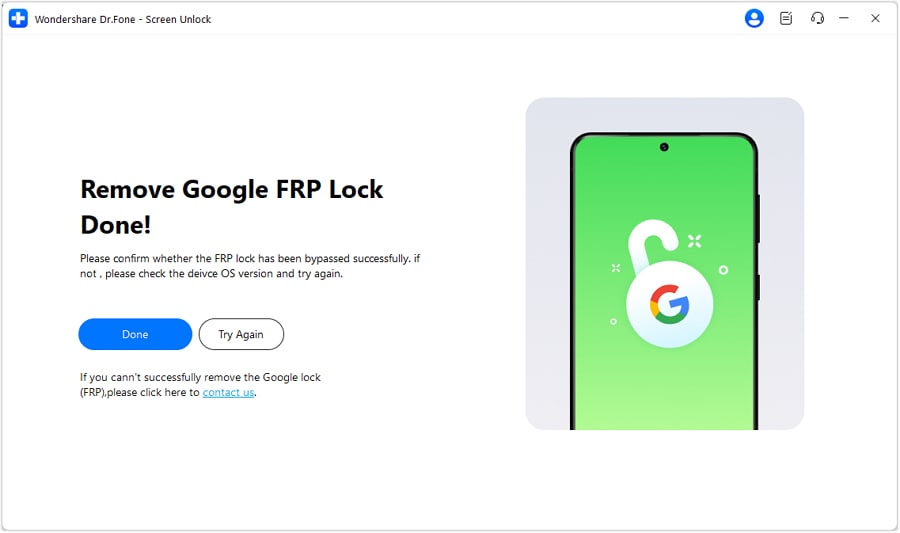
Step 6. Dr.Fone will start removing the FRP. Wait for the process to complete. Then, click “Done” to conclude the process.
Conclusion
Vivo Y15a is a budget-friendly smartphone. It handles multitasking, light gaming, and daily tasks well. Its strongest feature is excellent battery life. The phone also has some drawbacks. Charging is slow, and storage is limited. It also lacks NFC. Despite this, it offers great value for the price.
And if you get stuck at FRP while using it, Dr.Fone – Screen Unlock (Android) can help you bypass it quickly. You don’t need to know your password or username. It guides you through the entire process. You don’t need any technical skills. Download it now to keep your phone in control at all times!
 safe & secure
4,624,541 people have downloaded it
Frequently Asked Questions About Vivo Y15a
 Q1. Does Vivo Y15a have a headphone jack?Q2. Can Vivo Y15a play 60 fps videos smoothly?Q3. Is Vivo Y15a good for gaming?Q4. Does Vivo Y15a support NFC?Q5. How is the battery life of the Vivo Y15a?


Android Screen Unlock
- Unlock Android Screen
- Best Unlock Apps For Android
- Unlock Android Pattern Lock
- Bypass Android lock
- Unlock Android with Broken Screen
- Unlock Android Forgot PIN
- Unlock Without Google Account
- Unlock without Factory Reset
- Unlock Android Tablets
- Reset Locked Android Phone
- SafeUnlocks Review
- Unlock Huawei Phones
- Unlock Google Pixel Phones
- Unlock OnePlus Phones
- Unlock Vivo Phones
- Unlock Sony Xperia
- Unlock LG Phones
- Unlock Mi Pattern Lock
- Unlock OPPO Phones
- Unlock Realme Phones
- Unlock LG Phones
- Unlock Honor Phone
- Unlock Kyocera Phone
- Unlock Samsung Screen
- Bypass Samsung Lock
- Unlock Samsung Password/Pin
- Top Samsung Unlock Softwares
- Samsung Unlock Code Generator
- Get Free Samsung Unlock Codes
- Samsung Galaxy Secret Code List
- Samsung Knox Disable
- Reset Samsung Galaxy A12
- Unlock Samsung S22 Ultra
- Bypass Android FRP
- Top FRP Bypass Tools
- Disable FRP
- Bypass Android FRP
- Bypass FRP with PC
- Bypass FRP with ADB
- Bypass Google Account Verification
- Custom Binary Blocked by FRP Lock
- Bypass Google Pixel FRP
- Bypass Huawei FRP
- Huawei FRP Code
- Bypass Xiaomi/Redmi/Poco FRP
- Bypass OPPO FRP
- Bypass LG FRP
- Bypass Motorola FRP
- Bypass Lenovo FRP
- Bypass Realme FRP
- Bypass ZTE FRP
- Vivo Y15a FRP Bypass
- Moto G Pure FRP Bypass
- Bypass Samsung FRP
- Galaxy Z Fold 7 FRP Bypass
- Bypass Galaxy M01 FRP
- Bypass Samsung M11 FRP
- Bypass Samsung J5 Prime FRP
- Bypass amsung A02/A02 FRP
- Bypass Samsung A10/A10s FRP
- Bypass Samsung A12 FRP
- Bypass SamsungA20/A20S FRP
- Bypass Samsung A21/A21s FRP
- Bypass Samsung Galaxy 50 FRP
- Bypass Samsung Galaxy 51 FRP
- Bypass Samsung S7 FRP
- Bypass Samsung Galaxy S22 FRP
- FRP Bypass Tools
- Test DPC APK
- FRP File Bypass
- ES File Explorer
- Maxroms FRP Bypass
- GSM Aladdin
- Android Novo Tools FRP
- GSMNeo FRP
- Phoenix Service Tool
- MRT Key Review
- XSoft FRP Unlock
- FRPFile FirmwareBD
- ZeroKnox Removal Tool
- Samflash Tool
- Techeligible FRP Unlock
- Riserom FRP Bypass
- Romstage FRP Bypass
- GSM Prime FRP
- ● Manage/transfer/recover data
- ● Unlock screen/activate/FRP lock
- ● Fix most iOS and Android issues
- Free Download Free Download



James Davis
staff Editor