Move contacts, messages, photos, videos, app data, and more between iOS and Android.

 100% Security Verified | No Subscription Required | No Malware

 :
: 
 ChatGPT
 Perplexity
 Gemini
 Claude
 Grok
Grok
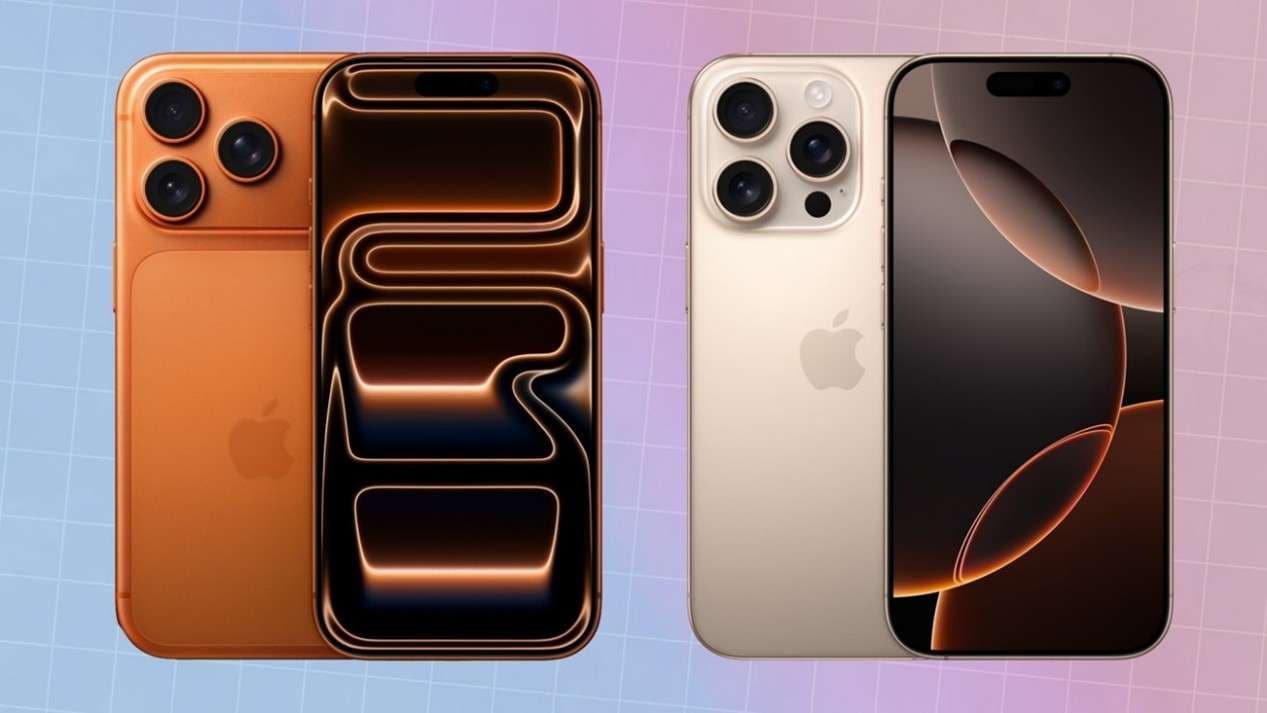
Each year, Apple's iPhone launch event captures the attention of the tech community, and with the anticipated arrival of the iPhone 17, current iPhone 16 users are facing a critical decision: is the upgrade a worthwhile investment? This comparison delves into the essential iPhone 16 vs iPhone 17 differences to help you decide.
This guide offers a detailed breakdown of the key distinctions, from design refinements and performance leaps to camera advancements and battery longevity. Furthermore, upgrading your device shouldn't mean compromising your data. Whether you move to the iPhone 17 or switch from iOS to Android, transferring photos, contacts, and apps can be complex. Dr.Fone - Phone Transfer simplifies this process, ensuring a secure and complete migration of your digital life, making it the ideal companion for your new device.
In this article
- Part 1. iPhone 16 vs. iPhone 17: At a Glance Comparison Table
- Part 2. Design and Display Enhancements
- Part 3. Performance Showdown: A18 Bionic vs. A19 Bionic
- Part 4. Camera System Upgrades: What's New?
- Part 5. Battery Life and Charging Speeds
- Part 6. The Critical Role of Data Transfer in Device Upgrades
- Part 7. Dr.Fone: Your Ultimate iPhone Data Transfer Solution
Part 1. iPhone 16 vs. iPhone 17: At a Glance Comparison Table
Before diving into the specifics, here is a clear, side-by-side summary of the most significant iPhone 17 vs iPhone 16 differences. This table highlights the key specifications to help you quickly understand what sets these two generations apart.
| Feature | iPhone 16 | iPhone 17 |
|---|---|---|
| Chipset | A18 Bionic | A19 Bionic (3nm process) |
| RAM | 6GB | 8GB |
| Display Brightness | 2,000 nits (peak) | 2,500 nits (peak) |
| Rear Camera (Ultra-Wide) | 12MP | 16MP |
| Optical Zoom (Pro Models) | 3x Telephoto | 5x Periscope Telephoto |
| Front Camera | 12MP | 16MP with Autofocus |
| Battery Life (Video) | Approx. 14 hours | Approx. 16 hours |
| Wireless Charging | Qi | Qi2 |
Part 2. Design and Display Enhancements
While Apple maintains its iconic aesthetic, the iPhone 17 introduces several noteworthy refinements in its design and display technology compared to the iPhone 16, enhancing both form and function.
Size & Weight
The iPhone 17 lineup keeps the familiar screen sizes—6.1 inches for the standard model and 6.7 inches for the Pro models—but feels noticeably lighter in hand. By incorporating a new aluminum alloy frame, it sheds approximately 5-8 grams, making it more comfortable for extended use than the slightly heavier iPhone 16.
Color Options
Moving beyond the classic iPhone 16 shades like Midnight and Starlight, the iPhone 17 introduces a fresh, vibrant color palette. New options such as Soft Lavender, Mint Green, and Warm Peach cater to users seeking a more personalized and expressive device.
Display Technology
Both models boast stunning Super Retina XDR OLED displays with ProMotion technology for a fluid 120Hz refresh rate. However, the iPhone 17's screen is engineered to be 20% brighter in outdoor conditions, reaching a peak brightness of 2,500 nits compared to the iPhone 16's 2,000 nits. This significant increase ensures superior readability and clarity, even in direct sunlight.
Part 3. Performance Showdown: A18 Bionic vs. A19 Bionic
For users who demand speed and responsiveness for gaming, content creation, or heavy multitasking, the performance gap between the iPhone 16 and iPhone 17 is a crucial consideration.
- Chipset: The iPhone 16 is powered by the formidable A18 Bionic chip. The iPhone 17, however, takes a significant leap forward with the A19 Bionic, Apple's first chip built on a 3nm process. This advanced architecture delivers a 15% boost in CPU performance and an impressive 25% increase in GPU speed. This translates to apps launching instantly, faster video exports, and flawlessly smooth gameplay in graphically demanding titles.
- RAM: Multitasking receives a major upgrade, with the iPhone 17 featuring 8GB of RAM, up from 6GB in the iPhone 16. This additional memory allows you to run more applications simultaneously—like editing photos while streaming music and browsing the web—without experiencing slowdowns or app reloads.
- 5G Connectivity: While both iPhones support 5G, the iPhone 17 is equipped with an advanced modem that enhances signal reception and boosts potential download speeds to 3Gbps, a noticeable improvement over the 2.5Gbps max speed of the iPhone 16.
Part 4. Camera System Upgrades: What's New?
Apple continues to push the boundaries of mobile photography, and the iPhone 17 introduces meaningful upgrades that distinguish its camera system from the already excellent one on the iPhone 16.
Rear Camera System
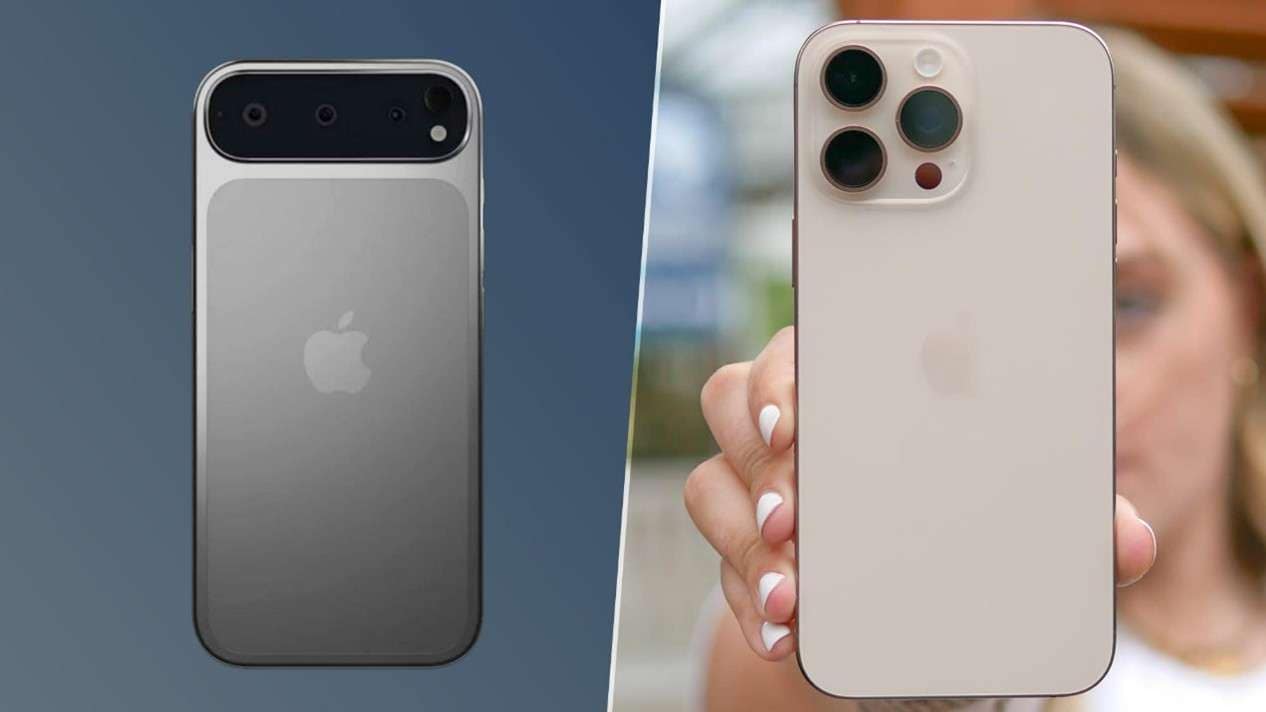
The iPhone 16 features a capable 48MP main sensor paired with a 12MP ultra-wide lens. The iPhone 17 retains the 48MP main camera but significantly upgrades the ultra-wide camera to 16MP. This enhancement captures sharper, more detailed wide-angle photos, particularly in low-light environments. Furthermore, the iPhone 17 Pro models introduce a periscope telephoto lens with 5x optical zoom, a major step up from the iPhone 16 Pro's capabilities.
Front Camera
Selfies and video calls get a notable boost on the iPhone 17. Its front camera is upgraded to 16MP and now includes autofocus, a feature missing on the 12MP front camera of the iPhone 16. The result is consistently sharper focus and clearer images, especially in dynamic or poorly lit settings.
Video Features
Both devices are capable of shooting stunning 4K video at 60fps. However, the iPhone 17 elevates its videography prowess by expanding its 'Cinema Mode' to support 4K resolution at 30fps. This is a significant improvement over the 1080p limit on the iPhone 16, allowing users to create videos with a more professional, cinematic depth of field.
Part 5. Battery Life and Charging Speeds
Consistent and reliable battery performance is essential. The iPhone 17 builds on the foundation of the iPhone 16 with optimizations that provide longer usage and more flexible charging options.
Battery Capacity
Thanks to the power efficiency of the A19 Bionic chip and software optimizations, the iPhone 17 offers a tangible improvement in battery life. It provides approximately 16 hours of video playback, a two-hour increase over the iPhone 16’s 14 hours. For typical daily use involving browsing, messaging, and social media, the iPhone 17 confidently lasts a full day, even for heavy users.
Charging Speed
Both iPhones support fast 20W wired charging, which can replenish the battery to 50% in just 30 minutes, along with 15W MagSafe charging. The key difference lies in standard wireless charging: the iPhone 17 adopts the new 7.5W Qi2 standard, ensuring better alignment and efficiency with a wider range of third-party wireless chargers compared to the iPhone 16’s standard Qi support.
Part 6. The Critical Role of Data Transfer in Device Upgrades
Whether you decide to transfer data from iPhone 16 to iPhone 17 or make the switch to an Android device, migrating your personal information is a crucial step. While Apple offers built-in tools like iCloud and Quick Start for an iOS to iOS data transfer, they come with limitations. iCloud's free tier is restricted to 5GB and is dependent on a fast internet connection, while Quick Start requires both devices to be physically present and can be slow.
The challenge intensifies when attempting an iOS to Android data transfer. Apple's native solutions are incompatible, forcing users to resort to cumbersome, manual methods that often fail to transfer critical data like message history or application data. This is precisely the problem Dr.Fone was designed to solve, providing a comprehensive, fast, and reliable data transfer experience regardless of the platform.
 Move data between iOS to Android and vice versa.
- Transfer contacts, SMS, photos, videos, music, and more types.
- Available with all phones with Android and iOS versions.
- Simple, click-through process.

Part 7. Dr.Fone: Your Ultimate iPhone Data Transfer Solution
Dr.Fone - Phone Transfer by Wondershare is engineered to eliminate the complexities of mobile data management. It offers a superior alternative for any Dr.Fone iPhone data transfer scenario, whether you're upgrading between iPhones or migrating to a new operating system.
Advantages of Dr.Fone for iOS to iOS Data Transfer
When moving from an iPhone 16 to an iPhone 17, Dr.Fone provides key advantages over Apple's native tools:
- No Internet Required: Unlike iCloud, Dr.Fone uses a direct USB connection to transfer data, eliminating the need for a Wi-Fi network and avoiding slow upload/download speeds.
- Comprehensive Data Transfer: It moves your entire digital footprint—contacts, messages, call logs, photos, videos, music, apps, and even app data—which tools like Quick Start often miss.
- High-Speed Process: Dr.Fone is significantly faster than cloud-based solutions. For example, transferring 1GB of photos can be completed in just a few minutes.
Step-by-Step Guide to Transfer Data with Dr.Fone
Using Dr.Fone to transfer your data from an iPhone 16 to an iPhone 17 or Android device is straightforward. Follow these simple steps:
Step 1 Download and Launch Dr.Fone
First, download Dr.Fone from the official website for your Windows or Mac computer. Install the software and open it.
Step 2 Navigate to Phone Transfer
From the main dashboard, select the "Phone Transfer" module to begin the data migration process.

Step 3 Connect Both Devices
Connect your iPhone 16 (Source) and your new iPhone 17 or Android phone (Destination) to the computer using their respective USB cables. Dr.Fone will automatically detect and display them.
Step 4 Select Data to Transfer
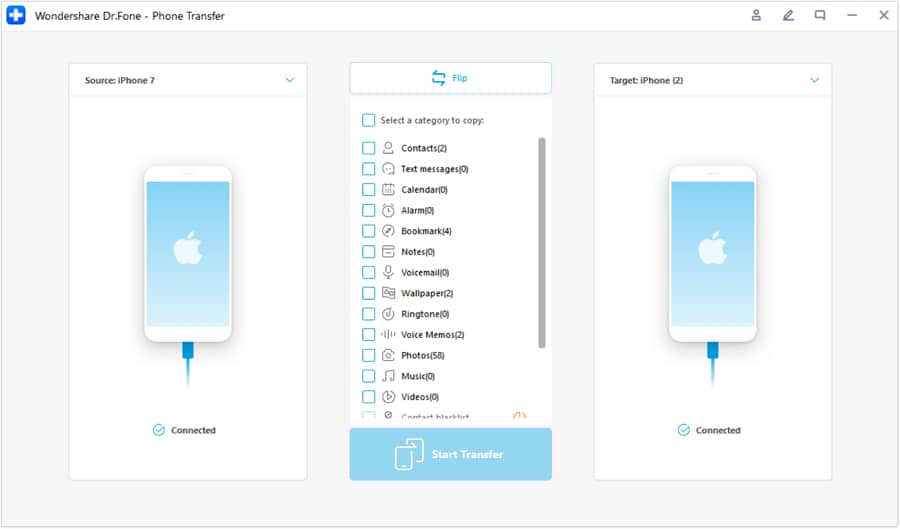
A list of transferable data types will appear. Check the boxes next to the data you wish to move, such as contacts, messages, photos, etc. You can transfer everything or make a custom selection.
Step 5 Initiate the Transfer
Click the "Start Transfer" button to begin the process. Ensure both devices remain connected until the progress bar indicates completion.
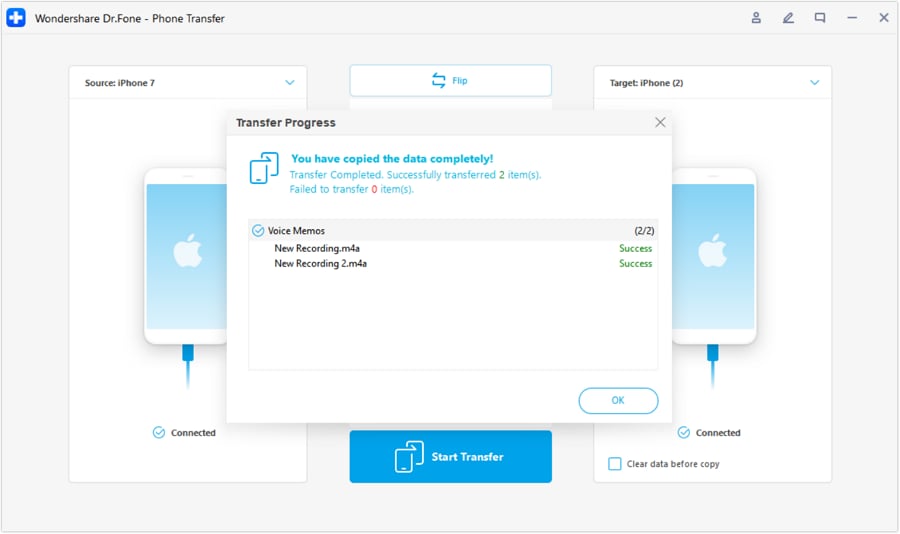
Once finished, you can disconnect your new device, which will now contain all the selected data from your old iPhone 16. For more detailed instructions, you can visit the official Dr.Fone transfer guide.
Conclusion
The iPhone 17 represents a significant evolution from the iPhone 16, offering a faster A19 chip, a brighter display, a more versatile camera system, and extended battery life. For iPhone 16 users who value peak performance and cutting-edge photography, the upgrade is a compelling proposition. Even if you're contemplating a switch to Android, the advancements in the iPhone 17 are worth considering.
Regardless of your choice, the transition to a new device should be seamless. Dr.Fone - Phone Transfer stands out as the definitive tool to manage your data migration. Whether you're moving from an iPhone 16 to an iPhone 17 or switching to Android, Dr.Fone removes the stress and ensures that your valuable data is transferred securely and completely, allowing you to enjoy your new phone without delay.




FAQ
1. Is it worth upgrading from the iPhone 16 to the iPhone 17?
The upgrade is highly recommended for users who prioritize performance, photography, and display quality. The A19 Bionic chip offers significant speed improvements, the camera system provides greater versatility (especially the 5x periscope zoom on Pro models), and the brighter display enhances outdoor usability. If these are key areas for you, the iPhone 17 is a solid investment.2. What are the main differences between the iPhone 16 and iPhone 17 cameras?
The biggest differences are the upgraded 16MP ultra-wide camera (from 12MP) for sharper wide shots, the new 5x periscope telephoto lens on Pro models for superior zoom, and the 16MP front camera with autofocus for clearer selfies. Additionally, Cinema Mode now supports 4K resolution on the iPhone 17.3. What is the easiest way to transfer all my data from an iPhone 16 to an iPhone 17?
While Apple's Quick Start is an option, the most comprehensive and reliable method is using a dedicated tool like Dr.Fone - Phone Transfer. It moves all data types, including app data, without relying on an internet connection, making the process faster and more complete than iCloud or Quick Start.4. Can Dr.Fone transfer WhatsApp chats from my old iPhone 16 to my new iPhone 17?
Yes, Dr.Fone - Phone Transfer is designed to migrate a wide range of data, including WhatsApp messages, attachments, and chat history. It ensures a seamless transfer of your conversations, which is often a pain point with other methods, especially when switching between iOS and Android.
 Add Wondershare Dr.Fone as a preferred source on Google