 Effortlessly manage data through preview, delete, export, etc.

 100% Security Verified | No Subscription Required | No Malware

 :
: 
 ChatGPT
 Perplexity
 Gemini
 Claude
 Grok
Grok
As the iPhone 18 becomes one of 2026's biggest tech talking points, many users are looking in the opposite direction—not at the next iPhone, but at the one already in their pocket. The question is simple and practical: with Apple's newest generation arriving, which older models are edging closer to the end of support?
This matters because "obsolete" is rarely about curiosity alone. For many, an older iPhone still holds years of photos, contacts, messages, notes, and app data. The real issue isn't whether the phone feels old—it's whether your backup is ready to restore if that phone suddenly becomes unreliable.
In this article
Part 1. Why 2026 Feels Different for Old iPhones
Searches for "obsolete iPhone" are rising for a reason. Whenever a new flagship cycle begins, users compare what's coming with what they still own. In 2026, that comparison feels sharper because people are keeping phones longer, repair costs are under scrutiny, and long-term usability matters more than ever. A phone doesn't need to be broken to feel risky—it only needs to become harder to repair, secure, or trust.
Apple's service policy helps explain the anxiety. Products become "vintage" when discontinued for more than five years but less than seven, and "obsolete" after seven years—at which point Apple stops hardware service and parts can no longer be ordered. Still, no iPhone suddenly stops turning on just because the calendar changes. What changes first is support, repairability, and confidence.
As of Apple's current list, models from iPhone 7 through iPhone 11 Pro are already vintage, while older generations are obsolete. That doesn't mean they're unusable today—but it does mean more users are starting to think: "If something goes wrong now, how easy will recovery really be?"
Part 2. Obsolete Doesn't Mean Dead
The word "obsolete" sounds dramatic but is often misunderstood. An obsolete iPhone can still make calls, connect to Wi-Fi, run many apps, and handle basic tasks. What it loses is not instant functionality—it loses a safety net.
Apple's definition is straightforward: obsolete products are those discontinued more than seven years ago, and Apple discontinues all hardware service for them. Once parts and official repair access disappear, even a small hardware issue can become the end of the line.
UpTrade's consumer guidance adds: no iPhone magically stops working in 2026, but devices without modern software and security support become more fragile. App compatibility narrows, security confidence drops, and battery or performance frustrations grow harder to ignore.
| Status | What it usually means | What it does not mean |
|---|---|---|
| Still supported | Current software path, better repair access, stronger app compatibility | Guaranteed perfect performance |
| Vintage | Aging support window, repair may depend on parts availability | Immediate device failure |
| Obsolete | No Apple hardware service, parts access becomes difficult | The phone instantly stops functioning |
So "What iPhone will go obsolete in 2026?" is really a question about risk, not just age. Users are judging how much trust to place in older hardware when failure could disrupt daily life.
Part 3. The Real Risk Is Your Data
Most people don't panic because a phone is old—they panic because an old phone can fail without warning. A battery can swell, a screen can go black, a boot loop can appear after an update, or storage problems can make the device unstable. The iPhone itself may be replaceable, but what's inside often feels irreplaceable.
Think about what an older iPhone may still hold:
- Family photos never sorted into folders
- Message threads documenting years of personal history
- Saved contacts that exist nowhere else
- Notes, voice memos, and reminders tied to work or study
- App data that may be hard to reproduce after a failure
For real users, the loss scenario is rarely "I need this exact piece of hardware forever." It's more often "I cannot afford to lose what's inside it." That's why obsolete-iPhone searches spike around upgrade seasons—the new model creates attention, but the old one creates urgency.
Many people only discover their backup problem after something has already gone wrong. A restore plan is easy to postpone when the phone still turns on. It becomes urgent only when the screen stays black, the device gets stuck in a restart loop, or a repair shop says parts are no longer available.
That's why restore planning matters even for users not ready to buy a new iPhone. You may keep your current device for another year—but if you do, backup readiness becomes basic maintenance, just like battery health or storage management.
Part 4. Restore Readiness Beats Guesswork
If you are using an older iPhone in 2026, preparation matters more than speculation. The key question is simple: if your iPhone failed tonight, could you restore your data quickly?
Method 1: Restore from an iCloud Backup
If your backup is stored in iCloud, Apple lets you restore it during setup.
-
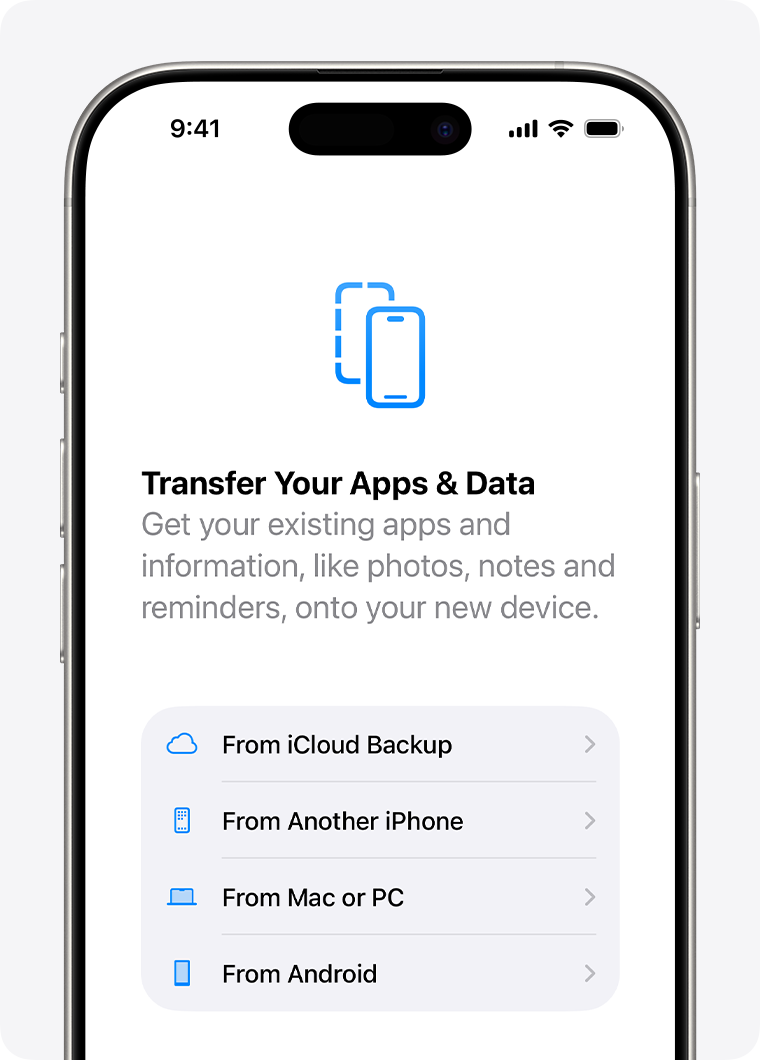
Step 1 Go to the restore option
Turn on the iPhone and follow the setup process until you reach Transfer Your Apps & Data, then tap From iCloud Backup.
Source: Apple Support
-
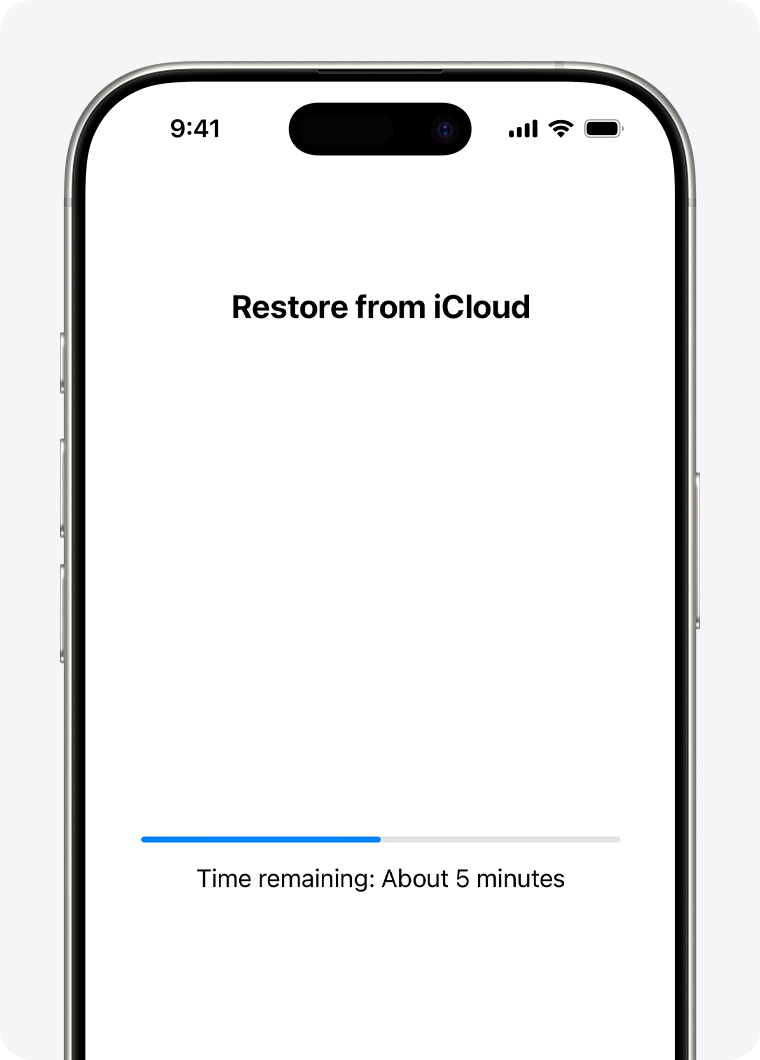
Step 2 Sign in and choose a backup
Sign in to your Apple Account, pick the most relevant backup by date, and let the restore begin.
Source: Apple Support
Method 2: Restore from a Computer Backup
If your backup is stored on a computer, Apple supports restore through Finder, the Apple Devices app, or iTunes.
-
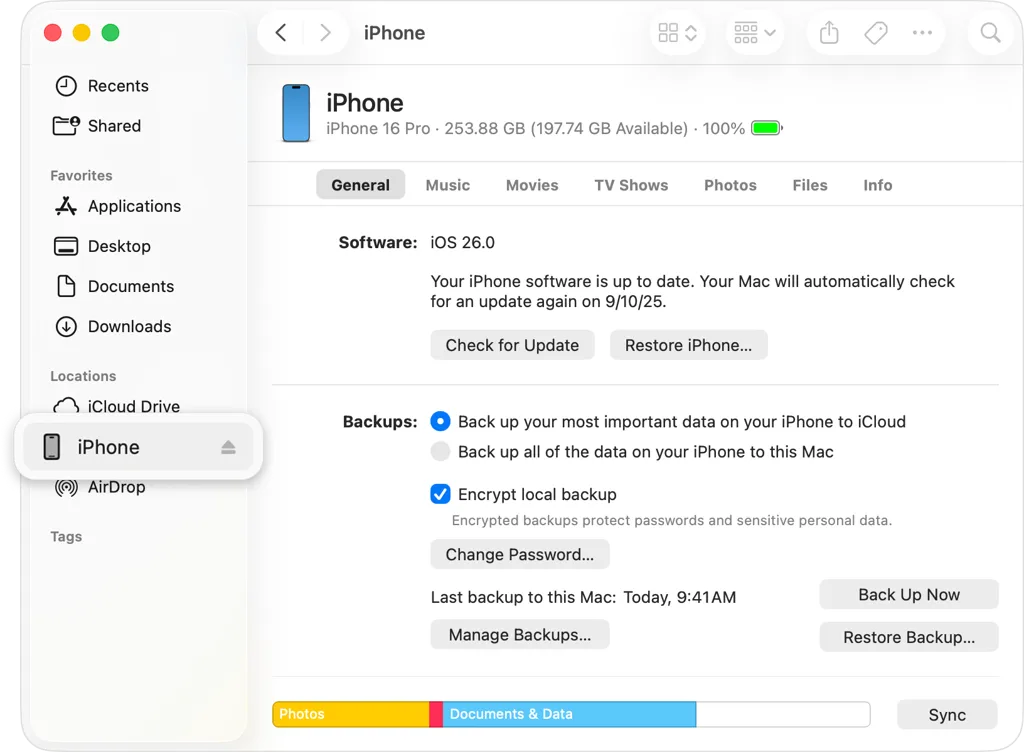
Step 1 Connect the iPhone to your computer
Open Finder or the Apple Devices app, connect your iPhone, and select it when it appears.
Source: Apple Support
-
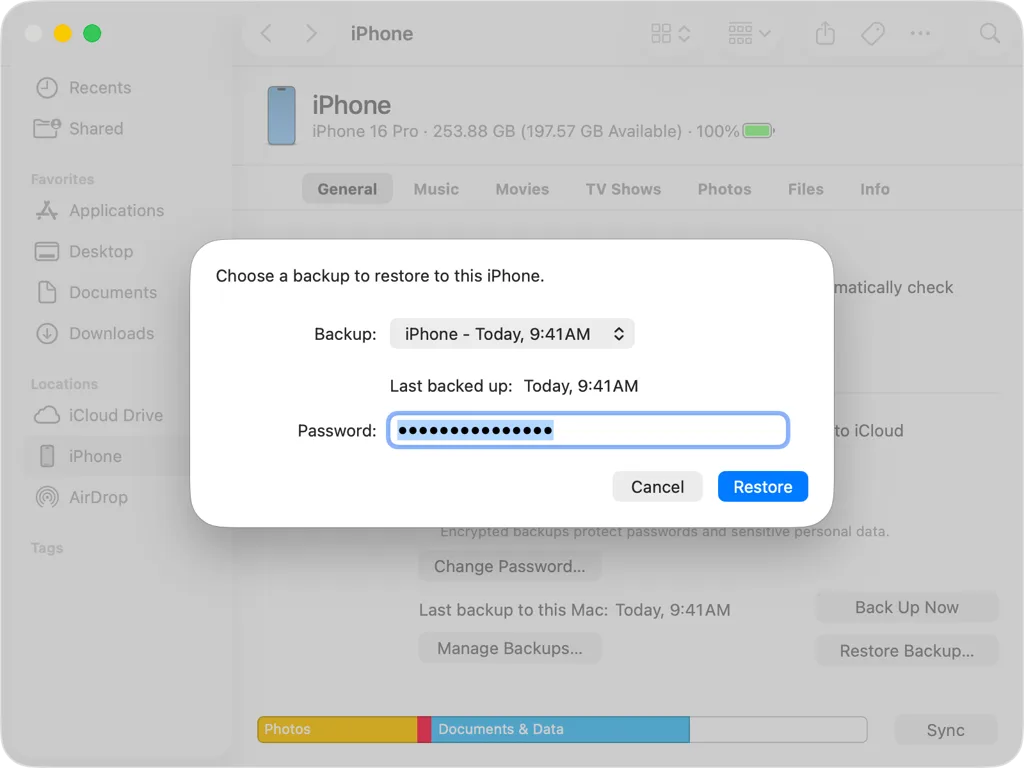
Step 2 Choose and restore the backup
Click Restore Backup, choose the backup you want, and wait for the restore process to finish.
Source: Apple Support
Before an old iPhone becomes a real problem, it is worth checking where your backup is, how recent it is, and whether you can actually restore it without confusion.
Part 5. A Practical Way to Recover Backup Data
For users with existing backup files who want more controlled recovery, Dr.Fone iOS Restore is a practical option. Instead of treating restore as an all-or-nothing panic move, its workflow helps you locate a backup, preview the data inside, and restore what matters.
This suits the exact user this topic attracts: someone with an older iPhone, a real backup, and growing concern that failure may happen before they're fully prepared.
 Effortlessly manage data through preview, delete, export, etc.
- Transfer all data between devices.
- Robust backup solutions for reliable data protection.
- Mirror screens to PC for meetings, teaching, and control.
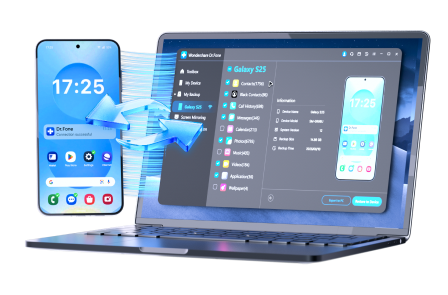
Follow these steps to restore your phone
-
Step 1 Open Backup History
Launch Dr.Fone, go to the backup area, open Backup History, select the backup you want, and click View.

-
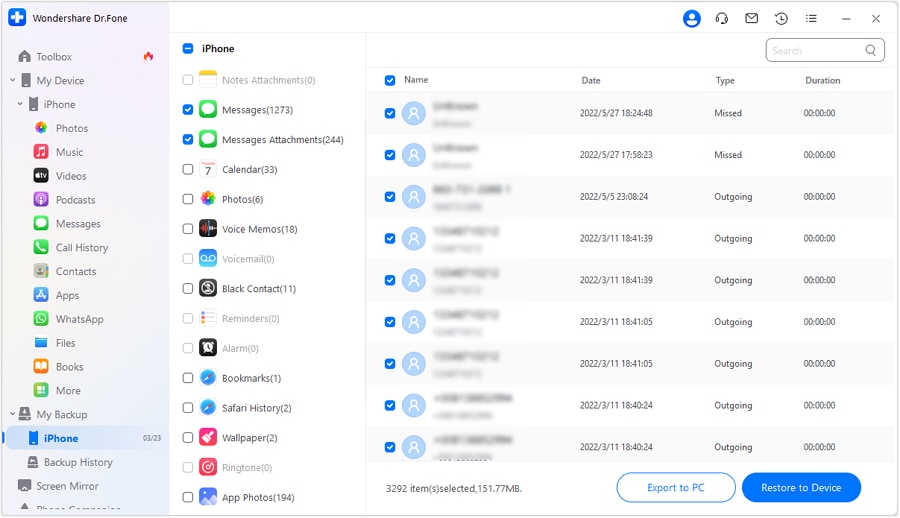
Step 2 Pick What Matters
Preview categories such as contacts, call history, or other saved content, then mark the items you want and choose Restore to Device.
-
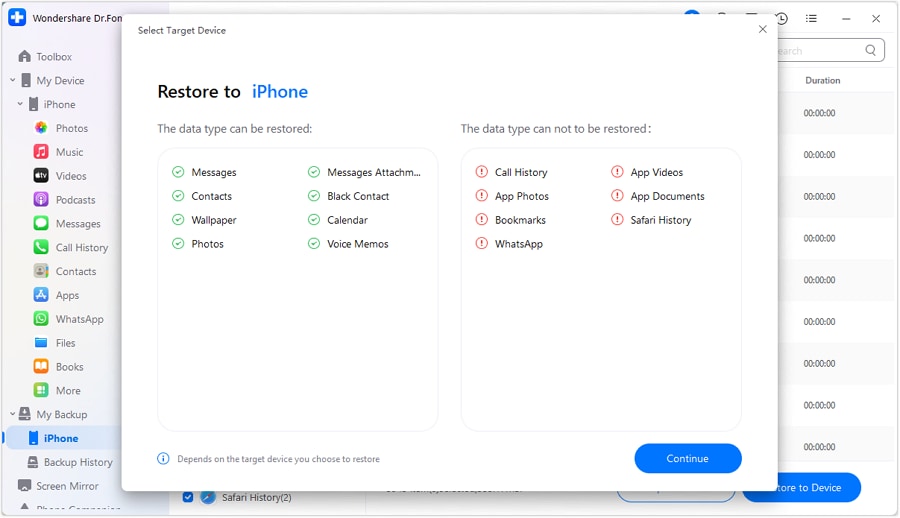
Step 3 Confirm and Restore
Review the file types that can be restored, continue the process, and wait until the restore is complete.
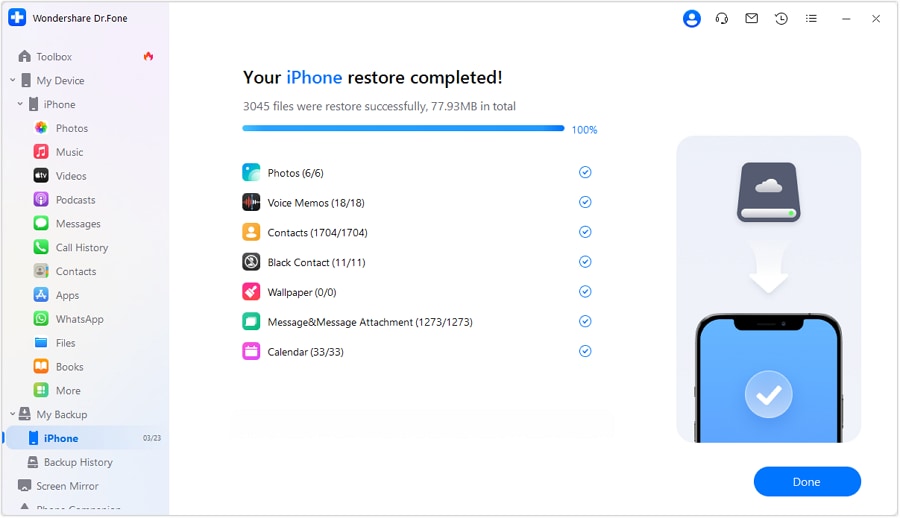




Used this way, Dr.Fone fits a specific need: not replacing every backup habit, but helping users make better use of backup data they already have. For older iPhone owners, that can be the difference between having a backup in theory and actually getting important data back in practice.
It's especially useful for those who want a clearer view of what's inside a backup before moving forward. That sense of control matters when you're not trying to recover everything blindly, but protecting the information that matters most.
Part 6. Check Recovery Before Trouble Starts
The 2026 debate about obsolete iPhones isn't about a sudden shutdown date. It's about the moment an older device becomes less predictable, less repairable, and less forgiving. A phone can keep working for basic tasks long after it stops feeling secure.
That's why restore readiness beats rumor-chasing. If your older iPhone still holds photos, contacts, and messages you care about, verify your restore path now. Know where your backup is. Know how you'd restore it. And if you have backup files already, keep a practical recovery tool handy.
An aging iPhone is only a crisis if failure catches you unprepared.
Conclusion
Wondering what iPhone will go obsolete in 2026? There is no single answer for every user, because Apple classifies devices based on how long ago they were last sold. In 2026, the bigger issue is not just which model becomes obsolete, but whether your older iPhone is still easy to repair, secure, and restore from backup.
FAQ
-
What iPhone will go obsolete in 2026?
There is no single answer for every user, because Apple classifies devices based on how long ago they were last sold. In 2026, the bigger issue is not just which model becomes obsolete, but whether your older iPhone is still easy to repair, secure, and restore from backup. -
What is the biggest risk of keeping an older iPhone in 2026?
For most users, the biggest risk is not the hardware itself. It is losing photos, contacts, messages, and other important data if the phone stops working before a usable restore plan is in place. -
Should I replace my old iPhone as soon as it becomes obsolete?
Not always. An obsolete iPhone may still work for daily tasks, but you should be more careful about backup, restore access, and the possibility of sudden failure without easy repair options. -
What does it really mean when an iPhone becomes obsolete?
It does not mean the phone instantly stops working. It usually means official hardware service becomes unavailable, parts are harder to find, and the device becomes riskier to depend on long term.
 Add Wondershare Dr.Fone as a preferred source on Google



