 Effortlessly manage data through preview, delete, export, etc.

 100% Security Verified | No Subscription Required | No Malware

 :
: 
 ChatGPT
 Perplexity
 Gemini
 Claude
 Grok
Grok
Imagine unboxing your brand-new Galaxy S26, only to find that your favorite messaging app will be missing after July 2026. For years, Samsung Messages has been the reliable hub for daily chats, but the digital landscape is shifting now. As Samsung moves toward a unified RCS experience, many users are facing the July 2026 showdown with questions about their saved memories.
Whether you're preparing for a device upgrade or simply want to stay ahead of the curve, understanding this transition is important. Therefore, this guide explains why Samsung Messages is shutting down and how to securely migrate your threads using reliable backups and recovery tools like Dr.Fone.
In this article
Part 1. Why Samsung Messages Changes Are Happening
According to Samsung, Samsung Messages is Samsung's built-in texting app, but it will be discontinued in 2026, and users will shift towards Google Messages. It is said that this is happening because the app will now be more advanced, with better security, AI features, and cross-device messaging. If you prefer to know more about this shift, review the mentioned reasons for Samsung Messages end of service 2026:
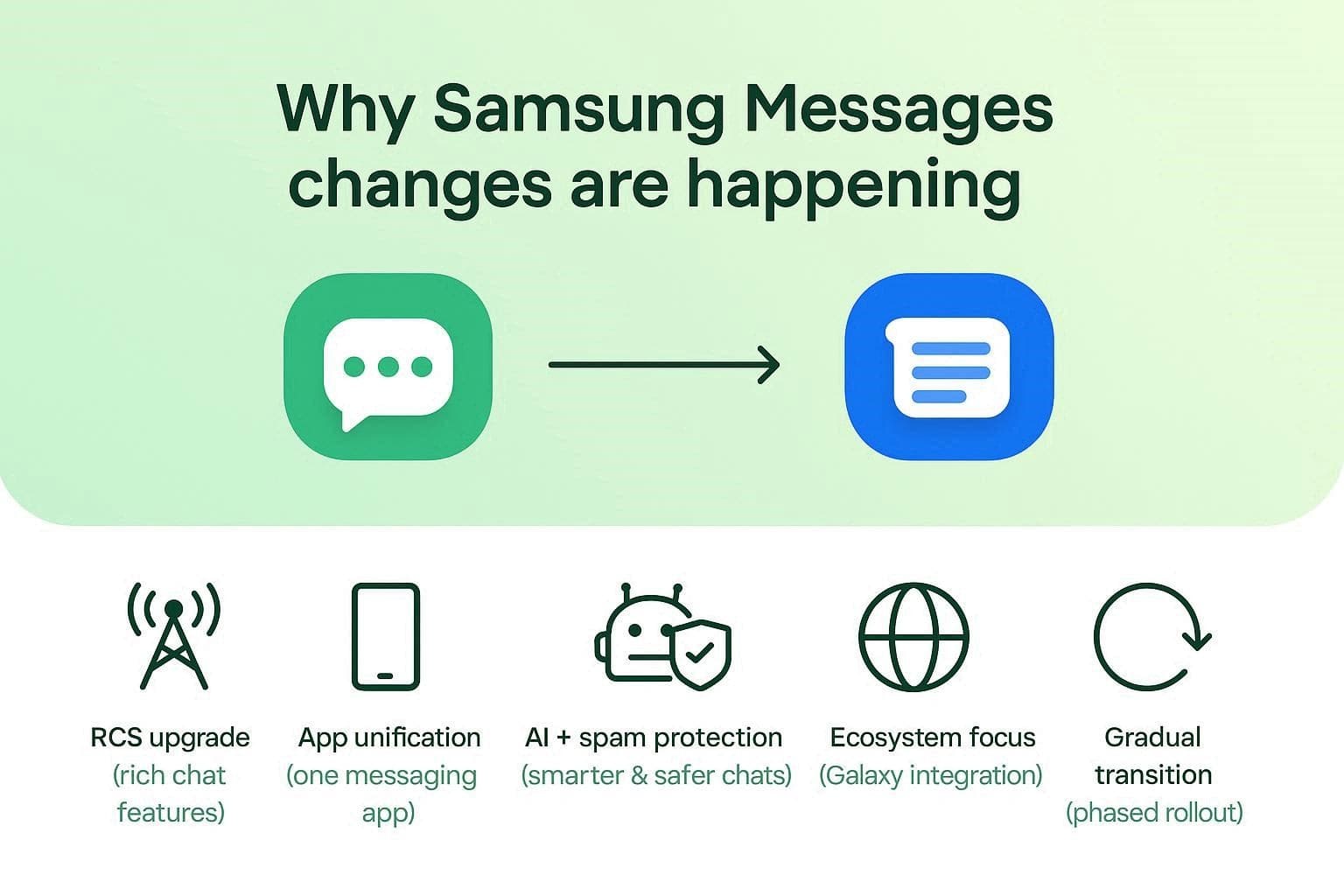
1. Shift to Google Messages (RCS Standard): Samsung is moving users to Google Messages, and the shift will bring features such as read receipts, typing indicators, improved group chats, and high-quality media via RCS. Thus, this ensures a consistent messaging experience across devices only when the RCS option is available and turned on (Availability varies by region). Users can also get suggested replies, reminders, and nudges to enjoy the spam protection feature.
2. Less Confusion, Fewer Duplicate Apps: Galaxy phones used to have both apps, which confused users and split development between two similar services. Now, Samsung simplifies things by keeping only one default app, which reduces clutter and maintenance.
3. Better AI, Security, and Spam Protection: Google Messages include smart replies, AI tools, and strong spam/scam filtering built in. By Samsung Messages being discontinued and switching, Samsung avoids rebuilding these features and delivers better protection faster.
4. Focus on Samsung's Unique Features: Instead of competing on basic texting, Samsung is focusing on its own ecosystem, such as Galaxy and One UI features. This lets the company invest in areas where it can stand out instead of duplicating Google's work. With features like Photomoji, users will be able to create their own emojis, letting them personalize the chatting experience.
5. Edit and Reimagine with Google Messages: With the Remix option in Google Messages, users can enhance and transform images using Gemini-powered features. Through this, you can send remixed images to any phone, including iPhones, if both devices are using Google Messages.
6. Introduce Exceptional Chat Features: Some regions and businesses still rely on Samsung Messages, so the shutdown is being phased in. Once you shift to Google Messages, you can record a 3-second video and customize the chat experience with different colors and effects. Hence, you can leverage all these features and shift from phone to tablet during the same conversions.
Part 2. What Happens to Your Existing Messages?
Having this shift, many users are now wondering is Samsung Messages going away. Ideally, when this shutdown occurs, your normal SMS/MMS texts will remain saved because they are stored in Android's system. When you switch to Google Messages, it reads the same data, so your chats, timestamps, and history appear automatically.
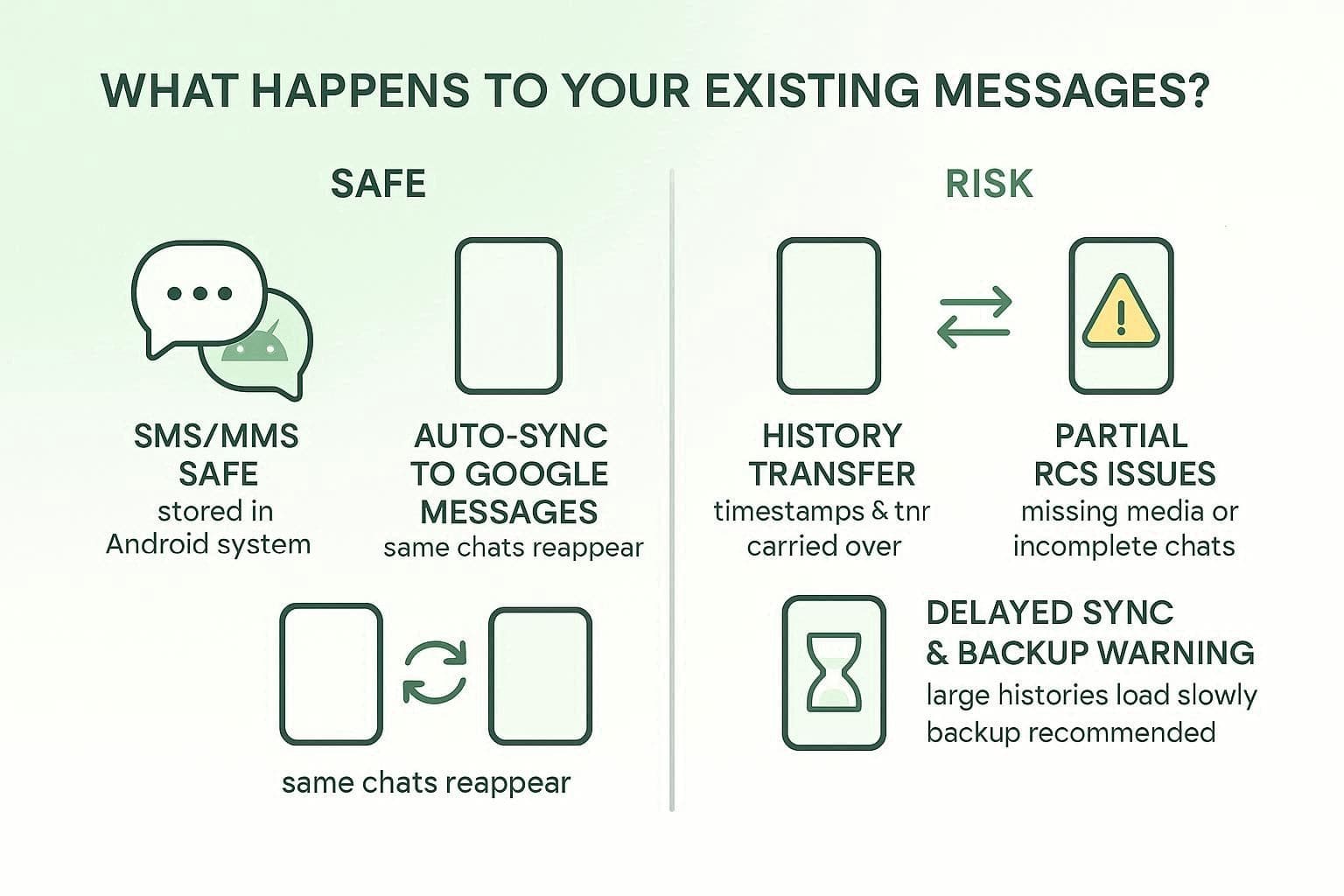
However, Samsung says that RCS chats and advanced features may not transfer perfectly. Hence, some conversations may look incomplete or older media may be lost if backup or sync wasn't enabled. Additionally, older Galaxy devices or watches may show missing chats. In fact, large message histories can sometimes take time to fully appear, so backing up first is the safest step.
Even though this shift is bringing new, better AI features, it feels like a push for most users, as most of them state that:

I feel like I'm being pushed to switch from Samsung Messages to Google Messages, even if I don't want to. While it works fine, it's disappointing to lose choice, and it makes Galaxy phones feel more like Pixel devices with just different hardware.
- r/samsunggalaxy
Part 3. How to Back Up Samsung Messages Before Transition
If you want to migrate RCS chats and advanced features completely before the Samsung Messages shutdown date, this section is for you. Since the backup is the right option, many users have reported issues, saying that:
I tried transferring my messages with Samsung Smart Switch, but they didn't move when using Google Messages. I had to switch back to Samsung Messages and retry, and then it worked, so it's a useful backup method.
- TomatoKind9189
Since there will be no switch-back option after July 2026, here are some options you can try to keep regular and RCS chats safe:
Method 1: Samsung Smart Switch (Recommended for New Phone)
As a built-in, native option, Samsung Smart Switch lets you easily move your messages, contacts, photos, apps, and settings to a new Galaxy phone. Hence, everything appears just as before, rather than requiring a separate restore. Additionally, it offers cable, wireless, and PC transfers, and works as a local backup tool. So, to know how to switch from Samsung Messages while keeping chats safe, review the mentioned guide:
-
Step 1
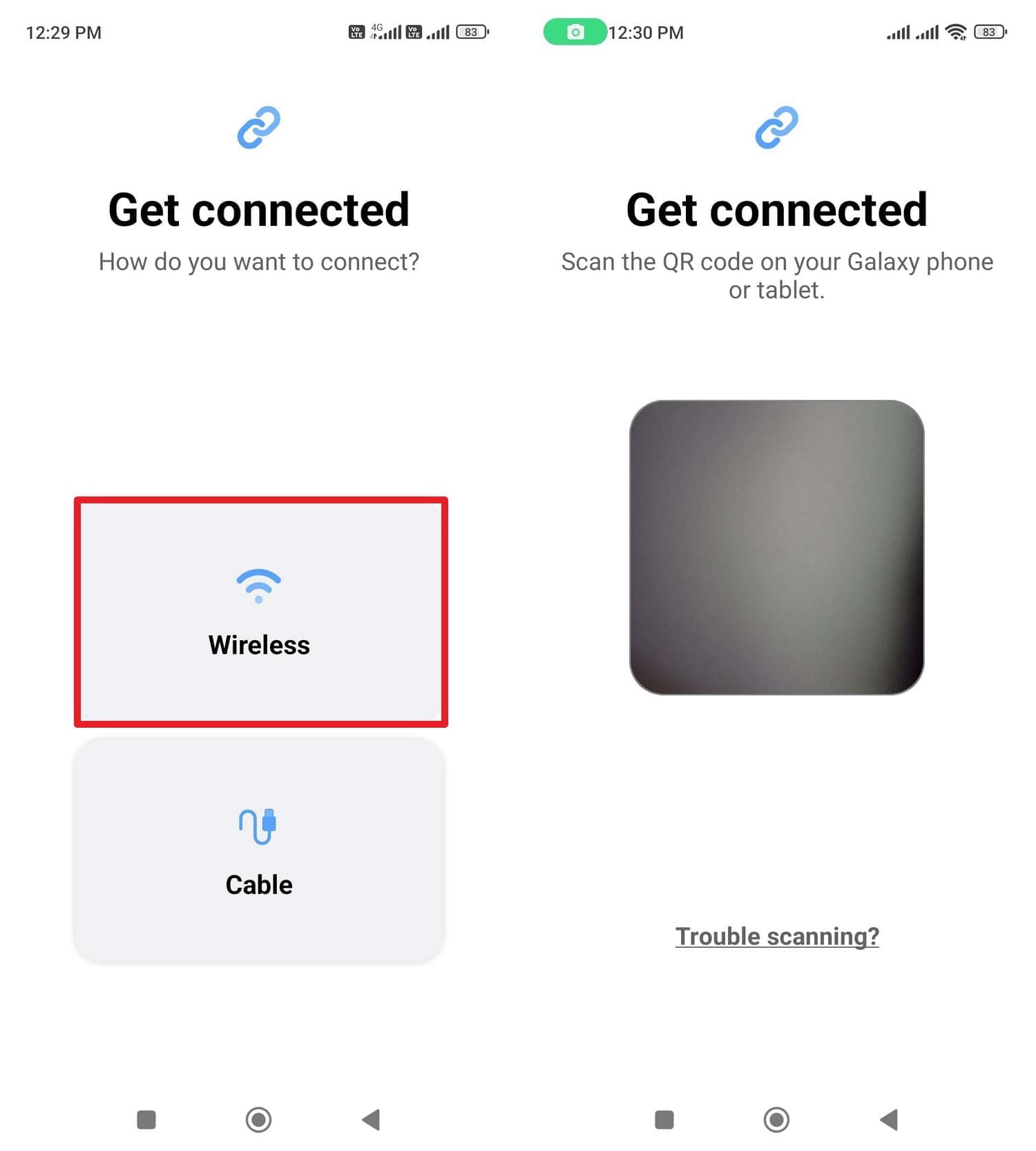
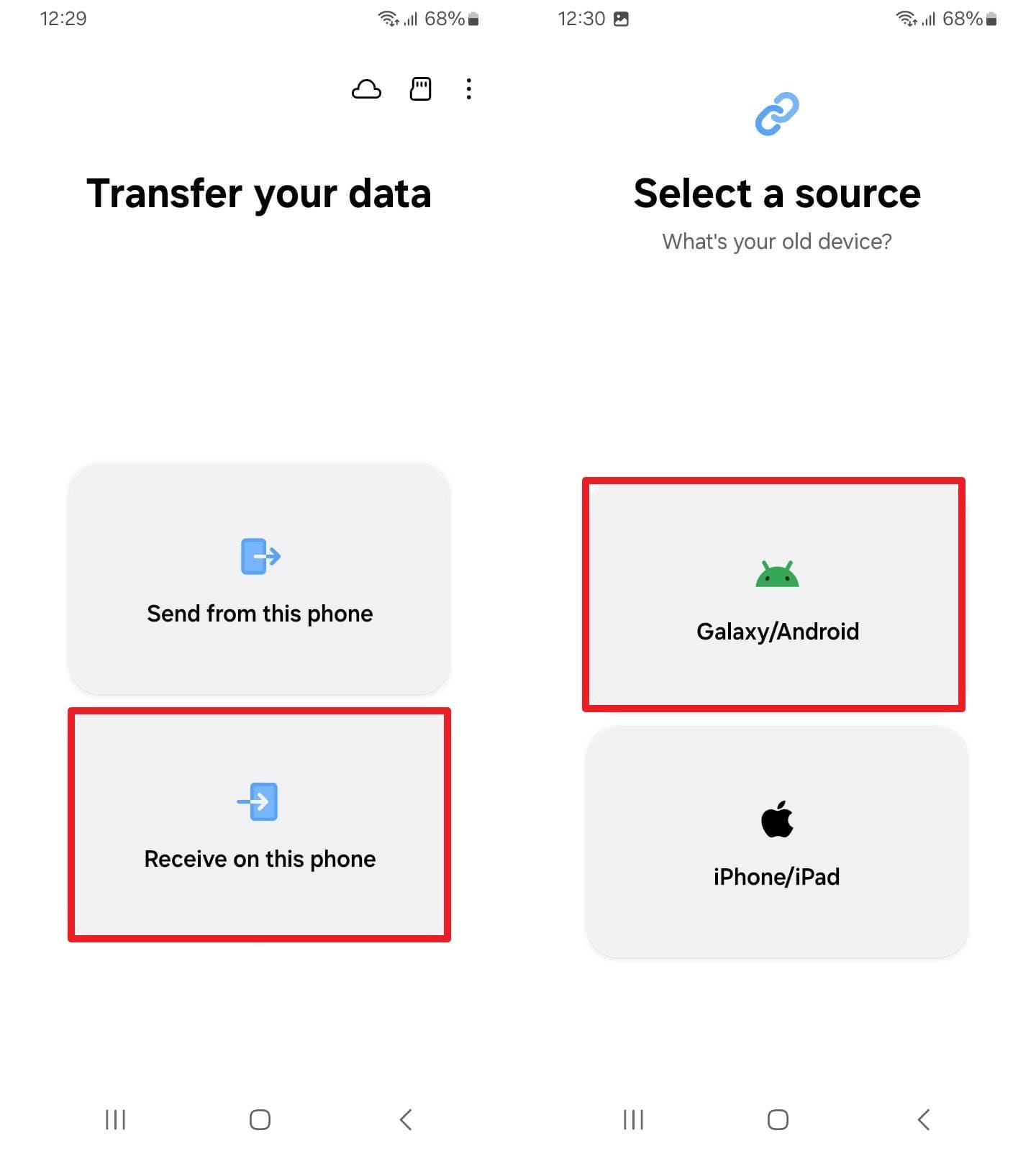
If you are moving data from one Android phone to another, install the app on both phones. After that, tap the "Wireless" option on the source device, then open the QR code scanner.
-
Step 2
Now, pick the "Receive On This Phone" option on the receiving device and choose the "Galaxy/Android" option.
-
Step 3
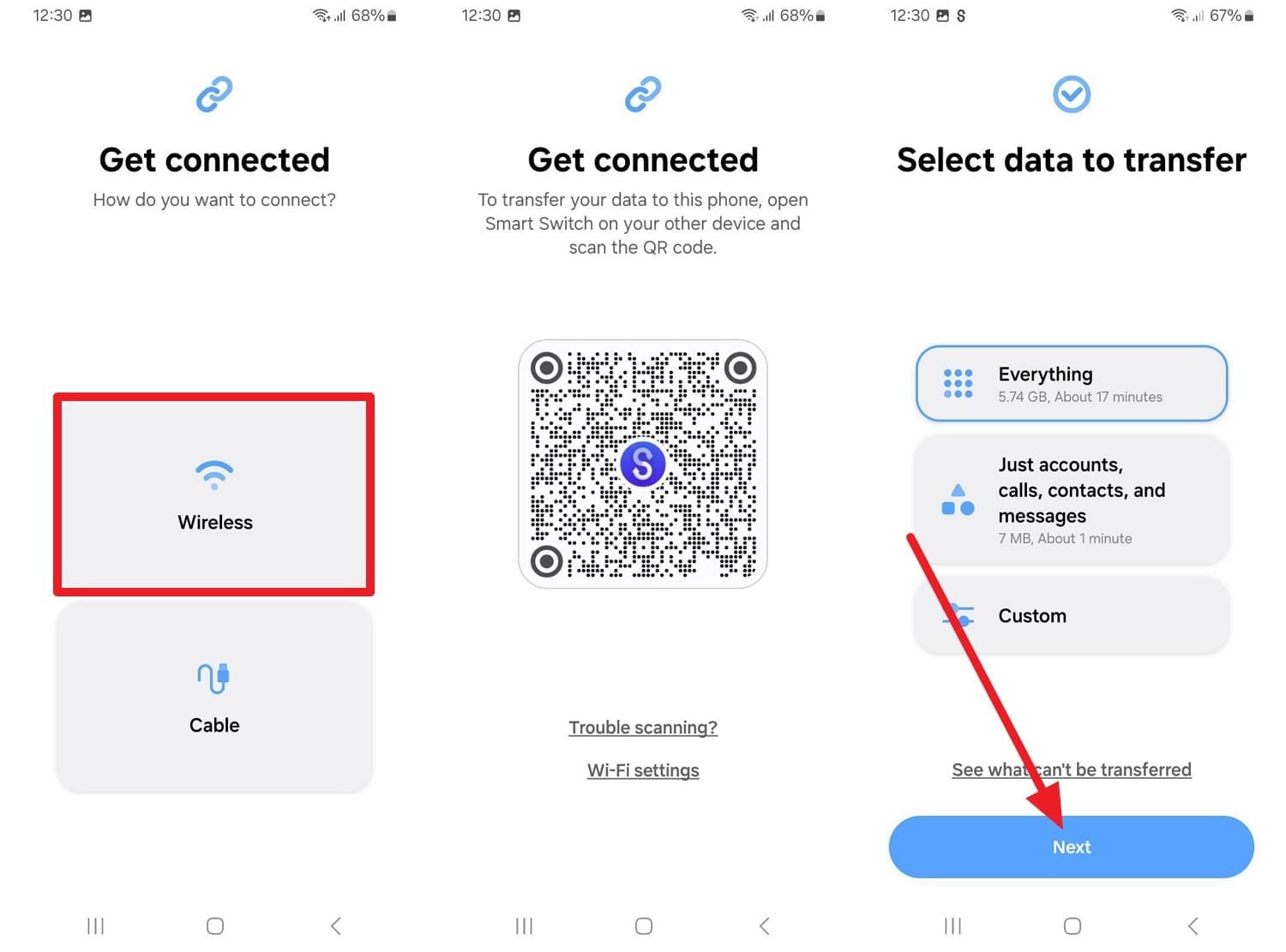
Select the "Wireless" option, and as the QR code scanner appears, scan it from the source device. Choose what you want to move by picking the "Just Accounts, Call, Contacts, and Messages" or "Custom" option and tapping "Next" to start the transfer.
Method 2: Samsung Cloud (Best for Backup & Sync)
In addition to the app, Samsung Cloud also makes it easy to back up your Samsung Messages, since it's built into Galaxy phones. Furthermore, it comes with simple settings and automatic backups that protect your chats in the background. After July 2026, when Samsung Messages is shutting down, you can easily restore your message history or sync data across Samsung devices. Regarding the usage, here is a simple, detailed guide for you:
-
Step 1
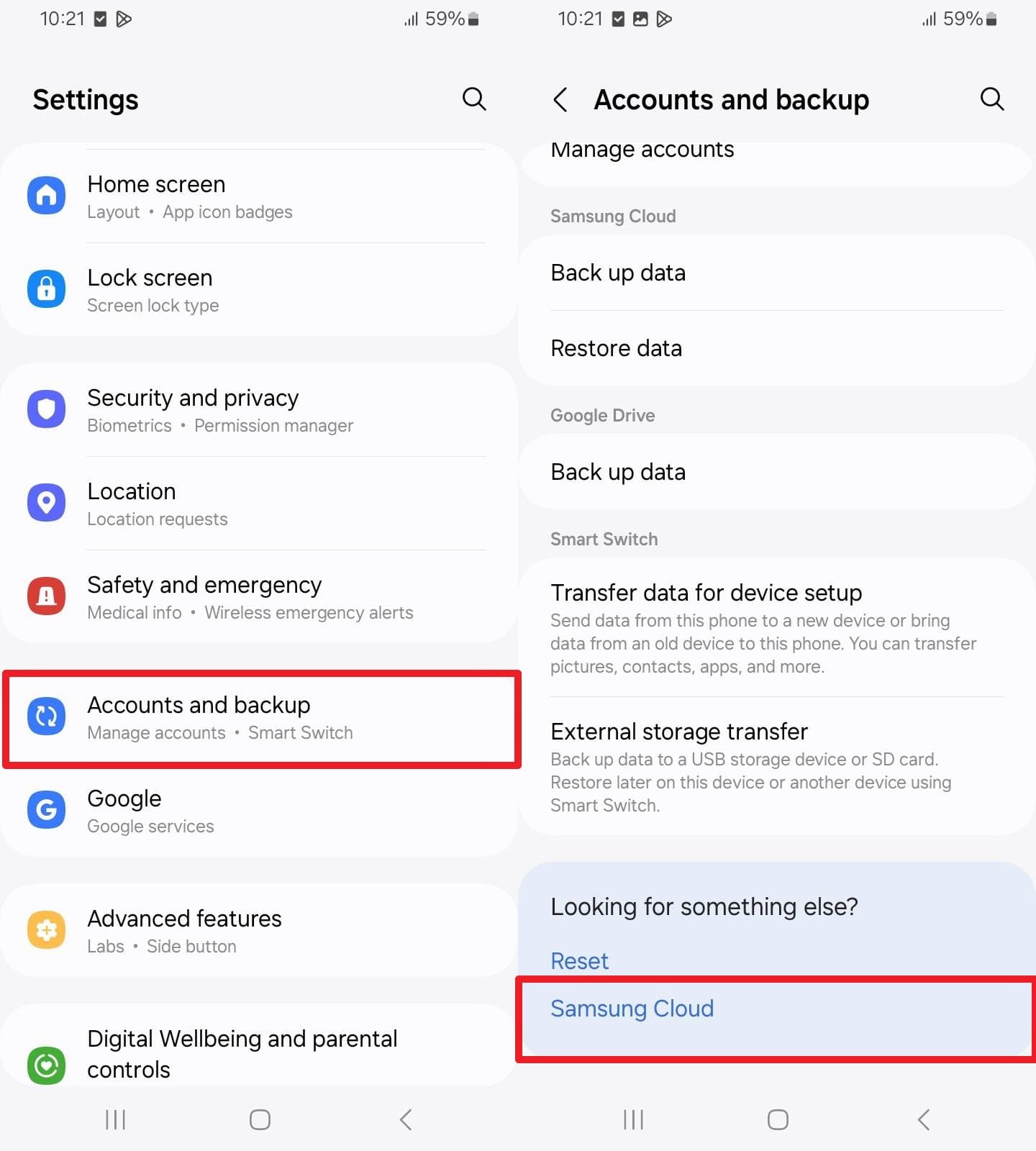
In the settings, choose the "Accounts and Backup" option and pick the "Samsung Cloud" option.
-
Step 2
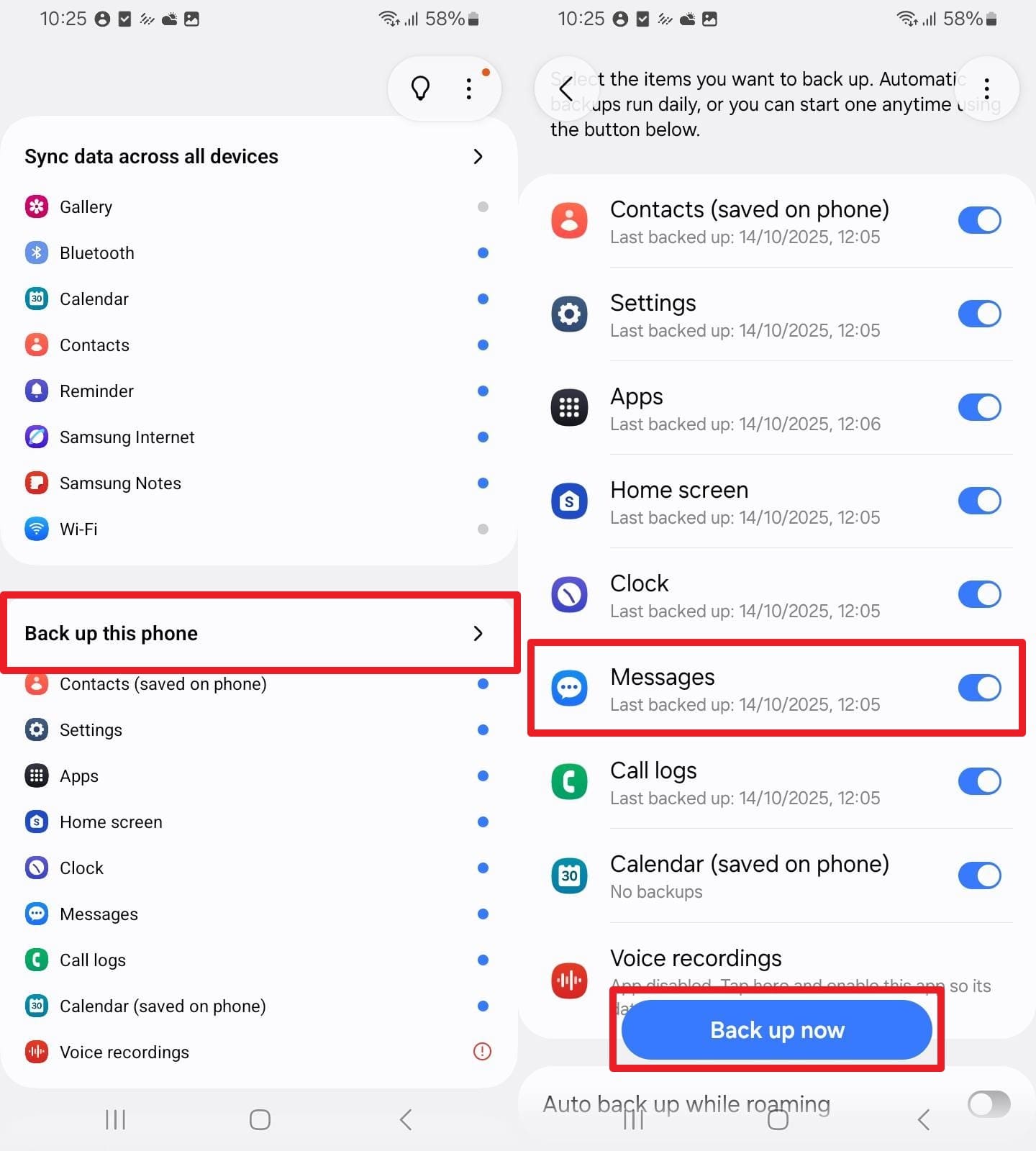
After that, select the "Backup This Phone" option, toggle the "Messages" option, and choose "Back Up Now."
-
Step 3
This will create the cloud backup that you can later restore.
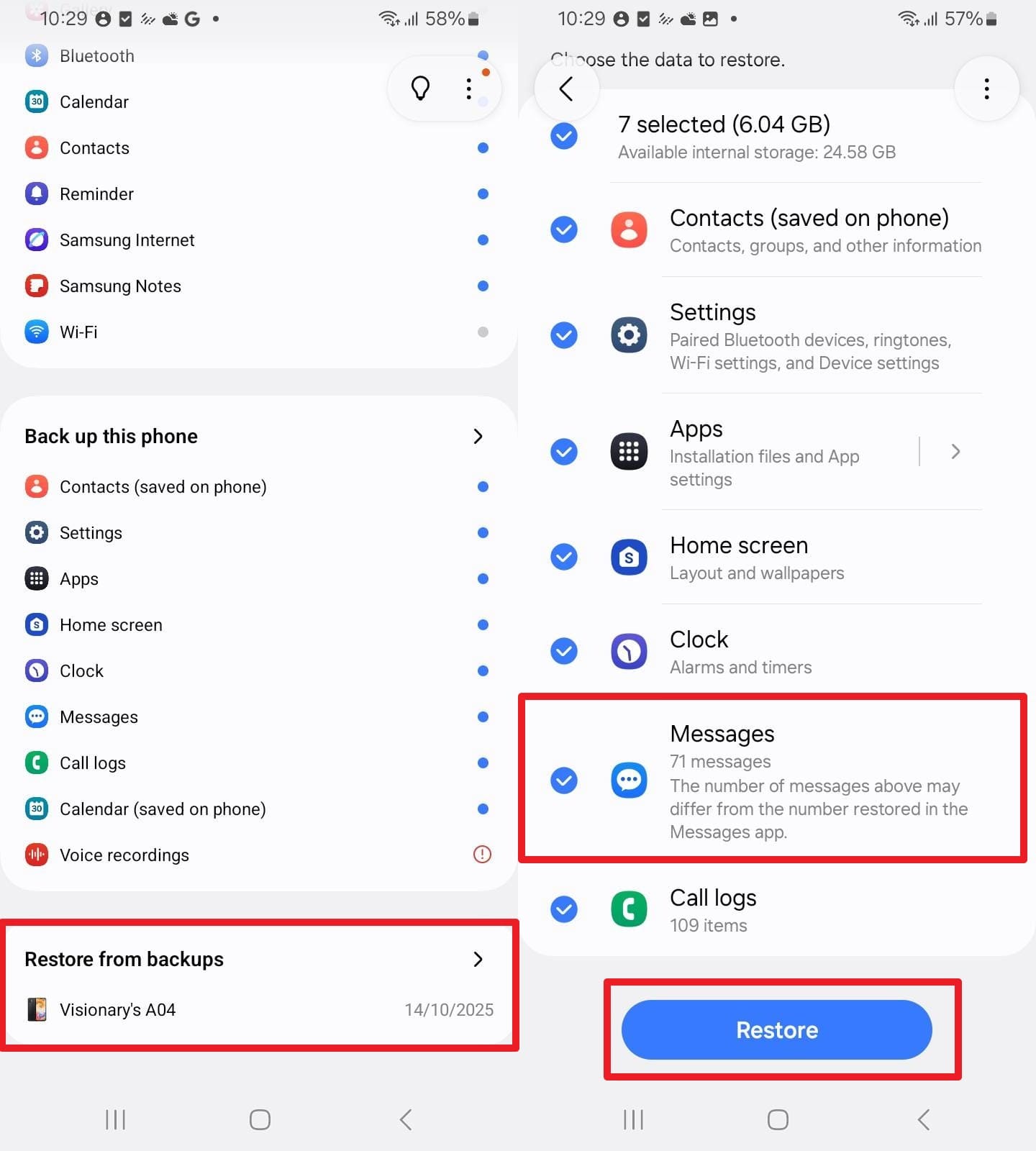
Method 3: Google Drive Backup (Backup by Google One)
Before reaching the Samsung Messages shutdown date, you can also use the Backup by Google One. This automatically saves SMS/MMS messages, call history, and settings to your Google account, so you can restore them when setting up a new device or resetting it. Nonetheless, it's built into Android and works across different brands, keeping all data safe in the Cloud.
Since it works as a full-device restore, it requires enough Google Drive storage and a stable connection. Once the conditions are met, here is how it can be used to back up Samsung Messages:
-
Step 1
In the settings, select "Google," then tap the profile icon to choose "Backup" in the "All Services" tab. After that, check the option for "Other Device Data" and press the "Back Up Now" button.
-
Step 2
Now, ensure the process finishes so your message history is saved in your Google account before Samsung Messages is shut down.
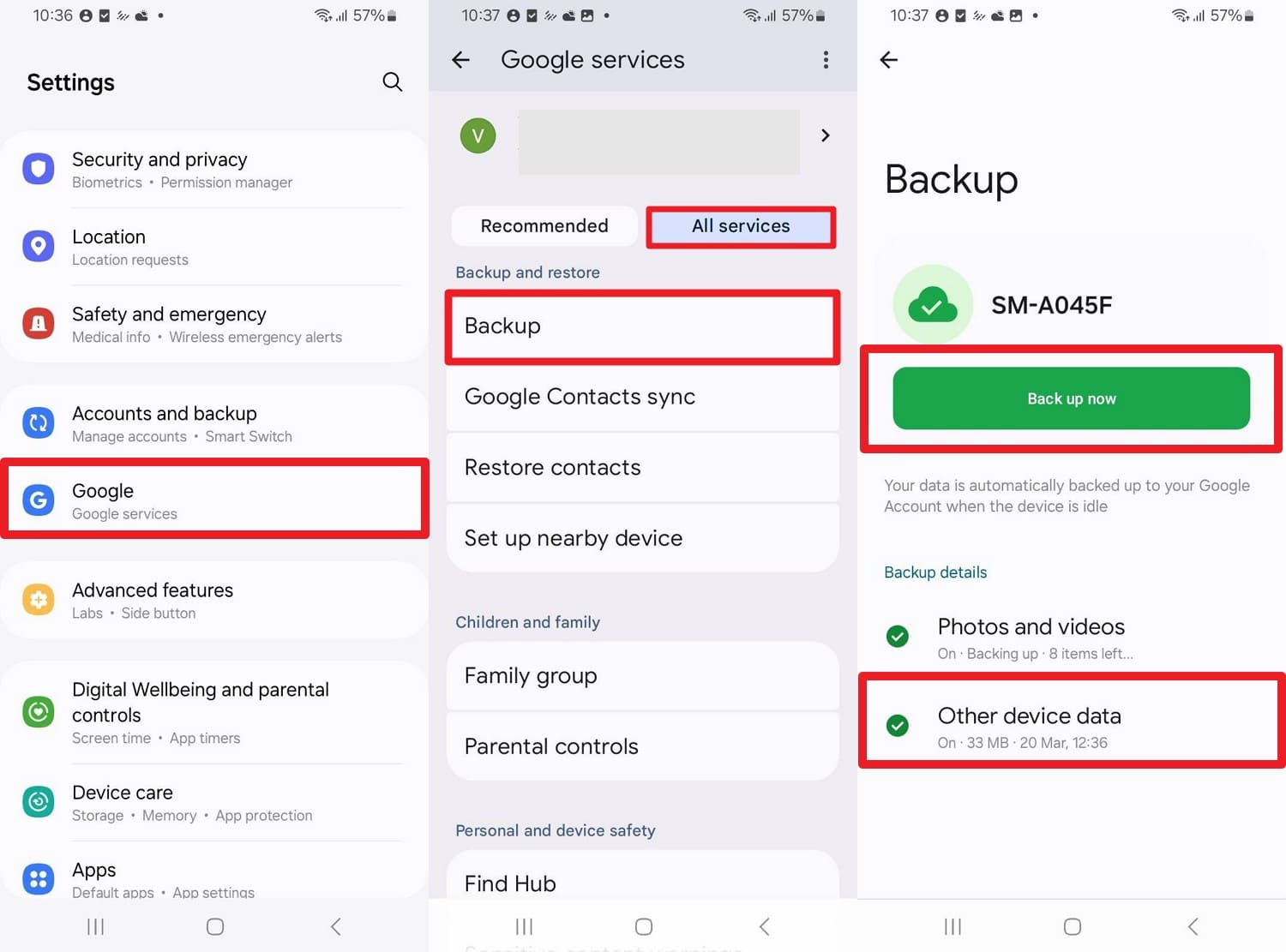
Method 4: Dr.Fone - Phone Backup (Android) for Local Backup
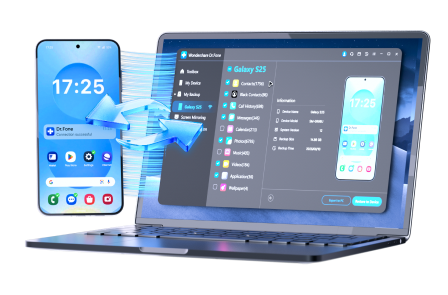
With Samsung Messages being discontinued, you can also use backup tools like Dr.Fone - Phone Backup to back up and restore your selected Android data. Not just RCS or regular messages, you can also use it to secure WhatsApp data wirelessly without incremental updates. For restoration, it can be done on both Android and iOS, covering iCloud or iTunes backups.
Overall, you can back up almost 10 types of Android data and restore it across 8000 Android devices. Users can control backup and restore with a preview and selective-pick option. Once restored, users can also save their Samsung Messages to a PC, which can be done in 2-3 steps. In short, such tools are intuitive options for beginners who don't know how to use Smart Switch or Samsung Cloud.
 Effortlessly manage data through preview, delete, export, etc.
- Transfer all data between devices.
- Robust backup solutions for reliable data protection.
- Mirror screens to PC for meetings, teaching, and control.
Guide to Backup and Restore Samsung Messages with Dr.Fone
To learn how to switch from Samsung Messages while keeping a secure backup, this recovery tool is tested in this section. So, review the mentioned guide for backup and restore, and learn how you can keep your Samsung Messages safe before July 2026:
-
Step 1 Choose Messages to Create Backup with Dr.Fone
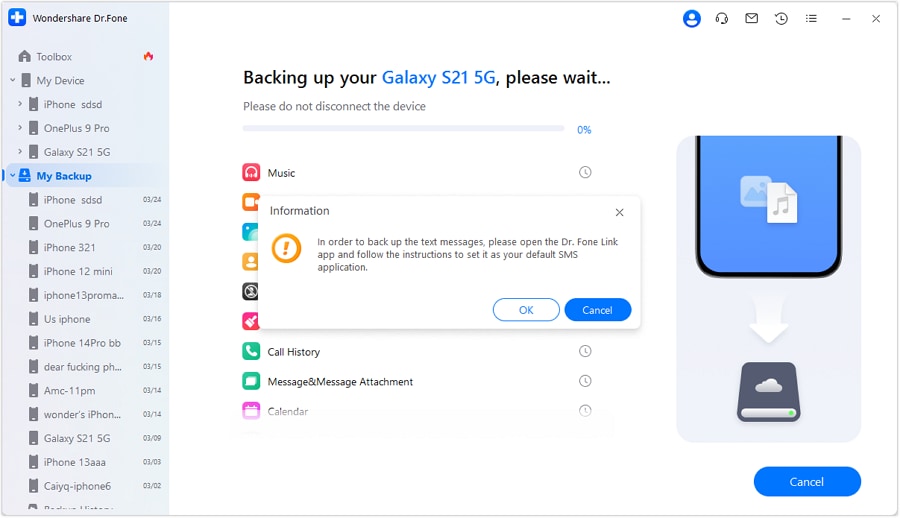
Connect the Android device, then in the "My Backup" section, tap the "Back Up Now" button after choosing "Messages." Now, open the Dr.Fone Link app and set it as the default SMS application, and once it's done, choose "OK."
-
Step 2 Open and Review the Backup Folder
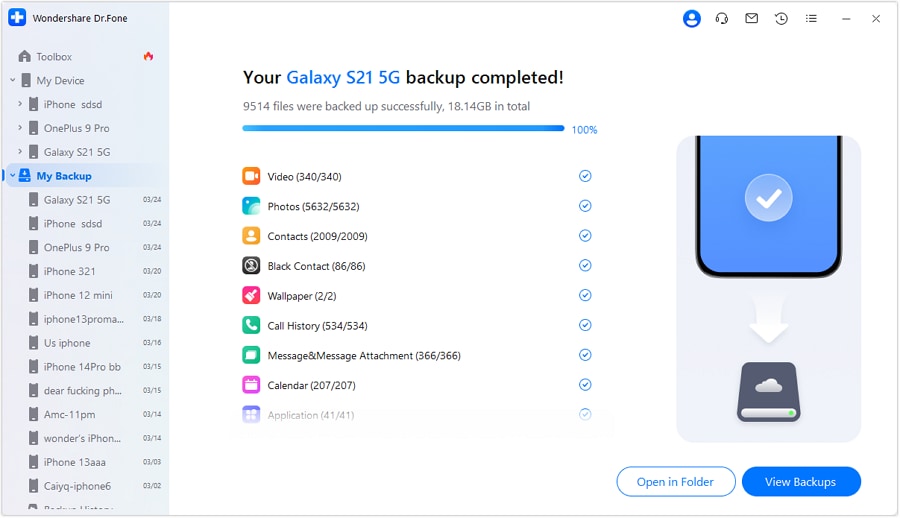
After that, the backup will start, and when the prompt appears, set the SMS application on Android to default and tap "OK." Review the created backup by choosing the "Open in Folder" option or "View Backups."
-
Step 3 Restore the Samsung Messages to PC or Device
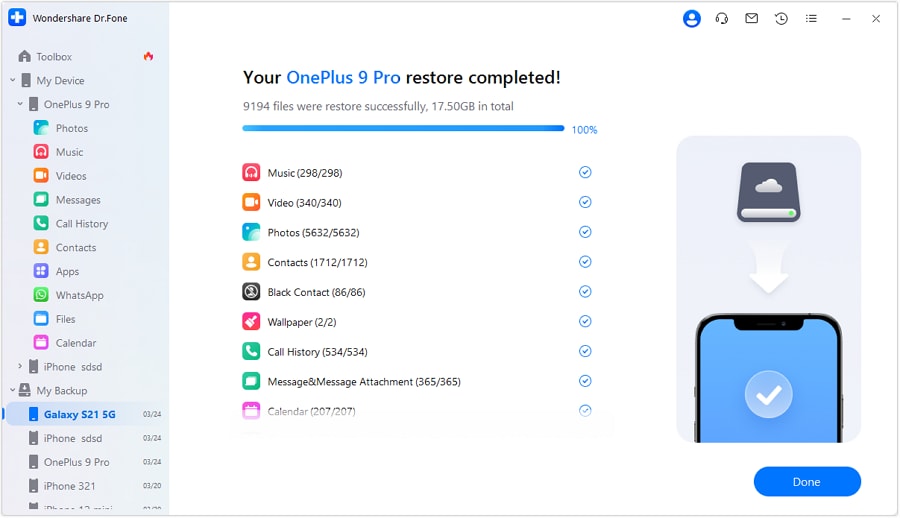
To restore it to a new device, choose the backup file in the "My Backup" section as you connect the device and press "Restore to Device" or "Export To PC." Continue by previewing the data types you can restore, and when the process ends, tap "Done."




Part 4. Things You Should Avoid While Moving to a New Messaging App
Now, you might want to try any of the given ways to back up Samsung Messages before the Samsung Messages shutdown date. If so, this section has listed some precautionary measures that you need to take before the big switch:
| Mistake to Avoid | Why It's a Problem | What to Do Instead |
|---|---|---|
| Switching Apps Without Backup | You may lose SMS/RCS history if the setup fails. | Backup first using Samsung Smart Switch or another backup tool. |
| Relying on One Backup Only | One failed backup means no restore option. | Use two methods (cloud + Smart Switch or SMS backup app like Dr.Fone). |
| Deleting Samsung Messages Too Early | Old chats or media may not transfer. | Keep Samsung Messages until everything is confirmed. |
| Ignoring RCS Settings | Chats may break or lose media. | Enable RCS in Google Messages and keep the internet on. |
| Switching Phone + App At The Same Time | Hard to know what caused the missing data. | Test backup first, then switch step by step. |
Conclusion
To conclude, Samsung Messages is shutting down in July 2026, and this shift toward a unified RCS experience has raised concerns about data management. Since most of the users want to keep the Samsung Messages, this guide has listed 4 simple ways to create a backup. So, stay prepared for this upgrade and combine 2-3 backup options, such as Smart Switch (for a new phone) or Dr.Fone - Phone Backup (for simple backup and restore).
FAQ
-
1. I have a Galaxy Watch; how does this affect my wearable?
If you have a Galaxy Watch 4 or newer (running WearOS), you can simply download Google Messages to maintain a full conversation history. However, older Tizen OS watches (Galaxy Watch 3 and earlier) will no longer support full chat history synchronization. You will still be able to read and reply to incoming notifications, but you won't be able to browse through old message threads on the watch itself. -
2. Is the Samsung Messages shutdown happening globally?
Currently, Samsung has confirmed this specific July 2026 timeline for the US market. While Samsung has been pre-installing Google Messages as the default globally since 2021, the app's functionality is being phased out by region. You can check the Samsung "Announcement" section within the Samsung Messages app for the exact date applicable to your area. -
3. What if I am using an older Samsung phone?
Devices running on Android 11 or older, such as Galaxy S9 or Note 9, are not affected by this shutdown. Samsung is maintaining the app on these devices due to software compatibility limits with the newer Google Messages infrastructure.
 Add Wondershare Dr.Fone as a preferred source on Google



