Move contacts, messages, photos, videos, app data, and more between iOS and Android.

 100% Security Verified | No Subscription Required | No Malware

 :
: 
 ChatGPT
 Perplexity
 Gemini
 Claude
 Grok
Grok
Imagine holding the new Samsung Galaxy S26 in your hand, and it intuitively understands your workflow before you even formulate a request. This futuristic concept is now a reality thanks to the highly anticipated S26 AI engine, designed to make daily smartphone tasks remarkably seamless. Officially unveiled at Galaxy Unpacked in early 2026, the entire Samsung Galaxy S26 lineup completely integrates next-generation machine learning right into its core. Powered by the deeply optimized One UI 8.5 software, users are greeted with intuitive menus, hyper-personalized context suggestions, and fluid background automation that preserves battery life while delivering maximum utility.
The vision behind these samsung S26 Galaxy AI features is built on functional, everyday usability rather than gimmicks. According to TM Roh, Chief Executive Officer at Samsung Electronics, the goal was to blend intelligent capabilities directly into the background. As noted in the Samsung Newsroom, he emphasized:

"Samsung wants AI to be reliable and easy for everyone to use every day. With the Galaxy S26 series, AI works quietly in the background so users can focus on what matters."

Whether you are debating the real-world value of these upgrades on Reddit or actively looking to upgrade, navigating the sheer volume of new capabilities can feel overwhelming. From generative photography to live call translation, this comprehensive guide will break down every vital feature you need to know. Plus, if you decide the upgrade is worth it, we will also show you how effortless phone data transfer can be handled safely without losing a single file.
In this article
- Part 1. Galaxy S26 AI at a Glance – What's New in One UI 8.5
- Part 2. Best Galaxy S26 AI Features Explained
- Pro Tip. Use Dr.Fone – Phone Transfer to Move Your Data to the S26 Faster
- Part 3. S26 Bixby vs. Gemini vs. Perplexity – Which AI Assistant Is Best?
- Part 4. How to Use Galaxy S26 AI Features Effectively – 5 Tips
Part 1. Galaxy S26 AI at a Glance – What's New in One UI 8.5
For users who want an immediate, high-level overview of the most impactful samsung S26 Galaxy AI features, the One UI 8.5 update introduces major overhauls across six distinct categories. Review this detailed table to see exactly how these capabilities change your daily mobile experience.
| Feature Category | Key AI Innovations in Galaxy S26 (One UI 8.5) |
|---|---|
| Photos & Video |
|
| AI Assistants & Agents |
|
| Calls & Voice |
|
| Messages & Chat |
|
| Productivity & Daily Overview |
|
| Privacy & Security |
|
Part 2. Best Galaxy S26 AI Features Explained
According to Samsung Electronics Co., Ltd., the advanced artificial intelligence algorithms layered into the S26 create the most proactive, frictionless user environment to date. But does the real-world performance match the keynote hype? Let's dive deep into the specific functionalities of the S26 AI architecture.
1. The Evolution of AI for Photos and Video
The camera hardware on the S26 is undeniably powerful—boasting an upgraded 50MP primary sensor (f/1.8 with OIS), a 12MP ultra-wide lens (f/2.2), and a 10MP 3x optical telephoto lens (f/2.4). However, it is the underlying galaxy s26 ai photo editing features that truly elevate the photography experience from standard shooting to professional-grade manipulation.
- Photo Assist 11: Imagine snapping a perfect group photo, only to realize someone's hand is blocking a face. The upgraded Object Remover and Generative Fill can intelligently erase the obstruction and accurately reconstruct the missing facial details. Furthermore, the robust "Create" functionality allows users to input natural language prompts or upload reference images to totally transform the environment.
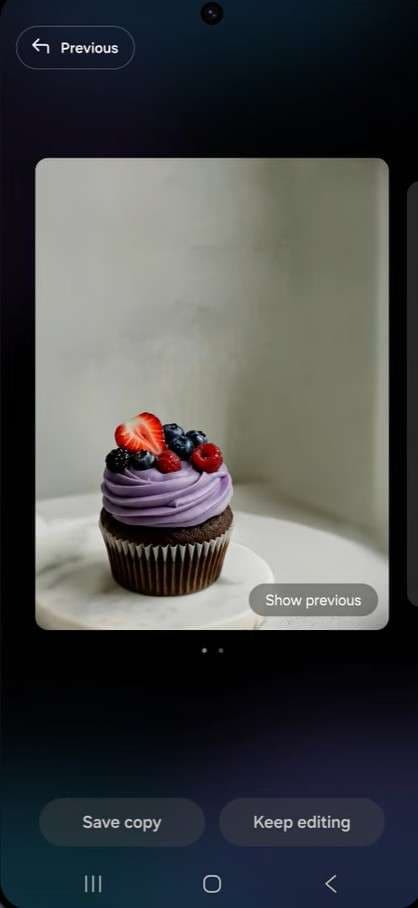
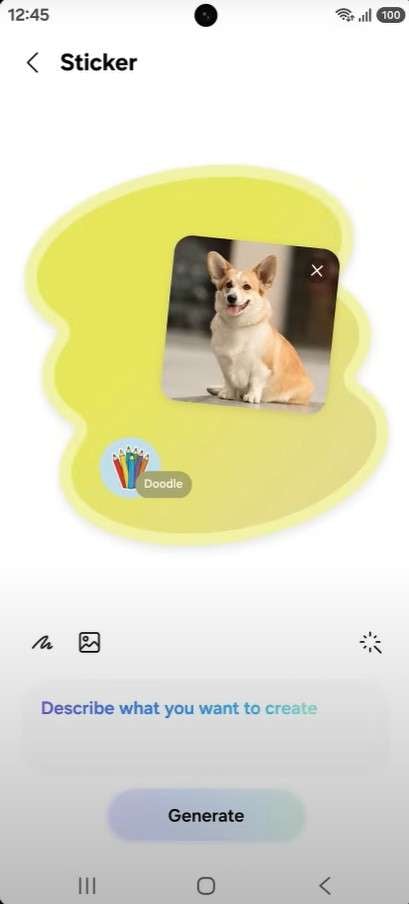
- Creative Studio: Positioned a mere swipe away from your Home screen, this dedicated generative space turns rough doodles, simple sketches, or text prompts into polished, high-resolution artwork. Create bespoke stickers for WhatsApp, generate unique profile cards, or craft ambient wallpapers in a variety of artistic styles.
- Upgraded AI ISP & Front-Facing Nightography: Low-light environments have historically ruined mobile photos with aggressive noise. The revamped AI Image Signal Processor (ISP) drastically cleans up grain and enhances dynamic range. Crucially, this AI ISP now fully supports the selfie camera, correcting skin tones, highlighting hair textures, and rendering authentic colors in dark settings.
- AI Scene & Detail Optimization: Enabled via "Intelligent Optimization," the S26 camera actively scans for over 32 diverse environmental scenes. Set your Quality Optimization to "Maximum" to allow the neural engine to push contrast, exposure, and color fidelity to breathtaking levels instantly.
Real User Experience
"The biggest advantage is the full integration into the native Gallery workflow. No exporting, no switching apps, no cloud upload... it just works natively." – Reddit user soymoloco
2. The Era of Multi-Agent AI: Bixby, Gemini, and Perplexity
One of the most heavily discussed topics surrounding the release is how Samsung manages multiple smart agents. The S26 bixby vs gemini dynamic has been expanded into an "Agentic AI" framework, adding the powerhouse research engine, Perplexity, into the mix.
- Agentic AI Integration: Rather than forcing users into a single ecosystem, the S26 acts as a hub for specialized AI agents. Need deep web research with accurate citations? Summon Perplexity. Need to adjust deep system settings? Bixby is your go-to. Want to interact with your Google Workspace? Gemini is pre-configured and ready.
- Upgraded Bixby: The native assistant has evolved significantly. It is highly contextual, remembering prior tasks and responding to complex, natural conversational language to execute multi-step device actions without needing rigid, robotic commands.
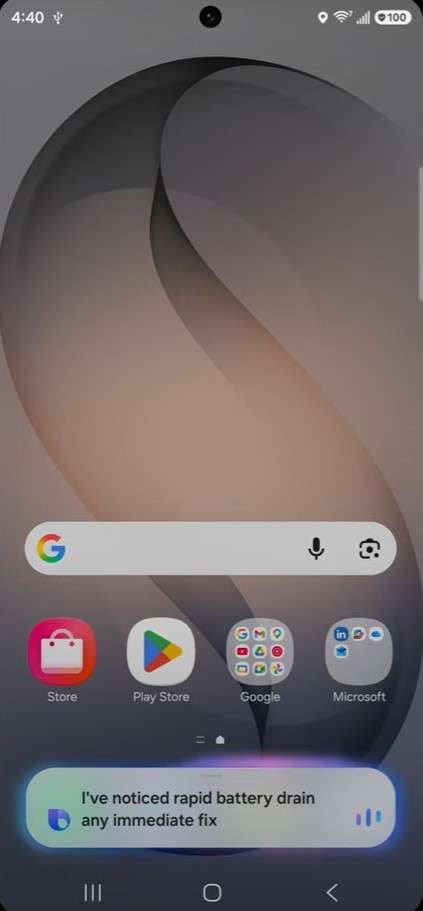
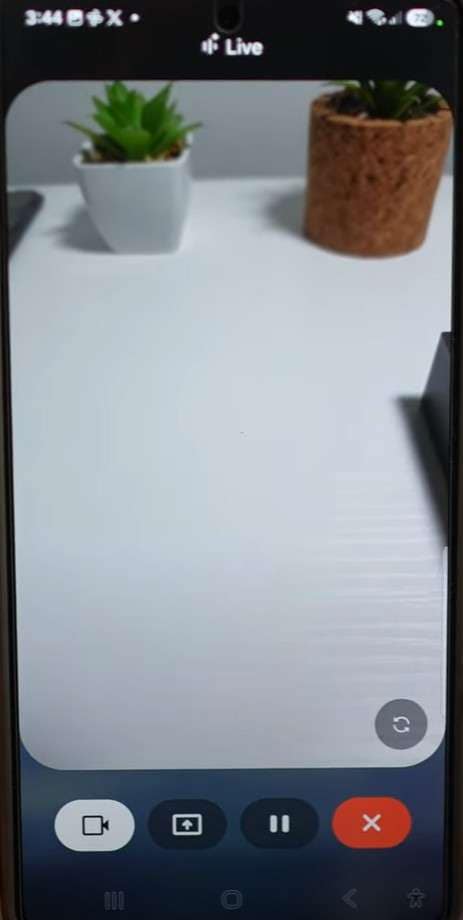
- Gemini Live with Screen Sharing: By activating "Live" within the Gemini overlay, the AI gains real-time awareness of whatever is displayed on your screen. You can point at an image in a browser, speak naturally, and Gemini will instantly process the context and provide solutions.
- Perplexity AI Integration: Accessible via a quick system gesture or the side key, Perplexity brings desktop-grade, cited academic and factual research directly to your mobile interface without needing to open a separate browser tab.
3. Revolutionary AI for Calls, Messages, and Notifications
Communication is the core of any smartphone, and the s26 ai call feature roster completely reinvents how users handle inbound interactions and daily chatting.
Advanced Voice and Call Innovations
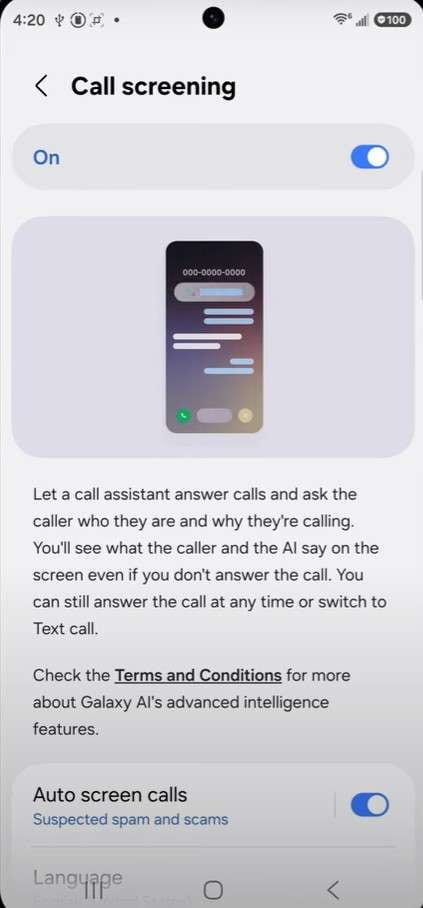
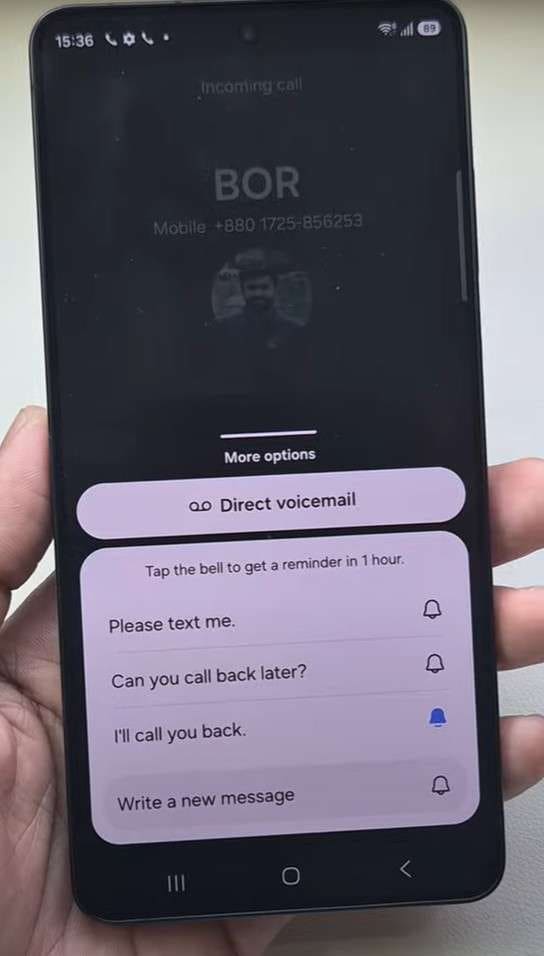
- Automatic Call Screening: Say goodbye to annoying spam calls. By tapping Call Assist, an automated voice will answer unknown numbers, interrogating the caller about their identity and intent. You can read the live transcript on your screen and decide whether to pick up or disconnect.
- Live Translate: Seamlessly conduct business or personal conversations across language barriers. The system delivers rapid, two-way audio and text translations mid-call. Furthermore, this capability extends to third-party VOIP apps like WhatsApp.
- Direct Voicemail Transcriptions: If a call rolls over to voicemail (which you can dictate to trigger between 5-20 seconds), the S26 AI generates a live text transcript directly onto your lock screen while the caller is actively leaving their message.
Intelligent Messaging via Now Nudge
Typing is augmented massively. The highly anticipated s26 now nudge is a standout feature for texting efficiency.
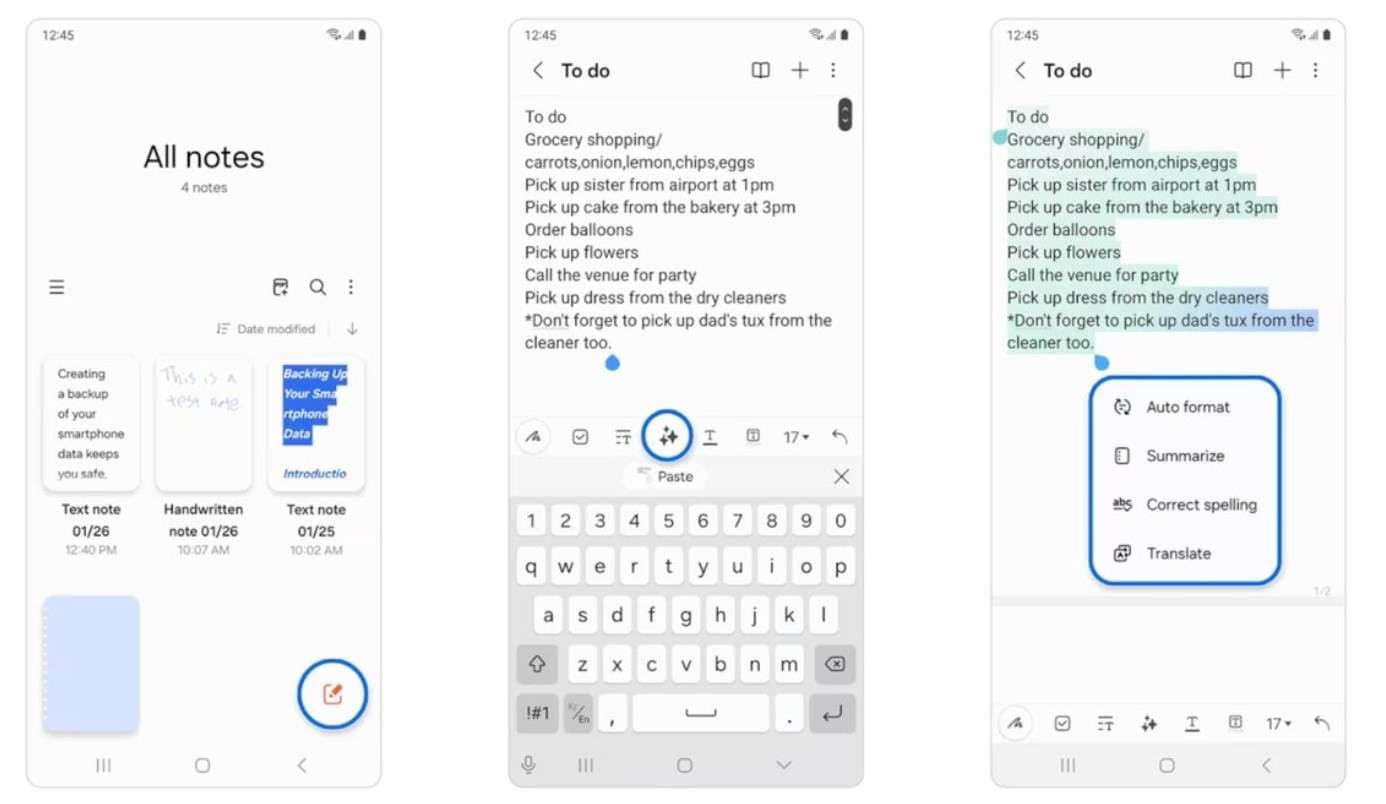
- Writing Assist (Chat Assist): Embedded right into the Samsung Keyboard, this tool analyzes your drafted text in real-time. It suggests grammatical fixes, can instantly translate your message before sending, and offers tonal shifts (e.g., turning a casual text into a professional email format).
- Context-Aware Suggestions (Now Nudge): When enabled, Now Nudge actively monitors the flow of your conversation. If a friend asks "Where are you?" or "Did you take a picture of that sunset?", Now Nudge instantly surfaces your live location or the exact image file right above your keyboard for one-tap sending.
Mastering Notification Chaos
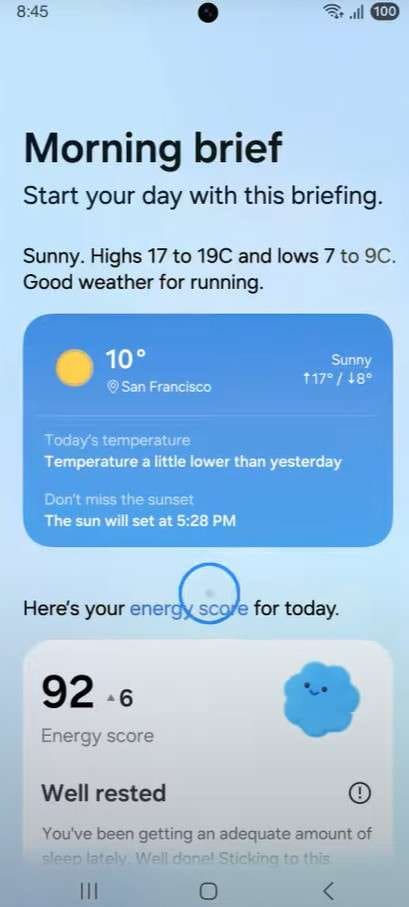
- Now Brief: Instead of endlessly scrolling through a crowded notification shade, Now Brief compiles your most important alerts, upcoming calendar events, and missed messages into one concise summary. You can even opt for a morning Audio Brief to listen to your schedule while getting ready.
4. Peak Productivity and Instant Search
For professionals and students alike, the S26 serves as an unmatched portable workstation. The s26 circle to search evolution is a primary example of this efficiency.
- Upgraded Circle to Search: Powered in collaboration with Google, users can long-press the home button and simply circle, scribble, or highlight anything on the screen. The AI identifies the object, text, or location within 3 seconds, delivering actionable web results without ever leaving your current app—even inside social media video feeds.
- Note Assist: Transforming chaotic meeting notes into clean, bulleted summaries is a breeze. It features robust auto-formatting, instant spell-check, and multi-language translation.
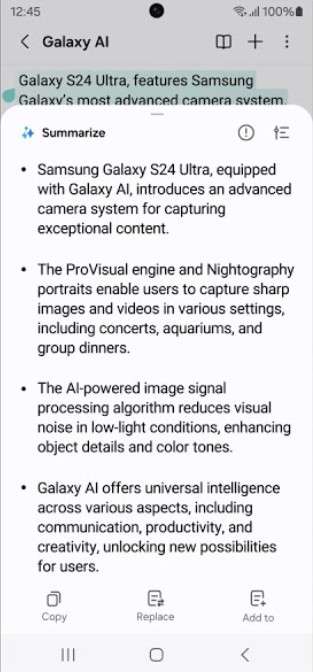
- Browsing & Transcript Assist: The built-in Samsung Internet browser can distill long-form articles into brief or detailed summaries. Similarly, the Voice Recorder uses Transcript Assist to separate speaker voices and transcribe lengthy meetings into accurate text across various languages.
5. Uncompromising Security and AI Transparency
With so much data processing happening, security is understandably a top concern. Thankfully, Samsung ensures your private data remains yours.
- AI Erase Tool for Watermarks: While the Galaxy adds subtle watermarks to AI-generated imagery for transparency, users retain the freedom to highlight and cleanly erase these markers or any other unwanted on-screen elements via the Photo Assist tools.
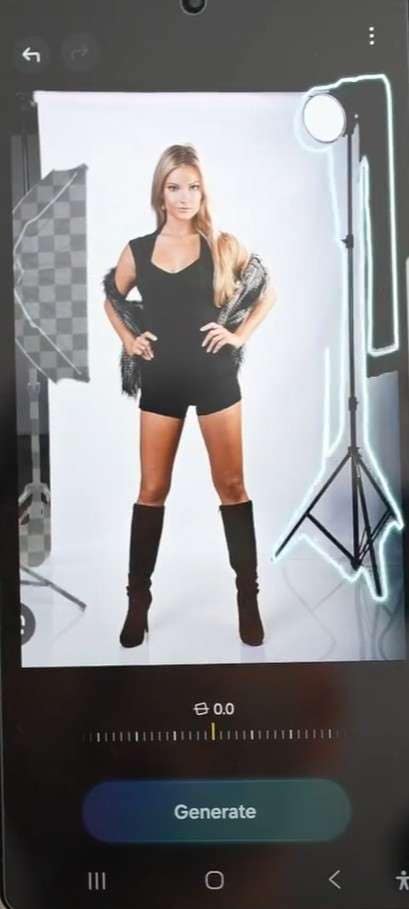
- Knox Vault and PQC Encryption: Processing complex AI requests safely requires robust architecture. The S26 employs Knox Matrix bolstered by Post-Quantum Cryptography (PQC) for end-to-end encryption. Sensitive contextual queries are handled exclusively via on-device processing, meaning your private conversations never hit a public cloud server.

Pro Tip. Use Dr.Fone – Phone Transfer to Move Your Data to the S26 Faster
It is incredibly tempting to dive right into the galaxy s26 ai photo editing features and start customizing your new device. However, the dreaded task of moving gigabytes of photos, contacts, and old messages from your previous smartphone often halts the excitement. To bypass the frustrating limitations of standard cloud backups, utilizing Dr.Fone - Phone Tranfer provides a one-click, highly secure local data migration solution.
Engineered to perfectly handle cross-platform migrations—such as jumping from an older iOS 17 device to the brand new Android 16-powered Galaxy S26—this toolkit ensures that complex data types like SMS logs, WhatsApp chats, high-resolution videos, and specific app data are ported over flawlessly. The process is entirely localized to your computer, meaning zero data is exposed to internet vulnerabilities or third-party servers.
Guide to Move Data from Android/iPhone to S26 via Dr.Fone
To swiftly set up your device and begin utilizing tools like the s26 circle to search, follow these foolproof steps to securely transfer your data:
 Move data between iOS to Android and vice versa.
- Transfer contacts, SMS, photos, videos, music, and more types.
- Available with all phones with Android and iOS versions.
- Simple, click-through process.

-
Step 1 Connect Both Devices to the Transfer Interface
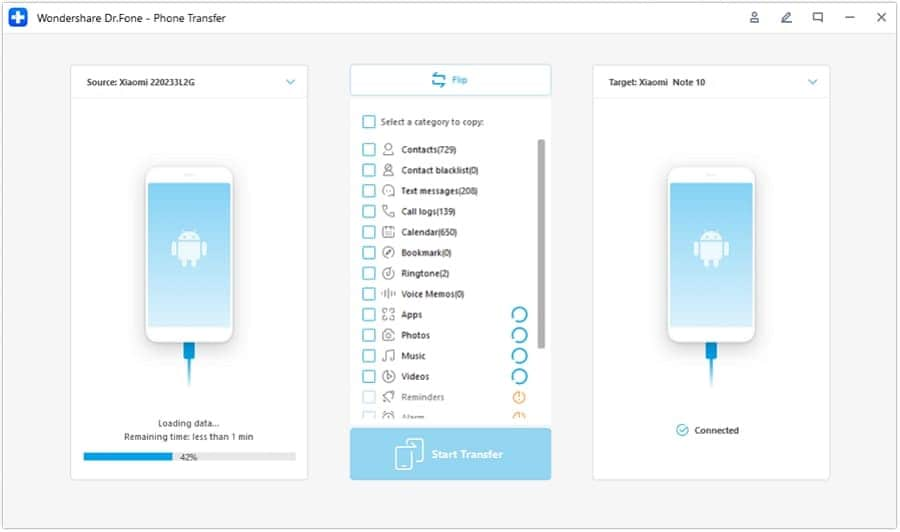
Launch the Dr.Fone software on your PC or Mac and select the "Phone Transfer" module. Connect both your old smartphone and your new Samsung Galaxy S26 via USB cables. If the devices are displayed in the wrong order, simply hit the "Flip" button so that the S26 is designated as the target destination device.
-
Step 2 Select File Types and Initiate the Migration
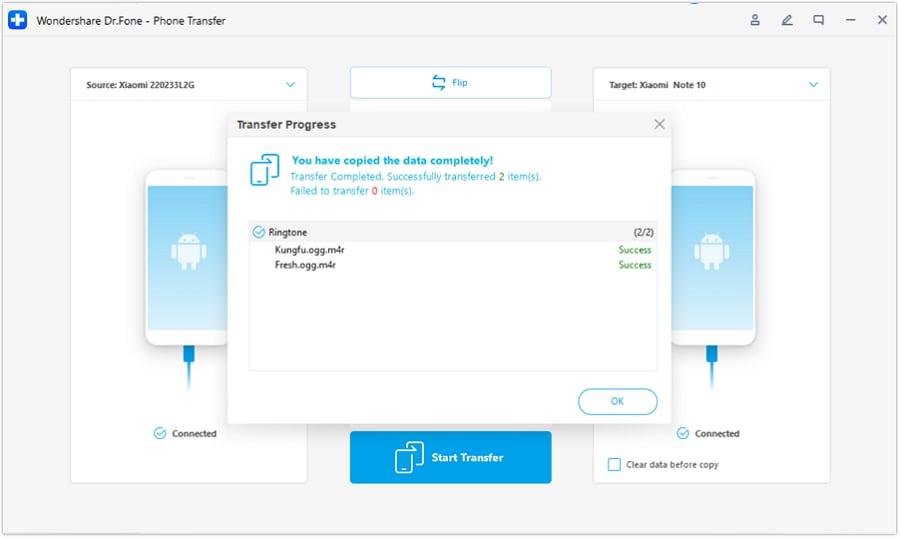
A comprehensive menu will appear listing all transferable data types (Contacts, Messages, Photos, Videos, etc.). Check the boxes corresponding to the data you wish to move. Once finalized, click the "Start Transfer" button. Keep both devices connected until the progress bar reaches completion, then click "OK" to safely eject your newly synced S26.




Part 3. S26 Bixby vs. Gemini vs. Perplexity – Which AI Assistant Is Best?
With three distinct AI agents bundled into one smartphone, a massive point of discussion is the s26 bixby vs gemini dynamic—and how Perplexity alters the equation. Rather than viewing them as competitors, it is best to understand their distinct specialties. Use this detailed breakdown to determine which agent to deploy for specific tasks.
| Feature & Capability | Bixby (Native Galaxy AI) | Google Gemini | Perplexity AI |
|---|---|---|---|
| Core Specialty Focus | Hardware/Device control, Samsung ecosystem routines | General generative AI, seamless Google app integration | Deep-dive answers, comprehensive web‑backed research |
| Offline Processing | High (Handles on‑device settings & basic commands) | Low (Requires consistent internet connection) | None (Online strictly) |
| System-Level Integration | Extreme (Integrated natively with One UI, camera, hardware) | High (Dominates Google apps like Maps, Drive, Docs) | Low-Medium (Operates primarily as a browser/standalone app) |
| Call & Voice Superiority | Excellent (Powers Call screening, routines, lock screen voice commands) | Average (Summarizes transcripts but lacks deep device control) | N/A (No direct call/device interception features) |
| Advanced Web Research | Basic (Reroutes standard web queries) | Strong (Leverages Google Search architecture) | Superior (Cites multiple authoritative academic/web sources) |
| Content Generation | Basic (Note formatting, short SMS drafting) | Very Strong (Drafts detailed emails, code, and long essays) | Exceptional (Produces detailed, structured, research‑grade drafts) |
| Best Use Case Scenario | Adjusting settings, setting alarms, offline tasks | Managing Gmail, translating text, casual web assistance | Complex academic questions, deep product comparisons |
Part 4. How to Use Galaxy S26 AI Features Effectively – 5 Tips
To truly maximize the vast potential of the samsung S26 Galaxy AI features without feeling overwhelmed by system prompts, follow these five essential configuration strategies right out of the box.
| Practical AI Tip | Action Required | Why This Matters for You |
|---|---|---|
| Streamline Your Galaxy AI Settings | Navigate to Settings > Advanced features > Galaxy AI. Toggle specific tools. | Prevents battery drain and UI clutter by turning off tools (like Live Translate) if you don't frequently travel or make international calls. |
| Designate a Primary Assistant | Set your default digital assistant (Bixby, Gemini, or Perplexity) mapped to the side key. | Ensures muscle memory matches your preferred workflow, granting instantaneous access for voice searches or hardware commands. |
| Personalize Now Nudge & Now Brief | Enable Now Nudge in Keyboard settings and configure Now Brief parameters. | Feeds the local AI engine with your daily habits, ensuring chat media suggestions and morning summaries are highly relevant, not generic. |
| Integrate AI into Professional Workflows | Actively force yourself to use Note Assist or Transcript Assist during real meetings. | Moves you past the "testing phase" into actual productivity, revealing how much manual formatting time these generative tools can save. |
| Strict Privacy Configuration | Enable Privacy Display (S26 Ultra), activate Knox Vault encryption, and review local-only AI toggles. | Guarantees that while you enjoy the massive benefits of smart contextual scanning, your highly sensitive business or personal data remains secure and unshared. |
Conclusion
The release of the Samsung Galaxy S26 series makes it abundantly clear that native, deeply integrated machine learning is the absolute future of mobile computing. The impressive evolution of S26 AI isn't just about flashy gimmicks; tools like the s26 ai call feature, intelligent camera generative fill, and instantaneous screen analysis provide undeniable utility that saves time every single day. By understanding the distinct advantages in the s26 bixby vs gemini debate and actively utilizing contextual tools like the s26 now nudge, users can transform their smartphone into a highly intuitive personal assistant. And when you are ready to make the leap to this cutting-edge hardware, relying on tools like Dr.Fone - Phone Transfer guarantees that your crucial legacy data follows you into the future seamlessly and securely.
FAQ
-
1. What exactly is Galaxy AI on the Samsung Galaxy S26 series?
Galaxy AI is an advanced, system-wide suite of machine learning algorithms embedded directly into the Samsung Galaxy S26 via One UI 8.5. It fundamentally enhances core smartphone functions, offering real-time language translation, predictive text via Now Nudge, generative photo editing, and dynamic system automation. -
2. Can the Galaxy S26 AI automatically manipulate or restore photos?
Yes, the S26 features highly advanced generative photography tools, primarily Photo Assist 11. Through this interface, users can completely remove unwanted objects, reposition subjects, or use generative fill to accurately recreate missing background elements using either text prompts or reference data. -
3. How does the S26 handle incoming phone calls using AI?
The S26 drastically improves communication via its AI Call Screening and Call Assist features. When an unknown number calls, the AI can automatically answer, interact with the caller to determine their intent, and generate a live text transcript on your screen so you can safely decide whether to answer or block the number. -
4. Are my private data and conversations safe when using Galaxy AI?
Absolutely. Samsung mitigates cloud security risks by executing sensitive AI processing—such as reading messages for Now Nudge or transcribing phone calls—entirely on the device. Furthermore, all local AI data is encrypted and protected by the hardware-level security protocols of the Samsung Knox Vault framework.
 Add Wondershare Dr.Fone as a preferred source on Google