 Transfer WhatsApp Swiftly between iOS and Android.

 100% Security Verified | No Subscription Required | No Malware

 :
: 
 ChatGPT
 Perplexity
 Gemini
 Claude
 Grok
Grok
Ways to transfer WhatsApp Business from Android to iPhone are limited because WhatsApp’s official Android-to-iPhone migration does not support WhatsApp Business. Unlike regular WhatsApp Messenger, the Business app requires a different transfer approach. Google Account backups cannot be directly restored through WhatsApp Business on iPhone, while Export Chat only preserves conversations as readable files.
Neither method restores chats inside the app. This guide explains these limitations and the preparation needed before switching devices. It also shows how Dr.Fone – WhatsApp Business Transfer provides a desktop-based option for moving supported WhatsApp Business data from an Android phone directly to an iPhone.
In this article
- Part 1. Can You Transfer WhatsApp Business from Android to iPhone?
- Part 2. Why Regular WhatsApp and WhatsApp Business Transfers Differ
- Part 3. What to Prepare Before Moving WhatsApp Business
- Part 4. How to Transfer WhatsApp Business from Android to iPhone with Dr.Fone
- Part 5. What WhatsApp Business Data Can Dr.Fone Transfer?
- Part 6. Can You Transfer WhatsApp Business from Android to iPhone for Free?
- Part 7. Common WhatsApp Business Transfer Problems and Fixes
- Part 8. What to Check After the WhatsApp Business Transfer?
Part 1. Can You Transfer WhatsApp Business from Android to iPhone?
The official route does not work for this transfer. WhatsApp states that WhatsApp Business Android-to-iPhone migration is not currently supported. Its Move to iOS process supports regular WhatsApp and requires a new or factory-reset iPhone. A Google Account backup also cannot be directly restored through WhatsApp Business on iPhone.
For an alternative, Dr.Fone – WhatsApp Business Transfer provides a desktop-based method to move supported WhatsApp Business data from Android to iPhone without using Move to iOS. The table below compares the available methods, their requirements, and their main limitations.
| Method | Full Business Transfer | Chats Appear in WhatsApp Business | iPhone Reset Required | Main Limitation |
|---|---|---|---|---|
| Move to iOS | No | No | Yes | Does not support WhatsApp Business |
| Google Account Backup | No | No | No | Cannot be directly restored on iPhone |
| Export Chat | No | No | No | Cannot be imported back into WhatsApp |
| Dr.Fone - WhatsApp Transfer | Yes | Yes | No | Requires a computer and compatible connections |
Part 2. Why Regular WhatsApp and WhatsApp Business Transfer Differ
Why is WhatsApp Business excluded while regular WhatsApp is supported? Before you move WhatsApp Business from Android to iPhone, understand the key differences that prevent the same official migration process from working for both apps:
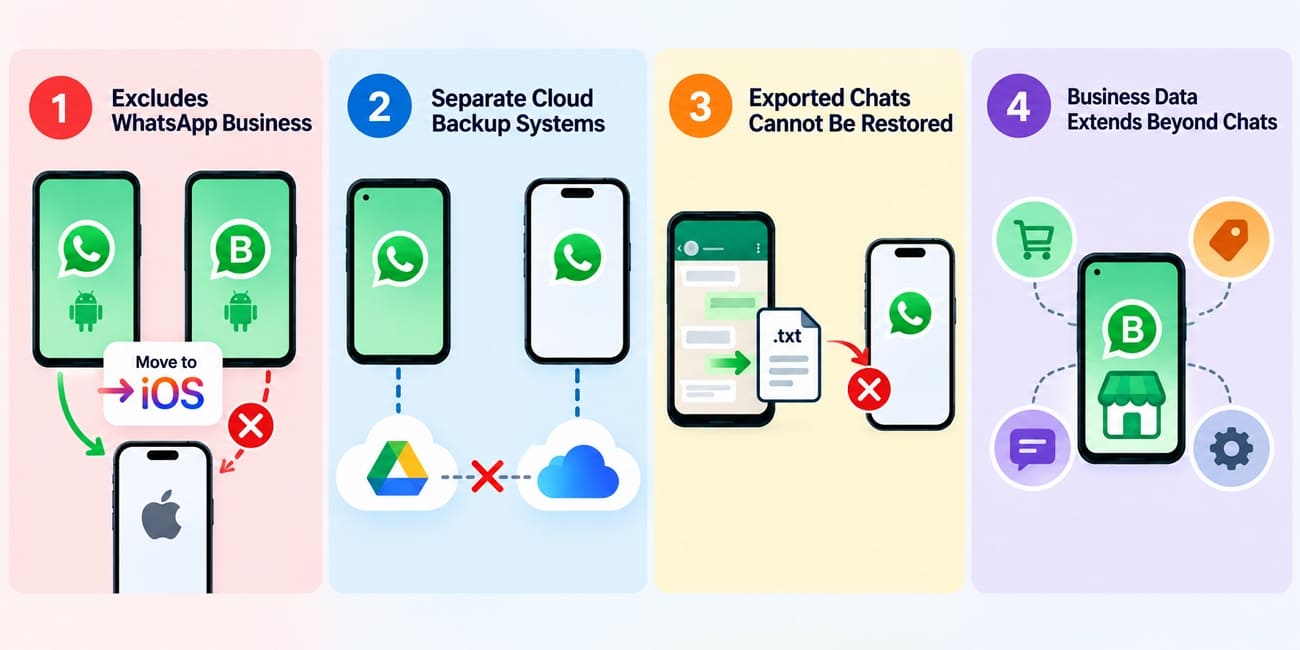
- Excludes WhatsApp Business: Official migration tools support moving regular WhatsApp Messenger chats from Android to iPhone using Move to iOS. However, WhatsApp explicitly states that this transfer process does not support WhatsApp Business accounts.
- Separate Cloud Backup Systems: Android WhatsApp backs up chat history to a Google Account, whereas iPhone WhatsApp uses iCloud. These cloud backups cannot be directly restored across the two platforms.
- Exported Chats Cannot Be Restored: Export Chat lets users save individual conversations outside WhatsApp for reference. However, exported chat histories cannot be imported back into WhatsApp Business as restorable conversations.
- Business Data Extends Beyond Chats: WhatsApp Business includes business-specific features beyond standard chat history. Catalogs, collections, labels, quick replies, and automated messages may require separate checking or management when switching platforms.
Part 3. What to Prepare Before Moving WhatsApp Business
Good preparation can prevent interruptions during a WhatsApp Business transfer from Android to iOS. Before starting the migration, review these key requirements to keep both devices ready and reduce potential transfer problems:
| Preparation Check | What to Confirm | Why It Matters |
|---|---|---|
| WhatsApp Business Version | Latest version on both phones | Helps maintain compatibility during transfer |
| Active Business Number | Business number can be verified | WhatsApp may require number verification |
| Android Backup | A current backup exists | Provides a fallback if transfer fails |
| iPhone Storage | Enough free space for transferred data | Large chat histories and media need sufficient storage |
| USB Cables | Working data cables for both devices | Charge-only cables cannot establish data connections |
| Device Battery | Both phones are sufficiently charged | Prevents shutdown from interrupting the transfer |
| Computer Availability | A compatible Windows PC or Mac is ready | Dr.Fone performs the transfer through a computer |
| Existing iPhone Data | Check for existing WhatsApp Business data | Destination data may need protection before transfer |

Part 4. How to Transfer WhatsApp Business from Android to iPhone with Dr.Fone
Running the transfer from a computer avoids both limitations at once. This approach lets you move WhatsApp Business from Android to iPhone, with chats transferred directly into the app instead of saved as text files. Dr.Fone - WhatsApp Business Transfer works with regular WhatsApp and WhatsApp Business, supporting transfers between Android and iPhone in either direction. It can move messages, photos, videos, voice notes, documents, stickers, and call logs.
You can also select specific data types to move instead of transferring everything. Dr.Fone lets users save WhatsApp or WhatsApp Business data to a PC and restore it later to another phone. Beyond WhatsApp and WhatsApp Business, the tool supports LINE, Kik, Viber, and WeChat backups. Dr.Fone also offers multi-device plans for phone shops, IT teams, and service desks.
 Transfer WhatsApp across Android & iOS.
- Backup & restore WhatsApp to PC securely.
- Preview & export chats selectively.
- Works with all iPhone & Android models.
Guide to Transfer WhatsApp Business Using Dr.Fone - WhatsApp Transfer
Connect both handsets to the computer before starting. Then, follow this detailed guide to complete the WhatsApp Business transfer from Android to iPhone:
-
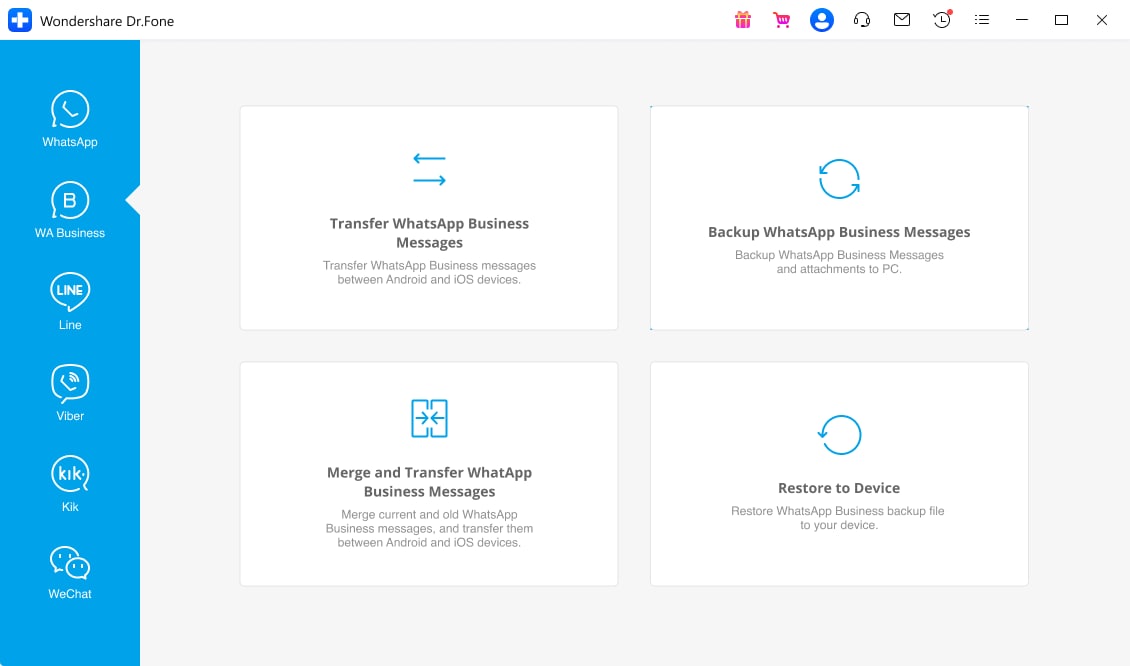
Step 1 Connect Both Phones and Open the Tool
Choose the “WhatsApp Transfer” tool from the “Toolbox” tab and select the “Transfer WhatsApp Business Messages” option in the “WhatsApp Business” tab.
-
Step 2 Set the Source and Destination
Connect the devices and put your Android handset in the “Source” position and the iPhone in the “Destination.” Choose the data types and press the “Transfer” button to continue.

-
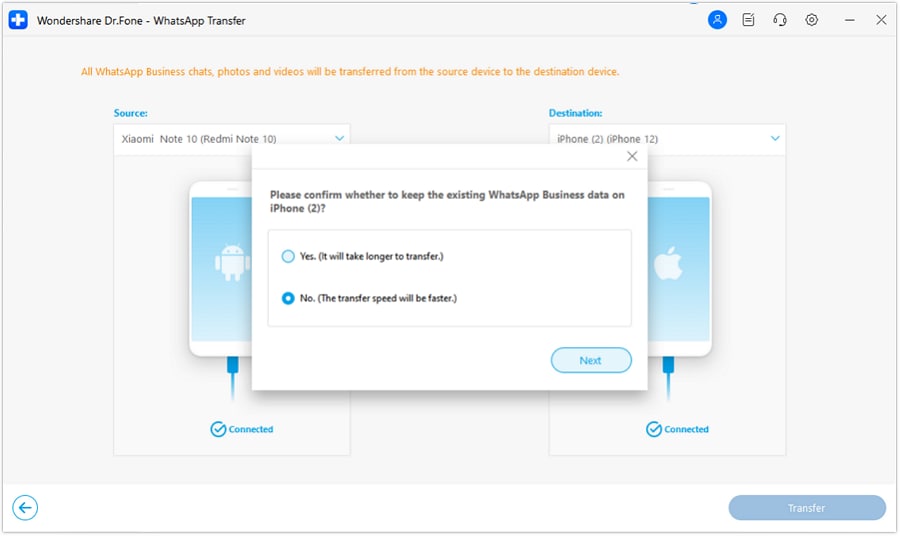
Step 3 Choose Whether to Keep Existing WhatsApp Business Data
Select “Yes” to keep the existing WhatsApp Business data on the destination iPhone, or “No” for a faster transfer. Click “Next,” then wait for Dr.Fone to complete the transfer process.
Part 5. What WhatsApp Business Data Can Dr.Fone Transfer?
Dr.Fone can transfer WhatsApp Business from Android to iPhone along with various types of chat data. The table below shows the WhatsApp Business data supported in the Android-to-iPhone transfer workflow:
| Data Type | Supported in Android-to-iPhone Workflow |
|---|---|
| Messages | Yes |
| Photos | Yes |
| Voice Notes | Yes |
| Videos | Yes |
| Documents | Yes |
| Call Logs | Yes |
| Stickers | Yes |
| GIFs | Yes |
| Audio Files | Yes |
| Broadcast Lists | Yes |
| Instant Video Messages | Yes |
| Polls | Yes |
| Group Chat History | Yes |
| Starred Messages | Yes |
Part 6. Can You Transfer WhatsApp Business from Android to iPhone for Free?
You might also wonder whether you can transfer WhatsApp Business from Android to iPhone for free. Several free methods can preserve some data, but their capabilities differ significantly. The table below compares what each option can actually do:
| Free Option | What It Can Do | Restores Chats into WhatsApp Business | Main Limitation |
|---|---|---|---|
| Move to iOS | Migrates regular WhatsApp chats | No | WhatsApp Business is not supported |
| Google Account Backup | Backs up WhatsApp Business data on Android | No | Cannot be directly restored through WhatsApp Business on iPhone |
| Export Chat | Saves individual conversations for reference | No | Exported chats cannot be imported back into WhatsApp Business |
Part 7. Common WhatsApp Business Transfer Problems and Fixes
You may encounter several issues when you move WhatsApp Business from Android to iPhone. The table below covers common transfer problems, their likely causes, and the appropriate checks or fixes:
| Transfer Problem | Likely Cause | What to Check or Fix |
|---|---|---|
| Android Not Detected | USB debugging disabled or connection issue | Enable USB debugging and reconnect the Android device |
| iPhone Not Detected | Trust permission not granted | Unlock the iPhone and tap Trust when prompted |
| Wrong Source and Destination | Devices assigned to the wrong positions | Use Flip to set Android as source and iPhone as destination |
| Insufficient iPhone Storage | Not enough space for transferred data | Free sufficient iPhone storage before starting the transfer |
| USB Connection Drops | Unstable cable or USB connection | Reconnect the devices or use another working data cable or port |
| Transfer Stops Midway | Device connection or transfer process interrupted | Keep both devices connected until Dr.Fone completes the process |
| Missing Data After Transfer | Some selected data did not transfer correctly | Check transferred data on the iPhone and repeat the transfer if needed |
Part 8. What to Check After the WhatsApp Business Transfer?
Completing a WhatsApp Business chat transfer does not guarantee that every business-specific feature or setting moves with it. After transferring WhatsApp Business from Android to iPhone, check your transferred chat data and business configuration separately. The table below highlights the key items to verify:
| What to Check | Quick Verification |
|---|---|
| Messages & Group Chats | Open recent, older, and group conversations to confirm message history transferred correctly. |
| Photos, Videos & GIFs | Check media across different chats and confirm videos and GIFs play correctly. |
| Voice Notes & Audio Files | Play transferred voice notes and other audio files to confirm they work. |
| Documents & Files | Open PDFs, invoices, quotes, and other transferred attachments. |
| Call Logs | Check that transferred WhatsApp call records appear correctly. |
| Stickers | Confirm transferred stickers appear correctly in relevant conversations. |
| Broadcast Lists & Polls | Check transferred broadcast lists, recipients, poll questions, options, and available results. |
| Instant Video Messages | Confirm transferred instant video messages appear and play correctly. |
| Starred Messages | Verify that transferred starred messages remain marked and accessible. |
Conclusion
WhatsApp's official migration does not support the Business app, Google Account backups cannot be directly restored on iPhone, and exported chats cannot be imported back. These limitations mean free methods cannot restore your Business conversations inside WhatsApp Business on an iPhone.
For a desktop-based alternative, Dr.Fone - WhatsApp Business Transfer can transfer WhatsApp Business from Android to iPhone without resetting the iPhone. Keep the Android phone unchanged until you verify transferred chats, media, voice notes, documents, and other supported data on the new iPhone.




FAQ
-
1. Can Move to iOS transfer WhatsApp Business from Android to iPhone?
No. WhatsApp’s Android-to-iPhone migration does not currently support WhatsApp Business. You need an alternative method, such as Dr.Fone - WhatsApp Business Transfer, to move supported Business data between Android and iPhone. -
2. Can I restore a Google Drive WhatsApp Business backup on an iPhone?
No. WhatsApp Business backups created on Android through a Google Account cannot be directly restored on an iPhone. WhatsApp Business on iPhone uses iCloud for its cloud backup and restore process. -
3. Is there a free way to transfer WhatsApp Business from Android to iPhone?
Not completely. Export Chat can preserve individual conversations for reference, but cannot restore them inside WhatsApp Business. For an in-app cross-platform transfer, Dr.Fone - WhatsApp Business Transfer provides a paid alternative. -
4. What WhatsApp Business data should I check after switching to iPhone?
Check old and recent chats, photos, videos, voice notes, documents, call logs, group chats, and starred messages. If transferred with Dr.Fone, also verify supported items such as stickers, GIFs, polls, broadcast lists, and instant video messages.
 Add Wondershare Dr.Fone as a preferred source on Google



