

What Does the Green Dot on Facebook & Messenger Mean?

Oct 22, 2026 • Filed to: Virtual Location Solutions • Proven solutions
 TL;DR:
The green dot on Facebook and Messenger indicates that a user is currently online, actively running the app in the background, or was active within the last 4 to 10 minutes.
● While "Active Now" reliably reflects real-time availability inside Messenger, the green dot provides a slightly delayed status that can trigger simply by clearing phone notifications or leaving the application open in the background.
● You can disable this visibility indicator without notifying your contacts by navigating to Menu, Settings & Privacy, Settings, and toggling off "Show When You're Active" under the Active Status menu on your iPhone or Android device.
● Users wanting to fake their geographic presence on these platforms can use Dr.Fone - Virtual Location to instantly teleport or simulate GPS movement on devices running Android 16 and iOS 26 without requiring a jailbreak.
Ask AI for a summary
 ChatGPT
 Perplexity
 Gemini
 Claude
 Grok
Grok
A lot of users feel confused when they suddenly notice a small green dot on Facebook. Many wonder if it truly shows someone is active or just recently online. This tiny symbol can create curiosity or even misunderstandings during daily chats. In addition, individuals review it prior to sending a text or even responding to messages.
As a result, it is necessary to know what the green dot actually is. Along with that, you should understand how it works to control your privacy. This guide explains what triggers it and how to manage it in simple and straightforward steps.
- Part 1. What Does the Green Dot on Facebook / Messenger Mean?
- Part 2. How Long Does the Green Dot Stay on Facebook?
- Part 3. Can Someone Be “Active” on Facebook But Not Actually Using It?
- Part 4. How to Turn Off or Manage Your Green Dot (Active Status)
- Pro Tip. Use Dr.Fone – Virtual Location to Control Your Facebook Location

Part 1. What Does the Green Dot on Facebook / Messenger Mean?
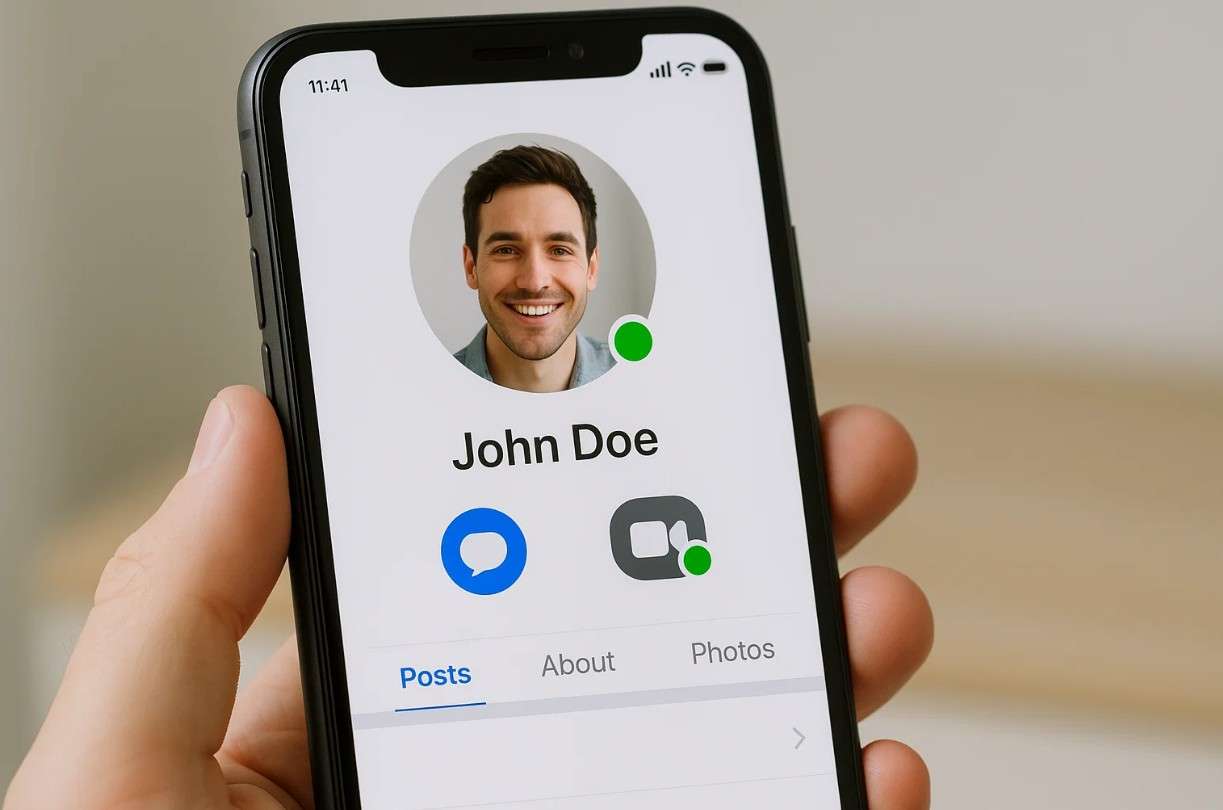
The green dot Messenger feature shows when a person is currently active or online. It appears beside their name or photo, meaning they can receive messages instantly. This icon also indicates that Facebook or Messenger is open on their device. Sometimes, it stays visible even if the user just has the app in the background. Plus, a green dot beside the camera icon means they are ready for video calls.
Benefits of the Green Dot on Facebook
These benefits make online interactions easier and reduce confusion during active status checks:
- Quick Contact: It helps you see when friends are active and ready for messages today. This makes starting conversations easier because you know they might reply soon.
- Fast Replies: You can message active friends knowing they are likely to respond quickly. It reduces waiting time and gives smoother chats during essential moments.
- Easy Planning: You can check active status before making plans or sharing quick updates. This helps organize conversations and reduces delays during simple planning again.
- Video Calls: The green dot by the camera icon shows availability for video calls. It lets you know when friends can pick up a video chat quickly.
- Business Use: Entrepreneurs can connect instantly with customers or clients for faster service. This helps build stronger relationships through timely replies and attention.
Disadvantages of the Green Dot Feature on Facebook
Despite its convenience, below are a few disadvantages that impact privacy and social life:

- Privacy Risk: Showing the green dot reveals your online presence to all friends automatically. This may make you feel exposed or uncomfortable about people tracking you online.
- Pressure to Respond: When others see you active, they expect quick replies to messages immediately. It can create stress or interruptions when you want to browse casually or work.
- Fake Availability: Users sometimes appear online but don’t intend to chat or reply promptly. This can lead to misunderstandings when messages are ignored after being seen.
- Mixed Signals: The green dot Messenger active now indicator sometimes sends unclear signs about activity. This may lead to confusion when timing matters during essential chats.
- Social Stress: Knowing you are active creates pressure to keep up social expectations. Some people feel forced to respond even when they prefer to avoid chatting.
What Triggers Facebook’s Active Status / Green Dot?
Facebook’s Active Status, or the green dot messenger, appears when you are online or recently active. Opening the Facebook or Messenger app triggers the green dot showing you as “Active Now.” Being in a chat or thread with someone makes you look active to that person specifically. Even briefly opening Facebook or Messenger or interacting with notifications can trigger the dot.
Part 2. How Long Does the Green Dot Stay on Facebook?
The green dot on Facebook usually stays visible for a few minutes after you stop activity. Most users report that it remains for about 4 to 10 minutes before changing status. It then updates to show a "last active X minutes ago" timestamp beside your name.
Moreover, having Facebook or Messenger running in the background may keep your status up to date. This behavior also applies to audio and video rooms where the Facebook green dot appears. The precise duration varies depending on app usage and device refresh settings.
Part 3. Can Someone Be “Active” on Facebook But Not Actually Using It?
Someone can appear active on Facebook even when not using it directly. In case the app runs in the background, the green dot shows prolonged activity. Also, notifications seen or cleared on a phone can trigger an active status briefly. Moreover, Facebook maintains “recently active” status for minutes after you close apps.

A short delay also keeps the status active for minutes after closing the application. In addition, clearing alerts from the lock screen can also update activity without real usage. So, this can make others wonder why they still show my green Messenger profile.
Difference Between Active Now and Green Dot
The terms “Active Now” and the green dot may look similar, but they work differently. This part shows a comparison table between these two terms:
|
Feature |
Active Now |
Green Dot |
| Meaning | Shows the user is currently online at this exact moment. | Shows the user is online or was recently active. |
| Accuracy | More precise and updated, closer to real-time activity today. | Slightly delayed and may remain visible after brief inactivity. |
| Duration | Disappears quickly once the user becomes inactive or closes apps. | It can stay for several minutes before switching to a time label. |
| Usage Scope | Seen mostly inside Messenger to show real-time availability. | Seen across Facebook and Messenger as a general online indicator. |
| Interaction Need | Usually requires direct activity like typing or viewing chats. | It can appear without direct use if the app runs in the background. |
| Reliability | Considered more reliable for immediate communication readiness. | Less reliable due to refresh delays and background processes. |
| User Impression | Suggests the person is actively present and ready to engage. | Suggests the person might be active or just recently online. |
Part 4. How to Turn Off or Manage Your Green Dot (Active Status)
Managing the green dot on Facebook lets you control your online visibility easily. This feature allows you to turn off active status so others can’t see when you’re online. You can choose to hide your green dot on Facebook for all or select people. Toggling this setting helps avoid unwanted messages and keeps your activity private. So, go through the steps below to understand how you can disable the active status:
For iPhone: Tap the "Menu" icon to expand "Settings & Privacy" to choose the "Settings" option. Afterward, access "Active Status" and turn off the "Show When You're Active" toggle.
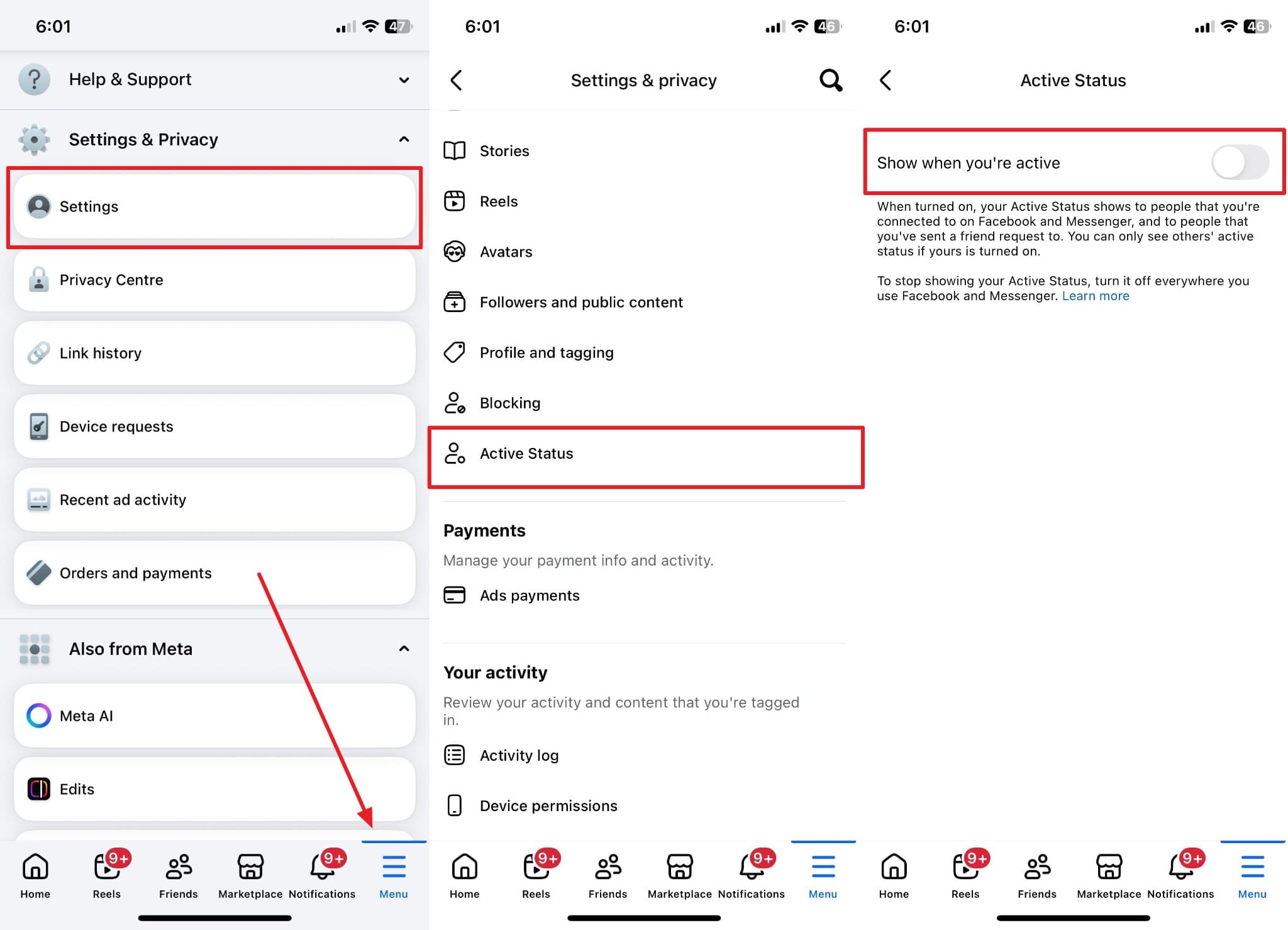
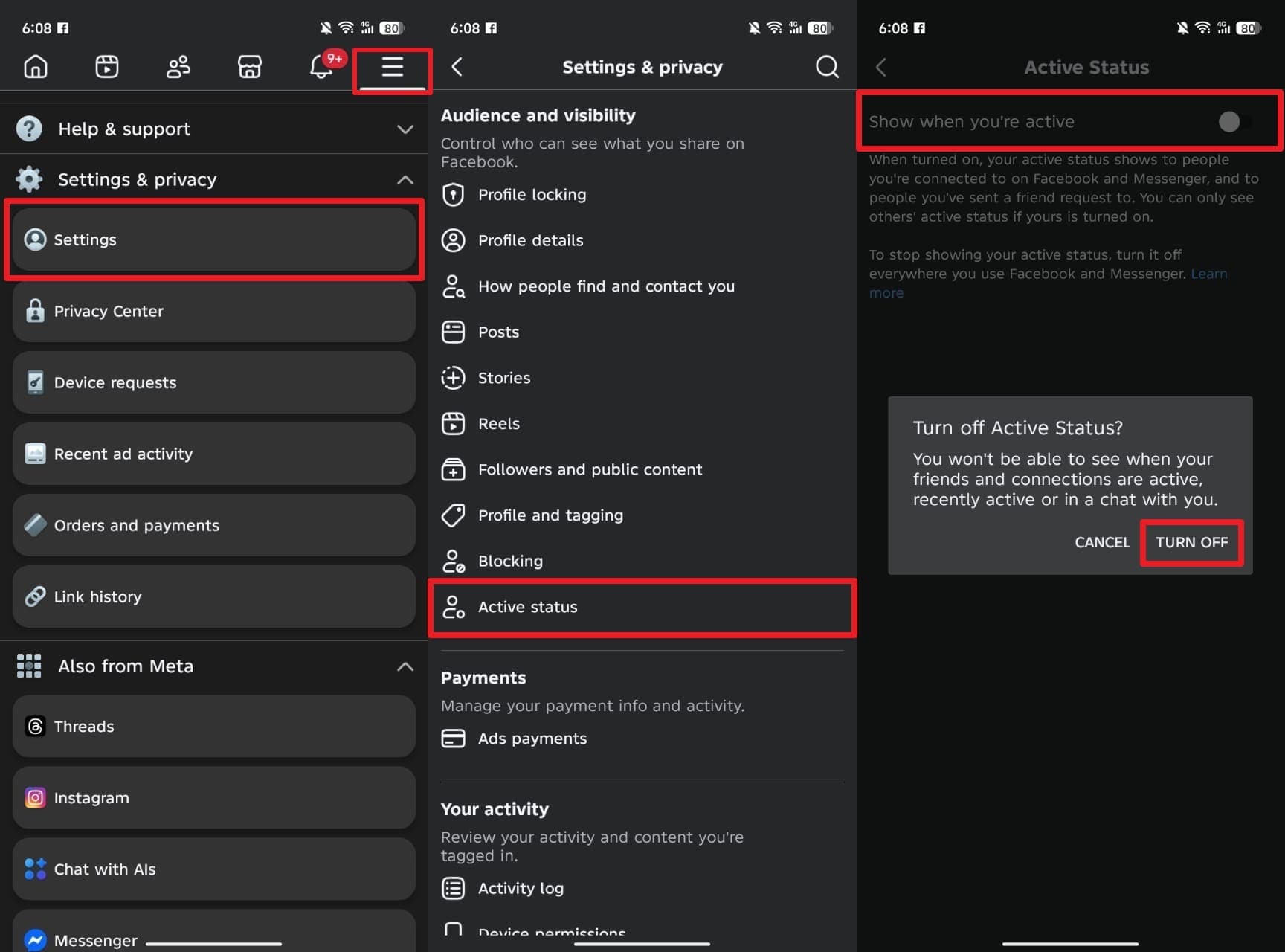
For Android: Open the “Menu” and go to “Settings & Privacy” to tap “Settings.” Next, enter “Active Status” to switch off the “Show When You’re Active” option and opt for “Turn Off.”
Pro Tip. Use Dr.Fone – Virtual Location to Control Your Facebook Location
Many Facebook users want to protect their real location while using social media platforms. Dr.Fone - Virtual Location offers a powerful solution to control and change your GPS. It supports both Android 16 and iOS 26 for broad compatibility and easy use. With one click, you can teleport to a location in the world instantly. Plus, simulate GPS movement by drawing a route or using the flexible joystick feature.
This helps keep your location on Facebook and Messenger reflecting a fake place. Furthermore, Dr.Fone offers multi-device control and supports live tracking with no jailbreak needed. Jump Teleport Mode also allows instant location changes without needing to walk physically. Apart from that, you can import/export GPX files to save favorite locations and manage location history.

Dr.Fone - Virtual Location
1-Click Location Changer for both iOS and Android
- Teleport from one location to another across the world from the comfort of your home.
- With just a few selections on your computer, you can make members of your circle believe you’re anywhere you want.
- Stimulate and imitate movement and set the speed and stops you take along the way.
- Compatible with both iOS and Android systems.
- Work with location-based apps, like Pokemon Go, Snapchat, Instagram, Facebook, etc.


Guide to Use Dr.Fone – Virtual Location to Control Your Facebook Location
Take guidance from the given steps to spoof your app location using the advanced features of Dr.Fone – Virtual Location:
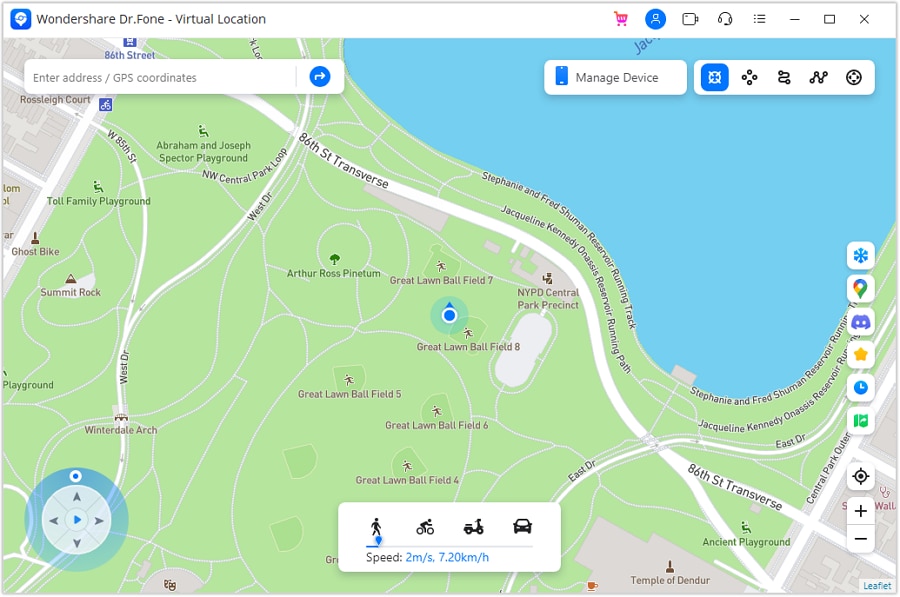
Step 1. Activate the Teleport Mode Feature
Connect your smartphone and click the “Teleport Mode” icon in the top-right toolbar. Next, use the search bar to type the place you want to appear and hit Enter.
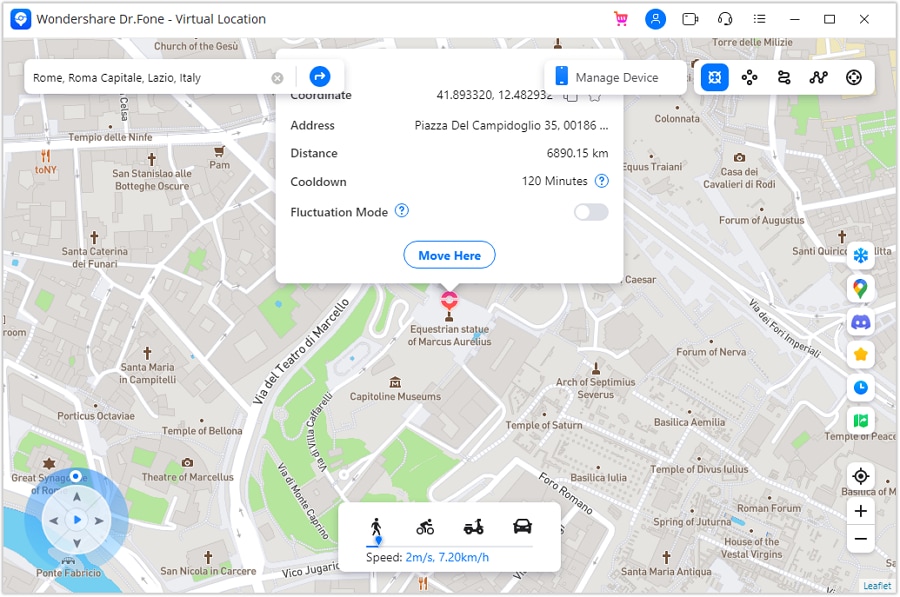
Step 2. Confirm the Teleport Destination
Following this, click the “Move Here” button to apply the change as the map centers on the chosen location.
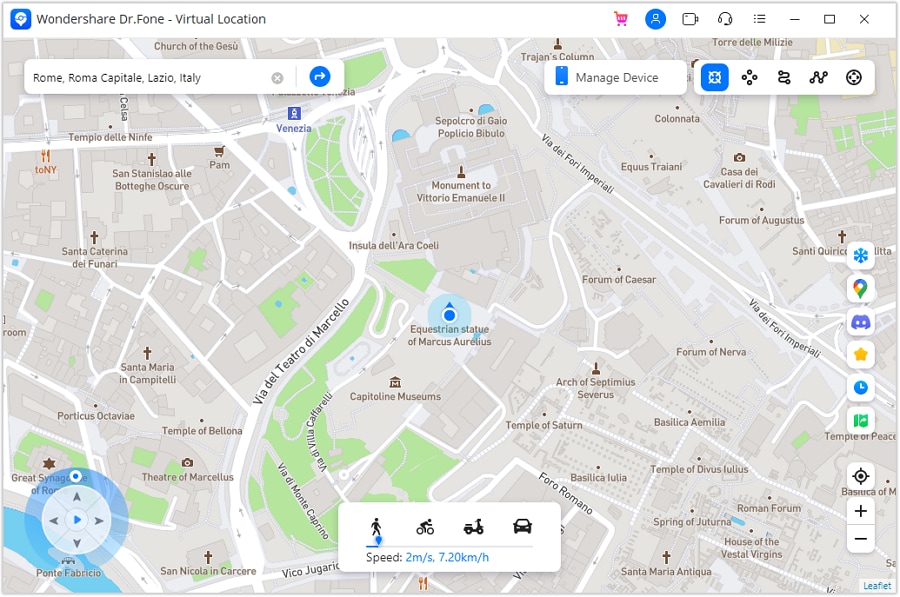
The virtual location updates instantly on the computer; open your phone’s map app or Facebook/Messenger to confirm.
Conclusion
In conclusion, understanding the green dot on Facebook helps you manage your online presence effectively. It shows who is active and improves communication, planning, and video call timing. Yet, being aware of its limitations avoids confusion or social pressure issues. You can also control visibility through simple settings on iPhone or Android devices easily. For complete privacy and location control, using Dr.Fone - Virtual Location is highly recommended.
 safe & secure
4,624,541 people have downloaded it
FAQs
 Q1. Can I appear offline while using Facebook on desktop?Q2. Does Messenger notify others when I turn off my green dot?Q3. Can I fake my green dot location using any app?
You Might Also Like
Virtual Location
- Change iOS Location
- 1. Best iOS Location Changers
- 2. Fake iPhone GPS Location
- 3. Change iPhone Home Address
- 4. Change iPad Weather Location
- 5. Track a Cell Phone Location
- 6. iPhone GPS not Working
- 7. iPhone “No Location Found”
- 8. iPhone “Location Not Available”
- 9. iTools Alternatives
- 10. DoPokeGo++ Alternatives
- 11. 3uTools Alternatives
- 12. Foneazy MockGo Alternatives
- 13. "No Location Found" Vs."Location Not Available"
- Change Android Location
- 1. Best Android Fake GPS Apps
- 2. Free Android Location Spoofers
- 3. Fake Android GPS Location
- 4. Android Location Settings
- 5. Fake GPS No Root
- 6. Fake GPS on Huawei
- 7. Fake GPS without Mock Location
- Hide GPS Location
- 1. Stop Sharing Location without Notifying
- 2. Fake Location on Find My Friends
- 3. Stop Google Tracking Your Location
- 4. Fake Location on Google Maps
- 5. Spoof Location on Life360
- 6. Turn Off Life 360 Without Knowing
- 7. Stop Life360 from Tracking You
- 8. Life360 Circle: Tips & Tricks
- 9. Track Location by Mobile Number
- 10. How Do I Know If My Phone Is Being Monitored
- 11. Can Life360 Track You When Your Phone is Off
- Fake GPS on Games
- 1. Play Pokémon Go Without Moving
- 2. Celebrate National Pokémon Day
- 3. Fake GPS on Mobile Legends
- 4. Spoof Ingress Prime Location
- 5. Spoof Location on Jurassic World Alive
- Fake Location on Social Apps
- 1. Fake Location on Whatsapp
- 2. Fake Location on Facebook
- 3. Fake Location on Telegram
- 4. Fake Location on Tiktok
- 5. Does Your Snap Score Increase with Chats
- 6. Fake Location on Snapchat
- 7. Add Location Filters on Snapchat
- 8. Change Location on Twitter
- 9. Change Instagram Business Location
- 10. Change Instagram Region/Country
- 11. Stop mSpy from Spying You
- 12. Change Location On Linkedin
- Fake Location on Dating Apps
- 1. Fake Hinge GPS
- 2. Top Funny Hinge Prompts
- 3. Apps Like Tinder
- 4. Enjoy Tinder Gold
- 5. Fake Tinder GPS
- 6.Tinder Keeps Crashing
- 7. Find People on Tinder
- 8. Use Grindr on a PC
- 9. Grindr Web app explained
- 10. Fake Grindr GPS
- 11. Grindr Unable to Refresh
- 12. Fake Bumble GPS
- 13. Bumble Snooze Mode Guide
- 14. Tinder vs Bumble vs Hinge
- Get Around Geo-blocking
- 1. Hola Fake GPS Alternative
- 2. Change Netflix Location
- 3. Bypass MLB TV
- 4. Change Location on YouTube TV
- 5. Change Play Store Country
- 6. Change Facebook Marketplace Location
- Followers & Unfollowers Trackers
- Location & Social Apps Tips
- 1. How to Share Live Location on Snapchat
- 2. Best Mobile Number Tracker
- 3. Best Private IG Viewer Tools
- 4. View a Private Instagram Account
- 5. Screenshot on Instagram Without Them Knowing
- 6. Does Instagram Notify When You Screenshot
- 7. Find Out If Someone Screenshots Your Instagram Story
- 8. Does Instagram Notify When You Screen Record
- 9. Fix iPhone Location Not Updating
- 10. Does Snapchat Show Who Viewed Your Profile
- ● Teleport GPS location to anywhere
- ● Play AR games without moving
- ● Spoof Location on the popular Apps
- Free Download Free Download Free Download




James Davis
staff Editor