Teleport your device anywhere instantly with one click.


 100% Security Verified | No Subscription Required | No Malware

 :

 ChatGPT
 Perplexity
 Gemini
 Claude
 Grok
Tinder for seniors is an option, not a separate age-restricted service or a promise of companionship. Older adults can use the app to meet other adults, describe what kind of connection they want, and decide whether its local community fits their preferences. Age alone does not determine your confidence with technology or your relationship goals.
Some people want a long-term partner; others are exploring dating again after a life change. Make your intentions clear rather than assuming every mature user wants the same thing. This 2026 guide focuses on practical choices, privacy, and the five safety habits in the source article without treating any app, badge, or tool as a guarantee.
You do not need to rush into a subscription, move a conversation off the app, or agree to a date before you feel ready. A useful starting point is a truthful profile, a manageable discovery range, and firm boundaries around money, private information, and contact.
In this article
Part 1. Is Tinder a Reasonable Choice for an Older Adult?
Yes, older adults are part of Tinder's adult audience. Its Community Guidelines require users to be at least 18; the platform is not reserved for people in their twenties. Whether it is a good choice for you depends on the available people in your area, your preferences, and your comfort with its interaction style.

Try the ordinary experience before deciding what you need from it. Check your discovery preferences, learn the profile and messaging controls, and practise finding the reporting and blocking options. If you ask someone trusted to help with setup, keep control of your own account, password, and verification codes.
For a clear profile, use recent photos you are comfortable sharing and write a short description of your interests and dating intentions. Avoid photos revealing your home address, important documents, or other people's private details. Honesty about your stage of life is more useful than trying to imitate what you think a younger audience expects.
The source suggests older users generally seek serious relationships, but no demographic evidence was provided to support that claim. Ask each match what they want, and assess whether their behavior aligns with their answer. A shared age range does not establish compatibility, honesty, or a common timeline.
Part 2. What May Appeal to Mature Singles
The original article presents growing popularity as established fact. A more useful approach is to consider the features that might fit your circumstances without assuming a measured growth trend. The same interface may feel convenient to one person and frustrating to another.

- A straightforward interaction pattern: You can inspect a profile, indicate interest, and talk when the matching flow allows it. Take time to learn what each control does rather than swiping quickly through unfamiliar screens.
- Time to communicate before meeting: Messaging can give you space to consider a conversation at home. That may feel more comfortable, but an online environment is not automatically safer than an in-person one and still contains fraud risks.
- Potential for meaningful connections: Shared interests can lead to conversation and companionship. Be clear about whether you seek romance, a relationship, or another kind of connection; the app is not a guarantee of any particular outcome.
- Control over your pace: You can pause, decline a conversation, or leave when the experience no longer suits you. You do not owe anyone continued access because they sent a compliment, paid for a feature, or spent time chatting.
Set a practical time and spending budget before making online dating part of your routine. If the local pool or interface is not a good fit, trying another platform or taking a break is a reasonable decision, not a failure.
Part 3. Five Safety Habits to Use Consistently
These habits apply to adults of every age. Tinder's own Safety Tips recommend protecting personal information, staying on the platform while getting to know someone, refusing money requests, and planning public meetings. They reduce exposure; they cannot control another person's actions.
3-1. Keep Sensitive Details and Account Access Private
Do not send your bank or card information, national identification details, home address, work routine, passwords, or one-time verification codes to a match. Seemingly casual details can reveal where you live or when you are alone. Avoid putting identifiable information about children or grandchildren in a public profile too.
If someone requests money, financial access, or a transfer for an emergency, stop the transaction and report the behavior through the app. A request to install a remote-access tool or move funds to a 'safe' account deserves the same caution. Being kind does not require surrendering control of your money or phone.

If you have already disclosed financial information or sent funds, contact your bank or payment provider promptly and secure affected accounts. Save relevant evidence for reporting. Do not send further money to someone promising guaranteed recovery of the original loss.
3-2. Use a Call as One Screening Step, Not Proof
A short phone or video conversation can help you assess whether a match communicates consistently and whether you feel comfortable continuing. It is not identity certification or proof of good intentions: images, voices, and conversations can be misleading.
Current feature correction: Tinder's Face to Face video-chat help page says that the feature has been deprecated. Do not follow old instructions expecting an in-app video button. Messaging with matches remains available through the normal app flow.

Remain on the platform while getting to know someone. If you both later choose another calling method, consider what personal details it exposes and use privacy controls you understand. Do not install an unfamiliar app, pay a 'verification fee,' or reveal a code simply because a match says it is necessary to talk.
3-3. Let Consistent Behavior Build Trust Gradually
Warm attention can be welcome, particularly when you are returning to dating. Still, allow the connection to develop without deadlines. Ask open questions about ordinary interests and intentions, notice major inconsistencies, and watch how the person responds when you set a boundary.
A considerate match should not pressure you to keep the relationship secret, abandon trusted friends, send private images, or prove affection through a purchase. Consult someone you trust if a conversation leaves you uncertain. You can step back without producing evidence that the person is definitely a scammer.

3-4. Recognize Patterns Common in Dating Scams
Be cautious about rapid declarations of love, a recurring inability to meet, inconsistent explanations, urgent emergencies, and pressure to move immediately to another messaging service. A single detail may have an innocent explanation; the combination of urgency, secrecy, and a request for money is particularly concerning.
Investment pitches are also a warning sign, even when the person initially avoids asking for a direct transfer. Do not open an account on a recommended trading site, buy cryptocurrency for them, or send gift-card codes. Tinder's safety guidance specifically cautions against investments and financial accounts suggested by matches.

Use the platform's reporting and blocking controls when behavior crosses your boundaries. Do not try to retaliate, secretly track the person, or collect more private information about them. Focus on protecting yourself, preserving relevant messages, and contacting appropriate support if money or account access is involved.
3-5. Plan a Public Meeting You Can Leave Independently
Choose a busy, familiar venue such as a cafe or restaurant, and keep the first meeting there. Avoid a home, isolated location, or sudden change of venue that makes you uncomfortable. Arrange your own transport and a backup way to leave; do not make a new acquaintance your only route home.
Tell a trusted person the planned time, location, and whom you are meeting. Charge your phone and consider an agreed check-in. If you choose to share your live location with that trusted person, use a feature you understand and keep the device reporting your actual position.

You may end a date early, decline an invitation, or ask venue staff for help. Keep your drink and belongings in sight and avoid letting politeness override discomfort. These precautions support a safer plan; they do not guarantee that any meeting is risk-free.
Location Tools Are Not Identity or Dating-Safety Tools
 Set your map route to simulate GPS movement.
- Set your wanted movement speed.
- HD and large map view to check location.
- Fake GPS location to anywhere.

Dr.Fone - Virtual Location provides GPS location changes and route simulation on supported devices. Those functions are relevant to permitted own-device location testing, not verifying a match, checking another person's whereabouts, or identifying a romance scam.
A simulated GPS point does not hide every location signal, encrypt a connection, unlock Tinder subscriptions, or guarantee a different discovery pool. For normal dating in another city, review Tinder's own official location options. Do not use third-party technology to bypass paid features or manipulate the service, and never rely on fake coordinates as a first-date safety measure.
Step 1 Confirm the authorized purpose
Check that your own phone and intended app support the test and permit simulated location data. If your goal is safer dating, begin with the privacy and meeting habits above instead of assuming GPS software provides protection.
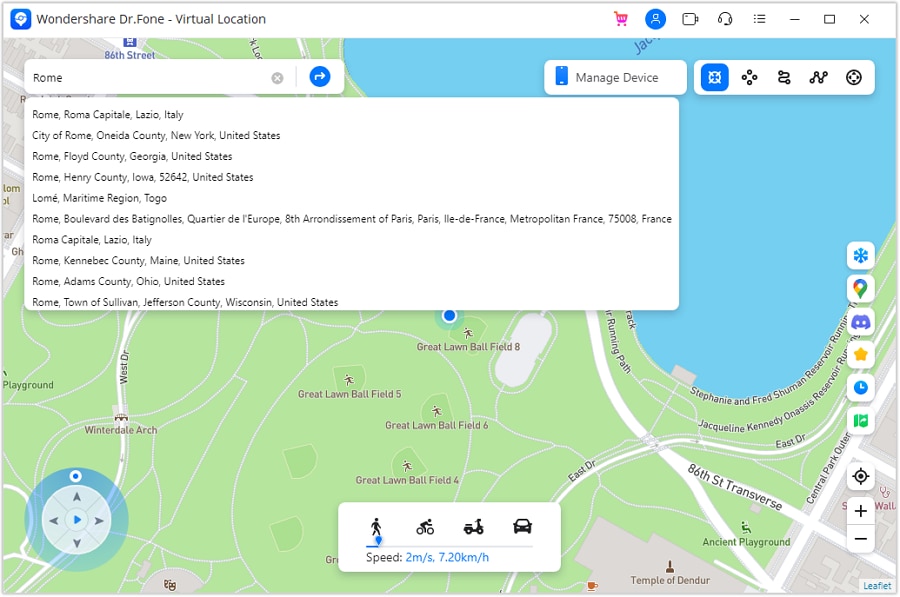
Step 2 Connect and preview the map
Open the desktop Virtual Location module, connect your supported device, and follow its current permission prompts. Review the starting point and the destination before applying any simulation.
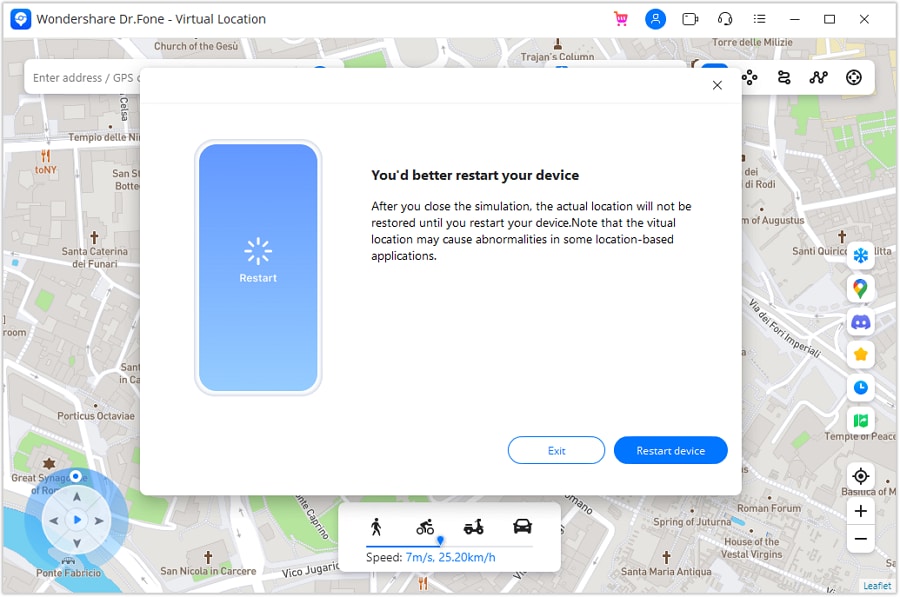
Step 3 End the test and check actual positioning
After the permitted test, stop the simulated location and verify that the phone reports where you really are. Do this before using navigation, emergency-related functions, or any location sharing that you and a trusted contact rely on.
Keep GPS testing separate from an actual date. Accurate positioning and trusted contacts are more relevant to a meeting plan than a simulated pin or an assumption of anonymity.




Conclusion
Dating later in life does not require different standards of honesty, consent, or respect. Try the app at your own pace, present yourself accurately, and assess whether the conversations and local choices fit what you want. A subscription, flattering profile, or reassuring video conversation cannot replace careful boundaries.
Use the five safety habits consistently and leave a conversation or meeting whenever you need to. Dr.Fone - Virtual Location is a supported GPS utility, not a way to verify a person or solve every dating risk. Keep that distinction clear when deciding whether any tool is relevant to your situation.
FAQ
1. Can Tinder be used safely by seniors?
Older adults can use it, but no dating platform guarantees safety. Protect sensitive information, refuse financial requests, use reporting controls, and plan public meetings with independent transport. A call or verification feature is only one part of assessing a connection.2. Should I compare alternatives aimed at mature singles?
Yes, if Tinder's local community or interface does not fit. The source mentions SilverSingles, OurTime, and Stir; do not assume all three have the same age focus or audience. Check current eligibility, local availability, privacy controls, and subscription terms rather than choosing solely by a familiar name.3. What should I know before paying for Tinder?
Explore the basic experience first. Plus, Gold, and Platinum provide different paid features, but prices and included benefits can vary. Read the actual offer, billing period, renewal terms, and cancellation process in your account; paying does not guarantee replies or a relationship.4. How can I begin a conversation naturally?
Choose a genuine detail from the person's profile and ask an easy, open question about it, such as a hobby or favorite kind of outing. Keep early conversation respectful and avoid sensitive identifiers or financial topics. A thoughtful message invites a response without creating an obligation to reply.
 Add Wondershare Dr.Fone as a preferred source on Google