 Teleport your device anywhere instantly with one click.

 100% Security Verified | No Subscription Required | No Malware

 :
: 
 ChatGPT
 Perplexity
 Gemini
 Claude
 Grok
Grok
A strong build in Meta Lock can change how every match feels. The problem is simple: useful weapons, traits, and talents often depend on spins, while spins can run out fast. That is why working meta lock codes matter. They give players extra chances to improve a build without spending more time on the same grind. Yet code lists can become old within days. A code may expire, need a goal count, or fail because one letter is wrong.
This guide keeps the process clear. It covers current codes, mobile and PC redemption, spin planning, trusted code sources, and quick fixes. It also includes a bonus location tool for mobile gamers who play other GPS-based games besides Meta Lock.
In this article
- Part 1. What is Meta Lock?
- Part 2. Active Meta Lock Codes Cross-Checked
- Part 3. Where and How to Redeem Meta Lock Codes on Mobile and PC
- Part 4. Smart Spin Strategy for Building a Stronger Meta Lock Player
- Part 5. Best Places to Catch New Meta Lock Codes First
- Part 6. Why Meta Lock Codes Fail and How to Fix Them
- Part 7. Bonus Tool for Mobile Gamers: Dr.Fone - Virtual Location Changer
Part 1. What is Meta Lock?
Meta Lock is a Roblox soccer game inspired by the Blue Lock manga series. It is not a basic football game. It also uses a gacha system that lets players roll for different powers, including rare and legendary abilities.
You can join several match types, such as 3v3 and 5v5 games. Practice mode also lets you train alone and improve your control before entering a real match. Players can visit the gym to build their skills further.
The game also includes stylish gear and special goal celebrations. These features let you create a more personal look while competing for wins.
Many useful abilities depend on spins. This is where active Meta Lock codes can help.
Part 2. Active Meta Lock Codes Cross-Checked
The codes below were cross-checked against fresh July 2026 trackers. These eight had the strongest overlap. Their status can still change without notice, so try them from top to bottom.
| Code | Reported Reward | Important Note |
|---|---|---|
| REBORN_SOON | 500 Spins and 500 Talent Spins | One tracker reports an 8-goal rule |
| HeroWeapon | Free Spins | The amount may appear after redemption |
| SorryAboutMaintenance | 150 Spins | One tracker reports a 5-goal rule |
| talentspinsidk | 150 Spins | One tracker reports a 5-goal rule |
| PrideOfJapan | 50 Spins | One tracker reports a 5-goal rule |
| ShadowNinja | 50 Spins | One tracker reports a 5-goal rule |
| DELAYCODEEE | 50 Spins | It ends with three “E” letters |
| HeroUpdSoon | 50 Spins | Match the capital letters |

Part 3. Where and How to Redeem Meta Lock Codes on Mobile and PC
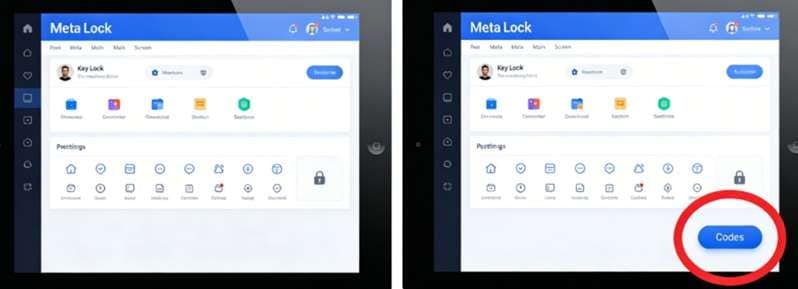
Finding a new code can be helpful, but you must input it in the right place. The redemption option is not visible on the main screen. You can find it in the Locker menu.
The process is the same whether on a PC, an iPhone, or Android.
Where to Enter Meta Lock Codes
-
Step 1 Launch Meta Lock
Open Roblox and start Meta Lock. Wait until your character and the main menu load fully.
-
Step 2 Open the Locker Menu
Select the Locker tab from the main menu.
-
Step 3 Find the Codes Button
Look at the bottom-right corner of the Locker screen. Tap or click the blue Codes button.
-
Step 4 Enter the Code
A text box will appear. Type or paste the code into the empty field.
-
Step 5 Claim the Reward
Press Enter on PC. On mobile, tap the confirm key on your keyboard. A valid reward will be added to your account balance.
Part 4. Smart Spin Strategy for Building a Stronger Meta Lock Player
Working codes can give you many free spins. However, the real value comes from how you use them. In Meta Lock, traits and skills are linked to famous Blue Lock characters. Each one supports a different playing style.
Do not use every spin as soon as you receive it. Save them until you know which trait suits your role and match strategy.
Top Traits Worth Targeting
- Isagi’s Direct Shot
Lorem Ipsum is simply dummy text of the printing and typesetting industry. It can help you take accurate shots inside the penalty area. - Nagi’s Trapping
Lorem Ipsum is simply dummy text of the printing and typesetting industry. It is useful for midfielders and forwards who often receive difficult passes. - Rin’s Accuracy and Puppeteer Traits
Lorem Ipsum is simply dummy text of the printing and typesetting industry. They can help you control the field and score from difficult positions or angles. - Flow State
Lorem Ipsum is simply dummy text of the printing and typesetting industry. It can improve your speed, shot strength, and overall impact on the field.
Keep some spins saved in case the developers raise the drop rate for rare traits such as Flow State.
Combine the spins you earn from active Meta Lock codes. Using them in larger batches gives you more chances to roll for powerful abilities instead of stopping with basic traits.
Part 5. Best Places to Catch New Meta Lock Codes First
New codes usually appear on the developer’s official pages. Following these sources can help you claim rewards before they expire.
- Official Meta Lock Discord
Join the official Discord server and check the announcements channel. Developers often share new codes there with patch notes, updates, and previews of future character traits. - Official Roblox Group
Follow the Meta Lock Roblox group for updates in your Roblox feed. Some rewards may also require group membership, so joining can be useful.
When New Codes Usually Drop
- Major updates: New maps, modes, or character traits may include a reward code.
- Server problems: Developers may release apology codes after delays or downtime.
- Like milestones: New rewards often appear when the game reaches a major number of likes.
Even official codes can fail if they expire or are entered incorrectly. The next section explains the most common code errors and how to fix them.
Part 6. Why Meta Lock Codes Fail and How to Fix Them
A code may sometimes show a red error message. The fix depends on whether the code is marked Expired or Invalid.
What Does “Expired” Mean?
An expired code was once active, but its reward period has ended. It cannot be used again.
This error is common with codes found in old videos, forums, or outdated posts. There is no way to restore an expired code.
What Does “Invalid” Mean?
An invalid message usually means the game cannot read the code as entered. Check these common problems:
- A letter’s case must match the original website’s exactly.
- When you use your phone, the first letter changes and a full stop is added.
- When you paste the code, there might be a hidden space before or after the code.
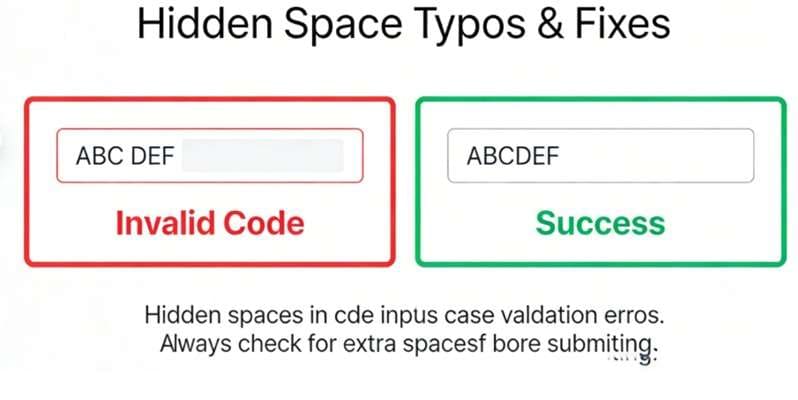
Clear the field and enter the code again carefully. Once your Meta Lock codes work, mobile players can also consider a useful location tool for other supported games.
Part 7. Bonus Tool for Mobile Gamers: Dr.Fone - Virtual Location Changer
Dr.Fone - Virtual Location can change the GPS position shown by an iPhone or Android phone. It is useful for people who also play GPS-based mobile games or use location-aware apps.
However, the tool does not create Meta Lock spins, unlock Roblox codes, or improve football stats. Meta Lock is not presented as a GPS-based game, so Dr.Fone should be viewed as a separate bonus tool for wider mobile gaming use.
 Set your map route to simulate GPS movement.
- Set your wanted movement speed.
- HD and large map view to check location.
- Fake GPS location to anywhere.
How to Use Dr.Fone Teleport Mode
-
Step 1 Open Virtual Location
Install Dr.Fone on your computer. Launch the program and select Virtual Location from the available tools.
-
Step 2 Connect Your Phone
Link your iPhone or Android phone to the laptop. Follow the connection guidelines shown by Dr.Fone.
-
Step 3 Select Teleport Mode
In the map screen, in the upper-right corner, select the Teleport Mode icon.
-
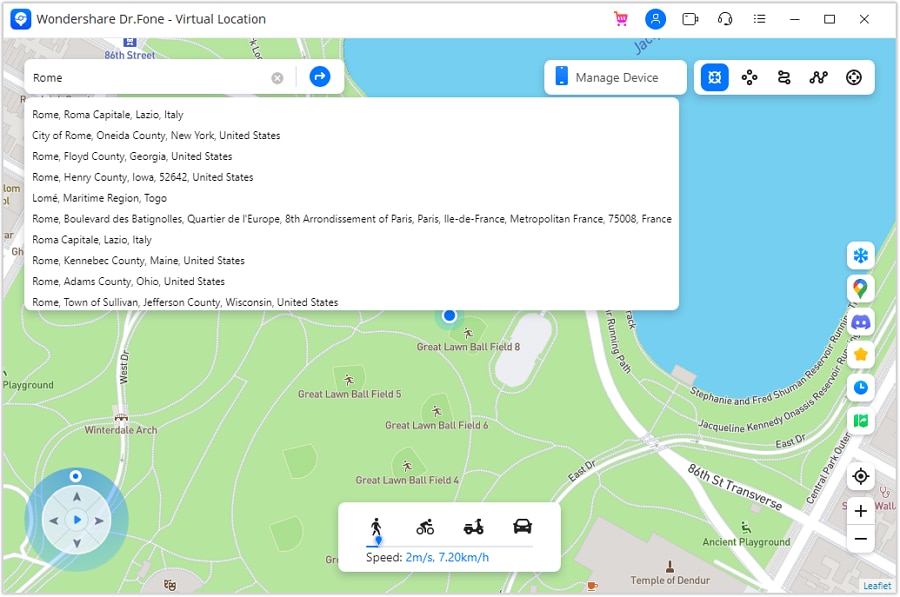
Step 4 Search for a Location
In the search bar, type a city, address, or place. Hit Enter to show the selected point on the map.
-
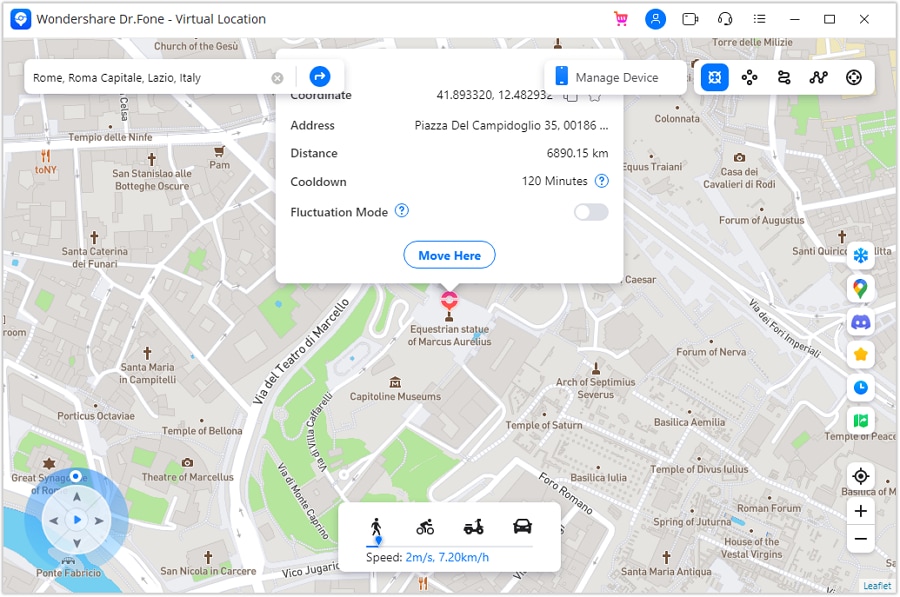
Step 5 Confirm the New Position
Check that the correct place appears. Click Move Here to set it as the phone’s virtual GPS location.
-
Step 6 Check the Location on Your Phone
Open a map app on the connected phone. The displayed position should match the place selected in Dr.Fone.




Conclusion
Active Meta Lock codes can give you more spins, but using them well matters just as much. Redeem each code carefully, match every capital letter, and check official Discord or Roblox updates before rewards expire. Save part of your spin balance so you can target traits that suit your role instead of rolling without a plan.
When a code fails, review spaces, keyboard changes, and case errors before assuming it is dead. Dr.Fone - Virtual Location is a useful extra for players who also enjoy GPS-based mobile games, though it does not affect rewards, spins, or performance inside Meta Lock.
FAQ
-
1. How can I find more Meta Lock codes?
New codes regularly appear in the official Roblox Group There's a discord. When checking a lot of channels it takes time so bookmark this page and come back for more updates. -
2. Why are my Meta Lock codes not working?
Check the spelling, capital letters, and punctuation first. The code must match the listed version exactly. If it still fails, it may have expired. -
3. How can I earn free rewards in Meta Lock?
Winning matches gives you more in-game cash. New players can start in Practice mode to build confidence. Each solo round counts as a win and gives 400 cash.
 Add Wondershare Dr.Fone as a preferred source on Google



