

Instagram Green Dot Guide: Activity Status, Accuracy & Privacy Tips

Oct 22, 2026 • Filed to: Virtual Location Solutions • Proven solutions
 TL;DR:
The Instagram green dot indicates a user currently has the app open for general activities, but it does not confirm they are actively chatting, reading messages, or viewing specific content.
● The indicator provides moderate accuracy because background app refresh or weak internet connections can cause false positives and slight status delays.
● You can hide your online presence by turning off the toggle under Profile > Messages or Story Replies > Show Activity Status, with the strict condition that you will also lose the ability to view the activity status of all other accounts.
● To obscure physical location, Dr.Fone - Virtual Location can spoof GPS coordinates for Instagram, functioning on both Android 16 and iOS 26 while supporting simultaneous multi-device control for up to 5 iOS devices.
Ask AI for a summary
 ChatGPT
 Perplexity
 Gemini
 Claude
 Grok
Grok
The green dot usually makes people curious about what it really means. Many times, you see it next to a friend’s name and wonder if they are active or talking to someone. This small circle may say a lot about your presence online, but it is not necessarily obvious.
Some people also worry about privacy and who can see their activity. So, this guide explains what the green dot on Instagram indicates and ways to manage or hide it. You will also learn helpful tips to control your online presence safely.

Part 1. What Is the Green Dot on Instagram?
It basically shows when someone is currently active or has been online recently. The green dot mainly appears in Direct Messages and next to profile pictures of followed accounts. In case you see it, the person likely has Instagram open and may respond quickly.
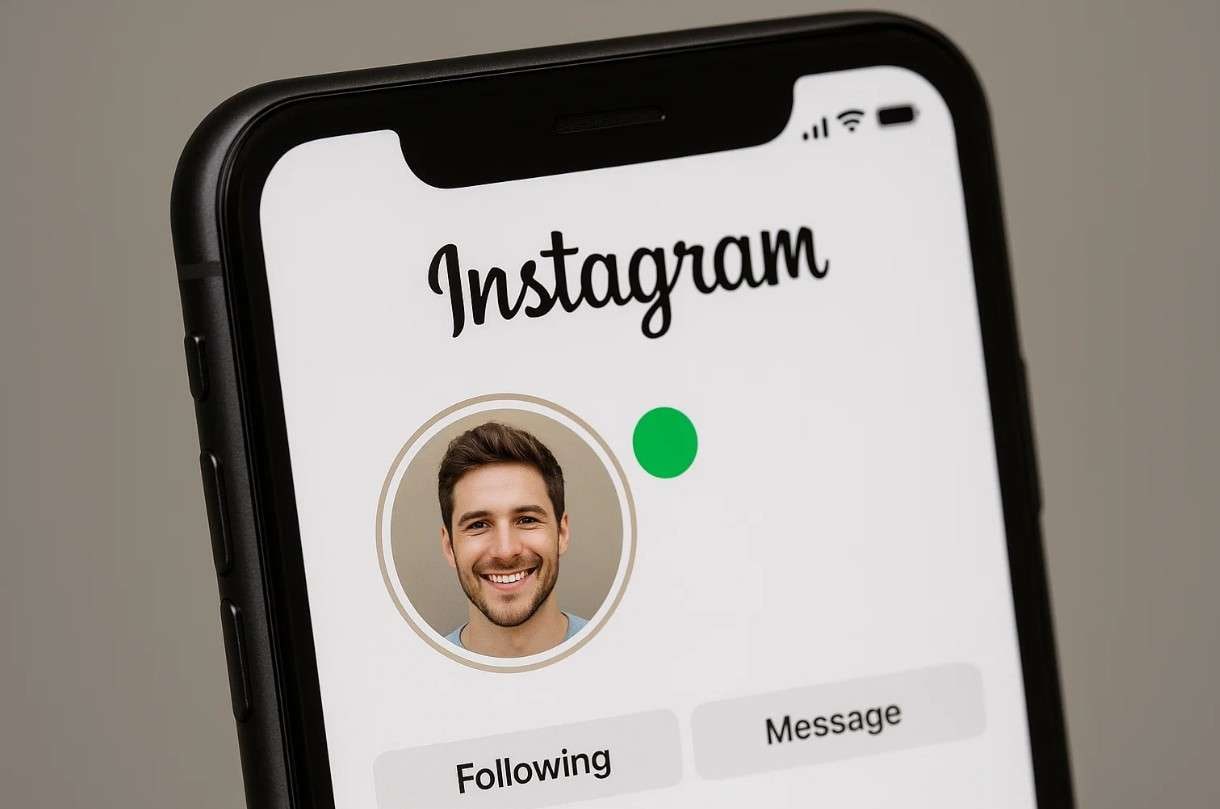
Sometimes, the green dot on Instagram, but not active in real time, can appear due to small delays. It works with labels like "Active X minutes ago" for more clarity. In addition, only accounts you follow or message can see your green dot, not everyone.
Instagram's Green Dot vs Other Apps' Activity Status
Different apps show online activity in slightly different ways, which can confuse users. Comparing Instagram’s green dot with other platforms helps understand its unique features clearly. Below, you will explore a comparison table between various social apps:
|
Feature |
|
|
Messenger |
Telegram |
Snapchat |
| Activity Indicator | Green dot in DMs and beside profiles | Online or Last Seen label | Green dot beside names and Stories | “Online” or “Last seen recently” label | Bitmoji activity or Snap Map status |
| Who Can See It | Only followed or messaged users | Anyone, based on privacy settings | Friends or message contacts | Anyone or limited per settings | Friends only |
| Accuracy Level | Moderate | High | High | Moderate | Low to Moderate |
| Extra Notes | Syncs with “Active now” or “Active X min ago.” | Real-time updates stop when the app is closed | Updates instantly when active or idle | Shows longer time ranges like “within a week.” | Depends on map use and recent snaps |
How Long Does the Green Dot Stay on Instagram?
The green dot on this app appears only while someone is actively using the app. It usually disappears within a few minutes after a user closes or leaves Instagram. Right after it disappears, a time label replaces it with their last seen activity. Hence, the green dot on Instagram means that someone is actively using the app.
Does the Green Dot Mean They Are Chatting with Someone?
It does not mean they are chatting because the user could be doing anything within the app. The green dot indicates general activity, like browsing or checking DMs. It does not confirm if they are reading messages or interacting with anyone. In addition to that, it appears that the app is open in the background. This helps clarify what the green dot means to Instagram story viewers.

Part 2. How Accurate Is the Instagram Green Dot/Active Now?
The Instagram green dot or “Active now” gives a fairly reliable activity estimate. It usually reflects whether someone was online in the last few minutes. Yet, this is not precise for real-time tracking and can show slight delays. Plus, factors like background app refresh or poor connection can cause delays or false positives. So, what the green dot means on Instagram is best understood as a rough indicator.
Green Dot vs Active Now — What’s the Difference?
Green dot and “Active Now” status on Instagram both indicate user activity, but differ slightly in usage. In this section, you discover a key comparison table between the two functions:
|
Feature |
Green Dot |
Active Now |
| Indicator type | Visual dot near profile | Text label under name |
| Meaning | User is currently online | User is currently or recently active |
| Visibility | In DMs, friends list, profiles | In DMs under username |
| Accuracy | Shows a live or almost live online status | May have a slight delay |
| Privacy control | Can be disabled in settings | Linked to the same setting |
| User action | User has Instagram open | User was active recently |
What The Green Dot Does Not Reveal?
As explored, it only shows general activity, not specific actions. Therefore, this does not reveal if someone is messaging you or anyone else. It cannot show whether they are viewing your Stories or reading messages. The indicator gives no location or device information about the user. It also does not provide precise timing, only a rough estimate. This feature protects user privacy while indicating basic online presence.
Part 3. How to Turn Off/Manage the Green Dot (Activity Status)
You can easily turn off the green dot on Instagram through the app's settings. It works on both Android and iPhone devices easily. This hides your online presence from others, helping protect your privacy. However, you also lose the ability to view others’ activity status, as the feature only works when enabled on both accounts. Thus, review the following guide to turn off the green dot feature on your device:
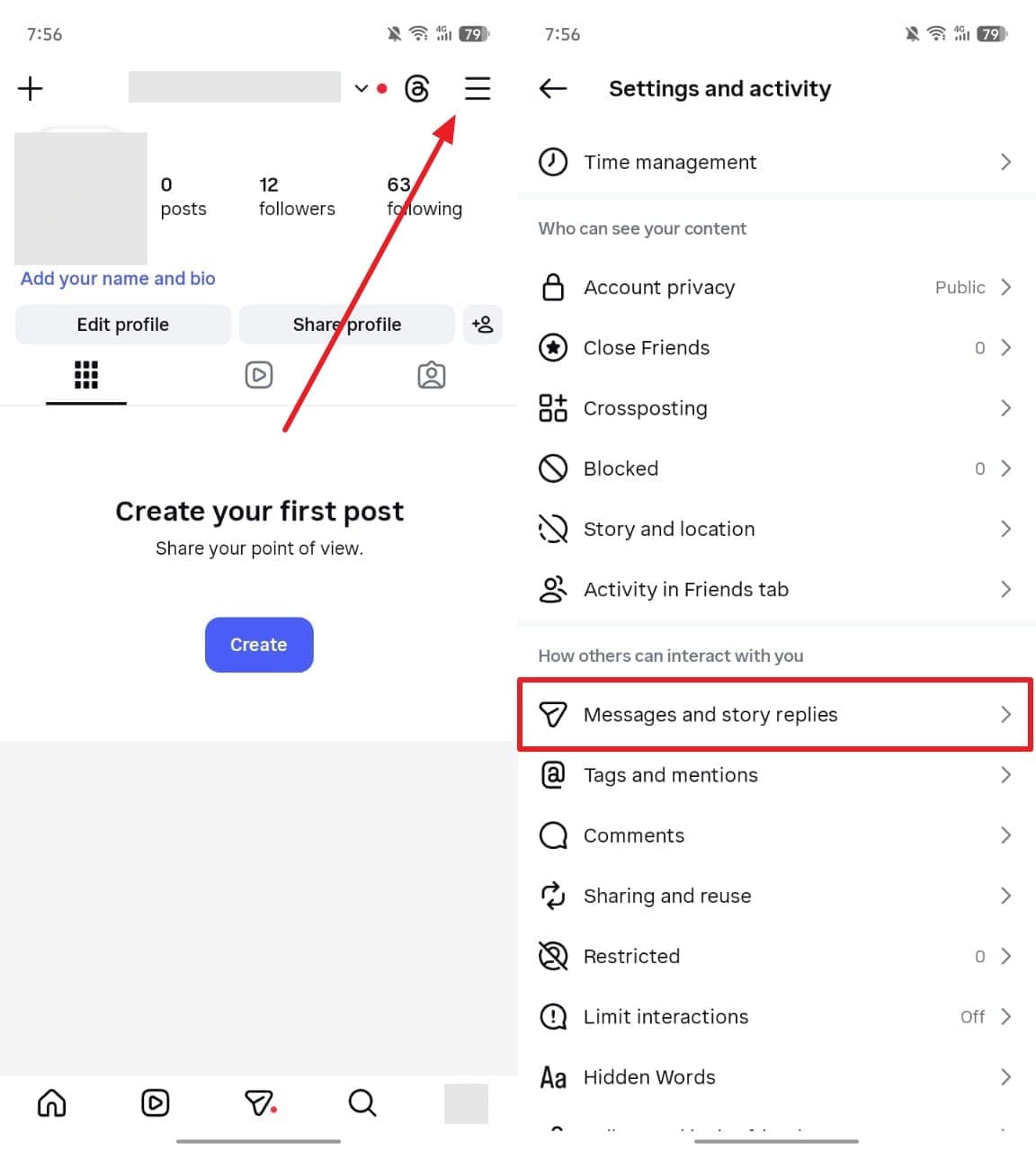
Step 1. On your preferred phone, access your profile and tap “Three Lines” to choose “Messages or Story Replies.”
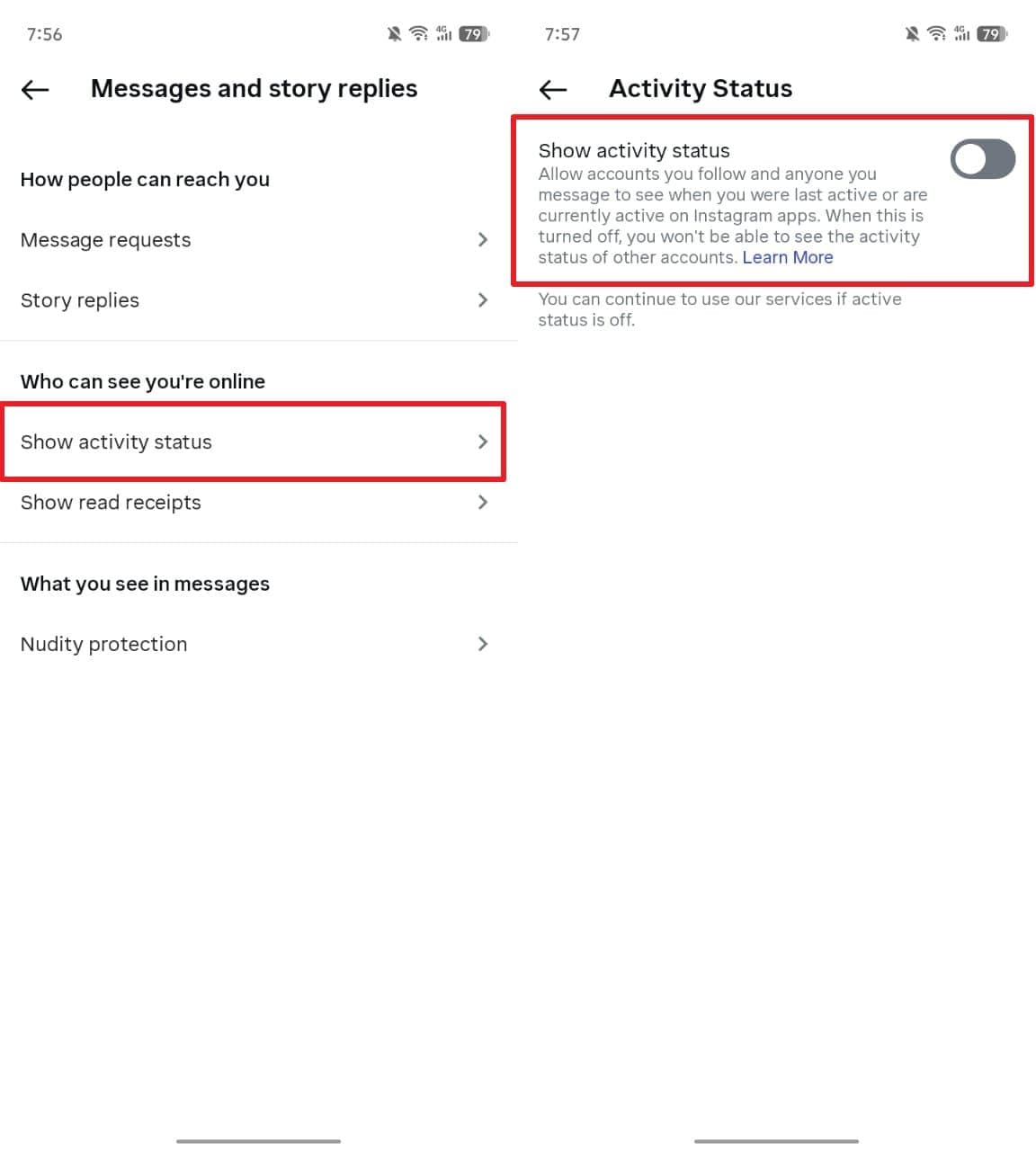
Step 2. Here, navigate to the “Show Activity Status” section and turn off its toggle.
Pro Tip. Change or Spoof Your Instagram Location Easily with Dr.Fone – Virtual Location
Sometimes, you may want to appear in a different location for privacy or app experiences. In such cases, Dr.Fone - Virtual Location lets users change GPS location on both Android and iOS easily. It works on both Android 16 and iOS 26, letting you teleport your GPS location anywhere. You can also simulate realistic GPS movement using a joystick or draw routes with adjustable speeds.
Additionally, the tool works with various other social apps or games, helping manage the location and features. Besides, its multi-device control supports up to 5 iOS devices simultaneously. The historical records automatically save visited locations for quick access and easy reuse. Apart from that, users can export GPX files to save favorite routes for future use. The cooldown timer reminds you not to change locations too frequently.

Dr.Fone - Virtual Location
1-Click to Spoof Your Instagram Location
- Teleport from one location to another across the world from the comfort of your home.
- With just a few selections on your computer, you can make members of your circle believe you’re anywhere you want.
- Stimulate and imitate movement and set the speed and stops you take along the way.
- Compatible with both iOS and Android systems.
- Work with location-based apps, like Pokemon Go, Snapchat, Instagram, Facebook, etc.


Guide to Spoof Your Instagram Location Easily with Dr.Fone – Virtual Location
You can adhere to the steps below to change your app’s location using this dedicated location spoofer:
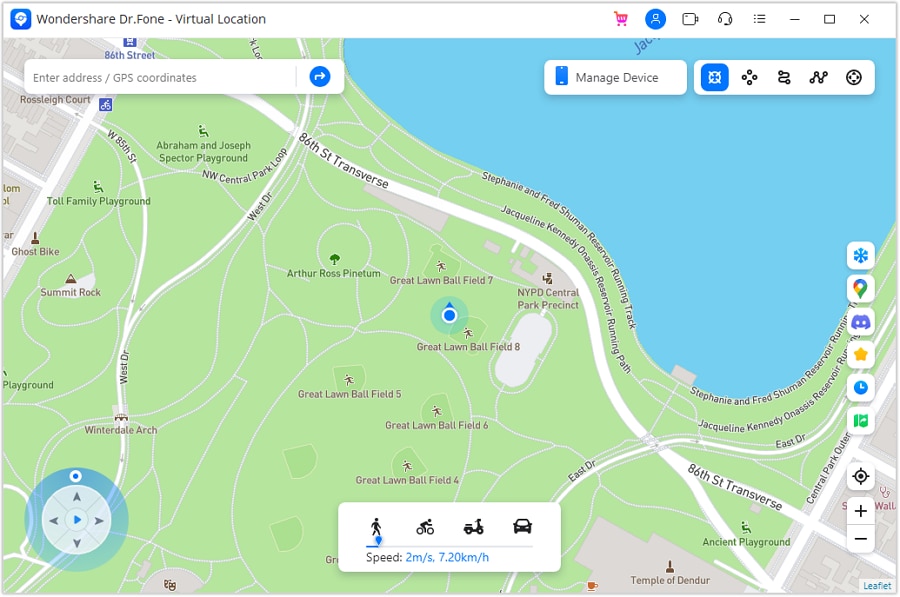
Step 1. Access the Tool’s Teleport Mode
Once your Android or iOS smartphone is connected, click the “Teleport Mode” icon on the top-right toolbar. It’s the first icon on the left to activate location spoofing.
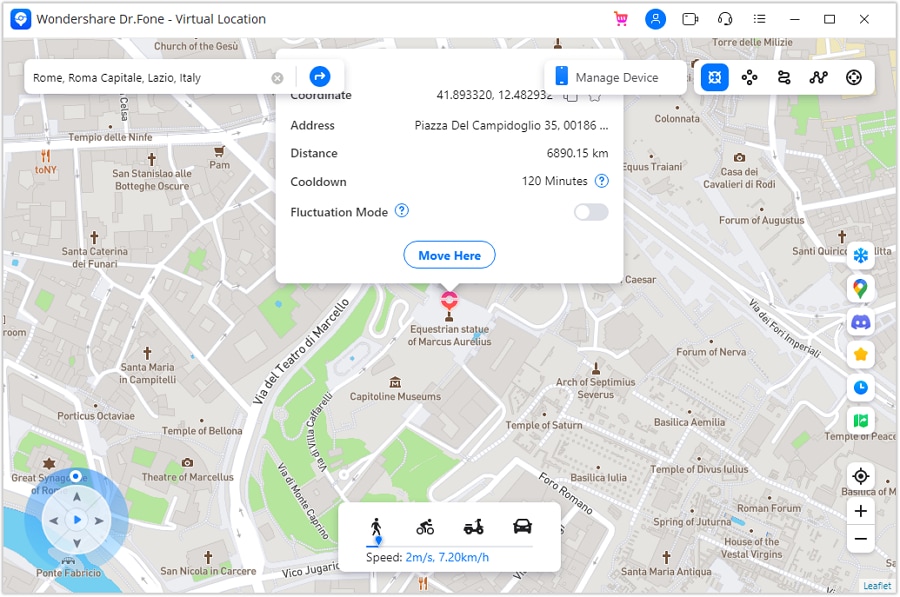
Step 2. Enter Your Desired Location
Use the search bar to type the place you want your device to appear and press “Enter.” The map will center on the selected spot, so review it carefully and click “Move Here” to finalize.
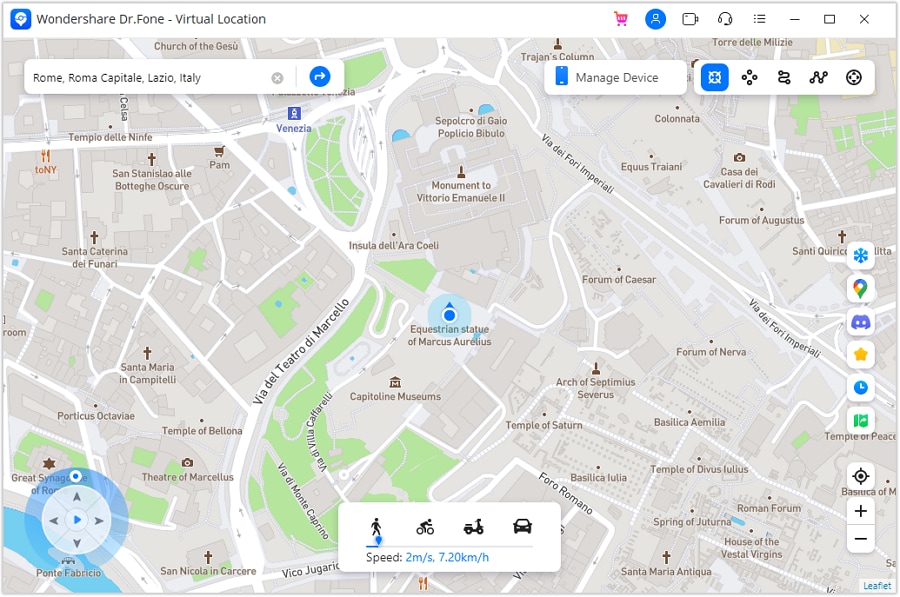
Step 3. Check the Updated Instagram Location
Afterward, the virtual location updates instantly on your computer; open your phone’s maps to verify the change.
Conclusion
In summary, the green dot on Instagram helps users understand friends’ online activity quickly. It shows general presence but not specific actions like messaging or viewing content. Besides, you can also manage or hide it through settings for better privacy. Understanding its accuracy and limitations prevents misunderstandings. For advanced control over your virtual presence, including location management, using Dr.Fone – Virtual Location is highly recommended.
 safe & secure
4,624,541 people have downloaded it
FAQs
 Q1. Will turning off my green dot affect message notifications?Q2. How often does Instagram update the “Active Now” status?Q3. Can the green dot be faked or spoofed for privacy reasons?

Virtual Location
- Change iOS Location
- 1. Best iOS Location Changers
- 2. Fake iPhone GPS Location
- 3. Change iPhone Home Address
- 4. Change iPad Weather Location
- 5. Track a Cell Phone Location
- 6. iPhone GPS not Working
- 7. iPhone “No Location Found”
- 8. iPhone “Location Not Available”
- 9. iTools Alternatives
- 10. DoPokeGo++ Alternatives
- 11. 3uTools Alternatives
- 12. Foneazy MockGo Alternatives
- 13. "No Location Found" Vs."Location Not Available"
- Change Android Location
- 1. Best Android Fake GPS Apps
- 2. Free Android Location Spoofers
- 3. Fake Android GPS Location
- 4. Android Location Settings
- 5. Fake GPS No Root
- 6. Fake GPS on Huawei
- 7. Fake GPS without Mock Location
- Hide GPS Location
- 1. Stop Sharing Location without Notifying
- 2. Fake Location on Find My Friends
- 3. Stop Google Tracking Your Location
- 4. Fake Location on Google Maps
- 5. Spoof Location on Life360
- 6. Turn Off Life 360 Without Knowing
- 7. Stop Life360 from Tracking You
- 8. Life360 Circle: Tips & Tricks
- 9. Track Location by Mobile Number
- 10. How Do I Know If My Phone Is Being Monitored
- 11. Can Life360 Track You When Your Phone is Off
- Fake GPS on Games
- 1. Play Pokémon Go Without Moving
- 2. Celebrate National Pokémon Day
- 3. Fake GPS on Mobile Legends
- 4. Spoof Ingress Prime Location
- 5. Spoof Location on Jurassic World Alive
- Fake Location on Social Apps
- 1. Fake Location on Whatsapp
- 2. Fake Location on Facebook
- 3. Fake Location on Telegram
- 4. Fake Location on Tiktok
- 5. Does Your Snap Score Increase with Chats
- 6. Fake Location on Snapchat
- 7. Add Location Filters on Snapchat
- 8. Change Location on Twitter
- 9. Change Instagram Business Location
- 10. Change Instagram Region/Country
- 11. Stop mSpy from Spying You
- 12. Change Location On Linkedin
- Fake Location on Dating Apps
- 1. Fake Hinge GPS
- 2. Top Funny Hinge Prompts
- 3. Apps Like Tinder
- 4. Enjoy Tinder Gold
- 5. Fake Tinder GPS
- 6.Tinder Keeps Crashing
- 7. Find People on Tinder
- 8. Use Grindr on a PC
- 9. Grindr Web app explained
- 10. Fake Grindr GPS
- 11. Grindr Unable to Refresh
- 12. Fake Bumble GPS
- 13. Bumble Snooze Mode Guide
- 14. Tinder vs Bumble vs Hinge
- Get Around Geo-blocking
- 1. Hola Fake GPS Alternative
- 2. Change Netflix Location
- 3. Bypass MLB TV
- 4. Change Location on YouTube TV
- 5. Change Play Store Country
- 6. Change Facebook Marketplace Location
- Followers & Unfollowers Trackers
- Location & Social Apps Tips
- 1. How to Share Live Location on Snapchat
- 2. Best Mobile Number Tracker
- 3. Best Private IG Viewer Tools
- 4. View a Private Instagram Account
- 5. Screenshot on Instagram Without Them Knowing
- 6. Does Instagram Notify When You Screenshot
- 7. Find Out If Someone Screenshots Your Instagram Story
- 8. Does Instagram Notify When You Screen Record
- 9. Fix iPhone Location Not Updating
- 10. Does Snapchat Show Who Viewed Your Profile
- ● Teleport GPS location to anywhere
- ● Play AR games without moving
- ● Spoof Location on the popular Apps
- Free Download Free Download Free Download


 > How-to > Virtual Location Solutions > Instagram Green Dot Guide: Activity Status, Accuracy & Privacy Tips
James Davis
staff Editor