

View Instagram Stories Without Being Seen: Easy Methods Explained

Oct 22, 2026 • Filed to: Virtual Location Solutions • Proven solutions
 TL;DR:
You cannot natively hide your view when opening an Instagram Story, but you can avoid the viewer list by exploiting cached app data, using an accepted secondary profile, or utilizing third-party web viewers for public accounts.
● The Airplane Mode trick requires letting stories preload and force-closing the app afterward, though long videos may fail to load fully, while the half-swipe preview risks registering as a permanent view if you accidentally lift your finger.
● Anonymous web tools like IncoStory permit story viewing and downloading without requiring your login credentials, but they cannot access private accounts, which strictly require an approved secondary profile.
● For users wanting to spoof their physical location on Instagram, Dr.Fone - Virtual Location allows one-click GPS teleportation and simulated route movement on devices running up to Android 16 and iOS 26.
Ask AI for a summary
 ChatGPT
 Perplexity
 Gemini
 Claude
 Grok
Grok
Do you want to check Instagram stories and wish the other person didn’t know? Maybe you want to stay private, see updates from friends, or just explore content safely. No matter the cause, there are multiple ways to view Instagram stories, and you won’t even show in the viewers' list. For that, this guide will show simple methods anyone can use to watch stories anonymously.
You will get answers on how to see IG stories without being seen and keep the activity hidden while being connected with the profiles. So, follow the given steps to enjoy Instagram stories freely and always maintain your privacy.
- Part 1. Can You See a Story On Instagram Without Opening It? — Reality Check
- Part 2. Can You Hide That You've Viewed Someone's Instagram Story?
- Part 3. 4 Step-by-Step Ways to View Stories Without Being Noticed
- Way 1. Try the Airplane Mode
- Way 2. Use the “Half-Swipe” (Peek) Trick
- Way 3. Use a Secondary (Anonymous) Instagram Account
- Way 4. Use Anonymous Instagram Story Viewer Tools / Websites
- Part 4. How Can You Stay Private Online? Discover Dr.Fone - Virtual Location

Part 1. Can You See a Story On Instagram Without Opening It? — Reality Check
Before you know how to view IG stories without being seen, let’s see if you can see a story on this app without actually opening it. You cannot fully watch someone’s private Instagram Story in the app without it being marked as “seen.” Instead, you can only see a small preview, like the profile ring or a partial swipe, but this does not show the full story.
Moreover, half swipe or preview tricks show only part of an image and can still count as viewed if done wrong. In addition to these tricks, some sites or apps let you see public stories, but they can compromise privacy and security or violate Instagram rules.
Part 2. Can You Hide That You've Viewed Someone's Instagram Story?
If you have decided to see Instagram stories without being seen, you might have questioned whether you can hide yourself as a viewer. In reality, as you open someone's Instagram Story in the app, there is no way to hide that view. Additionally, your username will appear in their viewer list as long as the story is visible.
Instagram continuously records who watched a story during its 24-hour life, and the owner can see those names. However, you can try some tricks, such as blocking the user after viewing, going offline, or deactivating your account. They may work temporarily, but they are unreliable and can affect social connections.
Part 3. 4 Step-by-Step Ways to View Stories Without Being Noticed
So, to know how to see stories on Instagram without being seen while trying safe tricks and third-party solutions, this section has got you covered. Review the 5 listed options along with the detailed guide and learn how they can hide you as a viewer.
Way 1. Try the Airplane Mode
Use this method for all types of stories, as it is simple and does not require extra apps. Additionally, you only need the Instagram app and your phone, which limits the need to share login details with unknown websites or tools. This method lets you watch multiple preloaded stories and is safer than using modified Instagram apps. So, to know how you can perform this on Android/iOS, review the guides below:
For Android
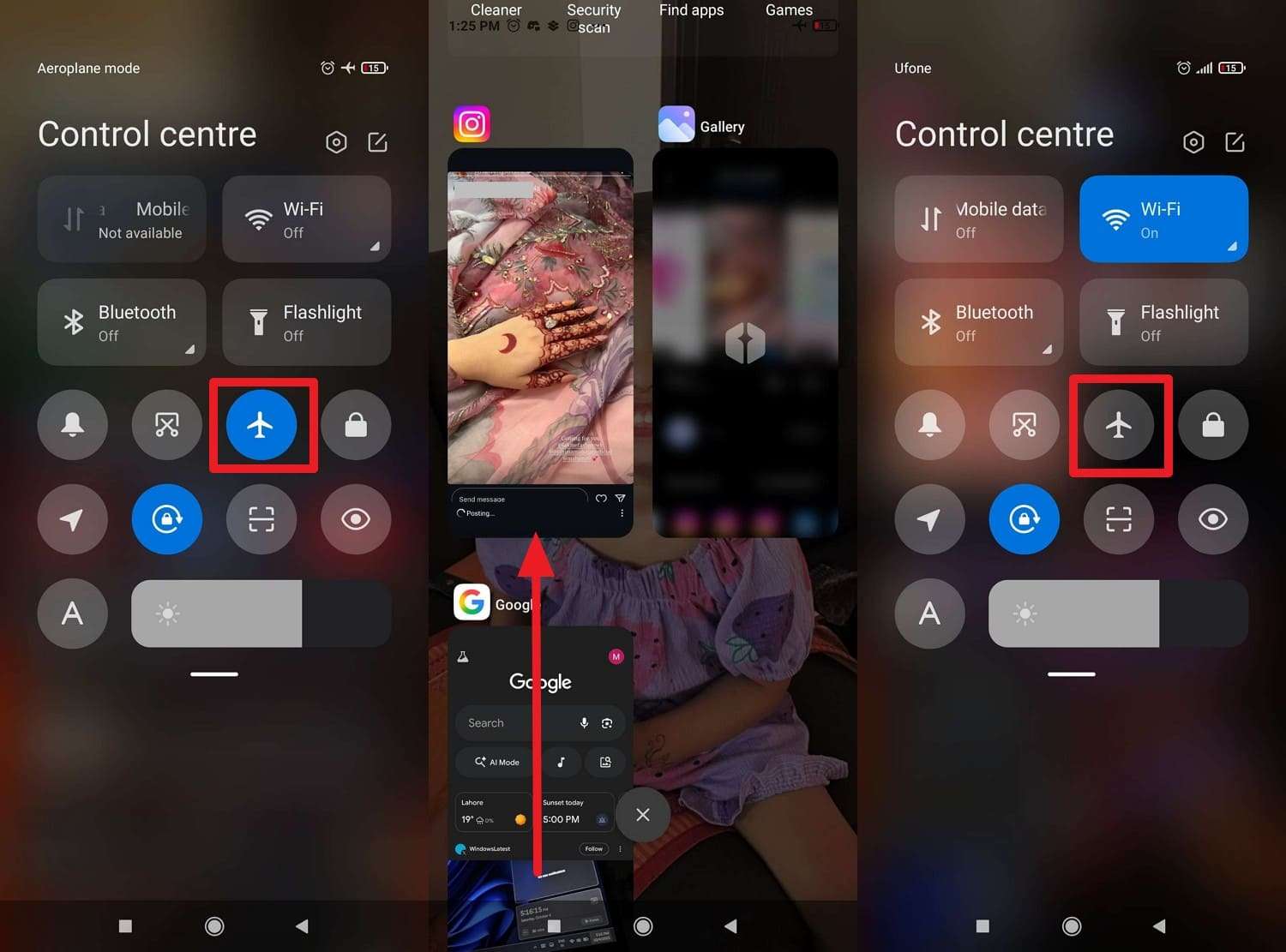
Step 1. Head to the “Stories” bar and wait a few seconds for the stories to load. Without leaving the app, open the “Quick Settings/Control Center” to enable “Airplane” mode.
Step 2. Go to IG now and view the story, which should play from the cached data. As you see the story, force close the app, turn Airplane Mode off, and go back online.
For iOS
Instructions: Go to the story tab and wait until all data has loaded properly, then enable the “Airplane” mode in the “Control Center.” View the preloaded story, then force quit the app to disable Airplane mode and go online again.
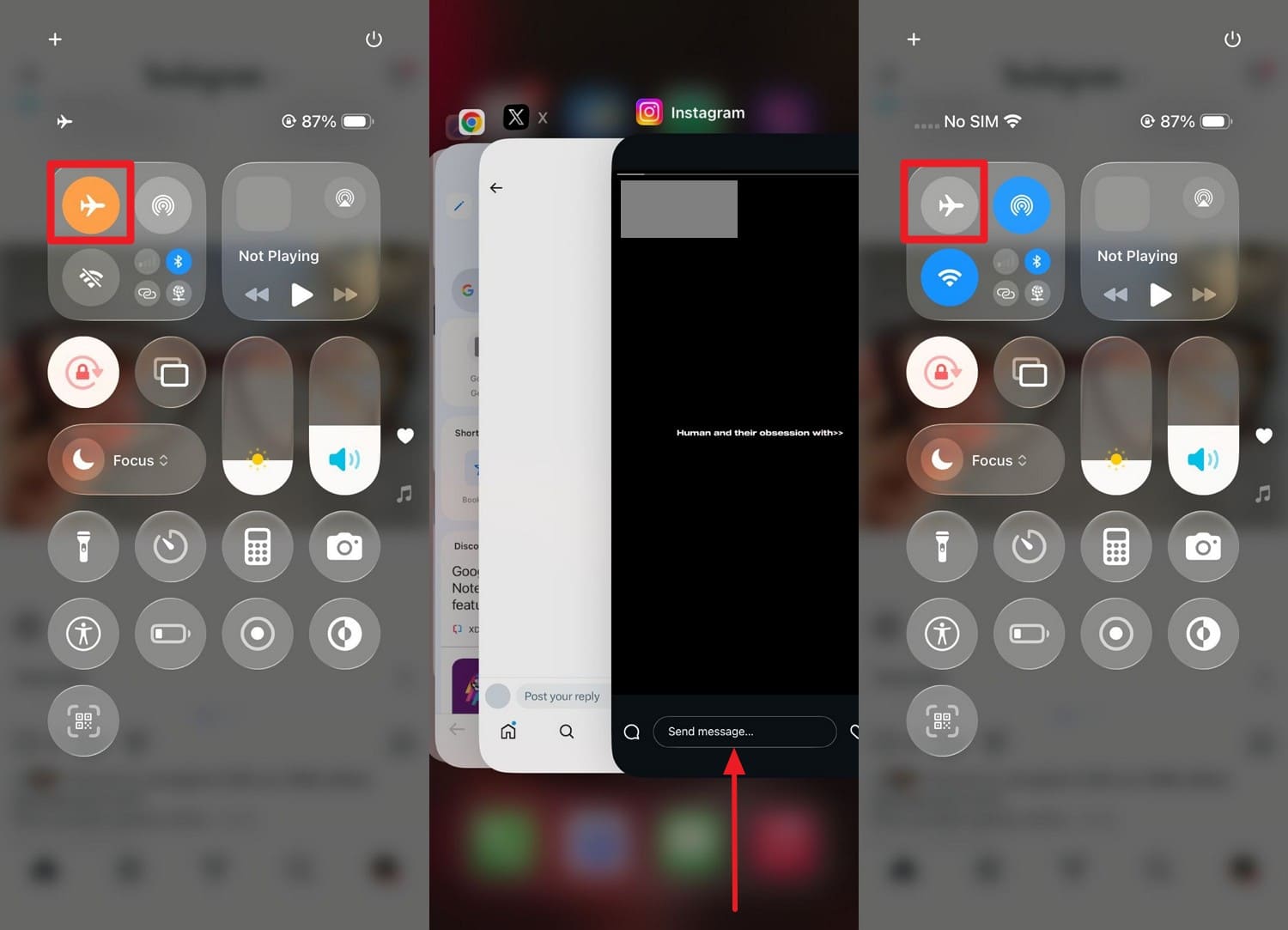
Note: Only what was fully loaded will play; long videos or many Stories might not load completely.
Way 2. Use the “Half-Swipe” (Peek) Trick
To watch Instagram Stories without being seen, use the peek or half-swipe trick to preview Instagram Stories. It does not need extra apps, but it is not fully reliable. Hence, users can slightly drag from the previous or next story to see part of the target story, like the first frame or text. The trick uses only Instagram, so your login stays safe, as shown:
Instructions: Just open a random story next to the targeted story that you want to see, and without lifting a finger, slightly drag towards that story. Stop halfway, so you see a “preview,” but do not let it snap fully to the targeted story. After viewing enough, move your finger back to the first story and lift it carefully.
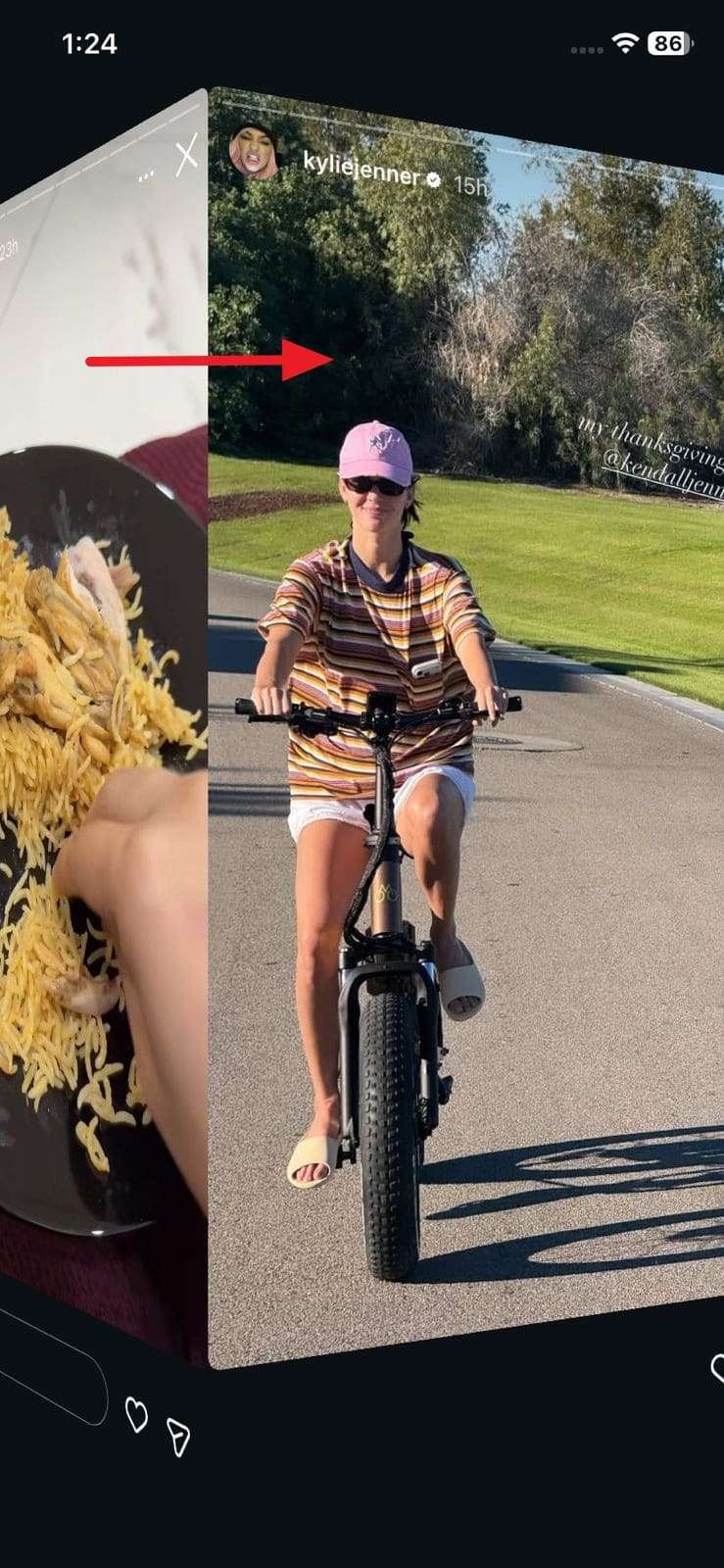
Note: If you swipe too far or lift your finger on the next Story, Instagram will mark it as viewed.
Way 3. Use a Secondary (Anonymous) Instagram Account
Use a secondary or anonymous Instagram account to watch stories, as only the secondary handle appears in the viewer list. For private accounts, it works reliably if your secondary account is accepted as a follower.
Additionally, you do not need tricks like Airplane Mode or half-swipes, and you can use Instagram normally from the secondary profile. Plus, it is safer than third-party tools because you do not have to share your password.
Way 4. Use Anonymous Instagram Story Viewer Tools / Websites
To see Instagram stories without being seen, anonymous Instagram Story viewer tools also let you see public stories. You usually only paste a username or link, so your real profile stays hidden. Additionally, some options let you download stories and view content beyond the 24-hour limit.
They work on any device through a browser, and they do not affect Instagram’s algorithm. So, here are some apps and website options that you can access on mobile phones or browsers to see IG stories anonymously:
Anonymous Instagram Story Viewer App (IncoStory - Story Viewer)
Instructions. Access the app on Android or iOS and press the “Search” box to type the name of a publicly available profile to view their story. Choose the targeted person when the app offers you a list of options and wait till it fetches all their stories for you.
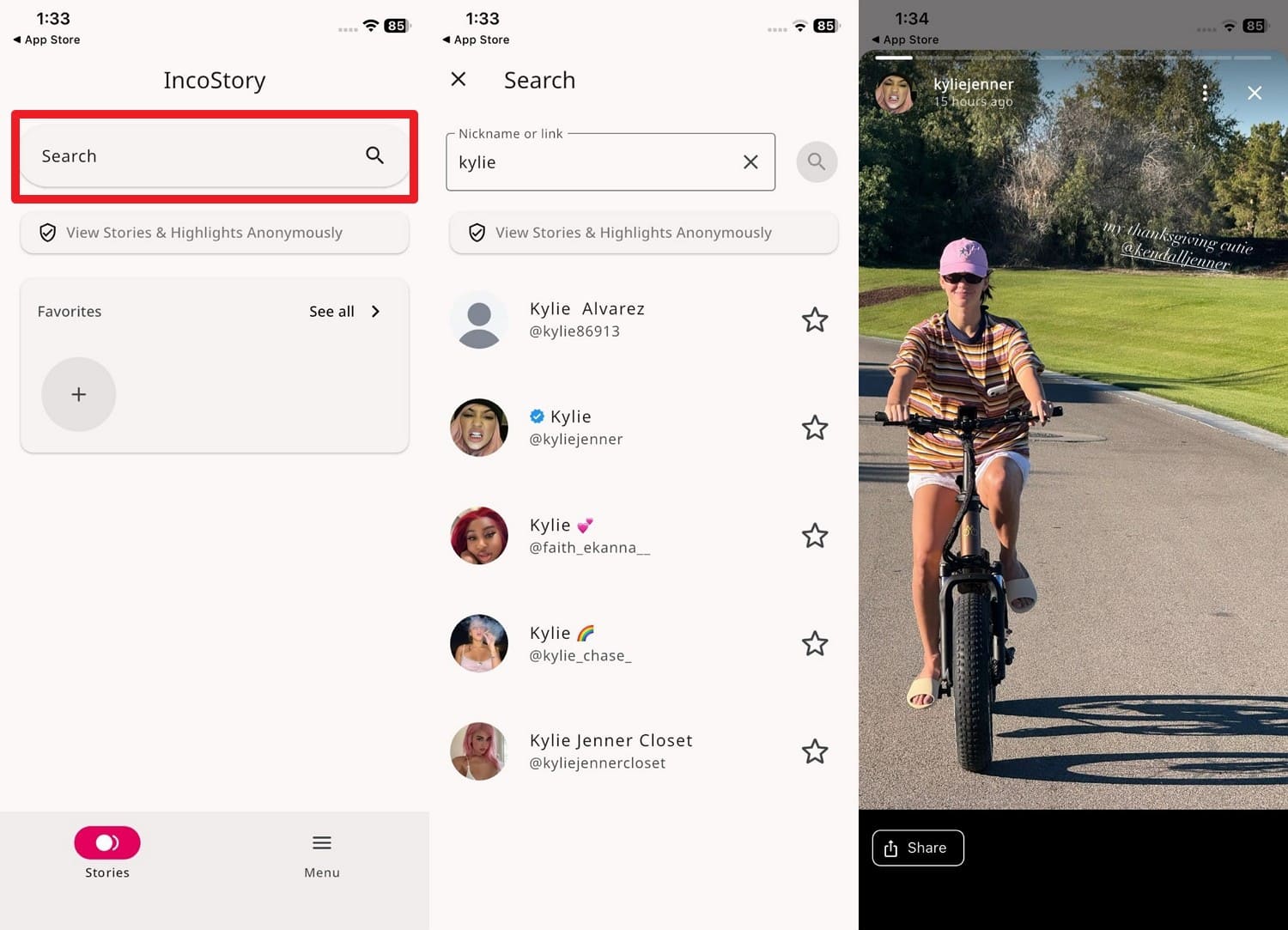
Anonymous Instagram Story Viewer Site
Step 1. Head to the Instagram Anonymous Story Viewer on the browser and type the full user name of a public profile in the given “Search” box.
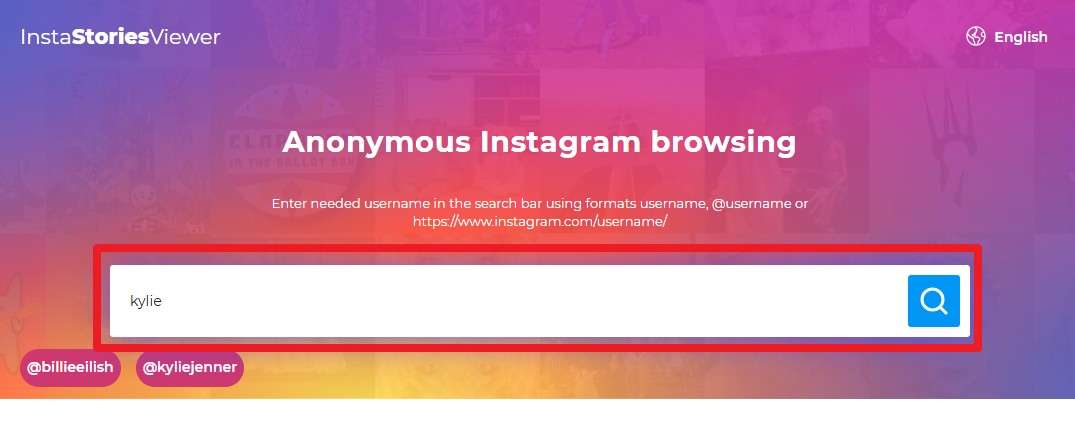
Step 2. When the specific account details are displayed, go to the ‘Stories” tab and hover over the targeted story you want to view. There, press the “Eye” icon and have a full preview of the story without being seen as a viewer.

Bonus Tip: How Can You Stay Private Online? Discover Dr.Fone - Virtual Location
On the quest for how to view IG stories without being seen, some users also want to hide or change their real location. They want to do that since IG now allows location-sharing status, and they prefer not to reveal where they actually are. In that case, Dr.Fone - Virtual Location allows you to teleport your GPS location in one click.
This advanced tool also lets you simulate GPS movement along the route you draw, and the Joystick is handy for more fun in AR games. Additionally, users can easily access this tool since it offers support for the latest Android 16 and iOS 26. One can try a one-stop route or select multiple routes so that the GPS can move along with different simulated speeds.

Dr.Fone - Virtual Location
1-Click Location Changer for both iOS and Android
- Teleport from one location to another across the world from the comfort of your home.
- With just a few selections on your computer, you can make members of your circle believe you’re anywhere you want.
- Stimulate and imitate movement and set the speed and stops you take along the way.
- Compatible with both iOS and Android systems.
- Work with location-based apps, like Pokemon Go, Snapchat, Instagram, Facebook, etc.


[Detailed Guide] Use Dr.Fone for Safe Browsing or Sharing Fake Location on IG
In addition to the joystick option, users can also use shortcut keys to control GPS movement in the tool. So, if all these features of Dr.Fone have fascinated you, review the listed guide and learn how to teleport the GPS location:
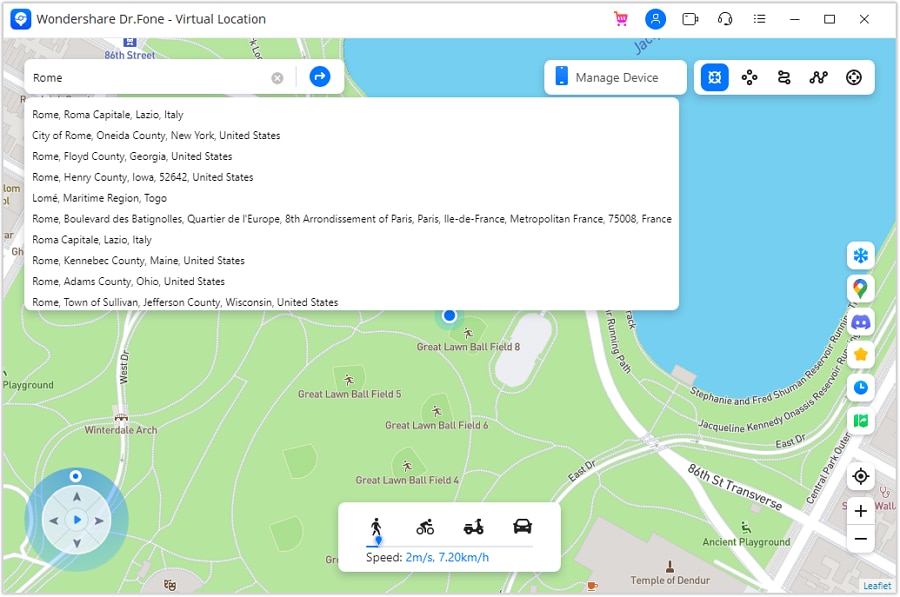
Step 1. Enable the Teleport Mode as You Connect the Device
Access the “Virtual Location” tool from the Toolbox, connect your device, and enable “Teleport Mode” by selecting the first icon in the top right corner. Now, click the “Search” bar and type the location that you want to fake on IG and hit the “Enter” button as you decide.
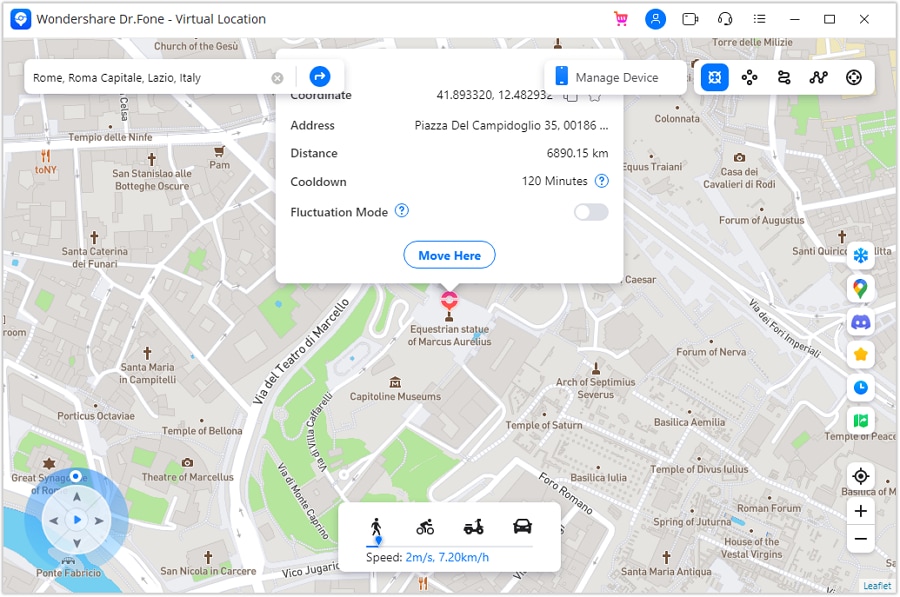
Step 2. Confirm the Teleported Location for IG
As you are directed to that location on the map, confirm it, and pick the “Move Here” option to change the phone’s location. After that, use your phone’s Map app to verify the virtual location to complete the process.
Conclusion
To wrap up, many users ask how to see an IG story without being seen, which this article has answered. So, this ultimate guide has shown how you can use some tricks, applications, or third-party sites to not show it in the viewers' lists. Besides, if you want to make a good impression on IG by showing the fascinating location where you are actually not in, try the Dr.Fone – Virtual Location.
 safe & secure
4,624,541 people have downloaded it
FAQs
 Q1. Is it legal to view Instagram Stories without being seen?Q2. Will Instagram block my account for secretly viewing stories?Q3. Can these methods work for private accounts?Q4. Can I download someone’s story when viewing anonymously?
You Might Also Like
Virtual Location
- Change iOS Location
- 1. Best iOS Location Changers
- 2. Fake iPhone GPS Location
- 3. Change iPhone Home Address
- 4. Change iPad Weather Location
- 5. Track a Cell Phone Location
- 6. iPhone GPS not Working
- 7. iPhone “No Location Found”
- 8. iPhone “Location Not Available”
- 9. iTools Alternatives
- 10. DoPokeGo++ Alternatives
- 11. 3uTools Alternatives
- 12. Foneazy MockGo Alternatives
- 13. "No Location Found" Vs."Location Not Available"
- Change Android Location
- 1. Best Android Fake GPS Apps
- 2. Free Android Location Spoofers
- 3. Fake Android GPS Location
- 4. Android Location Settings
- 5. Fake GPS No Root
- 6. Fake GPS on Huawei
- 7. Fake GPS without Mock Location
- Hide GPS Location
- 1. Stop Sharing Location without Notifying
- 2. Fake Location on Find My Friends
- 3. Stop Google Tracking Your Location
- 4. Fake Location on Google Maps
- 5. Spoof Location on Life360
- 6. Turn Off Life 360 Without Knowing
- 7. Stop Life360 from Tracking You
- 8. Life360 Circle: Tips & Tricks
- 9. Track Location by Mobile Number
- 10. How Do I Know If My Phone Is Being Monitored
- 11. Can Life360 Track You When Your Phone is Off
- Fake GPS on Games
- 1. Play Pokémon Go Without Moving
- 2. Celebrate National Pokémon Day
- 3. Fake GPS on Mobile Legends
- 4. Spoof Ingress Prime Location
- 5. Spoof Location on Jurassic World Alive
- Fake Location on Social Apps
- 1. Fake Location on Whatsapp
- 2. Fake Location on Facebook
- 3. Fake Location on Telegram
- 4. Fake Location on Tiktok
- 5. Does Your Snap Score Increase with Chats
- 6. Fake Location on Snapchat
- 7. Add Location Filters on Snapchat
- 8. Change Location on Twitter
- 9. Change Instagram Business Location
- 10. Change Instagram Region/Country
- 11. Stop mSpy from Spying You
- 12. Change Location On Linkedin
- Fake Location on Dating Apps
- 1. Fake Hinge GPS
- 2. Top Funny Hinge Prompts
- 3. Apps Like Tinder
- 4. Enjoy Tinder Gold
- 5. Fake Tinder GPS
- 6.Tinder Keeps Crashing
- 7. Find People on Tinder
- 8. Use Grindr on a PC
- 9. Grindr Web app explained
- 10. Fake Grindr GPS
- 11. Grindr Unable to Refresh
- 12. Fake Bumble GPS
- 13. Bumble Snooze Mode Guide
- 14. Tinder vs Bumble vs Hinge
- Get Around Geo-blocking
- 1. Hola Fake GPS Alternative
- 2. Change Netflix Location
- 3. Bypass MLB TV
- 4. Change Location on YouTube TV
- 5. Change Play Store Country
- 6. Change Facebook Marketplace Location
- Followers & Unfollowers Trackers
- Location & Social Apps Tips
- 1. How to Share Live Location on Snapchat
- 2. Best Mobile Number Tracker
- 3. Best Private IG Viewer Tools
- 4. View a Private Instagram Account
- 5. Screenshot on Instagram Without Them Knowing
- 6. Does Instagram Notify When You Screenshot
- 7. Find Out If Someone Screenshots Your Instagram Story
- 8. Does Instagram Notify When You Screen Record
- 9. Fix iPhone Location Not Updating
- 10. Does Snapchat Show Who Viewed Your Profile
- ● Teleport GPS location to anywhere
- ● Play AR games without moving
- ● Spoof Location on the popular Apps
- Free Download Free Download Free Download


 > How-to > Virtual Location Solutions > View Instagram Stories Without Being Seen: Easy Methods Explained
James Davis
staff Editor