Recover photos, messages, WhatsApp, and more — no backup
needed.
Recover photos, messages, WhatsApp, and more — no backup
needed.

 100% Security Verified | No Subscription Required | No Malware

 :
: 
 ChatGPT
 Perplexity
 Gemini
 Claude
 Grok
Grok
Just imagine you lost all your data from your iPhone or iPad because you installed the latest update. In moments like these, data recovery software for iPhones allows you to recover data from iCloud Backup, iCloud Drive & Sync, or local iOS backups. So, when you search for one, you come across 2 names: Dr.Fone – Data Recovery (iOS) and Tenorshare UltData.
However, you can't decide which one to choose, as you know less about them. Hence, this guide will present a detailed Dr.Fone vs UltData comparison to help you decide. So, compare all the metrics in the table to see how Dr.Fone outshines Tenorshare UltData.
In this article

Part 1. The Most Important Differences Between Dr.Fone and UltData
Before you compare Dr.Fone vs UltData, you need to know the basics and the main differences between these tools. Hence, glance at the basic definitions and learn the key aspects to choose the right option:
What is Dr.Fone - Data Recovery (iOS)?
Dr.Fone - Data Recovery is a data recovery tool for iPhone, iPad, and iPod Touch by Wondershare. This tool is available on Windows and Mac and allows you to recover 35+ of the most important data types. Along with basic data like images or videos, it can also retrieve data from Viber, WhatsApp, LINE, Kik, etc.
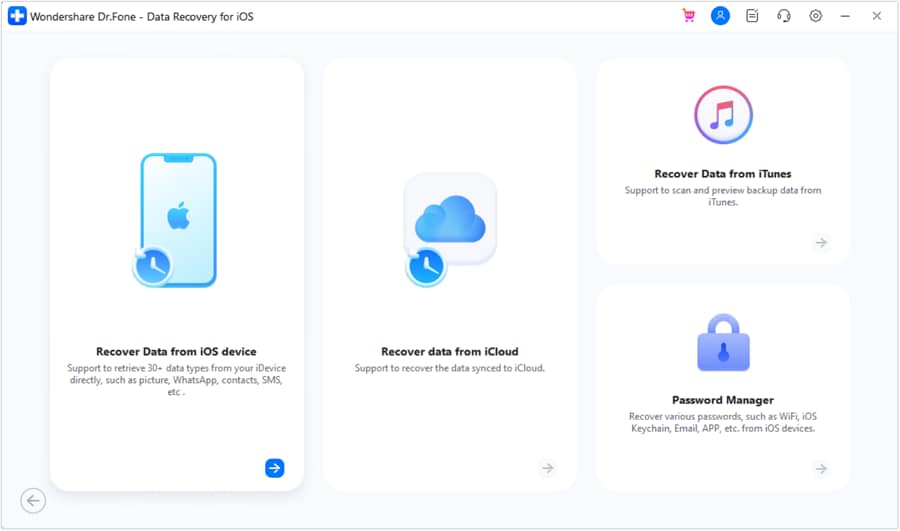
Most of all, users can control the data types they want, which means recovery is selective. In terms of data recovery, it can extract data from iCloud (Backup, Drive, Sync), iTunes, or local backups. Compared with many options, its vendor claims to provide weekly updates on all upcoming models and iOS versions, including the lastest iOS 27.
 Recovers data after deletion, crashes, or device damage.
- Supports photos, messages, contacts, WhatsApp, and more.
- Supports all major iPhone, iPad, and iPod models.
- Preview and recover only what you need.

What is Tenorshare UltData?
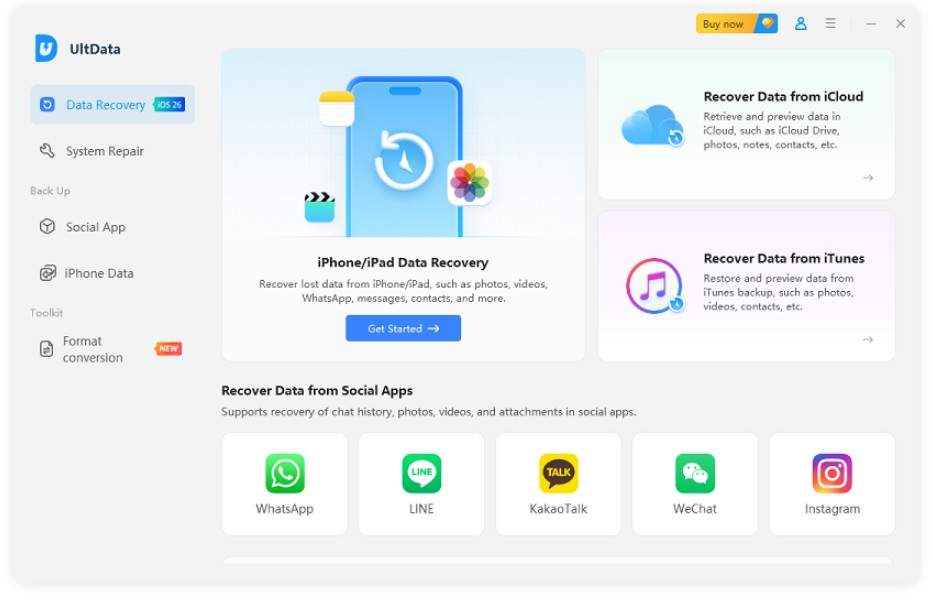
Tenorshare UltData can be installed on Windows and Mac to recover data from iOS devices, iCloud & iTunes backup. Through this, users can retrieve 35+ data types and app data, like WhatsApp, Messenger, Instagram, etc. Nonetheless, in most data recovery situations, the tool fails to recover data from phones.
At-a-Glance Comparison Table
To start with the Dr.Fone vs UltData comparison, let's see the main differences between both tools via the mentioned table:
| Feature | Dr.Fone - Data Recovery (iOS) | Tenorshare UltData |
|---|---|---|
| Main Method | The tool comes with separate guides for each data recovery option and lets users preview and scan the devices for free. Although the export has been paid for, users can preview the files in detail while adjusting the view and user filter options. | UltData offers basic scan and preview options, but no way to adjust the preview window. |
| iCloud Backup Support | This feature is fully supported in Dr.Fone, and the tool claims to give free backup package info, download, and preview access. | The feature is not supported in this tool. |
| Restore Destinations | With this tool, you can recover files to both PC and iPhone, including all data types. | Mainly, recovery to PC: in many cases, recovery is limited to phones or available for Contacts only. |
| Account Flexibility | Users can use up to 5 Apple IDs and manage independent histories seamlessly. | This information remains unclear, but the guide shows that the account is limited to a single Apple ID per registration. |
| Exclusive Features | This tool lets you recover WhatsApp View Once media and iWork files, with all the files completely reconstructed and intact. | Tenorshare UltData does not support this feature. |
Part 2. Recovery Methods and Common Recovery Tasks
Note that data recovery is not just about connecting the phone to the tool via USB. An ideal tool allows you to extract data from multiple locations, and the given table for Dr.Fone vs UltData explains the recovery methods:
| Feature | Dr.Fone - Data Recovery (iOS) | Tenorshare UltData |
|---|---|---|
| Direct iOS Device Scan | The tool can retrieve 17 important data types from the device, and recovery is available for both Phone and PC with no system restrictions. Main Point: Dr.Fone can scan and recover data even when the device is experiencing system issues, like a black screen. |
This tool can recover 25 data types, but the restore option is limited to PC only. |
| iCloud Backup | ✅ Users can recover 17 data types to their phones and PCs. Moreover, it offers a free option to access the backup package information and to download or preview it. | ❌ Not supported. |
| iTunes/Finder Backup | Free scan and preview options are available for 17 data types, and you can recover them to your phone and PC. Main Point: The tool uses the user's history of using iTunes or third-party application backups. In addition, it officially supports the decryption and parsing of encrypted iTunes backup files. |
UltData can retrieve 25 data types, but users can't recover the data to an iPhone. |
| iCloud Sync & Drive Data | With this recovery method, users can extract 12 data types to phone and PC. When you recover the data to your phone, you can easily save contacts, notes, calendar, and photos. | This tool supports 5 types of iCloud Sync and iCloud Drive, but recovery to the phone is limited to contacts only. |
| Social Media App Backups | In the Dr.Fone vs UltData comparison, Dr.Fone can recover data from 4 types of apps, including WhatsApp, from iCloud Drive. It can also help you recover WhatsApp View Once media to your phone and PCs. | Users can get access to 7 types of apps and WhatsApp data. However, it lacks the WhatsApp View Once media recovery feature. |
| Private Data Recovery | The tool can recover 3 data types without sharing any data to remote servers. In fact, its vendors claim that the recovery is 100% local and secure. | UltData can recover 3 private data items, but there is no separate entry, and the exact data type is unclear. |




Part 3. Supported Data Types and What Matters More Than Raw Counts
Many recovery tools claim to support all data types, yet their actual recovery capabilities differ significantly. So, to know whether this Dr.Fone vs UltData comparison falls into this category, review the mentioned table to know the reality:
Recover From Device
This section explains the data types that you can recover from the iOS devices:
| Data Types | Dr.Fone - Data Recovery (iOS) | Tenorshare UltData |
|---|---|---|
| Photos | ✅ | ✅ |
| Videos | ✅ | ✅ |
| App Photos | ✅ | ❌ |
| App Videos | ✅ | ❌ |
| App Audios | ❌ | ❌ |
| App Documents | ✅ | ❌ |
| Thumbnails | ❌ | ❌ |
| Audiobooks | ❌ | ❌ |
| Playlists | ❌ | ❌ |
| iBooks | ❌ | ❌ |
| Ringtones | ❌ | ❌ |
| Files | ❌ | ❌ |
| Safari-History | ✅ | ❌ |
| Safari Bookmarks | ✅ | ✅ |
| Contacts | ✅ | ✅ |
| Notes | ✅ | ✅ |
| Reminders | ✅ | ✅ |
| Voice Memos | ✅ | ✅ |
| Calendar | ✅ | ✅ |
| Calculator | ❌ | ✅ |
| Wi-Fi | ❌ | ❌ |
| Messages | ✅ | ✅ |
| Call Recordings | ❌ | ✅ |
| Phone Call | ❌ | ❌ |
| Call History | ✅ | ❌ |
| Facetime | ✅ | ❌ |
| ❌ | ❌ | |
| Voicemail | ✅ | ✅ |
| ✅ | ✅ | |
| WhatsApp Business | ✅ | ❌ |
| WhatsApp View Once | ✅ | ❌ |
| Messenger | ❌ | ✅ |
| LINE | ✅ | ✅ |
| Viber | ✅ | ✅ |
| KakaoTalk | ❌ | ✅ |
| Kik | ✅ | ❌ |
| ❌ | ✅ | |
| ❌ | ❌ | |
| Skype | ❌ | ❌ |
| Ins | ❌ | ✅ |
| Teams | ❌ | ❌ |
| Snapchat | ❌ | ❌ |
| Telegram | ❌ | ❌ |
Recover From iCloud (Sync, Drive, & Backup)
To further explore the Dr.Fone vs UltData comparison, review the mentioned iCloud-supported data types:
| Data Types | Dr.Fone - Data Recovery (iOS) | Tenorshare UltData |
|---|---|---|
| Photos | ||
| Videos | ||
| App Videos, Documents, Photos | ||
| Voicemail | ||
| Numbers | ||
| Pages | ||
| Keynotes | ||
| Contacts | ||
| Notes | ||
| Reminders | ||
| Calendar | ||
| Alarms | ||
| Safari Bookmarks | ||
| iCloud Drive Files | ||
| WhatsApp Business | ||
| WhatsApp View Once | ||
| Messenger | ||
| LINE | ||
| Viber | ||
| KakaoTalk | ||
| Kik | ||
| Skype | ||
| Ins | ||
| Teams | ||
| Snapchat | ||
| Telegram | ||
| Deleted Files |
Recover From iTunes
Between Dr.Fone vs UltData comparison, learn which tool lets you recover multiple data types from iTunes backups:
| Data Types | Dr.Fone - Data Recovery (iOS) | Tenorshare UltData |
|---|---|---|
| Photos | ✅ | ✅ |
| Videos | ✅ | ✅ |
| App Videos and Photos | ✅ | ❌ |
| App Documents | ✅ | ❌ |
| Numbers | ❌ | ❌ |
| Pages | ❌ | ❌ |
| Keynotes | ❌ | ❌ |
| Contacts | ✅ | ✅ |
| Notes | ✅ | ✅ |
| Reminders | ✅ | ✅ |
| Calendar | ✅ | ✅ |
| Messages | ✅ | ✅ |
| Attachments | ✅ | ✅ |
| Voice Mail | ✅ | ✅ |
| Voice Memos | ✅ | ✅ |
| Call Recordings | ❌ | ✅ |
| Call History | ✅ | ❌ |
| Safari History | ✅ | ❌ |
| Safari Bookmarks | ✅ | ✅ |
| ✅ | ✅ | |
| WhatsApp Business | ✅ | ❌ |
| Messenger | ❌ | ✅ |
| LINE | ✅ | ✅ |
| Viber | ✅ | ✅ |
| KakaoTalk | ❌ | ✅ |
| Kik | ✅ | ❌ |
| ❌ | ✅ | |
| ❌ | ❌ | |
| Skype | ❌ | ❌ |
| Ins | ❌ | ✅ |
| Teams | ❌ | ❌ |
| Snapchat | ❌ | ❌ |
| Telegram | ❌ | ❌ |
Based on the data types Dr.Fone vs UltData comparison, if you need to recover data from iCloud Backup, Dr.Fone - Data Recovery (iOS) is the right choice. Additionally, the tool lets you seamlessly restore WhatsApp View Once and WhatsApp Business data to your phone and PC.
Part 4. Restore Control, Preview, Pricing, and Final Choice
To make the final decision in this Dr.Fone vs UltData comparison, review the table provided below for pricing and final choice:
| Feature | Dr.Fone - Data Recovery (iOS) | Tenorshare UltData |
|---|---|---|
| "Free" Experience | Dr.Fone offers you a free scan and a complete thumbnail preview for all data types, including WhatsApp and app data. | Although the scan is free, it has a standard list view. Most of all, the guide evaluation showed that it failed to properly display the WhatsApp recovered data. |
| Scan Reliability & Speed | Its scan is highly stable, and real tests showed no lag or delay either. | The tool's reviews indicate it gets stuck during the scan. Moreover, it can't scan the app data when it recovers them from iCloud. |
| Monthly Pricing | $44.95 and covers 2 PCs and up to 5 mobile devices. | $45.95 with 1 PC, 5 Mobile Devices |
| Annual Pricing | $59.95 and covers 2 PCs and up to 5 mobile devices. | $49.95 with 1 PC, 5 Mobile Devices |
| Perpetual (Lifetime) Plan | $69.95 and covers 2 PCs and up to 5 mobile devices. | $65.95 with 1 PC, 5 Mobile Devices |
| Final Choice Verdict | This is the right choice for comprehensive iOS data recovery. Most of all, if you want to recover iCloud Backup, iWork Files, and WhatsApp View Once media files, Dr.Fone makes it seamless. In addition, it can restore data to both PCs and phones in all cases, and Apple ID access is better than UltData. | UltData clearly lacks the option to recover data from iCloud Backup, iWork files, or WhatsApp View Once. Since the "Overall" data count is the same, its plans are limited to 1 PC and 1 Apple ID. So, choose this tool if you only want to recover the basic data types to the PC, since recovery to the phone is not possible in all cases. |

Dr.Fone offers flexible recovery options, detailed previews, and broader restore support, making data recovery much easier.
Ryan C
UltData lacks iCloud Backup recovery and has more limitations when restoring recovered data to devices.
Laura M
Conclusion
In this r.Fone vs UltData comparison, Dr.Fone - Data Recovery is the ideal choice to recover data from iCloud Backup. Along with all the basic data types, users can easily save the recovered data to their phone and PC, which UltData lacks. Most of all, you can use Dr.Fone to retrieve WhatsApp View Once media files, which no other recovery tool can.
FAQs
-
Can Dr.Fone and UltData recover data from a broken iPhone?
Yes, both tools can recover data from the broken device if it is still detected by the computer. However, if your data is in iCloud Backup, only Dr.Fone - Data Recovery (iOS) can recover it, as UltData does not support this option. -
Do Dr.Fone and UltData support the latest iPhone models?
So far, both tools support the latest iPhone models and versions, like iOS 26. However, based on the test results, Dr.Fone - Data Recovery (iOS) updates weekly, while UltData doesn't, so Dr.Fone is likely the first to support iOS 27. -
Which iPhone data recovery tool is better for beginners?
Users who prefer a detailed guide and better recovery options can find Dr.Fone - Data Recovery (iOS) as the better choice for novices. In addition, it supports 5 Apple ID sign-ins and access to 2 PCs in all its plans, unlike Tenorshare UltData.
 Add Wondershare Dr.Fone as a preferred source on Google