Recover photos, messages, WhatsApp, and more — no backup
needed.
Recover photos, messages, WhatsApp, and more — no backup
needed.

 100% Security Verified | No Subscription Required | No Malware

 :
: 
 ChatGPT
 Perplexity
 Gemini
 Claude
 Grok
Grok

I accidentally deleted a crucial thread containing project details and verification codes. Where do deleted Android text messages go, and is there any actual way I can retrieve them before they are gone forever?
Sarah J. - Android User
Deleting an essential SMS message can induce a sudden wave of panic. One wrong tap, and an important conversation is completely erased. This can be incredibly stressful, especially if the text contained a one-time password, vital business proof, or irreplaceable sentimental words from a loved one. Such accidents occur far more often than expected in 2026, with users frequently searching for answers on how to reverse the mistake.
Whether a phone reset, a sudden system crash, or an accidental swipe caused the issue, the primary question remains the same: where do these messages actually go? The good news is quite simple: deleting a message does not always instantly destroy it. In many circumstances, the core data remains hidden deep within your device's architecture. However, time is the most critical factor—waiting significantly reduces your chances of a successful rescue. That is exactly why rapid action is necessary. Using advanced tools like Dr.Fone - Data Recovery can scan the deepest layers of your phone and retrieve lost messages before they are permanently overwritten. Let's explore exactly where are deleted texts stored on Android and how you can get them back safely.
In this article
Part 1: Where Are Text Messages Stored on Android?
If you want to understand how recovery works, you first need to know exactly where are text messages stored on Android. Unlike photos or documents that sit in easily accessible folders, SMS data operates within a highly secured framework.
1.1 The Core SQLite Database
Android smartphones manage SMS and MMS messages within a centralized system database. This database operates on SQLite, a lightweight relational database management system. It meticulously catalogs the sender's information, timestamps, and the actual text content directly inside the phone's internal memory partition.
The standard system file path where these communications live is typically: /data/data/com.android.providers.telephony/databases/mmssms.db
For standard users, this specific directory is completely inaccessible. The entire /data/ partition is strictly locked down for security purposes. Android blocks access to safeguard your privacy and prevent malicious apps from tampering with critical system files. Even if you install a robust file manager, you would need advanced "root" privileges just to view the folder's existence. Because the operating system intentionally obfuscates this database, you cannot simply browse your phone's storage for deleted texts like you would for a deleted PDF.
1.2 MMS Media Attachments (Photos & Videos)
Many users also frequently ask where are messaging photos and videos stored when they receive multimedia messages (MMS). These rich media files generally follow the same strict security protocols. Most MMS images and video clips are actively cached within the protected /data/ directory, meaning they remain concealed alongside the text database.
However, depending on your specific messaging application (like Google Messages or Samsung Messages) and your auto-save settings, the app might generate a duplicate copy in your public storage. You can occasionally locate these copied images inside your "DCIM" or "Pictures" folders. But the original, underlying MMS data remains locked in system storage. Understanding where are the text messages stored on Android perfectly illustrates why standard file browsing fails and why specialized recovery software is the only viable path to restoration.
Part 2: What Happens When You Delete a Text Message?
Now that we have established where are deleted text messages stored on Android natively, it is crucial to understand the mechanical process that occurs the moment you tap "Delete."
2.1 The Data is Marked, Not Erased
When an SMS is removed from an Android device, the operating system does not immediately wipe the data from your flash memory. Instead, the specific entry simply remains inside the mmssms.db database. The Android system changes the status of that database row from "allocated" to "unallocated" (or marked as deleted). This tag tells the phone that the physical storage space previously occupied by your message is now available to be written over. However, the exact binary data of your text continues to exist intact in the background.
2.2 The "Digital Limbo" Phase
This "marked" status places your deleted message into what is effectively a digital limbo. The smartphone still physically holds the message in its memory sectors, but the user interface removes all pointers leading to it. You cannot see it, open it, or search for it.
Consider a massive library with a detailed digital index. If you delete a book's entry from the index, the physical book remains exactly where it was on the shelf. You just don't know how to navigate to it anymore. Deleted texts function identically. Until that shelf space is given to a new book, the old data is perfectly recoverable. Advanced software bypasses the "index" and scans the raw "shelves" to find your concealed data.

2.3 The Main Enemy: New Data Overwriting
The single greatest threat to your deleted messages is normal phone usage. Every single action you perform on a smartphone generates new data. Receiving new text messages, allowing apps to update in the background, snapping photographs, caching videos, or even just browsing the web requires the phone to write new data to its internal storage.
When this occurs, the Android OS looks for "unallocated" space to store this new information. If it chooses the exact memory blocks where your deleted SMS is hiding, the new data permanently replaces the old data. Once overwritten, the message is obliterated forever, and absolutely no recovery tool can bring it back.
There is no native "Recently Deleted" bin for SMS on most standard Android builds. Because the texts wait silently to be overwritten, you must minimize phone use immediately after realizing a text is missing. The faster you deploy professional tools, the higher your success rate.
Part 3: How to Recover Deleted Text Messages on Android
Understanding the volatile nature of deleted data leads to one clear conclusion: you must act quickly to extract the information before it evaporates. Below are the most effective methods to retrieve your texts in 2026, starting with the highest-success solution for users without a prior backup.
Method 1: Using a Professional Tool – Dr.Fone – Data Recovery (Android)
Because the SMS database is locked in a hidden system directory, a professional desktop utility is required to bypass standard user limitations. Dr.Fone - Data Recovery is widely recognized as an industry-leading solution for this exact scenario. Optimized for over 6,000 Android models—including the latest devices from Samsung, Xiaomi, OPPO, Google Pixel, Huawei, and Motorola—it seamlessly supports all modern operating systems up to Android 16.
As a pioneer in mobile data retrieval, Dr.Fone is specifically engineered to handle accidental deletions, critical system crashes, and even scenarios involving physically damaged devices. What makes it exceptionally powerful is its ability to perform deep, low-level storage scans to locate that "marked" data before it gets overwritten, often achieving results without requiring you to root your device.
With an intuitive, user-friendly interface, you can effortlessly scan, preview the raw texts found in the hidden database, and selectively restore only the conversations you need. This eliminates the risk of overwriting your current data, which is a common danger when using traditional cloud restore methods.
 Scan Android phones and tablets directly.
- Preview and recover only what you want.
- Supports WhatsApp, photos, videos, contacts, and more.
- Works with 6000+ Android devices.

Step-by-Step Dr.Fone Text Message Recovery Guide
Follow these detailed steps to navigate the software and recover your precious SMS threads safely:
-
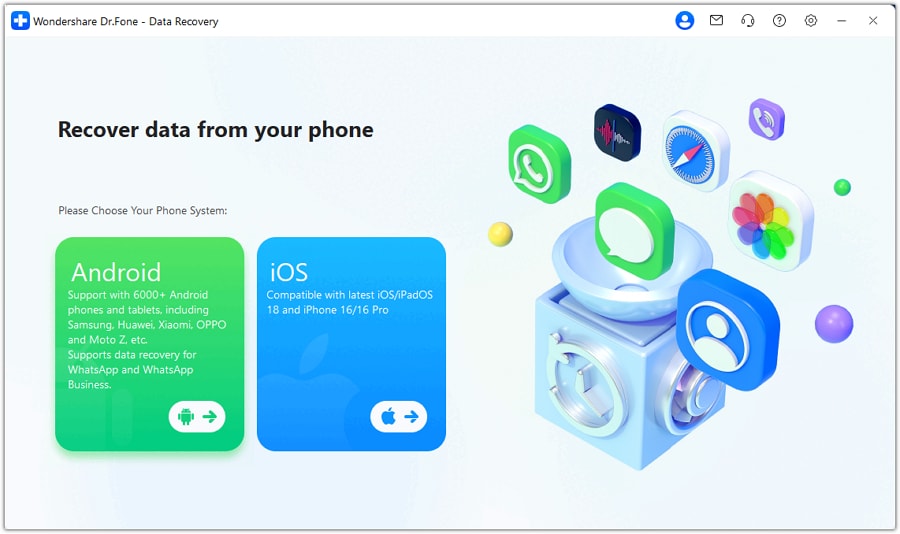
Step 1 Launch Dr.Fone and Select Recovery
Download and install Dr.Fone onto your PC or Mac. Open the application and navigate to the main dashboard. Click on Toolbox > Data Recovery > Android to initiate the process designed specifically for Android architecture.
-
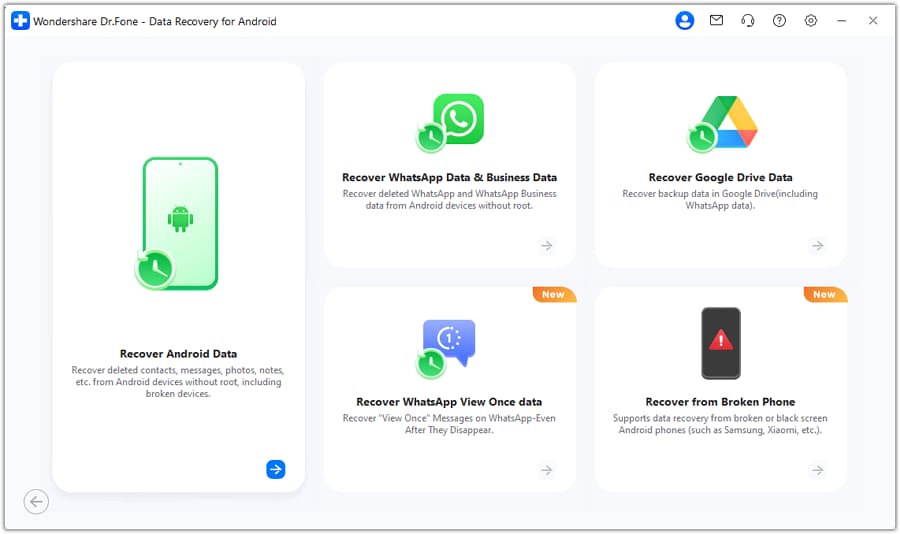
Step 2 Connect Your Device
Connect your smartphone to the computer using a high-quality USB cable. Ensure USB debugging is enabled. Choose the "Recover Android Data" module. The software will instantly detect your specific device model and prepare the environment.
-
Step 3 Scan for Messages
On the data selection screen, ensure the "Messages" category is ticked. Click "Start Scan." Dr.Fone will now rigorously search your internal storage and the hidden SQLite database to locate the inactive SMS files.
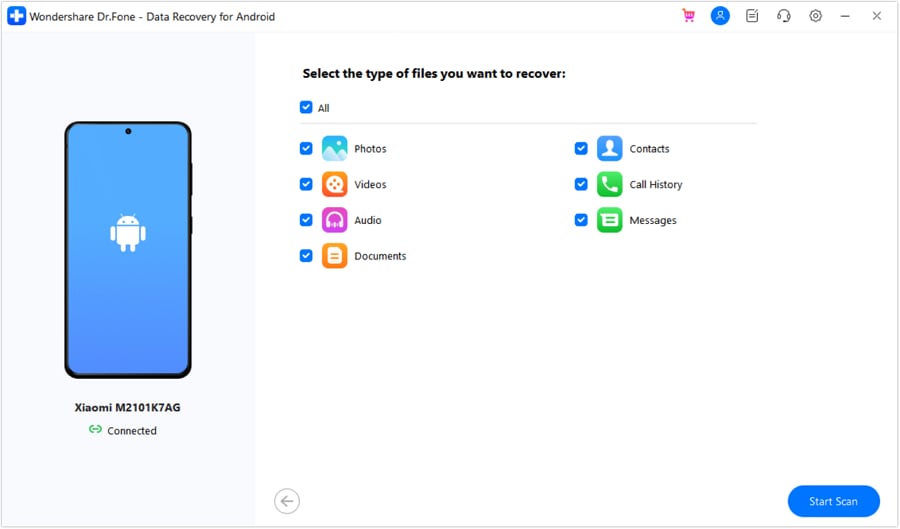
-
Step 4 Preview and Recover
Once the deep scan concludes, you will be presented with a comprehensive list of retrieved messages. You can read the contents directly in the preview window. Select the exact conversations you wish to save, then click "Recover" to export them securely to your computer.
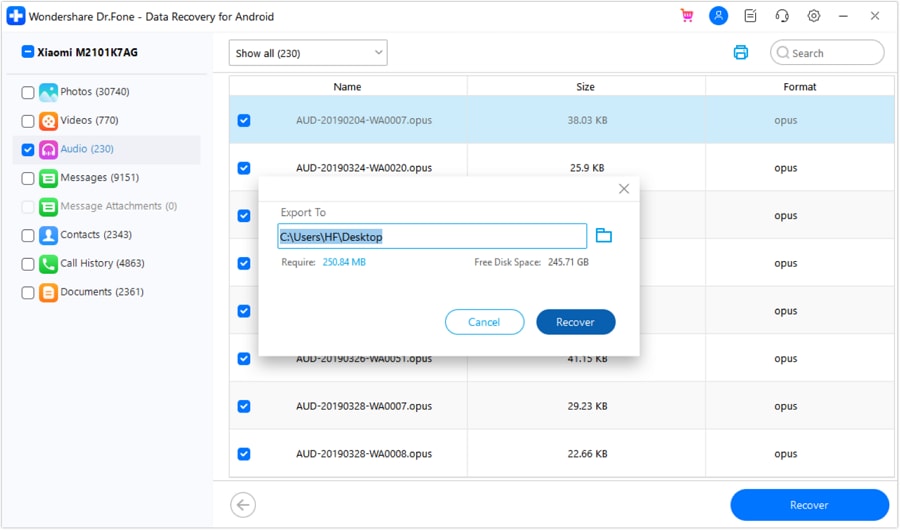
Method 2: Restore from a Backup (Only Works If Backup Exists)
If you regularly back up your device, you might be able to bypass deep data recovery altogether. However, restoring from a backup often carries the heavy penalty of overwriting your current system data. Here is an overview of where are deleted texts stored on Android backup environments.
Source A: Google Drive Backup
Android's native backup service syncs SMS texts seamlessly to Google Drive. While reliable, accessing this data is notoriously rigid.
Checking Backup Status: Navigate to Settings > Google > Backup and ensure that SMS backup was active prior to the deletion.
Critical Warning: Restoring messages from a Google Drive backup usually forces you to perform a full factory reset on your smartphone. This means any photos, contacts, or apps added after the backup was created will be permanently erased during the restoration process.
-
Step 1 Verify the Backup in Google Drive
Launch the "Google Drive" app on your phone. Tap the menu icon (three horizontal lines) and select "Backups."
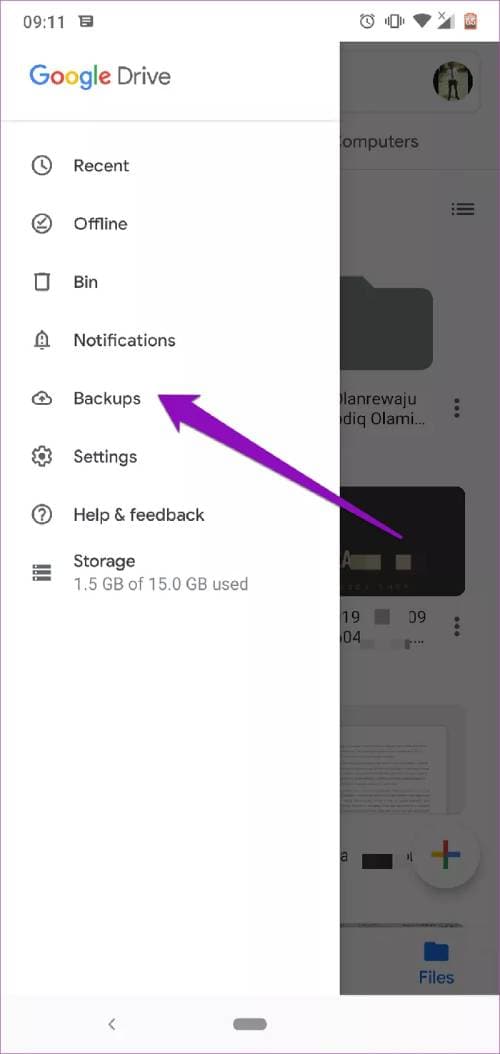
-
Step 2 Execute the Restoration
Locate your device's backup and confirm SMS is included. To get messages back from a Google Drive backup, you must factory reset the phone. During the initial setup wizard, choose to restore data from Google, which will pull your old texts back into the system.
Source B: Manufacturer or Carrier Backup
Device manufacturers and mobile carriers frequently offer exclusive cloud environments. Services like Samsung Cloud or Verizon Cloud operate independently from Google and might hold your missing texts.
-
Step 1 Access Account Settings
Navigate to "Settings," then locate "Accounts and backup" (menu names may vary slightly by manufacturer).
-
Step 2 Initiate Data Restore
Tap on "Restore data" under your specific cloud provider (e.g., Samsung Cloud).
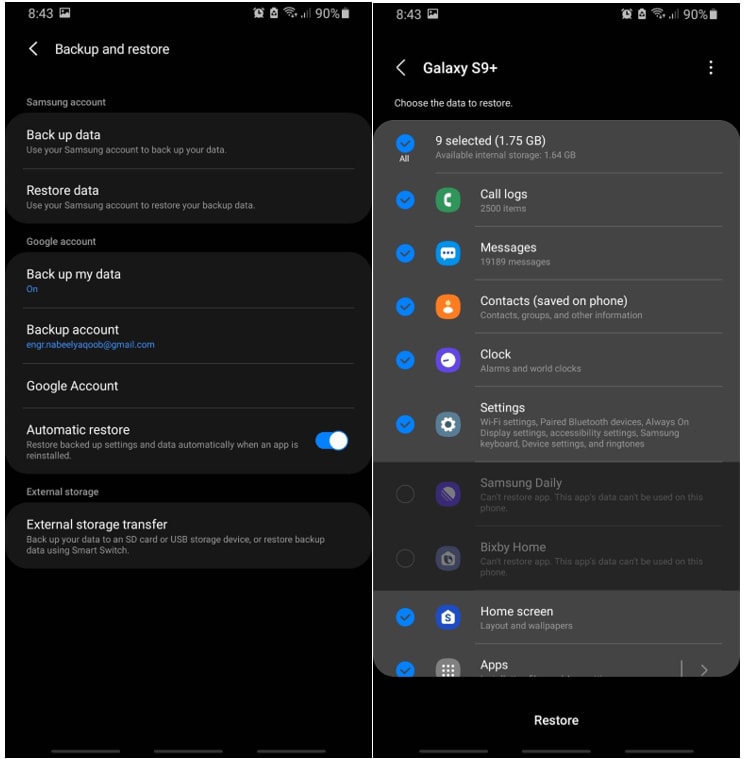
-
Step 3 Recover SMS
Check the box exclusively for "Messages" and tap "Restore" to inject them back into your phone.
Source C: Dedicated Third-Party App Backups
Applications like "SMS Backup & Restore" compile texts into readable .xml or .json formats. If you previously scheduled these exports to your SD card or local storage, you can seamlessly import them back into your messaging app without needing a factory reset.
Source D: In-App Trash (If Available)
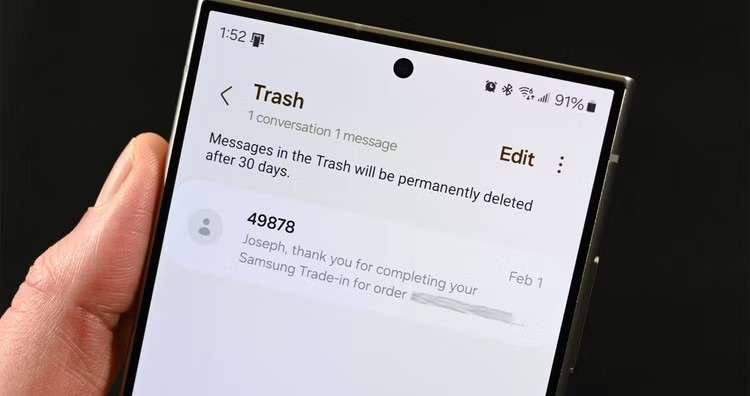
While native Android traditionally lacks a recycle bin for SMS, some modern custom UI skins (like Samsung's One UI) have introduced a temporary retention folder.
-
Step 1 Open the default "Messages" app.
-
Step 2 Tap the three dots to open the contextual menu.
-
Step 3 Select "Trash" or "Recycle bin."
-
Step 4 Long-press the specific messages you need and select "Restore."
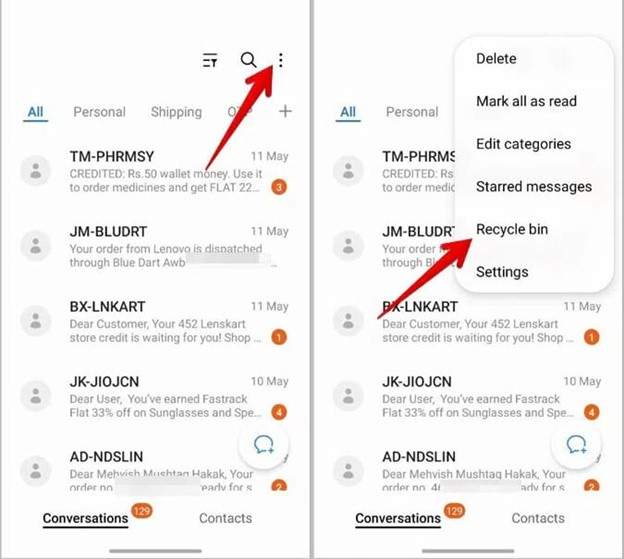
What Determines Whether Deleted SMS Can Be Recovered on Android
Not every deleted message is guaranteed to make a safe return. The viability of data recovery relies heavily on a few uncontrollable variables and user behaviors:
- Speed of Action: The quicker you attempt recovery, the less likely the system has had a chance to clean up the sector.
- Device Usage Restraint: Actively avoiding downloading apps, taking photos, or texting minimizes the chance of data overwrite.
- System Privileges: Rooted phones naturally grant recovery software deeper, unhindered access to system blocks, although advanced software can often bridge this gap on non-rooted devices.
- The Finality of Overwriting: Once a new file is definitively written over the exact memory blocks of the deleted text, the original data is destroyed permanently.
Conclusion
Discovering that you have accidentally deleted crucial information can be highly disruptive, but as we've explored, the situation is rarely entirely hopeless. Understanding exactly where are deleted texts stored on Android reveals that the data simply shifts into a hidden, inactive state within your phone's deep internal database. The key to successful restoration is reacting immediately before standard smartphone usage overwrites those vulnerable memory sectors.
If you do not have a pre-existing cloud backup, ceasing all phone activity and utilizing a robust professional tool like Dr.Fone - Data Recovery remains your safest and most reliable avenue. While options like Google Drive or manufacturer backups are valid, their limitations—such as requiring a total factory reset—often make them less appealing for targeted recovery. By moving quickly and using the right methodology, you can successfully pull those essential messages back from the brink.




FAQ
-
1. Exactly where are text messages stored on Android internally?
Text messages on Android are typically stored in a hidden SQLite database file located at the system path/data/data/com.android.providers.telephony/databases/mmssms.db. Because this is located in the root-protected/data/partition, standard users cannot access or view this file without specialized recovery software or root access. -
2. Can I browse my phone's files to find deleted messages?
No, you cannot manually browse your standard file manager to locate deleted SMS. The database that holds text messages is shielded by the Android operating system to prevent tampering and ensure user privacy. You must rely on professional data extraction tools or cloud backup restoration to view these files. -
3. How long do deleted text messages stay on my Android phone?
There is no specific time limit for how long deleted messages remain on your phone. They stay in a "marked as deleted" state within the storage memory until the Android system needs that exact space to save new data (like a photo, app update, or new text). Once overwritten, they are gone forever. -
4. Does checking my Google Drive backup delete my current phone data?
Simply checking the status or existence of a backup in Google Drive does not delete your data. However, the actual process of restoring SMS from a Google Drive backup typically requires you to perform a full factory reset on your device. Doing so will wipe any new data accumulated since the backup was created.
 Add Wondershare Dr.Fone as a preferred source on Google