Recover photos, messages, WhatsApp, and more — no backup
needed.
Recover photos, messages, WhatsApp, and more — no backup
needed.

 100% Security Verified | No Subscription Required | No Malware

 :
: 
 ChatGPT
 Perplexity
 Gemini
 Claude
 Grok
Grok
Have you ever opened a "View-Once" photo on WhatsApp only to realize seconds later that you needed to save that information? Whether it was a one-time passcode, a quick sketch, or a sentimental snapshot, the immediate disappearance of these files can be incredibly frustrating. You might be left wondering: Is it possible to recover WhatsApp view once media, or tucked away in a hidden corner of your phone's storage?
While WhatsApp's privacy features are designed to be permanent, technology often leaves a digital footprint. Therefore, this guide explores simple and practical ways to recover WhatsApp view once media Android. Find out whether it's possible and how recovery tools like Dr.Fone can play a part in this.
In this article

Part 1. Is It Possible to Recover WhatsApp View Once Media on Android?
To uncover the facts about WhatsApp view once recovery Android, note that recovery is possible but only in rare cases. Ideally, these photos, videos, and audio are made to disappear after you open them, and WhatsApp does not save them in your gallery or media folders. WhatsApp says that once the message is opened, there is no "Official" way to view it again, and you usually need to ask the sender to resend it.
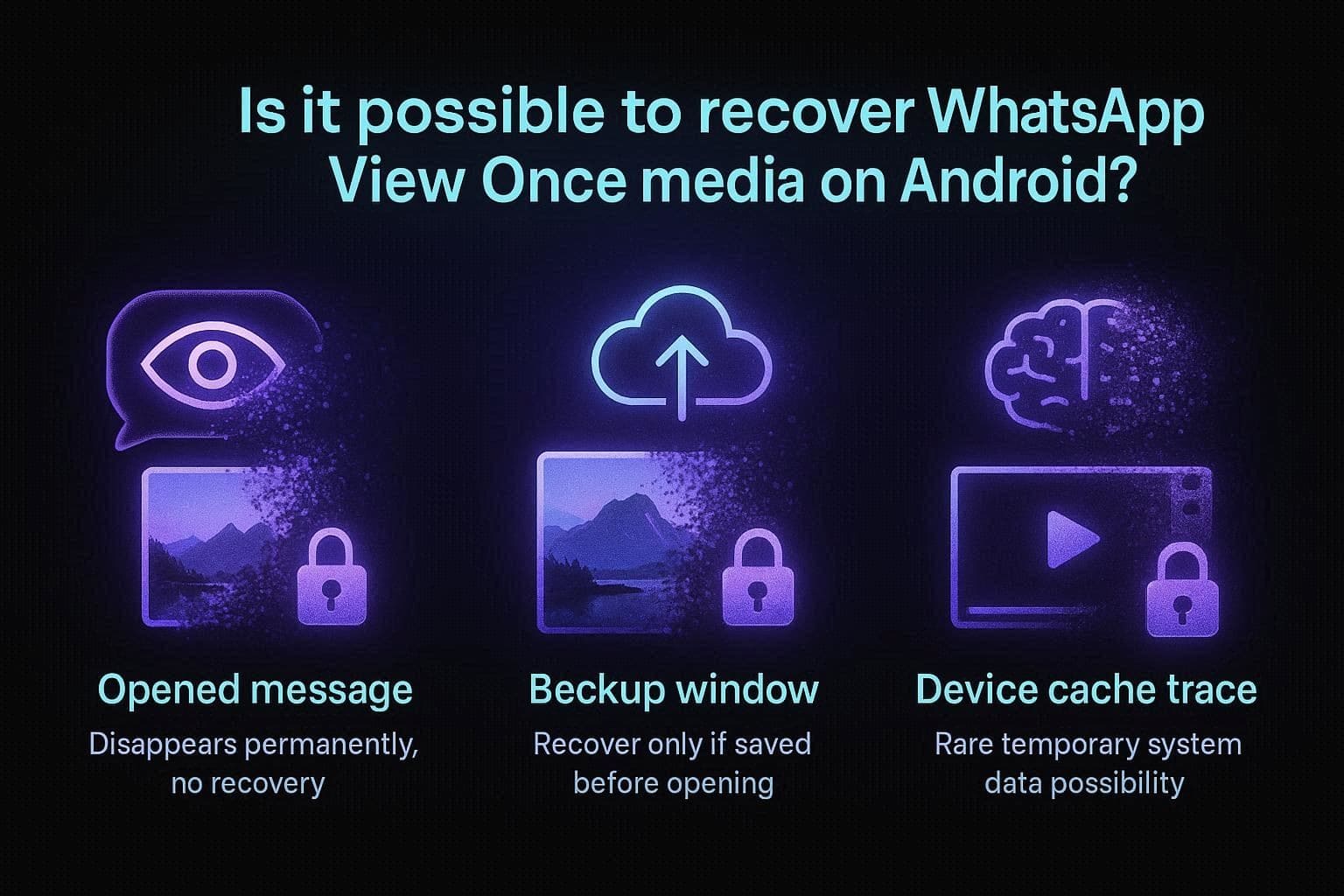
Furthermore, recovery is possible if the message was never opened and exists in an older backup, or if a temporary cache copy exists on the device. Some tools, like Dr.Fone, may also find View-Once data types in backups and storage, and they don't bypass WhatsApp security and may only require account verification. Additionally, if the view once media is an audio message, WhatsApp says users can record it using the built-in screen recorder.
Part 2. How to Recover WhatsApp View Once Media on Android (Before & After Opening)
Recovering "View-Once" media is the common concern for most of the users in 2026, as most of them state:
How can I view a picture that was sent to me, but it was automatically deleted after one viewing? - r/whatsapp
If you also want to recover WhatsApp view once photo Android, this detailed section can help.
Method 1. Check Device Trash/Recently Deleted/Status Cache
Sometimes, you can recover the opened View-Once media from hidden cache areas, and this method rarely works on Android devices for a limited time. At the same time, the Gallery or Trash folder can't help in this case, as the files are never saved there. In addition, WhatsApp/Media/.Statuses folder is only for Status updates, not View-Once media, so it does not reliably store those files.
Since a few devices keep short-lived copies in hidden WhatsApp media folders, you can still look there. So, to get back your unopened View-Once media files, follow the mentioned path in detail:
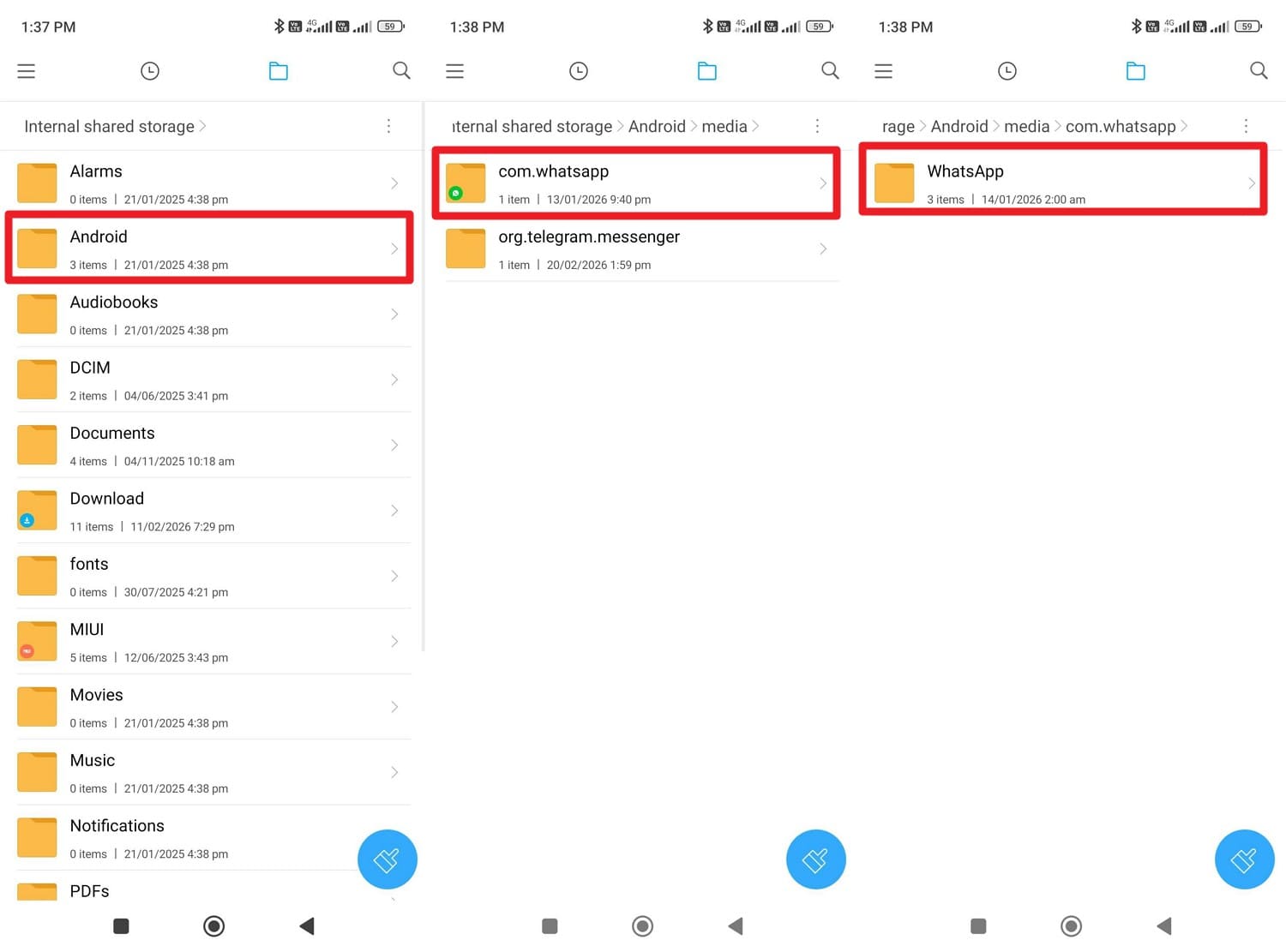
Instructions: In the File Manager, go to "Android/media/com.whatsapp/WhatsApp/Media/" and locate the app-specific cache folders. There, navigate to the "WhatsApp Images or Videos" or cache folders created by your gallery app. Sometimes a View Once file may stay in cache for a short time, but WhatsApp usually deletes it after you close it.
Method 2. Check Cloud or Phone Backups
To know how to recover the WhatsApp view once a photo after opening Android, use this option too. Nevertheless, it works only if the backup was made before you opened the messages, so the file still exists in that backup as unopened. Then you can restore Google Drive Backup on a new device to prevent using risky tools or making system changes. So, if you have backup and the same phone number and Google account, here is how it's done:
-
Step 1
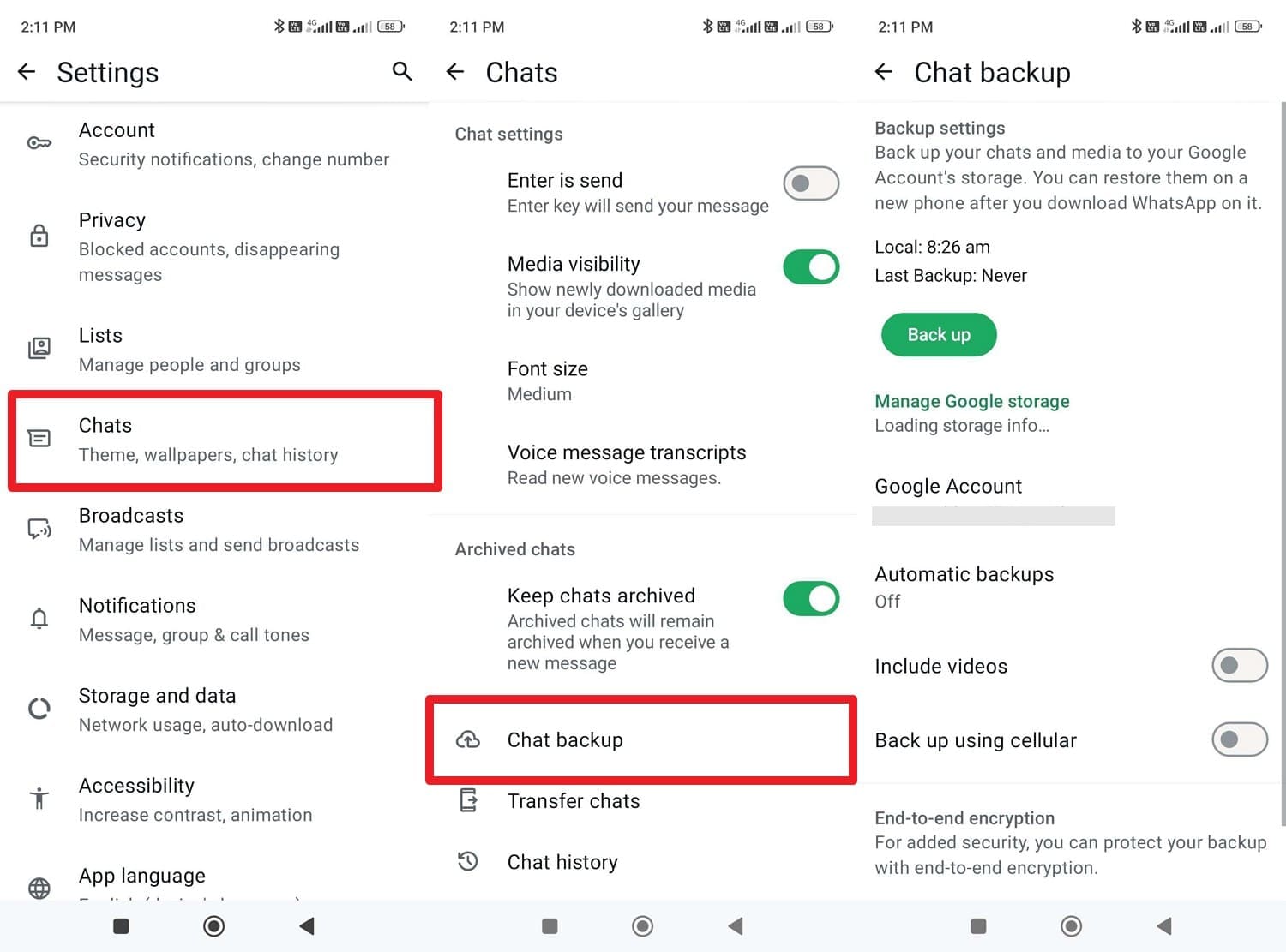
In the WhatsApp settings, go to the "Chat" and "Chats Backup" section to find the last backup timestamp for Google Drive.
-
Step 2
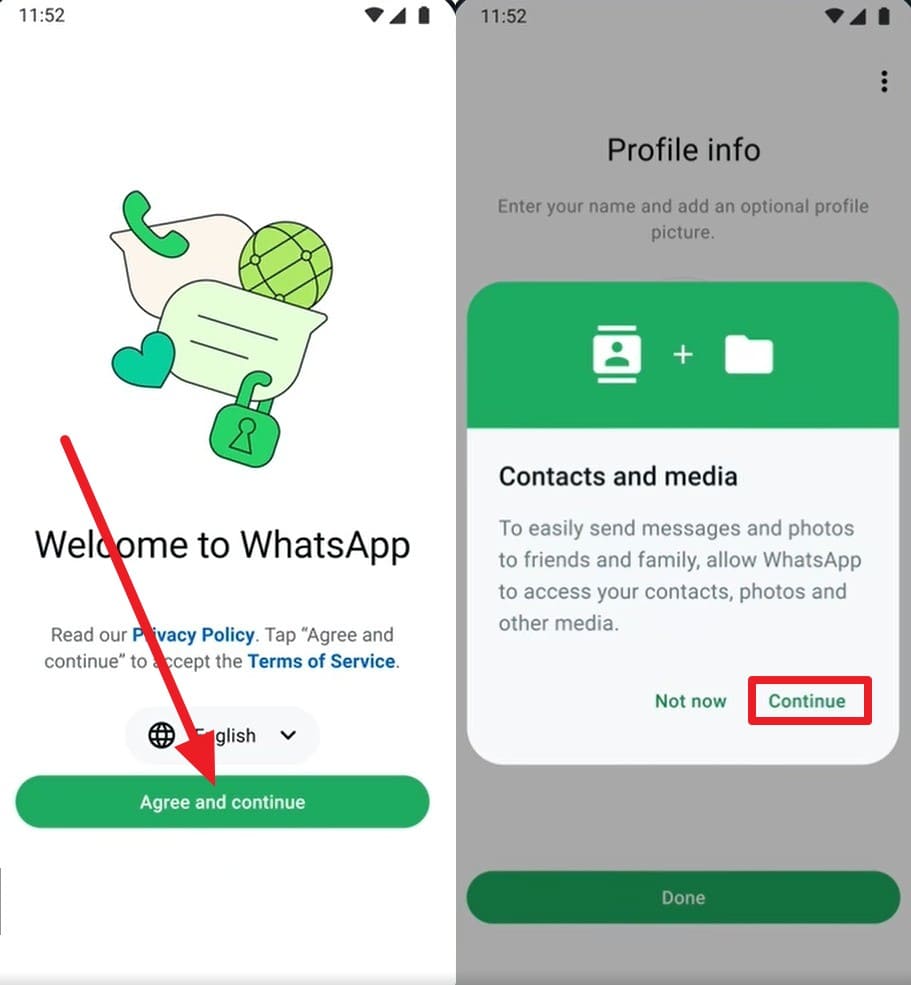
After that, uninstall and reinstall WhatsApp, and on the setup screen, choose the "Agree & Continue" button. Enter the phone number and verification code, then press the "Continue" and "Allow" buttons to proceed.
-
Step 3
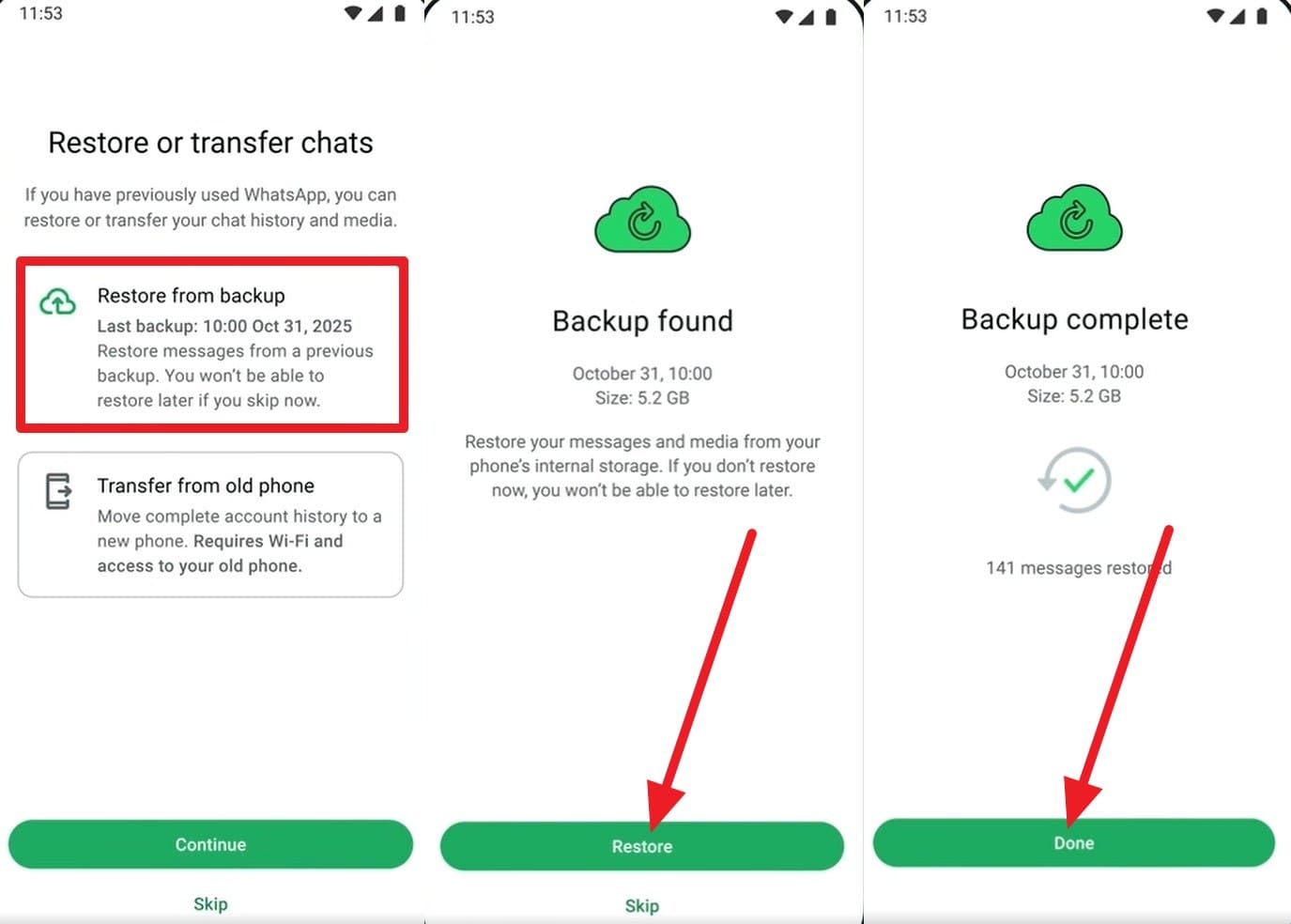
Later, choose the "Restore from Backups" option, and WhatsApp will automatically detect and display the backup. Choose the "Restore" button to retrieve your chat history and media from Google Drive, and press "Done" to conclude.
Method 3. Try Third-Party Recovery Tools (Advanced)
While exploring, is it possible to recover WhatsApp view once media? Use recovery tools to avoid backup requirements and DIY methods. Tools like Dr.Fone - Data Recovery (Android) allow you to recover deleted WhatsApp view once media without backup on Android. Whether the media is opened or unopened, it can perform a Read-Only scan and extract it, provided it's not overwritten by new data.
It gives a preview and lets you selectively restore the View-Once media files in 2-3 simple steps. Since it only requires scanning a QR code, you can save the recovered media files to a PC. Overall, the tool requires no app installation or extensive folder navigation, while keeping WhatsApp privacy terms intact.
 Scan Android phones and tablets directly.
- Preview and recover only what you want.
- Supports WhatsApp, photos, videos, contacts, and more.
- Works with 6000+ Android devices.

Guide to Use Dr.Fone – Data Recovery (Android) for View-Once Media
To recover WhatsApp view once media Android, it's important to know whether the tool actually delivers what it claims. Thus, the tool has been tested rigorously for Android View-Once media recovery, and the steps are given below:
-
Step 1Access the Data Recovery Tool for Android
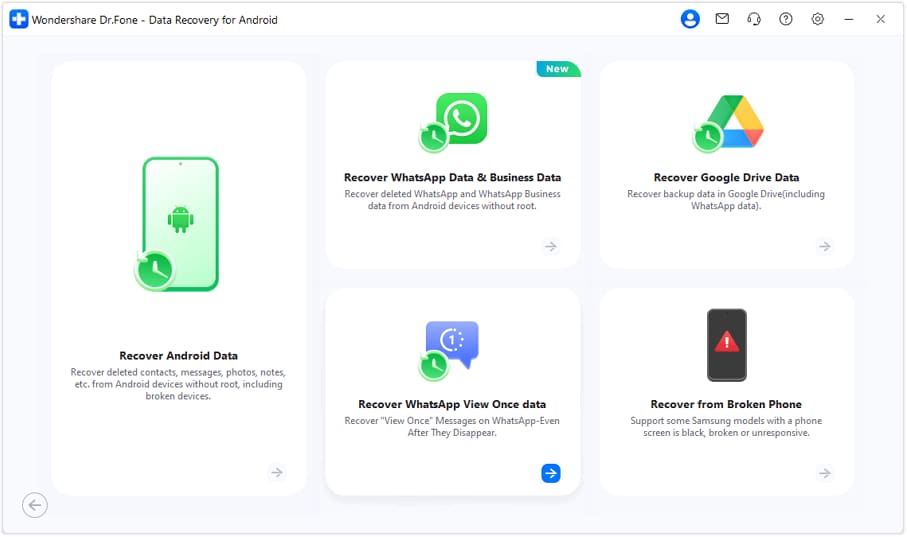
Tap the "Recover WhatsApp View Once Data" in the "Data Recovery" tool for Android.
-
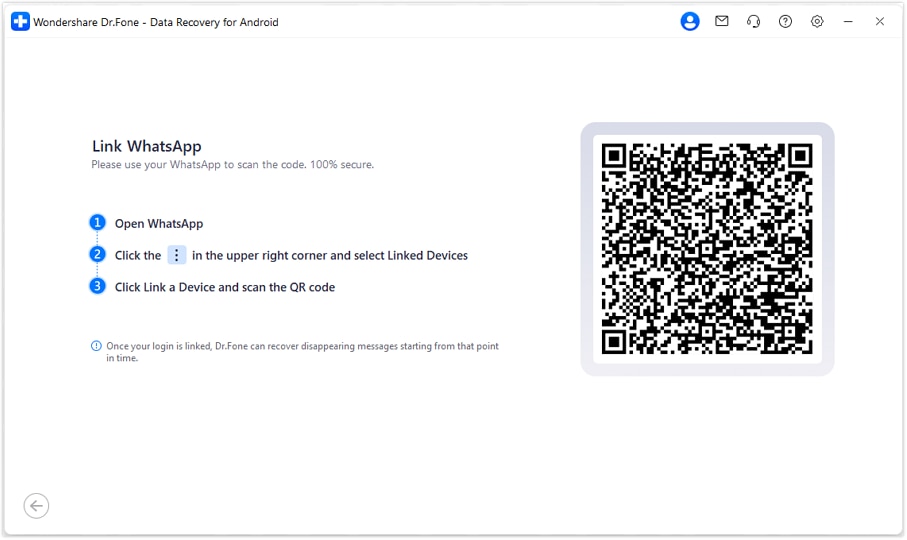
Step 2Scan the QR Code to Link the Device
After that, select the "Start Recovery" option, then scan the QR code on the new screen to link the device.
-
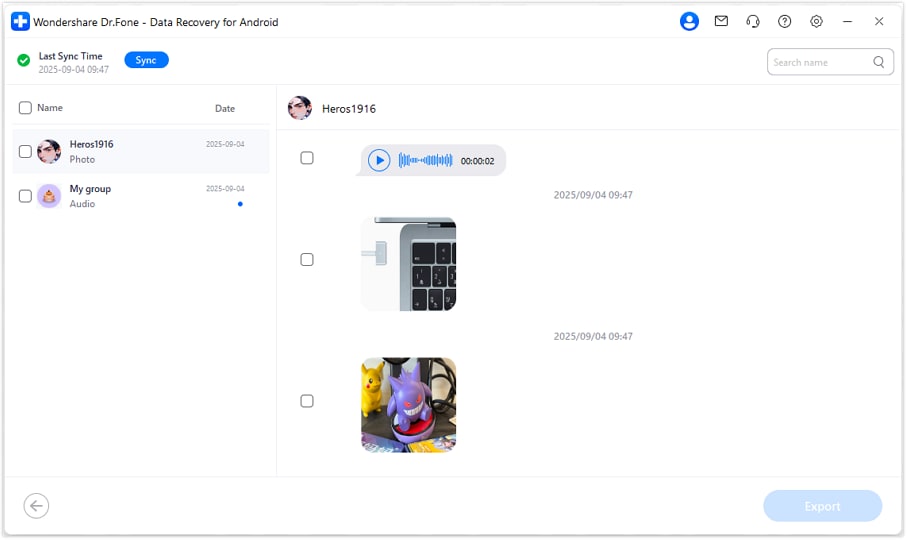
Step 3Preview and Export the Recovered Media
Within a few minutes, the tool will display the view once messages, preview all, and save the desired ones by pressing the "Export" option.




Part 3. Tips to Secure WhatsApp View Once Media Before Opening
For the WhatsApp view once recovery Android, quick action is a must. Therefore, this section highlights 5 tips to seamlessly secure View Once media files before opening them.
| Tips | What To Do | Why It Matters |
|---|---|---|
| Evaluate the Value | Before opening, determine if the content is worth saving or ask the sender for a permanent copy. | Prevents the stress of trying to recover lost data once the media is gone. |
| Use a Secondary Device | Keep a second phone or camera ready to photograph or film your screen physically. | Completely bypasses WhatsApp's screenshot blocking and viewed security triggers. |
| Request Regular Resend | Ask the sender to resend it as a normal photo, audio, or video instead of View Once, especially if you may need it later. | Allows you to save, rewatch, export, and include the media in backups without restrictions. |
| Open When Ready | Don't tap the media immediately; wait until you're fully prepared to view and save it. | Ensures you don't waste the one-time access by opening it accidentally. |
Conclusion
To wrap up, if you want to learn how to recover WhatsApp view once media on Android, know that there is no official method. Nonetheless, this guide has explained various workarounds that you can try to regain access to View Once media. However, if you can't find a cache folder or have opened the media before backing up, using recovery tools like Dr.Fone - Data Recovery (Android) is recommended for selective restoration.
FAQs
-
Can WhatsApp detect if I use a screen recorder on Android?
Currently, WhatsApp blocks screenshots and screen recording for View-Once media on supported Android versions. However, use another device instead before you tap the message. -
Can I recover View-Once audio messages?
Yes, since Android treats audio differently, you can use a screen recorder with Internal Audio enabled. If the file is already gone, tools like Dr.Fone still cannot guarantee recovery of deleted files. -
3. Is it possible to see who viewed my View-Once media in a group?
Yes, by tapping the "Message Info" icon, you can see who has opened the media. However, you cannot see who might have used a secondary device to record it.
 Add Wondershare Dr.Fone as a preferred source on Google