Recover photos, messages, WhatsApp, and more — no backup
needed.
Recover photos, messages, WhatsApp, and more — no backup
needed.

 100% Security Verified | No Subscription Required | No Malware

 :
: 
 ChatGPT
 Perplexity
 Gemini
 Claude
 Grok
Grok
Imagine you are staring at a shattered screen, and your phone detects either no touch or only a minor one. In this situation, the panic sets in when you realize your entire WhatsApp history is trapped inside that broken device. Whether the screen is black or just unresponsive, the need to recover WhatsApp messages from a broken Android phone arises.
Since the broken screen does not mean a complete loss of WhatsApp data, this guide explains quick, actionable methods. In situations where official or manual methods fail, learn whether recovery tools like Dr.Fone can be versatile.
In this article
- Can You Recover WhatsApp from a Broken or Unresponsive Android Phone?
- How to Get WhatsApp Off a Broken Android Phone
- Method 1. Google Drive Backup (Easiest)
- Method 2. Local Backup Transfer
- Method 3. Third-Party WhatsApp Data Recovery Software

- Method 4: Contact Professional Services
- How to Prevent WhatsApp Data Loss in the Future
Part 1. Can You Recover WhatsApp from a Broken or Unresponsive Android Phone?
Yes, in most cases, you can recover WhatsApp from a damaged phone Android, but it depends on the backup and the level of damage. If you have Google Drive Backup enabled, you can install WhatsApp on a new phone and use the same number and Google Account to restore your chats.
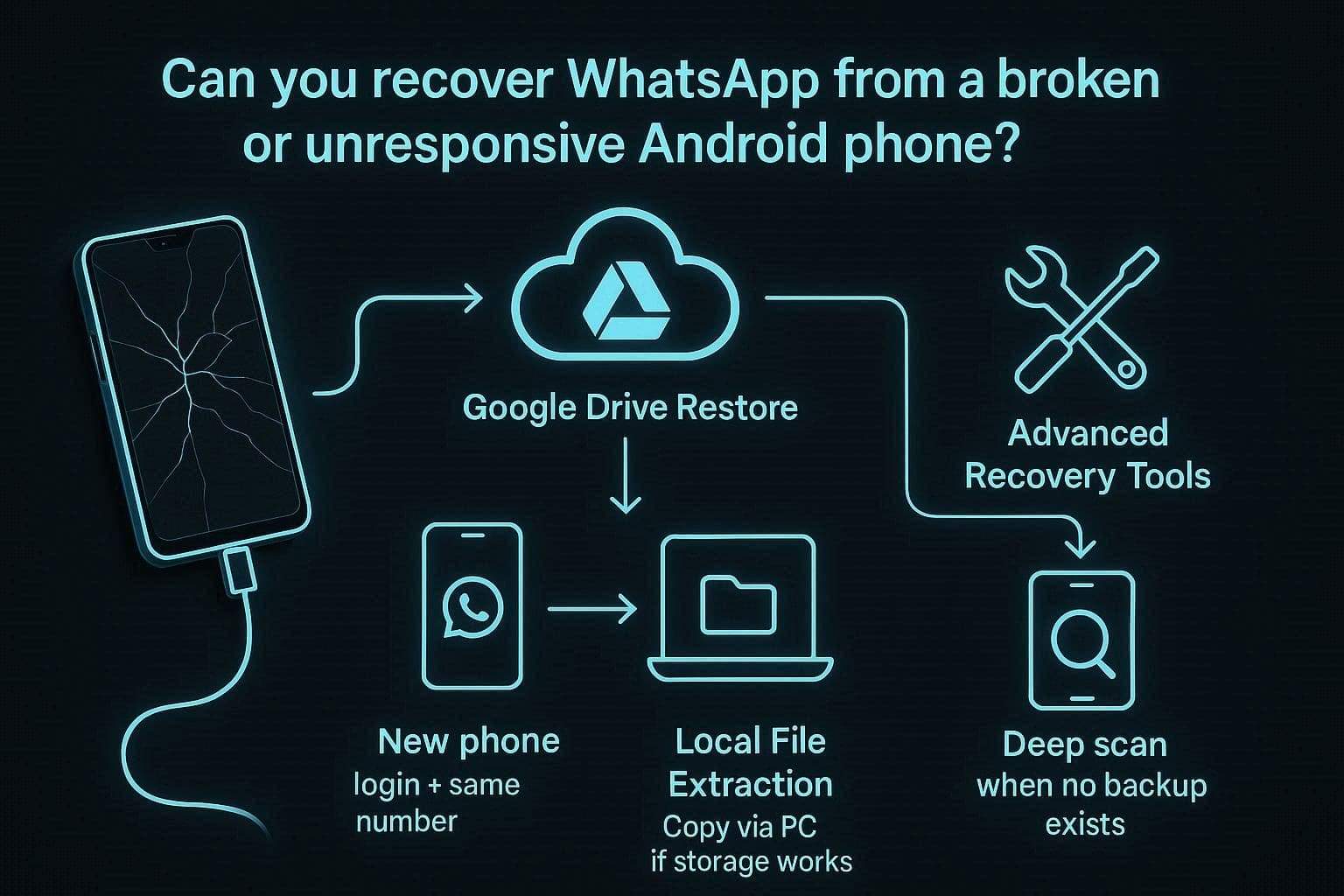
However, if no backup exists, but the local files are still on the phone, you can copy them to another device using a PC. In situations where there is no backup and the phone's storage is damaged as well, recovery tools like Dr.Fone for Android can recover lost chats.
Part 2. How to Get WhatsApp Off a Broken Android Phone
Broken phone and WhatsApp recovery are the hot topics now on Reddit debates, as users state that:

It stopped working today, and I tried to open WhatsApp on my tablet, but it only showed a QR scan from my phone, which I cannot use.
r/whatsapp
If you are also in this situation and want to learn how to get WhatsApp off a broken Android phone, this section offers 4 methods to try:
Method 1. Google Drive Backup (Easiest)
According to WhatsApp, reinstalling the app and verifying the same phone number restores your account and logs out your old device for security. So, if the phone screen is unresponsive, this is the easiest method to restore everything on a new device. This method is more reliable than local backup because it stays in your Google account and is explained in detail below:
When it Will Not Work:
- No backup exists, or, if one does, the wrong Google Account or phone number is used.
- The backup was overwritten by a newer one in Google Drive, or the device was factory reset before any backup was made.
- The end-to-end encrypted backup password is lost, or the backup is not linked to the same WhatsApp account used before.
-
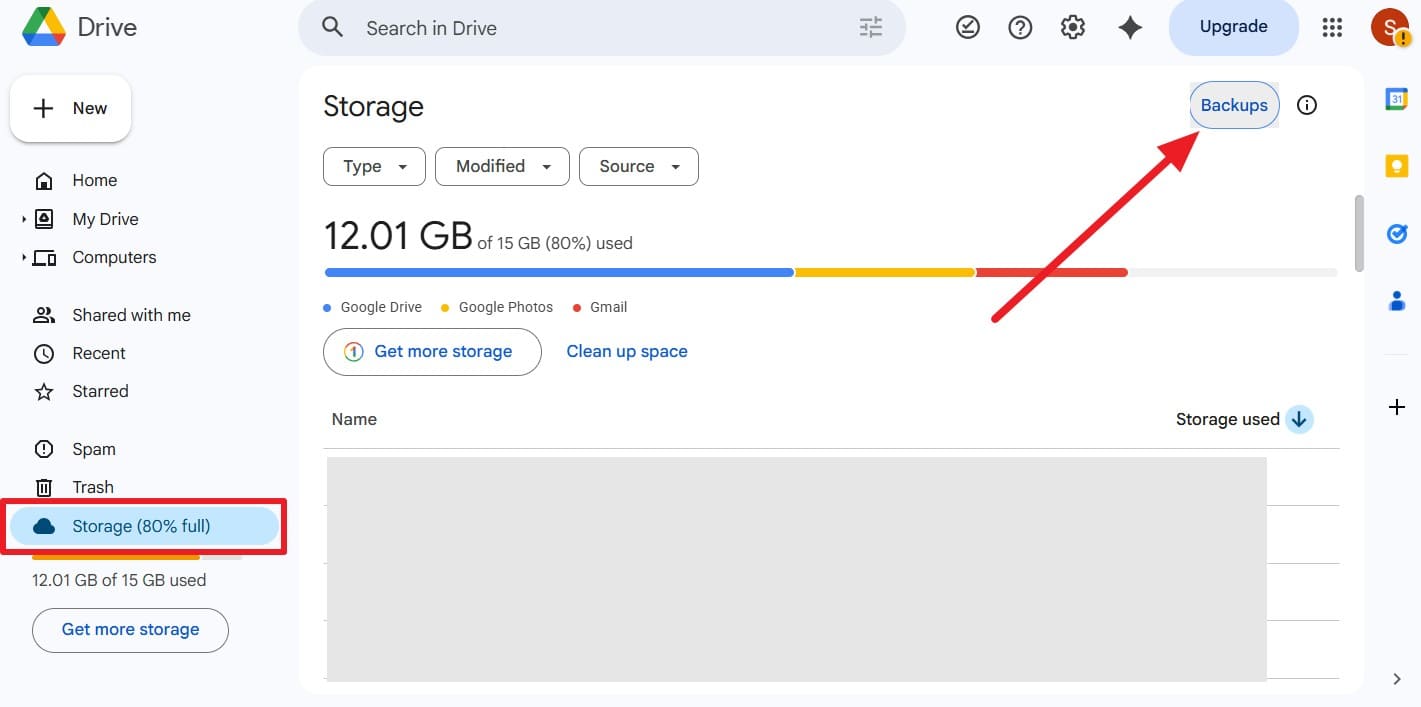
Step 1Check Google Drive Backup
On the Google Drive website, go to the "Storage" section and press the "Backup" option to check if the device is backed up.
-
Step 2Verify WhatsApp Account
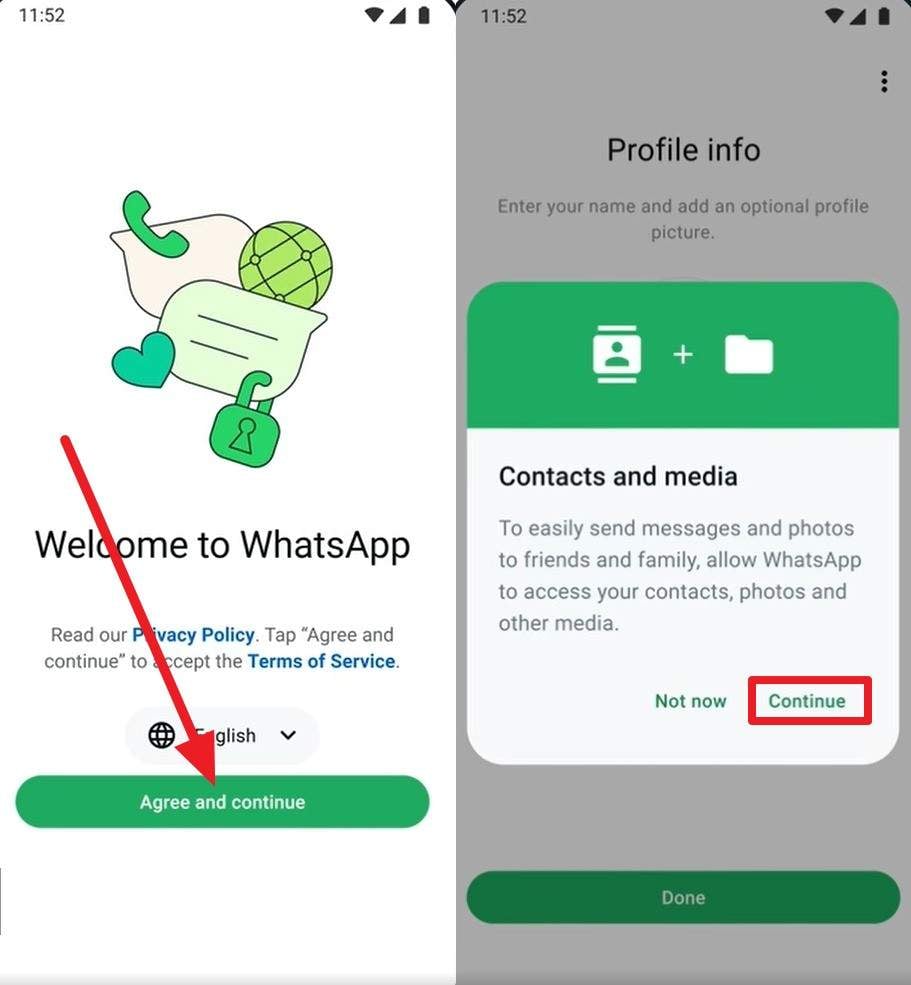
Install WhatsApp on the new device, then press the "Agree & Continue" button to add your phone number and enter the verification code to verify your account. After that, tap the "Continue" and "Allow" buttons to continue backup restoration.
-
Step 3Restore WhatsApp Backup
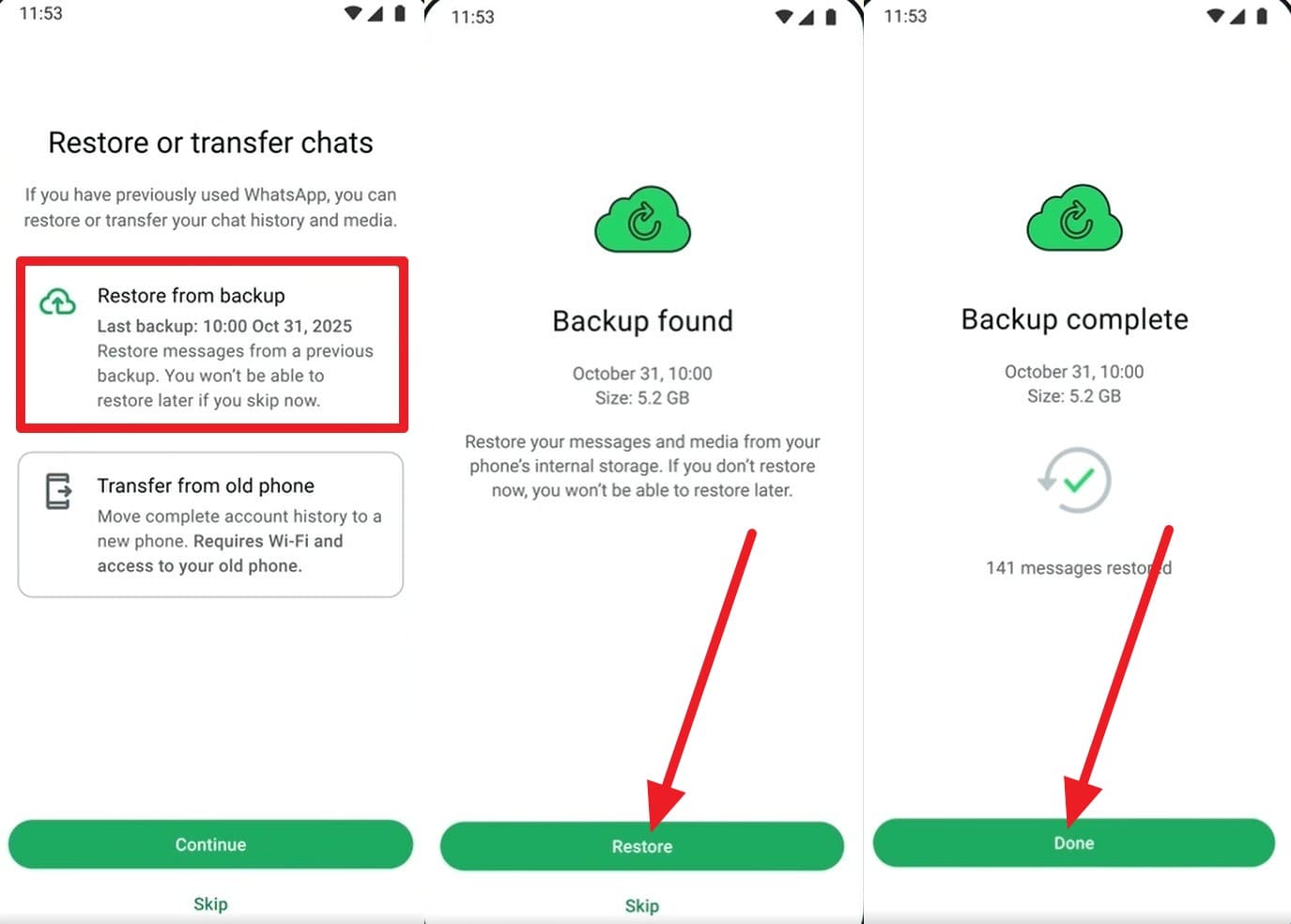
Then select the "Restore from Backup" option, and when WhatsApp displays backup details, select the "Restore" button. When it completes, press the "Done" button, and you can locate all the chats from your old phone.
Method 2. Local Backup Transfer
You can also try this manual method to recover data from an unresponsive Android phone WhatsApp. This option works when the Google Drive backup is unavailable or not up to date, and the phone is unresponsive. In this method, WhatsApp database files stored on the phone or SD card are copied to another device. Since it works without an internet connection, here is how you can perform it in a few taps:
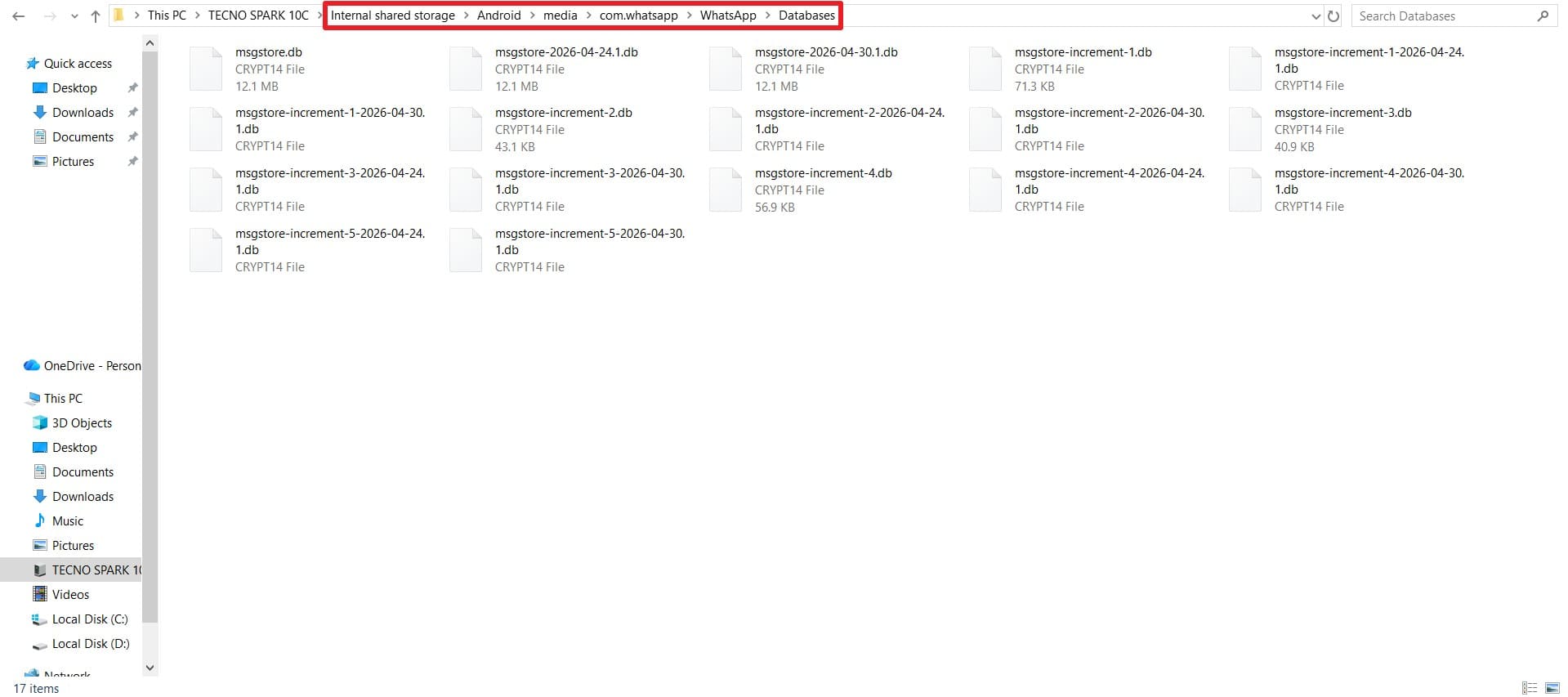
Instructions: Connect your Android phone to the PC via USB cable and go to "/Internal Storage/WhatsApp/Databases (or /Android/media/com.whatsapp/WhatsApp/Databases." Once there, copy these files into the same folder after connecting the new device, before verifying your number in WhatsApp.
Method 3. Third-Party WhatsApp Data Recovery Software
For the WhatsApp broken screen Android data recovery, you can also use recovery tools like Dr.Fone - Data Recovery (Android) to extract WhatsApp data from the broken screen. In this regard, the tool uses a read-only scan of the internal storage and requires no root access or USB debugging. There, users can recover 14+ data types, including WhatsApp and WhatsApp Business.
Unlike the Google Drive backup or local transfer methods, users can also get back View-Once media files. Later, users can preview the parsed data and export it to a PC or to an HTML/CSV file, even without a backup. With this tool, you can also keep the original quality of the media files and can recover data in 2-3 simple steps.
 Scan Android phones and tablets directly.
- Preview and recover only what you want.
- Supports WhatsApp, photos, videos, contacts, and more.
- Works with 6000+ Android devices.

Guide of Dr.Fone - Data Recovery (Android) for Recovering WhatsApp Data
To know how well this option lets you recover WhatsApp Android black screen, let's test its usage. Follow the simple, detailed guide mentioned below and determine if it's better than the above-mentioned options:
-
Step 1Access the Data Recovery Android Tool on Dr.Fone
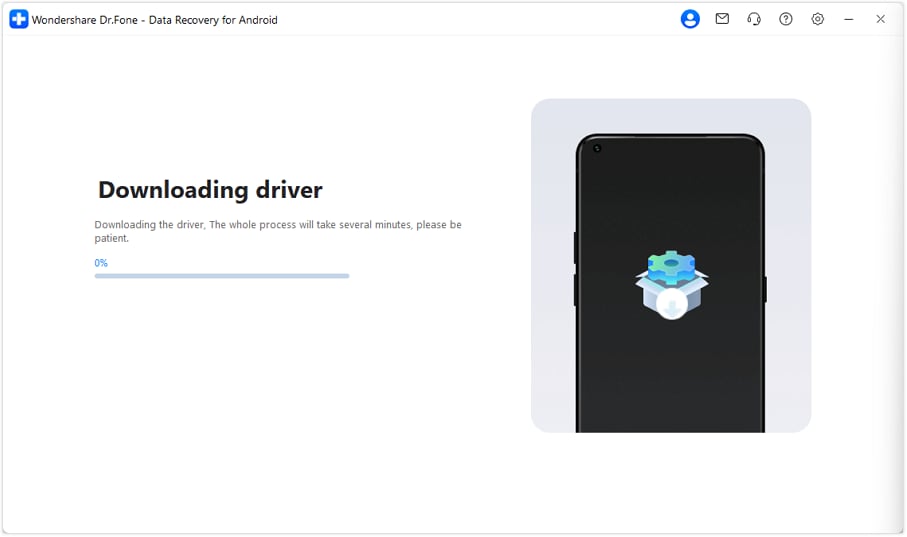
If the screen is on but unresponsive, choose the "Recover from Broken Phone" option in the Data Recovery Android tool. After that, select the phone condition, click "Next," and connect the device to the tool when prompted. Choose the "Ok" button, and the tool will start downloading the necessary drivers.
-
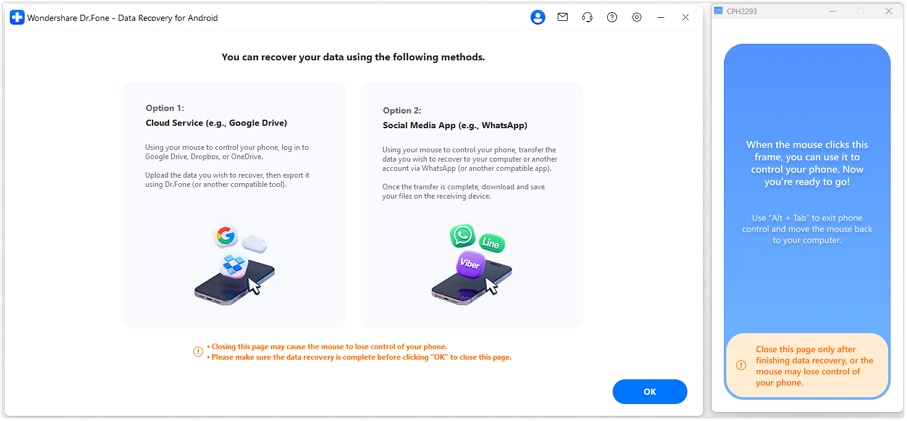
Step 2Control the Device with the Mouse On the Tool
Once installed, you can control the device from a PC using a mouse; click "Yes, It Works" to confirm and proceed. Choose a method to recover your data by using a cloud service to upload and download it, or a social media app to transfer it to another device or computer.
-
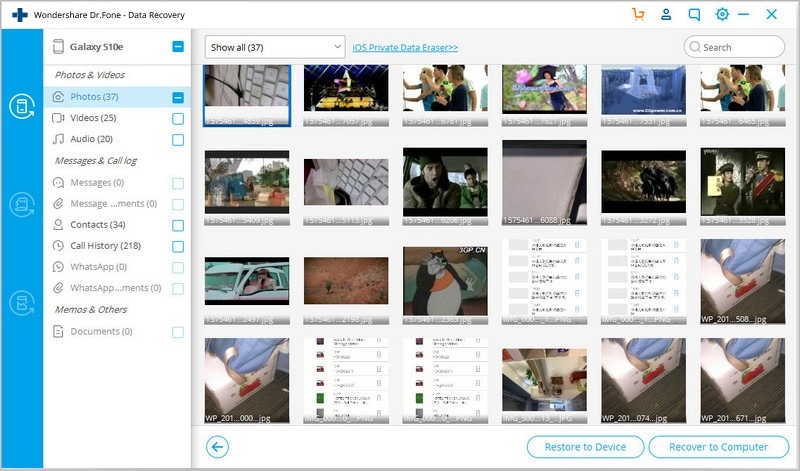
Step 3Preview and Export Data to Device or PC
The tool will extract WhatsApp data and display it on the screen; preview and select the desired one to restore using the provided export options.


 100% Clean &
Safe
100% Clean &
SafeWhen to Use Dr.Fone – Data Recovery (Android)
To further know where this tool can help recover WhatsApp from a dead Android phone, review this table:
| Phone Condition | Recovery Scenario | Why Use Dr.Fone? |
|---|---|---|
| Unresponsive Touch | The phone is on, but you can't enter your PIN or tap "Allow." | Control the device via your PC with a mouse to trigger data exports. |
| Black Screen | The device vibrates/rings, but the display is totally dead. | Directly extracts WhatsApp databases from storage without screen interaction. |
| Shattered Screen | The display is visible but freezing or dangerous to touch. | Selective preview lets you save specific chats or "View-Once" media to a PC. |
| No Cloud Backup | Google Drive is disabled, or the backup is outdated. | Pulls local database files directly from internal system folders. |
| Locked Device | Cannot access "File Transfer" mode due to screen lock. | Bypasses locks to parse WhatsApp Business and 14+ other data types. |
Method 4: Contact Professional Services
As a last resort to recover WhatsApp messages from a broken Android phone, contact professional services. They can help when your Android phone is severely damaged, and WhatsApp cannot be restored from Google Drive or local backup. Using the premium version of Dr.Fone, they can help extract data directly from internal storage, regardless of hardware damage.
Part 3. How to Prevent WhatsApp Data Loss in the Future
Now that you know how to get WhatsApp off a broken Android phone, it's important that you prevent data loss again. In this case, follow the 5 simple tips given in the table form to make recovery easier in the future:
| Action | Frequency | Why It Matters |
|---|---|---|
| Enable Google Drive Backup | Daily | Automatically saves chats and media to the cloud every night. |
| Include Media /Videos | Once | Ensures photos and videos are part of the cloud backup, not just text. |
| Use End-to-End Encryption | Once | Add a password to your cloud backup for extra security. |
| Check Storage Space | Monthly | Prevents backup failure due to a full Google Drive or phone. |
| Perform PC Backups | Periodically | Uses tools like Dr.Fone to keep an offline, secondary copy of chats. |
| Verify Phone/Email | Once | Ensures you can always access the Google account linked to your chats. |
Conclusion
Many users want to know how to recover WhatsApp messages from a broken Android phone, and this guide has outlined several methods in detail. When the touch is somehow responsive, the Google Drive backup option is best, but if it's black and dead, the local backup method can help. When nothing works, recovery tools like Dr.Fone - Data Recovery (Android) can extract data from internal storage via Read-Only mode.
FAQs
-
1. How do I get my 2FA code if I can't access my old phone?
If you have two-step verification enabled and cannot receive the SMS code or remember your PIN, you have to wait a 7-day reset period. WhatsApp does not provide a way to bypass this security measure without access to the registered SIM card. -
2. What if my phone is completely dead and won't turn on?
In this, you can restore an existing Google Drive backup on the new device or take the phone to a professional repair center. Before that, try the Dr.Fone - Data Recovery (Android) tool to see if the read-only scan can extract data from internal storage. -
3. Can I recover "View Once" media from a broken phone?
The standard Google Drive backups do not store "View-Once" media after they’ve been opened. However, recovery tools like Dr.Fone can retrieve the cached fragments of these files from internal storage if they haven't been overwritten by new data.
 Add Wondershare Dr.Fone as a preferred source on Google