 Recover photos, messages, WhatsApp, and more — no backup
needed.
Recover photos, messages, WhatsApp, and more — no backup
needed.

 100% Security Verified | No Subscription Required | No Malware

 :
: 
 ChatGPT
 Perplexity
 Gemini
 Claude
 Grok
Grok
Have you accidentally lost an important Instagram direct message and now feel completely frustrated? You are not alone. Countless users face this frustrating scenario when vital chats, media, or important text threads vanish without warning. The good news is that there are proven, safe ways to effectively recover deleted DMs, provided you act quickly and use the right workarounds. This definitive 2026 guide will walk you through exactly how to retrieve your missing conversations.
By following these meticulously detailed instructions carefully, you can learn how to recover a deleted DM on Instagram rather than panicking over lost information. We will cover built-in account tools, notification workarounds, cache exploration, and even explain how specialized tools like Dr.Fone can be an effective choice to retrieve lost data from your broader device ecosystem in a few straightforward taps.
In this article
Part 1. Can We Recover Deleted Instagram Chats/DMs?
Before diving into the exact steps of how to recover deleted DMs on Instagram, it is important to know that complete chat and DM recovery is strictly dependent on timing, backups, and precisely where the messages were stored on your device or network. Because Instagram does not have a dedicated "Recently Deleted" folder for Direct Messages like it does for posts or stories, you must rely on strategic workarounds.
Still, the most preferable and reliable way is to check Instagram's official "Download Your Information" tool for existing account data. Other than this, you can check linked Meta accounts or explore local app caches to retrieve deleted conversations. Users often wonder, can we recover deleted Instagram chats purely through support tickets? Unfortunately, no. If Instagram's servers have fully permanently deleted the messages across both ends and no external backup exists, recovery becomes nearly impossible. However, the four proven methods below hold a high success rate for recent deletions.
Part 2. How to Recover Deleted DMs on Instagram - 4 Ways
While understanding the basics of data retention, you must act swiftly. Review the carefully listed ways below and thoroughly understand how to get back deleted DMs on Instagram without compromising your account's security.
Way 1: Using Instagram Data Download
Instagram's official "Download Your Information" tool stands as the safest, most comprehensive way to view deleted chats or DMs outside the active application environment. It provides a full account archive packed into one consolidated ZIP file. This includes your complete message history that may no longer appear in the app UI due to accidental swiping. Additionally, the archived messages come in readable JSON or HTML formats, allowing you to seamlessly see conversations clearly in a web browser. So, to know how you can effectively use this powerful option, adhere to the mentioned guide:
-
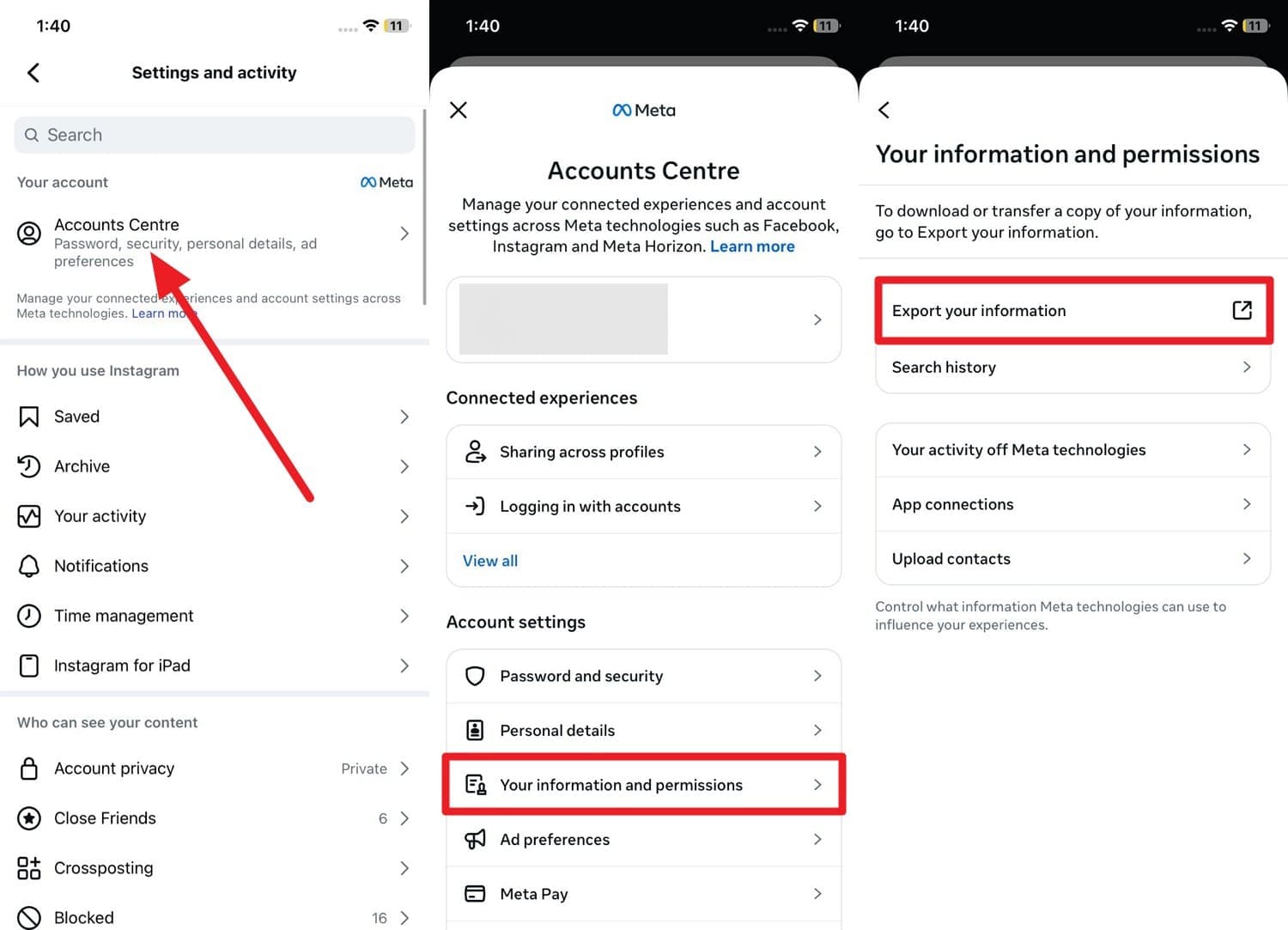
Step 1 Access Your Information Settings
Launch the Instagram app and navigate to your profile settings. Go to the "Account Centre" and tap on the "Your Information and Permissions" menu. After that, select the "Download Your Information" or "Export Your Information" option to continue saving the data.
-
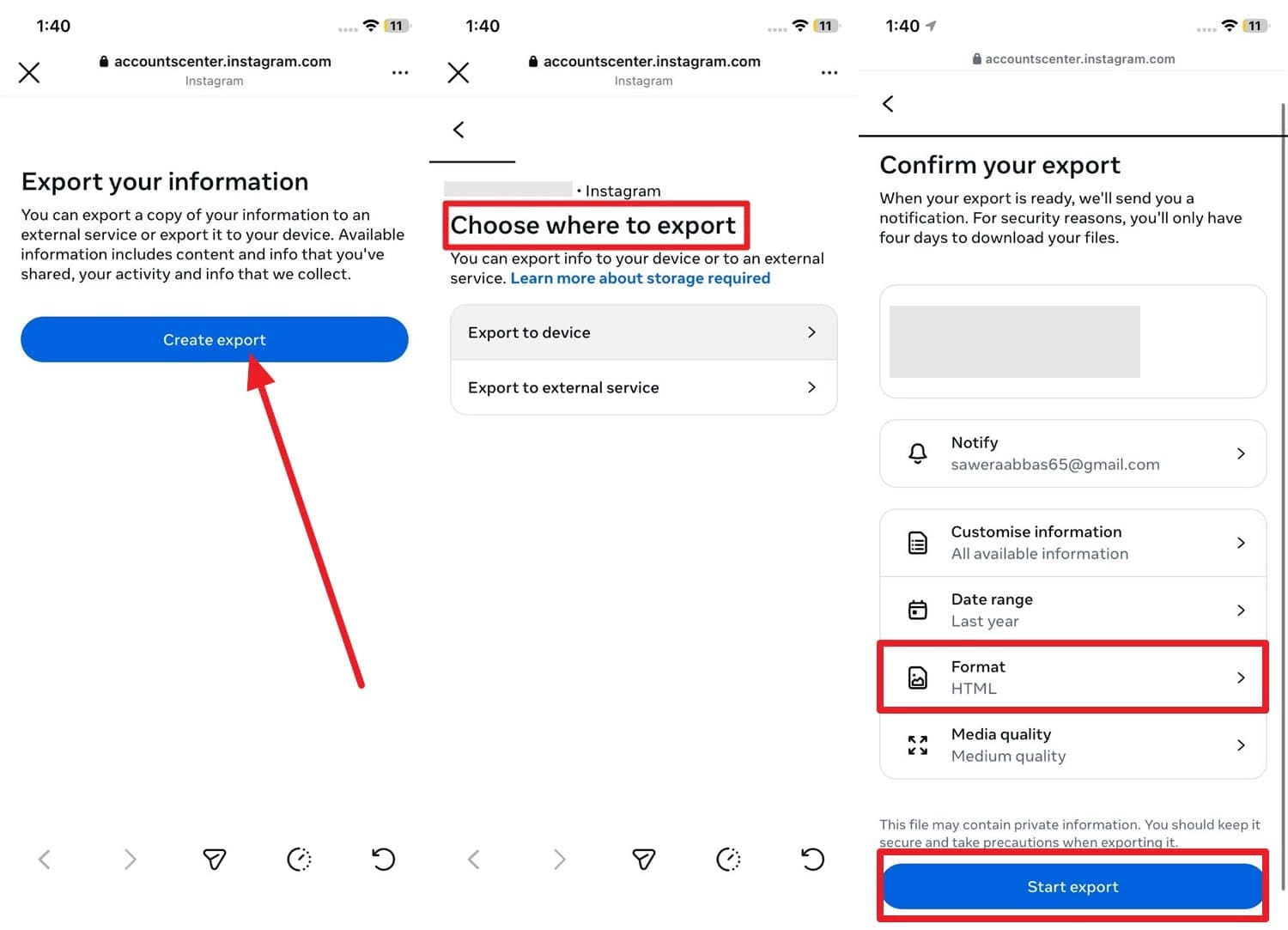
Step 2 Configure and Start Export
When directed to the new page, tap "Create Export" (or Request a download) and choose exactly where to save the data by tapping the listed profile options. Then critically select the export format as "HTML" for easiest reading, set the date range to "All Time", and press the "Start Export" button.
-
Step 3 Unzip and Read Your DMs
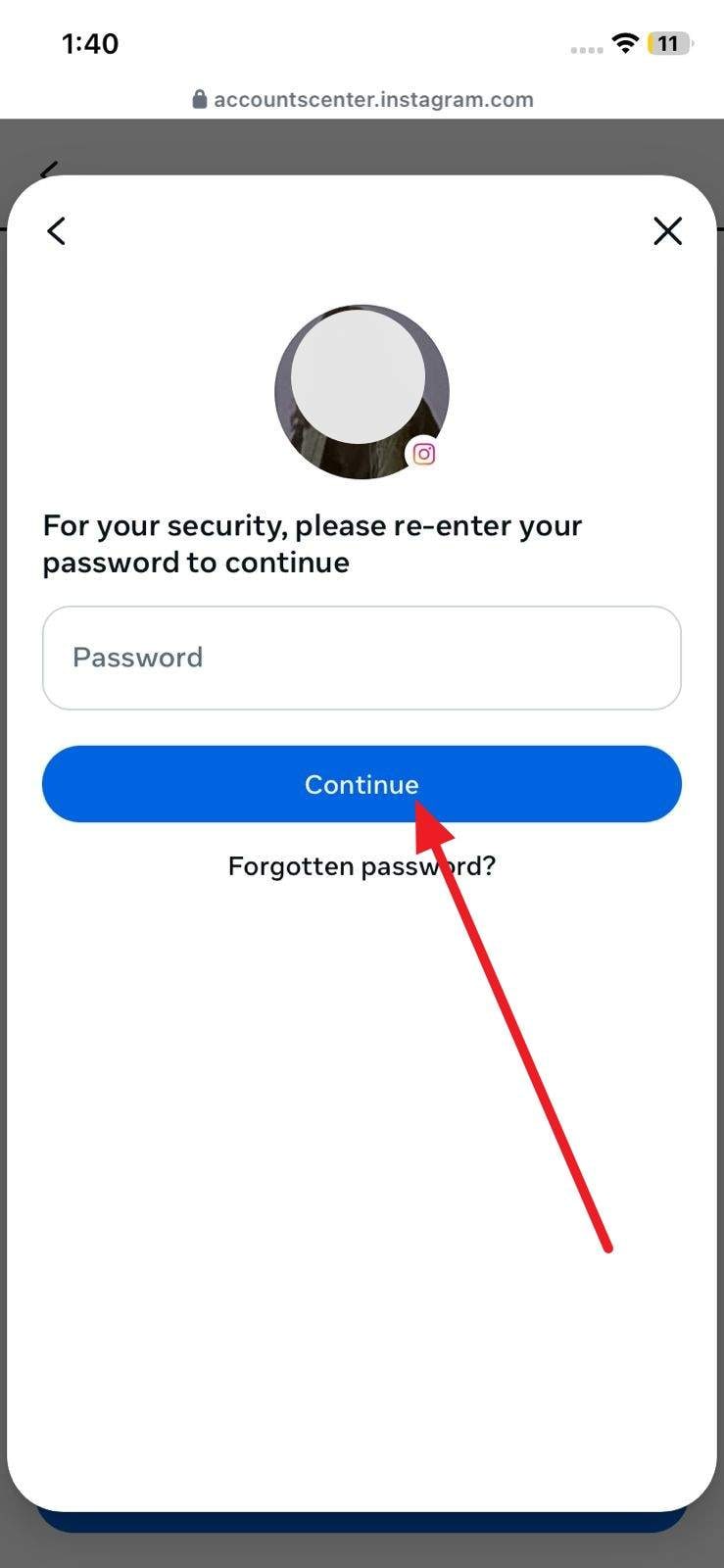
When asked, enter the account passcode to verify your identity, tap the "Continue" button, and wait for Instagram to compile and email the file. Once received, unzip the downloaded folder on your PC or smartphone, navigate to the "messages" folder, and open messages.html to view conversations.
Way 2: Check the Linked Account
As another highly effective way on how to recover deleted DMs on Instagram, you should immediately check your linked Facebook/Meta inbox. Some messages may still appear there entirely intact if your social accounts are closely connected, especially for business or creator profiles heavily relying on Meta's unified inbox structure. Even if a thread appears gone on Instagram, localized copies may remain undisturbed in the linked inbox, which serves as a highly reliable read-only backup.
Since you stay firmly within Meta's ecosystem for this workaround, you cannot restore these messages completely back into the main Instagram app interface, but you can definitely read and screenshot them. Here is how this linked account method works:
-
Step 1 Enter Meta Business Suite
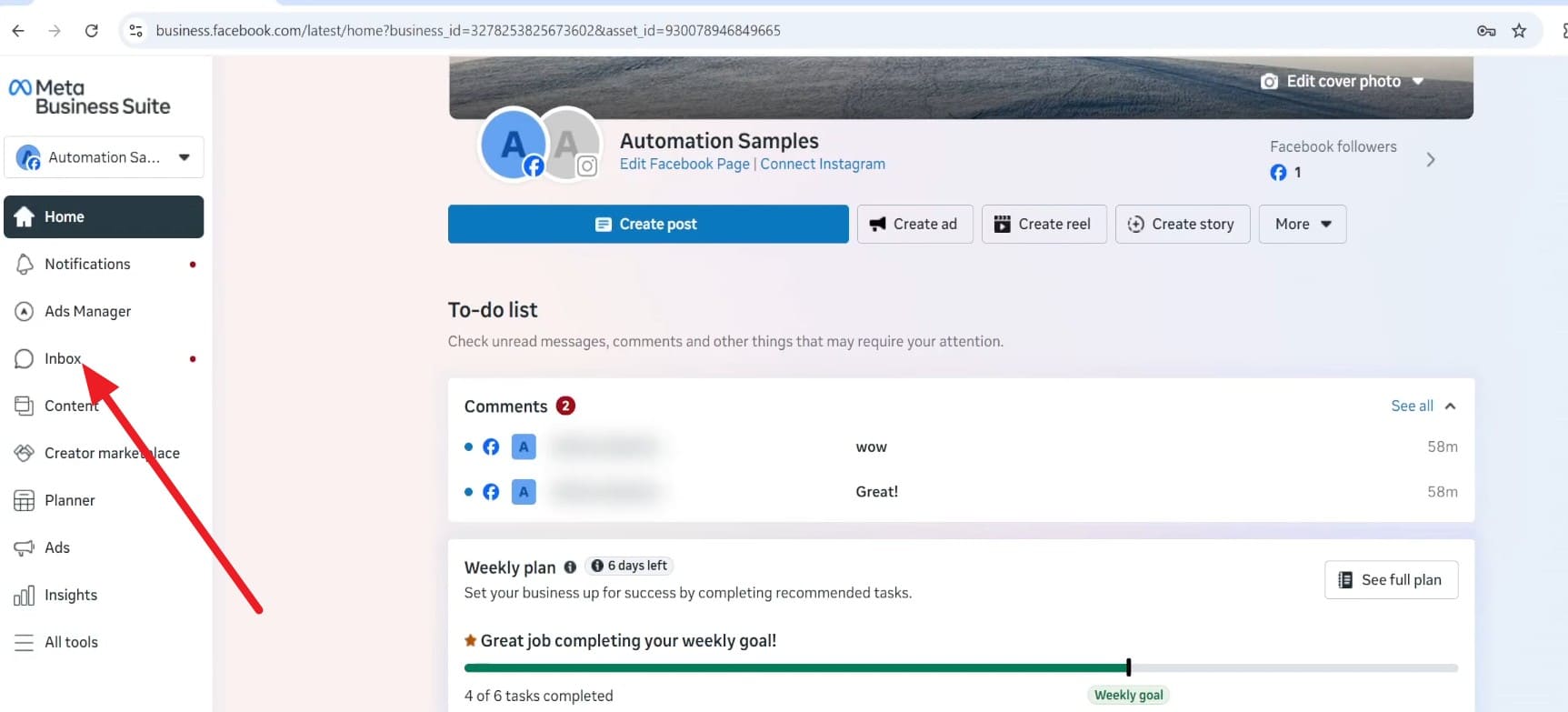
When you securely log in to business.facebook.com from a desktop browser, navigate to the Meta Business Suite dashboard. Once loaded, click directly on the "Inbox" section located on the left-hand navigation panel.
-
Step 2 Locate Instagram Threads
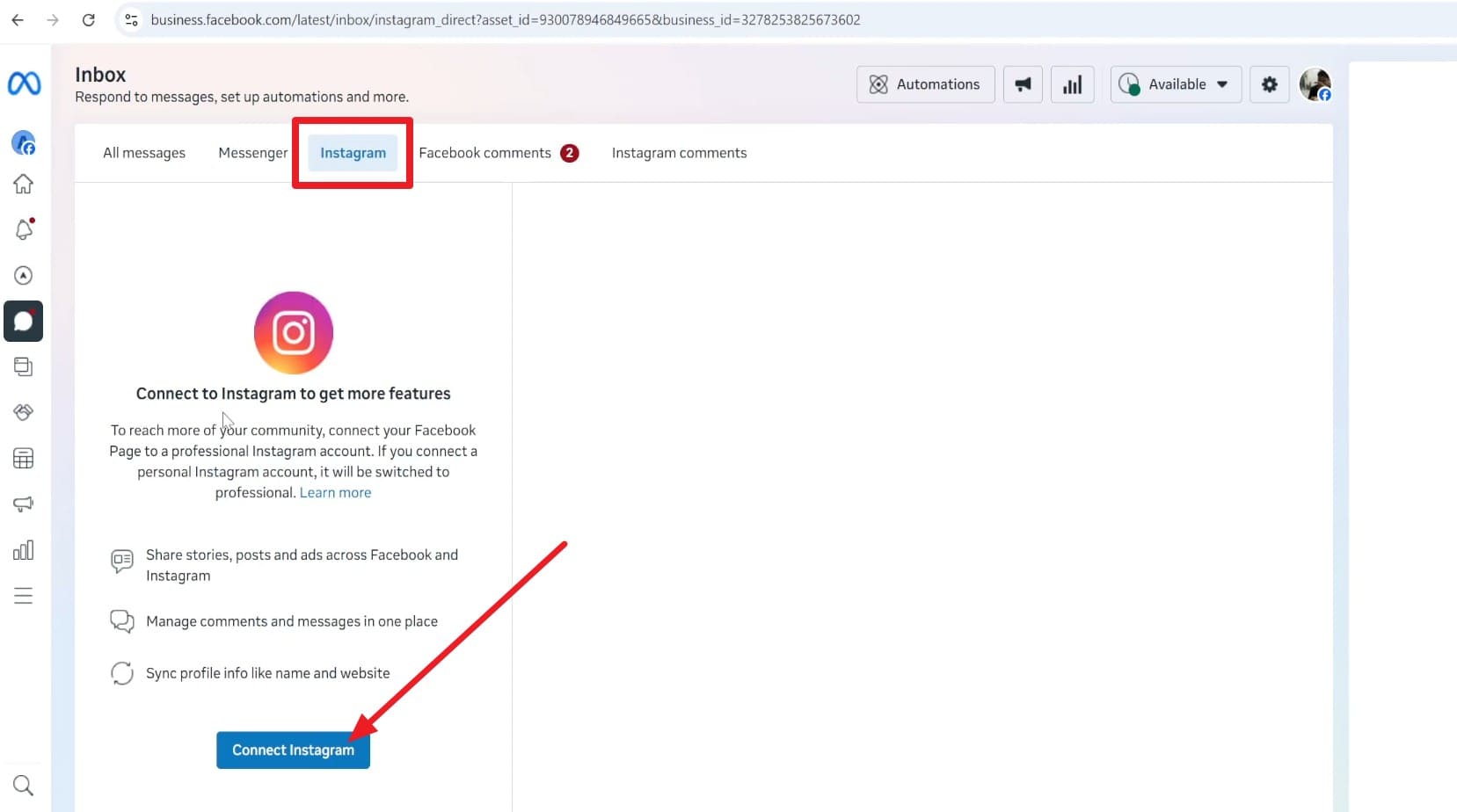
Next, specifically choose the "Instagram" tab at the top and carefully browse the chat list of a certain person. In case you haven't natively linked the account beforehand, press the "Connect Instagram" button to locate and synchronize future messages effectively.
Way 3: Access DM Fragments from App Cache
If you are an Android user asking how to see deleted DMs on Instagram, direct access to DM fragments from the system app cache can sometimes successfully show small parts of deleted Instagram chats. Your phone architecture inherently keeps temporary Instagram data for a short time to reduce loading speeds. Because of this, raw text pieces, thumbnails, or small media files may still exist in deeply nested cache folders.
However, note that this method mainly works exclusively on Android devices via native file manager tools, and it usually only shows disjointed fragments rather than a beautifully formatted chat UI. In addition, it also works strictly within a short time window, often about 24-48 hours after deletion, as demonstrated below for Android:
-
Step 1 Open Android File Manager
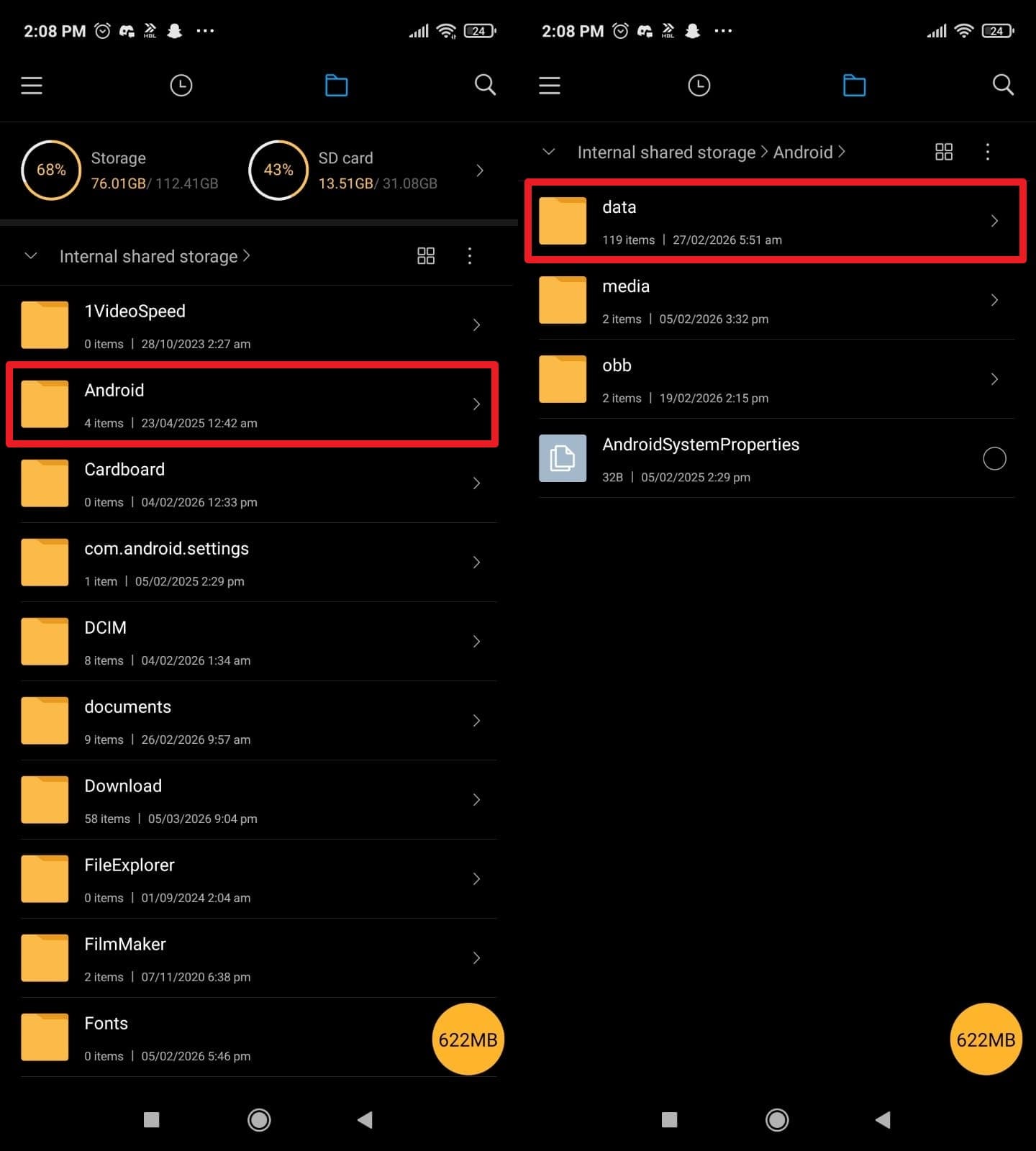
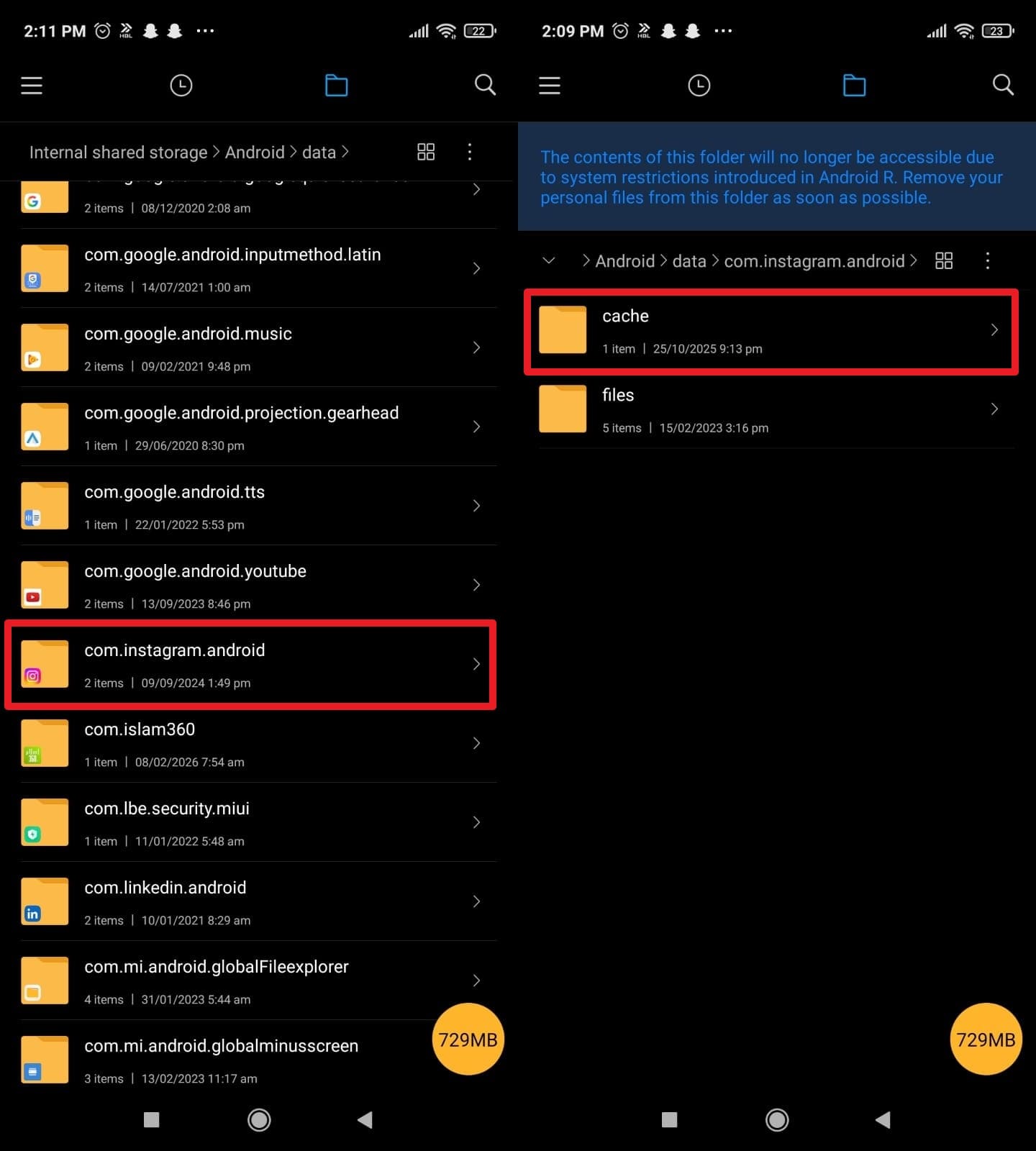
To learn how to get back deleted Instagram chats manually, open the default File Manager app on your Android device. Go directly to "Internal Storage," then carefully choose "Android" and open the "Data" directory.
-
Step 2 Explore Instagram App Cache
Scroll down and tap on the package named "com.instagram.android" and confidently select the "Cache" option. Look inside specific sub-folders named direct, messages, cache, media, or similar structures, and see if you can salvage the image thumbnails or raw text/JSON snippets.
Way 4: Through Archived/Restricted Messages
If you still frantically ask, can we recover deleted Instagram chats? You should double-check your account restrictions. Know that using the archived/restricted chats functionality lets you find conversations that are essentially hidden, not truly deleted from the database. Sometimes erratic swipes cause conversations to move to other hidden tabs like Requests, Hidden Requests, or General, so they abruptly disappear from the main primary inbox, but still exist fully intact.
In those specific cases, you can simply view and carefully move the thread back so it reappears seamlessly in your main DM list, as expertly guided below.

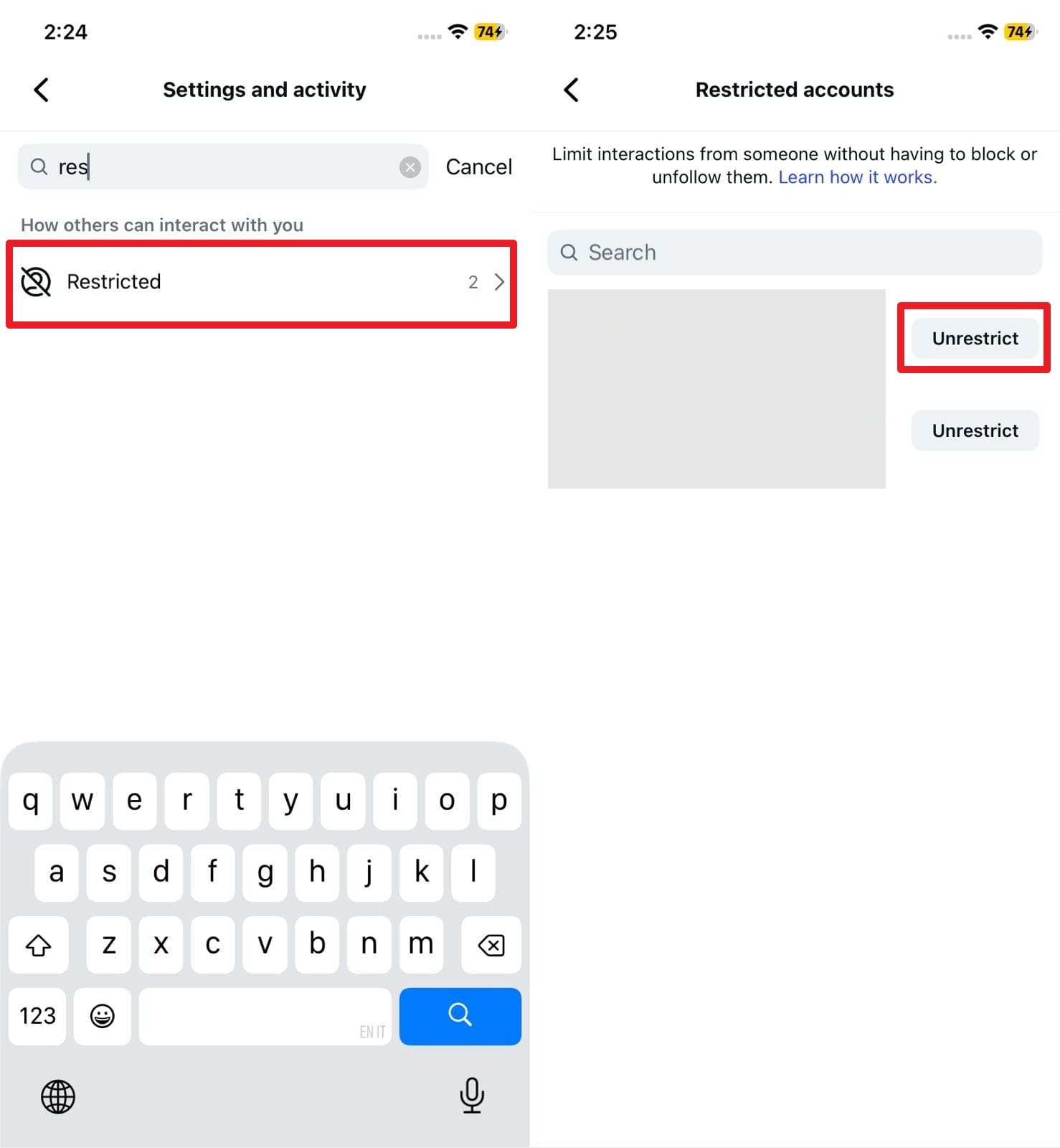
Instructions for Personal Accounts: Navigate to your profile settings, click on "Privacy", and search for "Restricted Accounts". From the populated list, find the target user and choose the "Unrestrict" button to instantly reappear the conversational thread in the primary DM list.
Whereas for the professional or creator account, here is exactly how you can effectively unarchive the hidden chat to recover DMs:
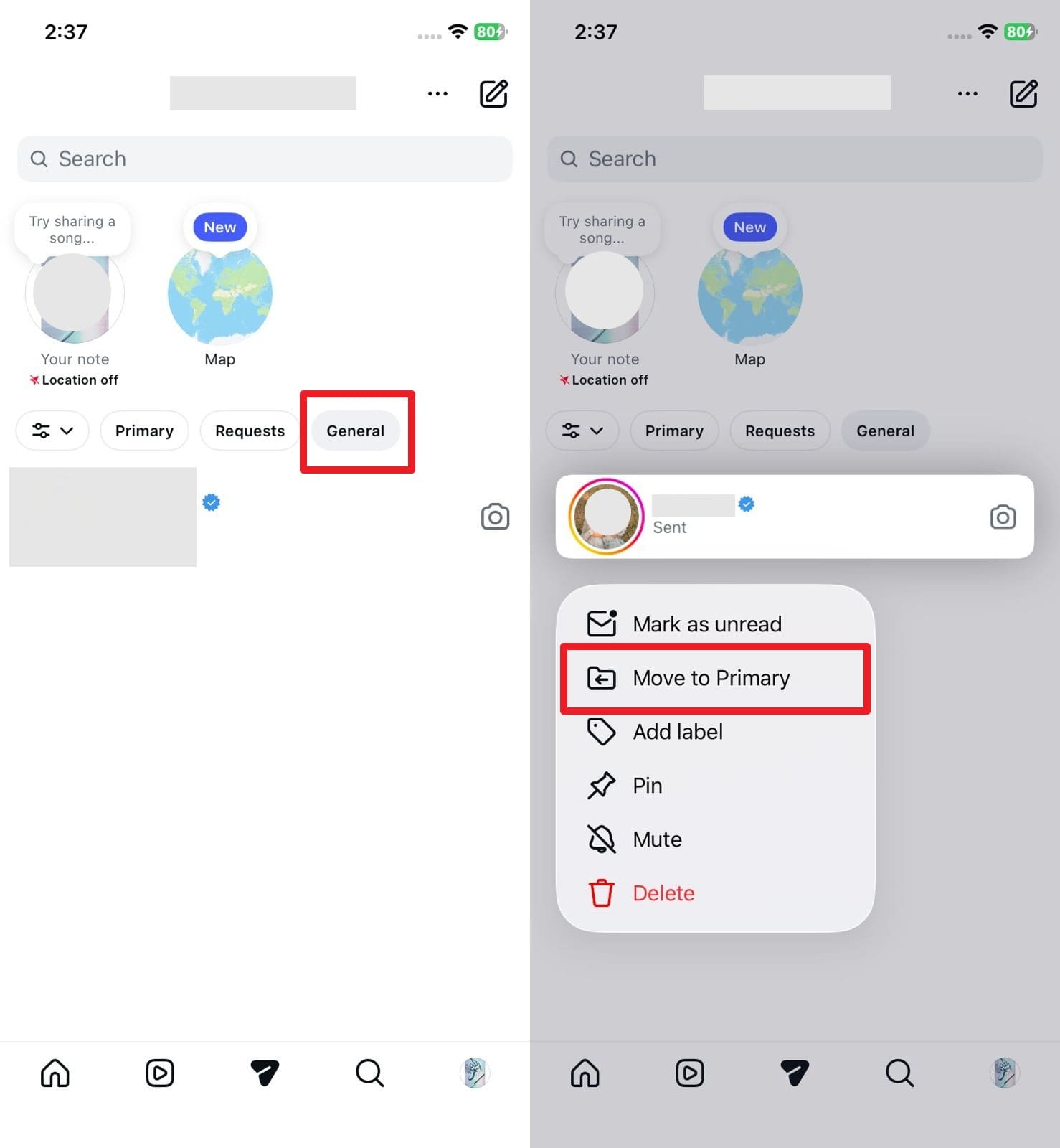
Instructions for Professional Accounts: If the chat was accidentally moved to the "General" tab instead of "Primary", simply navigate there. Long-press the specific conversation thread to trigger the sub-menu, and comprehensively select the "Move to Primary" option to unarchive the chat.
Pro Tip: Recover Your Lost or Deleted Phone Data with Dr.Fone
 Scan Android phones and tablets directly.
- Preview and recover only what you want.
- Supports WhatsApp, photos, videos, contacts, and more.
- Works with 6000+ Android devices.

While frantically searching online and learning "can I recover delete files and chats," you can lean on an industry-leading data recovery tool like Dr.Fone – Data Recovery to successfully restore deleted Instagram media files, photos, and crucial local caches directly from your device. This premium data recovery tool for Android and iOS lets users selectively and intuitively retrieve the data in specific batches, which they can also easily preview beforehand to ensure accuracy. For Android users dealing with massive amounts of cached media, the tool seamlessly supports 14+ file types and actively enables recovery of Instagram data, even from severely broken phones or corrupted operating systems.
Whereas on the latest iOS 26 & iPhone 17 Series, the robust tool lets Apple users retrieve precious data from iTunes and deeply stored iCloud backups without completely overwriting the current device state. Since the entire data recovery process is 100% local, Dr.Fone is likely the safest, most private option when basic manual methods like archiving or app cache hunting frustratingly fail to restore deleted chats or media. Overall, this comprehensive data recovery toolkit is highly beginner-friendly and dependably offers weekly updates on all upcoming Android and iOS versions to ensure maximum compatibility.
Tutorial to Recover Deleted Instagram Data via Dr.Fone - Data Recovery
For salvaging deleted Instagram media files or hidden local text remnants, here is exactly how Dr.Fone – Data Recovery makes sophisticated data retrieval possible with minimal technical effort:
-
Step 1 Connect Your Device
After launching the software on your computer and selecting the "Recover Data From an iOS Device" (or Android Device) option, securely connect the phone using an original USB cable. Then meticulously select the required data types you wish to recover to start the deep scanning process.
-
Step 2 Scan and Export Data
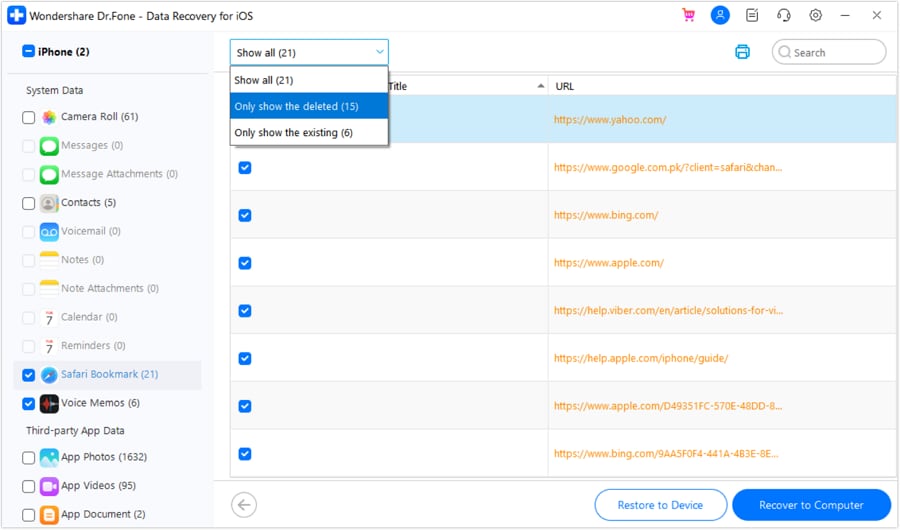
Patiently wait for the scan to finalize. Filter the data as it is progressively retrieved onto the dashboard screen, preview the recovered files to ensure it's what you need, then purposefully tap the "Recover to Device" or "Recover to Computer" option to export safely.




Part 3. Alternative Ways to See Deleted DMs on Instagram
When you still frustratingly can't locate the lost DMs using primary methods, don't give up just yet. Try these creative, alternative basic solutions given below to finally learn how to find deleted dms on Instagram reliably:
1. Via Android Notifications
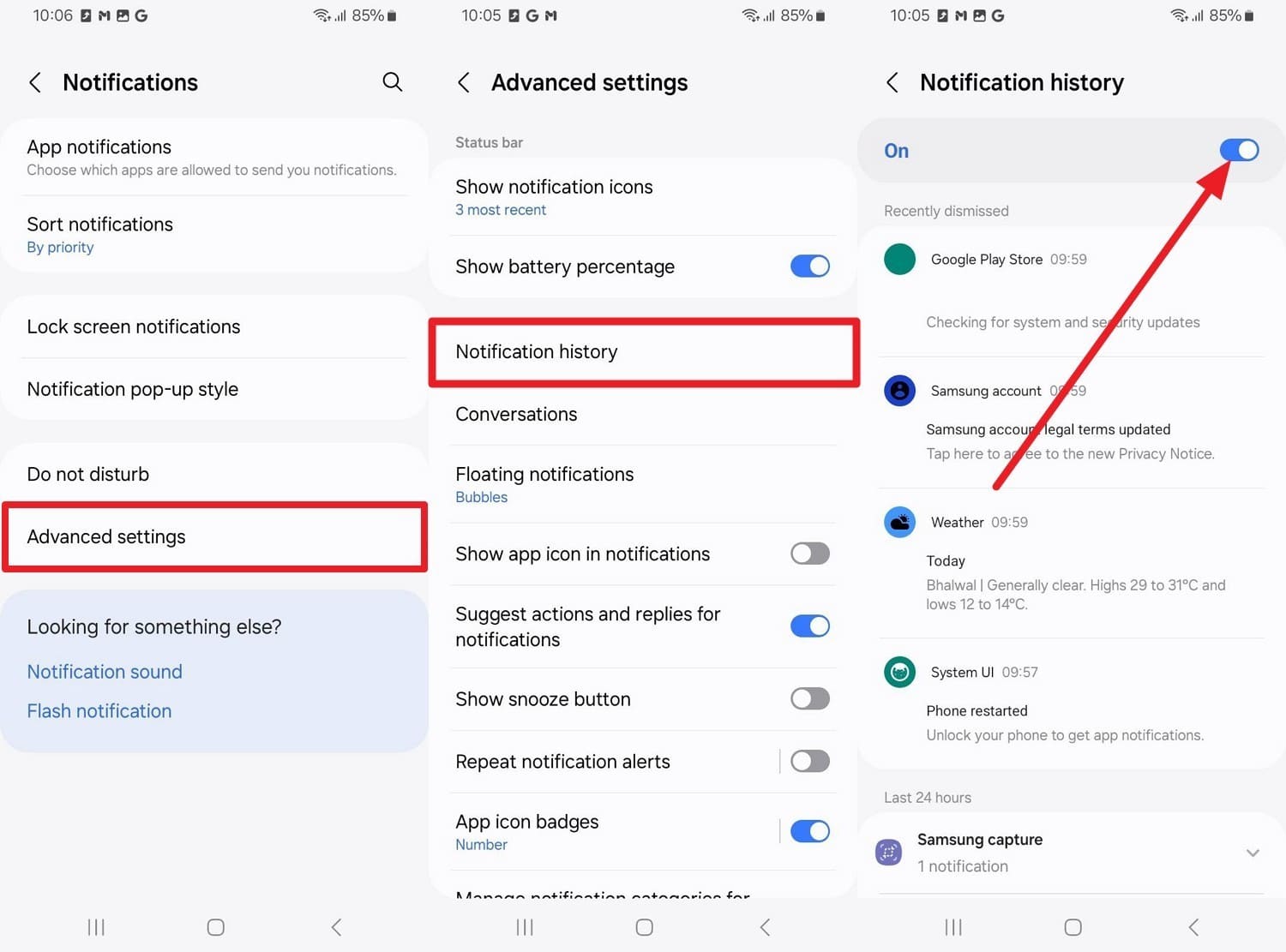
On Android 11 or later operating systems, the built-in Notification History feature may beautifully show deleted Instagram DM previews if the message came after you explicitly turned the feature on. This clever trick works exclusively for incoming received messages that generate a push notification. However, keep in mind that messages sent before the feature was enabled, and the very ones you sent yourself, do not appear there. So, here is exactly how you can enable this feature to see future DM alerts seamlessly:
Instructions: As you choose the "Apps & Notifications" or "Advanced Settings" option deeply embedded in the device settings, tap directly on the "Notification History" option. Here, quickly toggle the master option "On" and see future incoming Instagram notifications listed chronologically, and generously expand them to read full DM previews.
2. Check Screenshots for Chat History
Thoroughly check your local screenshot albums or dedicated screenshot apps to potentially find static visual copies of Instagram chats outside the app ecosystem. Know that taking screenshots serves as one of the most reliable manual backups and preserves the exact conversational text even immediately after total DM deletion. While this method may not fluidly restore the full dynamic conversation back into Instagram, it can tremendously help you find key crucial details like shared web links, specific dates, or forgotten usernames. Moreover, it is also inherently safe because you only need to search your own protected gallery already natively on your device.
3. Ask the Recipient
It is admittedly a last resort for many, but practically the safest and fastest way to organically recover deleted Instagram DMs because the digital chat log exists redundantly on both participating accounts. When you choose to delete a message or a whole thread, it mysteriously disappears only from your personal inbox, but the other person may still undoubtedly have the full, unabridged conversation perfectly preserved. Thus, they can quickly send a high-resolution screenshot or meticulously copy the raw text and transparently share it back with you upon request.
Conclusion
To conclude this comprehensive guide, when one last highly important text is sent or accidentally removed, the burning query about exactly how to recover a deleted DM on Instagram is almost automatically raised by millions of active users globally. Therefore, this expansive 2026 guide has thoroughly explained quick, tested, and highly innovative ways to retrieve those lost chats if you actively meet the specific timeline and ecosystem conditions. However, if you truly want a safe, deeply secure, and highly reliable offline recovery of your broader Instagram media data—including cached DM photos or attached files—utilizing a dedicated solution like Dr.Fone – Data Recovery is strongly recommended for ultimate peace of mind.
FAQ
-
1. Can Instagram Support directly restore deleted DMs?
No, Instagram support usually cannot restore deleted DMs once they are fully removed from your active account and cleared from their immediate servers. However, they strongly recommend and may guide you to request your historical data through the official account data download option as a primary backup workaround. -
2. Do Instagram DMs completely delete for both people involved?
No, when you intentionally or accidentally delete a DM thread on your end, it usually disappears strictly only from your local inbox. Unless you utilize the "Unsend" feature for specific individual messages, the other person may still clearly see the full retained conversation securely in their own account. -
3. Does deleting or uninstalling the Instagram app remove my DMs permanently?
No, simply uninstalling the application from your smartphone does not permanently erase saved messages from Instagram's encrypted cloud servers. All your active chats will faithfully return upon logging back in. Whereas, if you physically deleted the chat thread earlier within the app, merely reinstalling the software will absolutely not magically restore it. -
4. Can third-party tools definitively recover permanently deleted DMs?
While many unauthorized third-party apps claim to flawlessly retrieve deleted text messages from Instagram's database, most are insecure and highly ineffective at breaking server encryption. It is much safer to rely on official Meta downloads, linked account checks, or trusted local device recovery software like Dr.Fone to scan for residual cache fragments.
 Add Wondershare Dr.Fone as a preferred source on Google



