 Recover photos, messages, WhatsApp, and more — no backup
needed.
Recover photos, messages, WhatsApp, and more — no backup
needed.

 100% Security Verified | No Subscription Required | No Malware

 :
: 
 ChatGPT
 Perplexity
 Gemini
 Claude
 Grok
Grok
Accidentally deleting a significant number of TikTok videos or losing your precious unpublished drafts is a common issue for many creators. This situation can be incredibly frustrating, especially when those files contain valuable content, hours of creative edits, and unique filters that are hard to replicate. Luckily, deleted TikTok videos and drafts can often be recovered in a fast and safe way if you act quickly.
Consequently, this comprehensive tutorial will instruct you on how to recover deleted TikTok videos to retrieve lost data, both directly from your device storage and through the TikTok application's built-in features. You will also learn step-by-step instructions for each recovery method, discover the tools you can use, and explore expert tips to prevent future data loss. Whether you are wondering how to recover deleted drafts on TikTok or seeking a one-click solution, let's explore the most effective and reliable ways to restore your content.




In this article
Part 1. Can You Recover Deleted TikTok Videos or Drafts?
Before you learn exactly how to get drafts back on TikTok, it is crucial to understand that recovery heavily depends on your specific situation. Unlike posted videos, drafts are stored locally on your device rather than on TikTok's servers. In some scenarios, retrieving your content is entirely possible, while in others, it might be permanently lost. The following table highlights common situations to give you a better understanding of your recovery chances:
| Situations | Recoverable? |
|---|---|
| Draft still in TikTok "Drafts" folder | Yes – just open the app to view it |
| Deleted draft, app still installed | Sometimes – if a copy was saved to phone gallery or cloud trash |
| Deleted draft by uninstalling TikTok | No – permanently lost as drafts are stored locally |
| Switched phones / logged out (drafts on old device) | No – drafts are device-specific and do not sync across accounts |
| Posted video deleted from profile | Maybe – if saved, dueted, stitched, or shared elsewhere |
| Video saved to phone gallery | Yes – via gallery album, Recently Deleted, or cloud backup |
| No local copy, no backup, draft removed | No – unfortunately not recoverable |
Part 2. How to Recover Deleted TikTok Videos (6 Proven Ways That Work)
Those who seek to learn how to find deleted videos on TikTok efficiently should adhere to the practical solutions mentioned below. Depending on whether you lost an in-app draft or a downloaded video, one of these six proven methods will help you restore your content.
1. Try Data Recovery Software | One-Click Solution
If you only deleted the draft or video within the local app folder and your phone's storage has not been heavily overwritten by new data, professional recovery tools can be your best chance. Software like Dr.Fone - Data Recovery can securely scan your device to find hidden or deleted media files. It can recover deleted videos and over 14 other data types from Android devices, iTunes, and iCloud backups.
Furthermore, the tool claims a remarkably high success rate for local recovery, allowing users to restore data even from broken devices without requiring complicated root access or USB debugging. With support for over 6000 Android models and the latest iOS firmware, it is ideal for all users.
 Scan Android phones and tablets directly.
- Preview and recover only what you want.
- Supports WhatsApp, photos, videos, contacts, and more.
- Works with 6000+ Android devices.

To learn how to get your TikTok drafts back that were saved locally on your smartphone using this data recovery software, follow these simple steps:
-
Step 1 Choose the Recovery Option
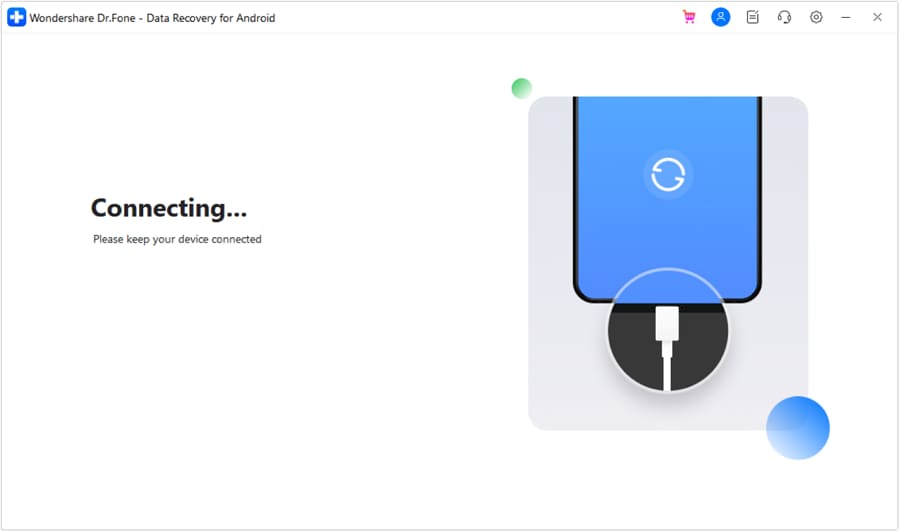
After downloading and installing Dr.Fone, access the "Data Recovery" tool from the main Toolbox. Select "Recover Android Data" or the iOS equivalent, and connect your mobile device to the computer using a USB cable.
-
Step 2 Scan, Preview, and Export
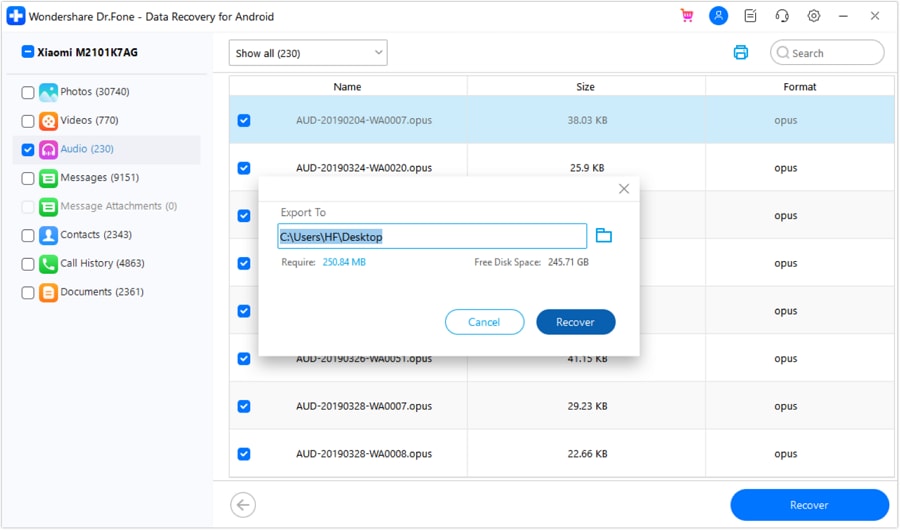
Choose the "Videos" category from the available data types list and click the "Start Scan" button. Once the tool retrieves the lost media, you can filter the results. Preview your lost TikTok videos, select the ones you need, and press "Recover" to export them safely to your computer.
2. Check TikTok's "Recently Deleted" Folder
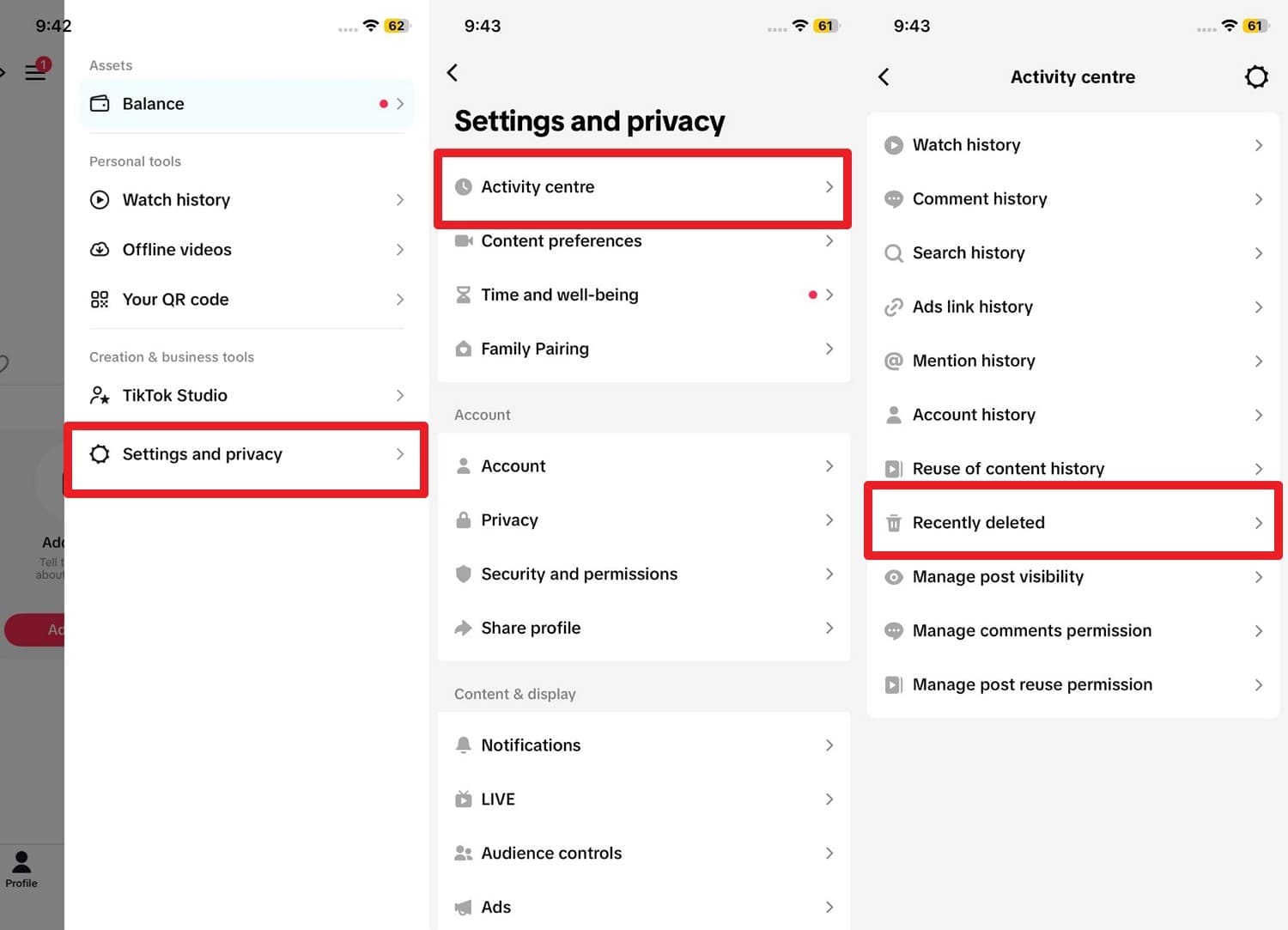
You can directly check the app's internal deleted folder to figure out how to find deleted videos on TikTok. This straightforward solution helps you get a deleted posted video back without requiring any third-party tools. TikTok's Recently Deleted feature lets you restore videos for about 30 days before they are permanently purged. It even shows a remaining day count so you know exactly how long you have left to restore.
Instructions: Launch TikTok and press the "Hamburger" menu icon on your Profile page. Tap on "Settings and Privacy", then select the "Activity Center" option. Click on the "Recently Deleted" menu to browse and restore your removed videos.
3. Request an Activity/Data Download
With this option, you can request a complete copy of your TikTok account's historical data. While it won't give you the actual video file for a deleted draft, it can provide crucial metadata about deleted posted videos, such as the title, posting date, and video ID, which can help you track it down elsewhere. Please note that the data download link expires in 4 days, and the log usually covers only the last 180 days.
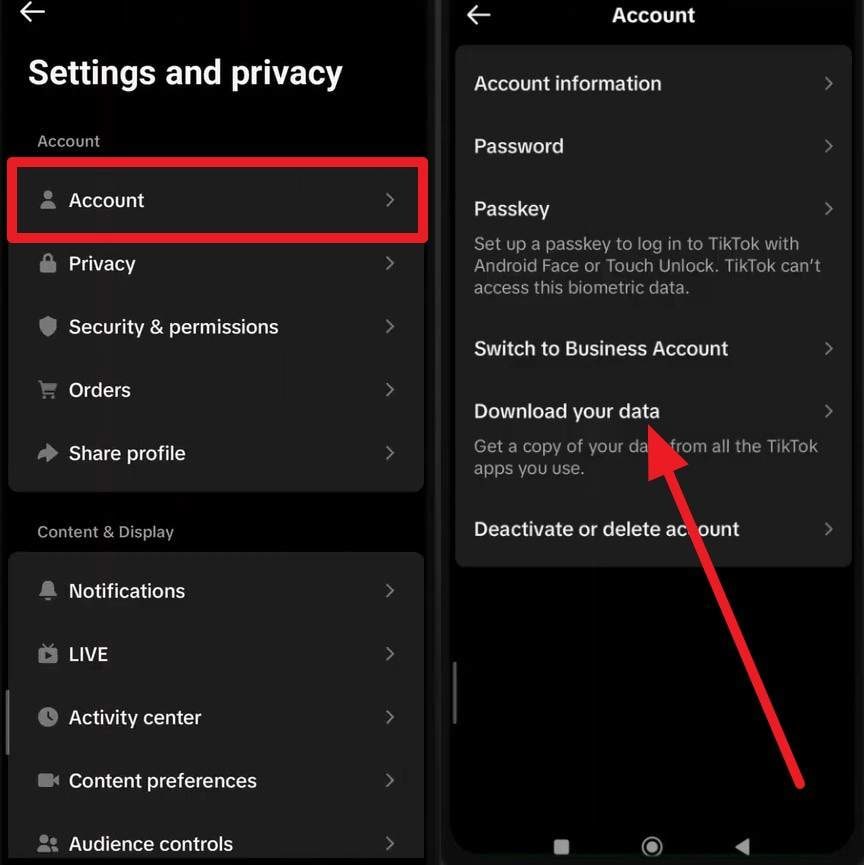
- Step 1. Navigate to "Settings and Privacy" from your profile. Tap on "Account" and select the "Download Your Data" option.
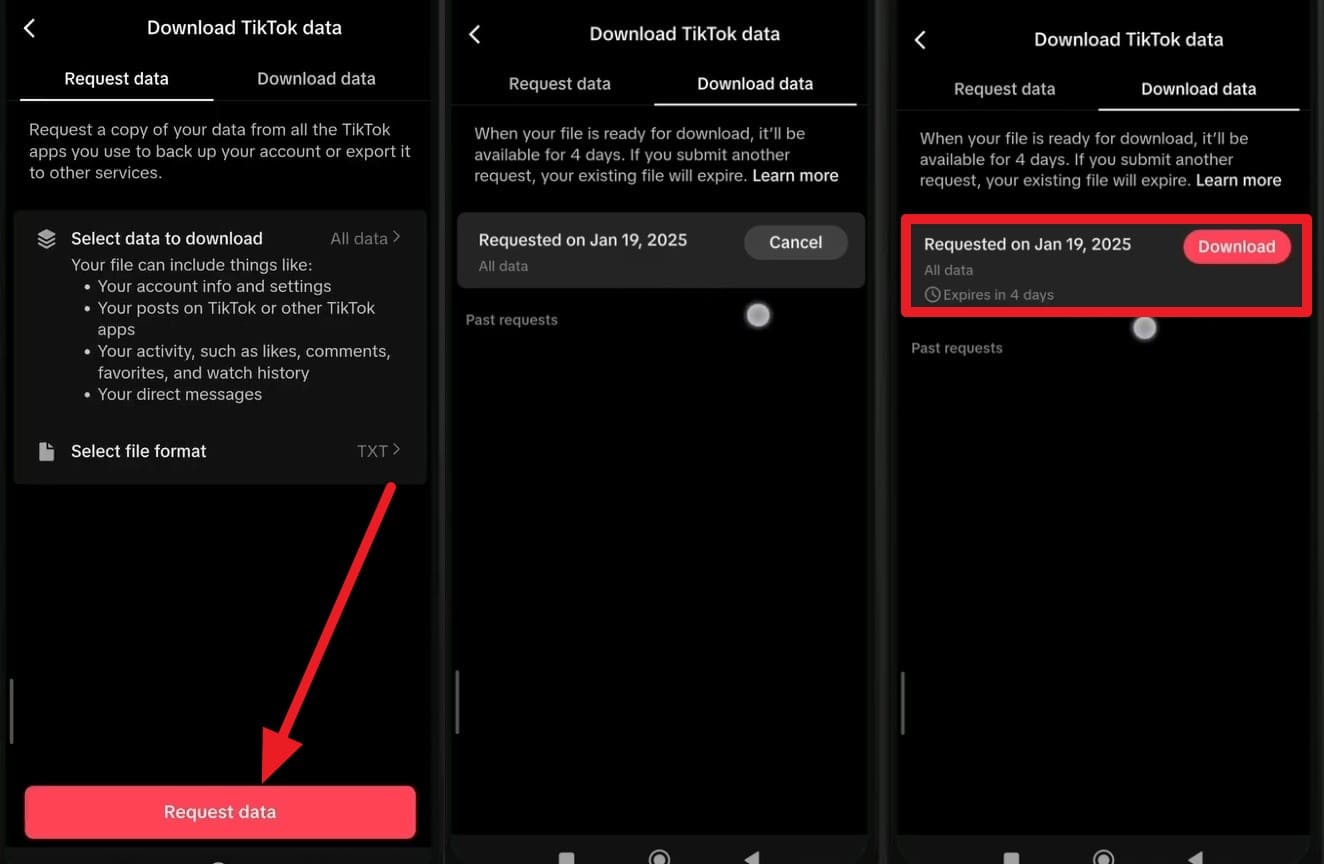
- Step 2. Choose your preferred file format (TXT or JSON) and tap "Request Data". Once the file is processed, move to the "Download Data" tab. Click the download button, verify your identity via email code, and save the archive.
4. Restore From Your Phone's Gallery Trash
Another reliable way for how to recover TikTok drafts is checking your smartphone's native Gallery Trash or Recently Deleted folder. If you had the "Save to Device" feature enabled before deletion, the video file might still be sitting in your trash. iPhones keep these files for up to 30 days, while Android devices typically retain them for 15 to 30 days.
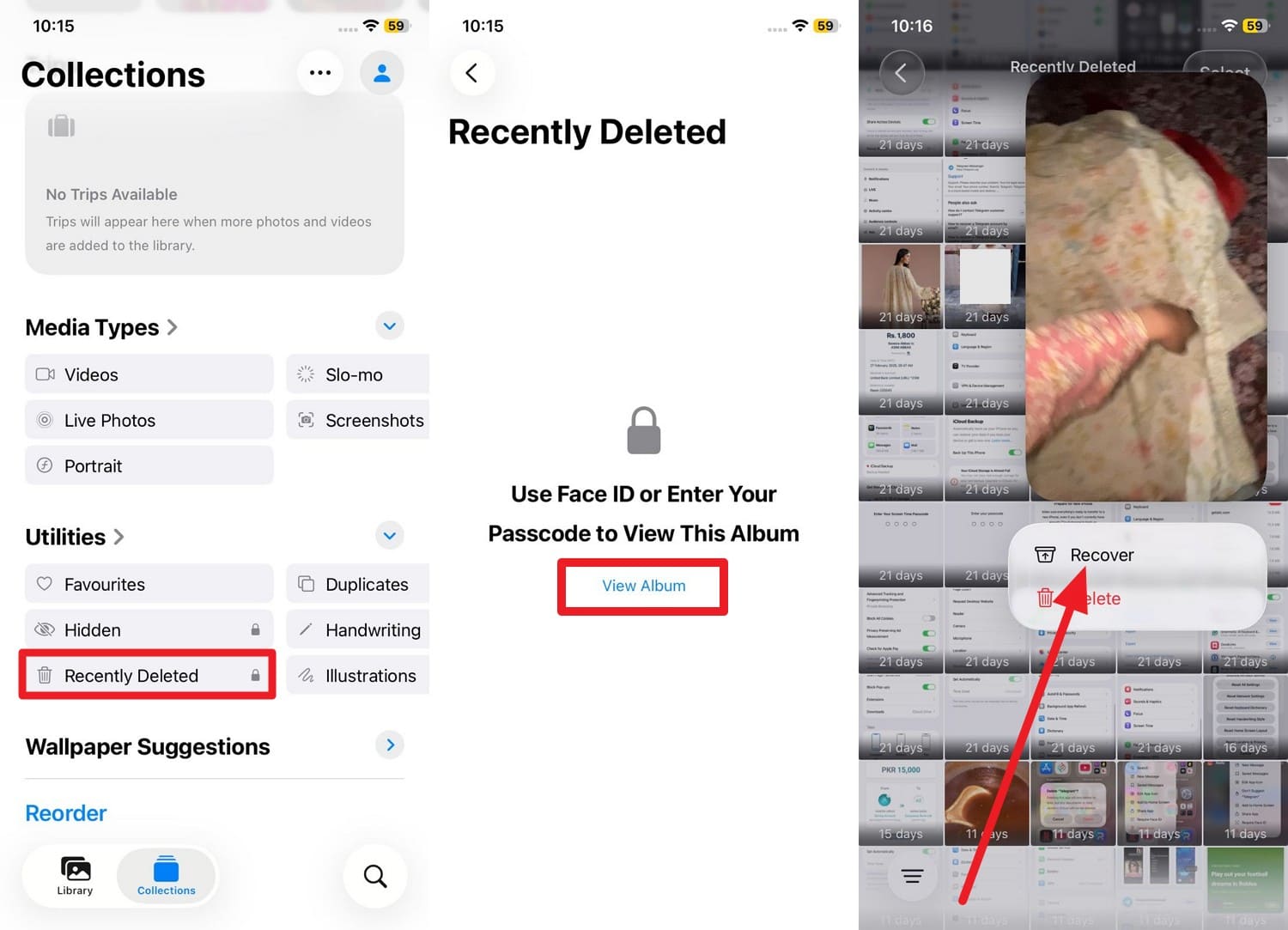
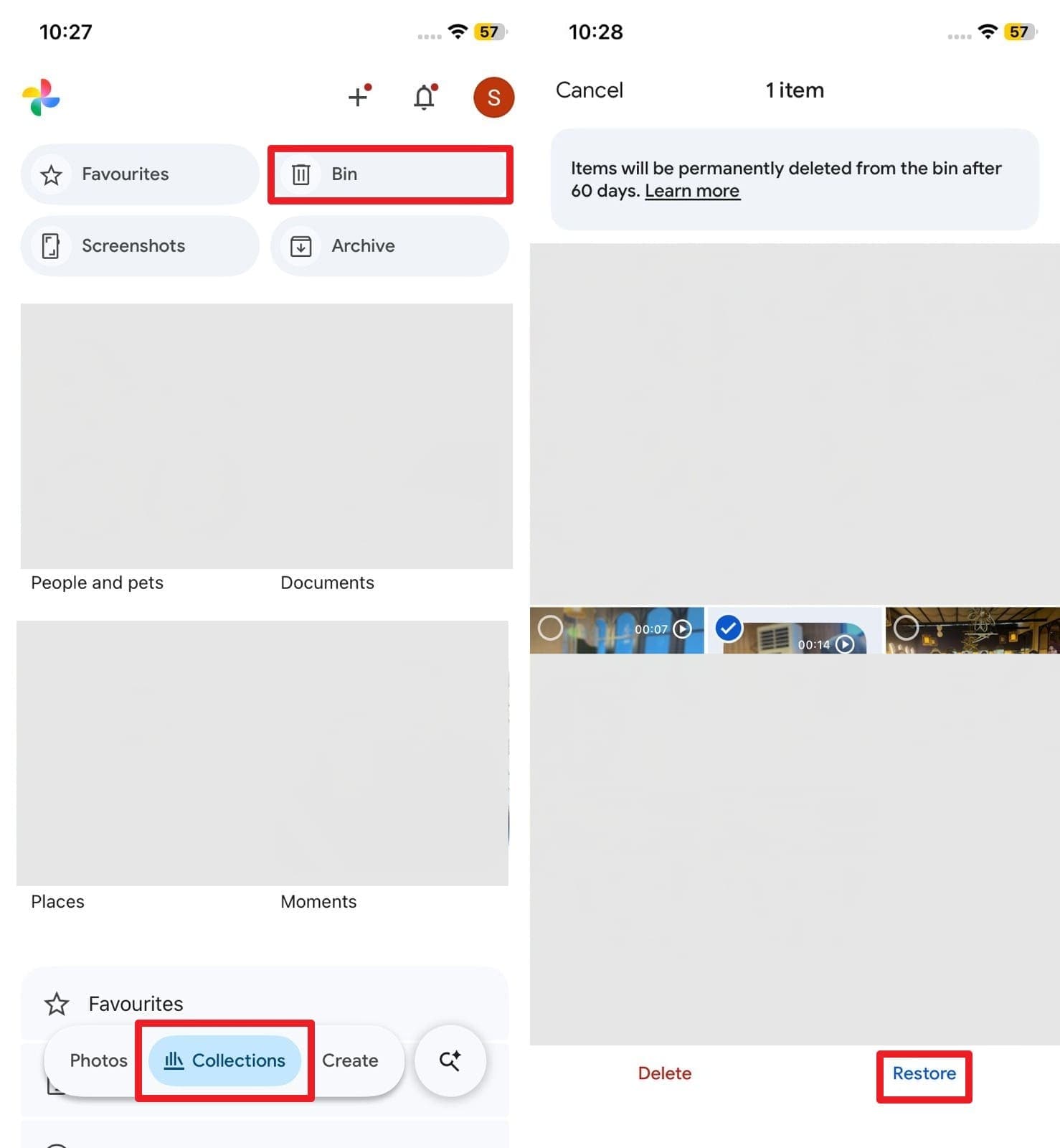
For iPhone Users: Open the Photos app, navigate to the "Albums" or "Collections" tab, and scroll down to the "Recently Deleted" folder. Authenticate with Face ID, locate your lost TikTok video, long-press it, and tap "Recover".
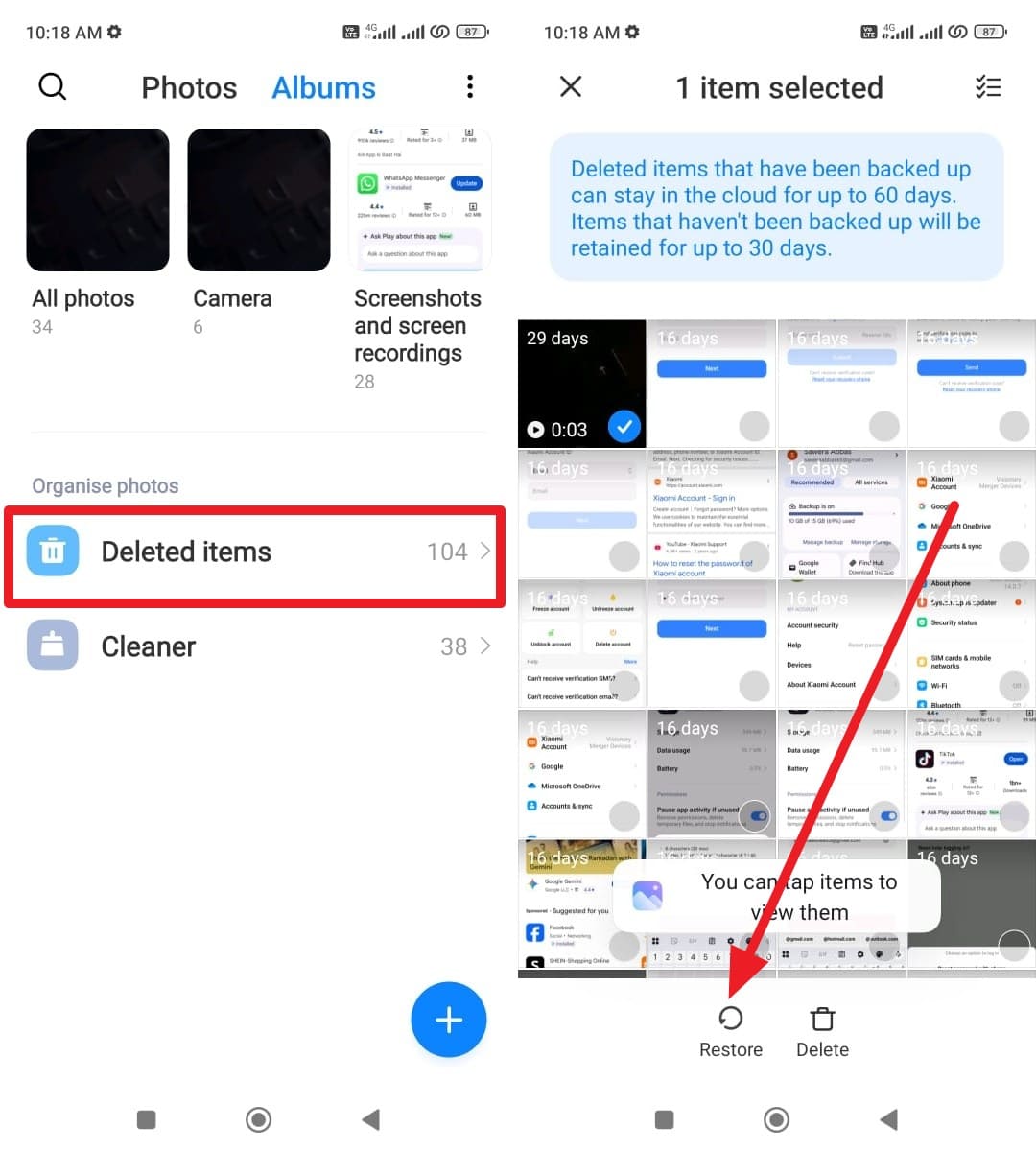
For Android Users: Open your Gallery app, navigate to the "Trash" or "Deleted Items" album, and find the removed TikTok draft. Select the files you want to retrieve and tap the "Restore" button to send them back to your main album.
5. Use Cloud Backups (iCloud or Google Photos)
While exploring how to recover drafts on TikTok, you should absolutely check your cloud backups. If your phone automatically syncs your camera roll to the cloud, any TikTok drafts or videos saved locally before being deleted from the gallery might still exist online. iCloud's Recently Deleted retains files for 30 days, whereas Google Photos keeps items in the Bin for up to 60 days.
Instructions for Google Photos: Go to the "Library" or "Collections" tab and tap on "Bin". Locate the deleted TikTok media files, select them, and hit the "Restore" button to download them back to your active storage.
6. Recover Via "Liked" Or Shared Copies
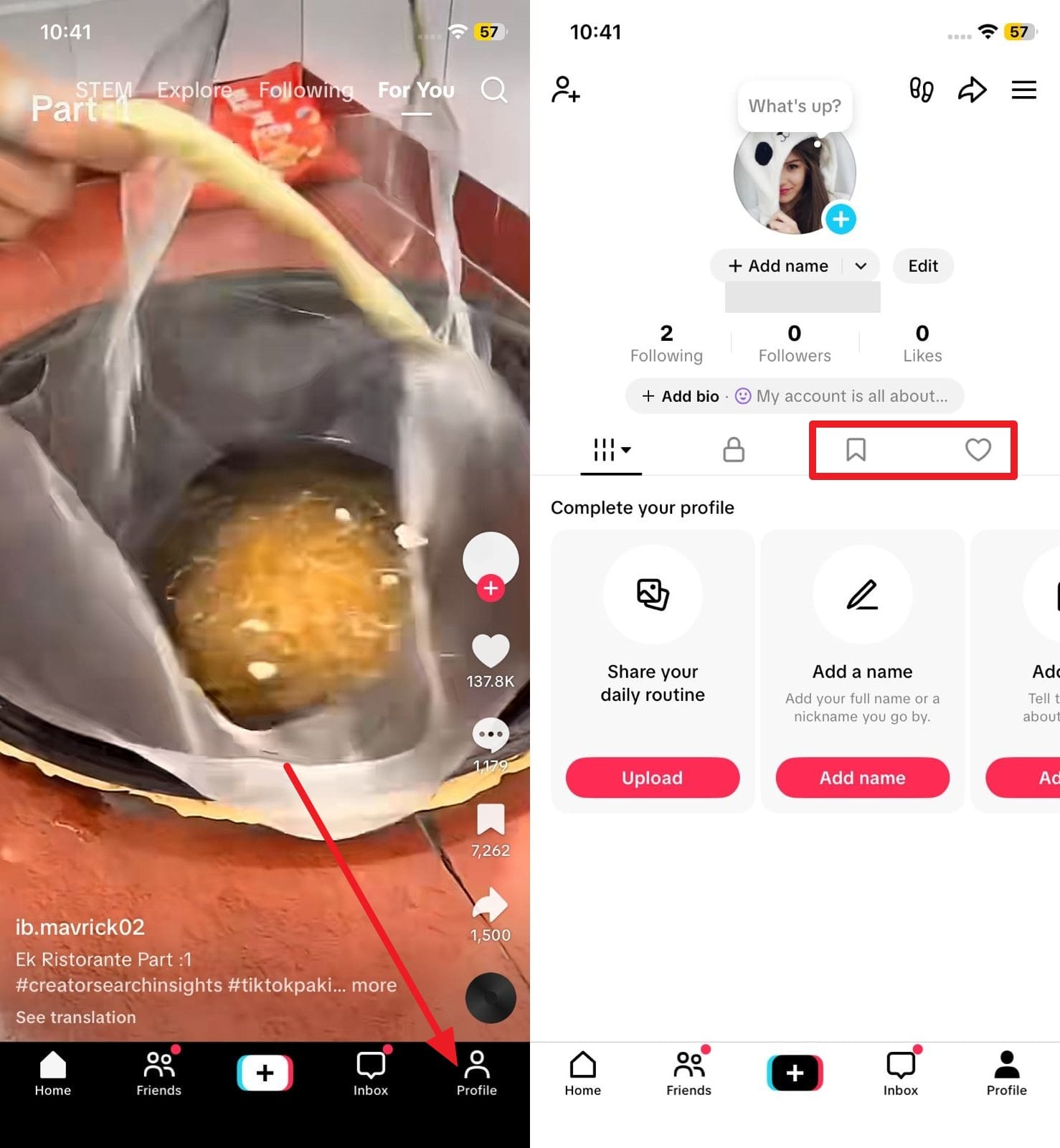
If you are still searching for how to recover deleted TikTok videos that were previously published, look into your interactions. Check your "Likes" and "Favorites" tabs to see if the video is still cached or accessible. Alternatively, ask friends if you ever shared the video with them via direct messages on TikTok, WhatsApp, or Instagram. If they have the link or a downloaded copy, you can simply ask them to send it back to you.
Instructions: Open the TikTok app, navigate to your Profile, and tap on the "Favorites" (bookmark icon) and "Likes" (heart icon) sections to scour through your historical interactions for the lost video.
Part 3. How to Recover Deleted TikTok Drafts (Important Limitations)
Now that you have learned how to get my TikTok drafts back, it is imperative to acknowledge the technical limitations of these methods. Setting realistic expectations can save you time during the recovery process.
| Recovery Method | When it Works Best | Key Limitations |
|---|---|---|
| TikTok's "Recently Deleted" | For posted videos deleted within the last 30 days | Only works for posted videos; files are permanently erased after expiry |
| Cloud Backups (iCloud/Google) | When videos/drafts were auto-synced to the cloud | Cannot restore in-app drafts that were never saved to the camera roll |
| Data-Recovery Software | If a local video file existed and hasn't been overwritten | Requires a computer; success depends on device usage post-deletion |
| Liked/Shared Copies | Video was posted, viewed, and shared with friends | Completely ineffective for unpublished drafts |
| Activity/Data Download | When you need metadata (titles, links) for account history | Provides text data only; cannot produce a playable video file |
| Phone Gallery Trash | When "Save to Album" was active and deletion was recent | Trash auto-clears after 15 to 30 days depending on the OS |
Part 4. How to Prevent TikTok Videos or Drafts from Being Lost Again
TikTok drafts easily disappear when you unexpectedly uninstall the app, clear app data to free up space, or switch to a new smartphone. Accidental deletion or platform copyright strikes can also wipe out your hard work instantly.
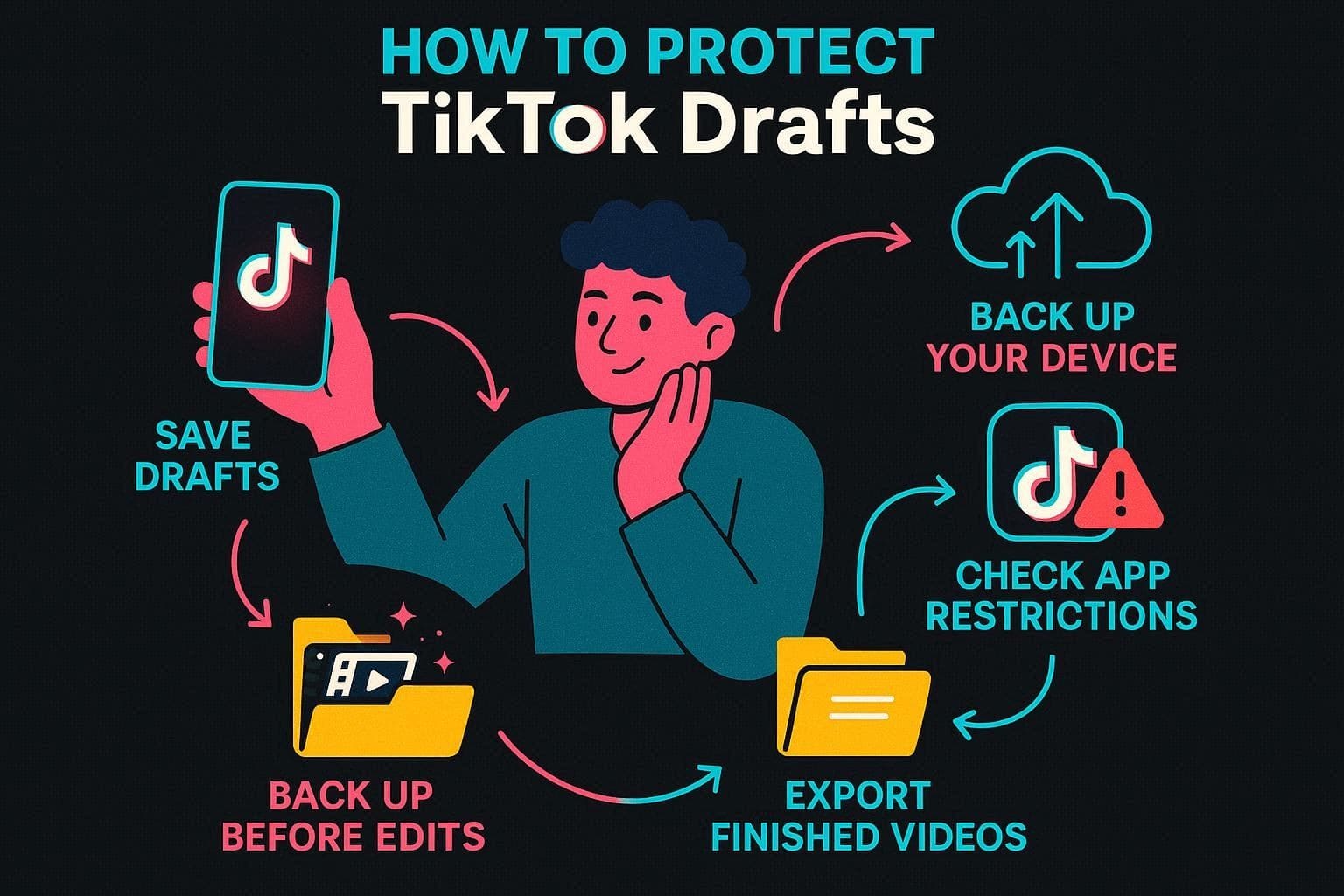
To ensure you never have to frantically search for how to recover deleted drafts on TikTok again, proactively implement these five crucial safety habits:
- Save Drafts to Camera Roll: Always enable the local save feature or manually export important drafts to your device before closing the app. This guarantees you have a master copy.
- Turn On Cloud Backup: Activate automatic sync for iCloud (iOS) or Google Photos (Android) to back up your media folders seamlessly.
- Avoid Hasty App Deletions: Remember that drafts are strictly stored on your local device. Logging out or uninstalling TikTok will permanently purge all drafts. Always back them up first.
- Backup Before Big Changes: Before applying complex edits, effects, or cuts, save an unedited copy of the video to your gallery.
- Organize Final Exports: Maintain a dedicated folder on your phone or Google Drive for finished TikTok content, creating a personal archive unaffected by app glitches.
Conclusion
In summary, understanding how to recover deleted TikTok videos and drafts is vital for content creators wanting to protect their digital footprint. This guide has detailed six actionable methods, ranging from checking built-in trash folders and cloud backups to reaching out to friends for shared copies. Each method has its own specific timeframe and limitations. When dealing with permanently deleted local files, utilizing professional tools like Dr.Fone - Data Recovery for iOS and Android stands out as a highly effective approach, offering advanced scanning capabilities to retrieve your lost TikToks safely and securely.
FAQ
-
1. Can TikTok support help recover deleted videos?
Sometimes TikTok support can assist with specific technical or account issues, but usually, they cannot restore deleted videos. Once a video is permanently removed from the server by the user, contacting support will not guarantee recovery. It's always better to rely on local backups. -
2. Can friends' phones help recover deleted TikTok videos?
Yes, if you shared the video earlier via direct message or if they utilized the save feature, friends might still have a full copy saved on their devices. Asking friends for their copies can be an incredibly easy workaround to recover your deleted TikTok video successfully. -
3. Can social media reposts help recover TikTok videos?
Absolutely. When someone reposts, stitches, or downloads your video on another platform like Instagram Reels, Twitter, or YouTube Shorts, a copy may still exist there. Searching your username across other social media sites can help you locate and save your deleted footage. -
4. Where do TikTok drafts go when they are deleted?
When a TikTok draft is deleted, it is completely removed from your device's internal app storage. Because drafts are never uploaded to TikTok's cloud servers, they do not go into a digital "Recently Deleted" bin within the app, making them impossible to retrieve unless you had previously exported a copy to your camera roll.
 Add Wondershare Dr.Fone as a preferred source on Google



