Recover photos, messages, WhatsApp, and more — no backup
needed.
Recover photos, messages, WhatsApp, and more — no backup
needed.

 100% Security Verified | No Subscription Required | No Malware

 :
: 
 ChatGPT
 Perplexity
 Gemini
 Claude
 Grok
Grok
Imagine casually scrolling through your Facebook profile, only to realize that an important memory, an insightful update, or a cherished photograph you recently posted has mysteriously vanished. The immediate realization that you may have accidentally deleted a post can be highly stressful, especially when it holds sentimental value or crucial information for your friends and followers. Fortunately, a deleted post on this social platform isn't always gone permanently. Facebook natively preserves removed content in dedicated sections for a specific grace period, granting users a window of opportunity to bring those memories back to life.




This comprehensive tutorial breaks down exactly how to recover deleted Facebook posts in 2026. By following these carefully tested methods, you can systematically check the correct archives and folders to retrieve your content. Moreover, if the media attached to your post was also erased from your smartphone, we will introduce how Dr.Fone - Data Recovery can serve as a robust safety net to retrieve vanished data from any Android or iPhone model.
In this article
Part 1. Can You Recover Deleted Facebook Posts?
If you find yourself frantically searching for how to recover deleted posts on Facebook, the first question that comes to mind is whether retrieval is fundamentally possible. The good news is that yes, you can successfully recover your deleted Facebook content, provided you act within a specific timeframe. Whenever you delete a status, photo, or video, Facebook’s system doesn't immediately overwrite the data. Instead, it temporarily relocates the post into a designated Trash or Recycle Bin section, holding it securely for a 30-day grace period.
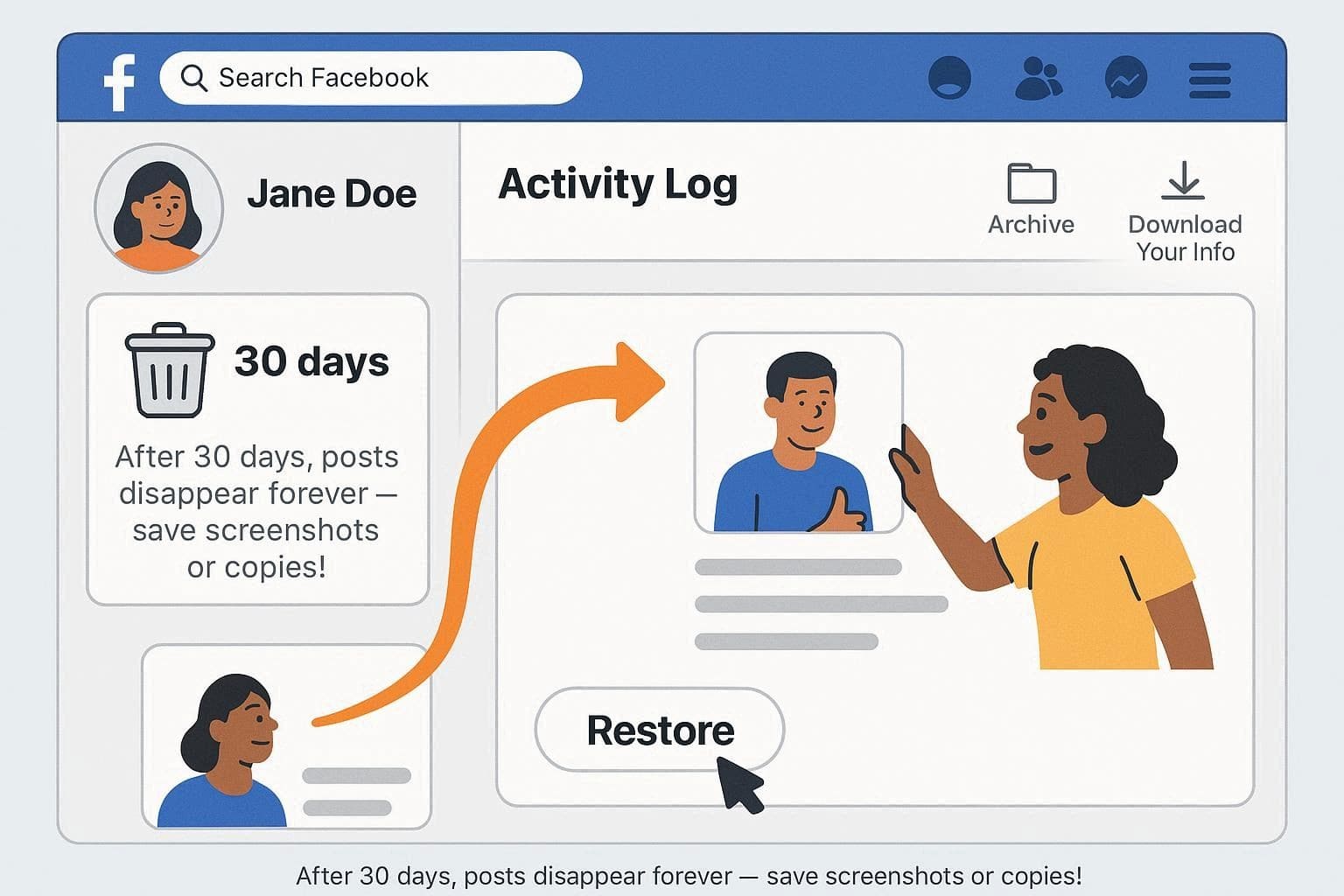
During this one-month window, accessing your Activity Log allows you to seamlessly restore the deleted content straight back to your profile or page. Beyond the Trash folder, you might also find remnants of your posts in the Archive section or by pulling a historical backup using Facebook's "Download Your Information" feature. However, once the 30-day threshold expires, Facebook's automated servers permanently purge the post. Should that happen, your only recourse is to manually reconstruct the post using local device backups, screenshots, or dedicated recovery software.
Part 2. How to Recover Deleted Facebook Posts Within 30 Days
For users acting quickly who want to understand how to recover a deleted post from Facebook before the 30-day countdown ends, the platform offers native, straightforward solutions. Below are the two primary approaches depending on whether it was a personal update or a business post.
Way 1. Using the "Trash" Feature (Activity Log Method)
The most reliable and immediate method is utilizing the built-in Activity Log. Because this feature is native to Facebook, it reinstates your post exactly as it existed before deletion. When restored from the Trash folder, the post retains its original timestamp, textual content, attached media, interactions, and specific privacy configurations. This eliminates the hassle of manually recreating the update. Follow these intuitive steps to figure out how to retrieve a deleted Facebook post quickly:
-
Step 1 Access the Activity Log Menu
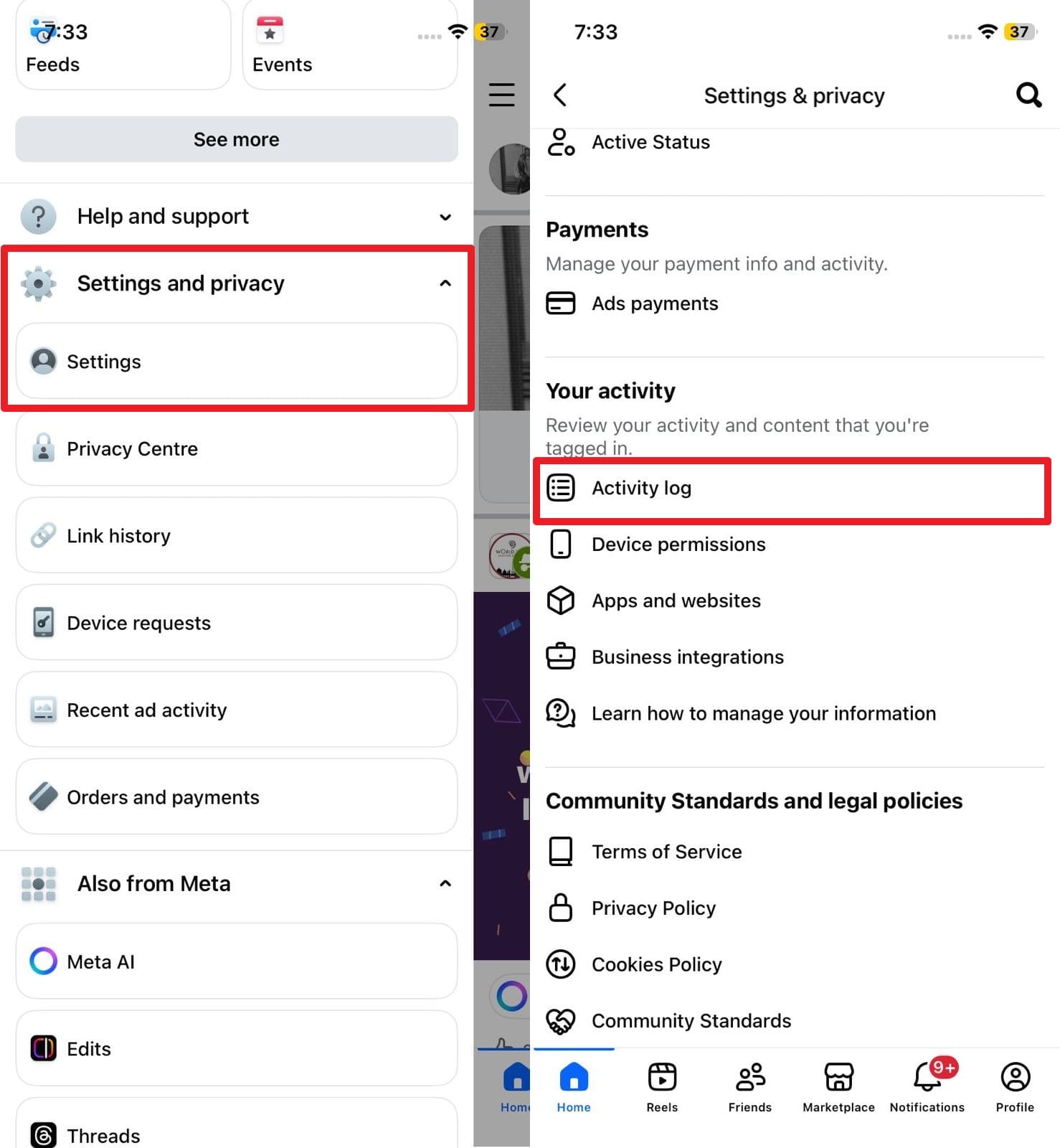
Launch the Facebook app and tap the "Hamburger" menu icon (three horizontal lines) located in the corner. Scroll down and expand the "Settings and Privacy" drop-down, then select "Settings." Navigate downwards until you locate the "Your Activity" category, and tap firmly on "Activity Log."
-
Step 2 Restore from the Recycle Bin
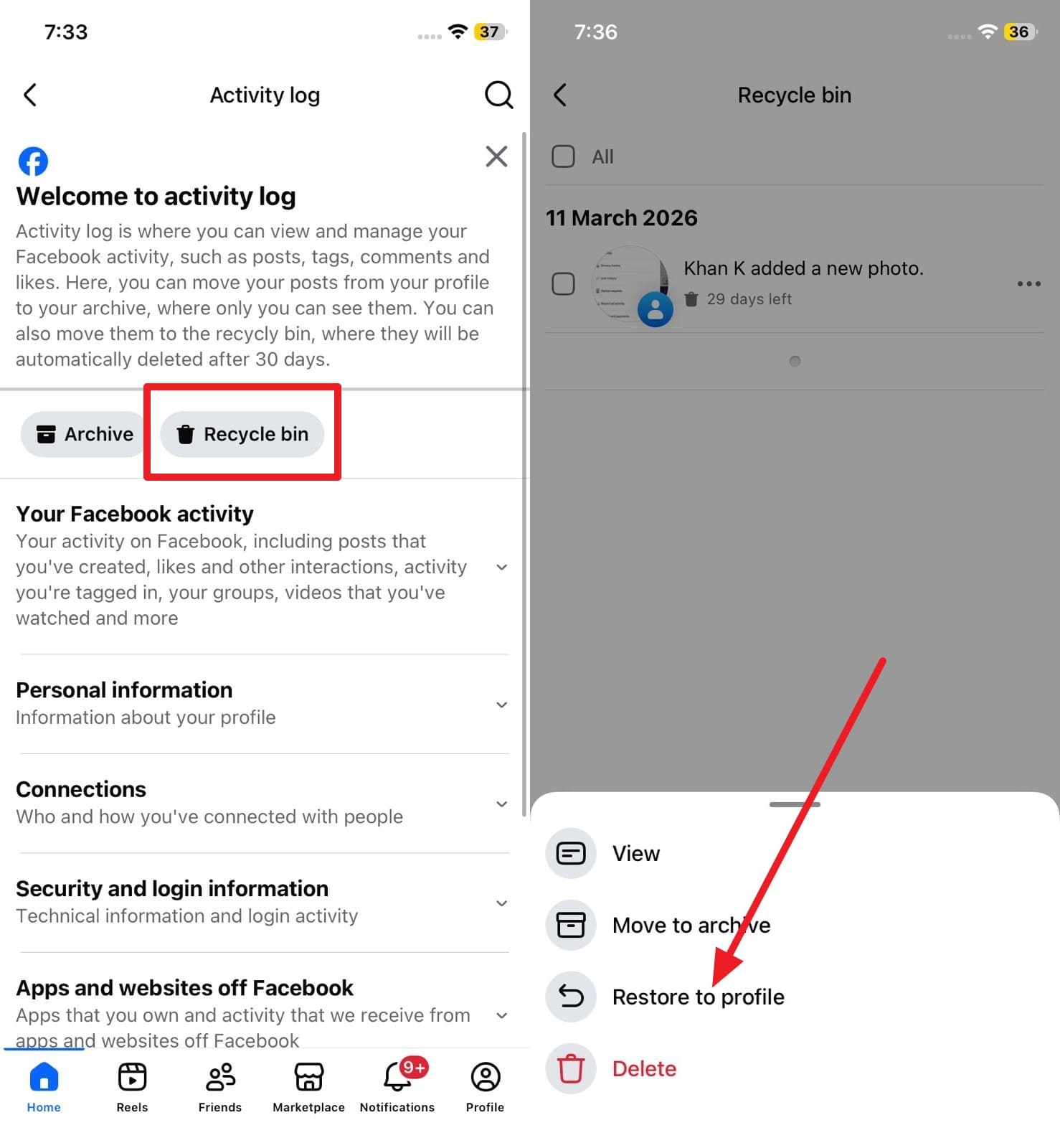
Within the Activity Log interface, select the "Recycle Bin" or "Trash" option positioned near the top. Browse through the recently removed items to find your missing post. Once identified, tap the "Three Dots" icon next to it and hit the "Restore to Profile" option to successfully bring it back online.
Way 2. Recover from Page/Business Tools (For Page Posts)
Managing a Business Page involves different administrative tools compared to a standard personal profile. Meta Business Suite and the Professional Dashboard track page-level deletions independently. These environments allow multiple page administrators to monitor content alterations and restore deleted assets seamlessly within the same 30-day period. Here is a quick guide on how to recover a deleted post on Facebook using the Meta Business Suite:
-
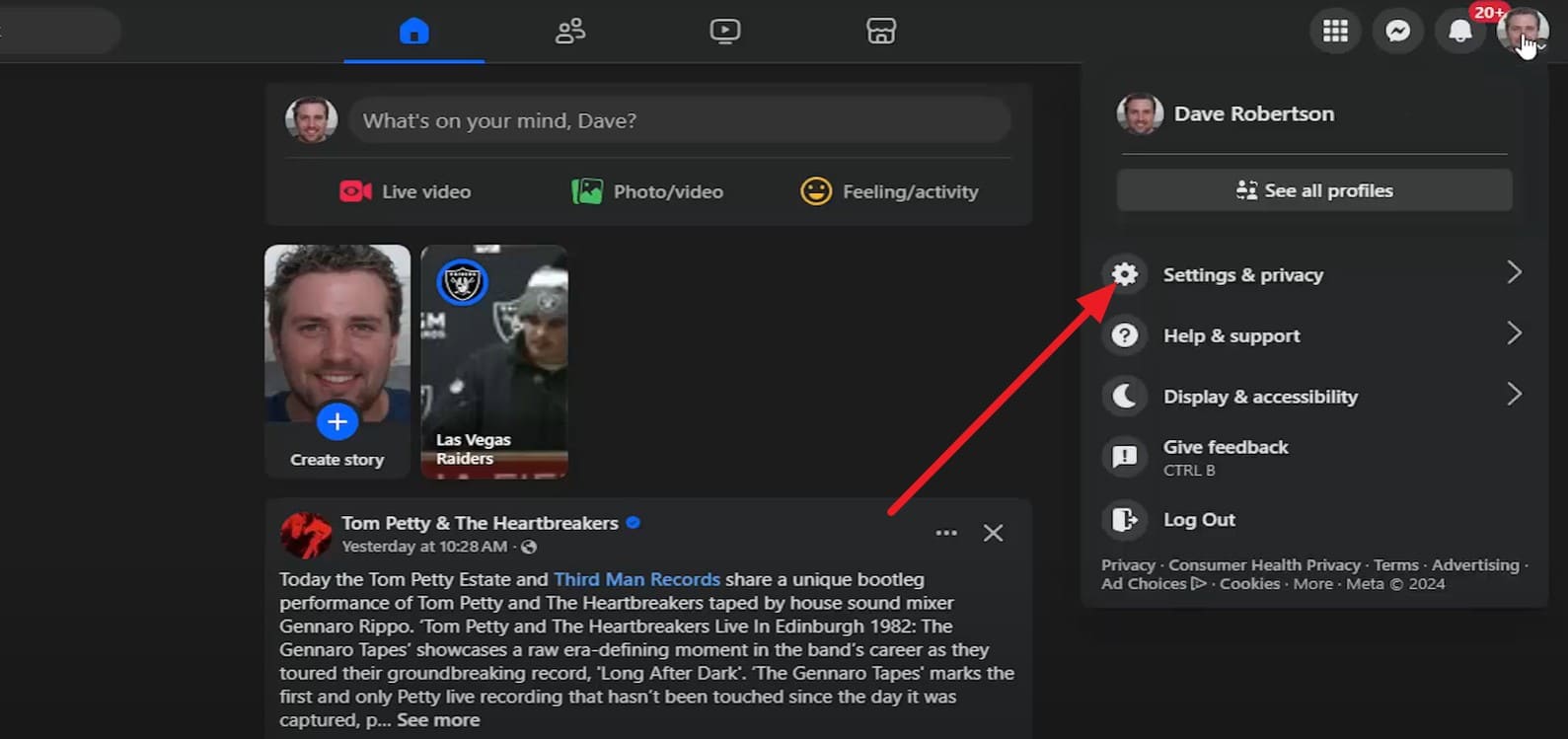
Step 1 Open Page Settings
Switch to your Page profile. Tap the Profile icon and proceed to the "Settings and Privacy" section to access the backend settings of your business account.
-
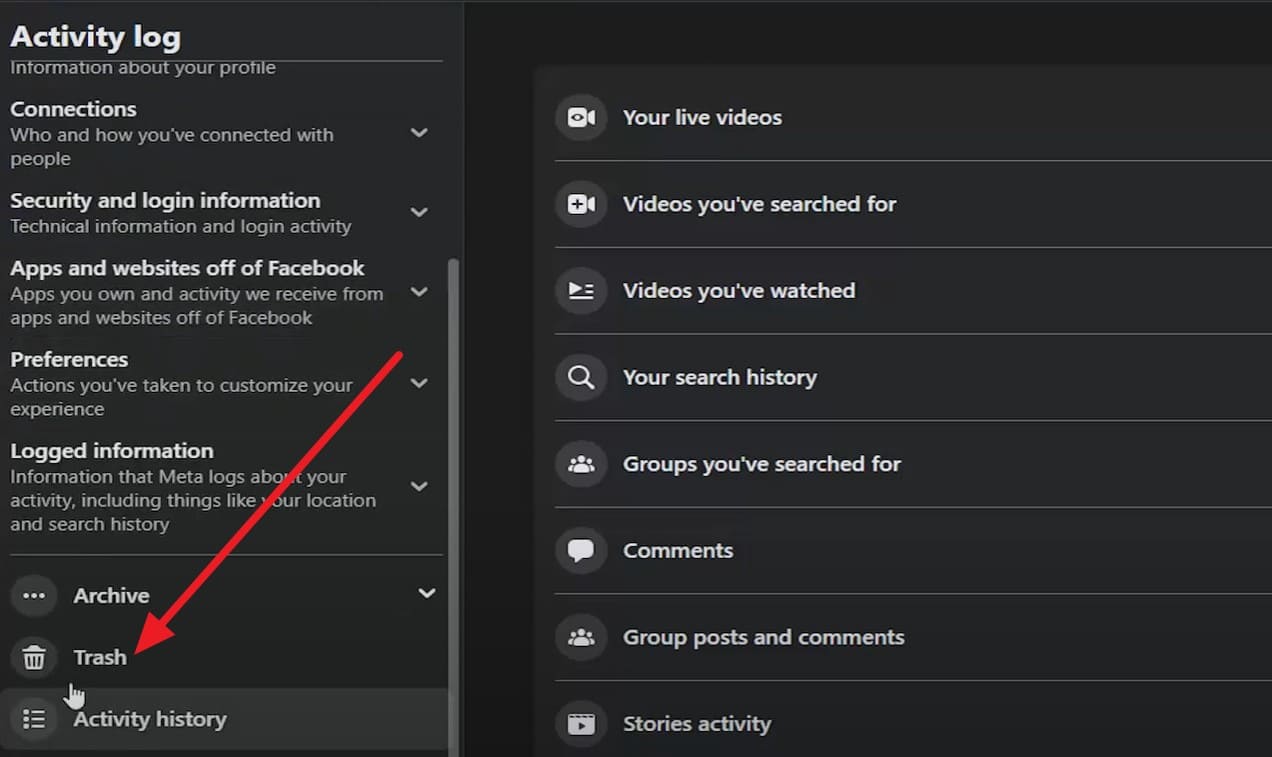
Step 2 Navigate to Trash
From the main menu, select "Activity Log." Utilize the left-hand sidebar to scroll down and click on the "Trash" option, which aggregates all recently removed page content.
-
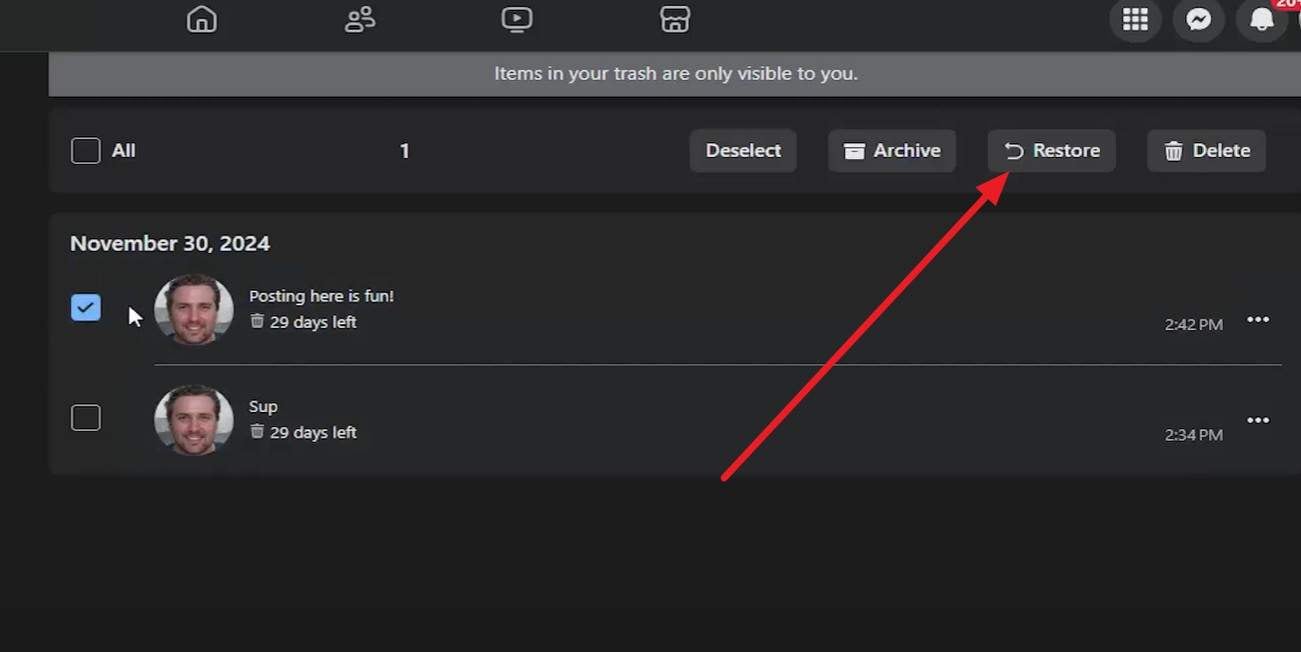
Step 3 Complete the Restoration
Locate the specific business post you intend to recover. Check the selection box beside it and click the "Restore" prompt to push the post back to your audience's feed.
Part 3. How Do I Retrieve Deleted Posts on Facebook After 30 Days? 5 Ways to Try
If more than a month has elapsed, you might be desperately wondering how to recover a deleted Facebook post now that the Trash folder has been emptied. While the platform's native restoration expires after 30 days, these five alternative workarounds can help you track down the original text, photos, or videos.
Way 1: Check Device Backups or Photo Apps
Often, the core value of a Facebook post lies in the photos or videos attached to it. When you upload media to social networks, a high-resolution copy usually remains preserved in your smartphone's internal storage or cloud backup system. Investigating the native Gallery or Photos application on your device—specifically the recently deleted folders—is a highly effective strategy to recover lost media.
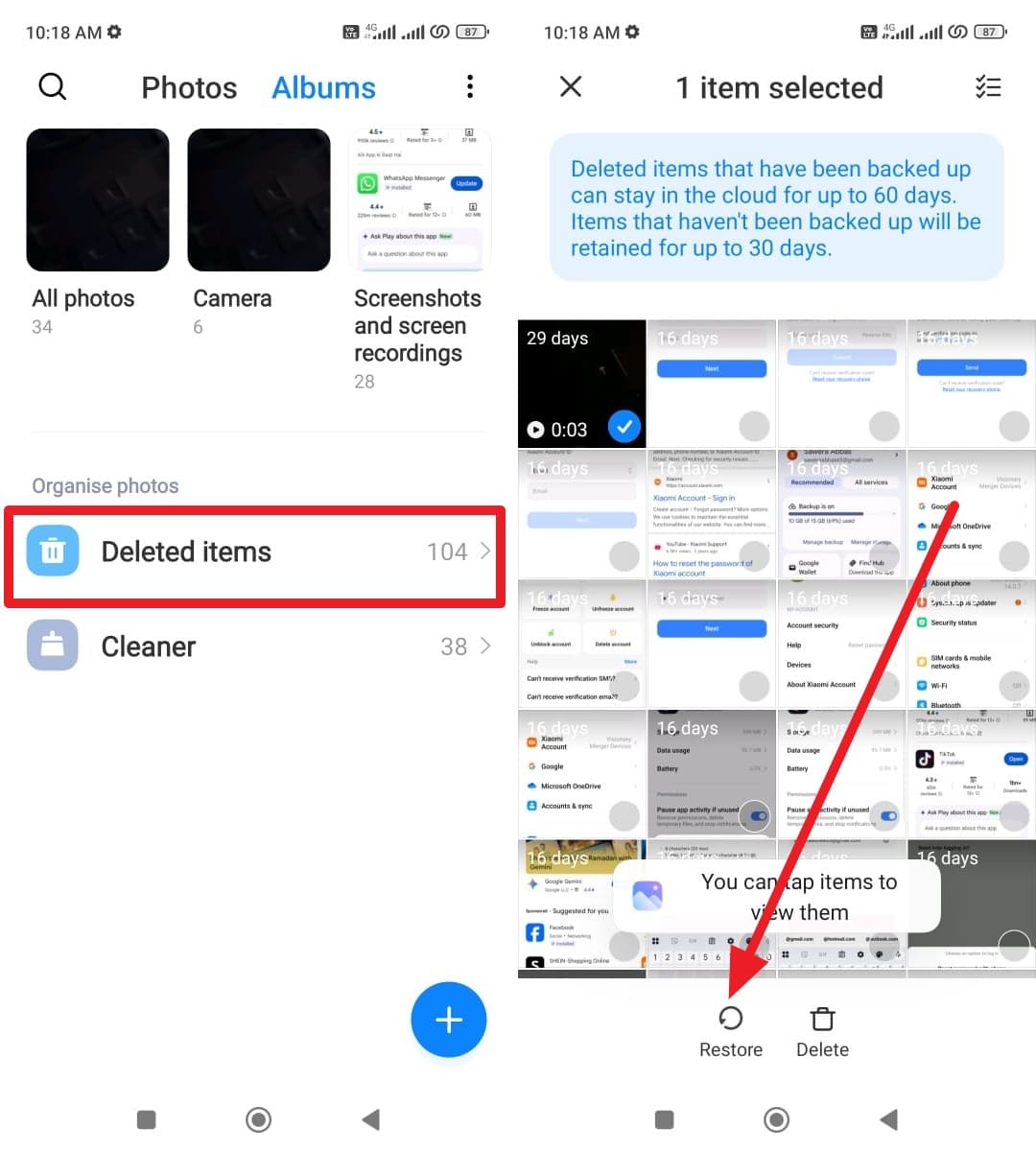
For Android Devices
Instructions: Open your native Gallery application and navigate to the "Albums" tab. Scroll down to locate the "Recently Deleted" or "Trash" folder. Search for the specific media files originally uploaded to your Facebook timeline, select them, and tap "Restore" to move them back to your main album.
For iPhone Devices
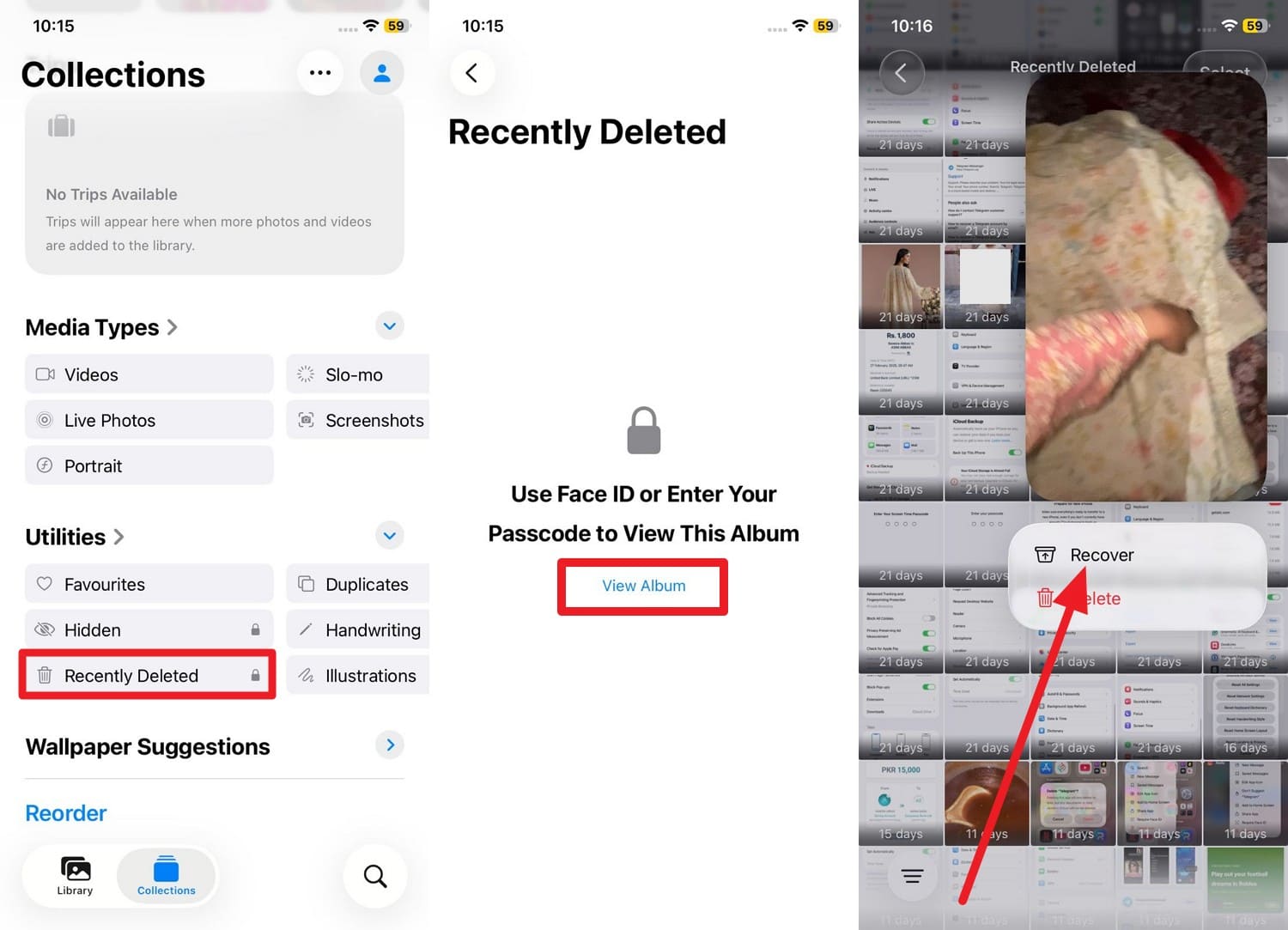
Instructions: Launch the Photos app on your iOS device and tap on the "Albums" tab at the bottom. Scroll to the "Utilities" section and select the "Recently Deleted" folder (authenticating via Face ID or Touch ID). Browse for the missing video or picture, tap it, and press "Recover" to salvage the file.
Way 2: Use "Download Your Information" on Facebook
Facebook features a comprehensive data export utility designed for users who wish to keep local offline archives of their social footprint. By employing the "Download Your Information" tool, you can generate an extensive backup containing posts, messages, photos, and interactions. It is crucial to note that this archive reflects the state of your account at the moment of creation. If the post was wiped before the export request, it won't appear. However, if you had previously set up routine downloads or generated a backup while the post was still live, this file serves as a perfect historical record.
-
Step 1 Request the Data Export
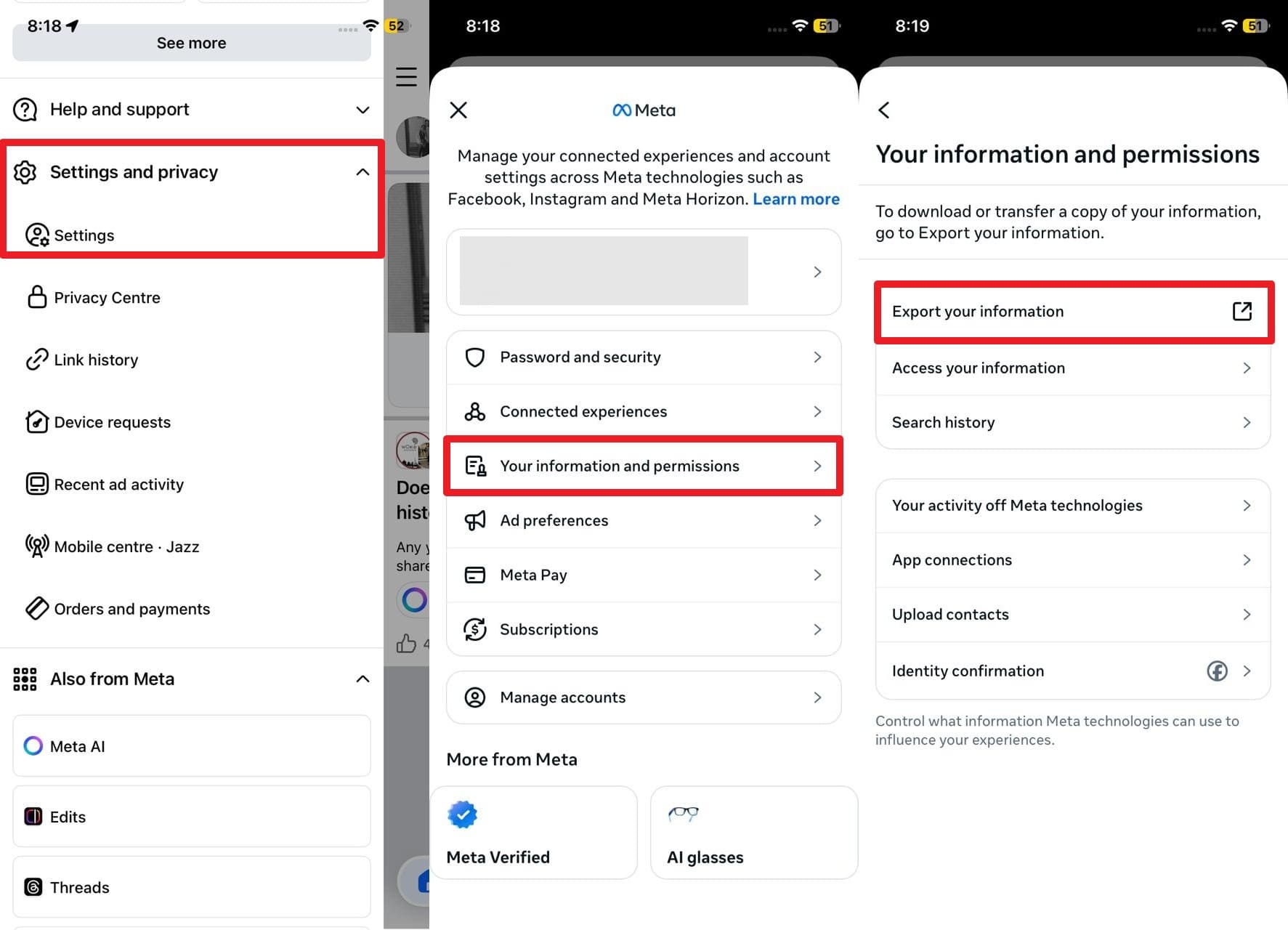
Navigate to "Settings and Privacy" > "Settings" > "Accounts Center." From there, tap on "Your Information and Permissions," followed by "Download Your Information."
-
Step 2 Download and Extract the Archive
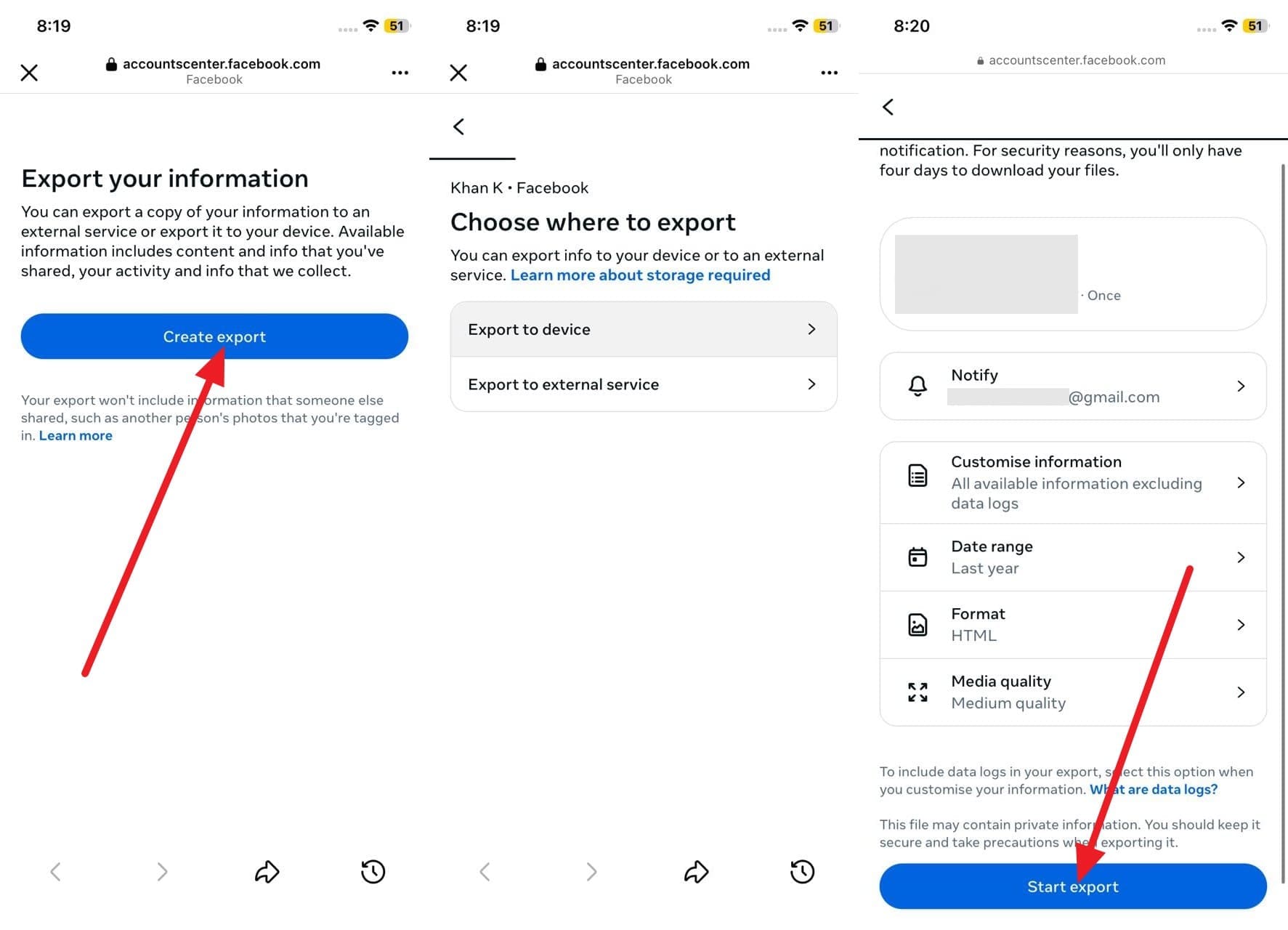
Click "Request a Download," choose your specific profiles, and designate the date range and file format (HTML or JSON). Hit "Submit Request." Depending on the volume of data, Facebook will notify you within a few hours to a few days. Once the email notification arrives, download the ZIP file, extract its contents, and browse the "Posts" folder to locate your deleted textual content and media.
Way 3. Check Your "Archive" Data
Sometimes, users mistakenly "Archive" a post rather than formally deleting it. The Archive acts as a hidden vault where posts are stripped from the public timeline but remain permanently preserved in your Facebook account. Unlike the 30-day Trash bin, the Archive has no expiration date. If your missing memory is simply hidden away, learning how to restore a deleted post on Facebook from this folder is trivial.
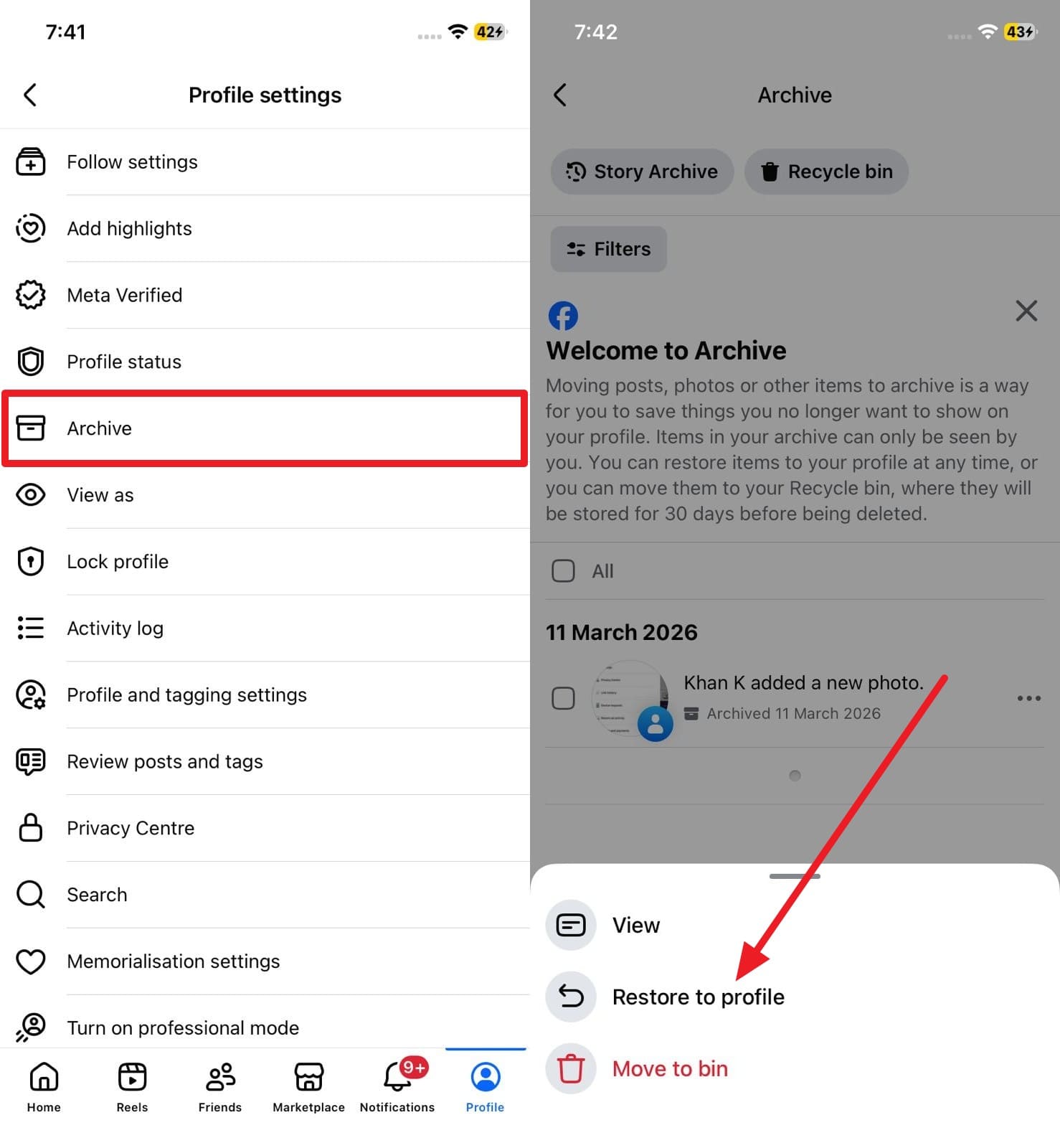
Instructions: Navigate to your primary Profile page. Tap the "Three Dots" menu icon beneath your profile picture and select "Archive." Once inside, locate the missing post, tap the three dots adjacent to it, and select "Restore to Profile" to make it visible to your friends once again.
Way 4: Utilize Timeline Review
While Timeline Review isn't explicitly a recovery instrument for permanently deleted content, it is heavily relied upon to locate posts where you were tagged by a friend but opted to hide from your timeline. Frequently, users confuse a hidden tag with a deleted post. The content may still be fully active on a friend's profile and simply pending your approval to appear on your own timeline.
-
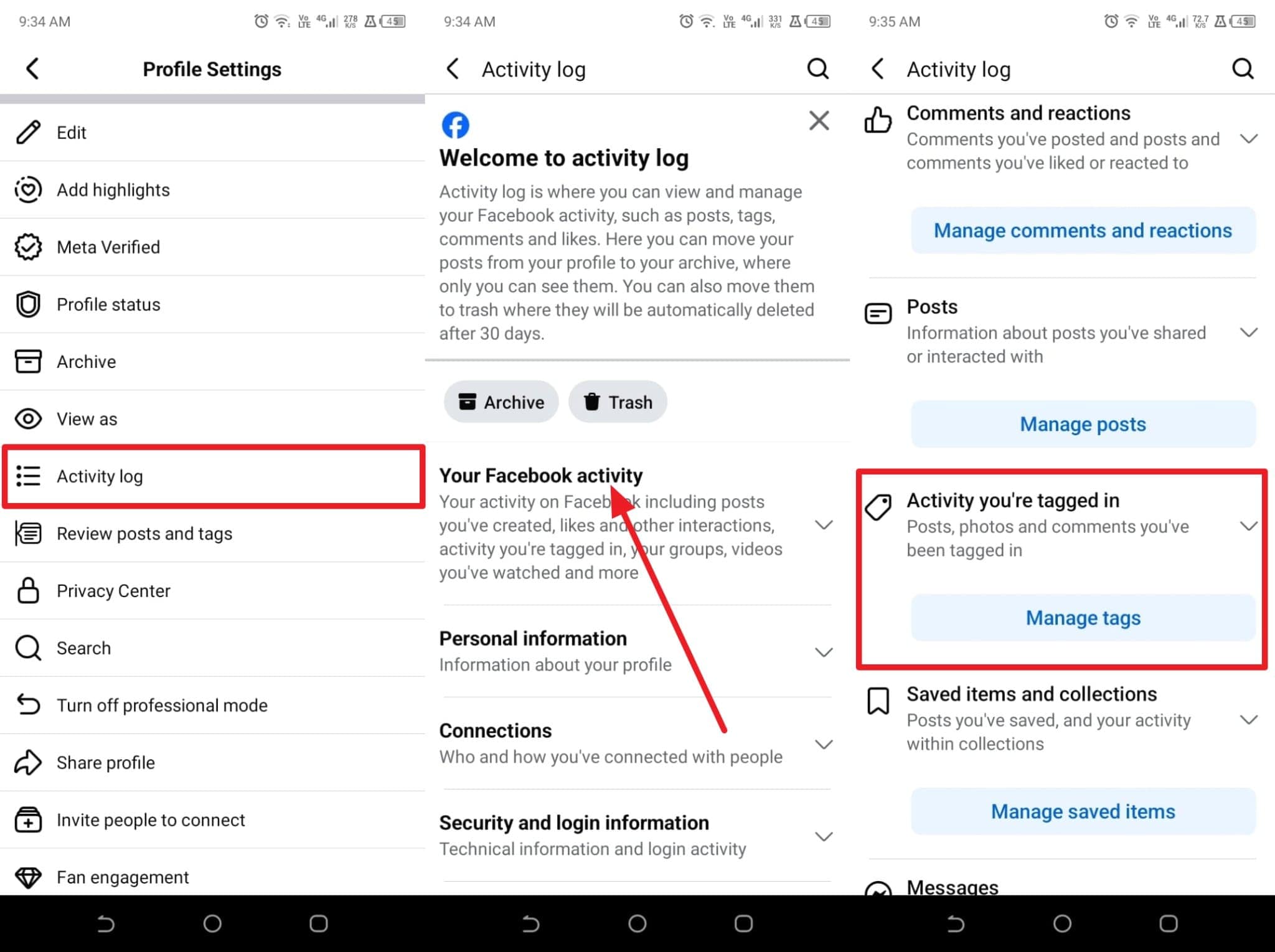
Step 1 Access the Tag Management Section
Open Profile Settings by tapping the "Three Dots" near the top of your page. Choose "Activity Log," expand the "Your Facebook Activity" tree, and under the "Activity You're Tagged In" segment, tap "Manage Tags."
-
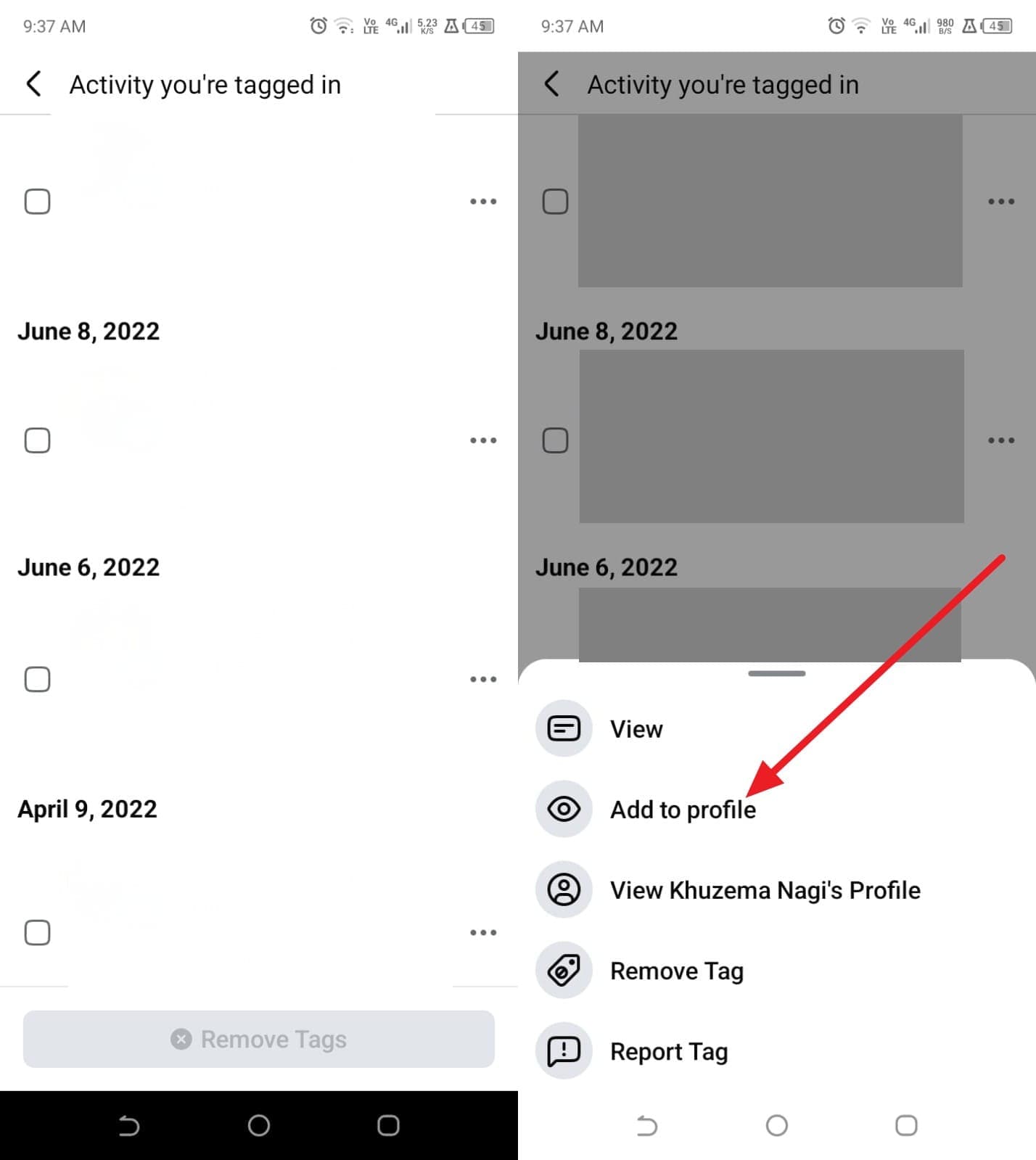
Step 2 Approve the Tag
Browse the list of pending or hidden tags. If you spot the post you presumed was deleted, select it and choose "Add to Profile." This will immediately reinstate the content onto your personal timeline.
Way 5. Ask Friends for Screenshots or Reshared Copies
If you are still desperately attempting to figure out how to retrieve deleted posts on Facebook, leaning on your personal network is a viable last resort. When a post gains traction, friends often interact, share, or screenshot the content. The post may still be accessible in a private group's history or in the notification logs of users who commented on it. Reach out to close contacts and ask if they can forward any saved screenshots, textual copies, or reshared links, allowing you to manually reconstruct and republish the update.
Pro Tip. Recover Deleted Facebook Data from Your Phone: Dr.Fone - Data Recovery
During your journey to discover how to retrieve deleted posts on Facebook, the most devastating realization is often that the original photographs and videos are missing from your mobile device as well. If the media was purged from your local storage and the 30-day Facebook Trash window has closed, Dr.Fone - Data Recovery provides a highly sophisticated and reliable lifeline for both Android and iOS environments.
Engineered to meticulously scan internal storage sectors, Dr.Fone easily uncovers deleted pictures, downloaded videos, WhatsApp attachments, and more without overwriting existing data. Its advanced scanning algorithm guarantees a superior recovery success rate, efficiently salvaging data even from devices suffering from systemic software crashes. The intuitive interface ensures that users of all technical skill levels can perform a deep device scan within minutes, providing ultimate control over selective file restoration.
 Scan Android phones and tablets directly.
- Preview and recover only what you want.
- Supports WhatsApp, photos, videos, contacts, and more.
- Works with 6000+ Android devices.

Simple Guide to Recover Facebook Data via Dr.Fone – Data Recovery
To comprehend exactly how to get back the deleted post in Facebook (specifically the associated local media), simply follow this streamlined workflow using the Dr.Fone software toolkit:
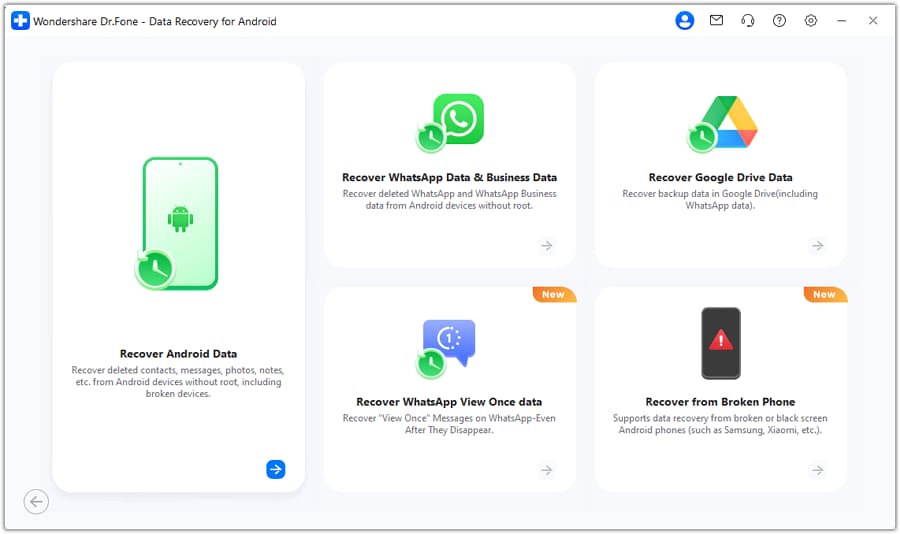
- Step 1: Launch Dr.Fone on your computer and select the "Data Recovery" module for Android or iOS. Connect your smartphone via a reliable USB cable.
- Step 2: Specify the exact file types you wish to recover (such as Photos, Videos, or App Data) to minimize scanning time. Click "Start Scan" and allow the software to securely analyze your device storage.
- Step 3: Once the deep scan concludes, utilize the preview pane to evaluate the retrieved media. Check the boxes next to the original Facebook assets you want back, hit the "Recover" button, and nominate a safe directory on your computer to save the extracted files.
Conclusion
In summary, accidentally erasing a treasured memory doesn't have to be a permanent catastrophe. By mastering how to recover deleted Facebook posts, you can swiftly leverage the Activity Log’s 30-day Trash window to restore your content with zero data loss. If you missed the native deadline, inspecting device backups, requesting data archives, and reviewing timeline tags provide excellent secondary avenues for retrieval. Most importantly, for users missing the core media files that comprised the post, Dr.Fone - Data Recovery stands out as the ultimate fallback tool, empowering you to extract deleted photos and videos directly from your Android or iPhone hardware.
FAQ
-
1. Can Facebook support recover my deleted posts?
No, the official Facebook support team cannot manually resurrect posts that are older than 30 days. Their system automatically and permanently overwrites deleted data from the backend servers once the grace period concludes. Consequently, customer support tickets for this issue will be closed without resolution. Nevertheless, you can independently bypass this limitation by recovering the foundational media directly from your smartphone's internal memory using specialized recovery software like Dr.Fone. -
2. Will deleting the Facebook app remove my posts permanently?
Absolutely not. Deleting or uninstalling the Facebook mobile application strictly removes the local client software from your device. All your personal data—including timelines, posts, photos, friends lists, and messages—remains securely anchored to Facebook's centralized cloud servers. The moment you reinstall the app and log back in with your credentials, your entire profile will repopulate flawlessly. -
3. Do Facebook groups keep copies of deleted posts?
No, the deletion mechanism is universally applied. Once you delete a post from a public or private group, the system immediately obliterates its visibility for all administrators, moderators, and standard members. However, the nature of the internet dictates that if a group member previously downloaded the attachment, shared the link to an external platform, or captured a screenshot prior to the deletion, those localized copies will still exist independently of Facebook's ecosystem. -
4. Does deactivating my Facebook account delete posts?
Deactivation is solely a temporary suspension of public visibility, not a data wipe. When you choose to deactivate your account, your profile, active posts, photographs, and comments become completely invisible to the public and your friends. However, Facebook safely archives this footprint in a dormant state. Upon logging back into your account, the deactivation is automatically reversed, and every single post is restored to its original state.
 Add Wondershare Dr.Fone as a preferred source on Google