Recover photos, messages, WhatsApp, and more — no backup
needed.
Recover photos, messages, WhatsApp, and more — no backup
needed.

 100% Security Verified | No Subscription Required | No Malware

 :
: 
 ChatGPT
 Perplexity
 Gemini
 Claude
 Grok
Grok
A sudden slip of the thumb and a vital chat disappears. To recover an accidentally deleted WhatsApp chat, either restore it from an iCloud or iTunes backup, or use a recovery tool. Such options can help, as most deleted messages stay on your phone or in the cloud for a short time.
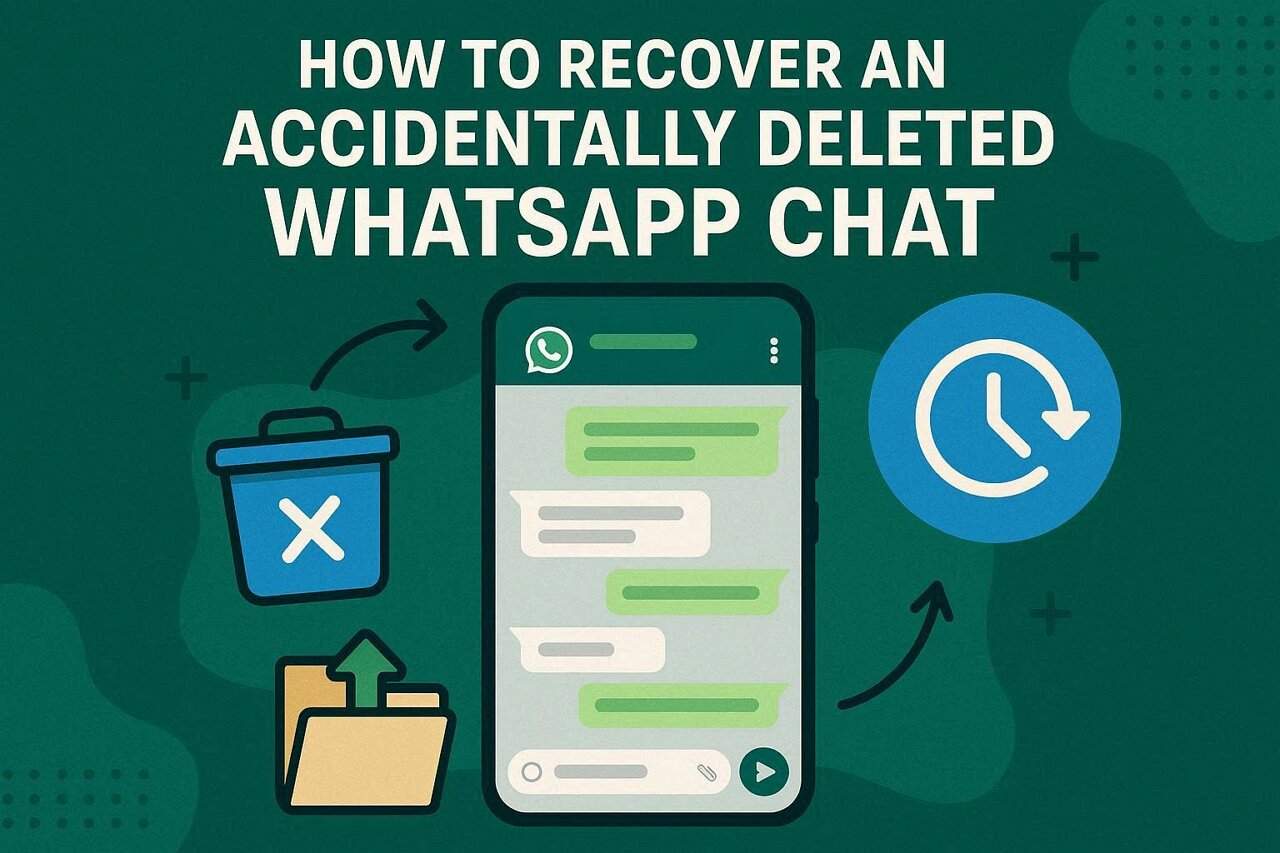
Therefore, this guide explains how you can use these methods to restore the conversation with media attached. While reviewing the details, determine whether iPhone data recovery tools like Dr.Fone are better than manual methods.
In this article

Part 1. I Accidentally Deleted a WhatsApp Chat – Is Recovery Still Possible?
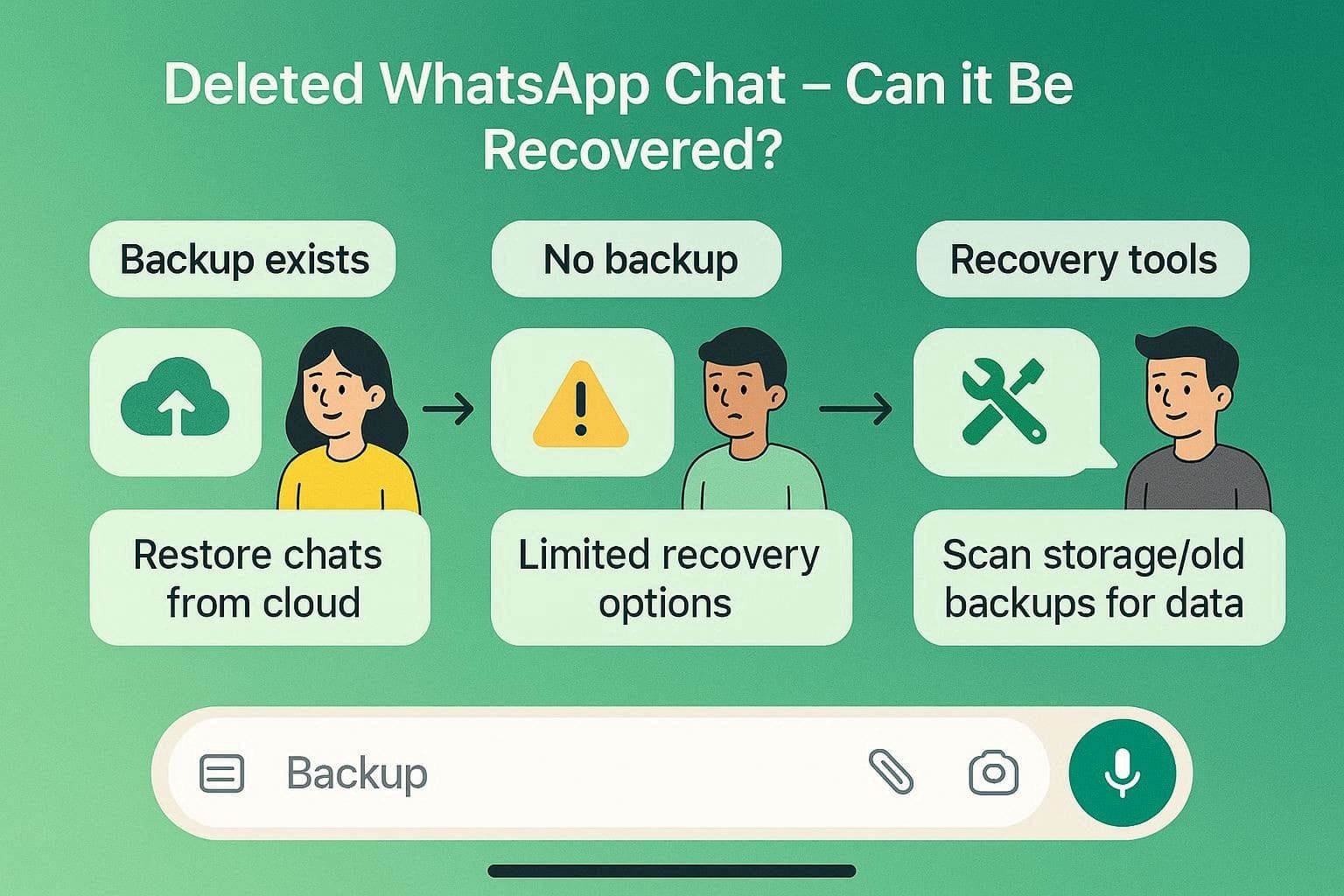
Multiple times, you might have asked, I accidentally deleted a WhatsApp chat; what can I do? Before learning any solution to this, it's important to know that WhatsApp chat recovery is possible, but it depends on what you do after deletion and whether a backup exists.
If a backup exists, WhatsApp can restore chats from iCloud on an iPhone. Without a backup, recovery is generally not possible because WhatsApp does not store messages on its servers. In such cases, third-party tools can recover deleted data from phone storage or old iPhone backups.
First Things to Check Before Trying Recovery
If you are clear with the main concept and wonder, I accidentally deleted WhatsApp chat, what to do next, this section covers key details. Follow the 3 mentioned quick checks and determine if any one method can be helpful:
Method 1: Check Archived Chats
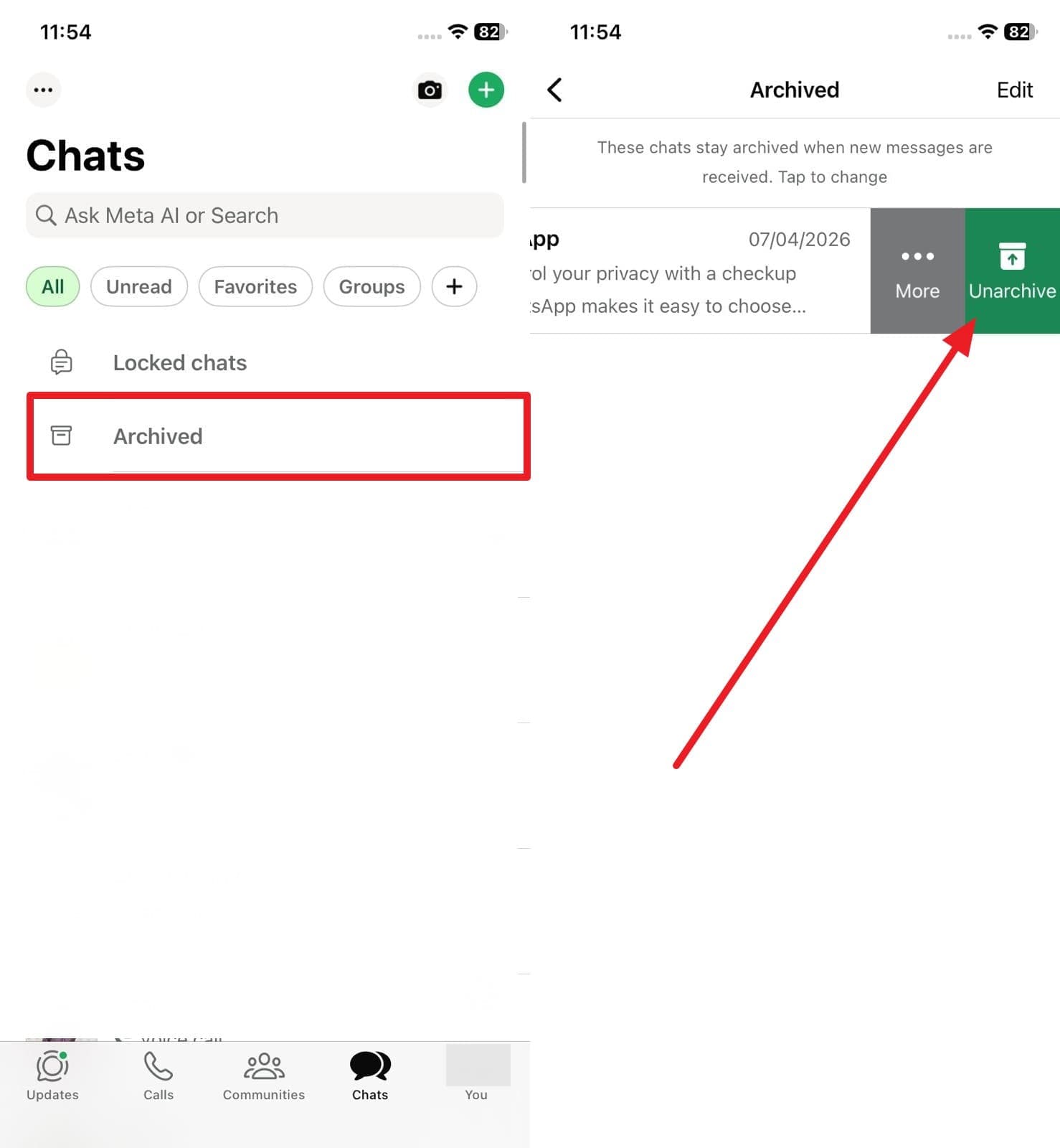
This is the first step, since many chats stay hidden rather than being truly deleted. Sometimes you tap the Archive button by mistake, so the chat does not vanish; it only moves out of the main list. Hence, this simple check gives a safe and quick result because it needs no backup, no reinstall, and no risk to current data. To know how you can do that, follow the simple steps mentioned below for guidance:
-
Instructions Check the Archive Folder
In the "All" section, locate the "Archive" folder and see if the lost chat is there. Upon finding that, simply swipe left and tap the "Unarchive" button to bring the chat back to the main chat list with all messages and media intact.
Method 2: Check Media in Gallery (WhatsApp Images, Videos, Documents Folders)
For the WhatsApp accidentally deleted chat, perform this action if you have lost certain media attachments within the chat. WhatsApp messages and media stay in separate places on iOS if the "Save To Photos" option is set to "Always" for a certain chat. These files do not always get removed when the chat gets deleted, so you can still view and save them.
Method 3: Confirm Chat Is Actually Deleted
This check saves time, lowers risk, and prevents unnecessary steps on your iPhone. Sometimes a chat looks gone but stays hidden due to archiving, muting, a long chat list, or display issues. By checking the search results and the Archived first, you may find the chat without needing to restore or reinstall.
If the conversation disappeared without a clear deletion event, use this guide to diagnose and restore missing WhatsApp messages before reinstalling the app.
Part 2. How to Restore Deleted WhatsApp Chats with Backup
What if you can't locate the chat after the quick checks and wonder, I accidentally deleted my WhatsApp chat, can backup help? In this situation, here are the 2 backup restoration options that you can try to recover the conversations:
1. Restore Your iCloud Backup
This is the official way to restore deleted chats on iPhone when a backup exists. Once performed, it can bring back all chats, messages, groups, and media saved up to the backup date. Nevertheless, it only works if the deleted chat was part of that backup, and it is safer than restoring the full iPhone. To know how you can restore your iCloud backup, follow the detailed guide mentioned ahead:
You get all text, photos, and voice notes that existed when you last backed up. Videos only return if you turned that setting on before the save.
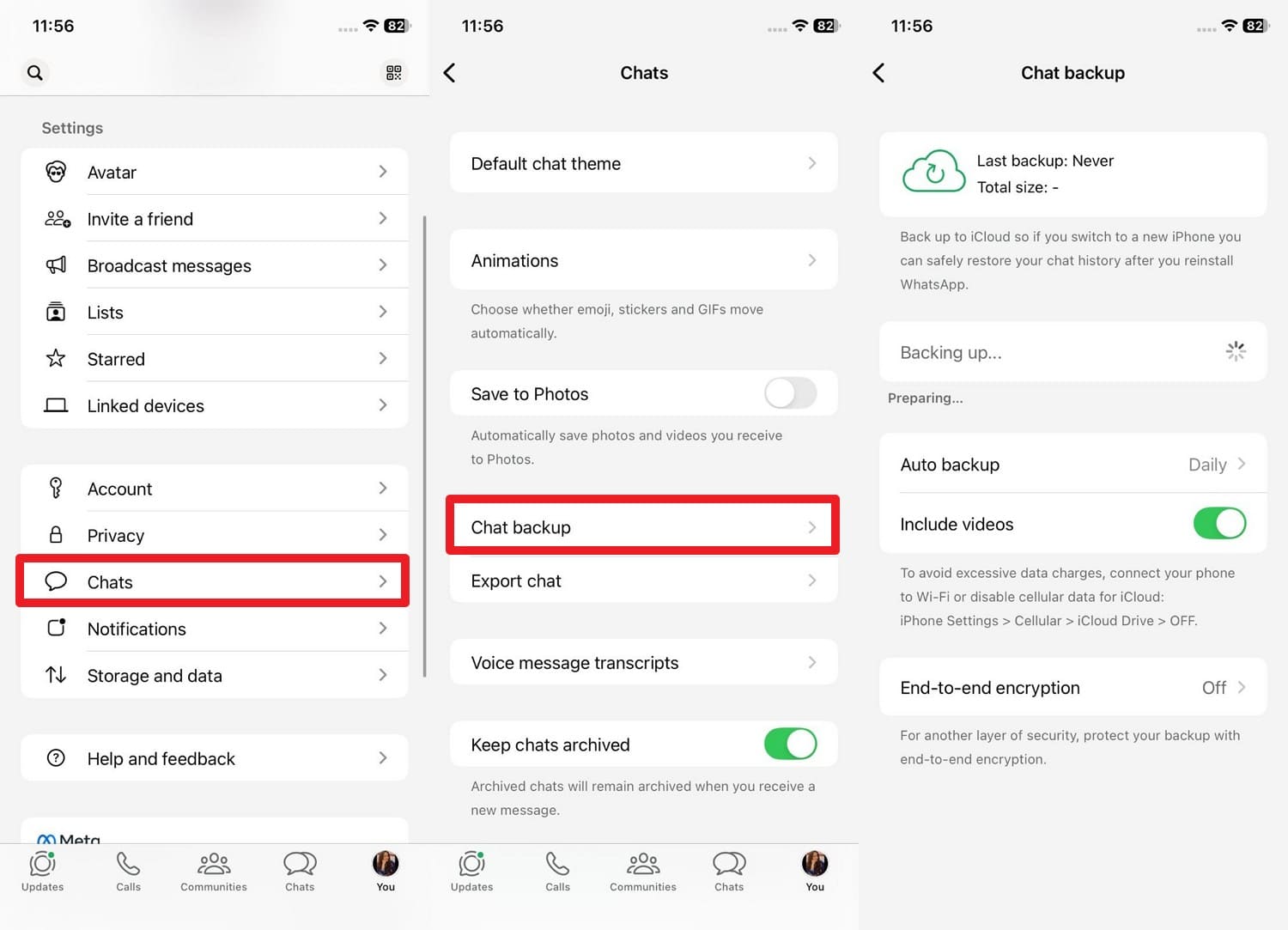
Check If You Already Have a WhatsApp Backup:
Before deleting the app, open WhatsApp and go to Settings > Chats > Chat Backup. Check the Last Backup date and time to ensure your data is saved in iCloud.
- Use the same Apple ID and phone number as the original backup.
- The phone needs enough free space, about double the backup size.
- iCloud Drive must stay turned on in iPhone settings.
-
Step 1 Delete and Reinstall WhatsApp
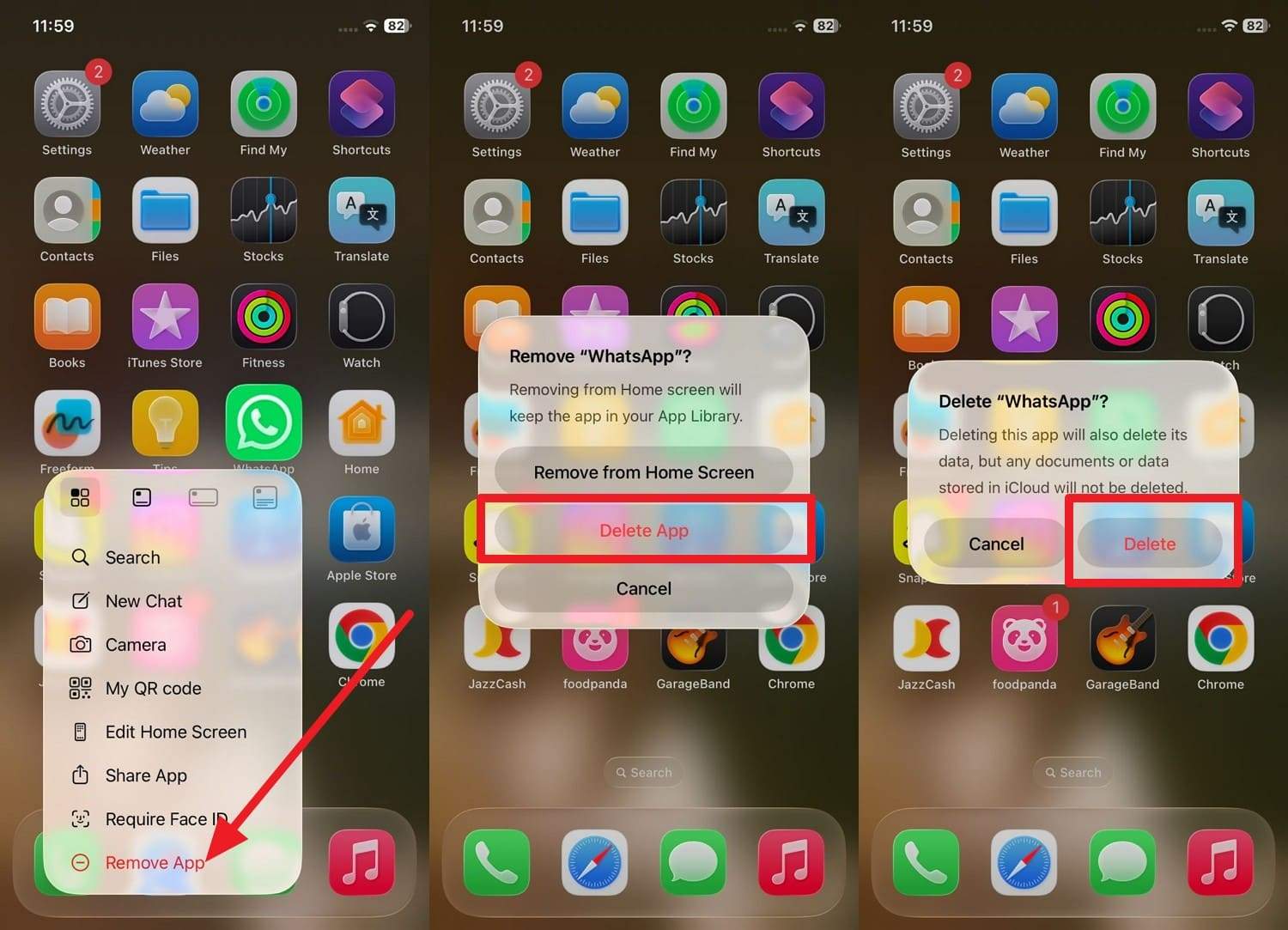
Long-press the WhatsApp icon on your home screen, select "Remove App," then tap "Delete App" and "Delete." After that, open the App Store, search for WhatsApp, and reinstall it.
-
Step 2 Verify Your Phone Number
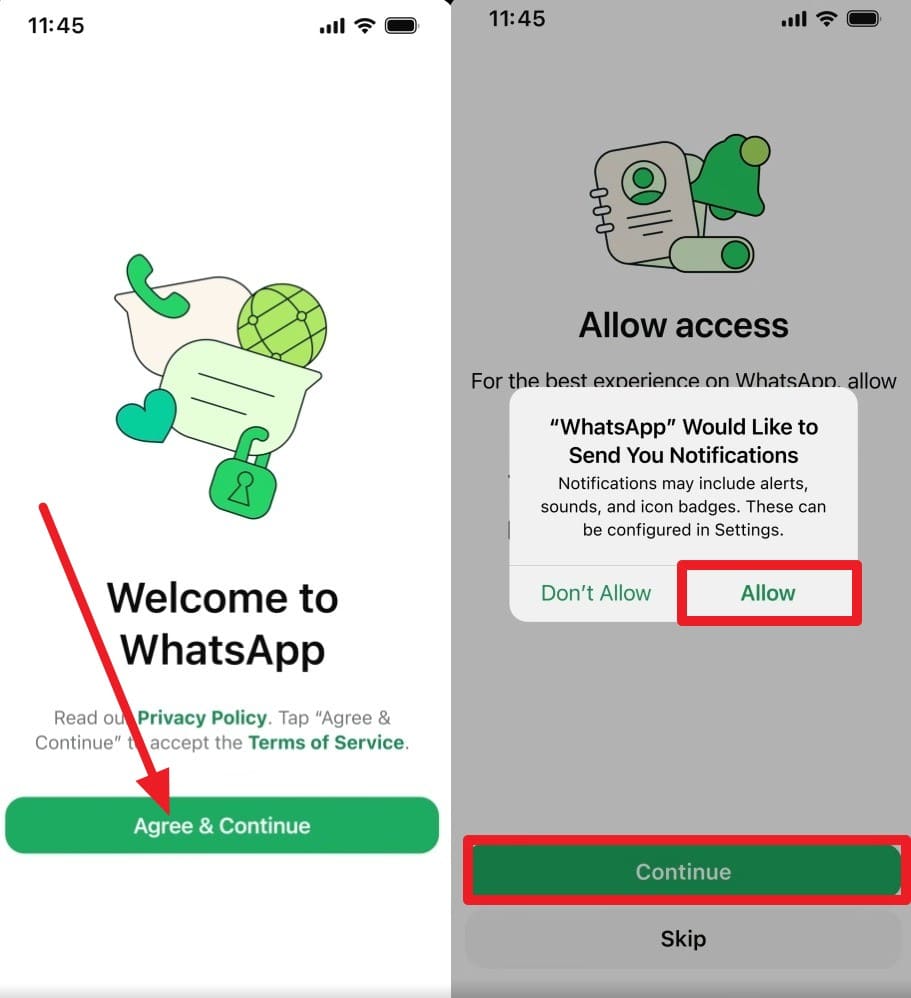
Open the newly installed app, choose the "Agree & Continue" button, and enter the same phone number you used when creating the backup and press "Next." Then, add the code to verify the details and select the "Continue" and "Allow" options when prompted.
-
Step 3 Restore the Backup
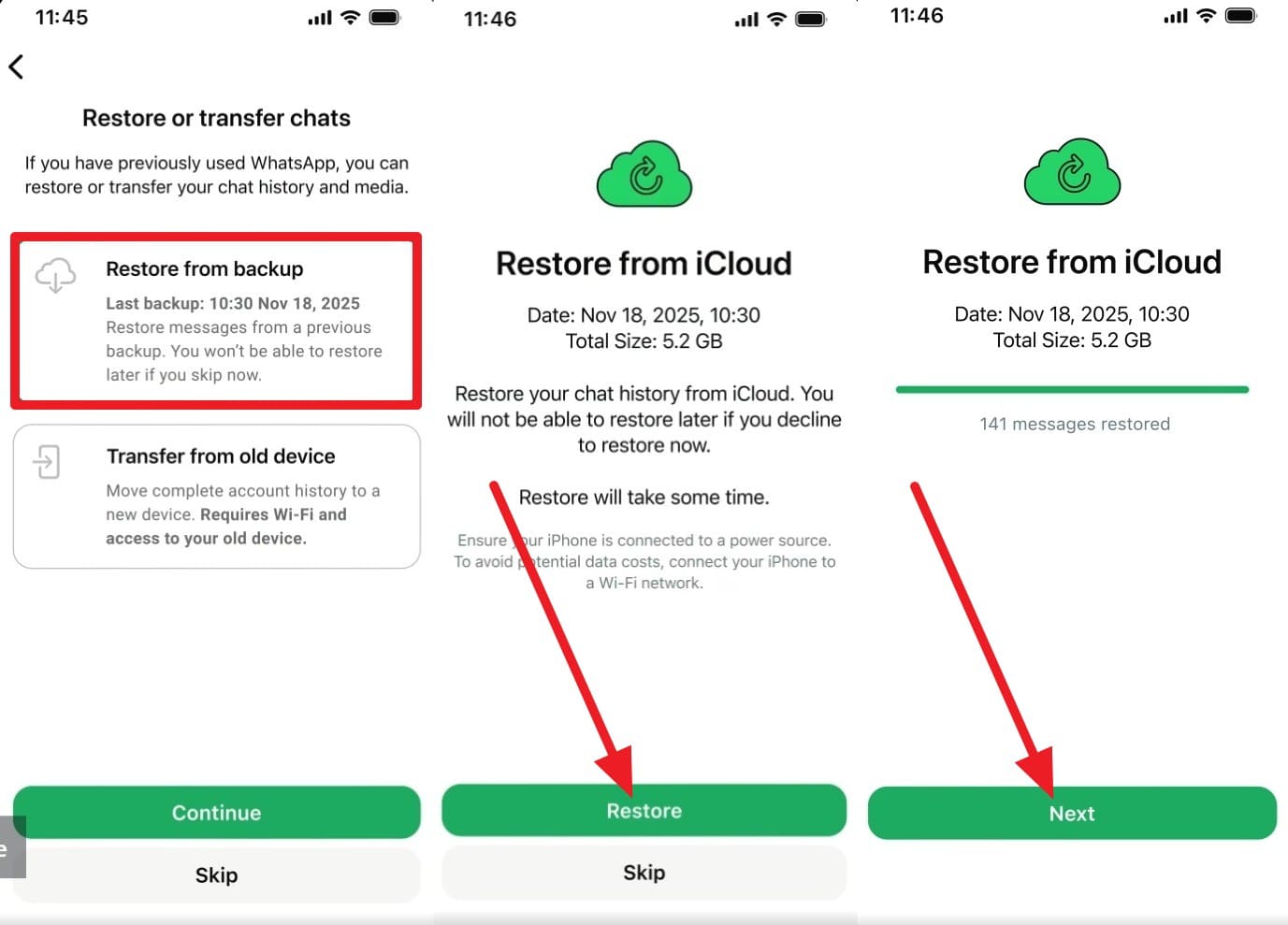
When WhatsApp automatically detects your backup, select the "Restore from Backup" option, then choose "Continue." Confirm that by tapping the "Restore" button and choosing "Next" once done to add the profile details. You will get a "Restoring Media" progress bar, after which you can access all the lost chats.
2. Restore iTunes/Finder Backup
While resolving your query of I have accidentally deleted a WhatsApp chat, it is suggested to restore the iTunes or Finder backup. When no iCloud chat backup exists, these computer backups often include full app data, so WhatsApp chats may still be included. If you made a backup on PC or Mac before chat loss, you can restore the whole iPhone to that backup date, including apps, settings, and data, as guided:
-
Step 1 Connect the iPhone
Use a USB cable to connect your iPhone to your computer and press the "Trust" option when prompted on the iPhone. On Windows or macOS Mojave and earlier, open iTunes, and on macOS Catalina and later, launch Finder.
-
Step 2 Access the Restore Backup Option
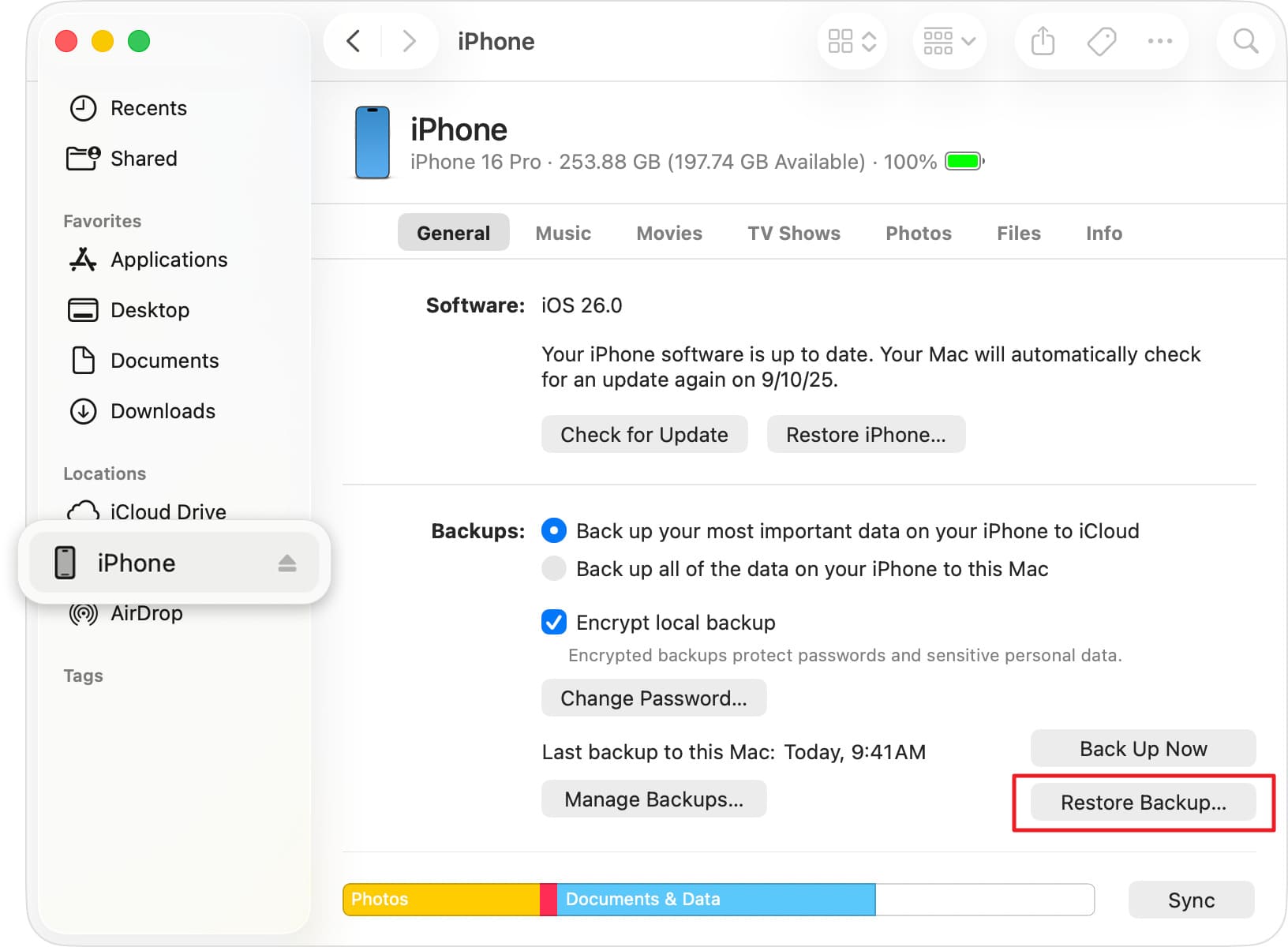
If you choose iTunes, tap the small "Phone" icon and go to the "Summary" tab. There, tap "Restore Backup" in the "General" tab to continue.
-
Step 3 Restore the Backup File
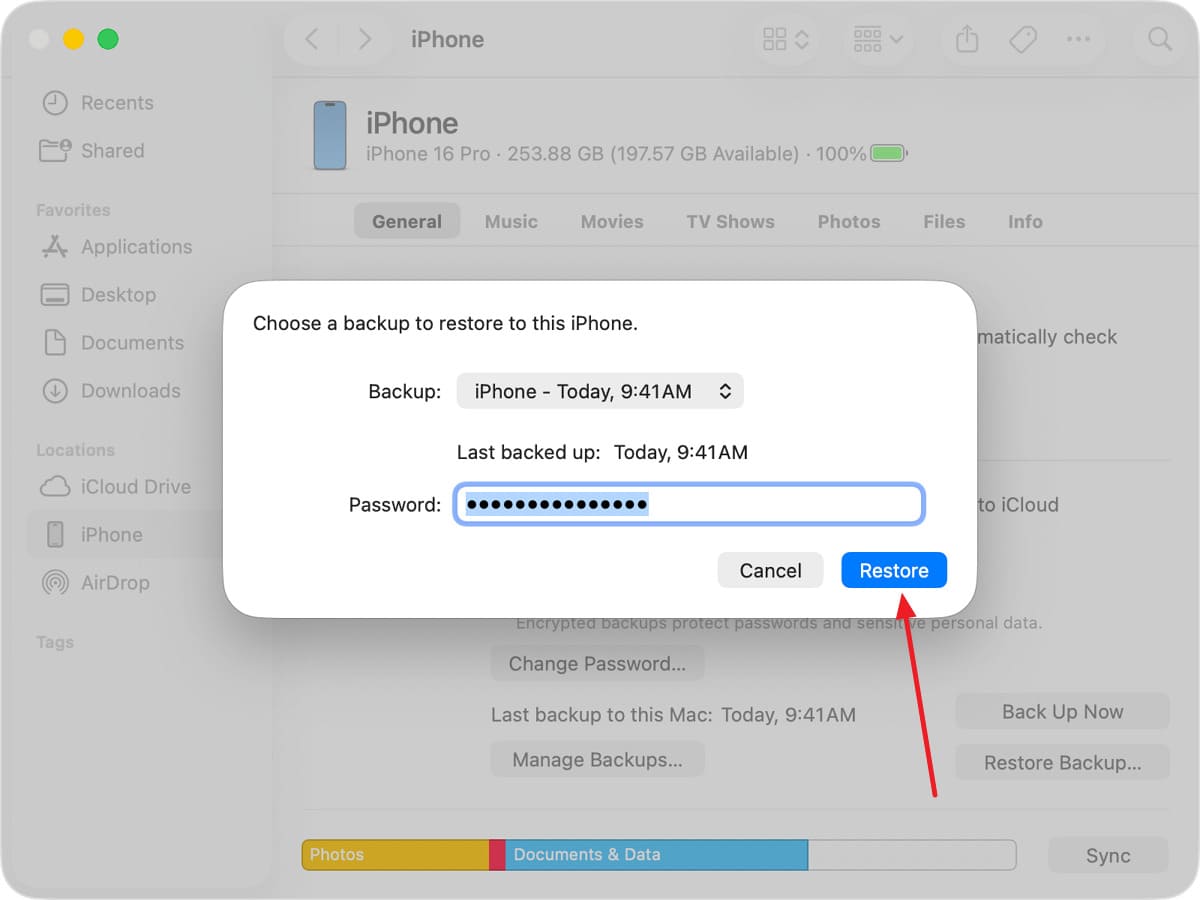
Enter your password (if the backup was encrypted), then choose the backup created when your WhatsApp messages were still on your device by selecting the "iPhone Name" menu. Click the "Restore" button and keep your device connected until it restarts and synchronizes with the computer.
Part 3. How to Recover WhatsApp Chat Without Backup (Best Solution)?
Let's say you tried the backup method and still question, I mistakenly deleted my WhatsApp chat, what to do when backup options fail? In this situation, data recovery tools like Dr.Fone - Data Recovery can help you recover 35+ data types, including WhatsApp chats and View Once media files. Since it supports iOS 26 & iPhone 17 Series, the recovery will be local and is claimed to have a 100% success rate.
In addition, users can recover the files from iTunes backups, iCloud-synced data, and iCloud Drive. Unlike other tools, you can choose the data types to recover and further filter the chats to save the specific ones. With a detailed, free Scan & Preview option, you can assess data accuracy and integrity before saving to the device. With an intuitive interface, recovery is easy to perform in 2-3 simple steps, making it accessible to novices.
 Recovers data after deletion, crashes, or device damage.
- Supports photos, messages, contacts, WhatsApp, and more.
- Supports all major iPhone, iPad, and iPod models.
- Preview and recover only what you need.

Guide to Recover WhatsApp Chat from iPhone Using Dr.Fone
For the accidentally deleted WhatsApp chat without backup recovery, here is how you can use this tool to recover chat with media files in a few taps. These steps are tested on many of the latest iPhone models to determine if they can actually recover the data.
-
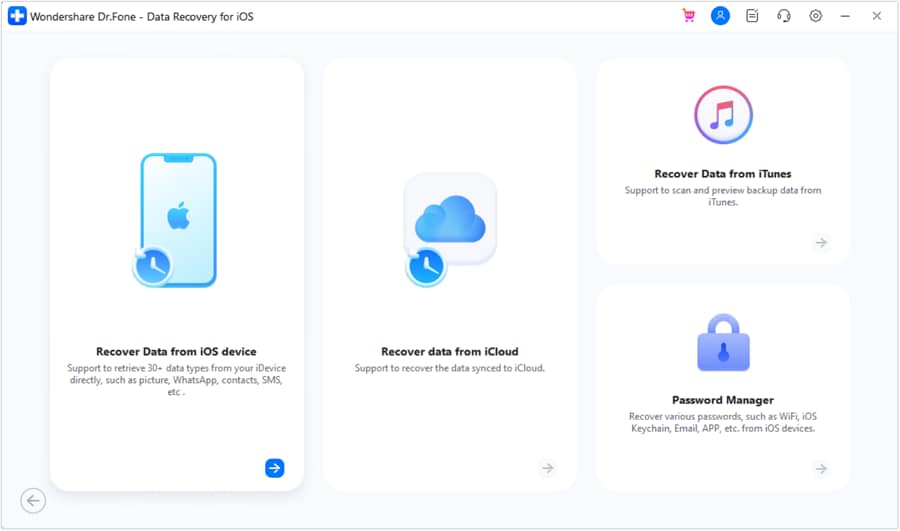
Step 1 Choose the Data Recovery Tool for iOS on Dr.Fone
As you choose the "Data Recovery" tool for iOS in the toolbox, pick the "Recover Data from an iOS Device" option.
-
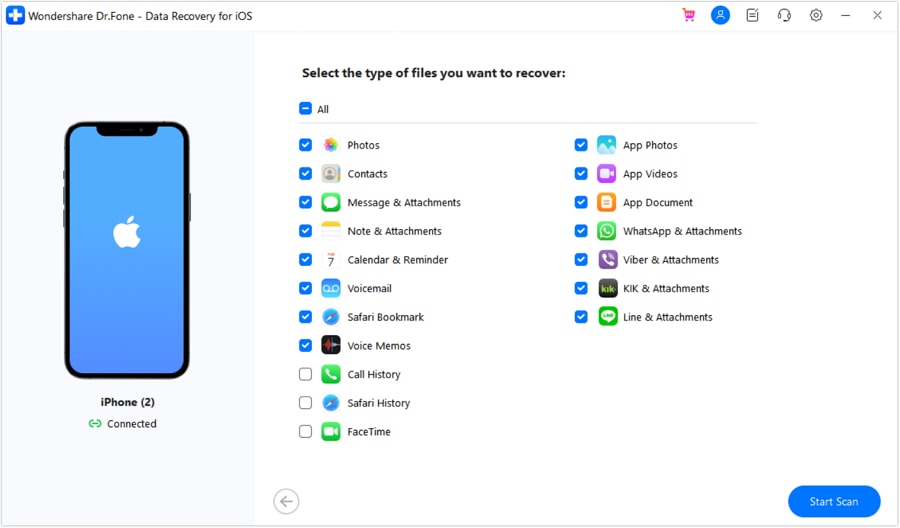
Step 2 Select Data Types to Start the Scan
After that, connect the device when prompted, and as the tool recognizes the device, the data types will be displayed. Select the "WhatsApp & Attachment" option and click the "Start Scan" button.
-
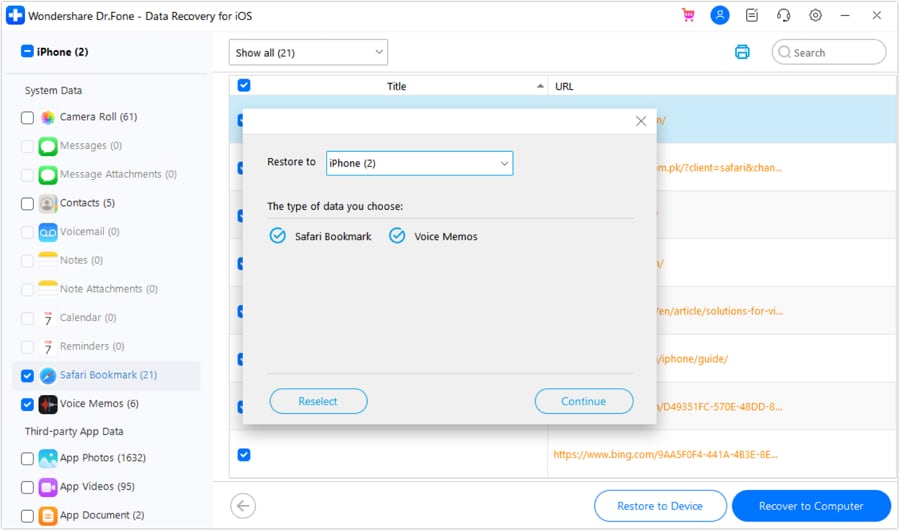
Step 3 Filter Chats and Pick the Restore to Location
When the deep scan ends and the chats are displayed, stretch the "Show All" menu and filter the conversations. Then, select the given export option, choose the "Restore To" option, and press the "Continue" button to save the restored chats.




Part 4. How to Avoid Losing WhatsApp Chats Again
To ensure you never face the situation of accidentally deleting a WhatsApp chat, follow the 5 simple tips mentioned below:
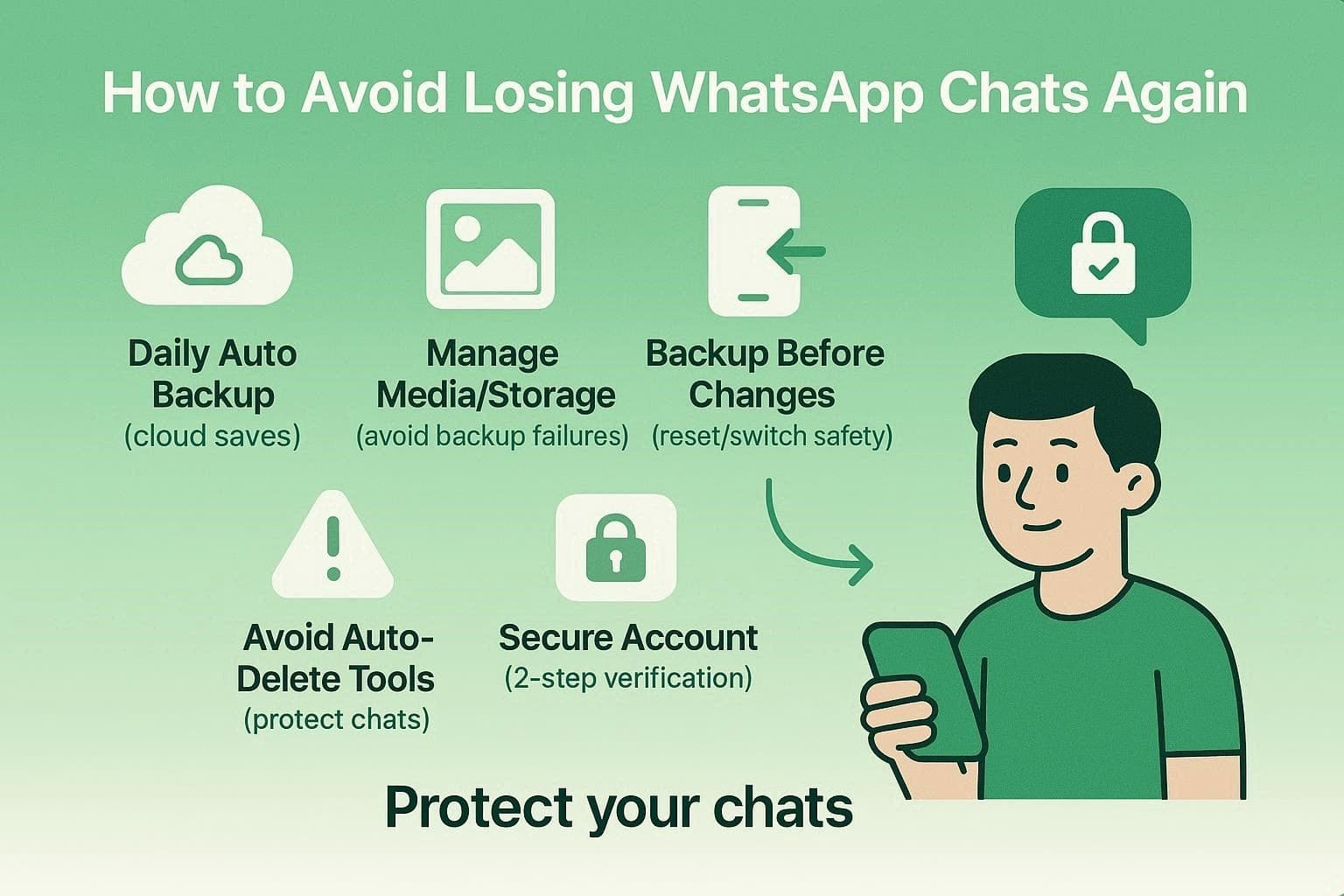
- Set Daily Cloud Backups: Turn on Auto Backup in WhatsApp settings using iCloud. Daily saves ensure you only lose a few hours of data if a mishap occurs.
- Manage Media and Storage: Enable video backups to keep files in the cloud, not just on your disk. In addition, watch your cloud space limits to prevent silent backup failures.
- Backup Before Big Changes: Perform a manual backup before switching phones, resetting your device, or updating your OS. Hence, this creates a fresh snapshot so you do not rely on old data.
- Avoid Auto-Delete Tools: Be careful with disappearing messages and third-party cleaner apps that wipe your folders. Furthermore, it's best to use WhatsApp's built-in storage tools to safely remove large files.
- Secure Your Account: Enable Two-Step Verification with a PIN and an active email address to prevent account hijacking. Thus, this prevents attackers from logging in and wiping your chat history.
Conclusion
Losing a WhatsApp chat is stressful, but it does not have to be permanent. To reclaim your data after accidentally deleting a WhatsApp chat, review the 3 options given in this article, including backup and non-backup options. If the data is truly deleted, your best official move is to reinstall WhatsApp and restore your latest iCloud or iTunes backup. For users without a backup, Dr.Fone - Data Recovery offers a better alternative.
FAQs
-
1. Will restoring a backup delete my current WhatsApp data?
Yes, restoring a backup replaces current chats; therefore, any new messages after the backup date may be lost. However, you can export important chats beforehand, so you do not permanently lose recent conversations or files. -
2. Is it safe to use third-party WhatsApp recovery tools?
Tools like Dr.Fone are safe for local data recovery, as they are trusted solutions designed to protect user data and prevent privacy risks or corruption. Moreover, always check reviews and permissions, as unreliable tools can misuse your data or damage your device's storage. -
3. Can I recover deleted WhatsApp chats from another phone?
You can recover chats on another phone; however, it requires the same number and access to the linked backup account. Additionally, restoring from iCloud or iTunes ensures chats sync properly, so your data appears on the new device. -
4. Why is my WhatsApp backup not showing during restore?
Your backup may not appear because a mismatched Apple ID or phone number often causes this common issue. Additionally, ensure iCloud Drive is enabled, because disabled settings can prevent WhatsApp from detecting available backups.
 Add Wondershare Dr.Fone as a preferred source on Google