 Recover photos, messages, WhatsApp, and more — no backup
needed.
Recover photos, messages, WhatsApp, and more — no backup
needed.

 100% Security Verified | No Subscription Required | No Malware

 :
: 
 ChatGPT
 Perplexity
 Gemini
 Claude
 Grok
Grok
We have all experienced that moment of instant regret: hitting 'send' only to immediately realize you made a typo, sent a private detail to the wrong contact, or forwarded incomplete information. The panic quickly sets in, and you desperately wonder how to unsend a text message on Android before the recipient has a chance to read it.
While Android devices historically relied on traditional SMS networks that offered no recall options, the evolution of Rich Communication Services (RCS) and app-based messaging has completely changed the landscape. Today, if you act quickly, you can frequently unsend text messages on Android and rectify those awkward mistakes effortlessly.
Therefore, this comprehensive guide will explore the practical ways to unsend a text on Android safely and easily across various platforms, including Samsung Messages, Google Messages, WhatsApp, and Facebook Messenger. Additionally, as we resolve the query of how to unsend a text message on Android, we will also show you how to safely recover mistakenly deleted messages.
In this article
- Part 1. Can You Unsend a Text on Android?
- Pro Tip. Dr.Fone - Data Recovery: Recover Messages You Thought Were Gone
- Part 2. How to Unsend a Text on Android Using Google Messages
- Part 3. How to Unsend Texts in Popular Messaging Apps on Android
- Part 4. What to Do If Unsend Is Not Available (Practical Tips)
Part 1. Can You Unsend a Text on Android?
Before you learn the exact steps on how to unsend a text on Android, it is essential to understand whether this action is genuinely possible on your device. The short answer is yes, but with a major caveat: you can only unsend messages on Android using applications that communicate over the internet (Wi-Fi or cellular data) rather than standard cellular networks. These include WhatsApp, Telegram, Signal, Messenger, and Google Messages using the RCS protocol.
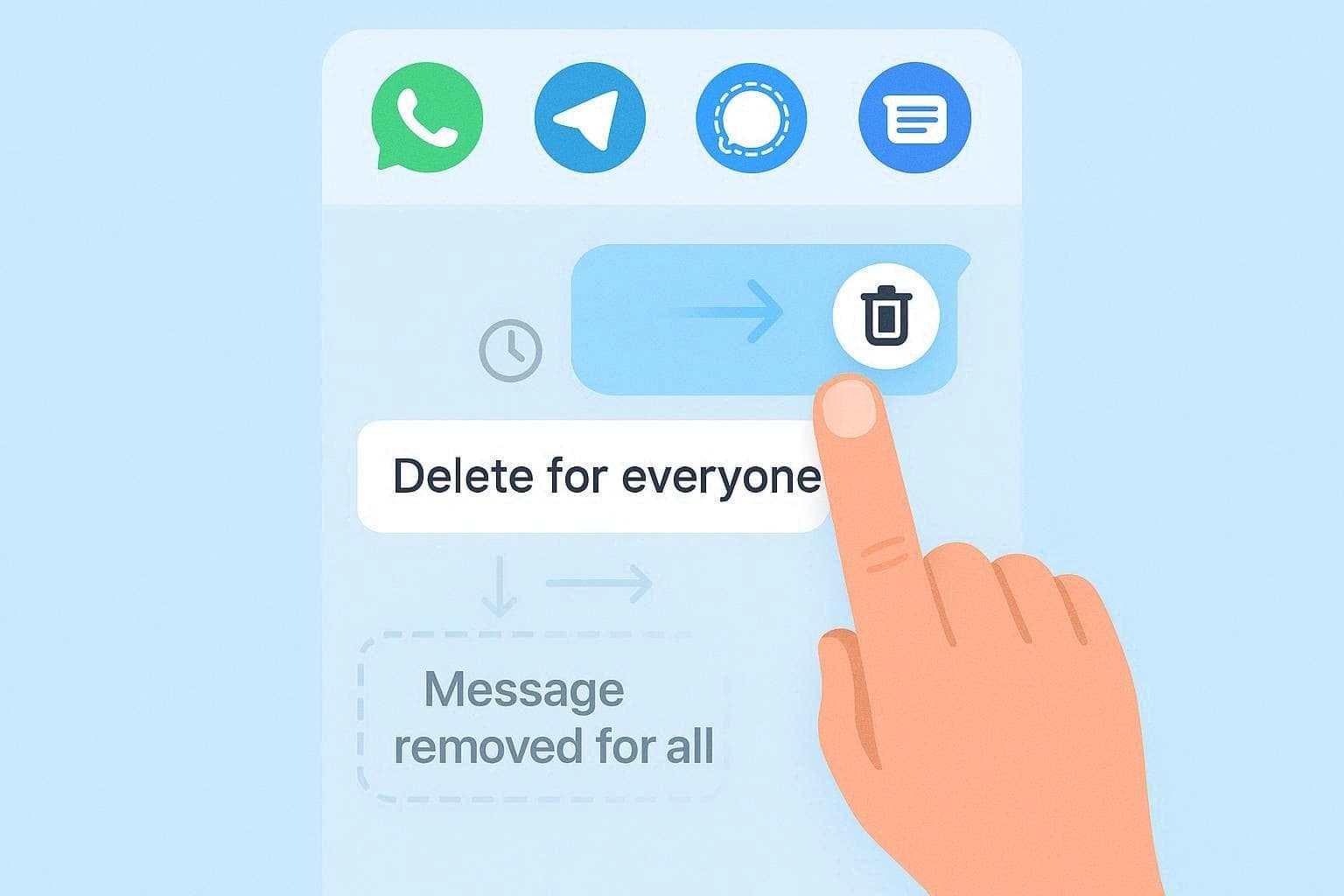
In these modern internet-based apps, you typically just long-press the message and select 'Delete for Everyone' or a comparable recall option. However, both users must be utilizing compatible software, and the ability to pull back the text will always depend on the specific rules and time limits enforced by that platform.
When It's Not Possible
If you are using traditional SMS or MMS messages routed directly through your cellular carrier, they cannot be unsent once they are marked as 'Delivered.' Deleting an SMS from your screen only removes it locally from your smartphone; the recipient will still see it. Tricks like rapidly enabling airplane mode are only effective if the text is still in the 'Sending' phase and has not yet reached the carrier's server.
Key Factors Affecting Unsend Options
Now that we have answered whether you can unsend a text on Android, let us review the primary technical factors that determine your success when attempting to recall a message:
| Factor | Effect on Unsend Ability |
|---|---|
| Message Type | SMS/MMS cannot be truly unsent; data-based chats (RCS, WhatsApp, etc.) fully support the unsend feature. |
| App/Protocol Support | Only applications and protocols equipped with a "delete for everyone" command can wipe messages on both ends of the conversation. |
| Time Limits | Most messaging apps only permit unsending within a strict time window (ranging from a few minutes to two days). Afterward, you can only delete it locally. |
| Both Sides' App/Settings | Both the sender and the recipient generally must be using the same application and compatible protocol versions for the unsend feature to synchronize. |
| Delivery and Device State | If an SMS message is completely delivered, it cannot be recalled. Canceling the transmission before it completes sending is the only foolproof way to stop an SMS. |
Pro Tip. Dr.Fone - Data Recovery: Recover Messages You Thought Were Gone
 Scan Android phones and tablets directly.
- Preview and recover only what you want.
- Supports WhatsApp, photos, videos, contacts, and more.
- Works with 6000+ Android devices.

While you are figuring out how to unsend a text message on Android, you might accidentally delete valuable conversations from your end permanently. When panic strikes, robust data recovery tools like Dr.Fone – Data Recovery can come to your rescue by offering seamless, deep-scan retrieval solutions designed for both Android and iOS devices. Built for everyone, it requires absolutely no technical skills to operate.
This powerful software empowers users to selectively scan and recover over 13 different file types, ensuring you can restore precisely what you need without overwriting existing device data. Boasting an incredibly intuitive interface and simple guided steps, it stands as the ideal solution for everyday smartphone users. You can efficiently recover standard SMS texts, WhatsApp Business data, and even View Once media files, maintaining continuous support for over 6,000 Android models.
Guide to Recover Lost Messages on Android with Dr.Fone
To understand exactly how this industry-leading Android data recovery software can retrieve your deleted conversations, follow this straightforward guide:
-
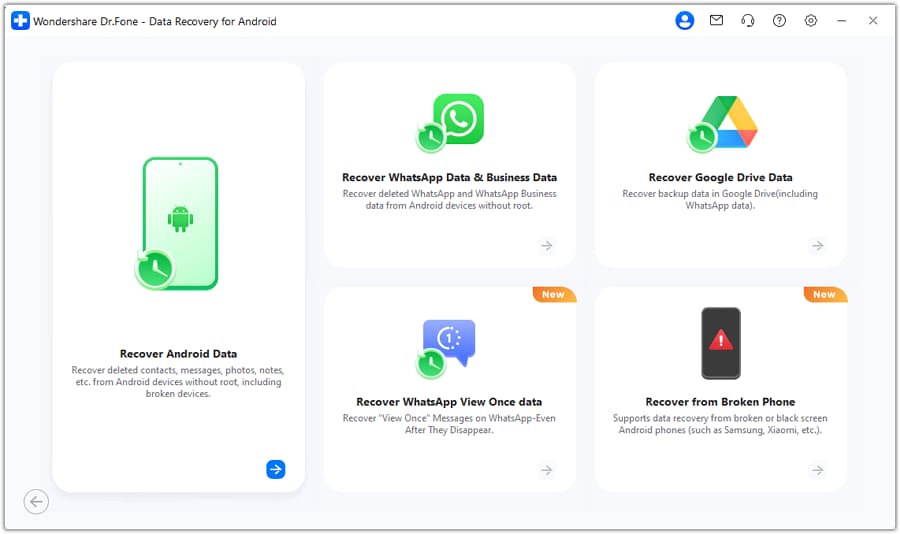
Step 1 Choose the Recover Android Data Option
Launch the Dr.Fone application on your computer. Expand the Toolbox menu on the main interface and select the "Data Recovery" module. Next, choose "Android" and then click "Recover Android Data." You will be prompted to connect your Android device using a USB cable.
-
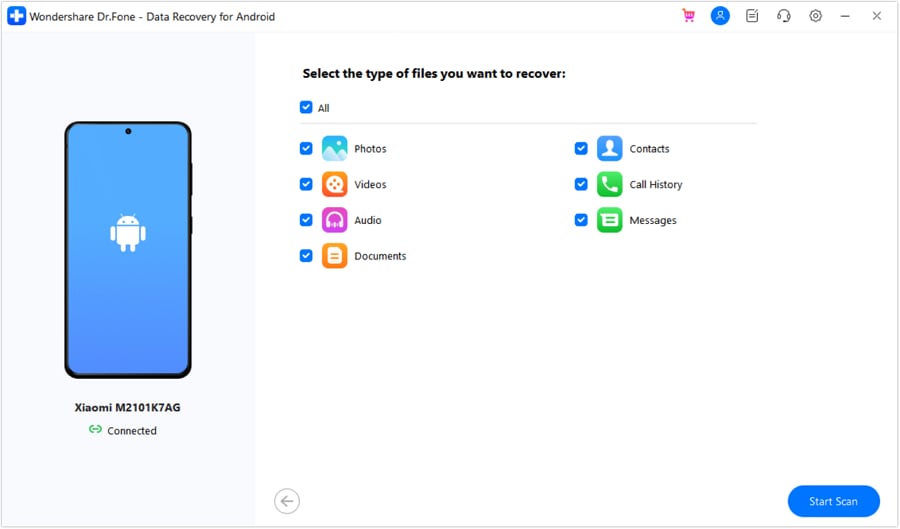
Step 2 Pick Messages and Start the Scan Process
Once the tool successfully detects your connected device, it will display a menu of recoverable data types. Check the box next to "Messages," then click the "Start Scan" button to initiate a deep search of your phone's internal storage.
-
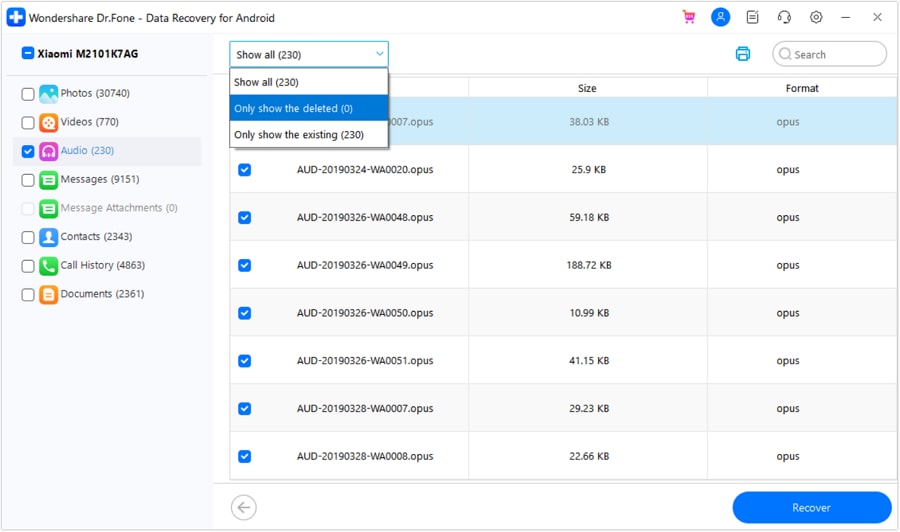
Step 3 Filter the Messages & Choose to Recover on the Device
Wait patiently for the scan to conclude. You can then filter the retrieved messages, preview the chat contents to ensure they are the ones you want, and finally press the "Recover" button to save them securely.




Part 2. How to Unsend a Text on Android Using Google Messages
If you use Google Messages, you can leverage RCS (Rich Communication Services) chats to discover how to unsend a message in Android natively. However, this is highly conditional: both you and the recipient must be using Google Messages with the RCS feature fully enabled and active. Keep in mind that this approach is entirely ineffective for standard SMS/MMS texts or when texting someone who does not have RCS capabilities, such as users on older devices or different platforms without RCS integration.
Additionally, you must act fast. Once the limited unsend time window expires, your only option will be to delete the message locally from your own screen. To successfully unsend an active RCS message, follow these straightforward instructions:
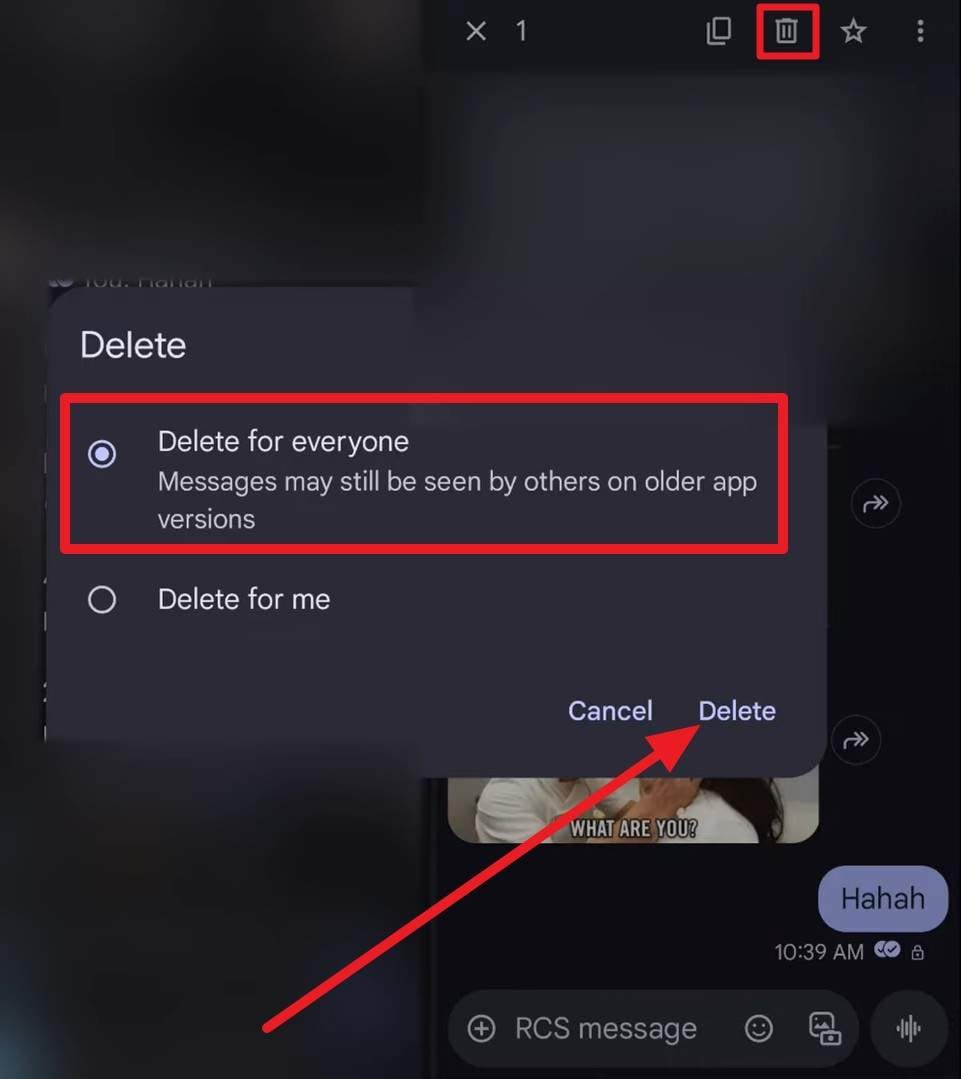
Instructions: Open the Google Messages app and navigate to the RCS conversation. Long-press the specific message bubble you wish to unsend. A toolbar will appear at the top of the screen; tap the "Delete" (trash can) icon. From the resulting pop-up menu, explicitly choose the "Delete for Everyone" option and confirm by tapping "Delete."
Part 3. How to Unsend Texts in Popular Messaging Apps on Android
Beyond default texting tools, millions of users constantly ask how to unsend text messages on Android within globally popular platforms like WhatsApp, Telegram, or Facebook Messenger. These platforms operate entirely over the internet, giving them full control over server-side message delivery. This section outlines the specific steps and necessary requirements to utilize the unsend features in these leading apps.
Samsung Messages: Is There a Recall or Unsend Option?
If you rely on the default Samsung Messages application, the vast majority of texts cannot be unsent once they are delivered. This is because Samsung Messages primarily routes texts via traditional SMS/MMS protocols managed by your cellular carrier. Pressing delete on a delivered message will only scrub it from your phone's screen; it will have zero impact on the recipient's inbox.
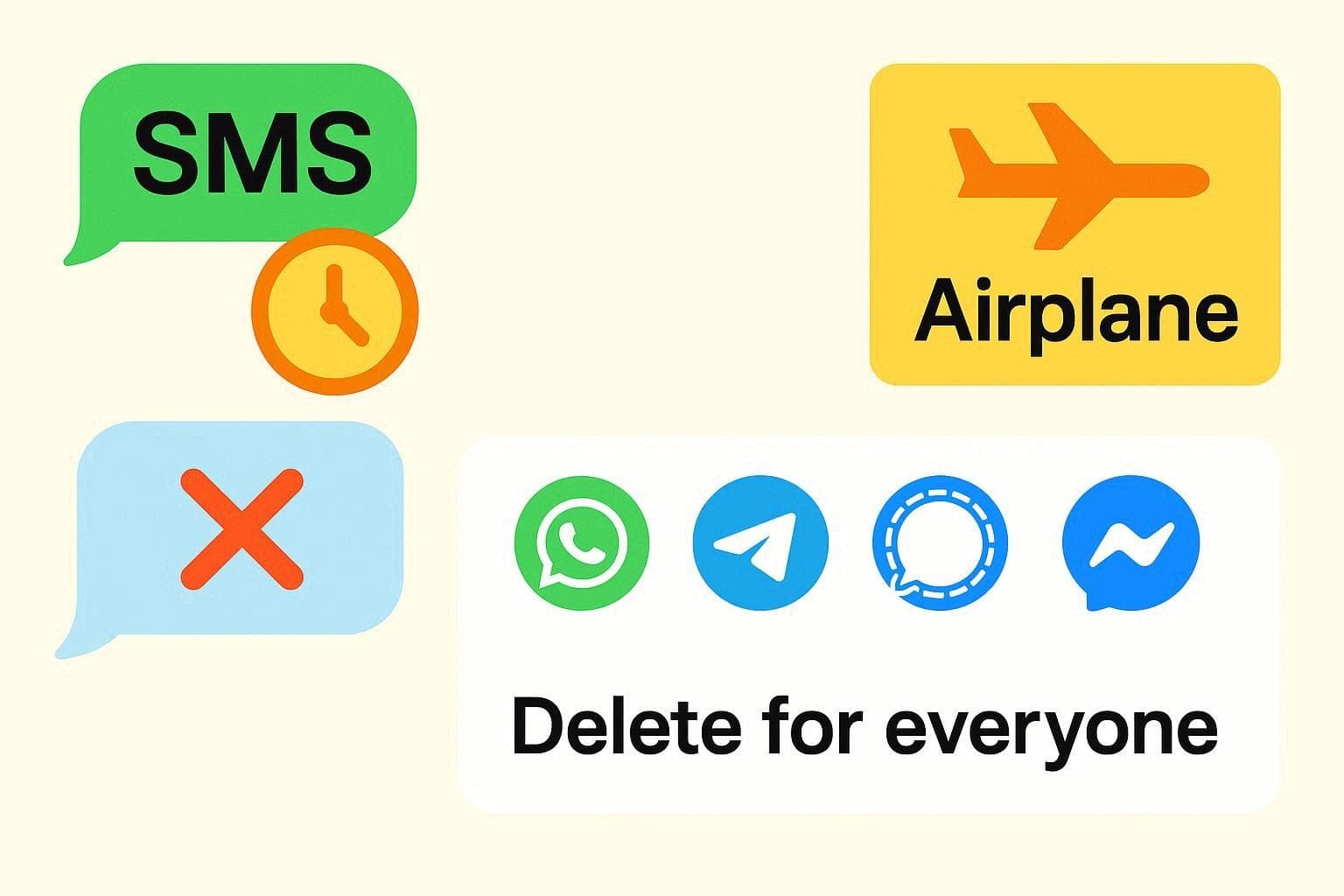
While enabling airplane mode immediately after hitting send might occasionally block an outgoing text, it is highly unreliable since SMS delivery typically takes mere milliseconds. If the text has already slipped through, your best recourse is to promptly send a follow-up message to clarify or apologize. For those who frequently need a safety net, it is highly recommended to migrate your daily chats to secure internet-based platforms like WhatsApp or Google Messages.
Other App-Based Messaging Platforms
Moving past standard cellular networks, you might still wonder, can I unsend a text message on Android if I use dedicated chat applications? The answer is a resounding yes. Let us break down how message recalling works across some of the most dominant communication platforms in the Android ecosystem.
WhatsApp: Delete for Everyone
WhatsApp is famous for its robust recall features, allowing you to delete messages so they disappear from both your device and the recipient's screen. Instead of the original content, a placeholder stating "This message was deleted" will appear. This powerful feature fully supports standard texts, photos, videos, voice notes, documents, and applies to both direct messages and group chats. In recent updates, WhatsApp grants users an extended window of roughly two and a half days to execute this action.
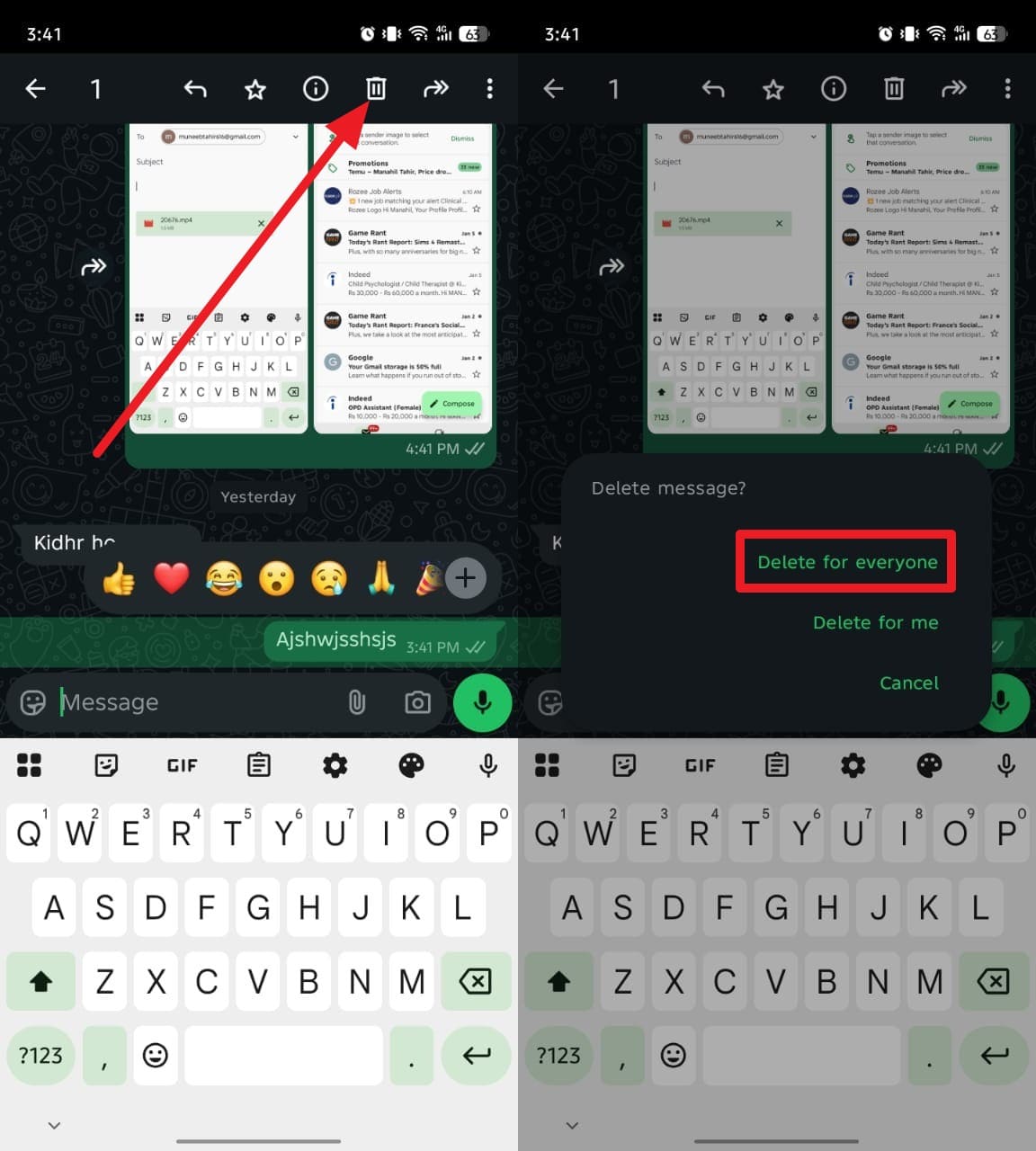
Instructions: Open the chat and long-press the mistaken message. Tap the "Delete" (trash bin) icon located at the top of the interface. When the pop-up appears, tap "Delete for Everyone" to permanently unsend it.
Facebook Messenger: Remove Sent Message
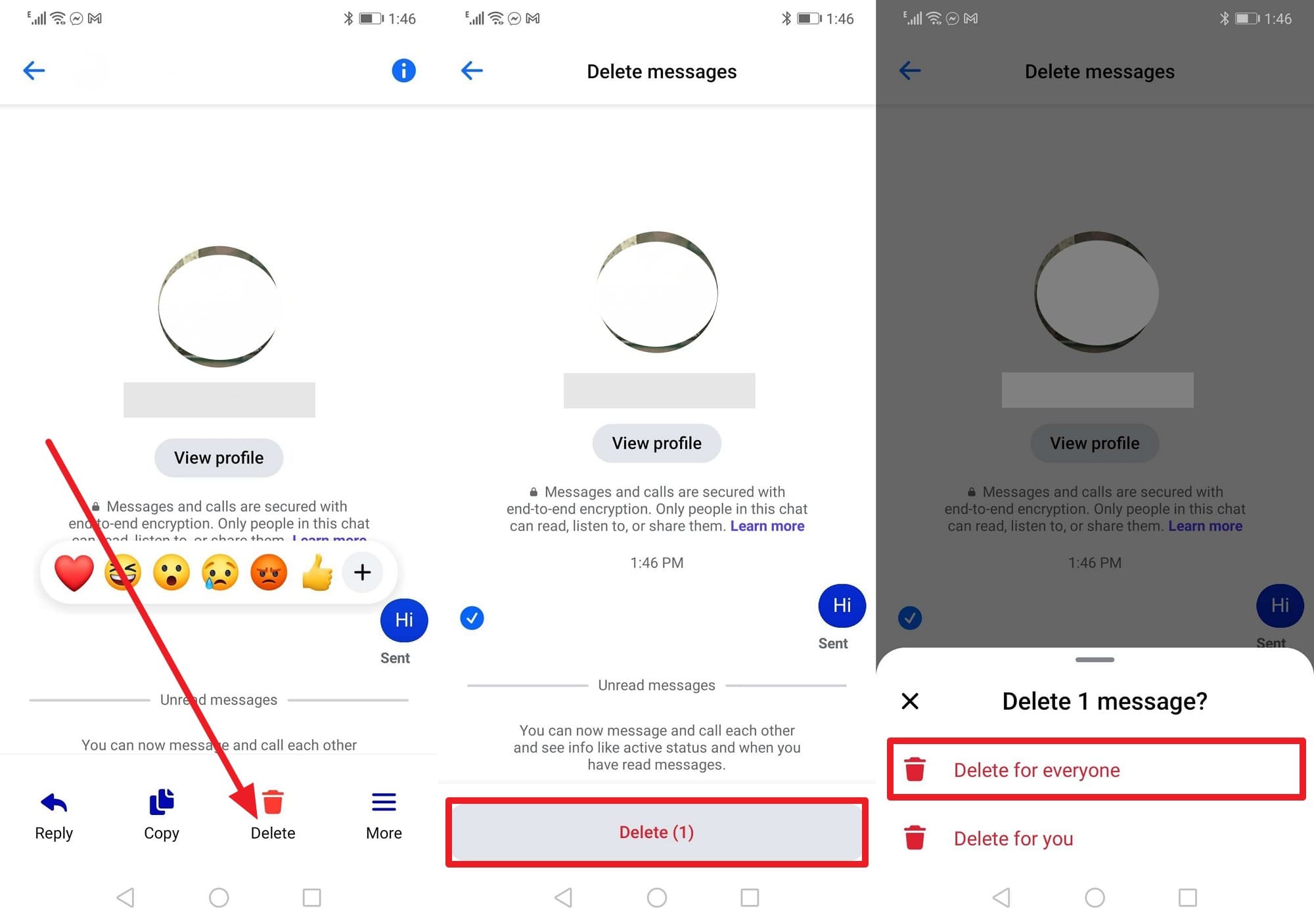
If you are searching for how to unsend a text message on Android via Facebook Messenger, the process is incredibly seamless. Messenger allows you to remove sent texts, photos, and links from everyone's view in a chat. Similar to WhatsApp, the recipient will notice a "Message unsent" placeholder indicating you took back a statement. Be careful not to accidentally select "Remove for You," which only deletes your local copy while leaving it visible to others.
Instructions: Press and hold the specific chat bubble you want to recall. Tap the "Remove" or "More" option at the bottom of the screen to reveal further actions. Finally, select "Unsend" (or "Remove for Everyone") to successfully withdraw the message from the entire conversation.
Telegram: Delete Messages for Everyone
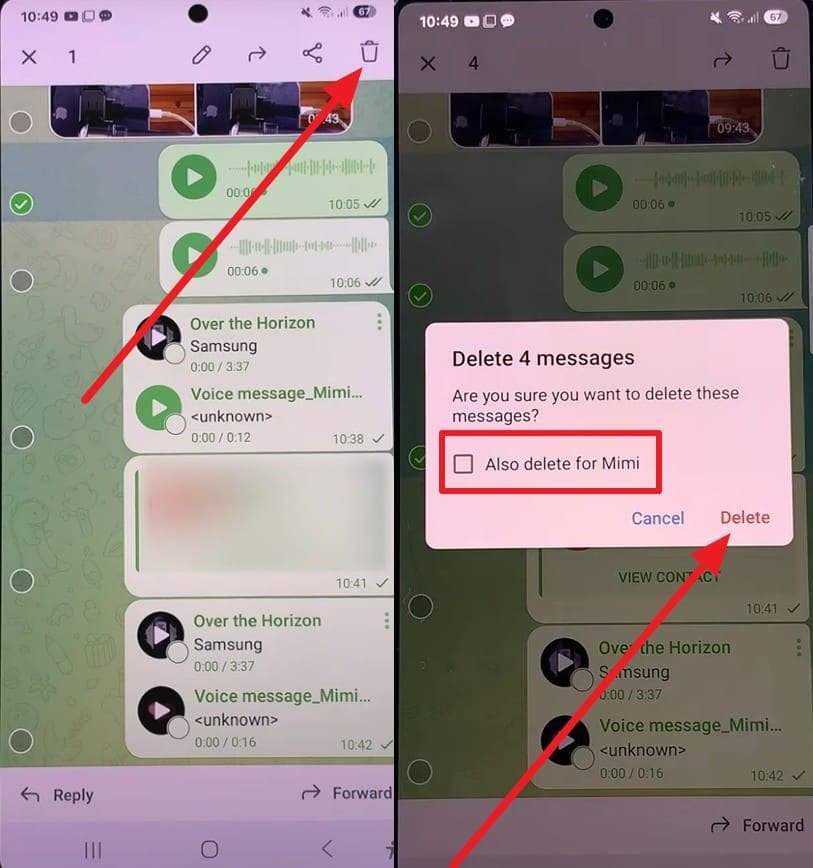
Telegram takes message deletion to an entirely new level regarding privacy. It allows you to unsend messages at any time, with absolutely no time limits. Furthermore, in one-on-one personal conversations, you can delete your messages (and even the other person's messages) without any "message deleted" notification or placeholder being left behind. It behaves as if the conversation never happened. In larger group chats, standard members can delete their own messages for everyone, while group admins maintain the authority to moderate and delete anyone's texts.
Instructions: Long-press the message you wish to remove and tap the "Delete" icon situated at the top right. Crucially, ensure you check the box that says "Also delete for [Recipient's Name]." Tap "Delete" to finalize the wipe on both devices.
Signal: Delete Messages and Unsend
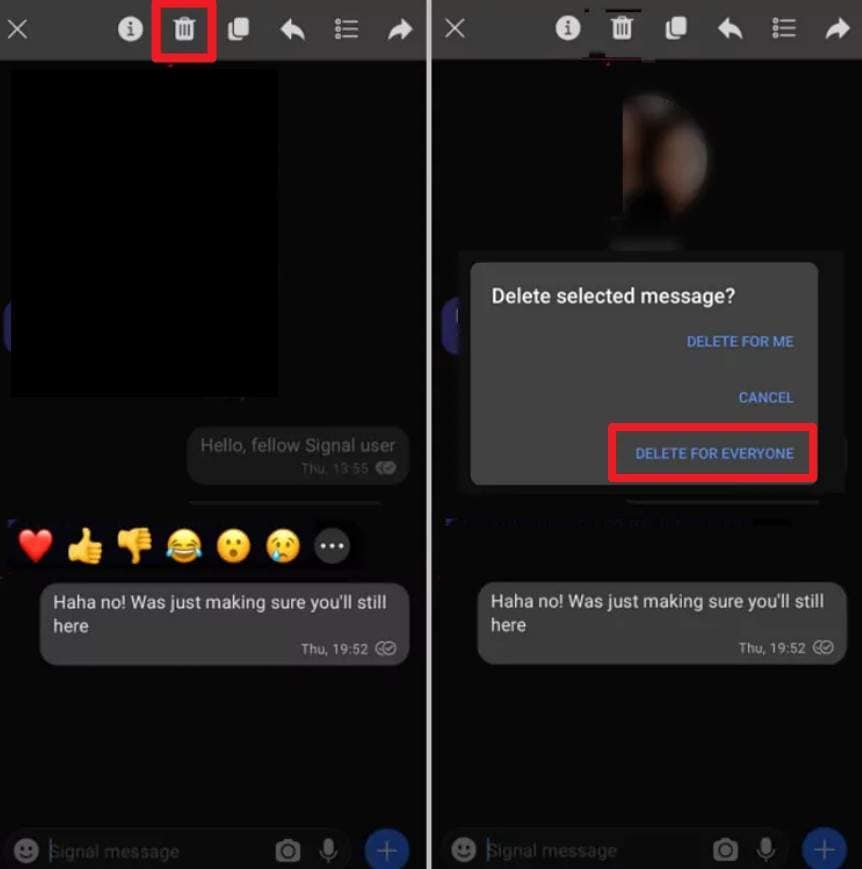
Privacy-conscious users frequently ask, can I unsend a text message on Android if I am utilizing Signal? Yes, Signal is fully equipped with a reliable unsend feature, but it enforces a strict 24-hour limit. If you miss this window, the message becomes permanently etched into the recipient's local chat history, and you can only erase your copy. When successfully unsent, Signal will drop a small "This message was deleted" badge in the chat thread.
Instructions: Tap and hold the offending message bubble, select the "Delete" (trash can) icon from the top menu, and carefully choose "Delete for everyone" from the prompt to completely revoke access to the text.
Part 4. What to Do If Unsend Is Not Available (Practical Tips)
If you have exhausted all methods on how to unsend a text on Android and realize you have either passed the app's time limit or used an unsupported SMS network, you will need alternative strategies. Here are the most practical approaches to handle irreversible messaging mistakes:
Request the Recipient to Ignore or Delete the Message
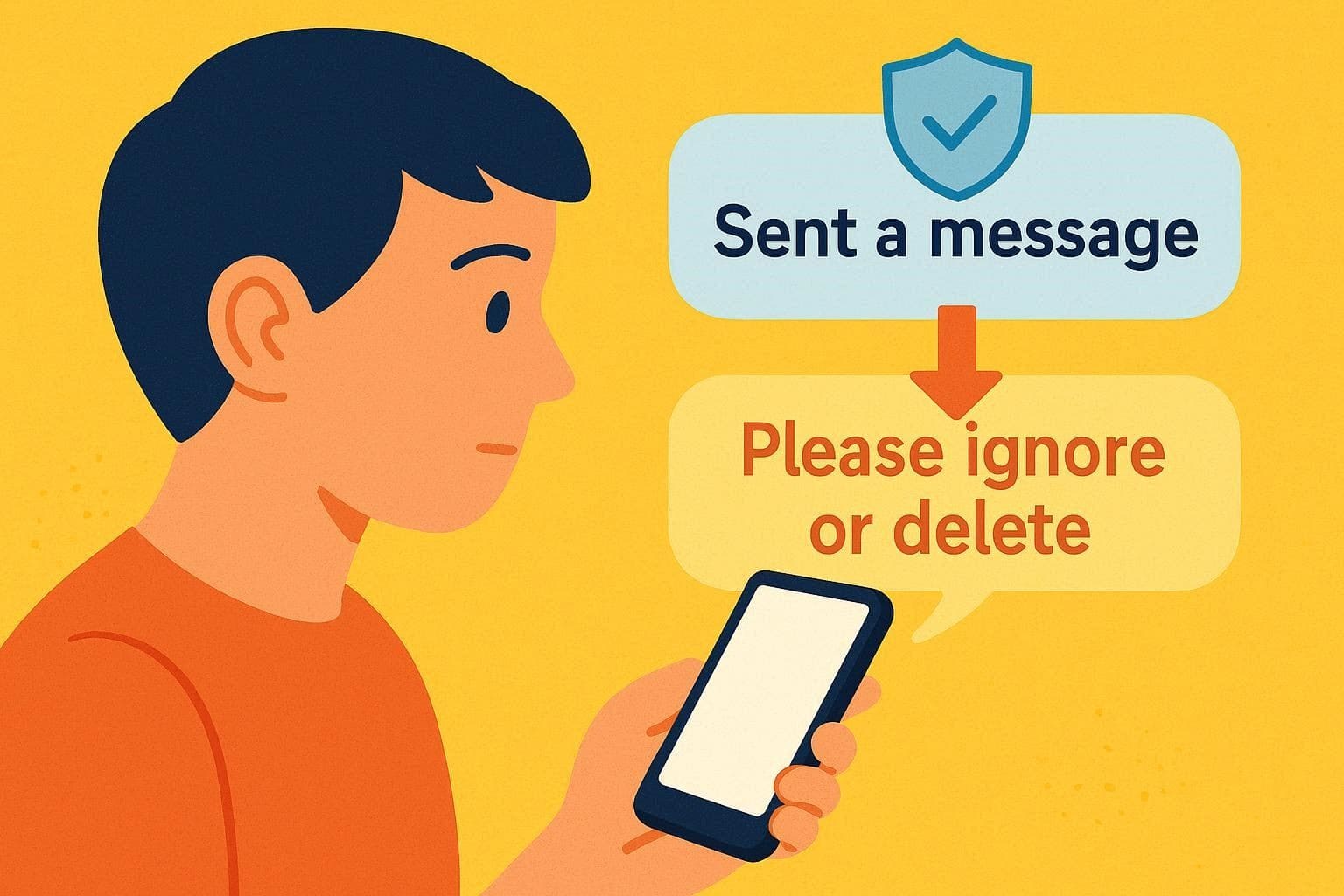
When technical workarounds fail, transparent communication is your best option. If you cannot electronically recall an Android message, immediately ask the recipient to ignore or delete the text manually. Sending a quick follow-up text clarifies your intentions and prevents misinterpretations, incorrect data usage, or the spread of accidental private information. Stating "Please ignore my last text, it was a typo" demonstrates accountability and helps maintain professional or personal trust.
Use App-Specific Workarounds (Editing or Disappearing Messages)
Instead of completely deleting a message, many modern chat apps now allow you to seamlessly edit sent messages. If you made a factual error, editing the text can quickly fix the situation without the drama of deleting it entirely. Furthermore, if you are concerned about long-term privacy, you can proactively enable "Disappearing Messages" features found in WhatsApp, Signal, and Telegram. This automatically purges messages from both devices after a predetermined time (e.g., 24 hours or 7 days).
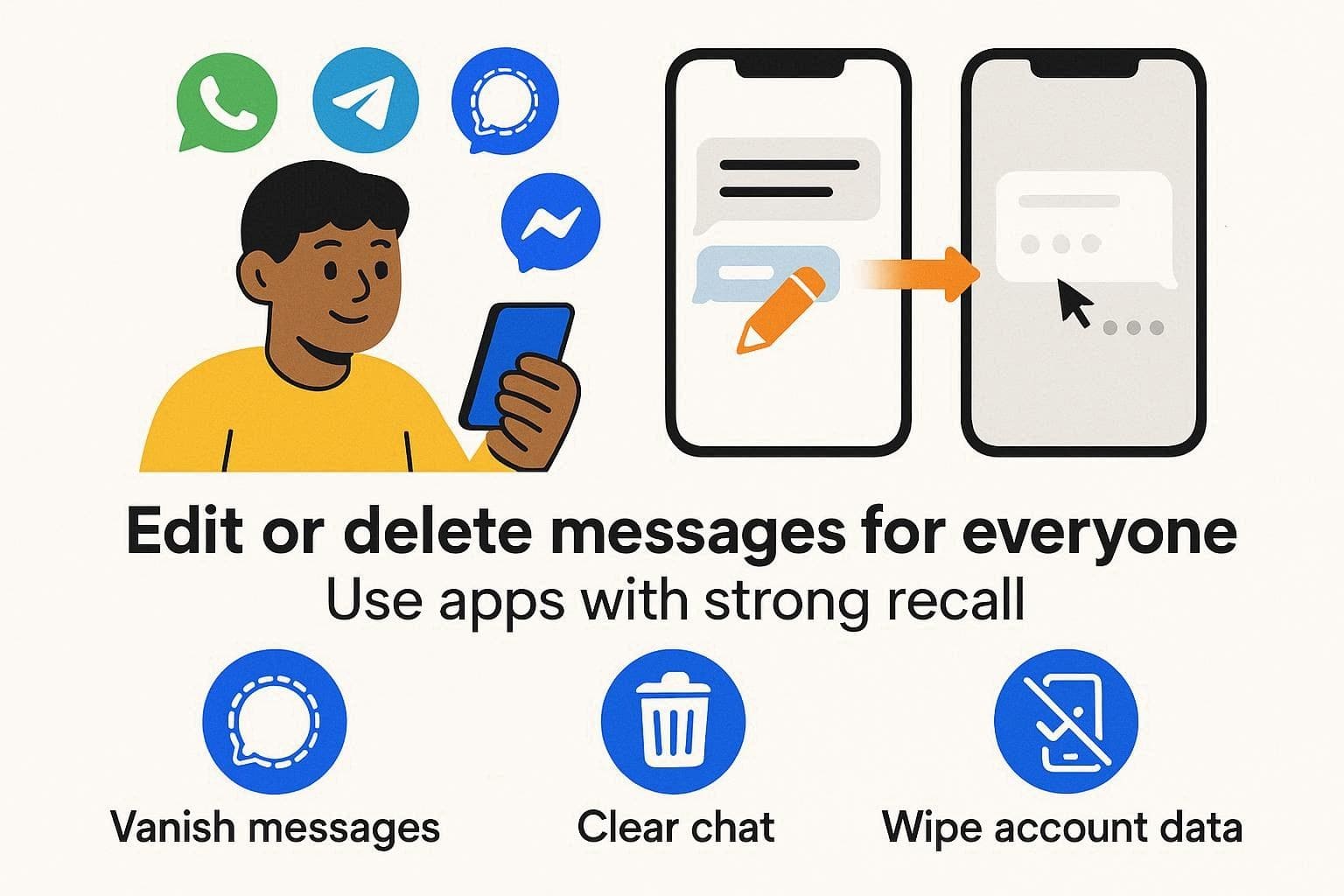
Every application enforces unique rules regarding message editing and automated deletion. If your daily conversations often require privacy or quick corrections, it is highly advisable to transition away from standard, uneditable SMS texting and rely entirely on encrypted, feature-rich platforms.
Conclusion
In summary, resolving the dilemma of how to unsend a text message on Android is entirely feasible if you are using modern protocols like Google Messages (RCS) or third-party platforms such as WhatsApp, Telegram, or Signal. While traditional SMS messages remain permanently un-recallable once sent, utilizing internet-based apps grants you the necessary tools to wipe away mistakes before they cause harm. Should you accidentally delete vital data while trying to manage your messaging history, we strongly suggest utilizing Dr.Fone – Data Recovery for a secure, selective, and stress-free data restoration experience.
FAQ
-
1. Does turning off data stop a message from being sent?
No, because a standard SMS utilizes your cellular carrier's voice/text network, not Wi-Fi or mobile data. Disabling your mobile data will only halt internet-based app chats (like WhatsApp or Messenger), while your carrier will continue to push the SMS through the cellular signal. -
2. Can I unsend a message if the other phone is currently turned off?
No. If you sent a standard SMS, the text will safely wait on the carrier's network servers and immediately deliver the moment their device powers back on. Once the SMS leaves your smartphone, it is completely out of your control, regardless of the recipient's phone status. -
3. Do mobile carriers store my deleted text messages?
Yes, many telecommunication carriers routinely keep encrypted copies or metadata logs of SMS communications for a designated period (often for legal or billing compliance) after delivery. Deleting an SMS from your Android interface clears your screen but does not erase the carrier's backend records. -
4. How long do I have to unsend a text message on Android using third-party apps?
The time limit varies wildly by application. For instance, Signal gives you 24 hours to delete a message for everyone, WhatsApp currently allows over two days, Messenger offers varying unsend windows based on updates, and Telegram famously allows you to unsend messages indefinitely with zero time restrictions.
 Add Wondershare Dr.Fone as a preferred source on Google



