Recover photos, messages, WhatsApp, and more — no backup
needed.
Recover photos, messages, WhatsApp, and more — no backup
needed.

 100% Security Verified | No Subscription Required | No Malware

 :
: 
 ChatGPT
 Perplexity
 Gemini
 Claude
 Grok
Grok
What if you've just opened a View-Once message from a client or colleague, only to realize later that it contained critical information that you forgot to note down? You tap the message again, but now it's gone, replaced with the dreaded status "Opened." On an iPhone, this feels like a dead end due to Apple's strict privacy sandboxing.
While the feature is designed for total privacy, losing important data is a setback. Therefore, one needs to know how to see view once photo again in WhatsApp on iPhone and to what extent this is possible. So, this guide explains the reality of View-Once media and how recovery tools like Dr.Fone can help.
In this article
- View Once Photo or Video Expired on iPhone — Can It Be Recovered?
- How to Recover WhatsApp View Once on iPhone: The Quickest Way

- Other Alternatives to Save Important View Once Media
- What Affects the Chances of Recovering View Once Media?
- Why Is Recovering WhatsApp View Once Media Harder on iPhone Than Android?
Part 1. View Once Photo or Video Expired on iPhone — Can It Be Recovered?
If you are wondering, can you recover a view once photo WhatsApp? It's better to assume the media is gone after you open and close it. WhatsApp is designed to disappear this media after it's opened, and users can't save, forward, screenshot, or screen record on an iPhone, unless it's audio. This is because WhatsApp says that iOS users can use the built-in screen recorder to capture audio from a view once message.
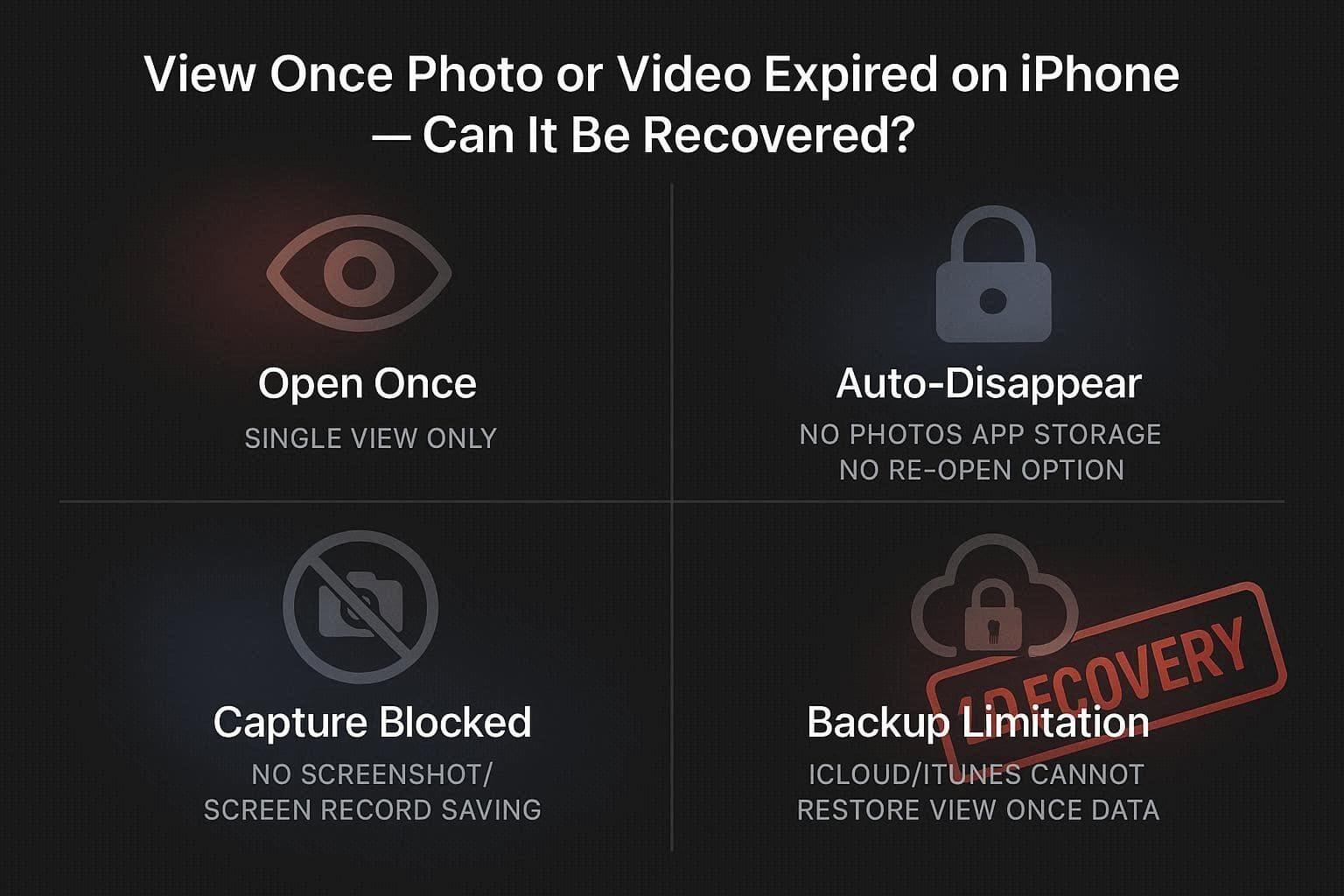
In addition, the opened photos and videos are not even saved in the Photos app, and the "Opened" message appears with no option to view again. Regarding backup, note that iCloud and iTunes backups cannot restore View Once media because WhatsApp treats it as temporary data. Hence, there is no official method to get it back once it's closed, and you have to ask the sender to resend it.
Part 2. How to Recover WhatsApp View Once on iPhone: The Quickest Way
Once cleared with the basics, if you still want to recover WhatsApp view once photo iPhone, recovery tools like Dr.Fone - Data Recovery can help. Since the tool supports iOS 26 and iPhone 17 series, you can recover View-Once media in 2-3 steps if the data has not been overwritten by new data. Users can perform local recovery, as the tool only requires QR code-based scanning to create the link.
Using the read-only scan, when the View-Once media is recovered, users can preview and selectively choose the media they want to save. In addition to View-Once, you can recover 35+ data types with this tool, making it a versatile option. Overall, it's reliable and intuitive, with separate tabs making navigation seamless for all types of users.
 Recovers data after deletion, crashes, or device damage.
- Supports photos, messages, contacts, WhatsApp, and more.
- Supports all major iPhone, iPad, and iPod models.
- Preview and recover only what you need.

Guide to Recover View-Once Media Using the Recovery Tool
If you want to know how to use this WhatsApp view once recovery app, this section has tested this tool in detail for you. Here, iPhone 17 is used to test its claims, and the detailed guide is mentioned below:
-
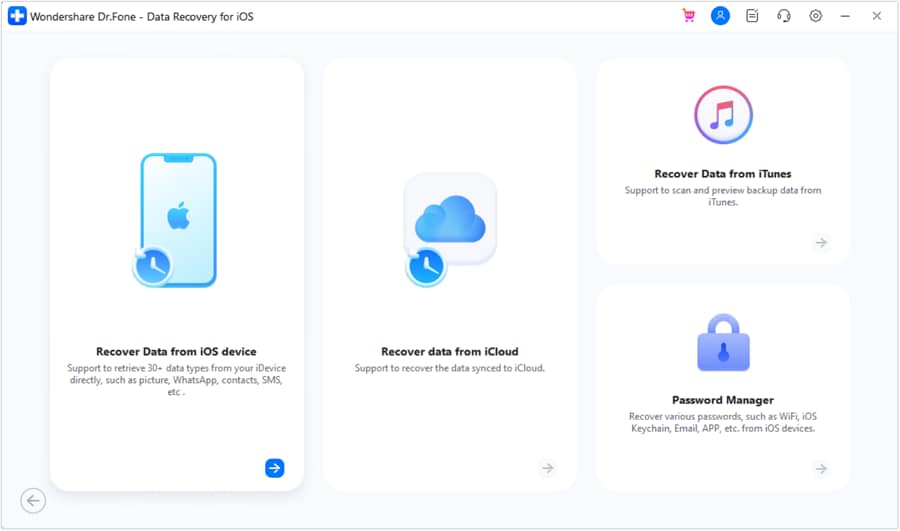
Step 1Locate the Data Recovery Tool for iOS
As you pick the Data Recovery tool for iPhone, press the "Recover WhatsApp View Once Data" option.
-
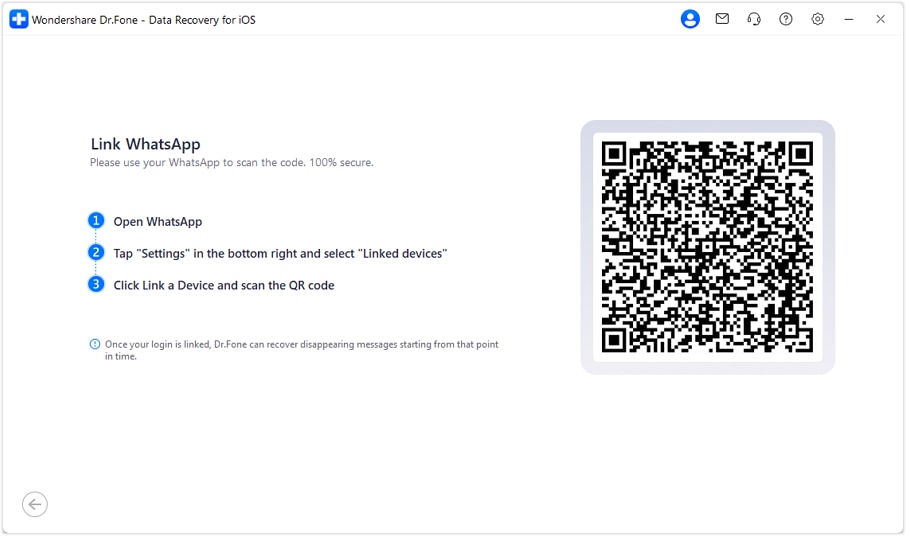
Step 2Scan the QR Code to Link iDevice WhatsApp
After that, tap on "Start Recovery" and scan the QR code to link the devices.
-
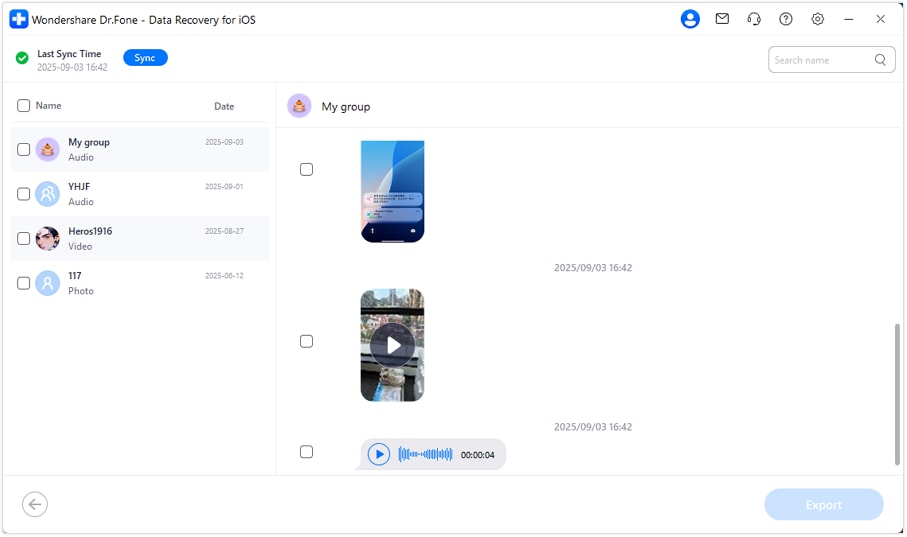
Step 3Preview & Save the Recovered View Once Media
When the tool detects and displays the View-Once media files, choose the desired ones and tap "Export."




Part 3. Other Alternatives to Save Important View Once Media
Recovery tools can help at this point, but if you still ask how to view one time photo in WhatsApp again, here are some tricks you can try:
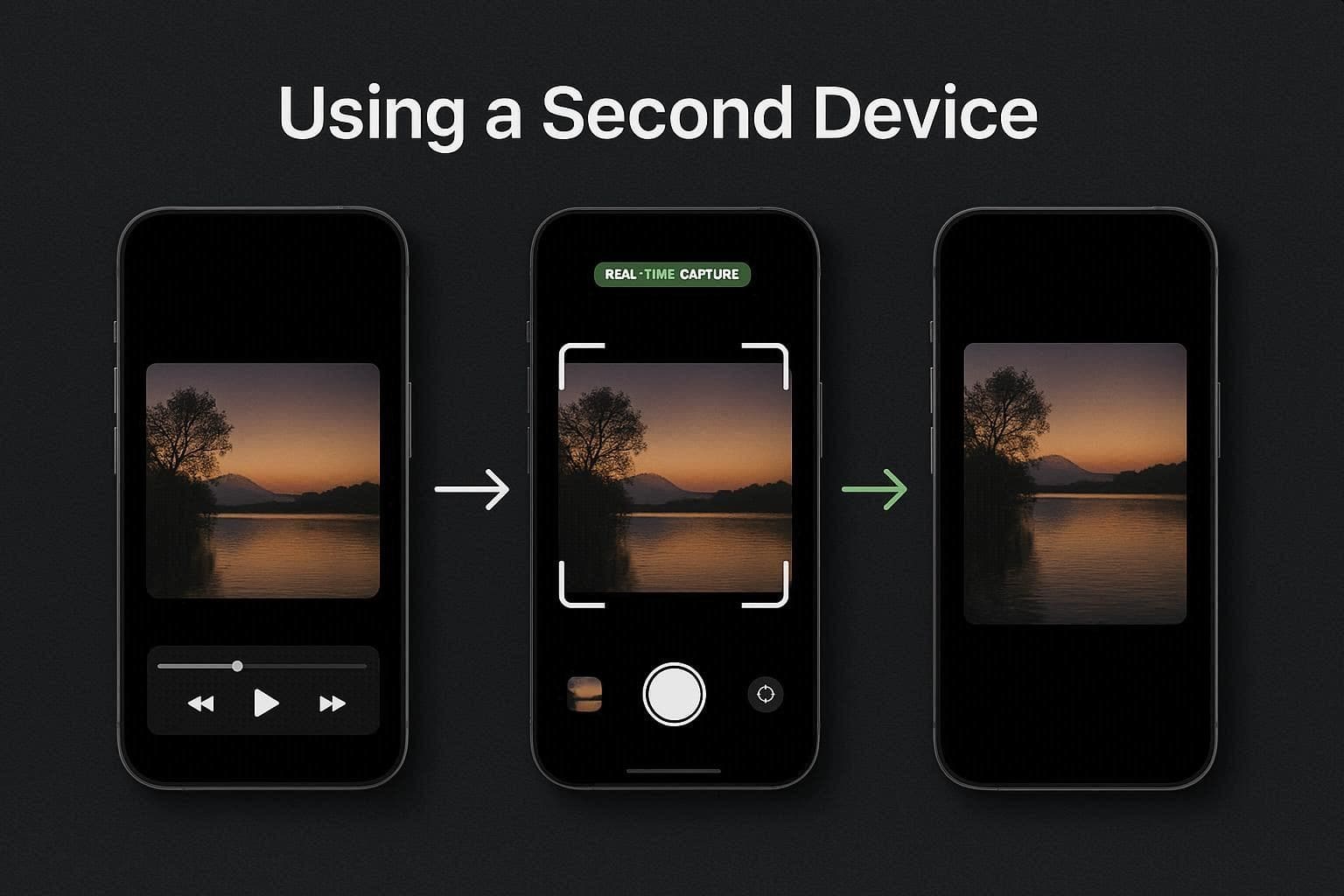
1. Using a Second Device
Use a second device, like a tablet or another phone, to save a copy of the View Once media when the main device blocks them. Simply place the phone above the target device, and as you open it, capture it immediately. Hence, this method works on any phone or platform and does not need extra tools or applications.
2. Requesting a Regular Send
This is another safe and most respectful way to keep a copy of the View Once media on your device. Regular media can be opened any time, saved to your gallery, and included in the backups, unlike View Once. Additionally, it complies with proper privacy rules, as the sender clearly agrees to share a permanent copy.
Part 4. What Affects the Chances of Recovering View Once Media?
Recovery is possible only in certain situations. Success is never guaranteed.
Several factors determine whether WhatsApp View Once media can still be recovered on iPhone.
1. How Long Ago the Media Was Opened
The longer you wait, the lower the recovery chance becomes. iOS continuously manages temporary storage and may automatically remove remaining fragments over time.
If possible, attempt recovery immediately after realizing the media is gone.
2. Whether New Data Has Overwritten the Storage
After opening the View Once file, continued phone usage can overwrite the storage sectors where temporary fragments once existed.
Activities that may reduce recovery chances include:
- Recording videos
- Downloading apps
- Taking photos
- Installing updates
- Heavy social media usage
Once overwritten, the original fragments are usually unrecoverable.
3. Cache Cleanup Processes
WhatsApp updates, iOS storage optimization, and cleanup operations may erase temporary data automatically in the background.
This is why some users can recover recent media while others cannot.
4. Available Remaining Fragments
In some cases, recovery software may only detect:
- Partial images
- Thumbnails
- Metadata
- Corrupted previews
instead of the complete original file.
5. iPhone Storage Optimization Settings
Features like "Optimize iPhone Storage" may aggressively manage temporary data and reduce the amount of recoverable content remaining on the device.
Part 5. Why Is Recovering WhatsApp View Once Media Harder on iPhone Than Android?
Many online View Once recovery methods are Android-only. That is because Android and iPhone manage app storage very differently.
How WhatsApp Handles View Once Media
When a View Once file is opened, WhatsApp temporarily processes the media for viewing. After the session ends, the app attempts to remove normal access to the file.
On some Android devices, temporary cache remnants may remain accessible briefly through file managers or recovery utilities.
iPhone works differently.
Apple's iOS Sandbox Restrictions
Apple uses a strict sandbox security system where each app operates inside an isolated storage environment.
This prevents:
- File managers from browsing WhatsApp internal storage
- Other apps from accessing temporary WhatsApp data
- Direct cache extraction in most situations
As a result, View Once recovery on iPhone is significantly harder than on Android.
Why iCloud and iTunes Backups Usually Don't Restore View Once Files
Many users expect iCloud or iTunes backups to restore disappeared media later. Unfortunately, opened View Once content is usually excluded from backup retention because WhatsApp treats it as temporary private media.
Even after restoring a backup, users often only see:
- The chat history
- The "Opened" label
- No recoverable media file
Can Jailbreaking Help?
Some users search for jailbreak-based recovery methods to access hidden app storage. While jailbreaking may expose additional directories, it also introduces serious risks, including:
- Security vulnerabilities
- Device instability
- WhatsApp issues
- Warranty concerns
- Malware exposure
For most users, professional recovery tools are a much safer option than modifying iOS itself.
Conclusion
Summing up, many iOS users want to know how to see view once photo again in WhatsApp, since Apple and WhatsApp have strict privacy policies. While the standard backup option won't work, this guide has explained how recovery tools like Dr.Fone - Data Recovery can help while keeping the privacy terms intact.
To be on the safe side, pair the recovery tool with a secondary device to photograph the important data. Otherwise, request the sender; if your friend won't send the media, use Dr.Fone to selectively recover it.
FAQs
-
Can I take a screenshot of a View Once photo on iPhone if I'm quick enough?
No, WhatsApp has implemented "Screenshot Blocking" for all the View Once media files. If you attempt to take the screenshot or use the native iOS screen recorder, the resulting file will only show a black screen or security notification. -
Can the sender tell if I recovered their View Once photo?
If you use an external method, such as a second device or recovery tools like Dr.Fone, the sender will not receive any notification. In fact, they will only see the standard "Opened" message. -
Is there a time limit to recover unopened View Once media?
Yes, according to WhatsApp, if you haven't opened a View Once message within 14 days of its send date, it will automatically expire in the chat. Hence, this will make it much harder to retrieve, even with the specialized software.
 Add Wondershare Dr.Fone as a preferred source on Google