Recover photos, messages, WhatsApp, and more — no backup
needed.
Recover photos, messages, WhatsApp, and more — no backup
needed.

 100% Security Verified | No Subscription Required | No Malware

 :
: 
 ChatGPT
 Perplexity
 Gemini
 Claude
 Grok
Grok
Accidentally deleting your precious photos – family, travel, work – can be a real nightmare. Immediately after that, a trustworthy recovery tool is what you should be looking for, right?
DiskDigger Photo Recovery is one of the best-known data recovery apps. It is often referenced in the list of apps that Android users download for the quickest and simplest way to recover deleted photos. This review discusses the key features of DiskDigger, performance of recovery, pricing, advantages and disadvantages, and comparison with other programs. Wondershare Dr.Fone may be an excellent option if you want a more powerful tool.
This guide will be helpful not only for Android and Windows users but also for those who are on a tight budget and need a reliable method to restore lost pictures. Let's explore further!
In this article
- What is DiskDigger? (Quick Overview)
- How DiskDigger Works — Scan Modes Explained
- Performance Review — Does DiskDigger Actually Work?
- A: What It Does Well
- B: Real Limitations & Common Issues
- C: What Affects Recovery Success
- D. Final Verdict on Performance
- Who should (and shouldn't) use Diskdigger?
- Bonus Section: Dr.Fone — The Best Diskdigger Alternative for Android

Part 1. What is DiskDigger? (Quick Overview)
DiskDigger is a very simple and light data recovery software tool that was made by Defiant Technologies, LLC. Even though it was a single developer project, it has gained huge popularity because of its simplicity, dependability and frequent updates. While it cannot compete with large and enterprise-supported data recovery tools, it is still a good and trusted solution to restore deleted pictures and files.
DiskDigger data recovery software has two primary versions:
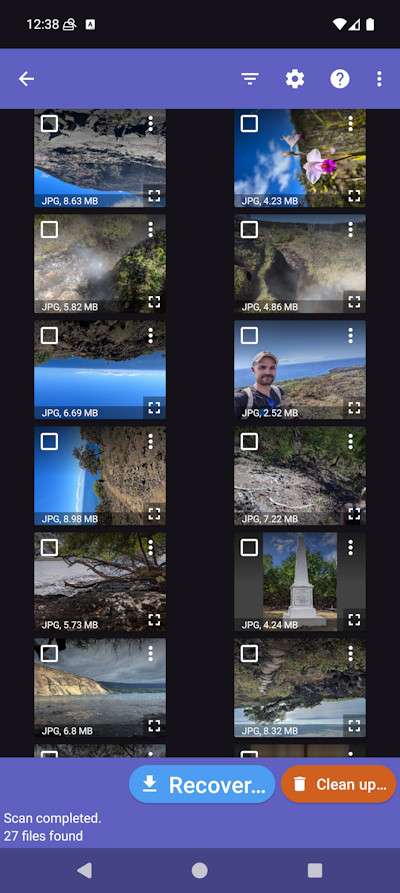
- DiskDigger for Android: A disk digger photo recovery app mainly geared towards photo and video recovery. It has the capability of performing both simple and deep scans.
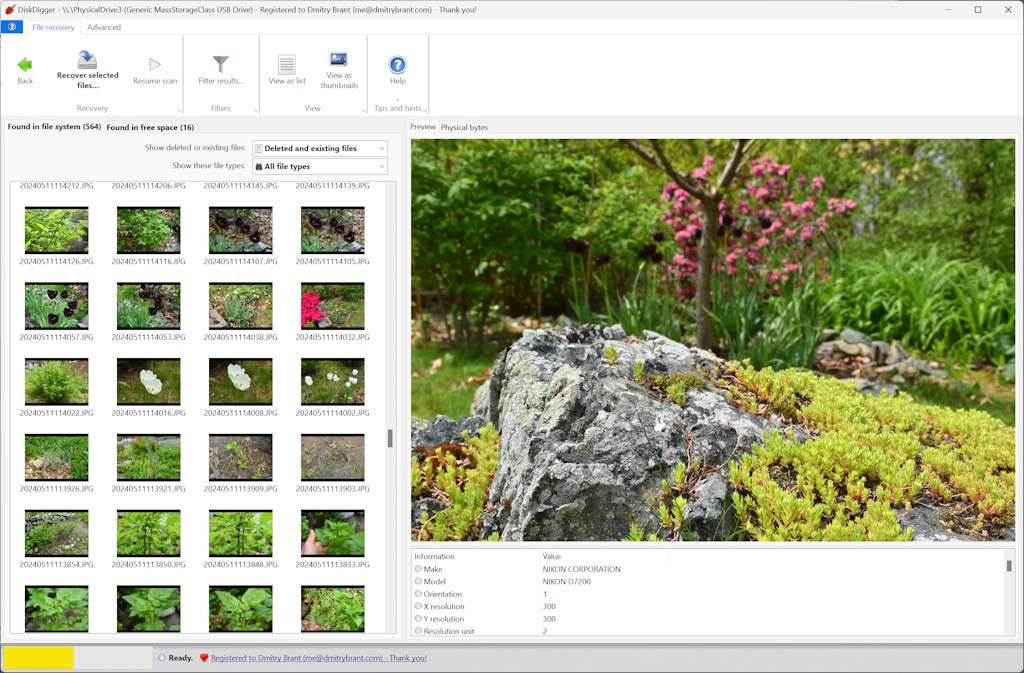
- DiskDigger for Windows: A computer application that can recover photos, documents, videos, and most file types from internal drives, USBs, SD cards, and external storage devices.
The tool can easily be downloaded from the Google Play Store, and the official DiskDigger website. The Windows software can be used with any Windows version, and the most recent Beta version even allows it to be used on Linux and macOS, thus making it even more adaptable.
Key Features of DiskDigger
- A unified deep recovery scan: This is a hybrid of scanning the file system and deep examination of the free space to recover deleted photos, videos, documents, etc.
- Cross-platform availability: Compatible with all Windows versions, Beta builds can also run on Linux and macOS. The Android app allows both basic and full scans.
- Powerful Android photo & video recovery: Deleted photos can be recovered without root (limited), whereas root access on the device is needed for deeper scans and recovery of a wider range of files.
- Compatible with all major storage types: Besides internal drives, SD cards, USB sticks, and camera cards, the software can even recover data from external drives and disk images of the types VHDX/VDI.
- Vast file system compatibility: Besides those most used by Windows, Linux and macOS, the program can open and recover data from Btrfs, F2FS, ReFS, ZFS, HFS/HFS+, NTFS, FAT, exFAT, and many legacy Unix file systems.
- Better recognition of various file types: Updated heuristics for image and video file types like JPG, MP4, MPO, and even RAW camera formats (CR3, ARW, NEF, SR2).
- Preview and filtering features: You can filter by type, size, and location; preview photos and extract metadata from images and videos.
Free vs Pro version
| Feature | Free Version | Pro / Personal License |
|---|---|---|
| Recover photos & videos | Limited | Full |
| Recover documents & other file types | No | Yes |
| Deep scanning & full file recovery | Limited | Yes |
| Save recovered files directly | Limited options | Unlimited |
| Price | Free | $14.99 (personal license) |
| Support & updates | Basic | Full, ongoing updates |
Part 2. How DiskDigger Works — Scan Modes Explained
DiskDigger data recovery software comes with dedicated scanning modes for both Android as well as Windows, customized according to the platform and user's technical access (rooted vs non-rooted on Android).
Android scan modes
Basic scan ("Dig Deep")
- Works on any phone, whether rooted or not.
- Only scans the file system for the photos and videos recently deleted.
- Quick and easy; perfect when you just want to recover a file or two.
- In non-rooted mode, you can only recover low-resolution files; to get full-resolution files, your device needs to be rooted.
Full scan ("Dig Deeper")
- You are going to need a rooted phone if you want to have access to all the memory partitions.
- With this method, you can scan your internal memory (/data) and your SD cards (/mnt/sdcard) as well.
- You can even use this option to recover files of any type, including documents and RAW camera formats.
- It even lets you upload your recovered files via FTP.
- There is a cleanup section as well: delete permanently and wipe free space to make sure your deleted files will not be recoverable by others in the future.
Windows scan modes
DiskDigger for Windows has a single powerful scanning engine, but it still has some differences:
Filesystem scan aware ("Dig Deep" + "Dig Deeper combined")
- One-time scanning of both the filesystem structures and the unallocated/free space.
- It can recover deleted files from hard drives, USB drives, memory cards, and disk images.
- Works with a lot of file systems: NTFS, FAT, exFAT, ReFS, HFS+, ZFS, Btrfs, F2FS, UFS, Minix, Ultrix, and virtual disks (VDI/VHDX).
- Finding lost metadata and fragmented files for even more thorough recovery.
Part 3. Performance Review — Does DiskDigger Actually Work?
A. What It Does Well
DiskDigger is a powerful file recovery software that gets the job done albeit at different levels based on the platform and the type of files you want to recover. The software stands out in recovering photos and videos on Android platforms, especially on rooted devices.
On the other hand, Windows users experience efficient documents, video, and system file recovery. It handles a huge number of file types including raw camera files like CR2, SR2, NEF, ARW, and standard images such as JPG and PNG. On Windows, the single scan that scans both filesystem structures and unallocated space helps DiskDigger recover files from formatted or corrupted drives more effectively, and it also reconstructs fragmented files by parsing metadata.
B: Real Limitations & Common Issues
Here are few limitations & common issues of DiskDigger:
Android limitations:
- Non-rooted devices can only recover lower-resolution photos and videos; full-resolution recovery requires root access.
- Recovery of non-media files (documents, archives) is limited to rooted devices.
- Wiping free space or cleaning up files is experimental and may leave traces due to wear-leveling in flash memory.
- File recovery may display existing or cached files, requiring careful filtering to find actual deleted files.
Windows limitations:
- Recovery depends heavily on disk state: TRIM-enabled SSDs or heavily overwritten disks may limit success.
- Very large disks may slow down scan speed, though the unified scan reduces this compared to older versions.
C: What Affects Recovery Success
Recovery success with DiskDigger depends on multiple factors including device type, rooting status, file type, storage condition, and how recent the deletion is. Android users with rooted devices will get more full resolution files, however, the non-rooted users will be limited. Windows users usually get better results from healthy drives and supported file systems; however, TRIM-enabled SSDs or data that are overwritten reduce recovery rates.
D. Final Verdict on Performance
DiskDigger is a good option to recover photos and some other files at a basic level, but it has limitations that you should be aware of. It gets a fair assessment for performance which can also be seen in the scores given by users: 3.1/5 on Google Play Store and 2.7/5 on Amazon. If you only want to recover some files it will work well enough but if you are looking for a full recovery of all files you won't be able to rely on it at 100%.
Part 4. Who should (and shouldn't) use Diskdigger?
DiskDigger is a great choice if you:
- Have a rooted Android device, allowing you to access the entire memory partitions and thus recover better.
- You mainly want to recover photos in the usual formats like JPG, CR2, or SRF.
- You have very limited budget and are looking for a simple, low-cost recovery tool.
- You are a Windows user and require trustworthy recovery of FAT32 drives or memory cards.
Consider an alternative if you:
- Have a non-rooted device and want a full deep scan for videos or other files.
- You are working with iOS or macOS data recovery, which is not supported by DiskDigger.
- You are looking for a higher overall success rate, especially for less common or large files.
- You require extensive file type support other than photos, for example, complicated documents, system files, or archives.
Bonus Section: Dr.Fone — The Best Diskdigger Alternative for Android
For more advanced, no-root Android recovery free from DiskDigger's restrictions, Dr.Fone - Data Recovery is the ideal answer. Intended for recovering deleted files from any Android phone, it recognizes over 6,000 models including Samsung, Xiaomi, OPPO, Vivo, Huawei, OnePlus, and others.
 Scan Android phones and tablets directly.
- Preview and recover only what you want.
- Supports WhatsApp, photos, videos, contacts, and more.
- Works with 6000+ Android devices.

How to retrieve Android data using Dr.Fone in 4 easy steps
Step 1Start Dr.Fone and pick Android recovery
Launch Wondershare Dr.Fone on your PC, navigate to Toolbox > Data recovery, and set Android as your device type. Connect your phone to the PC using a USB cable and then let Dr.Fone recognize it.

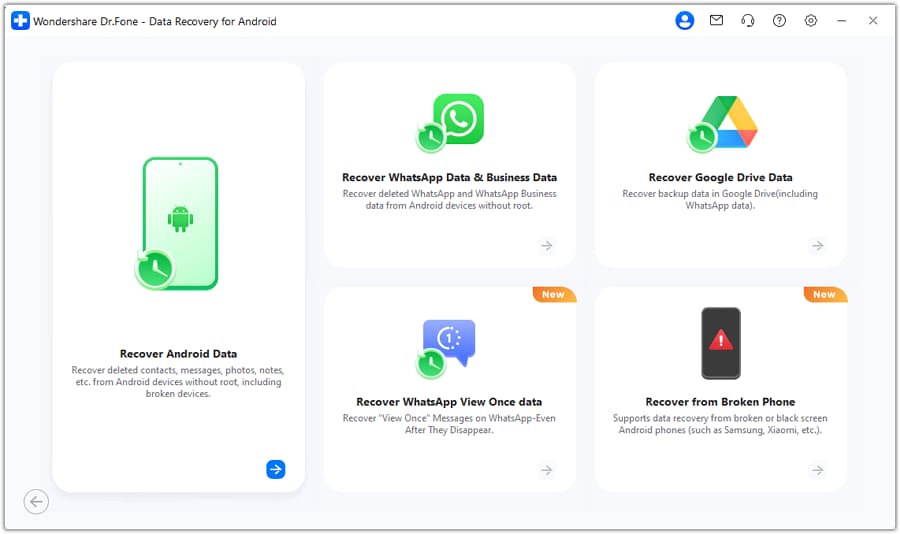
Step 2Pick the recovery by Android feature
Find and mark on the next page the option Recover Android Data, which is one of the features.
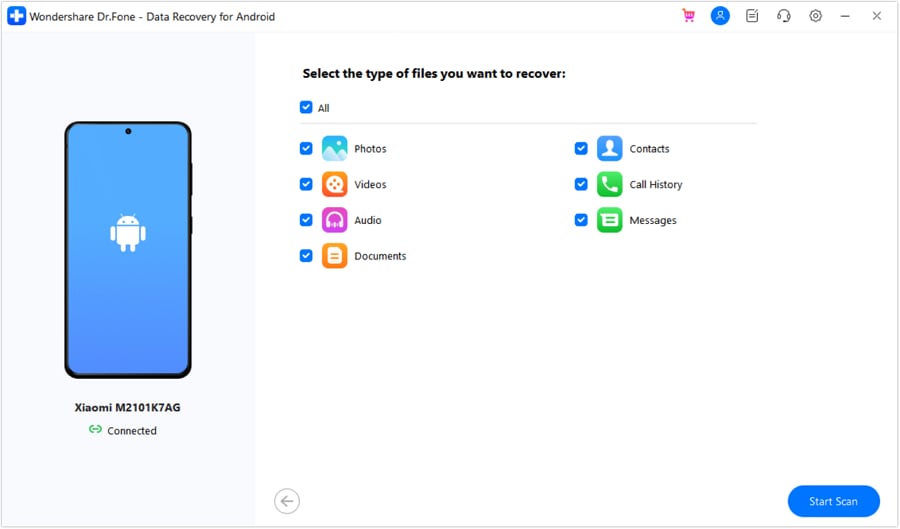
Step 3Choose Data
Select from the categories listed those that correspond to the types of files to be restored, pictures, movies, communications, phonebook, etc. Press Start Scan to initiate the scanning.
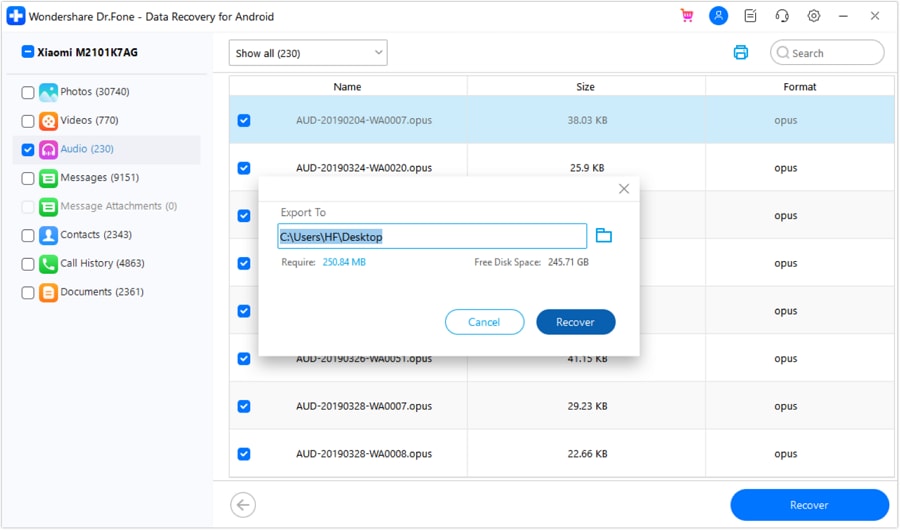
Step 4Go through and sift the recovery results
Look at the documents recovered. Quickly locate certain file classes or those deleted only with the help of filters on top. Pick out the files. Hit Recover. Choose a folder to store. Click OK. Dr.Fone will get your chosen data back to the computer.


Conclusion
DiskDigger data recovery is a great and inexpensive software recovery tool for those who mainly want to recover deleted photos from their Android phones or carry out simple file recovery on their Windows PCs. As it has a small footprint, uses signature-based scanning, and can work with different image file types, it is highly suitable for quick, simple recovery tasks, particularly on rooted devices.
Those who want a much higher rate of successful recovery, more sophisticated handling of file systems, or recovery on iOS/macOS should consider Dr.Fone – Data Recovery is a complete tool.
FAQ
-
Is DiskDigger safe to use?
DiskDigger is completely free from malware. Defiant Technologies offers Windows and Android versions as genuine software products. However, we recommend that you get the app from the official website or Google Play to be 100% sure to have the original and safe one. -
Can DiskDigger recover permanently deleted photos?
It is possible, but it cannot guarantee 100%. Many things come into play, such as whether the data blocks have been overwritten or not, if the device is rooted, and the age of the deletion.• Rooted Devices: Greater likelihood of success• Non-rooted Devices: Limited to simple scanning and may not be capable of retrieving deeply deleted files -
Why are recovered photos blurry?
Usually, recovering images that are blurry or that look like a lower resolution version is because only some data fragments are left on the storage. If the original image has been overwritten, DiskDigger might be able to "carve" small preview thumbnails but not the full-resolution file.
 Add Wondershare Dr.Fone as a preferred source on Google