Recover photos, messages, WhatsApp, and more — no backup
needed.
Recover photos, messages, WhatsApp, and more — no backup
needed.

 100% Security Verified | No Subscription Required | No Malware

 :
: 
 ChatGPT
 Perplexity
 Gemini
 Claude
 Grok
Grok
What if you have just reinstalled WhatsApp or switched to a new iPhone? Out of nowhere, you are staring at a screen asking for a 6-digit PIN you haven't used in months. In this situation, you try every possible combination, but nothing works. You're locked out, and the realization hits that WhatsApp doesn't use a standard password you can easily reset with any "Forgot Password" button.
This frustrating lockout situation is mainly due to Two-Step verification, a security feature that can be a roadblock in some cases. So, if you're wondering how to reset WhatsApp password on iPhone, this guide explains the rules for the 7-day period and how to regain access to your account. For your safety, learn how tools like Dr.Fone, a password manager and data recovery tool, can help.
In this article
- Understanding WhatsApp Password and Security Setup
- How to Reset WhatsApp Two-Step Verification PIN on iPhone(General Access Issue)
- Forgot WhatsApp PIN Without Email – What Happens?
- What to Do If You Forgot Your WhatsApp Password Completely

- Pro Tip. Try WhatsApp Data Recovery with Dr.Fone - Data Recovery (iOS)
Part 1. Understanding WhatsApp Password and Security Setup
Regarding the forgot WhatsApp password, note that WhatsApp does not use a standard username and password. Instead, it uses your phone number to sign up, and you verify it with a 6-digit SMS code, so you do not need to remember any password. This makes it simple, but also creates risks because anyone who gets your phone number and SMS code can try to access your account.
To improve safety, WhatsApp offers two-step verification, which adds a 6-digit PIN that you set yourself. So, this PIN is needed when you log in on a new device and helps protect your account even if someone steals your SMS code.
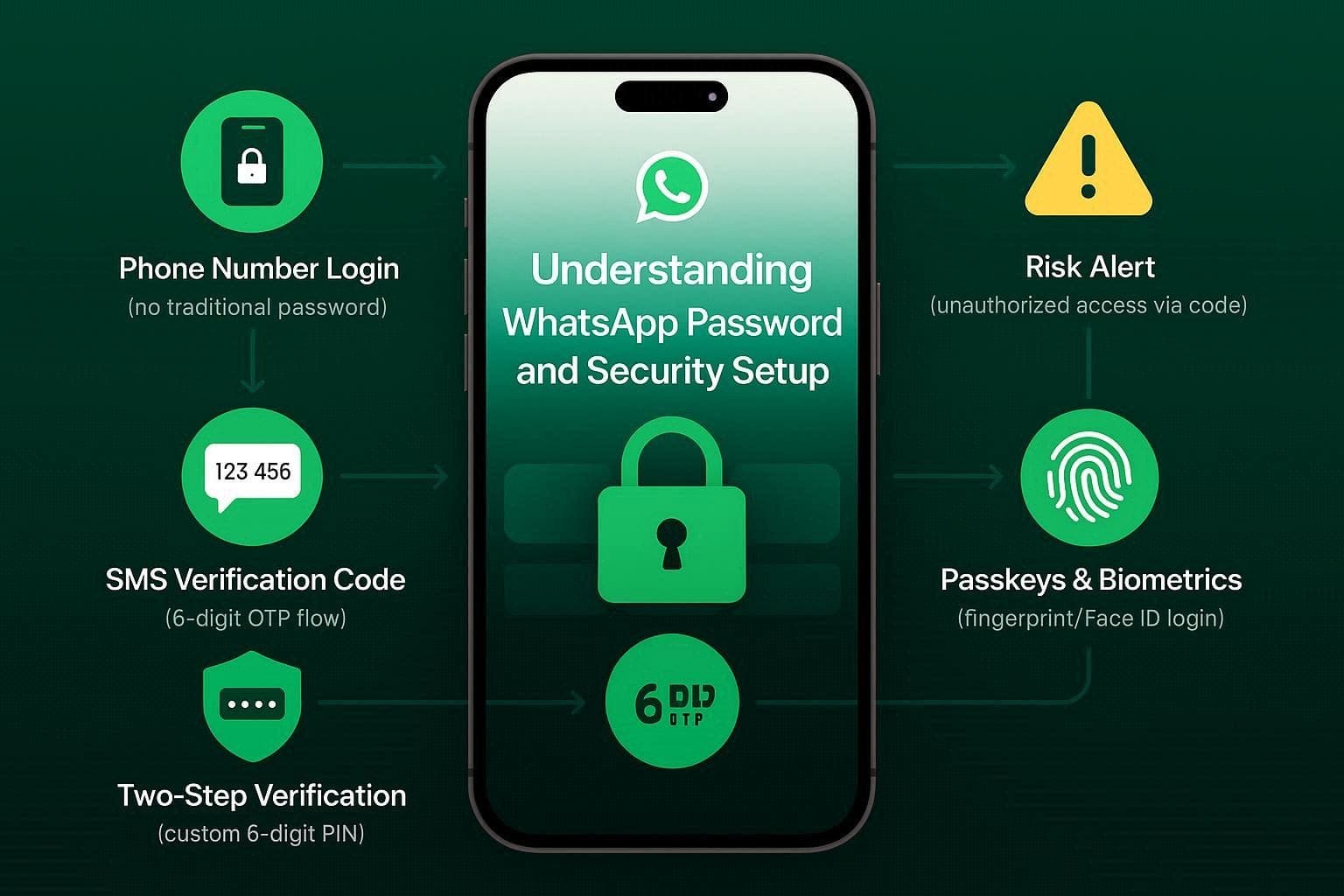

WhatsApp forgot PIN 7 days wait Explained
As per WhatsApp Help Center, you can't reset the PIN for 7 days if you didn't add an email address or can't access it. Likewise, you may face issues if you receive the code by email instead of SMS, or if you can't receive OTPs on your phone number. During this period, no one can access your account. When it ends, reset WhatsApp two-step verification PIN via the "Forgot PIN? > Reset Account" option.
Part 2. How to Reset WhatsApp Two-Step Verification PIN on iPhone(General Access Issue)
If you wonder how to reset WhatsApp password, you are not alone. Many users on Reddit have stated the same issue, saying that:

I forgot my WhatsApp end-to-end encryption password, and now I can't restore my chat backup, even after contacting support. Has anyone faced this? Is there any way to recover it, or do I have to start fresh? What should I do to avoid this next time?
- r/whatsapp
To resolve this issue, review the provided methods and learn how to reset the PIN using the email address and SIM OTP.
Method 1. Reset PIN with Email Address (Immediate Reset)
Using this method avoids the 7-day-long wait and keeps all your chat, media, and settings data safe. Additionally, this simple and safe way makes it easy to switch devices or restore your account without any loss. To know how it can be done in a few simple taps, review the mentioned guide:
-
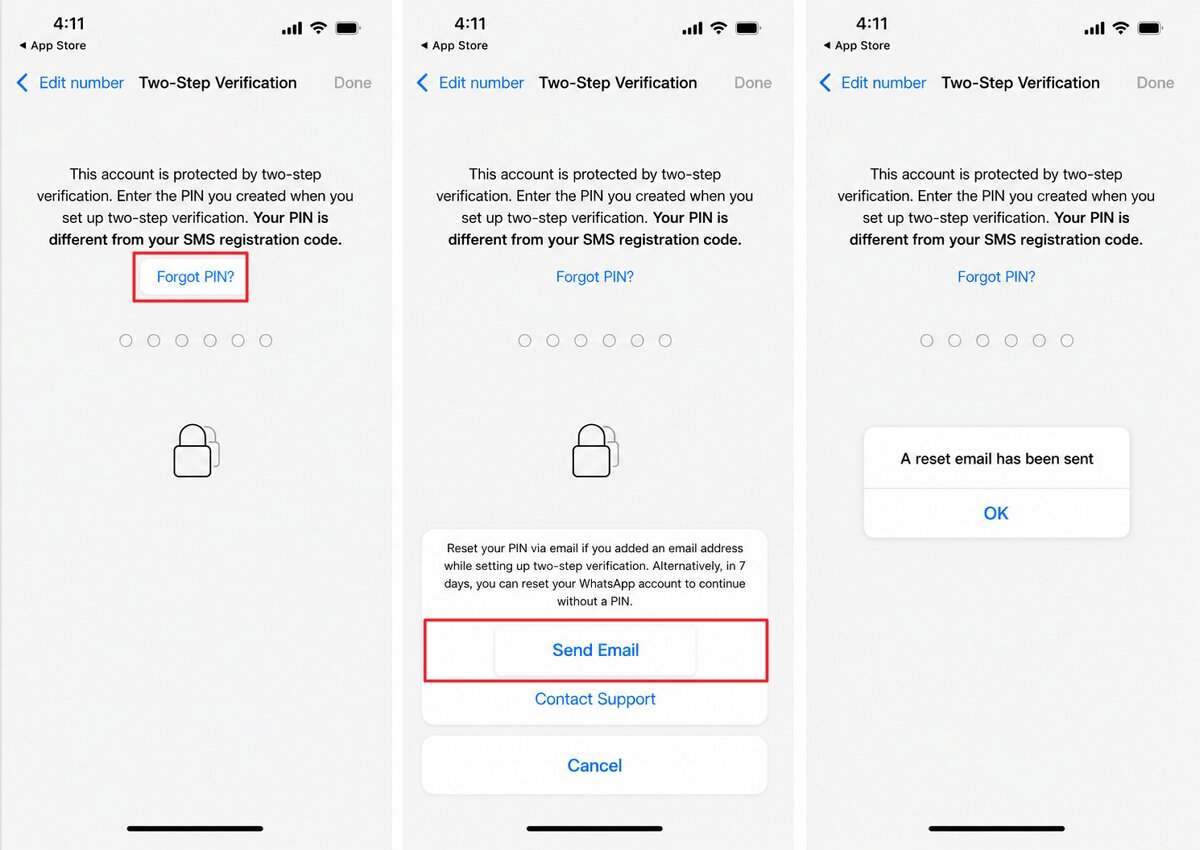
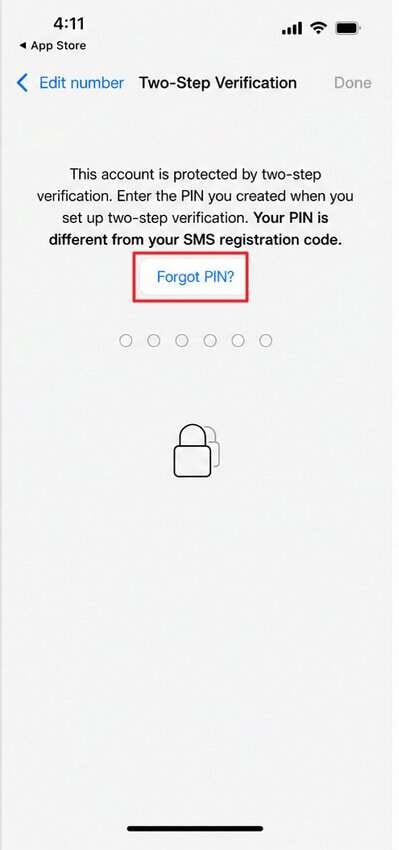
Step 1 Tap the "Forget PIN" when prompted to Two-Step Verification and choose the "Send Email" option.
-
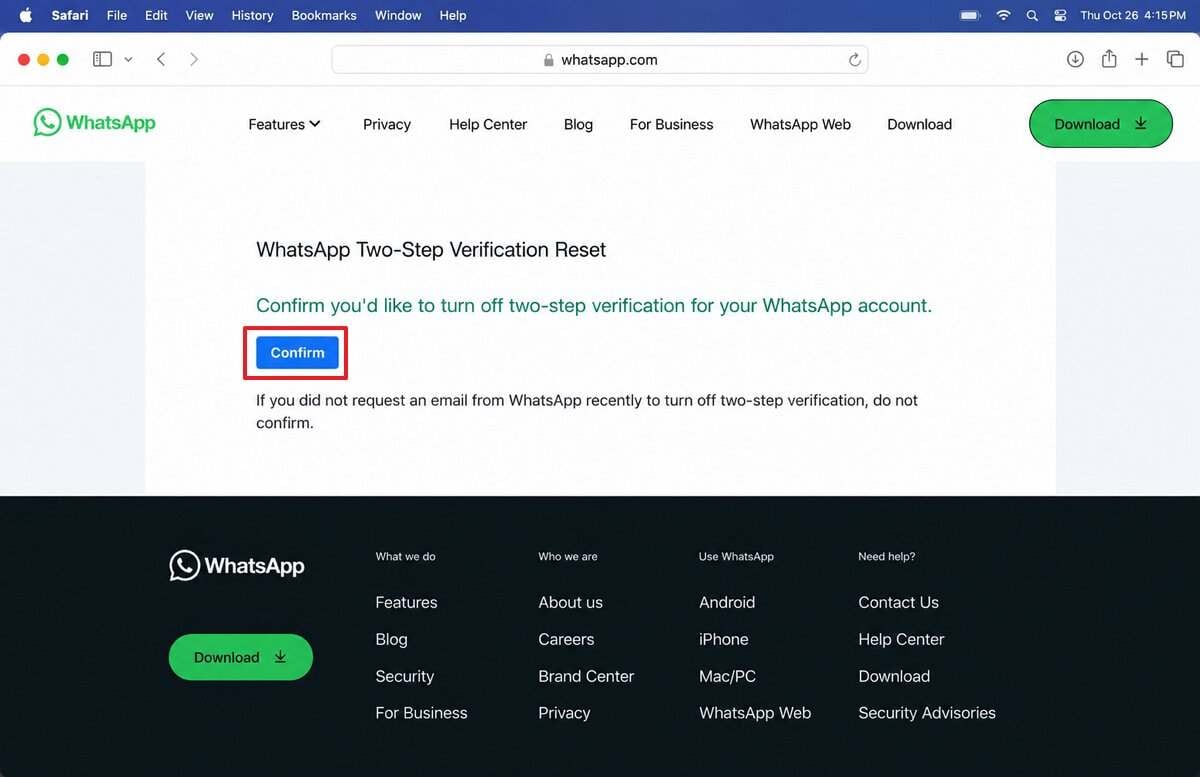
Step 2 Now, check your Gmail, tap the reset link, and press the "Confirm" button to verify the reset request.
Follow the on-screen instructions as you head back to WhatsApp and login into your account without any PIN.
Method 2. Reset PIN with SMS OTP (Alternative for Email Registration)
If you signed up with email instead of SMS, you can still reset your WhatsApp PIN using an SMS code. SMS OTP serves as a backup for resetting your WhatsApp PIN if you can't access your email. Additionally, it allows instant reset without a 7-day wait for WhatsApp forgot PIN 7 days wait and keeps all data safe. Since it works even with basic network coverage, here is how you can use it to rest PIN:
Instructions. When you receive the Two-Step verification prompt, select the "Forget PIN" button, then choose the "Send Code" option. After that, enter the OTP you received by phone and create a new PIN to confirm it.
Part 3. Forgot WhatsApp PIN Without Email – What Happens?
For the WhatsApp forgot PIN no email situation, there comes the 7-day wait if you haven't added it or can't access it. During this time, your account stays locked, and you cannot send messages or use WhatsApp on any device. Since there is no way to skip or reduce the wait, you get the reset-your-account option after 7 days.
This method deletes all chats that were not backed up, and you must set up WhatsApp again with the same number. Instead, only data saved to the cloud or media already stored on the iPhone can be recovered after the rest.
Instructions: Tap the "Forget PIN" option, and WhatsApp will inform you to wait for 7 days. After this period, choose the "Forget PIN" option again, then select "Reset Account" to set up Two-Step verification with a new PIN.
Part 4. What to Do If You Forgot Your WhatsApp Password Completely
While learning how to reset WhatsApp password, if the given method fails or you don't want to reset the device, there are workarounds you can try, as mentioned:
Method 1. Contact WhatsApp Support (Limited Success)
Contacting WhatsApp Support gives you an official, safe way to report PIN or account issues and helps you avoid scams or fake recovery tools. It may not always bypass the 7-day wait, but it creates a support record and can help in special cases like hacking, SIM fraud, or technical errors. Furthermore, it shows how much time remains in the wait period and explains what will happen to your data.
Method 2. Use Dr.Fone - Password Manager for Account and Password Access
There is a chance that you saved the PIN in a password management app but forgot about it. Even though WhatsApp does not use a normal password, tools like Dr.Fone - Password Manager can help. Such options can recover saved credentials, such as email, Apple ID, and other accounts linked to WhatsApp recovery, in 2-3 simple steps.
There, you can filter the passcodes from the list and export them to CSV to save them elsewhere. Overall, the separate tabs for each tool make navigation seamless, and the tool needs no jailbreaking to view stored network credentials.




Pro Tip. Try WhatsApp Data Recovery with Dr.Fone - Data Recovery (iOS)
As an iOS user, let's say you tried to reset the account after WhatsApp forgot PIN no email situation, and wiped the data, but want it back. Here, recovery tools like Dr.Fone - Data Recovery allow you to recover photos, messages, videos, and WhatsApp data. The tool supports OS 26 & iPhone 17 Series and offers a local recovery option, allowing users to decide which data to keep or delete.
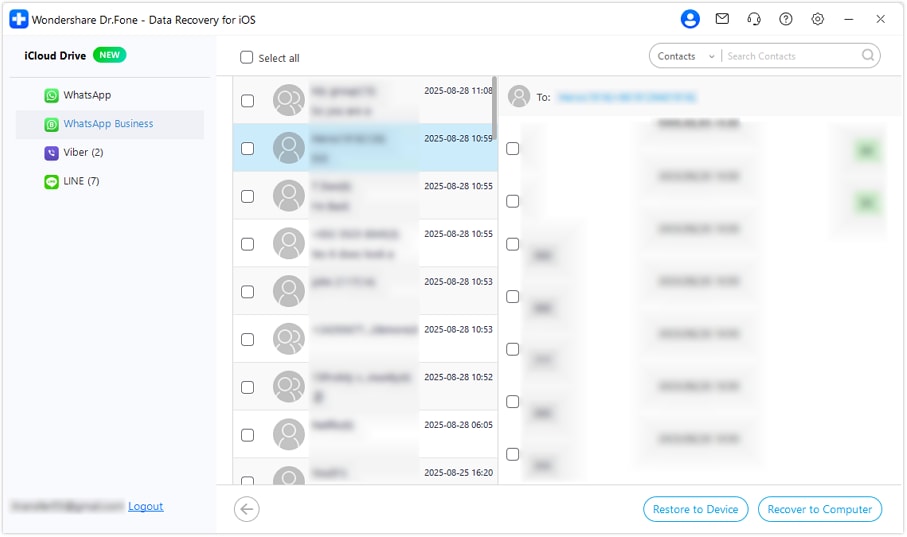
Furthermore, users can also use it to recover iTunes backups, iCloud-synced data, and iCloud Drive files in 2-3 simple steps. Unlike other recovery options, the tool is intuitive and comes with fully guided steps for beginners. Dr.Fone only requires you to log in to iCloud and enter the verification code to retrieve WhatsApp or WhatsApp Business data, which you can save to the device or computer later.
 Recovers data after deletion, crashes, or device damage.
- Supports photos, messages, contacts, WhatsApp, and more.
- Supports all major iPhone, iPad, and iPod models.
- Preview and recover only what you need.

Guide to Recover the Deleted WhatsApp & WhatsApp Business Data
While learning reset WhatsApp two-step verification PIN, it's important to understand how effective recovery tools can be. To test that, this section has tested its usage to help you determine the success rate, and a guide is mentioned ahead:
-
Step 1 Locate the Recovery tool for iOS on Dr.Fone
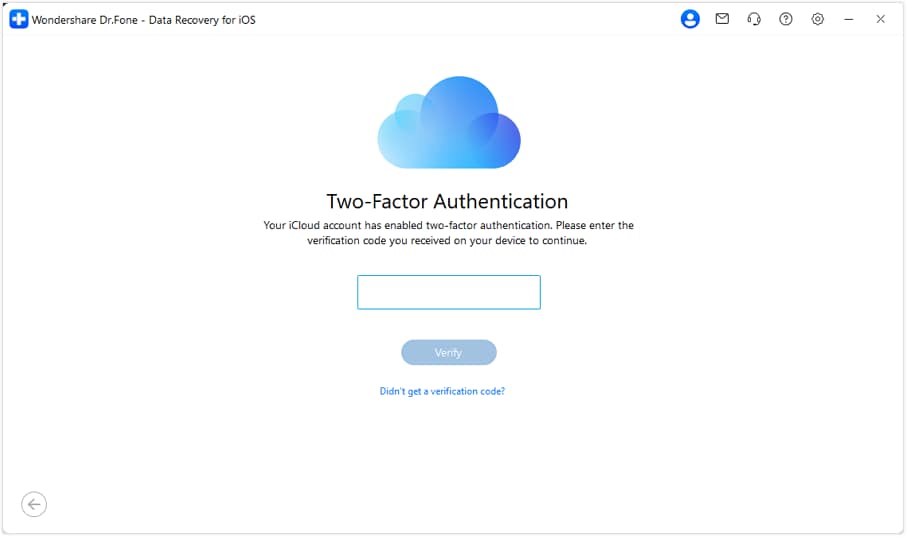
In the Data Recovery tool for iOS, select the "Recover WhatsApp Data" option, and the tool will start extracting information from iCloud Drive. When asked, add the iCloud credentials and complete the two-factor authentication by pressing the "Verify" button.
-
Step 2 Choose WhatsApp or WhatsApp Business
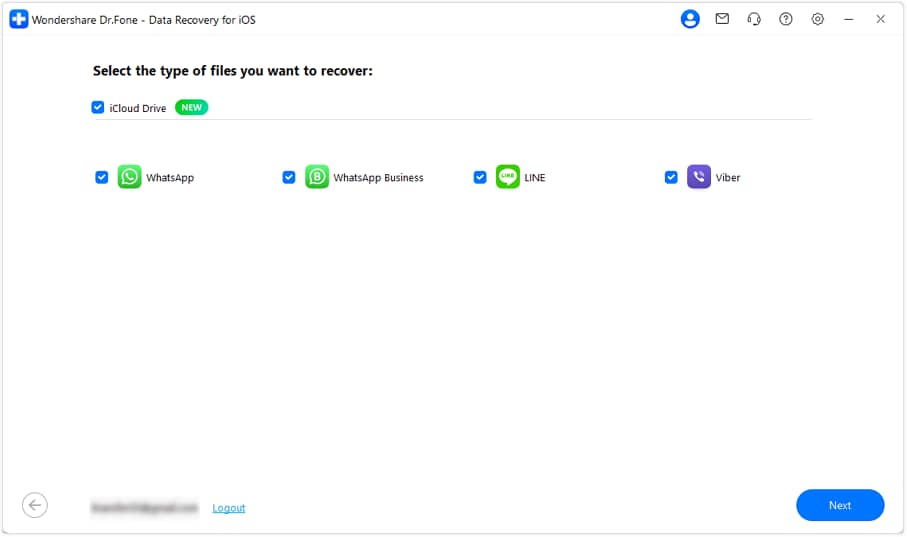
After that, select the WhatsApp or WhatsApp Business chat data types and click the "Next" button.
-
Step 3 Download & Filter the Chats After Recovery
As the tool starts downloading the backup files from iCloud, tap the "Download" button next to the backup you want to recover. Insert the country code and phone number of the WhatsApp account and choose the "Verify" button to add the received code. Finally, filter the chats you want to keep and pick the given export options.
Conclusion
Many users want to know how to reset WhatsApp password on iPhone, and it's seamless if you have an email linked to your account. If not, this guide has explained the 7-day wait set by WhatsApp and has introduced safe and reliable workarounds.
Ideally, it is suggested to locate the PIN in a password manager like Dr.Fone to check whether your credentials were saved previously. If you have to wait 7 days and a reset is needed, somehow use recovery tools to get your iOS data back in real-time.
FAQs
-
1. Is the Two-Step Verification PIN the same as my Passkey?
Starting in 2025, WhatsApp supports passkeys (Face ID, Fingerprint, or Device PIN), which help you log in without a SIM code. On the contrary, two-step verification is a separate, additional layer of security, and you will be asked for your 6-digit PIN periodically to verify that it's you. -
2. Can WhatsApp Support speed up the 7-day reset period for me?
No, WhatsApp's security protocol is automated to prevent social engineering attacks. Thus, support cannot verify your identity over the phone or by email to bypass this timer; you must wait for the full 168 hours to regain access. -
3. Will my contacts know I'm locked out of my account?
No, your account remains active and online to your contacts during the 7-day wait. However, since you cannot log in, you won't receive any messages sent during this time. Once you reset the account, those pending messages are typically deleted from the server for privacy.
 Add Wondershare Dr.Fone as a preferred source on Google