Recover photos, messages, WhatsApp, and more — no backup
needed.
Recover photos, messages, WhatsApp, and more — no backup
needed.

 100% Security Verified | No Subscription Required | No Malware

 :
: 
 ChatGPT
 Perplexity
 Gemini
 Claude
 Grok
Grok
Snapchat Data Download: Can My Data Recover Deleted Messages?
Submit a request for your Snapchat data download, and Snapchat emails a notification when your ZIP data export becomes ready for download. Most users open this archive with expectations of a full chat history, but find a far smaller dataset. The export contains only what server infrastructure retains: saved messages, snap timestamps, and links to Memories.
Whether deleted chats appear in this file depends on server retention rules set long before your request. This guide further explains how to download it and when to use Dr.Fone - Data Recovery (iOS) for Snapchat data recovery.
In this article
- Part 1. What Is Snapchat My Data?
- Part 2. Can Snapchat My Data Recover Deleted Messages?
- Part 3. How to Download Snapchat My Data on iPhone
- Part 4. How to Open and Check Snapchat My Data
- Part 5. What If Snapchat My Data Does Not Contain Deleted Messages?
- Part 6. Snapchat My Data vs Dr.Fone - Data Recovery (iOS)
- Part 7. Common Snapchat My Data Download Problems
- Frequently Asked Questions
Part 1. What Is Snapchat My Data?
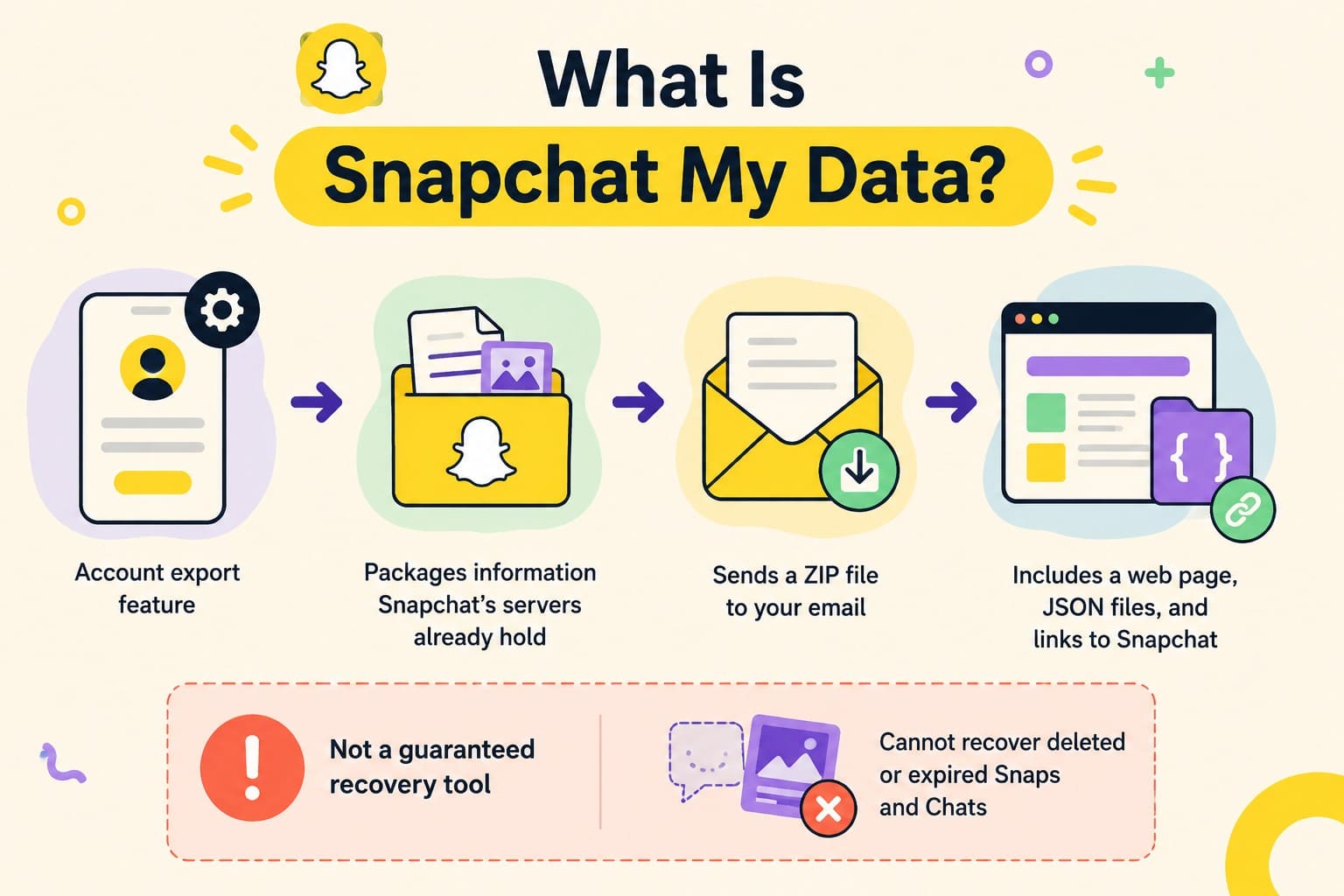
Snapchat My Data is an account export feature rather than a recovery one. It packages the information Snapchat's servers already hold into a ZIP file and emails you a download link. The export mirrors what the servers kept, so anything Snapchat deleted under its normal rules was already gone before you ever made the request.
What arrives is a small ZIP holding a browsable web page, a folder of JSON files, and links pointing back to Snapchat. However, My Data is not a guaranteed recovery tool for deleted or expired Snaps and Chats.
What Information Does Snapchat My Data Include?
Many users wonder: does Snapchat My Data show deleted messages? To know this, review the mentioned table and see which data is added in My Data:
| My Data Category | What It May Include | Can It Recover Deleted Content? |
|---|---|---|
| Saved Chat History | Retained/saved Chat information | Only information Snapchat still retains |
| Snap History | Snap activity and metadata | No Snap content |
| Memories | Saved Memories available to your account | Memories can be exported separately |
| Account Information | Account and profile information | No |
| Friends | Friend-related account records | No |
| Login History | Account access and device-related information | No |
| Location | Location information Snapchat retains | No |
Saved Chat History vs Snap History
Saved Chat History and Snap History contain different types of information. Saved Chat History may contain retained Chat information, while Snap History primarily records activity rather than the content of a Snap. Snapchat confirms that Snap and Chat metadata can include information such as the date, time, sender, and receiver, but metadata does not contain the actual content of the Snap or Chat.
Part 2. Can Snapchat My Data Recover Deleted Messages?
Snapchat My Data cannot reliably recover deleted messages. The export only provides information Snapchat still retains when your request is processed. If a Chat or Snap has already been deleted from Snapchat's servers under its retention rules, My Data should not be treated as a way to restore its original content.
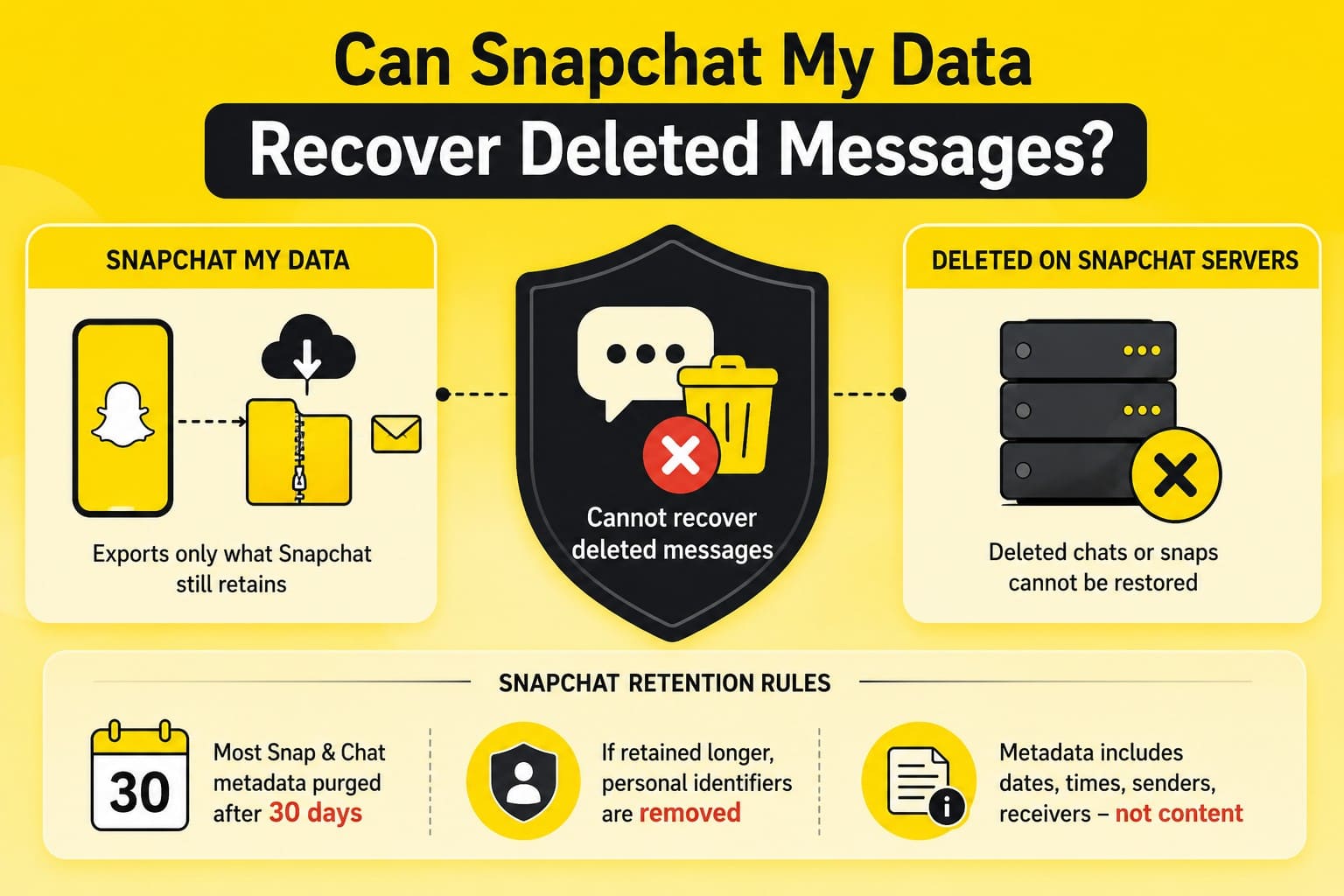
The app purges most Snap and Chat metadata after 30 days. When analytics require longer data retention, Snapchat strips personal identifiers before analysis. This metadata tracks dates, times, senders, and receivers, but excludes actual message content.
Part 3. How to Download Snapchat My Data on iPhone
The process to download Snapchat data begins in the app and finishes in a browser, and Snapchat documents each stage. To know how each step is performed, review the mentioned steps in detail:
-
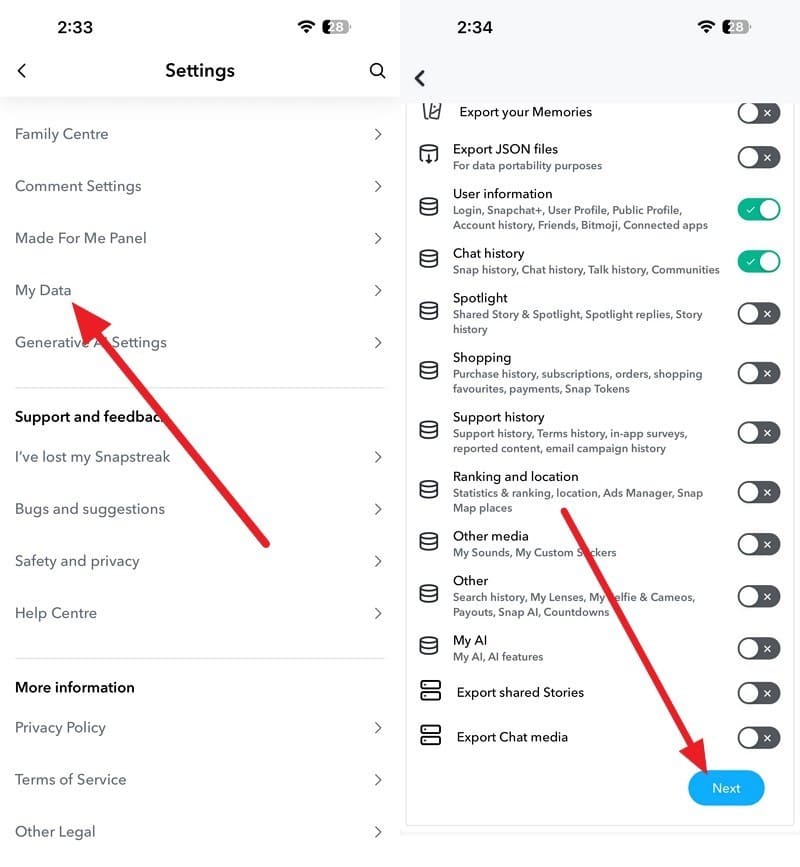
Step 1 Open Snapchat Settings
Open Snapchat settings > Go to “My Data” > Choose what to export > Press “Next.”
-
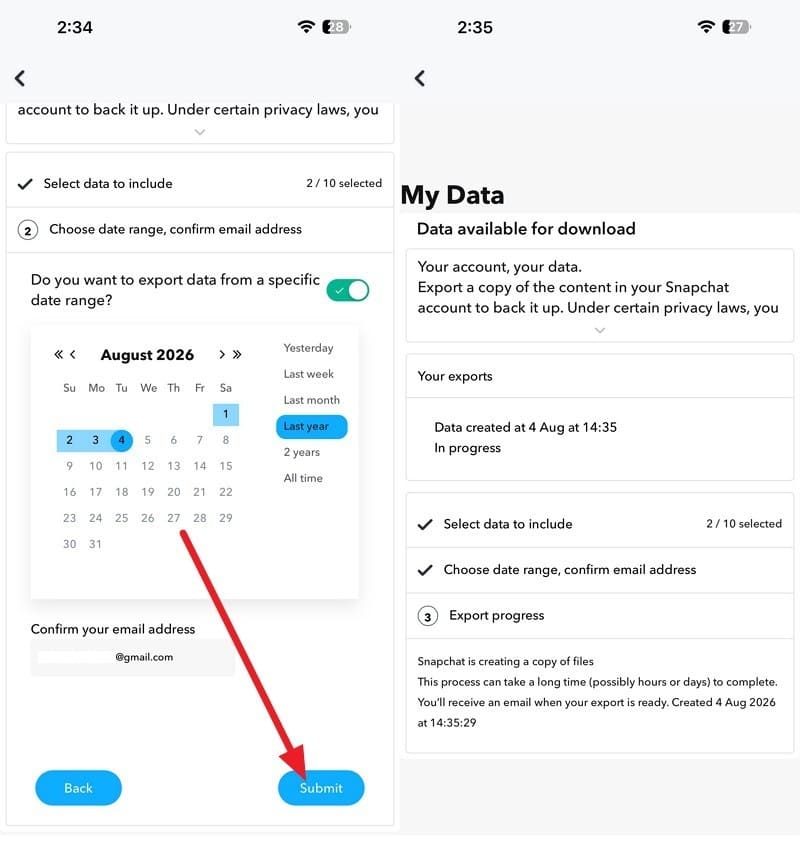
Step 2 Submit the Export
Select the time range > Confirm the email address > Select “Submit” to create the export.

Part 4. How to Open and Check Snapchat My Data
With the ZIP sitting in your Files app, the format becomes the next obstacle. What Snapchat sends is a ZIP archive containing account data and optional exported Memories files. Review this section and see if Snapchat My Data deleted messages recovery is possible after you get the email.
-
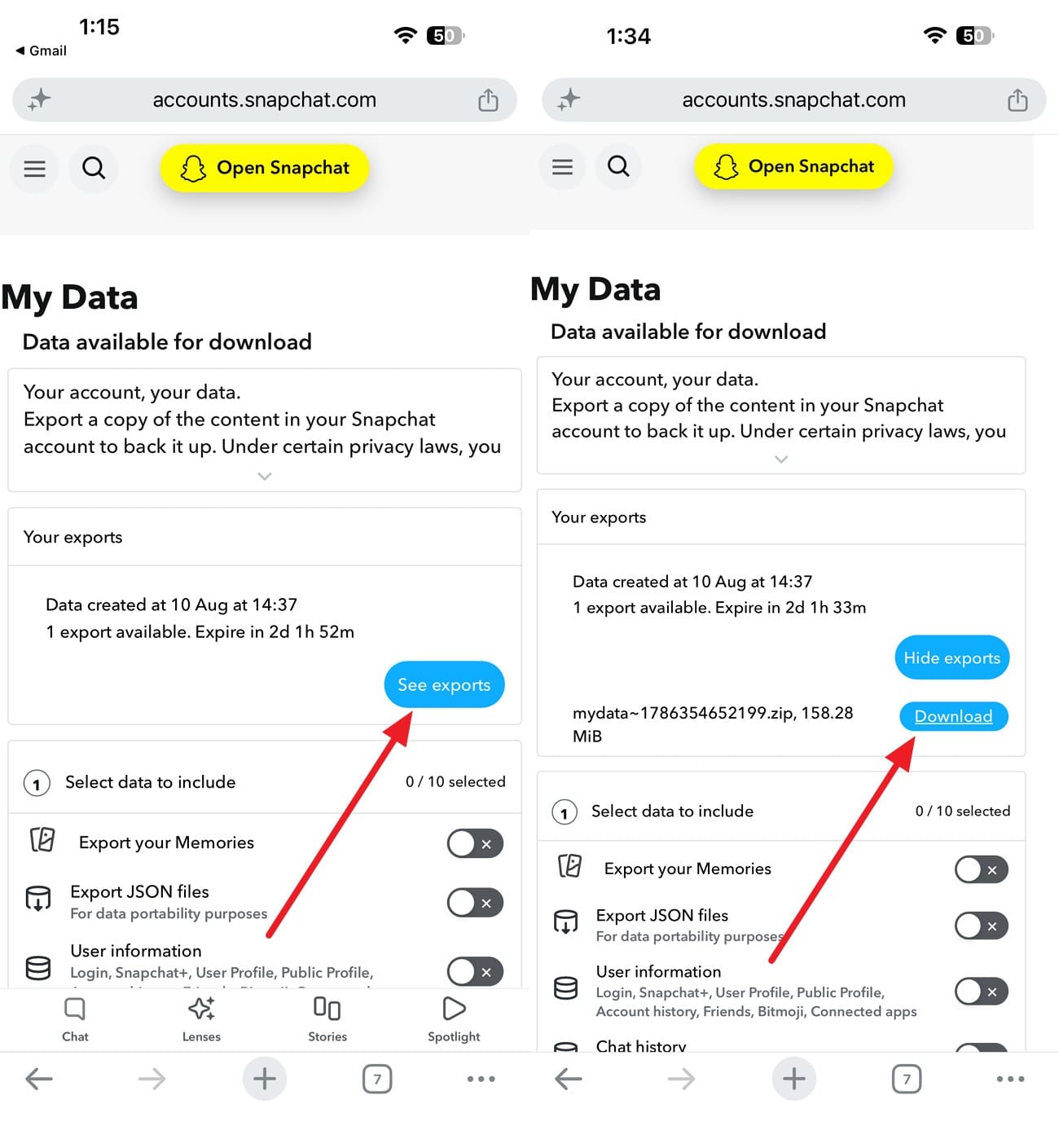
Step 1 Download the ZIP File
Access the email when the export is ready > Sign in > Select “See Export” > Choose “Download” > Save the ZIP file.
-
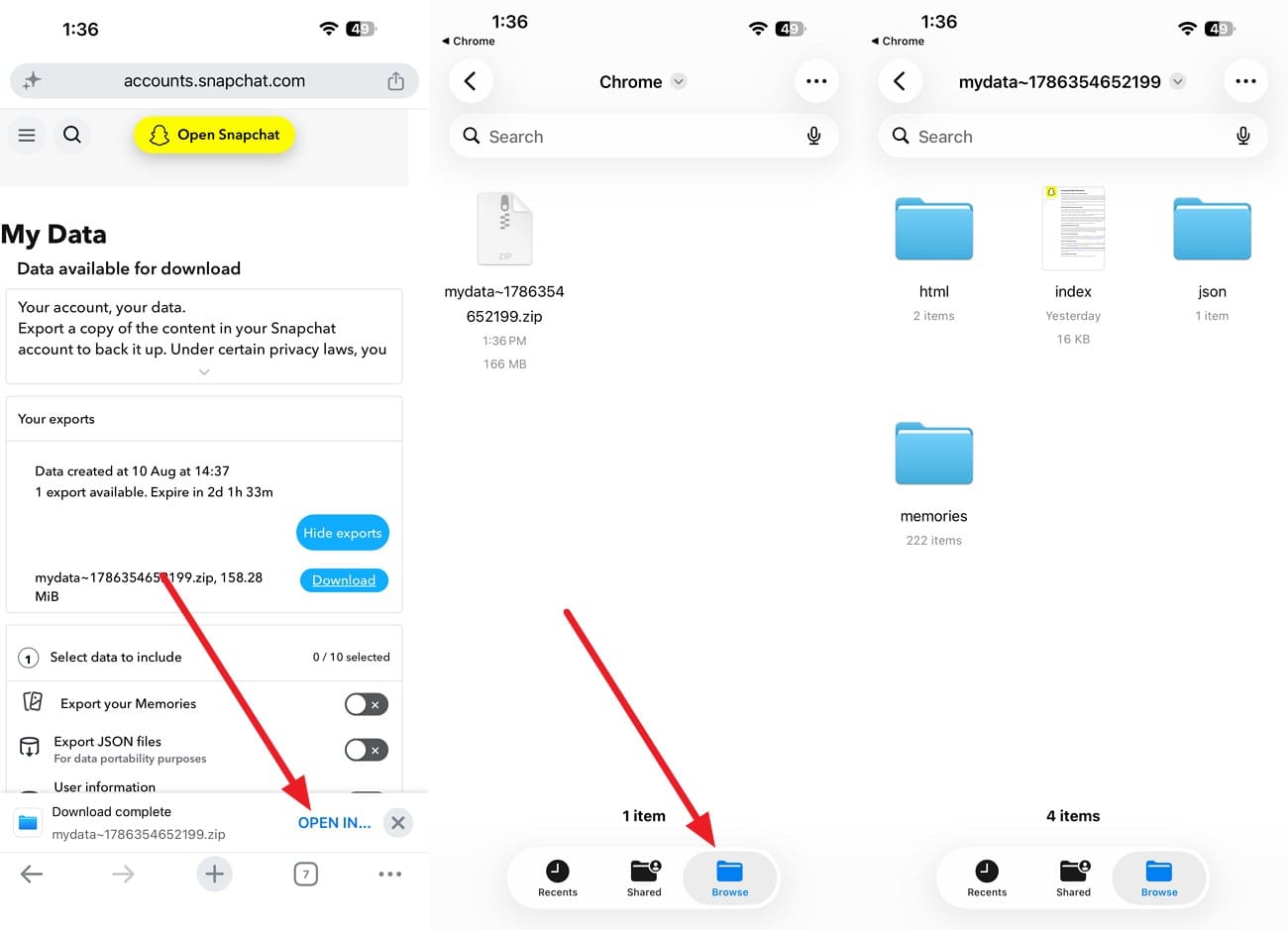
Step 2 Extract the File
When the file download process is complete, choose the “Open In ..” option and pick the Files App. Tap on the file in the “Browse” section to extract it.
-
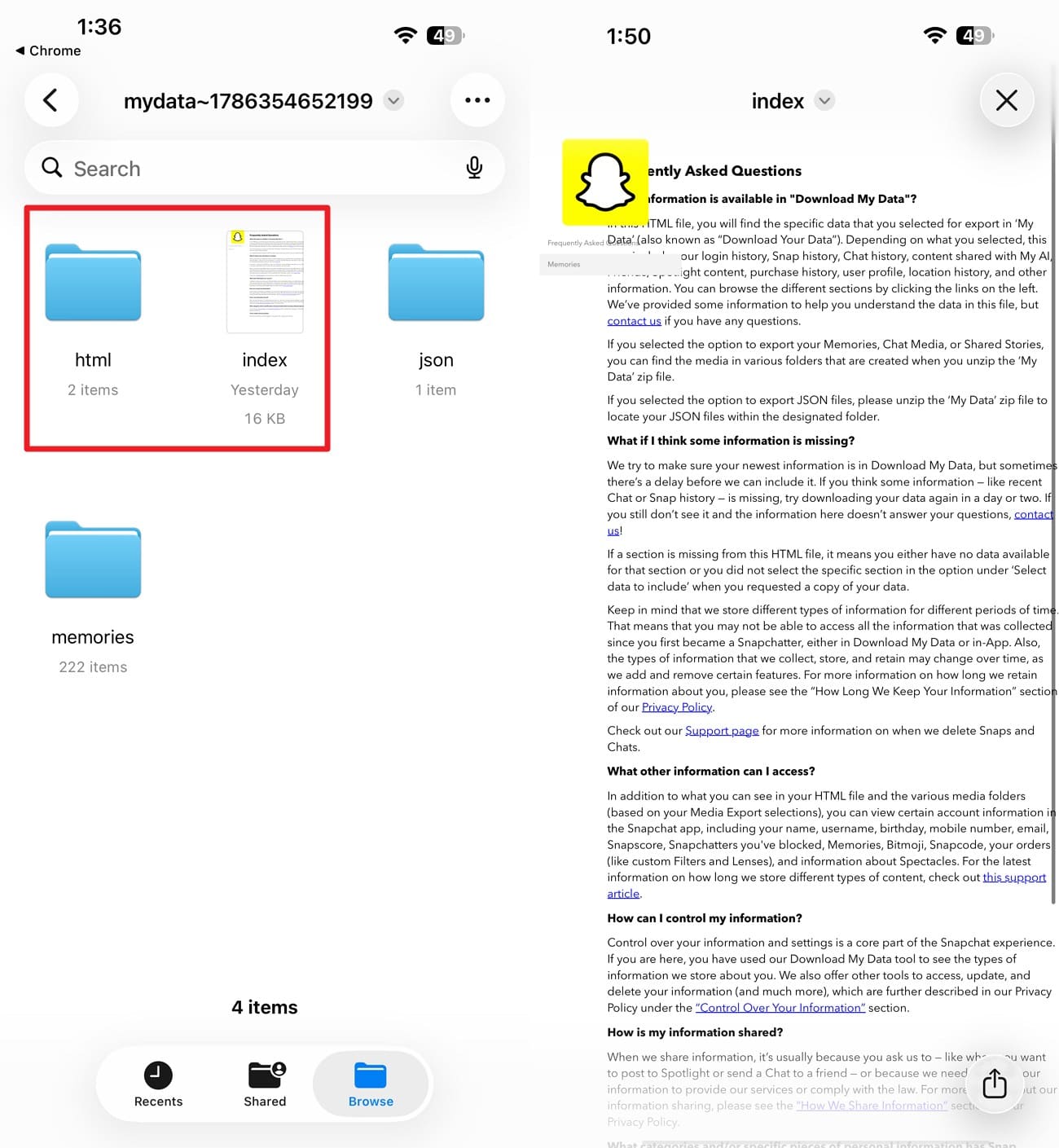
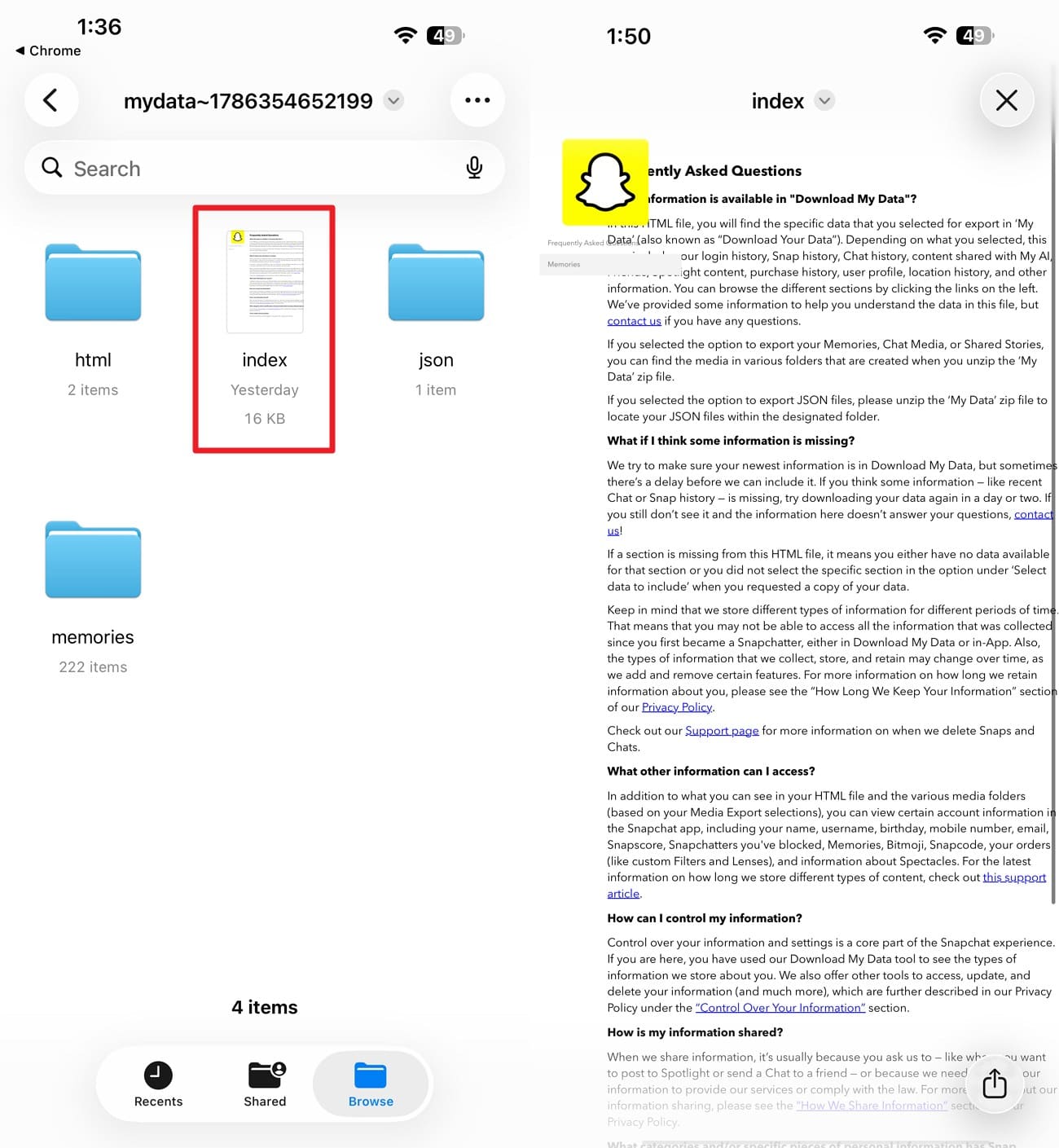
Step 3 Open My Data
Press the “html” or “index” files to access the MY Data. The index.html opens in your browser, where each category appears as a readable page instead of raw code.
Find Saved Chat History and Snap History
The index page places the two main records under distinct headers, and only one contains message text. You can access both records through two separate methods.
Instructions. Open the chat history section from the index, which lists conversations by contact. For the raw records instead, go to the "json" folder, where “chat_history.json” and “snap_history.json” carry the same data. Any text editor opens them, though a JSON viewer's much easier to read.
Check Memories and Other Available Data
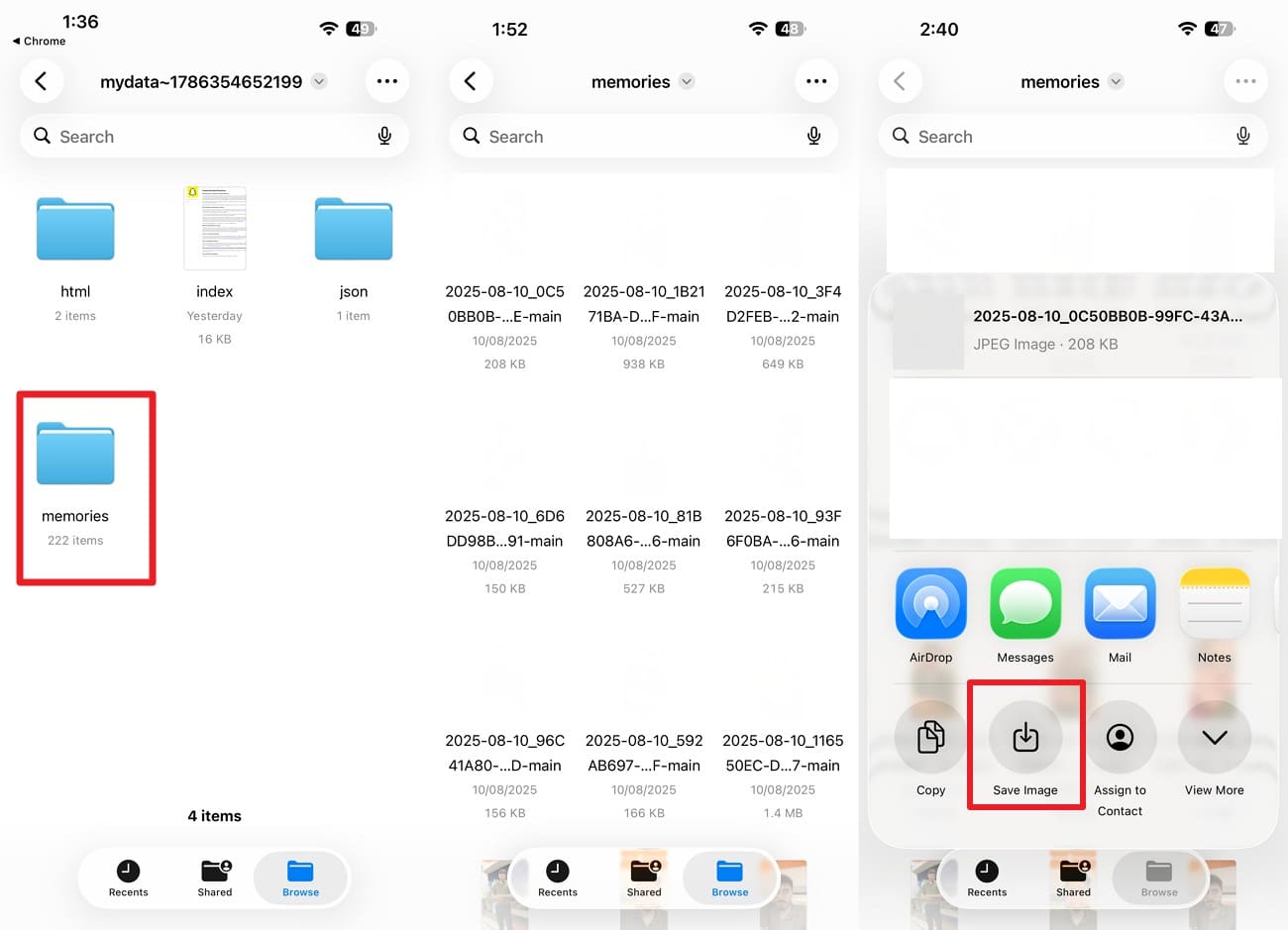
Snapchat provides a dedicated option for exporting Memories. When requesting My Data, users can enable Export your Memories, or choose Request Only Memories for a Memories-specific export. If they are already in a readable format, here is how you can access them from Snapchat My Data:
Instructions. Open the “Memories” folder > Long-press the image > Choose "Save > Save Image."
Part 5. What If Snapchat My Data Does Not Contain Deleted Messages?
The export settles the server-side question and stops there. These 5 routes cover the gaps it leaves after you download Snapchat data.
Method 1. Check Saved Messages in Snapchat
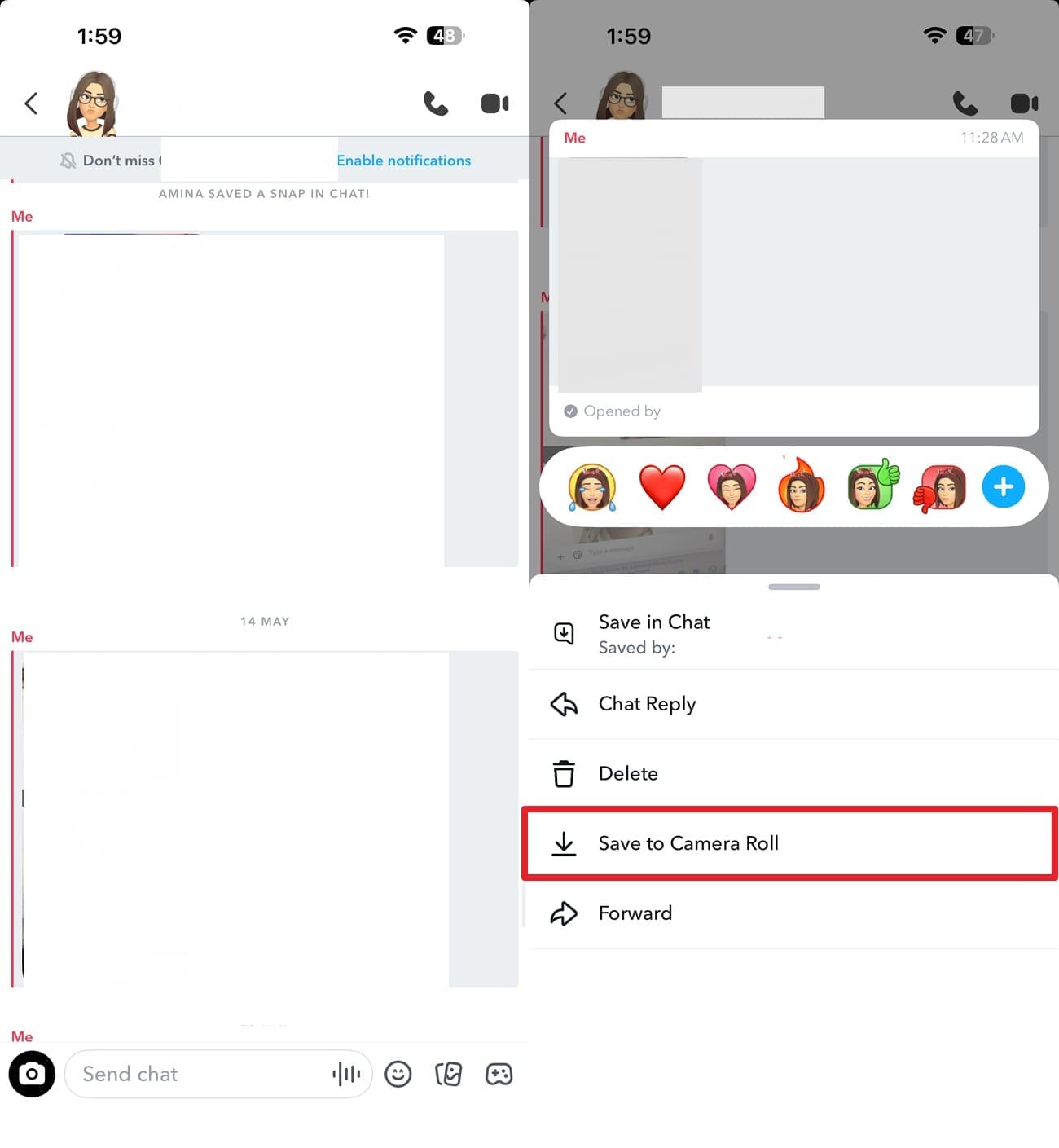
Saved messages carry a grey background and remain until unsaved or deleted, while other messages follow settings. As for the guide for this method, go through the mentioned directions and locate messages:
Instructions. Open the chat and look for messages (images) with a “Gray Background Highlight.” Press and hold anything else you want to keep, and choose the “Save to Camera Roll” option.
Method 2. Search for a Cleared Conversation
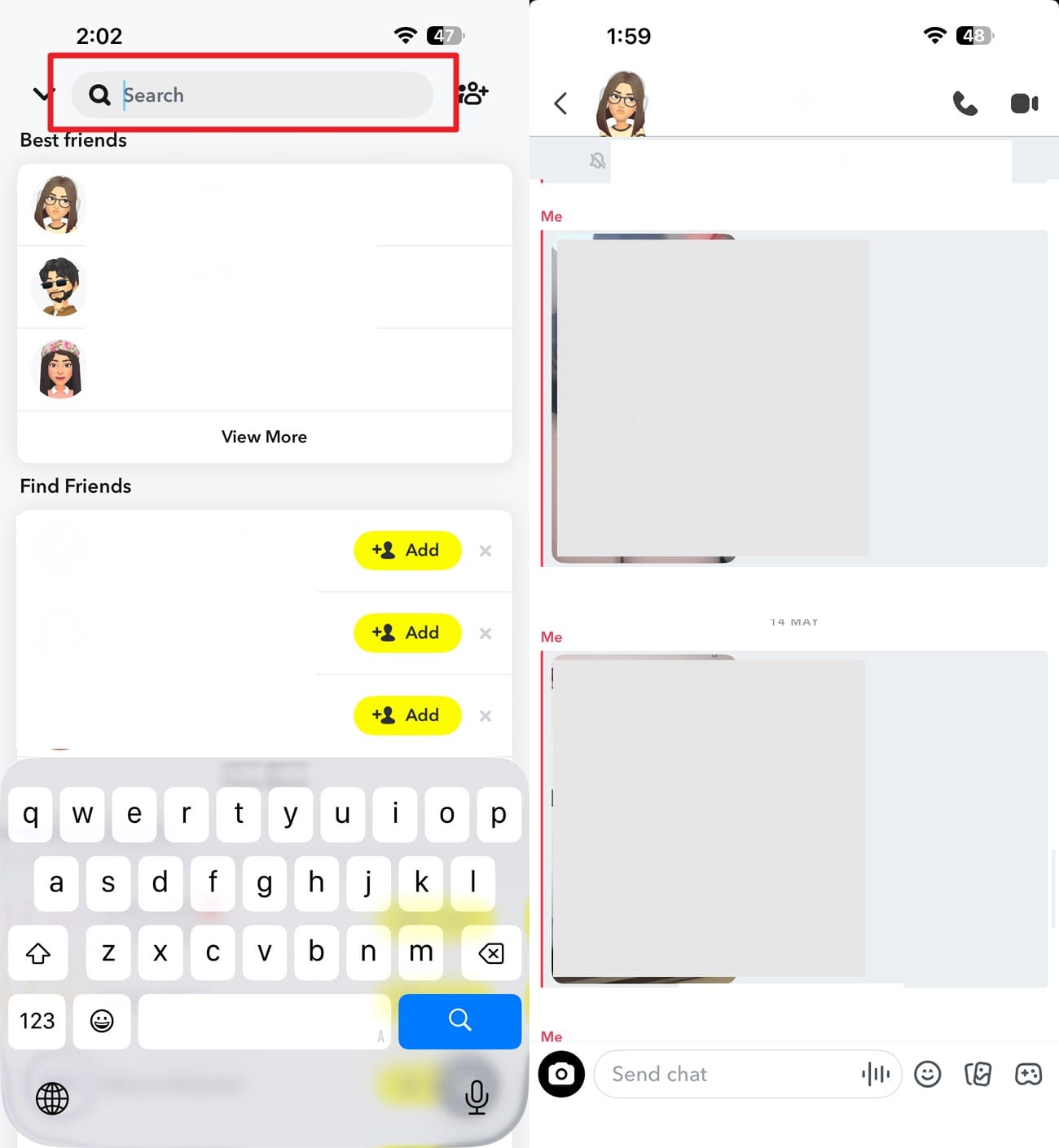
Clearing a conversation from your Snapchat Chat feed does not delete its saved or sent content. Snapchat confirms that clearing only removes the conversation from the Chat feed.
Instructions. Tap the search bar in Snapchat and enter the person's username or display name. Open the result, and any saved messages reappear inside the restored thread.
Method 3. Ask the Other Participant for a Saved Copy
Save actions apply to the entire message, so a saved item stays visible to both users. If the recipient saved a message you did not, it appears in their archive rather than yours. Ask them to open the conversation and check for saved messages still visible on their side. If the messages are there, have them screenshot the thread, or run their own export for the complete record.
Method 4. Check Snapchat Memories and the iPhone Photos App
In addition to Snapchat My Data, if the missing content was previously saved, check Snapchat Memories and your device's local photo library separately. Snapchat says deleted or lost Memories cannot be restored by Snapchat Support, but another copy may still exist on the device.
Method 5. Recover Snapchat Data Using Dr.Fone - Data Recovery (iOS)
Whatever the archive skipped is either gone or still on the phone. Snapchat writes a working copy into local storage so the app functions without a signal. Nothing in that copy answers to the export you just downloaded. Desktop software's the only way in, because Apple prevents apps on the iPhone from inspecting deleted data.
Dr.Fone - Data Recovery (iOS) supports Snapchat Chats & Attachments as recovery categories, helping users locate recoverable Snapchat data on their device. You can preview scanned results before recovery, filter the available files, and select only the Snapchat content you want to export. This provides a targeted option when Snapchat My Data does not contain the missing content.
 Recovers data after deletion, crashes, or device damage.
- Supports photos, messages, contacts, WhatsApp, and more.
- Supports all major iPhone, iPad, and iPod models.
- Preview and recover only what you need.
How to Scan for Cached Snapchat Data
So far, you know the answer to: does Snapchat My Data show deleted messages? Follow this step-by-step guide and learn how Dr.Fone can help in recovering Snapchat data:
-
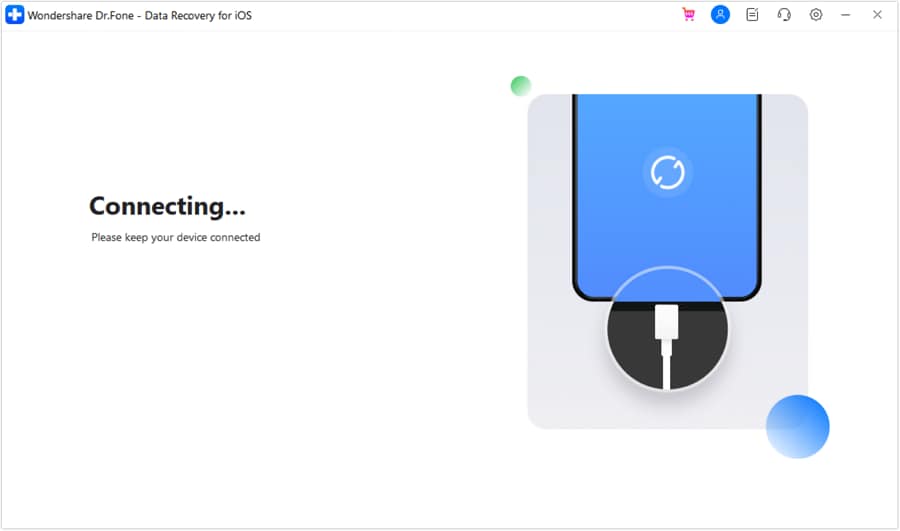
Step 1 Start a Device Scan
On the Data Recovery tool for iOS, choose the “Recover Data from iOS Device” mode and connect your iDevice when prompted.
-
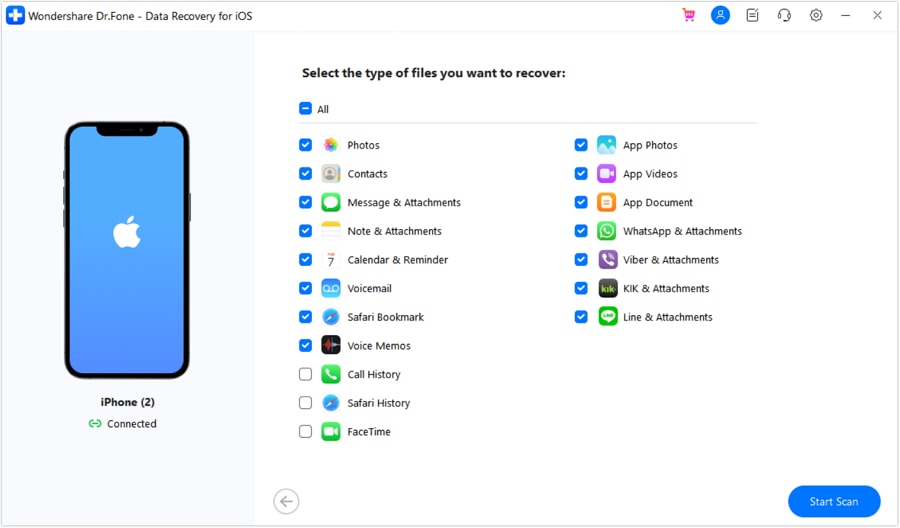
Step 2 Limit the Scan to Snapchat
Select “Snapchat” from the listed data categories, then click “Start Scan” to begin searching for recoverable Snapchat data.
-
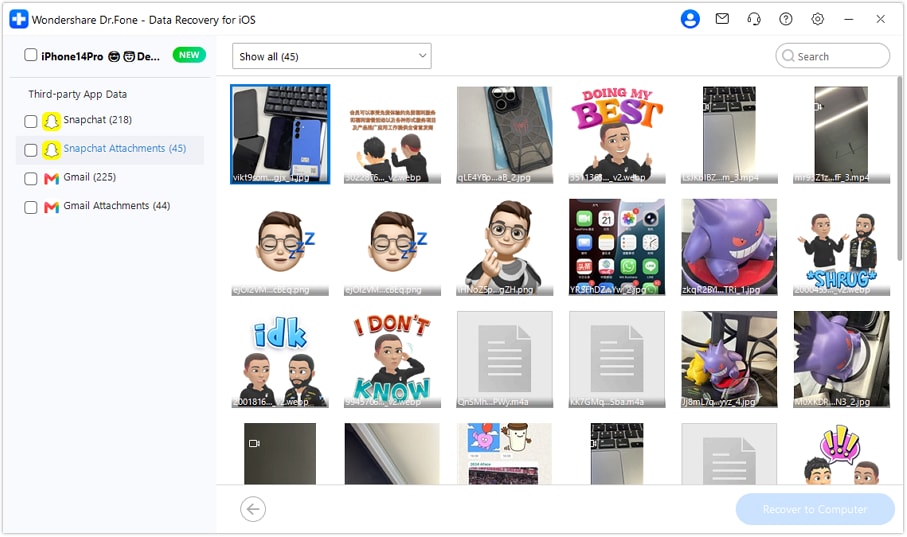
Step 3 Review Snapchat Data and Export
Once the scan is complete, filter the results to show deleted data, select the Snapchat items you want, and click “Restore to Computer” to save them.




Part 6. Snapchat My Data vs Dr.Fone - Data Recovery (iOS)
To compare Snapchat My Data with Dr.Fone Data Recovery (iOS) for message retrieval, review the mentioned table:
| Factor | Snapchat My Data | Dr.Fone – Data Recovery |
|---|---|---|
| Source Read | Snapchat's servers | The iPhone, plus its backups |
| Saved Chats | Yes, with full text | Yes, where still cached |
| Deleted Or Unsaved Chats | No | Sometimes, if not overwritten |
| Snap Media | No, metadata only | Sometimes, from app storage |
| Memories | Yes, as links or files | Only what remains on the device |
| Needs The iPhone | No | Yes |
| Cost | Free | Paid, with free preview |
| Turnaround | Hours to two days | Minutes to an hour |
Verdict: Run the export first, because it costs nothing and covers everything Snapchat still holds. Dr.Fone Data Recovery (iOS) is the follow-up when the archive arrives without what you were looking for, since the iPhone is the only remaining source for unsaved content. The 2 overlap far less than they appear to, so running both is reasonable rather than wasteful.
Part 7. Common Snapchat My Data Download Problems
During the download Snapchat data process, learn what types of issues you can face and how to fix them:
| Problem | Possible Cause | Recommended Solution |
|---|---|---|
| Email Never Arrives | Wrong address or a spam filter | Check the address on the request page and search spam |
| Download Link Is Dead | Download link has expired | Submit a fresh request and download promptly |
| Archive Is Far Smaller Than Expected | Snapchat retains limited Chat data | Normal behavior because retention varies by data type |
| Memories Folder Is Missing | The Memories export option was left off | Repeat the request with “Export your Memories” enabled |
| ZIP Will Not Open on iPhone | Large or incomplete ZIP download | Re-download it or extract it on a computer |
| Chats Stop at a Certain Date | Selected date range limits the export | Expand the range or request all available data |
Conclusion
A Snapchat Data Download returns only account records that Snapchat servers currently retain, such as saved chats and Memories links. When the server archive misses unsaved or deleted content, local device caches serve as your final recovery source. Dr.Fone - Data Recovery (iOS) scans these remaining local device files to extract lost Snapchat threads before new data overwrites them.
Frequently Asked Questions
-
1. How long does Snapchat take to prepare My Data?
Usually a few hours, though large accounts can take a day or two to process. Snapchat emails a link when the archive is ready, and that link expires, so download it promptly rather than leaving it for the weekend. -
2. How far back does Snapchat My Data go?
Exports default to roughly a year of history, and most chat and snap metadata is only retained for about 30 days. Older records need a separate request with an earlier date range, and even then those retention limits still apply. -
3. Does downloading Snapchat My Data notify friends?
No, the request's tied to your own account, and nobody in your friends list is told about it. The archive also contains only your side of the record, not anyone else's saved copies.
 Add Wondershare Dr.Fone as a preferred source on Google