Recover photos, messages, WhatsApp, and more — no backup
needed.
Recover photos, messages, WhatsApp, and more — no backup
needed.

 100% Security Verified | No Subscription Required | No Malware

 :
: 
 ChatGPT
 Perplexity
 Gemini
 Claude
 Grok
Grok
Imagine you just lost all the data on your phone or in your local and cloud backups, and don't know what to do. After extensive research, you came across Dr.Fone and FonePaw, but you're not sure which tool to choose.
In this situation, if you look for a detailed Dr.Fone vs FonePaw comparison, this guide is for you. Review the recovery methods and data type options for both tools to determine whether Dr.Fone - Data Recovery (iOS) is the ideal choice.
In this article
- A Quick Look at Dr.Fone and FonePaw
- The Differences That Matter Most for Everyday Users

- Common Recovery Tasks: Photos, Messages, Contacts, and Backups
- Supported Data: Dr.Fone - Data Recovery (iOS) vs FonePaw
- Preview, Ease of Use, and Value for Money
- Which Tool Offers Better Value for Everyday iPhone Recovery?
Part 1. A Quick Look at Dr.Fone and FonePaw
Glance at the basic details of this Dr.Fone vs FonePaw comparison section to know about both tools.
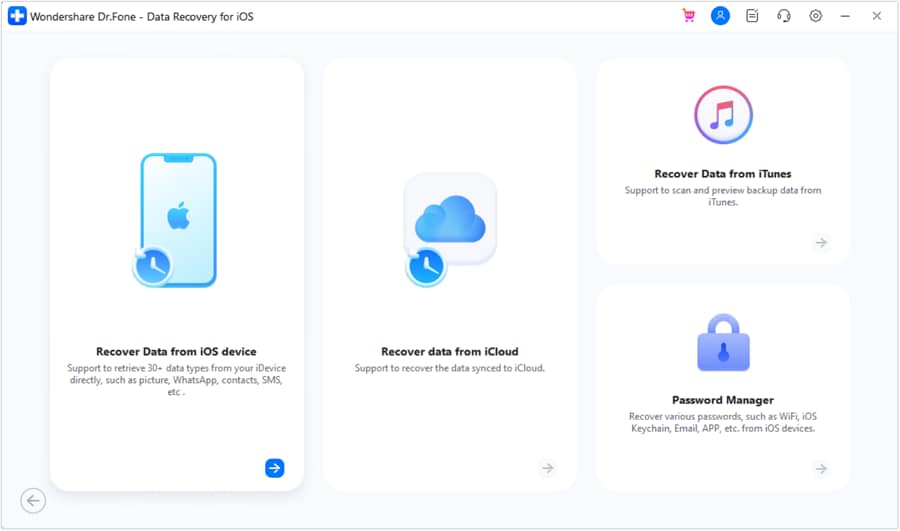
What is Dr.Fone - Data Recovery (iOS)
Developed by Wondershare, Dr.Fone - Data Recovery is a Windows and Mac recovery tool with 8 recovery functions. From older to new models, iPhone, iPad, and iPad Touch, this tool claims to recover 35+ data types. Additionally, Dr.Fone guarantees 100% local, secure data recovery using its Read-Only mode to prevent data overwriting.
It comes with a simple, clean interface where users can perform a free scan and preview files with no learning curve. The separate guide and notes make it easy to get iCloud Backup package information and restore the data to the phone and PC. Furthermore, it provides 24/7 live support and quick weekly updates to deliver recovery solutions for upcoming models and versions, such as iOS 27.
 Recovers data after deletion, crashes, or device damage.
- Supports photos, messages, contacts, WhatsApp, and more.
- Supports all major iPhone, iPad, and iPod models.
- Preview and recover only what you need.

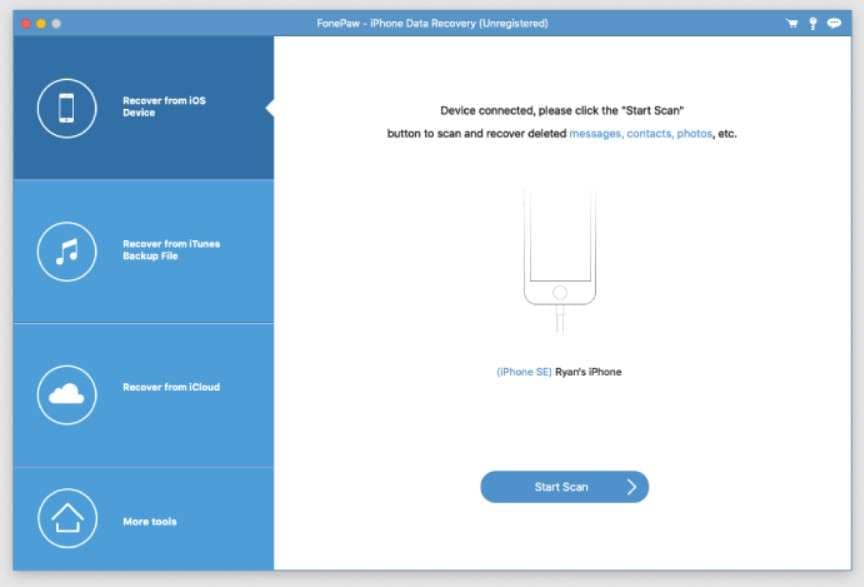
What is FonePaw iPhone Data Recovery?
FonePaw iPhone Recovery solution is compatible with iPhone 17 and iOS 18 and can recover 30+ file types. When accessed on Windows and Mac, it can recover data from iTunes, iCloud Sync, and devices in 3 steps, says the vendor. However, the guide and experts say the interface is cluttered and that recovery can take more than 3 steps. Unlike Dr.Fone, this tool only allows users to recover data to their computer.
Part 2. The Differences That Matter Most for Everyday Users
In the data recovery tool, users want to know about the main recovery method and ID management. In addition, data management also matters the most, as the following Dr.Fone vs FonePaw comparison has highlighted:
| Usability & Technical Vector | Dr.Fone - Data Recovery (iOS) | FonePaw iPhone Data Recovery |
|---|---|---|
| Main Method | When users connect the device and choose the preferred recovery method, the tool can perform a quick scan and give a detailed thumbnail preview. For iCloud Backup recovery, it provides detailed information about the backup package and lets you download it at no cost. | The tool scans the device after the recovery method selection. However, no backup info is shown to recover iCloud Sync files. |
| Multi-Account Agility | High flexibility; allows users to log in to and switch between up to 5 distinct Apple IDs on a single computer node. | Low flexibility; typically restricts account operations or forces re-authentication when switching cloud profiles. |
| System Repair Integration | Dr.Fone comes with a dedicated system repair tool to fix a boot loop or a black screen issue before or after recovering data. | FonePaw iPhone Data Recovery lacks an integrated system repair layer and relies solely on the phone. |
Part 3. Common Recovery Tasks: Photos, Messages, Contacts, and Backups
To further explore this Dr.Fone vs FonePaw comparison, let's see the support recovery options for both tools:
| Specific Recovery Action | Dr.Fone - Data Recovery (iOS) | FonePaw iPhone Data Recovery |
|---|---|---|
| Direct Device Memory Scan | Dr.Fone allows you to recover 17 data types, including personal and app data (photos, videos, and documents), which you can save to a PC. | Users can recover 14 data types. However, for iOS 13 or later devices, it needs an encrypted scan to locate lost call history, FaceTime, and Safari History data. Needs a registration code to recover the data to the computer; recovery to a phone is not possible. |
| iCloud Sync Processing | You get the option to freely scan and preview 12 major data types. You can save all recovered data to a PC, while only contacts, notes, calendars, and photos can be restored directly to an iPhone. | This tool can recover only 5 data types upon iCloud sign-in, and users can save the data to a computer, not phones. |
| iCloud Backup Downloads | Using users' historical backups or automatic device backups, Dr.Fone can retrieve 17 major data types. You can later access the backup package information and save the data on your phone and PC. | ❌ Not Supported |
| iCloud Drive Apps | 4 main apps' data, like Viber, WhatsApp/WhatsApp Business, LINE, and Kik, can be recovered. Using free scan and preview options, you can save data on phones and PCs. | ❌ Not Supported |
| iTunes/Offline Archives | In the Dr.Fone vs FonePaw comparison, Dr.Fone can extract 17 data types from backups created by the user's iTunes history or third-party applications. The tool has no system requirements and can restore data to phones and PCs without overwriting. | Can recover 14 basic data types, but the recovery is limited to computers only. |
| WhatsApp / WA Business Messages | ✅ Supported | Only WhatsApp is supported. |
| Self-Destructing Message Recovery | ✅ Supported. In fact, it's the exclusive feature of Dr.Fone - Data Recovery (iOS) that most tools lack. It reconstructs disappearing media, and users can freely scan and preview thumbnails to recover their phones and computers. | ❌ Not Supported |
| Private Data Recovery | Dr.Fone allows you to recover 3 types of private data. With secure, 100% local processing, it claims not to share data with any third-party servers. | ❌ Not Supported |




Part 4. Supported Data: Dr.Fone - Data Recovery (iOS) vs FonePaw
In addition to the recovery methods, if you want to have a detailed overview of supported data types, here is the comprehensive Dr.Fone vs FonePaw comparison:
Recover From Device
Here are the supported data types of both tools that you can recover from the device:
| Data Types | Dr.Fone - Data Recovery (iOS) | FonePaw iPhone Data Recovery |
|---|---|---|
| Photos | ✅ | ✅ |
| Videos | ✅ | ✅ |
| App Photos | ✅ | ✅ |
| App Videos | ✅ | ✅ |
| App Audios | ❌ | ✅ |
| App Documents | ✅ | ✅ |
| Memos and Attachments | ❌ | ✅ |
| Thumbnails | ❌ | ❌ |
| Audiobooks | ❌ | ❌ |
| Playlists | ❌ | ❌ |
| iBooks | ❌ | ❌ |
| Ringtones | ❌ | ❌ |
| Files | ❌ | ❌ |
| Safari-History | ✅ | ✅ |
| Safari Bookmarks | ✅ | ✅ |
| Contacts | ✅ | ✅ |
| Notes | ✅ | ✅ |
| Reminders | ✅ | ✅ |
| Voice Memos | ✅ | ✅ |
| Calendar | ✅ | ✅ |
| Calculator | ❌ | ❌ |
| Wi-Fi | ❌ | ❌ |
| Messages | ✅ | ✅ |
| Phone Call | ❌ | ❌ |
| Call History | ✅ | ✅ |
| Facetime | ✅ | ❌ |
| ❌ | ❌ | |
| Voicemail | ✅ | ❌ |
| ✅ | ✅ | |
| WhatsApp Business | ✅ | ❌ |
| WhatsApp View Once | ✅ | ❌ |
| Messenger | ❌ | ❌ |
| LINE | ✅ | ❌ |
| Viber | ✅ | ❌ |
| KakaoTalk | ❌ | ❌ |
| Kik | ✅ | ❌ |
| ❌ | ❌ | |
| ❌ | ❌ | |
| Skype | ❌ | ❌ |
| Ins | ❌ | ❌ |
| Teams | ❌ | ❌ |
| Snapchat | ❌ | ❌ |
| Telegram | ❌ | ❌ |
Recover From iCloud (Sync, Drive, & Backup)
Since FonePaw only supports iCloud Sync, the Dr.Fone vs FonePaw comparison shows iCloud supported data types:
| Data Types | Dr.Fone - Data Recovery (iOS) | FonePaw iPhone Data Recovery |
|---|---|---|
| Photos | ✅ | ✅ |
| Videos | ✅ | ✅ |
| App Videos, Documents, Photos | ✅ | ❌ |
| Voicemail | ✅ | ❌ |
| Numbers | ✅ | ❌ |
| Pages | ✅ | ❌ |
| Keynotes | ✅ | ❌ |
| Contacts | ✅ | ✅ |
| Notes | ✅ | ✅ |
| Reminders | ✅ | ✅ |
| Calender | ✅ | ✅ |
| Alarms | ✅ | ❌ |
| Safari Bookmarks | ✅ | ❌ |
| iCloud Drive Files | ✅ | ❌ |
| ✅ | ❌ | |
| WhatsApp Business | ✅ | ❌ |
| WhatsApp View Once | ✅ | ❌ |
| Messenger | ❌ | ❌ |
| LINE | ✅ | ❌ |
| Viber | ✅ | ❌ |
| KakaoTalk | ❌ | ❌ |
| Kik | ❌ | ❌ |
| ❌ | ❌ | |
| ❌ | ❌ | |
| Skype | ❌ | ❌ |
| Ins | ❌ | ❌ |
| Teams | ❌ | ❌ |
| Snapchat | ❌ | ❌ |
| Telegram | ❌ | ❌ |
| Deleted Files | ✅ | ❌ |
Recover From iTunes
Regarding iTunes, the recoverable data types are mentioned in this Dr.Fone vs FonePaw comparison:
| Data Types | Dr.Fone - Data Recovery (iOS) | FonePaw iPhone Data Recovery |
|---|---|---|
| Photos | ✅ | ✅ |
| Videos | ✅ | ✅ |
| App Audios | ❌ | ✅ |
| App Videos and Photos | ✅ | ✅ |
| App Documents | ✅ | ✅ |
| Memos and Attachments | ❌ | ✅ |
| Numbers | ❌ | ❌ |
| Pages | ❌ | ❌ |
| Keynotes | ❌ | ❌ |
| Contacts | ✅ | ✅ |
| Notes | ✅ | ✅ |
| Reminders | ✅ | ✅ |
| Calender | ✅ | ✅ |
| Messages | ✅ | ✅ |
| Attachments | ✅ | ✅ |
| Voice Mail | ✅ | ✅ |
| Voice Memos | ✅ | ✅ |
| Call History | ✅ | ✅ |
| Safari History | ✅ | ✅ |
| Safari Bookmarks | ✅ | ✅ |
| ✅ | ✅ | |
| WhatsApp Business | ✅ | ❌ |
| Messenger | ❌ | ❌ |
| LINE | ✅ | ❌ |
| Viber | ✅ | ❌ |
| KakaoTalk | ❌ | ❌ |
| Kik | ✅ | ❌ |
| ❌ | ❌ | |
| ❌ | ❌ | |
| Skype | ❌ | ❌ |
| Ins | ❌ | ❌ |
| Teams | ❌ | ❌ |
| Snapchat | ❌ | ❌ |
| Telegram | ❌ | ❌ |
Dr.Fone - Data Recovery (iOS) is the right choice if you want to restore more data types from iCloud. Unlike FonePaw, it can easily recover general and app data from iCloud Backup, Sync, and Drive with free previews.
Part 5. Preview, Ease of Use, and Value for Money
Other than the recovery methods, learn how the preview and pricing details in the given Dr.Fone vs FonePaw comparison:
| Commercial Factor | Dr.Fone - Data Recovery (iOS) | FonePaw iPhone Data Recovery |
|---|---|---|
| Pre-Purchase Data Verification | This tool provides transparent previews of all data types, allowing users to assess the accuracy of restored data before purchase. | Conditional Preview: The free preview is limited to the "restore from device" method. For iTunes or iCloud Sync unindexed blocks or database formats, the tool needs an active license. |
| Pricing Structure | ● Monthly: $44.95 ● Yearly: $59.95 ● Perpetual: $69.95 Available for 1-5 mobile devices and 2 PCs, with free weekly software updates and technical support. |
● Single-User License: $66.47 ● One-Month License: $49.95 ● One-Year License: $55.97 Available on 6 Devices and 1 PC, with 1 year of free upgrades. |
| Post-Export File Layout | Compared to other tools, it restores original image structures, retains message timestamps, and outputs text logs into clearly formatted directories. | It recovers photos and videos well, but some text data may be exported as plain CSV files or simple text. |
| Customer Support Access | Dr.Fone provides detailed recovery guides, responsive customer support, and an online help center to assist users throughout the recovery process. | Standard web-based email contact forms with slower enterprise turnaround times. |

I lost my WhatsApp chats after a crash, but Dr.Fone recovered them quickly and was easy to use.
Jason K. – Sales Consultant, Atlanta, GA
I recovered some files with FonePaw, but the limited iCloud options and computer-only restore were disappointing.
Olivia T
Part 6. Which Tool Offers Better Value for Everyday iPhone Recovery?
Between Dr.Fone vs FonePaw comparison, experts say that Dr.Fone is the better solution for an everyday user. The tool comes with affordable monthly plans and lets you access the recovery tool on 2 PCs, where you can easily manage 5 Apple IDs. Most of all, it supports better data types and isn't limited to iCloud Sync.
Conclusion
To conclude the Dr.Fone vs FonePaw comparison, Dr.Fone - Data Recovery (iOS) offers better iOS recovery solutions than FonePaw. This is because FonePaw is limited to basic data types recovery, whereas Dr.Fone allows you to recover 35+ data types. This includes iCloud Backup, Sync, Drive, and local backups, as well as WhatsApp View Once recovery.
FAQs
-
Does recovering data overwrite existing files on my iPhone?
No, tools like Dr.Fone - Data Recovery (iOS) use a Read-Only scan that can prevent data from being overwritten. In fact, this free scan has no lag and requires no manual effort or rescanning when connection failures occur. -
Can I recover deleted WhatsApp photos and videos?
Yes, Dr.Fone - Data Recovery (iOS) allows you to recover WhatsApp data from iCloud Drive, as well as from 4 other apps. There, you can preview and filter the images and videos for free and save them on your phone or PC. -
How long does an iPhone data recovery scan usually take?
Scan time depends on device storage size, data volume, and the selected recovery methods. Since the FonePaw scan is basic, you can use Dr.Fone - Data Recovery (iOS) to perform a Read- Only scan to safely extract the data within a limited duration. -
Which tool is better for users with multiple Apple IDs?
Dr.Fone - Data Recovery (iOS) is the right choice because it lets you manage 5 Apple IDs on Windows or Mac. Moreover, users can easily switch and recover 35+ data types from iPhone, iPad, and iPad Touch.
 Add Wondershare Dr.Fone as a preferred source on Google