Recover photos, messages, WhatsApp, and more — no backup
needed.
Recover photos, messages, WhatsApp, and more — no backup
needed.

 100% Security Verified | No Subscription Required | No Malware

 :
: 
 ChatGPT
 Perplexity
 Gemini
 Claude
 Grok
Grok
Do you think you can still recover your iCloud data, but don't know which data recovery tool to choose? Many users struggle to find the best option that offers a seamless recovery option and broader data type support. Hence, this article will provide a detailed Dr.Fone vs. Gbyte comparison to determine the best tool for iCloud recovery.
In this article

Part 1. What iCloud Recovery Users Need to Know First
In this Dr.Fone vs. Gbyte comparison, you need to know the basics of the tool first via the mentioned details:
What is Dr.Fone - Data Recovery (iOS)?
Renowned as the complete data recovery solution, Dr.Fone - Data Recovery is a Wondershare tool. It is designed to recover data from iCloud Backup, Sync, and Drive, and iTunes backup in no time. In addition, users can also use it to retrieve data from iOS devices, whether they are broken, locked, or unresponsive.
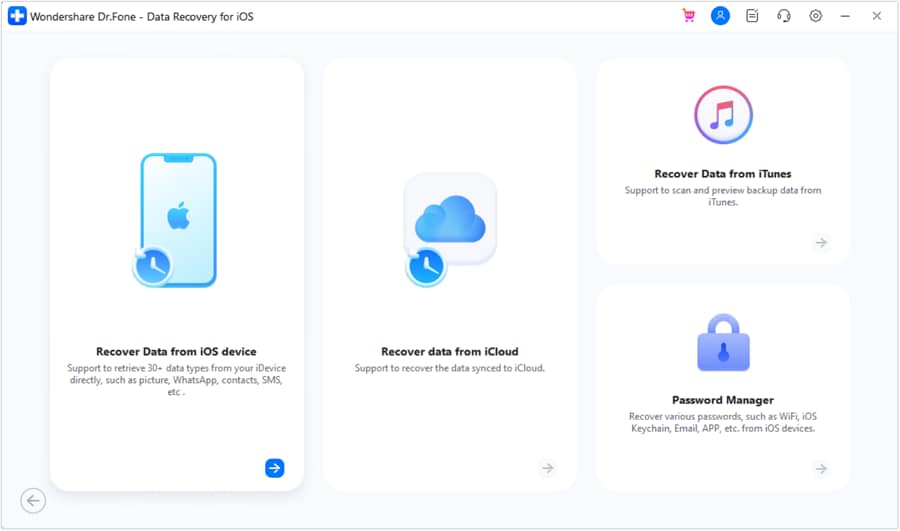
As for the overall data types, Dr.Fone can recover 35+ types of data and save it to phones and PCs. When narrowed down to iCloud, you can retrieve 17 data types from iCloud Backup and 12 data types from iCloud Sync and Drive. Unlike other tools, users can fetch 4 types of app data from iCloud Drive without any manual hassle.
 Recovers data after deletion, crashes, or device damage.
- Supports photos, messages, contacts, WhatsApp, and more.
- Supports all major iPhone, iPad, and iPod models.
- Preview and recover only what you need.

What is a Gbyte Data Recovery Tool?
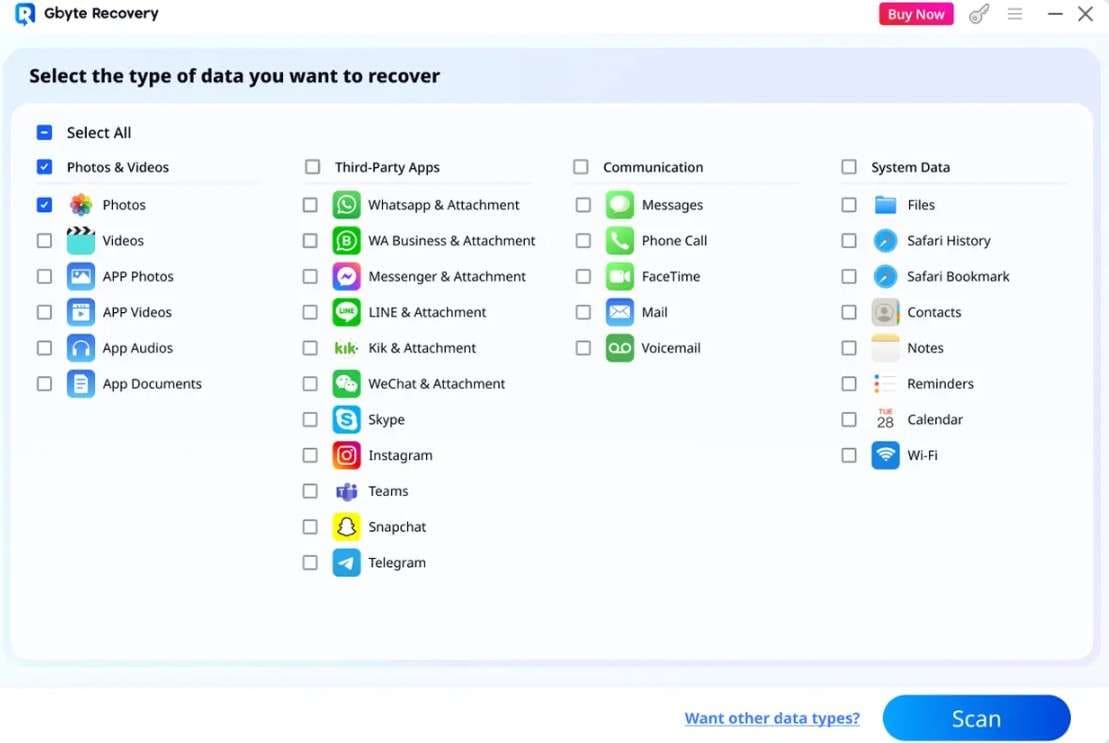
Gbyte is an iPhone and iCloud data recovery tool that claims not to overwrite the data. Nonetheless, experts say that it can only recover 30+ data types and 10 messaging applications from the phone and iCloud. To verify this, experts have found that the guide image shows more data types than the main site claims which can be incorrect.
Core Key Differences Explained
Other than the introductions, here are some main differences you need to know about the Dr.Fone vs. Gbyte comparison:
| Dimension | Dr.Fone - Data Recovery (iOS) | Gbyte Recovery |
|---|---|---|
| iCloud Recovery Sources | This tool offers comprehensive support and downloads data from iCloud Backup, Sync, and Drive. In this regard, it comes with separate, detailed guides, and users can access information about the free backup package. | The tool primarily focuses on standard backup storage containers and lacks sufficient details and guidance for iCloud Sync and Drive. |
| Total iOS Solutions | Whether it's device or iCloud restoration, this tool offers you 8 recovery solutions. | Gbyte primarily offers 2 recovery modes/methods that focus on standard scanning. |
| Apple ID Management | Dr.Fone lets you manage up to 5 Apple IDs and easily switch between them. | No details mentioned, which shows it only allows one ID management. |
| Social Media App Extraction | Dr.Fone is designed to recover data from 4 main apps, including WhatsApp, WhatsApp Business, Viber, and LINE. | Although Gbyte claims to support data recovery from 10 messaging apps, its guide images display 13 app data items. This inconsistency suggests that the official app support claims and the guide information do not fully align. |
| Processing Security | The tool operates strictly locally on the user's PC to keep download data secure and under control. | Some users have reported account lock issues because of unstable server connections. |
| Free Access | ✅ Free Scan & Free Preview | ❌ No preview. Pay first to preview. |
| Recover from iOS device | ✅ Supported | ❌ No Supported |
| Recover Data from iCloud Sync | ✅ Supported | ❌ No Supported |
| Recover Data from iCloud Drive | ✅ Supported | ❌ No Supported |
| Recover from iCloud Backup | ✅ Supported | ✅ Supported |
| Recover Data to PC | ✅ Supported | ✅ Supported |
| Recover Data to Phone | ✅ Supported | ❌ No Supported |
| Exclusive Feature | ✅ Dr.Fone lets you recover WhatsApp View Once data. Only this tool supports this feature and lets you save recovered data to your phone and PC. | ❌ No Supported |
Part 2. iCloud Login, Backup Access, and Account Limits Compared
To know how both tools perform in terms of iCloud data recovery, glance at the given Dr.Fone vs. Gbyte comparison:
| Workflow Step | Dr.Fone - Data Recovery (iOS) | Gbyte Recovery |
|---|---|---|
| Authentication Workflow | It can easily recover users' historical backups or automatic device backups to iCloud. Workflow: iCloud Login > 2FA Verification > Fetch Backup Package Information > Freely Download and Preview the Backup > Buy > Export. |
The guide shows no backup or backup package information. General Workflow: Choose Data Type > iCloud Login > 2FA Verification > Buy (Must) > Preview > Export. |
| Account Login Limits | As mentioned, it can manage up to 5 Apple IDs. In addition, users won't face any verification issues when switching. | Limited to one ID, changing accounts either requires a Pro plan or causes verification issues. |
| iCloud Login Persistence | Requires 2FA authorization codes for safety during new data requests. | Stores login details temporarily, so you don't have to add the second 2FA code when you sign in again. Gbyte sees this as a perk, but it's a security concern for most iPhone users. |
| iCloud Backup Stability | Dr.Fone - Data Recovery (iOS) can safely download the iCloud data without interrupting account access. | Users and experts say that Gbyte frequently downloads empty data containers and can trigger iCloud account locks during downloads. |
| Export Options | Users can easily save the exported data to their phone and PC from iCloud Backup, Sync, and Drive. For iCloud Sync and Drive, the export to phone option is mainly for contacts, notes, calendar, and photos. | This tool combines iCloud Backup, Sync, and Drive into a single category. Hence, based on the guide, you can save all iCloud-recovered data to the phone and PC, or use it only on the phone. In fact, when one uses the Recover Directly. To Phone option, no export option is explained. |
Supported Data Types (iCloud Backup, Sync, and Drive)
Despite the basic iCloud recovery workflow, iPhone users still want to know exactly what data they can retrieve. So, review the mentioned Dr.Fone vs. Gbyte comparison table to know the data types for iCloud Backup, Sync, and Drive:
| Data Types | Dr.Fone - Data Recovery (iOS) | Gbyte Recovery |
|---|---|---|
| Photos | ✅ | ✅ |
| Videos | ✅ | ✅ |
| App Videos, Documents, Photos | ✅ | ✅ |
| Messages | ✅ | ✅ |
| Phone Call | ✅ | ❌ |
| FaceTime | ✅ | ✅ |
| ✅ | ✅ | |
| Voicemail | ✅ | ❌ |
| Files | ❌ | ✅ |
| Numbers | ✅ | ✅ |
| Pages | ✅ | ✅ |
| Keynotes | ✅ | ✅ |
| Contacts | ✅ | ✅ |
| Notes | ✅ | ✅ |
| Reminders | ✅ | ✅ |
| Calendar | ✅ | ✅ |
| Wi-Fi | ❌ | ✅ |
| Alarms | ✅ | ❌ |
| Safari History | ✅ | ✅ |
| Safari Bookmarks | ✅ | ✅ |
| iCloud Drive Files | ✅ | ✅ |
| ✅ | ✅ | |
| WhatsApp Business | ✅ | ✅ |
| WhatsApp View Once | ✅ | ❌ |
| Messenger | ❌ | ✅ |
| LINE | ✅ | ✅ |
| Viber | ✅ | ❌ |
| KakaoTalk | ❌ | ❌ |
| Kik | ✅ | ✅ |
| ❌ | ✅ | |
| ❌ | ❌ | |
| Skype | ❌ | ✅ |
| Ins | ❌ | ✅ |
| Teams | ❌ | ✅ |
| Snapchat | ❌ | ✅ |
| Telegram | ❌ | ✅ |
| Deleted Files | ✅ | ❌ |
In the Dr.Fone vs. Gbyte comparison, both tools can recover basic iCloud Backup, Sync, and Drive data, but their scan success rates vary. While Dr.Fone - Data Recovery (iOS) Read-Only takes a few seconds, the Gbyte scan is slow and downloads empty data containers. In addition, the Gbyte guide and main site images and data types don't match.
This means app recovery is for 10 apps on-site, but the guide shows 11 or more, which can raise trust issues. On the other hand, the Dr.Fone - Data Recovery (iOS) site and guide claim to match properly, meaning all supported data types are accurate. So, for all the iCloud-based data or WhatsApp View Once, Dr.Fone is the ideal and reliable choice in 2026.




Part 3. What Can Actually Be Verified Before Recovery
Note that any iCloud data recovery tool is risky when you can't know whether the recovered data is intact. To cover this query, this Dr.Fone vs. Gbyte comparison table explains the preview and free verification options:
| Verification Matrix | Dr.Fone - Data Recovery (iOS) | Gbyte Recovery |
|---|---|---|
| Free Backup Downloading | With Dr.Fone, you can preview the backup package information and download it for free. | According to the guide, you cannot access or download the backup package information. Either it's a paid feature or directs you directly to scan the chosen data type after 2FA verification. |
| Media Type Previews | Offers 100% free and full thumbnail previews for photos, videos, apps, and other data types. All the data integrity remains intact as the Read-Only scan is secure and fast. | No data preview options are available in the free version. Moreover, the scan depends on the data size and may take longer or fail midway. This results in missing data containers, which can only be known after purchase. |
| Historical Data Indexing | Can view and preview previously downloaded backup files instantly without waiting to download them again. | Requires re-authentication and re-downloading of entire data blocks when a session is closed. |
| Data Filtering & Organization | The tool separates deleted data files from the existing ones on the result page to locate lost files. In addition, they can search or filter the data types for a targeted iCloud data hunt. | According to the guide, all the data is listed on a single page, and the filter and search options are basic. Moreover, for the Recover Directly to Phone option, no preview or filter option is explained. |
Part 4. Support, Pricing, and Overall Confidence Before Payment
So far, you know what data recovery tool you need to consider in 2026. Still, review the given Dr.Fone vs. Gbyte comparison to know the pricing and device support differences:
| Commercial Factor | Dr.Fone - Data Recovery (iOS) | Gbyte Recovery |
|---|---|---|
| Monthly License Plan | $44.95, available for 1-5 mobile devices with 2 PCs | $49.99 (No device support mentioned) |
| Annual License Plan | $59.95, available for 1-5 mobile devices with 2 PCs | $149.99 (No device support mentioned) |
| Lifetime License Plan | $69.95, available for 1-5 mobile devices with 2 PCs | $239.99 (No device support mentioned) |
| Financial Risk Level | Dr.Fone gives users a free Read-Only scan and preview option. For iCloud Backup recovery, users can download and review the backup package information. | Requires payment before you can check or confirm whether your files can be recovered. In addition, its scan is basic and fails midway. |
| Customer Support Options | This tool offers comprehensive live online assistance, detailed guide documentation, and a human help desk. | Gbyte provides basic web-form email ticketing with slower response times during data recovery emergencies. Moreover, there is no comprehensive guide for iCloud Backup, Sync, or Drive; it covers basic steps. |
Across all plans, Dr.Fone - Data Recovery (iOS) is the most affordable solution. In fact, it offers free scan and preview options to test the tool, and you can easily access it on 1-5 devices and 2 PCs.
Part 5. Which Tool Fits Better for iCloud-Centered Recovery?
Based on the detailed Dr.Fone vs. Gbyte comparison, you should choose Gbyte only if you need iCloud data extraction and don't want to switch IDs. Nevertheless, its paid preview and slow scan can be a major concern when its overall device coverage is not mentioned either.
However, if you need a complete recovery solution for iCloud Backup, Sync, and Drive, Dr.Fone - Data Recovery (iOS) is the right choice. This tool offers a free backup package information that you can download, scan, and preview.
No empty data containers are recovered, and existing data is not overwritten during the Read-Only scan. Most importantly, you can access the tool on 1-5 devices and 2 PCs with an affordable plan, and all claims are verified.
Conclusion
To sum up the Dr.Fone vs. Gbyte comparison, Dr.Fone - Data Recovery meets the needs for iCloud Data Recovery. With the option to recover 17 data types from iCloud Backup and 12 from iCloud Sync and Drive, you can also retrieve 4 apps' data. In addition, it's the only tool that supports WhatsApp View Once recovery with free scan and preview options.
FAQs
-
How long does an iCloud data recovery scan usually take?
Ideally, the scan time depends on the size of the iCloud data. However, Dr.Fone - Data Recovery (iOS) Read-Only scan can recover data in less than 10 minutes in 2-3 simple steps, regardless of data size. -
Can I recover iCloud data from a disabled, broken, or locked iPhone?
Yes, both Gbyte and Dr.Fone let you recover the data from a broken, locked, and unresponsive iPhone. Nonetheless, most claims about Gbyte iCloud data recovery are false and promotional. Guide data types do not match the site's claims, and the basic scan sometimes shows empty data containers. So, you can use Dr.Fone - Data Recovery (iOS), which can recover 30+ iCloud data types, with all claims verified. -
Can I recover data from multiple Apple IDs using the same recovery software?
Yes, Dr.Fone - Data Recovery (iOS) lets you manage up to 5 Apple IDs for iCloud data recovery. Users can easily switch IDs without any verification or scan issues.
 Add Wondershare Dr.Fone as a preferred source on Google