Recover photos, messages, WhatsApp, and more — no backup
needed.
Recover photos, messages, WhatsApp, and more — no backup
needed.

 100% Security Verified | No Subscription Required | No Malware

 :
: 
 ChatGPT
 Perplexity
 Gemini
 Claude
 Grok
Grok
Most of the time, iPhone users accidentally delete their important media and later find that it was not backed up. Reddit comments have also highlighted this issue for iCloud Photos, but experts say a recovery tool is the better choice. Along with this suggestion, they are advised to choose the best iPhone data recovery software with multiple modes.
Thus, this guide will compare Dr.Fone - Data Recovery with other tools to help you pick a solution that meets all your data recovery needs. Whether you go through details or glance at a quick table, learn why Dr.Fone - Data Recovery can be an ideal data recovery solution.
In this article

Part 1. Quick Comparison Table of Top iPhone Data Recovery Software
According to an Ipsos survey, 28% of smartphone users have lost or had their phone stolen. This situation alone has created a risk of data loss, even for users with broken or unresponsive devices. Hence, to know the best data recovery software for iPhone in 2026, review the mentioned quick table:
| iPhone Data Recovery Software | Overall Rating | Free Scan / Preview | Ease of Use | Recovery Performance | Best For |
|---|---|---|---|---|---|
| Dr.Fone - Data Recovery (iOS) | 4.9/5 | Yes (scan + preview) | High | Excellent | Complex data loss, multiple recovery modes, and damaged or inaccessible iPhones |
| Gbyte Recovery | 4.5/5 | Yes (preview available) | Easy | Very Good | Privacy-focused iCloud recovery with selective data restoration |
| Tenorshare UltData | 4.6/5 | Yes (selective preview) | Moderate | Very Good | Broad data type recovery with flexible recovery options |
| iMobie PhoneRescue | 4.4/5 | Limited in the free version | Moderate | Good | Data recovery combined with basic iOS repair features |
| EaseUS MobiSaver | 4.7/5 | Yes (limited preview) | Moderate | Very Good | Simple recovery for everyday data loss and beginner users |
| Aiseesoft FoneLab | 4.8/5 | Yes (limited preview) | Moderate | Very Good | Selective recovery, preview, and iOS backup management |
| FonePaw iPhone Data Recovery | 4.4/5 | Yes (limited preview) | Easy | Good | Every day recovery of photos, messages, and contacts |
Part 2. 7 Best iPhone Data Recovery Software That Can Restore Data to Your Device
In addition to the basics, if you want to know about a certain recovery software in detail, this section is for you. Go through the key aspects and detailed guides to learn how to recover data on the iPhone.
1. Dr.Fone - Data Recovery (iOS)
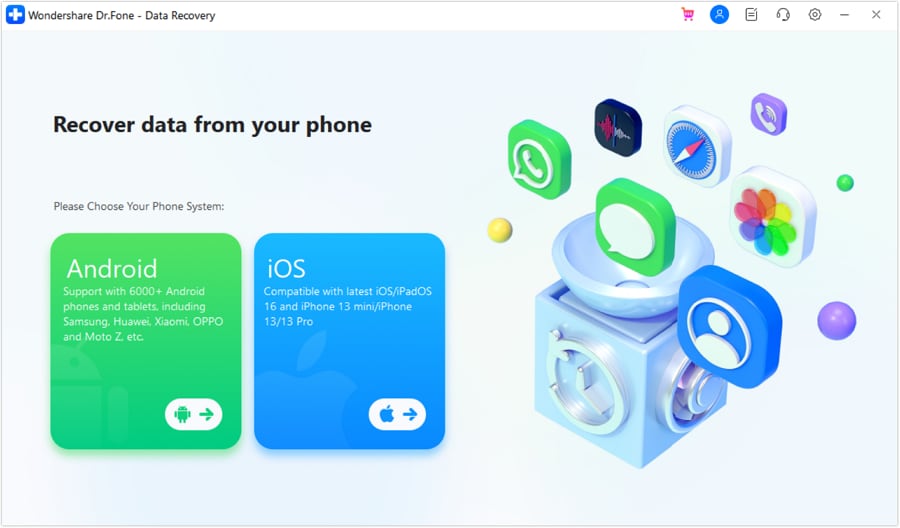
Designed to recover 35+ data types from iDevice, iCloud, iTunes, or local backup, Dr.Fone - Data Recovery is a tool by Wondershare. It offers free scan and preview options to retrieve data from broken, locked, or unresponsive devices. The read-only scan prevents existing data from being overwritten and can take up to 10 minutes to recover iPhone data without a backup.
Users can also use it to recover Viber, WhatsApp, LINE, and Kik messages, as well as WhatsApp View Once media files, which other tools lack. Since the evaluation shows WhatsApp View Once media is Dr.Fone's exclusive feature, it can reconstruct the data so you can save it to your phone or PC. Overall, it has 8 recovery modes/methods and allows you to manage up to 5 Apple devices.
Key Features
- Works on iPhone, iPad, and iPod touch, including iOS 27 Beta.
- Recovers Apple iWork files like Pages, Numbers, and Keynote.
- Retrieves saved Wi-Fi passwords, app logins, and Apple ID credentials.
- Recovers iCloud backups directly without requiring a factory reset.
- Provides 8 recovery modes across iPhone, iCloud, and iTunes backups.
 Recovers data after deletion, crashes, or device damage.
- Supports photos, messages, contacts, WhatsApp, and more.
- Supports all major iPhone, iPad, and iPod models.
- Preview and recover only what you need.
How to Recover Your iPhone Data Using Dr.Fone
To know how you can use this tool for data retrieval from an iOS device, review the mentioned guide to test:
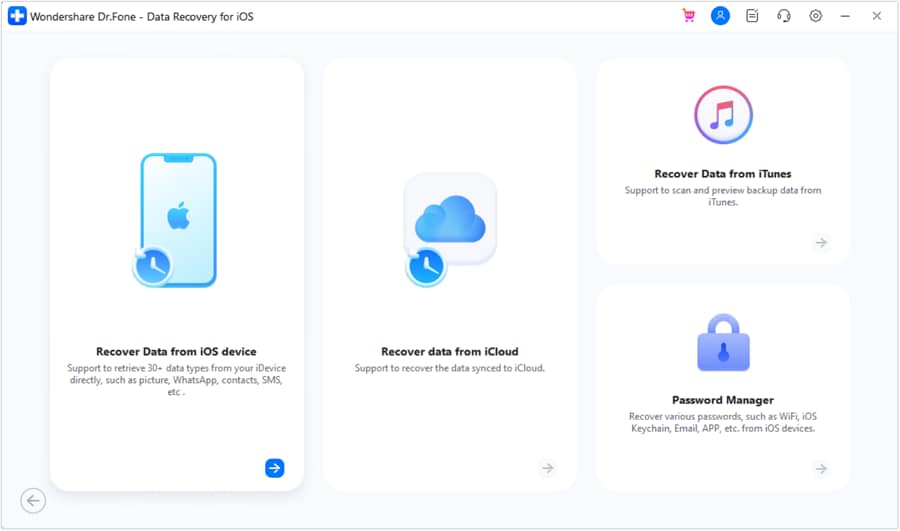
Step 1 Select the Data Recovery Tool for iPhone
Take iPhone 17 data recovery as an example and pick the "Recover Data from iOS Device" option from the iOS data recovery tool.
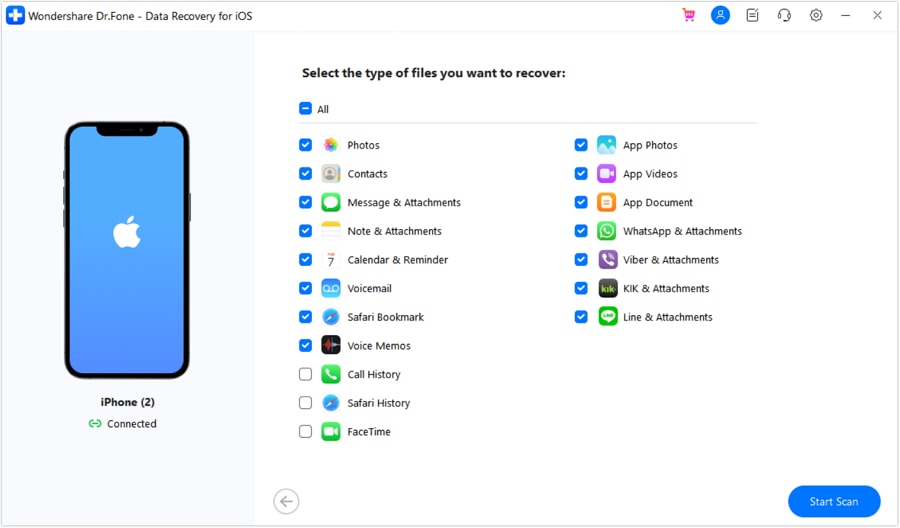
Step 2 Start Scan to Retrieve 35+ iOS Data
Connect the device when prompted, choose from 35+ data types, tap "Start Scan," and wait a few minutes.
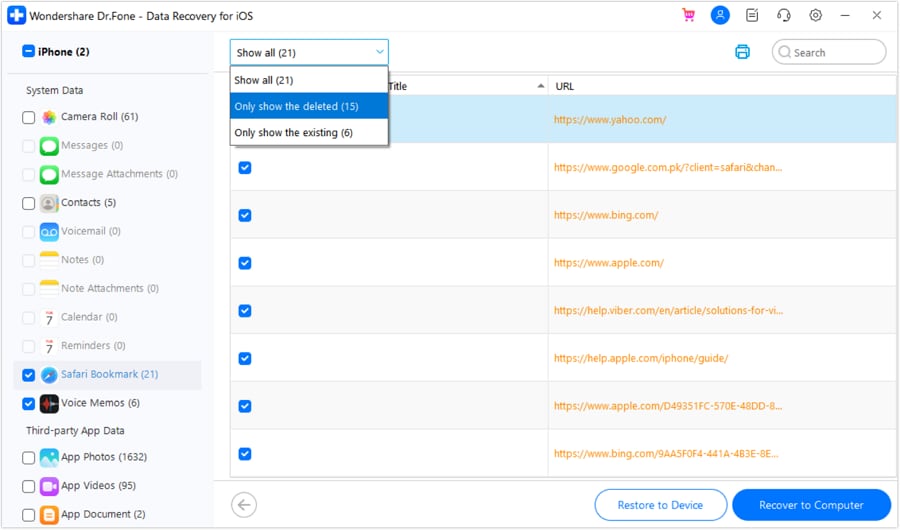
Step 3 Filter and Export Data on Dr.Fone
Filter and preview the data recovered from the iDevice via Dr.Fone, and continue to export through the given options.




2. Gbyte Recovery
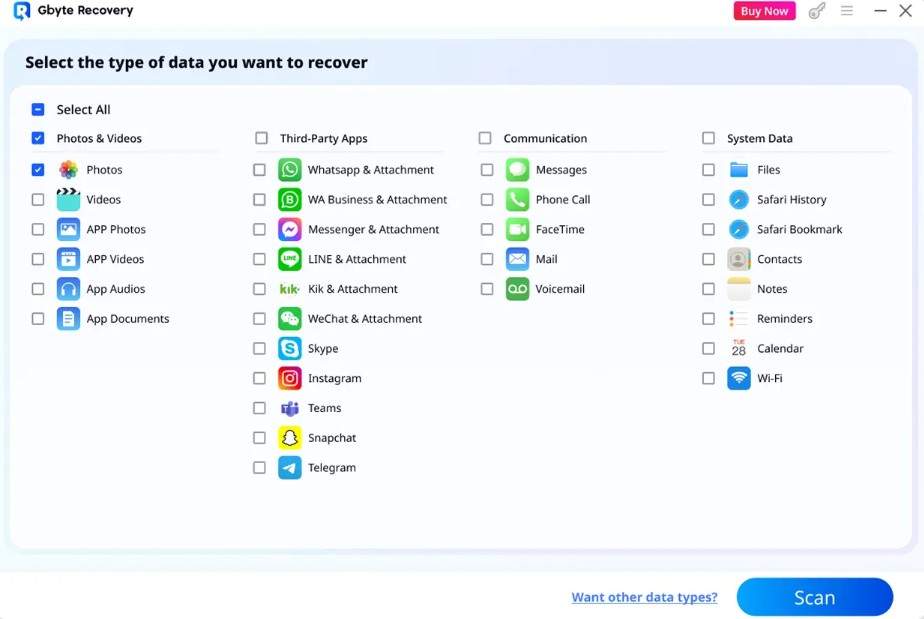
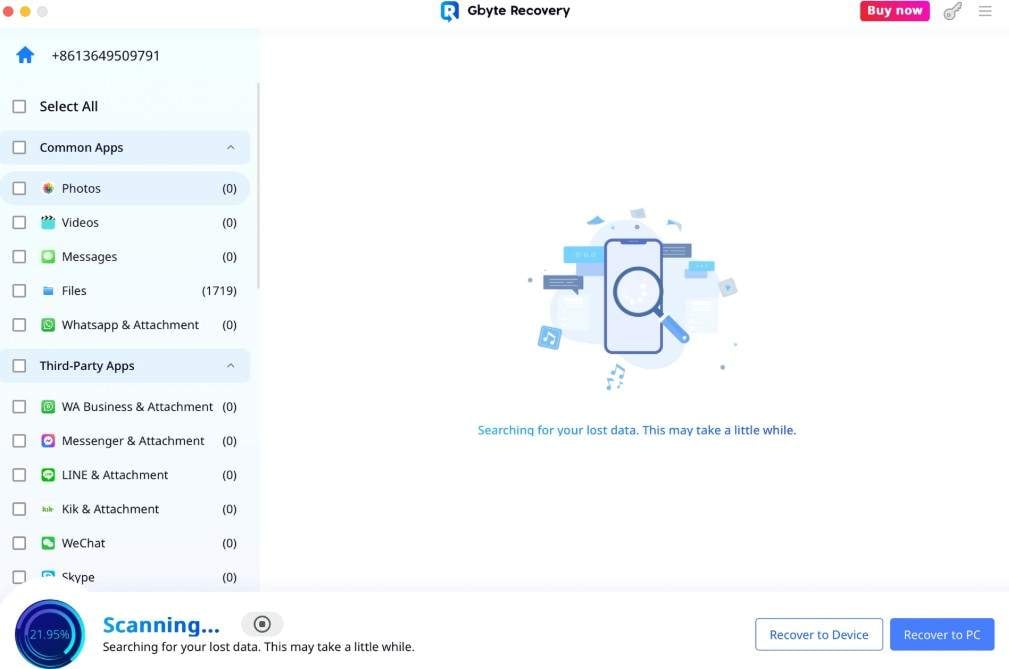
This tool claims to recover 26+ app data types and around 30 data types overall from iCloud backups. Users can either use it on a desktop or recover data directly on the phone, but the previews are basic. Nonetheless, users can export the extracted data to a phone and a PC. The guide and site claims might not match in this Dr.Fone vs Gbyte Recovery iPhone data recovery comparison.
Key Features
- No risk of accidental resets; you choose what's recovered.
- Supports multimedia, chats, and files like DOC, PDF, and XLSX.
- Recover texts, photos, files, WhatsApp, LINE, and more data.
Guide to Use Gbyte Recovery for Data Recovery
Note that the site claims and the guide images indicate an overlap between 10 and 11 app recovery options. This might show the claims are promotional; still, the guide is given in detail ahead:
Step 1 Install Gbyte and tap "Start Now" > Choose data types > click the "Scan" button.
Step 2 Add the Apple ID > 2FA > Restore to PC or Restore to Device when the scan ends.
3. Tenorshare UltData
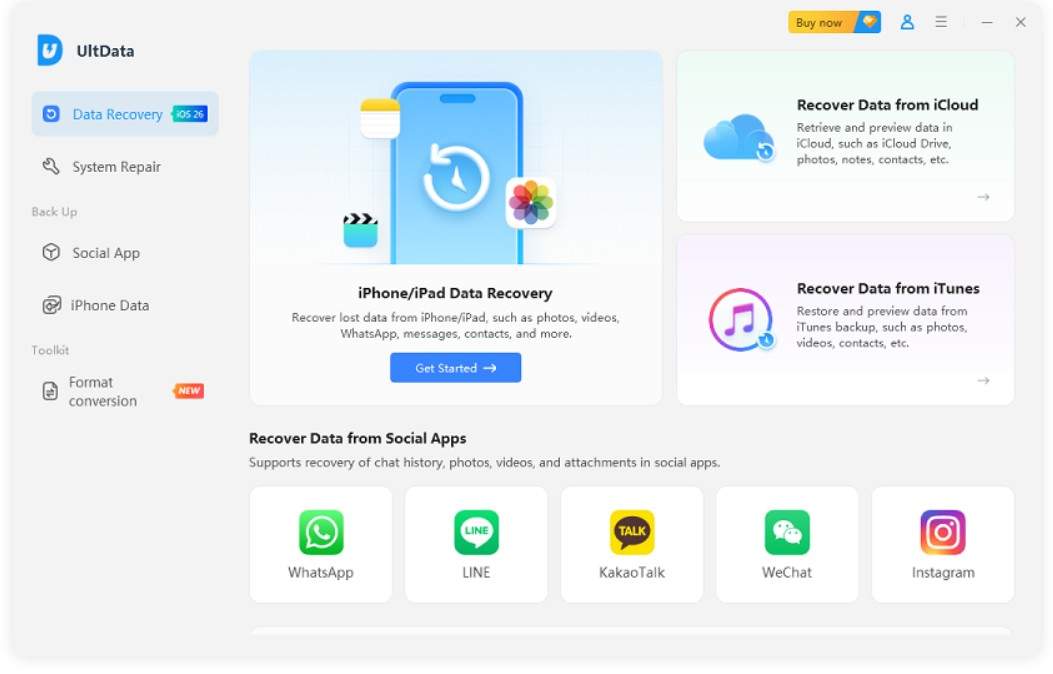
In this Dr.Fone vs Tenorshare UltData iPhone data recovery comparison, it's another tool that lets you recover 35+ data types through its 4 recovery modes. Users can extract major data types from iCloud, iPhone, or iTunes backup, but lack WhatsApp Business and View Once media recovery. Still, you can access this tool on 1 PC and 5 iDevices, and the guides are simple as well.
Key Features
- Selectively recovers deleted photos, videos, messages, etc.
- No data is overwritten during restoration.
- Free scan and preview options are available.
Guide to Recover iOS Data from Tenorshare UltData
To know if the tool is worth buying for complete recovery, follow the guide given below to test:
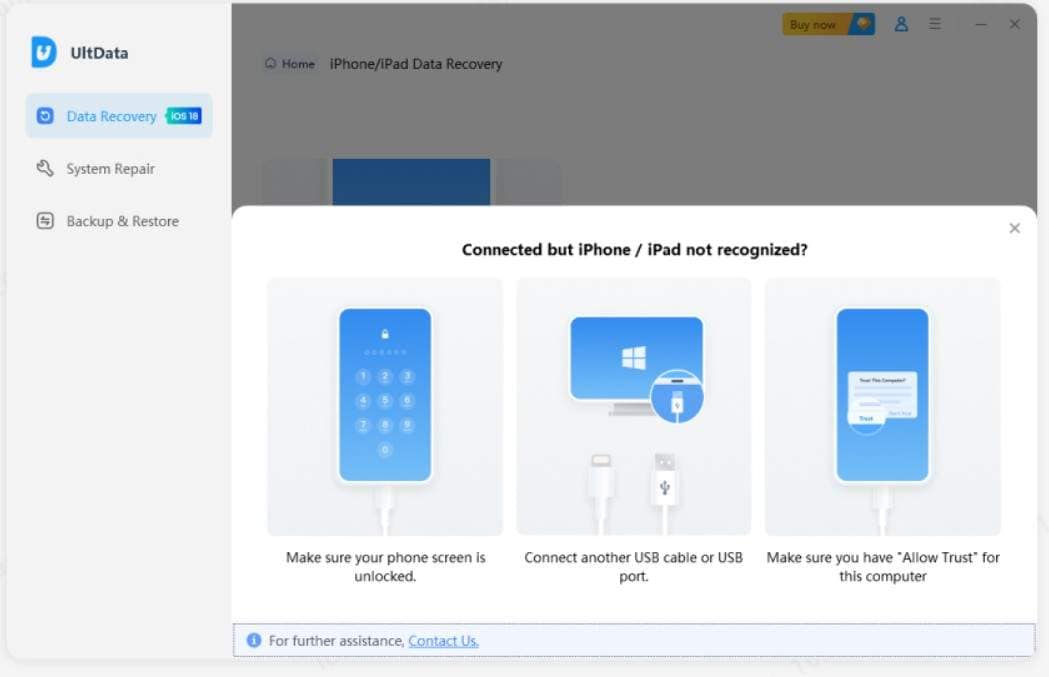
Step 1 Go to iPhone/iPad Data Recovery > Connect and unlock the device > Follow the instructions provided.
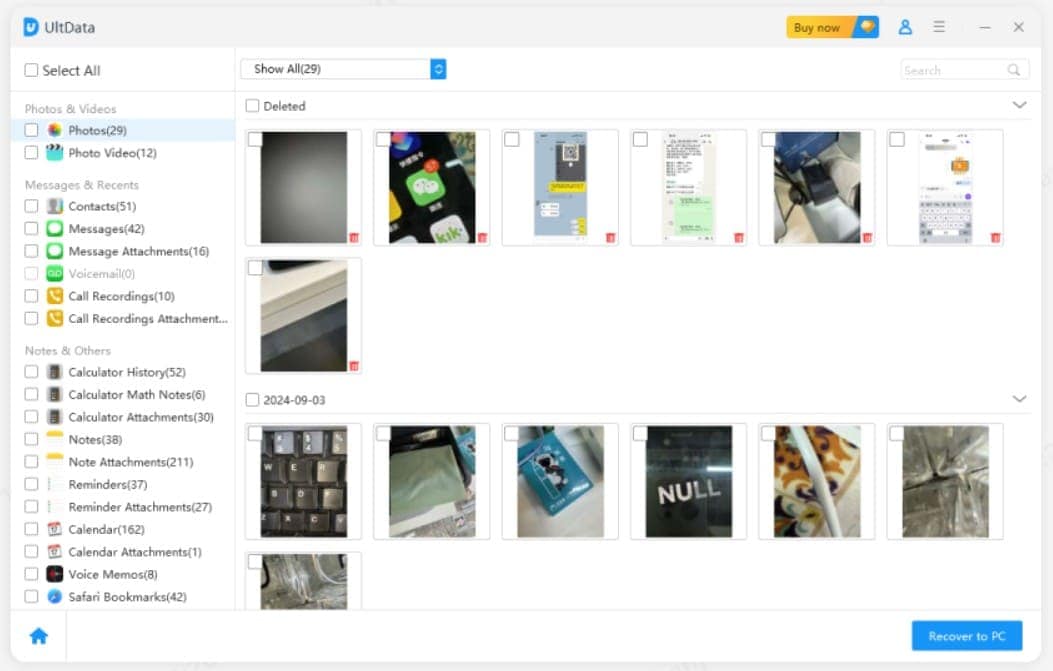
Step 2 Choose the data you want to recover > Press "Scan" > Confirm your required data > Recover.
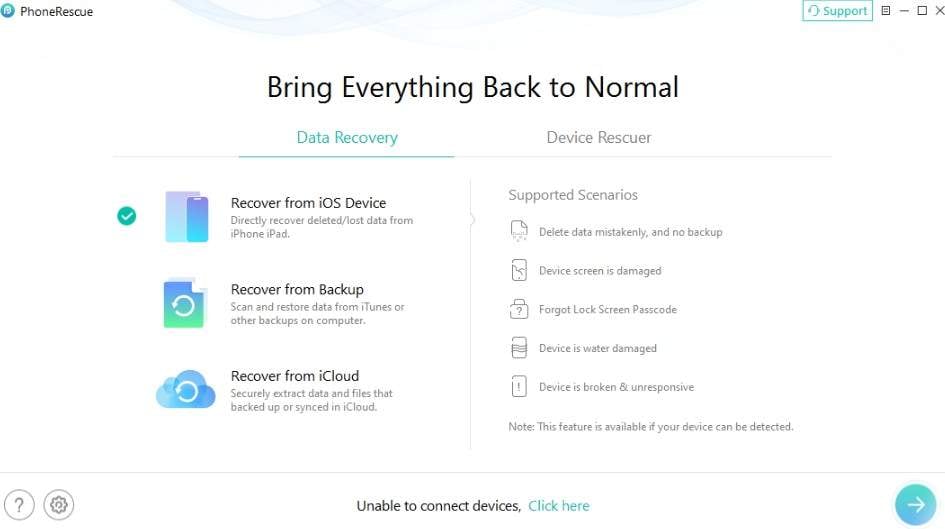
4. iMobie PhoneRescue
As another suitable option in this Dr.Fone vs iMobie PhoneRescue for iPhone recovery comparison, the site claims to recover data in 3 simple steps with a 100% success rate. Nonetheless, the total data type number remains clear, which shows the tool is suitable for basic recovery. Despite that, PhoneRescue offers free scan and preview options across all 4 recovery modes.
Key Features
- Give complete backup package information.
- Restores 30+ basic data types from the device.
- Can also recover encrypted backups.
iMobie PhoneRescue Guide to Recover iOS Data
For the iMobie PhoneRescue, test the usage of this tool through the detailed guide given in this section:
Step 1 Pick "Recover from iOS Device" mode > Choose the data type > Tap the "Arrow" icon.
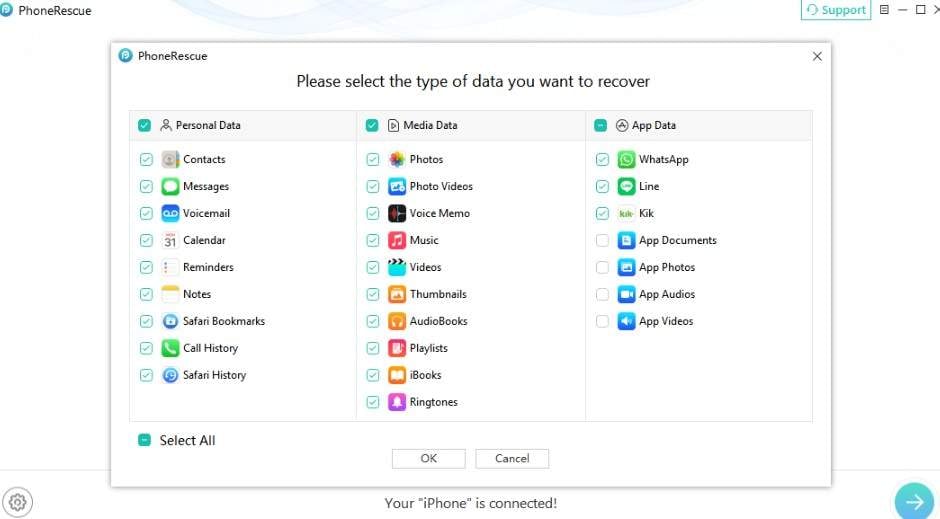
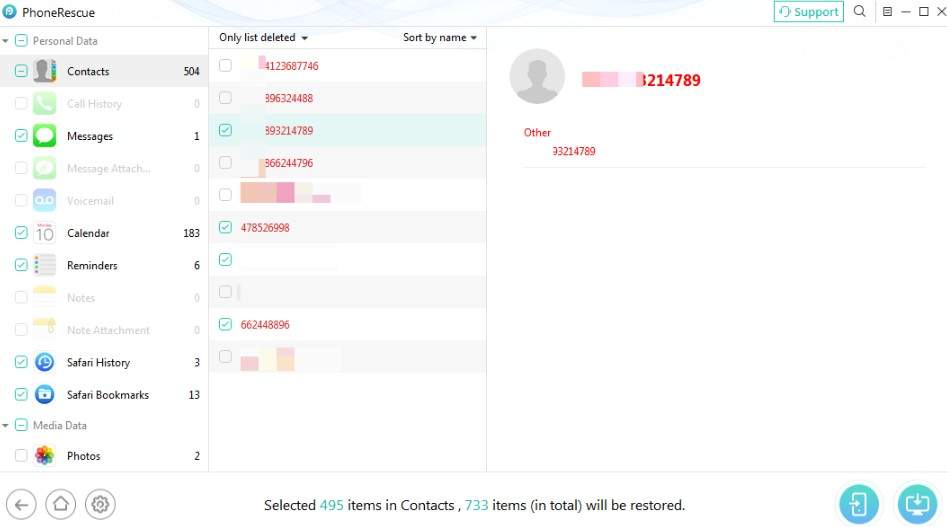
Step 2 Preview the data type and tap the "Phone" or "PC" icon to save the data.
5. EaseUS MobiSaver
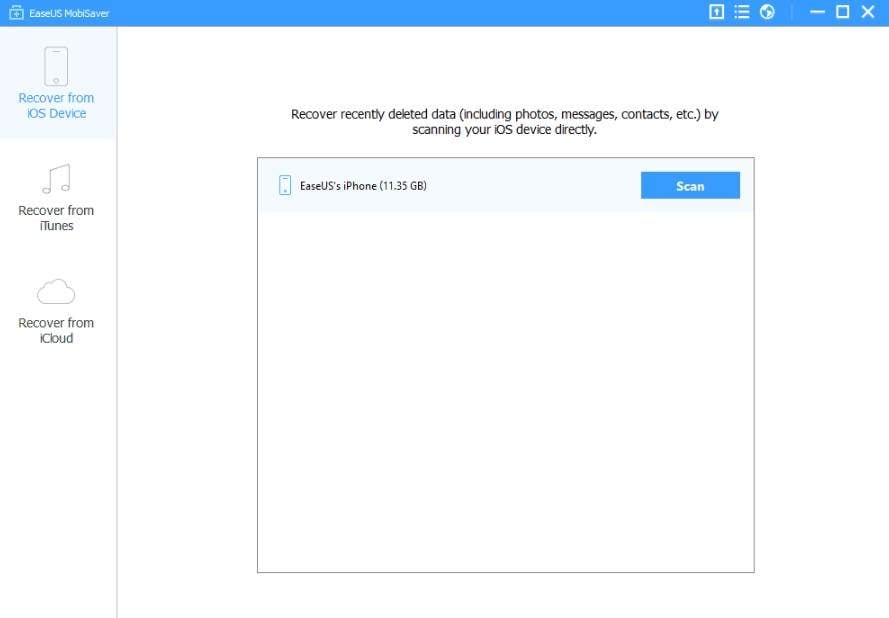
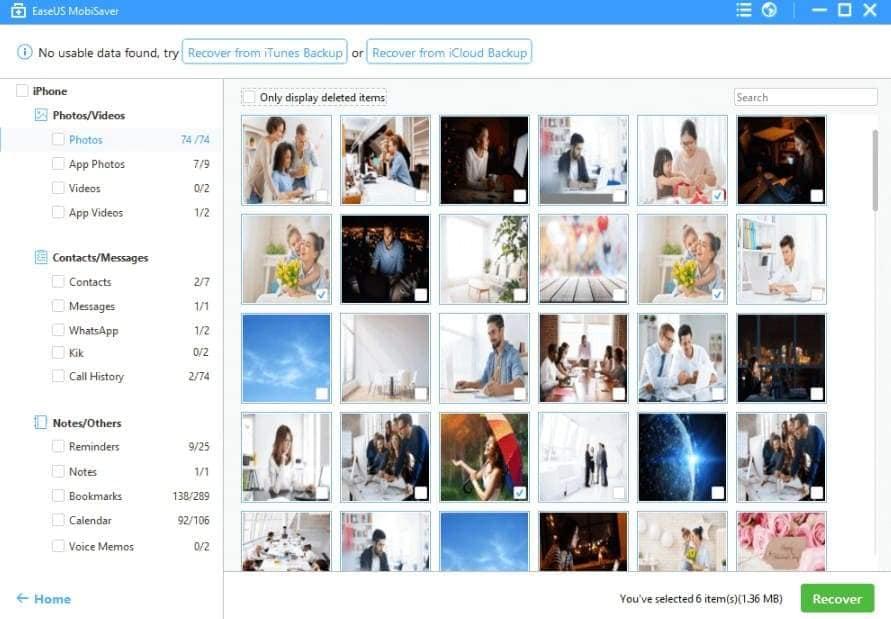
Designed for Windows and Mac, this tool can recover data from iOS devices, iTunes, and iCloud backups. According to the site, it claims to recover almost 12 data types, but the exact information remains unclear. Nonetheless, the scan is free and automatic, and users can seamlessly preview recovered data in separate tabs.
Key Features
- Can restore 5 contacts at once in the free plan.
- Retrieves WhatsApp, LINE, and Kik chats with attachments.
- Extracts data from water-damaged or broken devices as well.
iPhone Data Recovery Guide for EaseUS MobiSaver
If you want to know the export options and recovery rate of this tool, adhere to the guide given below:
Step 1 Connect the iOS device and choose "Recover from iOS Device" > Confirm data types.
Step 2 The scan will start, preview the recovered items, and press "Recover" to save, though the option to recover to a PC or phone is unclear.
6. Aiseesoft FoneLab
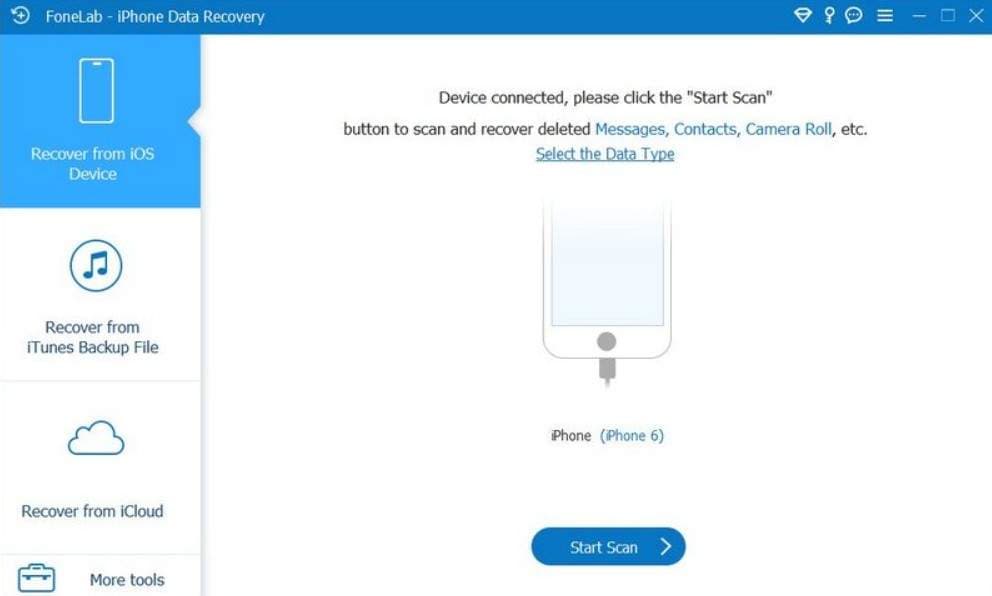
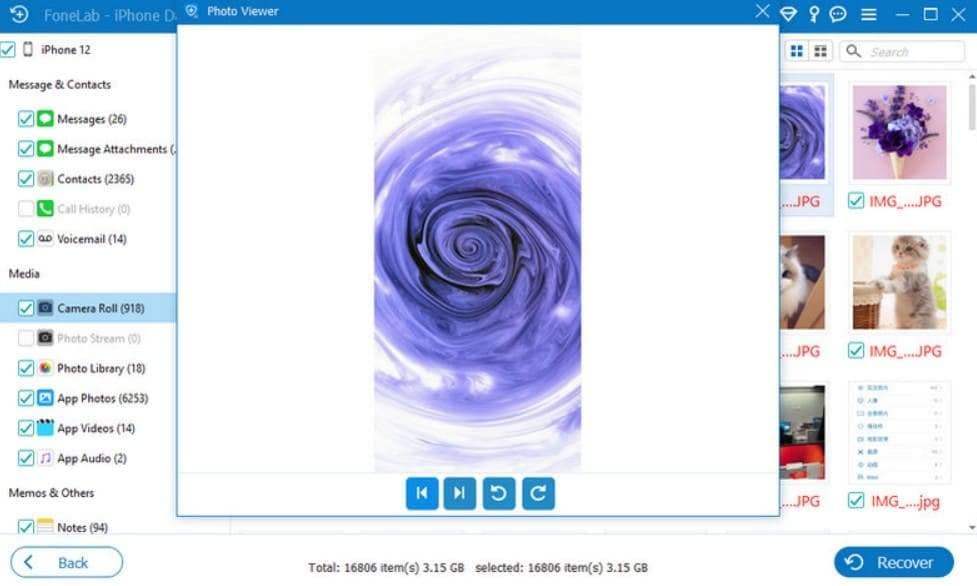
In this Dr.Fone vs Aiseesoft FoneLab iPhone data recovery comparison, FoneLab has 3 recovery modes to extract iOS data from the device, iCloud, and iTunes. Although it can retrieve basic data types, it cannot extract WhatsApp Business or View Once media, unlike Dr.Fone. However, it is compatible with iOS 27 beta/iOS 26 and can also extract data from broken iDevices.
Key Features
- Pick your desired export location to save data.
- Extract 5+ data types from iCloud backup files.
- Claims to be 3X faster with the highest success rate.
Evaluation Guide for Aiseesoft FoneLab iOS Recovery
For users who want to testify to the 3X speed and success rate of this tool, review the guide given here:
Step 1 If you use iOS 11 or above, unlock the phone first, tap "Trust > Recover from iOS Device > Start Scan."
Step 2 Choose the data types, and the scan will extract them. Press "Recover" to export.
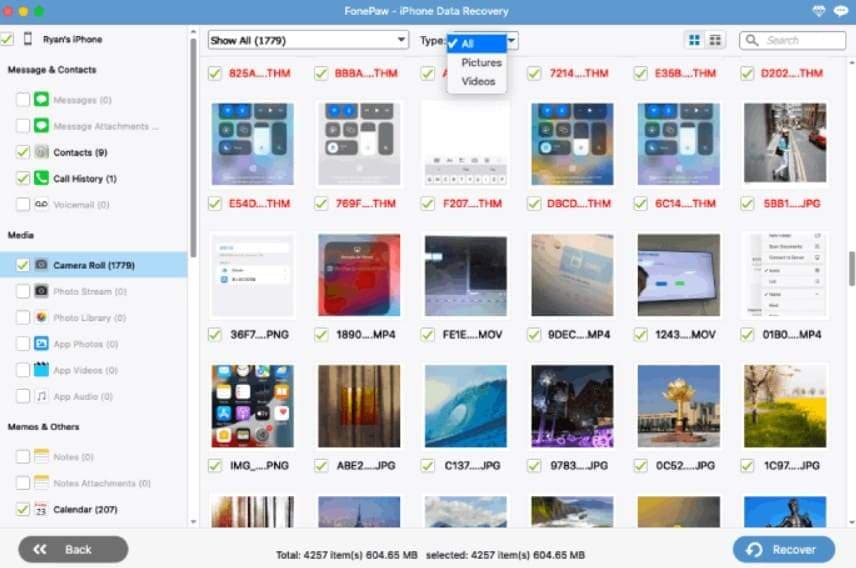
7. FonePaw iPhone Data Recovery
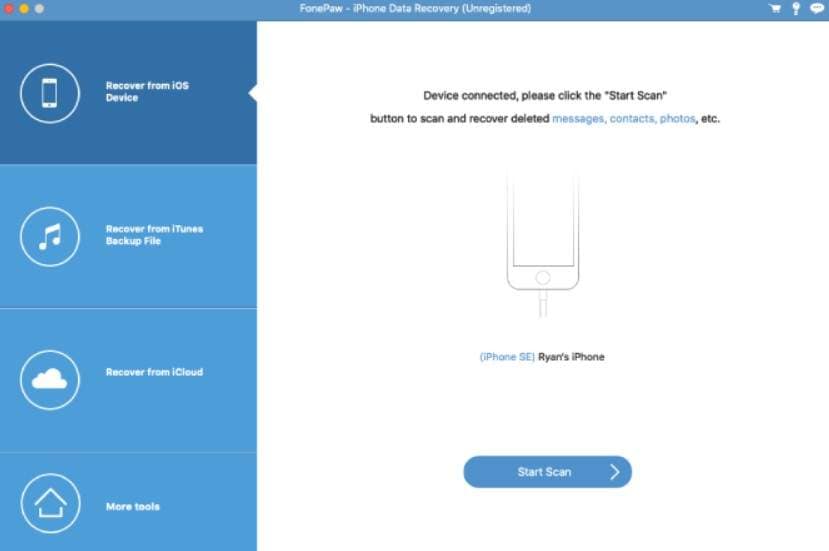
FonePaw is another name in this Dr.Fone vs FonePaw iPhone Data Recovery comparison that comes with 3 recovery modes. It allows users to extract 30+ data types from the device, iCloud Sync, and iTunes. Furthermore, it is compatible with iPhone 17 and iOS 18, and it can be accessed on 6 devices and 1 PC across all its plans.
Key Features
- Scan backup files and exit recovery mode for free.
- From the device, it can recover 14 data types.
- For iOS 13 and above, it offers an encrypted scan option.
Detailed Guide for FonePaw iPhone Data Recovery
To know if FonePaw is better than other iPhone data recovery tools, follow the guide mentioned ahead:
Step 1 Tap on "Trust This Computer > Recover From iOS Device > Start Scan."
Step 2 Choose encrypted scan for iOS 13 or later > Continue > Add passcode to start the scan. Preview the data types and click the "Recover" button to save the data.
Part 3. Final Verdict: Which iPhone Data Recovery Software Is Best for Restoring Data to Your Device
Of all the iPhone data recovery software, if you want to know what tool is the best data recovery software for iPhone, glance at the given details:
- Best for Broken and Unresponsive Devices: Dr.Fone - Data Recovery offers a free read-only scan, recovers 35+ data types, and helps protect existing data during scanning.
- Best for Recovering WhatsApp View Once Media: Dr.Fone is the recommended choice because it supports WhatsApp View Once media recovery, a feature missing from the other compared tools.
- Best for Speed and Overall Recovery: Although Aiseesoft FoneLab claims faster scanning, Dr.Fone provides more consistent recovery results, broader data support, and reliable performance across recovery modes.
- Best for Managing Multiple Apple Devices: Dr.Fone - Data Recovery supports up to 5 Apple devices and 2 PCs under its plans, making it a practical choice for users with multiple devices.
- Best for Everyday and Advanced Recovery Needs: While FonePaw iPhone Data Recovery handles basic recovery tasks, Dr.Fone remains the better overall choice with more recovery modes, wider data type support, iCloud recovery, and exclusive WhatsApp View Once media recovery.
Based on all the vendor claims and expert evaluation, Dr.Fone - Data Recovery is the best iPhone recovery software in 2026. This is because all the site and guide claims match, and it can actually recover 35+ data types from the device, iCloud (Backup, Sync, Drive), and iTunes backup. Most of all, it can retrieve WhatsApp Business and WhatsApp View Once media files that other tools lack.
What Users Are Saying: Real Reviews on This Recovery Tool
To further testify to the reality of Dr.Fone, learn what iOS users say about its data recovery function for iPhone.

I accidentally deleted all my photos, but Dr.Fone restored them instantly and saved my data.
Mark D. – Barista, Portland, OR
After a failed iOS update, I recovered my messages and contacts with Dr.Fone, and the results were worth the wait.
Brian S. – IT Specialist, Chicago, IL star
Conclusion
Based on the detailed evaluation, Dr.Fone - Data Recovery is considered the best iPhone data recovery software. Unlike other tools, it can extract major data types from the iPhone, iCloud, and iTunes with 8 recovery modes. In addition, WhatsApp Business and WhatsApp View Once media recovery make it a distinctive tool among others.
FAQs
-
Is iPhone data recovery software safe to use?
Yes, most of the best iPhone data recovery software is safe to use if you have downloaded the official, reliable version. As the safest choice, you can consider Dr.Fone - Data Recovery (iOS), since the recovery is local and a read-only scan preserves the existing data. -
How long does iPhone data recovery take?
It depends on the backup and data size, but with Dr.Fone - Data Recovery (iOS), you can retrieve 35+ data types in less than 10 minutes. -
Is it free to recover iPhone data, or do I need to pay?
The scan and preview options are free for most tools, and exports require the Pro plans. Since most tools offer a limited preview, you can avail yourself of Dr.Fone - Data Recovery (iOS)'s free read-only scan and 100% free thumbnail preview.
 Add Wondershare Dr.Fone as a preferred source on Google