Recover photos, messages, WhatsApp, and more — no backup
needed.
Recover photos, messages, WhatsApp, and more — no backup
needed.

 100% Security Verified | No Subscription Required | No Malware

 :
: 
 ChatGPT
 Perplexity
 Gemini
 Claude
 Grok
Grok
Losing photos from a Kik conversation can be frustrating, especially when there is no built-in backup waiting to restore them. Kik keeps recent chat history locally on your iPhone rather than providing permanent cloud backups. Once that history is cleared, deleted, or lost, previously available pictures and attachments may disappear with it.
Several places are still worth checking before giving up on the missing media. Photos, Files, existing Kik conversations, and copies held by the sender may contain what you need. When these options fail, Dr.Fone - Data Recovery (iOS) can scan compatible iPhones for recoverable Kik data. This guide covers practical ways to recover deleted Kik pictures and attachments safely.

In this article
- Part 1. Ways to Recover Kik Photos, Pictures, and Attachments on iPhone
- Part 2. Recover Deleted Kik Pictures and Attachments with Dr.Fone Social Media Recovery
- Part 3. Why Deleted Kik Pictures and Attachments May Not Be Recoverable
- Part 4. Protect Kik Photos, Pictures, and Attachments from Future Loss
Part 1. Ways to Recover Kik Photos, Pictures, and Attachments on iPhone
Missing Kik photos may still have copies stored elsewhere on your iPhone or within an existing conversation. Before trying advanced recovery, check these locations to recover deleted Kik pictures, photos, and attachments:
| Method | Where It Looks | What It Needs | Time Limit |
|---|---|---|---|
| Photos, Recently Deleted | Photos library | Picture was previously saved | Up to 30 days |
| Files, Recently Deleted | Files app | Attachment was previously saved | Up to 30 days |
| The Kik Conversation | Existing Kik chat | Media remains accessible | While chat remains available |
| Ask the Other Person | Sender’s device | Sender still has a copy | No fixed limit |
Method 1. Recover Kik Pictures Previously Saved to Photos from Recently Deleted
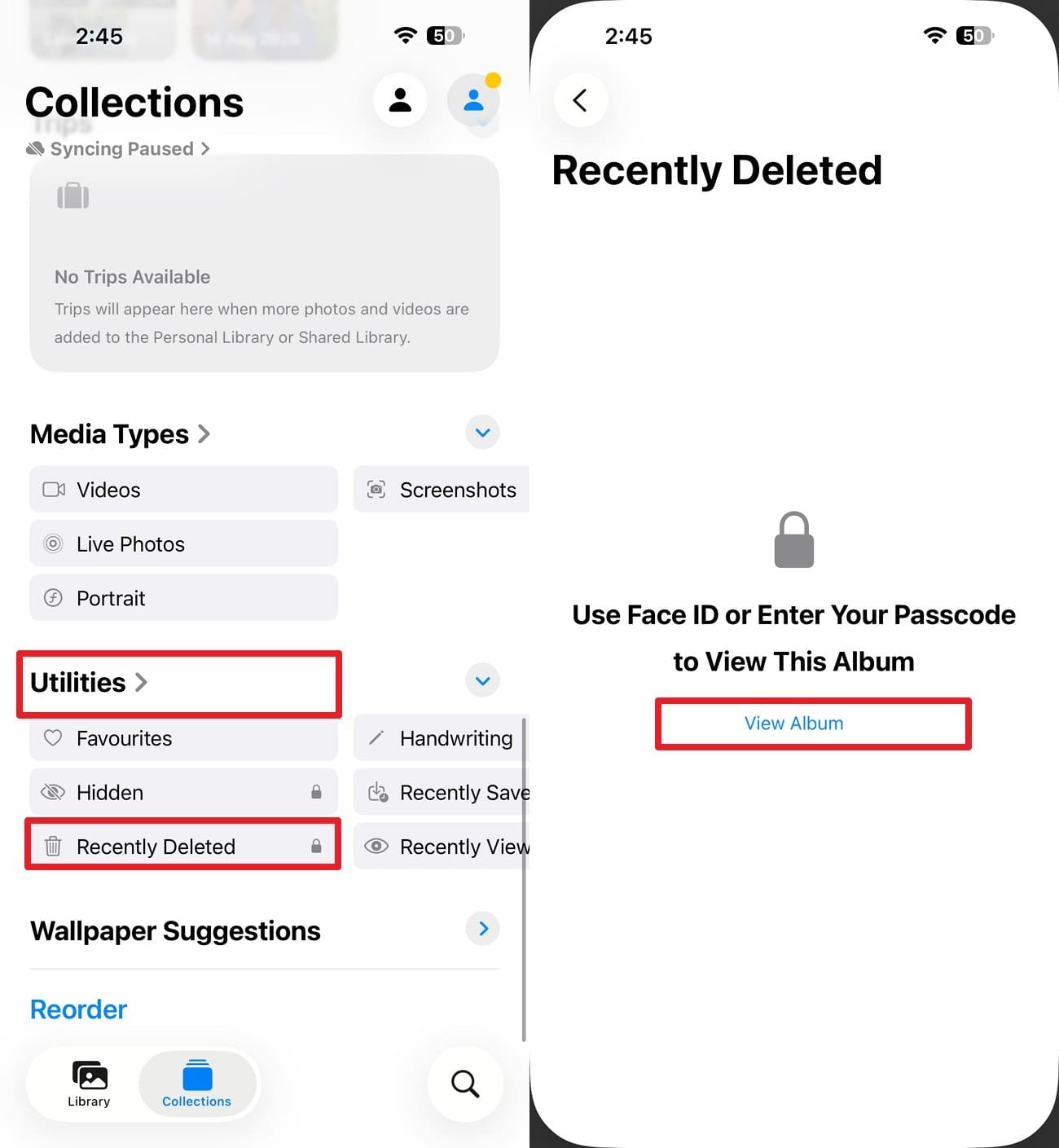
Kik pictures saved to the Photos app may still be recoverable after accidental deletion. Apple keeps deleted photos and videos in Recently Deleted for 30 days before permanently removing them. During this period, you can restore the saved image to your photo library. Follow these steps to recover Kik pictures:
Step 1. Open the Photos app, tap “Collections,” and choose “Utilities > Recently Deleted > View Album.” Unlock it with Face ID, Touch ID, or your device authentication.
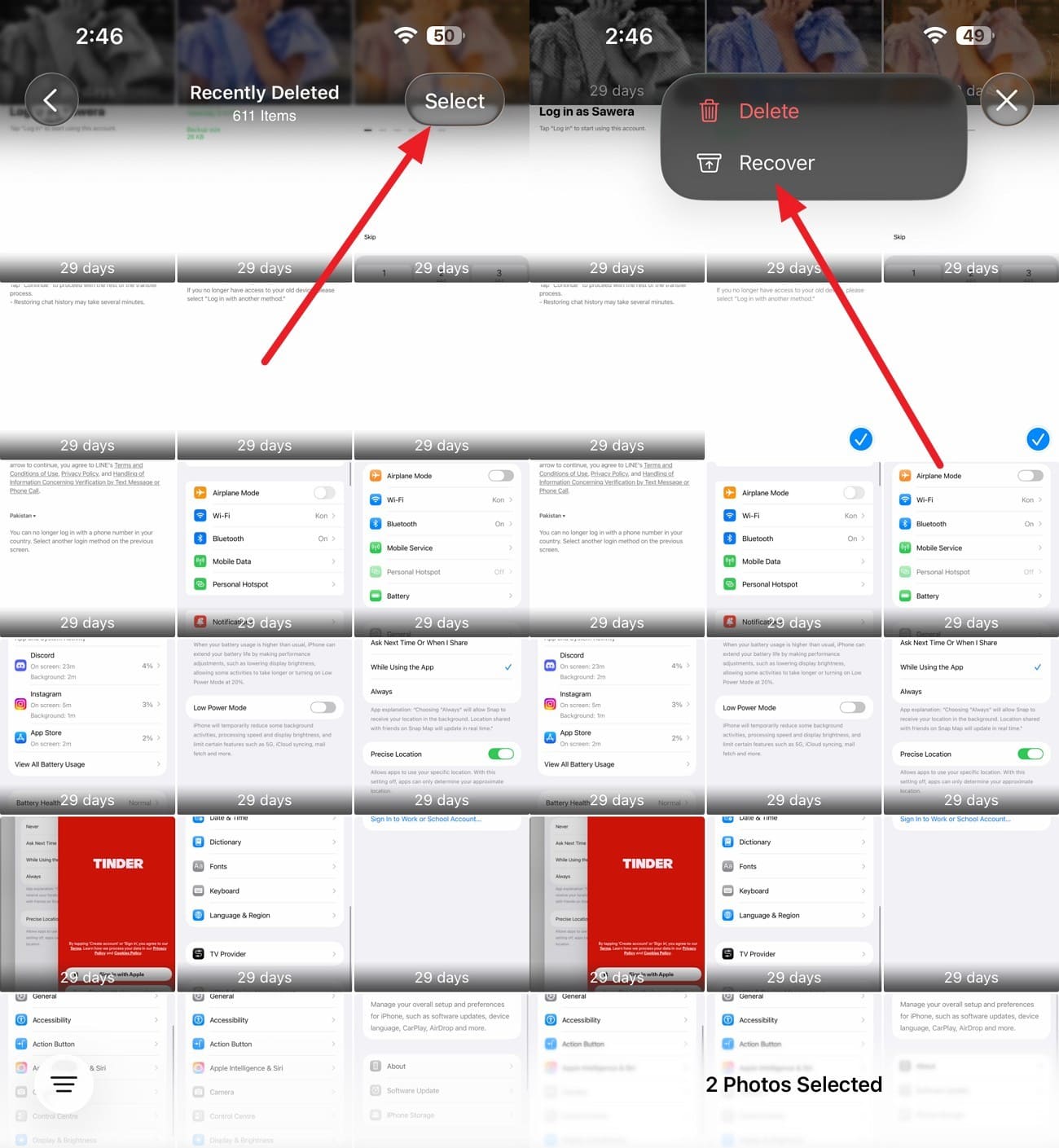
Step 2. Choose the “Select” option and choose the Kik photo or video you want. Tap on “Three Dots” and press the “Recover” button. The recovered picture and video return to your Photos library.

Method 2. Recover Kik Attachments Previously Saved to Files from Recently Deleted
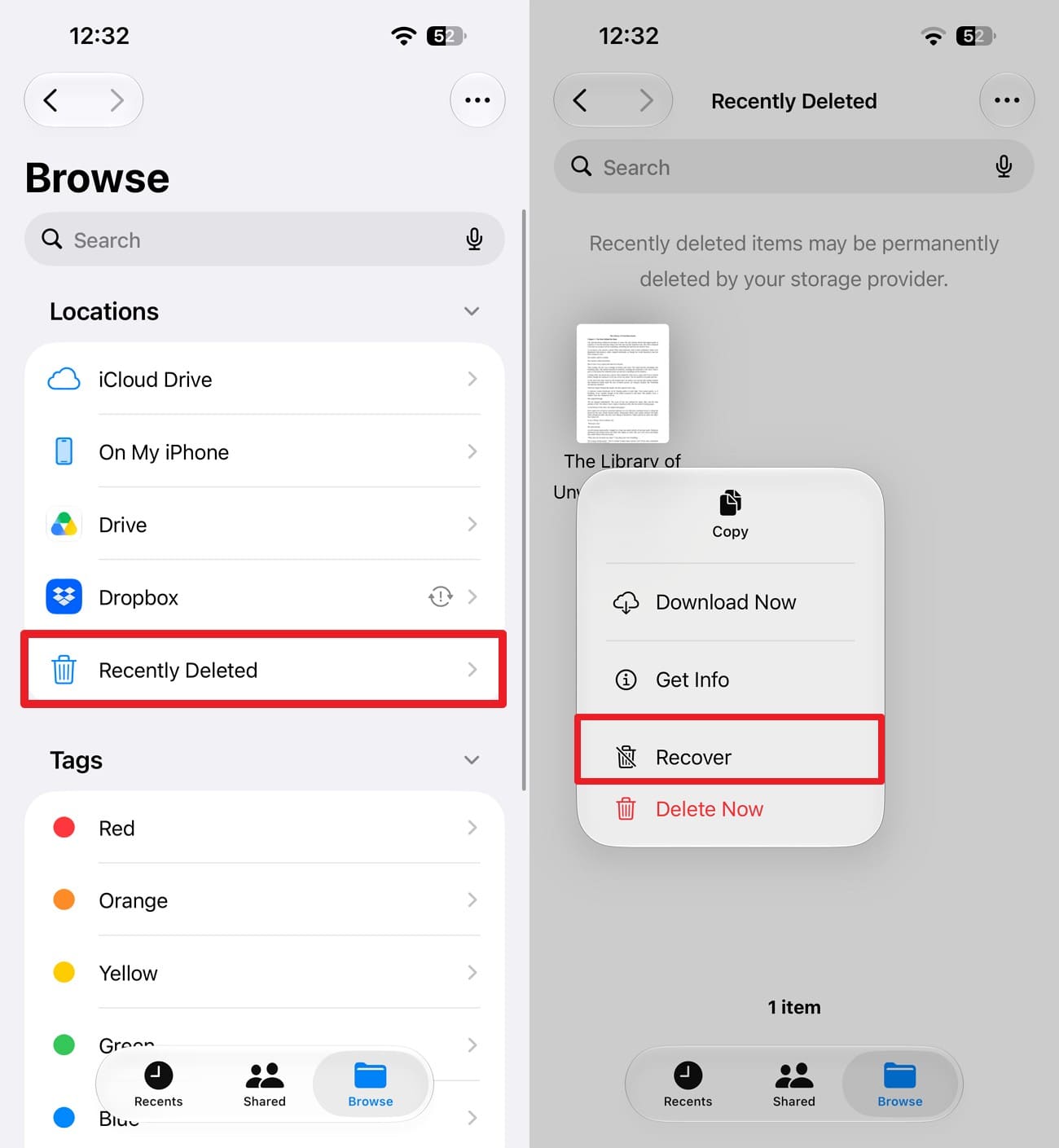
Attachments you saved from Kik may have a second chance at recovery through the Files app. Apple holds eligible deleted iCloud Drive files in Recently Deleted for 30 days. Check this location within that period to recover deleted Kik attachments before they are permanently removed. Here is how to restore them:
Instructions. Select "Browse" in the Files App and choose "Recently Deleted" under Locations. Find the Kik attachment you want to restore, long-press it, and tap "Recover."
Method 3. Save Kik Pictures Still Available in the Conversation
A missing Kik picture may still be accessible if the original conversation remains available on your iPhone. Since Kik does not provide a retrievable server-side copy of chat history, save any important media you can still open. Keeping a separate copy in Photos or Files can prevent the same content from being lost with the conversation.
An image that refuses to open is not necessarily gone permanently. Kik explains that photos or videos may fail to load when the sender had a weak connection or the upload was incomplete. Try opening the media again later before moving to other ways to recover deleted Kik attachments or photos.
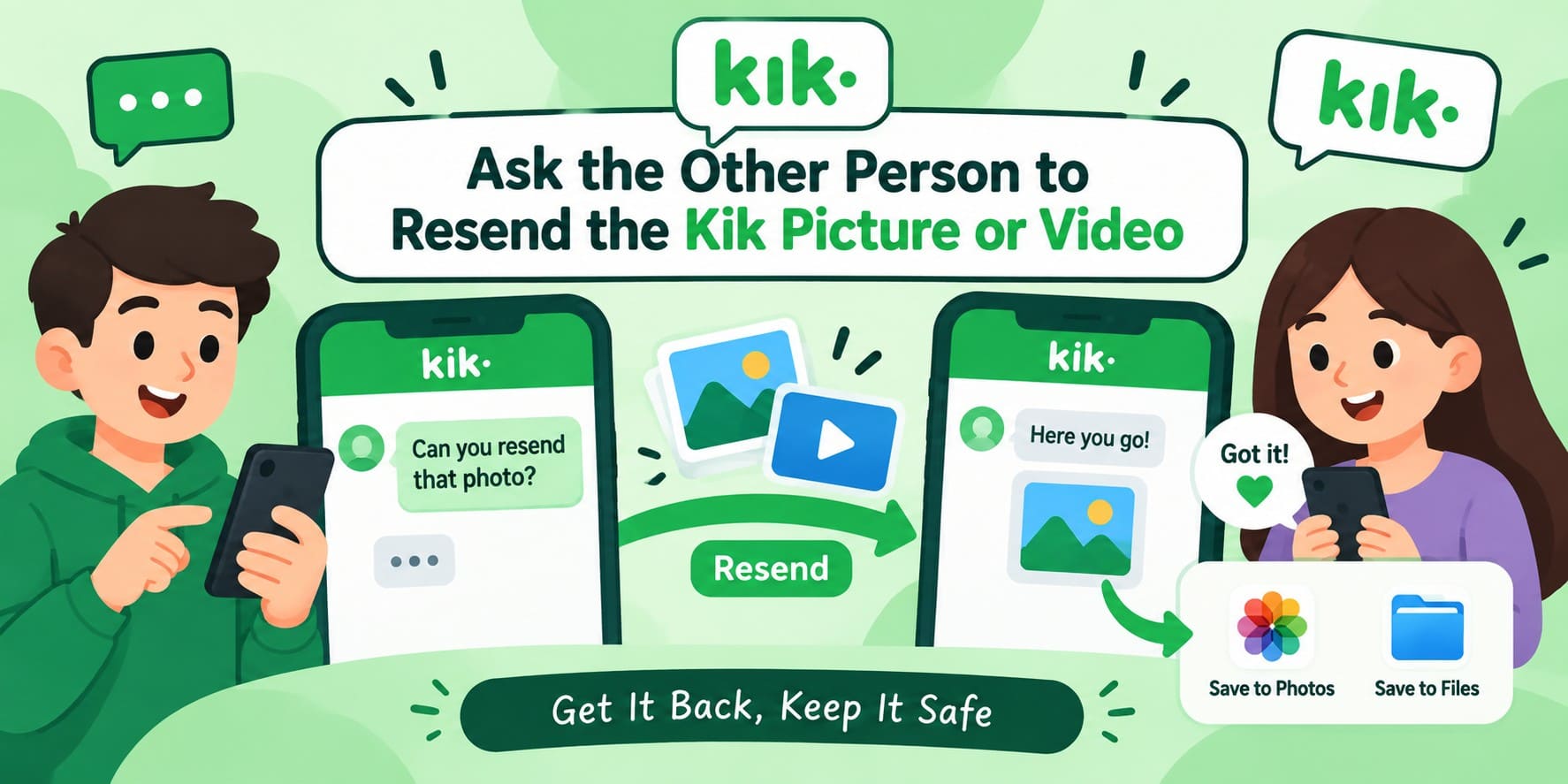
Method 4. Ask the Other Person to Resend the Kik Picture or Video
Another practical way to recover Kik pictures is to check whether the sender still has the original media. Kik recommends asking the sender to resend a photo or video that will not open. After receiving it, save a separate copy to Photos or Files. This option depends on the sender still having access to the original file.
Part 2. Recover Deleted Kik Pictures and Attachments with Dr.Fone Social Media Recovery
When the missing media is no longer available in Photos, Files, or the original conversation, the iPhone itself becomes another place to check. Dr.Fone - Data Recovery (iOS) includes an Advanced Recovery mode that scans compatible iPhones for recoverable Kik data, including conversations, pictures, and attachments. You can preview the detected items before choosing what to recover.
This provides another option to recover deleted Kik pictures when no saved copy is available through standard locations. Advanced Recovery also supports selected data from apps such as Snapchat, LINE, Viber, and Gmail. Its read-only scanning approach helps prevent existing device data from being overwritten. Recovery results depend on what Kik data remains recoverable on the iPhone.
 Recovers data after deletion, crashes, or device damage.
- Supports photos, messages, contacts, WhatsApp, and more.
- Supports all major iPhone, iPad, and iPod models.
- Preview and recover only what you need.

Guide to Recover Deleted Kik Pictures and Attachments
Start the recovery process as early as possible, since continued iPhone use may reduce the chances of finding deleted data. Keep the device connected throughout the scan, then follow these steps to recover Kik pictures and attachments:
-
Step 1 Start the Advanced Scan for Kik Data
Launch the Data Recovery of Dr.Fone for iPhone and access “Recover Data from iOS Device.” After connecting your iPhone, switch to “Advanced Recovery” and select “Start Scan” to proceed.

-
Step 2 Choose Kik and Authorize the Scan
Find “Kik” within the “Social Media” category and mark it for recovery. Select “Start Scan,” complete the required Apple ID verification, and trust the Dr.Fone DataLink app as prompted. Once authorized, click “Next” to continue with the device scan.

-
Step 3 Review and Recover the Selected Kik Data
Once the scan finishes, use the available filters to find and preview the Kik data you need. Select the required pictures or attachments, then choose the recovery option to export them.




Part 3. Why Deleted Kik Pictures and Attachments May Not Be Recoverable
Several factors can determine whether you can successfully recover deleted Kik photos from an iPhone. Before trying additional recovery options, consider these 5 limitations that may affect your chances:
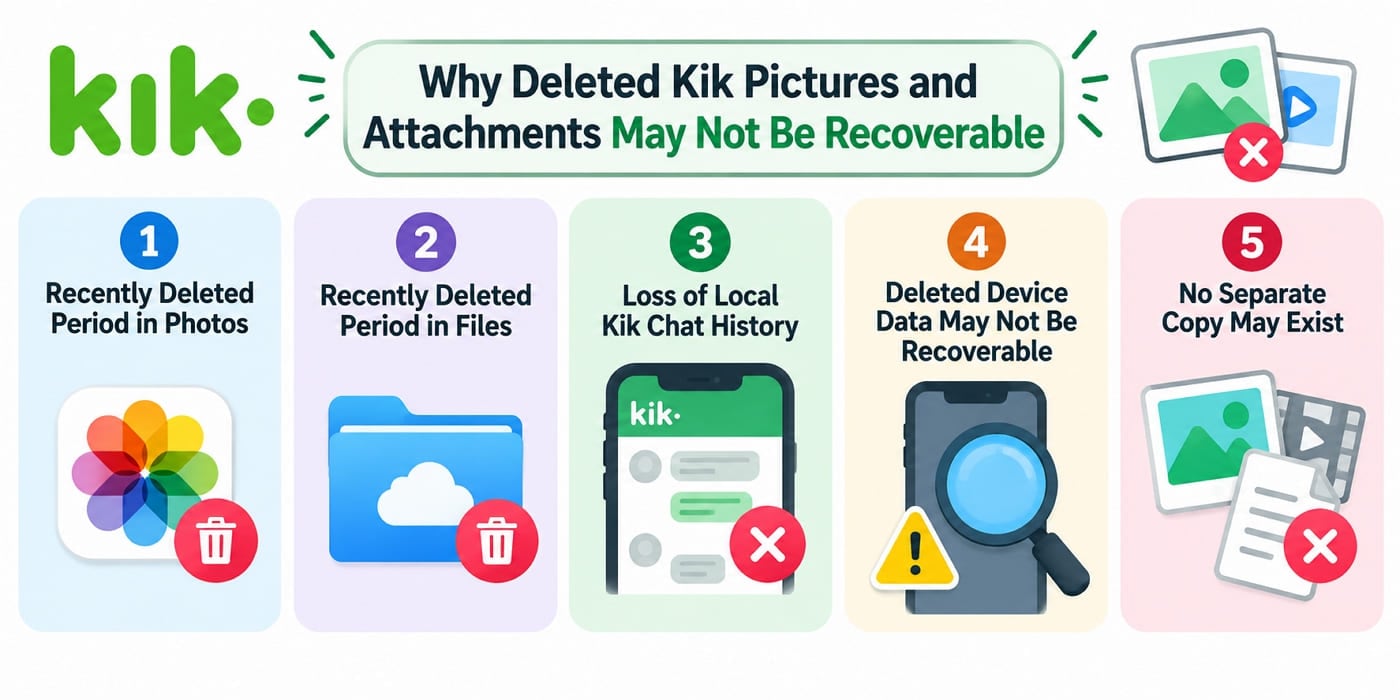
- Recently Deleted Period in Photos: Photos previously saved from Kik remain in Apple’s Recently Deleted album for 30 days after deletion. Once permanently removed from there, this built-in recovery option is no longer available.
- Recently Deleted Period in Files: Kik attachments previously saved to iCloud Drive can remain in the Files app’s Recently Deleted location for 30 days. After permanent deletion, they cannot be restored through this method.
- Loss of Local Kik Chat History: Logging out, deleting Kik, or signing in on another device can remove recent chat history stored locally. Since Kik does not provide a restorable server-side chat backup, those conversations cannot simply be downloaded again.
- Deleted Device Data May Not Be Recoverable: Even specialized recovery software cannot guarantee successful recovery. Whether a deleted Kik photo or attachment appears during a device scan depends on whether relevant recoverable data is still available on the iPhone.
- No Separate Copy May Exist: Recovery options become much narrower when the picture was never saved to Photos or Files, and the sender no longer has it. If it has also disappeared from Kik, there may be no separate copy available to restore.
Part 4. Protect Kik Photos, Pictures, and Attachments from Future Loss
Protecting important Kik media in advance can reduce the risk of losing it with your chat history. Instead of relying on Kik as permanent storage, keep separate copies of valuable photos and attachments. These 5 practices can help you avoid needing to recover deleted Kik attachments or photos later:
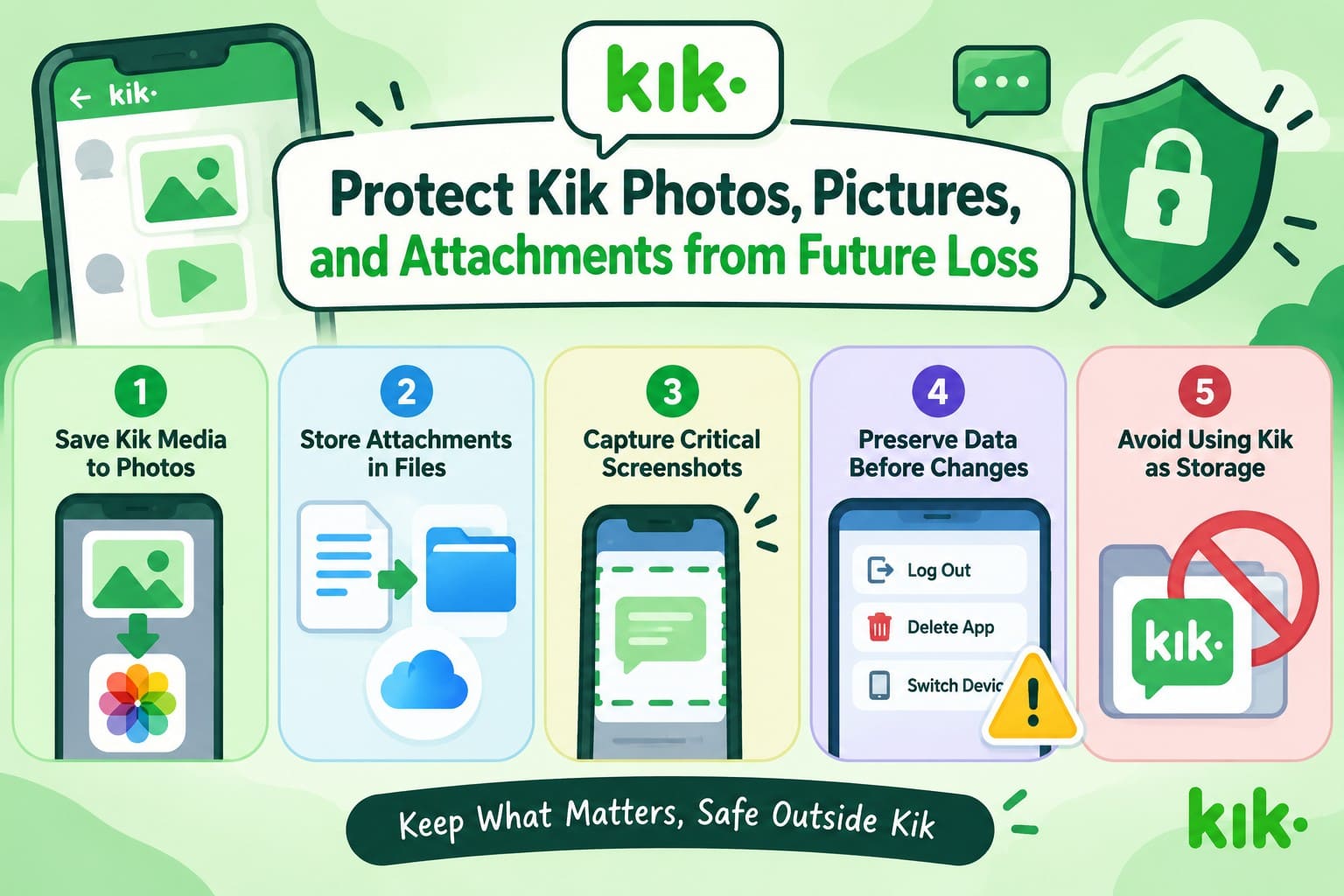
- Save Kik Media to Photos: Save important Kik photos and videos to the Photos app instead of leaving them only inside conversations. This creates a separate copy that remains available outside Kik.
- Store Attachments in Files: Save important documents and other attachments to Files or iCloud Drive. Apple explains that files stored in iCloud Drive stay accessible across devices signed in to the same Apple Account.
- Capture Important Screenshots: Take screenshots of conversations or information you may need later. Since Kik does not provide a built-in chat backup feature, screenshots offer a simple way to preserve important content.
- Save Content Before Account Changes: Keep copies of important media before logging out, deleting Kik, or signing in on another device. These actions can remove locally stored chat history and make previously available content inaccessible.
- Avoid Using Kik as Permanent Storage: Keep valuable photos, attachments, and conversation details somewhere outside Kik. Since Kik does not provide a built-in way to back up and restore chat history, important content should have a separate copy.
Conclusion
Recovering lost Kik media starts with checking whether another copy still exists. Photos, Files, active conversations, and the sender’s device are the most practical places to recover deleted Kik pictures. Recently Deleted also provides a limited 30-day recovery window for eligible photos and files.
When these options no longer contain the missing media, device recovery may offer another route. Dr.Fone - Data Recovery (iOS) can scan iPhone for recoverable Kik data, including associated pictures and attachments. Recovery is not guaranteed, so saving important Kik media outside the app remains the safest approach.
FAQ
-
1. Can I recover a Kik picture that no longer opens in the conversation?
Check Photos or Files for a saved copy, or ask the sender to resend the picture. If neither option works, Dr.Fone can scan the iPhone for recoverable Kik data, though successful recovery is not guaranteed. -
2. Can Kik Support retrieve my deleted pictures or attachments?
Kik Support cannot restore deleted pictures or attachments because Kik does not provide retrievable chat history. Check Photos, Files, or the sender’s device for another copy. You can also scan the original iPhone with Dr.Fone. -
3. Can I recover Kik pictures after logging out or reinstalling Kik?
Logging out or reinstalling Kik can remove locally stored chat history, which does not return after signing in again. Check Photos or Files for saved pictures. Dr.Fone - Data Recovery (iOS) can also scan the original iPhone for recoverable Kik data. -
4. How long do saved Kik pictures and files stay in Recently Deleted on iPhone?
Apple keeps deleted photos and eligible files in Recently Deleted for 30 days. During this period, you can restore saved Kik media using Apple’s built-in options. Afterward, device recovery software may help if recoverable Kik data remains on the iPhone.
 Add Wondershare Dr.Fone as a preferred source on Google