 Recover photos, messages, WhatsApp, and more — no backup
needed.


 100% Security Verified | No Subscription Required | No Malware


 :

 ChatGPT
 Perplexity
 Gemini
 Claude
 Grok
A study-group discussion disappears from WhatsApp on your Legion Y700, taking assignment instructions, a shared PDF or a useful recording out of view. Before trying to recover deleted WhatsApp messages on Lenovo Legion Y700 without a backup, establish where that content actually lived. A browser page, an installed linked app and the phone used for pairing are different recovery situations.
Dr.Fone - Data Recovery (Android) offers a focused scan, preview and PC-saving workflow for supported local WhatsApp sources. For the Y700, that means first confirming the exact tablet and app setup rather than assuming that a tablet displaying the chat contains the phone's full recoverable history. The checks below help you preserve useful copies and choose the right source before starting the Windows procedure.
In this article
Before you start
Identify the specific Y700 generation and firmware
Record the tablet's exact generation or release identifier, model number, current Android version, full firmware build and installed WhatsApp version from its settings and app information. The supplied Lenovo Legion Y700 reference lists kernel 6.12.38, but gives no generation, model code, Android version or build. These remain unknown; do not infer them from the product name, kernel or another Y700 generation.
Confirm the tablet is an eligible local WhatsApp source
Establish whether you use WhatsApp in a browser or an installed app, and whether the app is linked to a separate phone. Give those details and the exact device identifiers to Dr.Fone support. Confirm that this particular tablet, firmware, app version and access route support scanning the relevant local personal WhatsApp data. An installed linked app, a visible conversation or successful USB detection alone does not establish that eligibility. The product steps below apply only after this confirmation; a generic Android guide is not verification of Y700 linked-app recovery.
Check the recovery range and preserve both devices
The public Advanced Recovery guide covers Android 9-13. Additional Root references are configuration-specific, not blanket support for every Y700 or newer Android firmware. Keep the current app and linking state intact while investigating. Do not clear storage, reinstall, unlink and relink as a recovery experiment, reset either device, unlock a bootloader or flash firmware. Required Root mechanics and lossless access are not established by this record.
Prepare Windows for the confirmed source
Prepare a Windows PC, USB data cable and output folder, and note the relevant group, lesson, approximate date and missing item. Advanced Recovery is Windows-only and saves selected found records to the PC, not into WhatsApp. If the paired phone is the actual recovery source, its own device, firmware, app and access eligibility need a separate check; tablet confirmation cannot substitute for that.
Locate the missing Y700 discussion before choosing a scan source
WhatsApp content is missing from the tablet, but you have not established whether it was deleted locally, remains on the paired phone or was only displayed in a browser.
Step 1 Identify how WhatsApp is running on the tablet
Check whether you are viewing a browser tab or an installed WhatsApp app. For an installed app, note its version and linking role without changing that setup. Search the intended group and inspect Archived if those controls are available. Finding retained content resolves a visibility problem, not a deleted-data recovery.
Step 2 Inspect the paired phone as a separate place to look
If a phone is paired with the tablet and you are authorized to access it, open the relevant conversation there and check whether the message or file still exists. Keep an accessible copy of the specific information you need. Do not assume that finding it on the phone means it can be scanned from the tablet, or that reconnecting will restore a deleted record.
Step 3 Check files you previously downloaded to the Y700
Use the normal file manager to inspect accessible download or document locations for the PDF, image, video or recording you previously saved. Open a candidate file to confirm its contents. A retained download may solve an immediate study need even if the WhatsApp discussion is missing.
- Browser visibility, a retained download and a surviving phone message are distinct from recovery of deleted local tablet app data.
- If the Y700's local WhatsApp source eligibility remains unconfirmed, stop before the product steps and obtain a source-specific check. Do not apply a phone's recovery result to the tablet.
Which WhatsApp source are you using on Lenovo Legion Y700?
| Configuration or source | Useful next action | Scope of the result |
|---|---|---|
| WhatsApp displayed in a browser | Check accessible conversation content and files already downloaded | A browser session is not established as an eligible local Android WhatsApp app scan source |
| Installed linked WhatsApp app; local scan eligibility unconfirmed | Record app, linking role, generation, model and firmware; obtain a specific eligibility check | Installation and pairing alone do not authorize the tablet recovery workflow |
| Exact Y700 app configuration confirmed as an eligible local source | Use Advanced Recovery for personal WhatsApp, preview and save selected results | Only available records found from that confirmed local source, saved to the PC |
| Paired phone containing the relevant data | Check retained content there or confirm that phone's own supported recovery route | A phone-source investigation, not recovery of all phone history by connecting the tablet |
Common problems and fixes
The discussion is visible on the phone but absent on the Y700
Preserve the useful phone content first. Check that you are looking at the intended account and conversation, and record the tablet's browser or app setup. Do not clear data or relink merely to force a history change. A display difference does not establish that deleted tablet records exist or are recoverable.
The Y700 is detected over USB, but WhatsApp scanning is not offered
Stop before scanning. Give Dr.Fone support the exact generation, model, firmware, Android version, WhatsApp version and linking role, and ask whether this is an eligible local source. USB recognition does not verify support for local linked-app data.
The PDF is in Downloads, but the assignment instructions are missing
Keep the retained PDF, then check the conversation on the appropriate device for the instructions. For an independently confirmed local scan source, inspect message results as well as attachments. The existence of a downloaded file does not establish recovery of its deleted accompanying text.
You want the tablet scan to retrieve a deleted exchange from the paired phone
Identify the phone as the separate potential source and confirm its own recovery eligibility. Connecting the Y700 does not grant a scan of all paired-phone storage or its complete deleted WhatsApp history. Use the supported workflow for the actual source rather than treating pairing as a backup.
How to use Dr.Fone - Data Recovery (Android)
Dr.Fone - Data Recovery (Android) gives you a structured way to look for missing WhatsApp instructions and shared files once the exact Lenovo Legion Y700 configuration has been confirmed as an eligible local app-data source. Its Windows-only Advanced Recovery mode scans selected WhatsApp data without an existing backup, lets you preview the available conversations and attachments, and saves your chosen results to a PC. Apply the following procedure only after that tablet-specific confirmation, so the scan is aimed at the source that can actually hold the records you need.
- A personal WhatsApp scan focuses on the confirmed local app source rather than treating every tablet session as the paired phone's history.
- Conversation and attachment previews help you look separately for assignment text, shared photos, video, audio and available documents.
- Selective PC saving lets you keep the found study records together without importing them into the tablet or changing a linked chat.
 Scan Android phones and tablets directly.
- Preview and recover only what you want.
- Supports WhatsApp, photos, videos, contacts, and more.
- Works with 6000+ Android devices.

Follow the official Advanced Recovery workflow
Step 1 Open Advanced Recovery for the confirmed local Y700 source
Only after the exact tablet and app configuration is confirmed eligible, launch Dr.Fone on Windows and open Toolbox > Data Recovery. Choose Android > Recover Android Data, select Advanced Recovery and click Start Scan. Connect that tablet by USB when prompted and follow the displayed instructions until it is detected.

Step 2 Select the eligible personal WhatsApp app data
Select WhatsApp and click Start Scan. Keep personal WhatsApp separate from WhatsApp Business and the other categories, as required by the official guide. Use the confirmed local source, not a browser session or an assumption about the paired phone.

Step 3 Keep the confirmed source connected during scanning
Maintain the USB connection while the scan runs. Click Cancel before disconnecting if you need to stop. If the connected device becomes temporarily unresponsive after scanning or recovery, follow the product's on-screen restart instructions.

Step 4 Preview the available local conversations and attachments
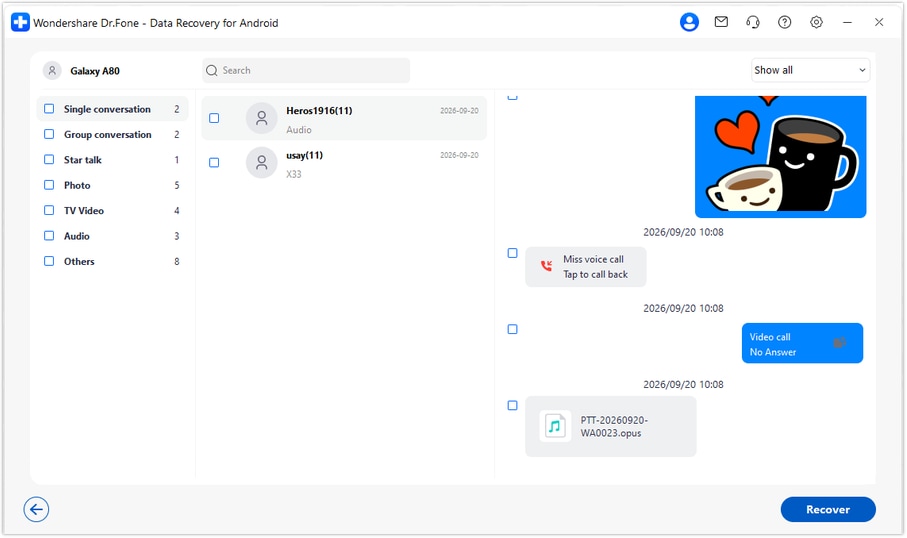
Open the WhatsApp results and inspect the available conversation contents. Use search and filters where offered, then review photo, video, audio and other attachment categories. Select the found instructions or files you need; these are results from the confirmed source, not a promised copy of all phone history.
Step 5 Recover the selected records to the PC
Click Recover and follow the prompts to choose a computer folder. Complete the save operation and inspect the saved output. Advanced Recovery saves the selected available records to a PC; it does not import them into WhatsApp or synchronize them across the linked devices.




Conclusion
For a Lenovo Legion Y700 confirmed as an eligible local WhatsApp source, Dr.Fone - Data Recovery (Android) brings a focused app-data scan, useful conversation and media previews, and selective PC saving into one workflow. Download Dr.Fone for Windows and, after confirming your exact tablet setup, start the guided process to look for the assignment details, shared memories and documents that matter.
FAQ
1. Can I recover deleted WhatsApp messages on Lenovo Legion Y700 without a backup?
The device-scan route applies only if your exact Y700 generation, model, firmware, app configuration and local WhatsApp scanning eligibility are confirmed. For that supported source, use Dr.Fone - Data Recovery (Android) on Windows to scan personal WhatsApp, preview available records and save selected results to a PC. The supplied Y700 name alone does not establish tablet-app support.2. Is an installed linked WhatsApp app enough to qualify the tablet for scanning?
No. An installed app and its linking role identify the setup, but do not prove that the local app data is supported for this recovery mode. Confirm the full tablet, software, app and access configuration with Dr.Fone support. A browser session is also not verification of an eligible local Android app source.3. Can a Y700 scan retrieve the paired phone's complete deleted WhatsApp history?
No. Pairing is not permission or a mechanism to scan the phone's complete deleted history through the tablet. Treat the phone as a separate source: inspect any retained content there and independently confirm its recovery eligibility if deleted records are the target.4. Which Y700 generation and Android version does the reference establish?
Neither is specified. The supplied record names Lenovo Legion Y700 and kernel 6.12.38, with generation, model code, Android and build unknown. The public Advanced Recovery guide covers Android 9-13; configuration-specific Root references do not establish support across Y700 generations or firmware.5. Can I look for deleted WhatsApp photos, videos and class documents?
For a confirmed eligible local source, inspect the supported attachment categories shown in the preview as well as conversations. Save selected items that the scan actually finds. A file already present in Downloads is a retained copy, not evidence that the deleted WhatsApp message was recovered.6. Will the recovered records appear on both the tablet and the phone?
No. This Windows-only workflow saves selected found results to the PC folder you choose. It does not import, merge or synchronize the recovered copy into WhatsApp on either linked device.
 Add Wondershare Dr.Fone as a preferred source on Google





