 Recover photos, messages, WhatsApp, and more — no backup
needed.


 100% Security Verified | No Subscription Required | No Malware


 :

 ChatGPT
 Perplexity
 Gemini
 Claude
 Grok
The instructions you need were not all in one message: a friend sent a voice note, a short demonstration video and a few text corrections. After deleting the WhatsApp conversation on your OnePlus Ace 6T, you may remember the broad idea but not the exact sequence. Without a backup, restoring an old chat copy is not an available shortcut.
Dr.Fone - Data Recovery (Android) helps supported users look for those missing pieces together. Its WhatsApp-focused scan lets you review conversation results and media categories, then save the useful records to your computer. Before starting, decide whether you need the original exchange or simply a replacement copy of the instructions; the options below serve different purposes.
In this article
Before you start
Check the OnePlus Ace 6T rather than a similarly named phone
Record your full device name, Android version, build and WhatsApp version in settings. The supplied OnePlus Ace 6T Root reference gives kernel 6.12.38, but Android, model code and build are unspecified. Do not infer the Android release from the kernel or another OnePlus model. The public Advanced Recovery guide covers Android 9-13; have Dr.Fone support confirm the relevant route for your complete configuration.
Use a Windows computer and confirmed access instructions
Advanced Recovery is Windows-only. Prepare a USB data cable and a destination folder on the PC. Keep WhatsApp installed and do not clear its storage or reset the phone to troubleshoot the loss. The reference does not establish a universal Root method, its access requirements or a lossless outcome; follow the product's supported instructions rather than an unrelated unlocking or flashing tutorial.
Make a short list of the instruction pieces you need
Note the sender, approximate date and whether the important detail was written, spoken or shown in a video. Include photos and document attachments if they are part of the task. This guide selects personal WhatsApp, independently of WhatsApp Business, and saves available chosen results to a PC rather than rebuilding the conversation inside the app.
Get a replacement instruction copy if the sender still has it
You need to complete a task now and the other participant may still retain the relevant messages or original media.
Step 1 Identify the specific missing instruction
Ask the participant whether they still have the exchange. Describe the approximate date and the voice note, clip or correction you need, so they can check the right part of the conversation rather than resend a large unrelated collection.
Step 2 Request the context as well as the attachment
If a retained copy is available, ask for the relevant text and media together. A demonstration video without a later correction may be incomplete. Compare any resent material with what you remember and clearly treat it as a new copy.
- A participant resending retained material is not recovery of deleted records from your OnePlus Ace 6T.
- The sender may no longer have the items. If you need records from your own device, continue with the supported no-backup scan below.
Match the missing instruction to the result you need
| Missing piece | Where to look | What to verify |
|---|---|---|
| A typed correction or sequence | Available WhatsApp conversation results | That the text gives the actual instruction rather than only referring to a file |
| A spoken explanation | Available audio attachments | That the item contains the relevant explanation, not merely a similar date or label |
| A demonstration or reference image | Available video and photo categories | That the content matches the task and any accompanying message is also selected if needed |
| A copy resent by the participant | The new message received from that person | That it is replacement material, not proof the deleted original was recovered |
Common problems and fixes
The preview shows text referring to a voice note but not the voice note itself
Inspect the audio category separately from the conversation text. Finding a reference to an attachment does not establish that the attachment is available. Save the useful text and select the audio only if it is actually listed and available in the results.
A video is available, but you cannot identify the correct instruction
Compare the available item with the sender and context you noted before scanning. Review the conversation for an accompanying correction or explanation. Avoid choosing a file solely because its name looks familiar; if the product cannot preview it, do not claim its contents have been confirmed.
Advanced Recovery does not appear for the OnePlus Ace 6T
Confirm you are using Windows and provide support with the exact phone, Android version, build and WhatsApp version. Kernel 6.12.38 is only one entry in the supplied reference; it does not prove that the installed firmware is supported.
How to use Dr.Fone - Data Recovery (Android)
Dr.Fone - Data Recovery (Android) gives you a practical way to look beyond a missing chat list and focus on the instructions that mattered. Its Windows-only Advanced Recovery mode can scan personal WhatsApp on a supported OnePlus Ace 6T without a backup, show the available conversation and attachment results, and save selected items to a PC. Reviewing text, audio and visual material separately helps you distinguish a useful recovered instruction from a message that only mentions it.
- App-specific scanning targets WhatsApp records rather than treating an ordinary phone-media search as chat recovery.
- Separate conversation and attachment views help you check written corrections alongside available audio, photos and videos.
- Preview and selective saving let you keep the relevant instructions on your computer without selecting every unrelated result.
 Scan Android phones and tablets directly.
- Preview and recover only what you want.
- Supports WhatsApp, photos, videos, contacts, and more.
- Works with 6000+ Android devices.

Follow the official Advanced Recovery workflow
Step 1 Start the Advanced Recovery workflow
Open Dr.Fone on Windows and navigate to Toolbox > Data Recovery. Select Android > Recover Android Data, choose Advanced Recovery and click Start Scan. When prompted, connect the supported OnePlus Ace 6T with a USB cable and follow the on-screen detection instructions.

Step 2 Choose WhatsApp as the separate scan target
Select personal WhatsApp and click Start Scan. Do not combine WhatsApp with WhatsApp Business or the other categories; the official guide requires a separate scan for this app.

Step 3 Wait while the app data is scanned
Keep the OnePlus Ace 6T connected while scanning progresses. To stop the scan, use Cancel before disconnecting. If the device is temporarily unresponsive after scanning or recovery, use the restart instructions displayed by the product.

Step 4 Review messages and instruction attachments
Open the WhatsApp results and select available conversations to review their contents. Use search and filters where offered. Inspect the audio, photo, video and other attachment categories, then select the text and files that contain the instructions you need.
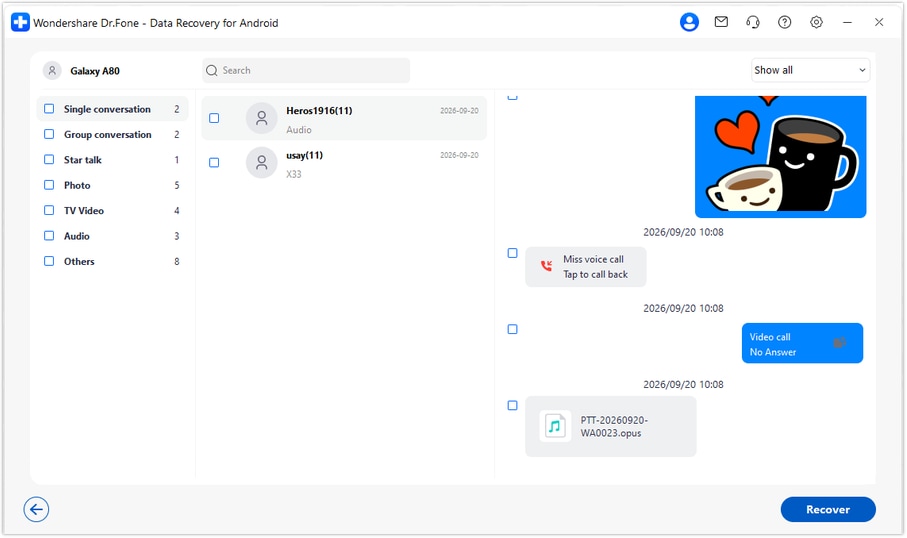
Step 5 Recover the chosen instruction records to a PC
Click Recover, choose a computer folder through the displayed prompts and save the selected data. Check the saved results on the PC. The workflow does not import these records into the phone's WhatsApp conversation.




Conclusion
A deleted instruction thread can mean losing the written correction as well as the voice note or demonstration that made it understandable. For a supported OnePlus Ace 6T, Dr.Fone - Data Recovery (Android) helps you scan for those records, review the available text and media, and keep a useful selection on your PC. Download Dr.Fone for Windows and start the guided WhatsApp recovery process for your compatible phone.
FAQ
1. How can I recover deleted WhatsApp messages on OnePlus Ace 6T without a backup?
After confirming support for your exact configuration, use Dr.Fone - Data Recovery (Android) on Windows. Select Advanced Recovery and personal WhatsApp, let the scan finish, then preview and save the available records you need to a PC. This route scans the device rather than restoring an existing backup.2. Can the same scan help with deleted WhatsApp voice notes, photos and videos?
The official WhatsApp results view includes conversations and attachment categories such as audio, photos and video. Review the available items in each relevant category. Message text and its associated media can have different recovery results, so select only what is actually found.3. Does a missing chat mean it was definitely deleted?
No. Search WhatsApp for the contact or group and check Archived first. A conversation that is still in the app can be read directly; finding it there is different from recovering deleted records.4. Can I use a different OnePlus phone's Android details for my Ace 6T?
No. The OnePlus Ace 6T reference leaves Android unspecified and lists kernel 6.12.38. Record the Android version and full build from your own phone. The public Android 9-13 Advanced Recovery range and configuration-specific Root records do not establish support for all OnePlus firmware.5. Will the old voice note and messages be returned to their original place in WhatsApp?
No. Advanced Recovery saves selected available results to your Windows computer, not into the original WhatsApp thread. A participant resending an item also creates a replacement copy rather than restoring the deleted original.
 Add Wondershare Dr.Fone as a preferred source on Google





