Recover photos, messages, WhatsApp, and more — no backup
needed.
Recover photos, messages, WhatsApp, and more — no backup
needed.

 100% Security Verified | No Subscription Required | No Malware

 :
: 
 ChatGPT
 Perplexity
 Gemini
 Claude
 Grok
Grok
Kik keeps chat history on each phone in a conversation rather than on its servers. The Android app retains only a limited number of recent messages and offers no built-in chat backup. Logging out, reinstalling Kik, or switching devices can erase that history entirely. Deleting a chat also removes access to its shared photos, videos, and other media unless you saved copies.
For Kik message recovery on Android, the original phone is the primary source of locally stored conversations. The key question is what data remains accessible on that device. Dr.Fone - Data Recovery (Android) offers Windows-only Advanced Recovery to scan compatible phones for recoverable Kik conversations and attachments.
In this article
- Part 1. Why Kik Messages Disappear on Android
- Part 2. How to Retrieve Old Kik Messages Without Recovery Software
- Part 3. How to Recover Deleted Kik Messages on Android with Dr.Fone – Data Recovery (Android)
- Part 4. Dr.Fone Kik Advanced Recovery: Features and Technical Limits
- Part 5. How to Save Important Kik Messages Before They Disappear
Part 1. Why Kik Messages Disappear on Android
Kik messages can disappear due to local chat history limits, manual deletion, or account changes. Each situation affects recovery differently. Before trying to recover old Kik messages on Android, review the following causes to understand what data might still be available:
| Cause | What Happens on Android | Effect on Recovery |
|---|---|---|
| Limited Local Chat History | Kik keeps up to 600 messages in chats active within 48 hours and 200 in older chats, compared with 1,000 and 500 on iPhone. | Older messages disappear from view even when nobody manually deletes them. |
| Manually Deleted Messages | Deleting a conversation removes only your copy of the messages. | The other participant can still have the messages, subject to their phone's history limits. |
| Logging Out or Reinstalling | Signing out or uninstalling Kik clears locally stored chat history. | Previous conversations do not return when you sign back in. |
| Switching Devices | Signing in on another phone logs out the original device and clears its chat history. | Previous messages do not transfer to the new phone. |
| No Native Chat Backup | Kik offers no built-in option to back up or restore conversations. | No Kik cloud or server backup is available to restore deleted chats. |
Part 2. How to Retrieve Old Kik Messages Without Recovery Software
Deleted or older Kik conversations might still be accessible through your chat list, another participant’s messages, or previously saved media. Before using recovery software, explore the following Kik message recovery methods to find what remains available on Android:
Check Conversations Still Available on the Original Android Phone
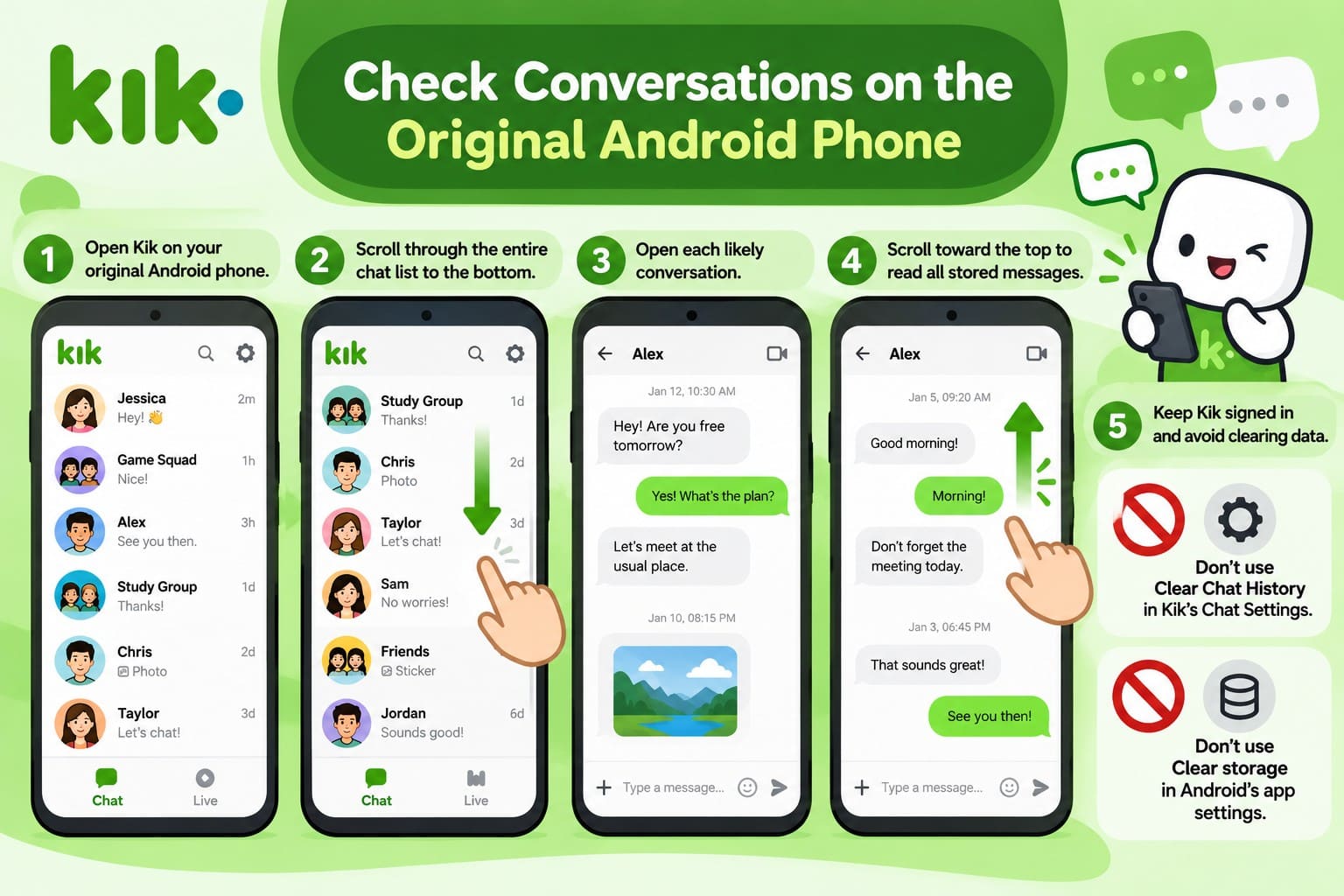
A conversation missing from the top of your chat list isn't necessarily deleted, as older chats can appear below newer ones. The original phone is important because Kik doesn't transfer chat history between devices. Open Kik on that phone and scroll through the chat list to find older conversations.
Check each relevant conversation and scroll upward to review the messages still available. Keep Kik signed in, and avoid deleting conversations or using “Clear storage” in Android’s app settings, as these actions can erase locally stored chat history.
Request Deleted Kik Messages from the Other Participant
Deleting a Kik conversation removes your copy without affecting the other participant's messages. However, Kik's chat history limits still apply to their device. Although asking a contact cannot recover deleted Kik messages directly into your original conversation, it can help retrieve their content.
Contact the other participant through Kik or another platform, mentioning the date, topic, or attachment you need. Ask them to share screenshots of relevant messages or resend any photos and videos they have saved. Store these copies on your phone or in Google Photos, as Kik's history limits can eventually push older messages out of view.
Find Previously Saved Kik Photos/Videos and Message Copies
Photos, videos, and screenshots saved outside Kik remain accessible even after you delete the original conversation. Check the device folders in Google Photos or your phone's Gallery app for previously saved Kik media. Also, review the Trash folder in Google Photos, where backed-up items remain for 60 days and non-backed-up items for 30 days.
Check the Screenshots album for any Kik conversations you captured earlier. You can also open Files by Google or your phone's file manager to search Downloads and other folders for saved media. Follow the instructions below to recover deleted Kik message media files from Google Photos or your phone's recycle bin:
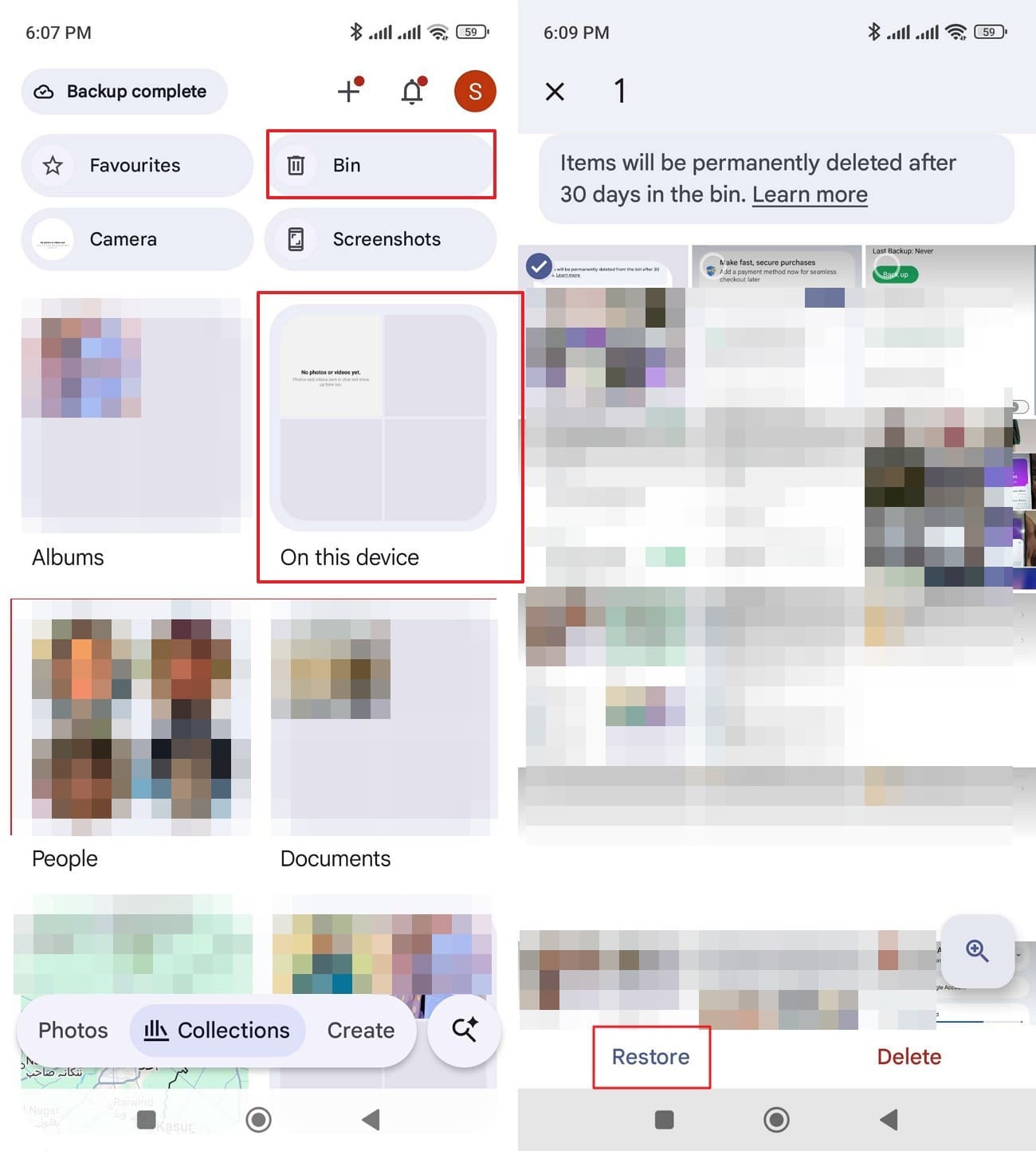
For Google Photos
Instructions. Go to “Collection,” check “On This Device Folder” first, and then choose “Bin.” There, locate the missing or deleted Kik message media, then tap “Restore.”
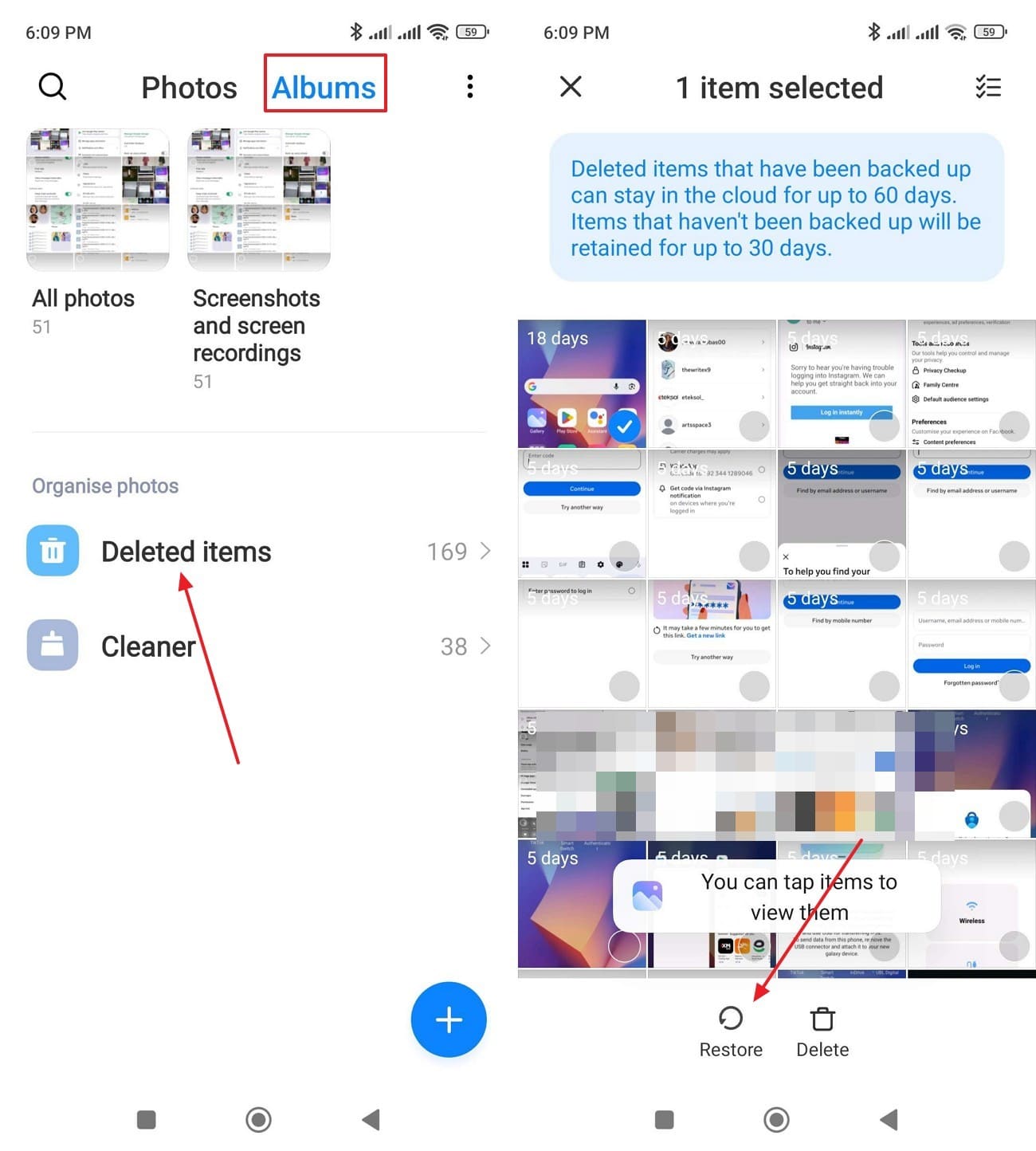
For Recycle Bin
Instructions. In the Gallery, open “Albums > Deleted items,” select the Kik images or videos, and tap “Restore.” Labels vary by phone.
Part 3. How to Recover Deleted Kik Messages on Android with Dr.Fone – Data Recovery (Android)
When Kik messages are no longer accessible through the app, other participants, or saved copies, scanning the original device offers another recovery option. For Kik message recovery, Dr.Fone - Data Recovery (Android) provides an Advanced Recovery mode exclusively for Windows. This feature scans compatible Android phones to identify deleted Kik conversations and attachments that remain accessible within the device's storage.
Before proceeding, check whether your phone meets the compatibility requirements for Advanced Recovery. This data recovery feature supports Android 9–13, excluding Huawei devices running Android 12 or 13. Kik messages and attachments found during scanning can be previewed individually, allowing you to choose which items to save. Selected data is exported to a Windows PC rather than restored directly into Kik.
 Scan Android phones and tablets directly.
- Preview and recover only what you want.
- Supports WhatsApp, photos, videos, contacts, and more.
- Works with 6000+ Android devices.
Guide to Scan Android for Recoverable Kik Messages with Dr.Fone
Start the process of recovering deleted Kik messages by connecting your Android phone to a PC with a data-capable USB cable. Then, follow these steps to scan for recoverable Kik conversations and attachments:
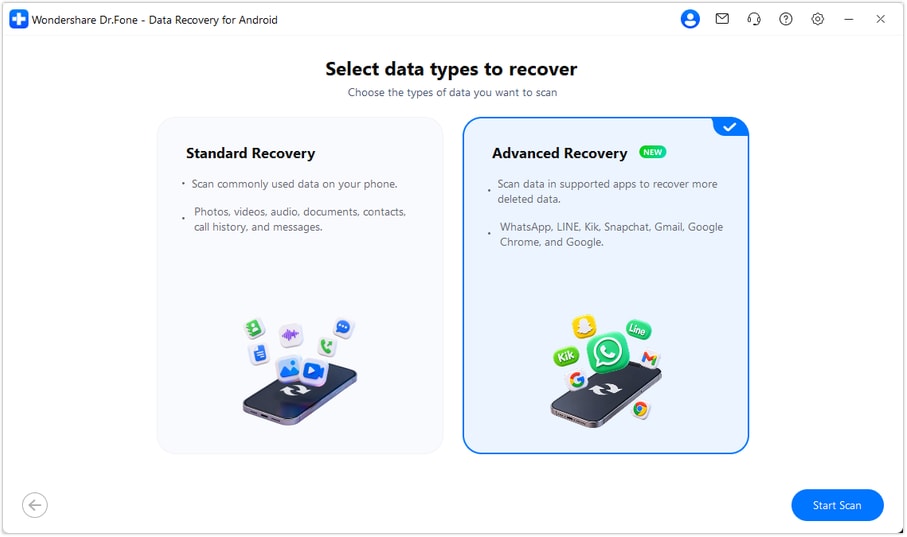
Step 1 Enable Advanced Recovery
Launch Dr.Fone and open “Data Recovery.” Select “Android,” choose “Recover Android Data,” and enable “Advanced Recovery.” Click “Start Scan” to proceed with the recovery setup.
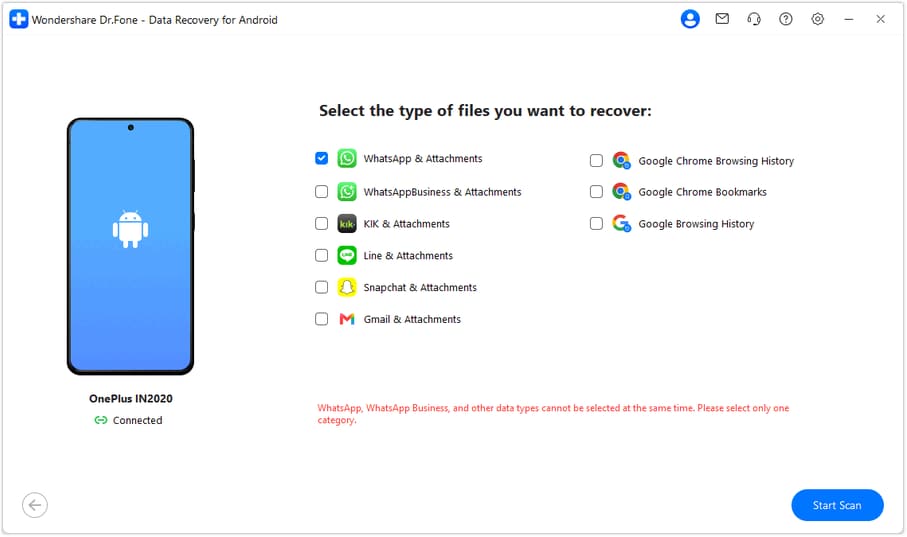
Step 2 Choose Kik Messages and Attachments
Once Dr.Fone recognizes your phone, select “Kik & Attachments” from the available data categories. Click “Start Scan” to search for recoverable conversations and attachments stored on the device.
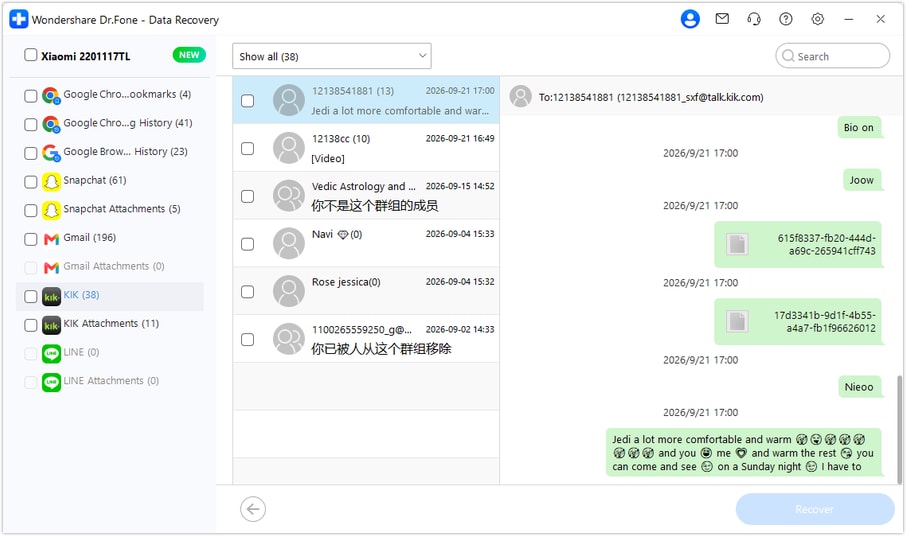
Step 3 Preview and Export Kik Data
After scanning, browse the detected Kik messages and attachments in the preview window. Select the items you need, click “Recover,” and specify a folder on your Windows PC to save them.
Want to find your missing Kik conversations? Try Dr.Fone - Data Recovery (Android) on a Windows PC to scan for deleted messages and attachments. Recovery depends on the data still accessible on your device, and recovered files can be saved to your computer.




Part 4. Dr.Fone Kik Advanced Recovery: Features and Technical Limits
Before scanning your device, check its compatibility with Dr.Fone and understand what data the software can recover. If you want to recover old Kik messages, the following details explain the supported devices, recovery features, and technical limitations:
| Feature | Details and Limitations |
|---|---|
| Windows Availability | Introduced with Dr.Fone Windows V13.9.9. Advanced Recovery is not available on Mac. |
| Supported Android Devices | Works with compatible Android 9–13 phones, excluding Huawei devices running Android 12 or 13. Android 14 and later are not supported. |
| Recoverable Kik Content | Scans for deleted Kik conversations and attachments still accessible on the device. Recovery depends on the available data. |
| Scanning Options | Allows Kik to be selected alongside other supported data types. WhatsApp and WhatsApp Business require separate scans from other categories. |
| Preview and Recovery | Lets users preview detected messages and attachments before exporting selected items to a Windows PC. Direct restoration to Kik is not supported. |
Part 5. How to Save Important Kik Messages Before They Disappear
Kik doesn't provide a built-in chat backup feature, making it important to save conversations before they disappear. Instead of relying on Kik message recovery after data loss, use these 5 practical tips to protect your messages and attachments on Android:
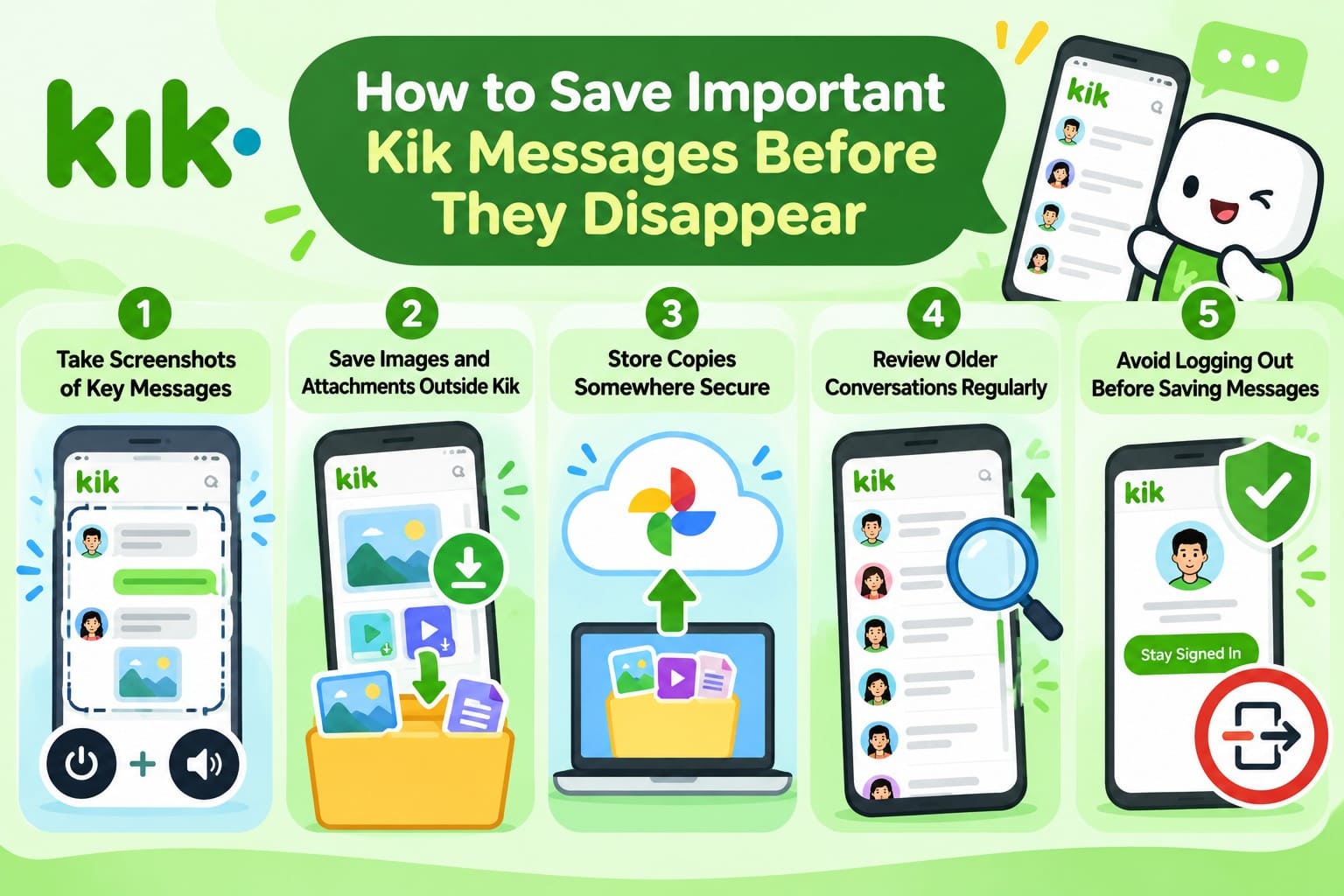
- Take Screenshots of Key Messages: Press Power and Volume Down together to capture important chats. On Android 12 or later, tap Capture more if available to capture longer conversations. Keep screenshots private to protect personal information.
- Save Images and Attachments Outside Kik: Download important photos, videos, and other media to your phone's storage. These saved copies remain accessible even if you delete the original conversation or reinstall Kik.
- Store Copies Somewhere Secure: Back up screenshots and downloaded media to Google Photos or a computer. Complete this before logging out, reinstalling Kik, or switching devices to avoid losing important content.
- Review Older Conversations Regularly: Check active chats frequently because Kik limits the number of messages retained on Android. Save important messages before newer conversations push them out of the available history.
- Avoid Logging Out Before Saving Messages: Stay signed in on your original Android phone until you've saved important conversations. Logging out, reinstalling Kik, or clearing app storage erases locally stored chat history.
Conclusion
For Kik message recovery on Android, start by checking existing chats, saved media, or copies held by other participants. If the messages are still missing, Dr.Fone - Data Recovery (Android) can scan compatible devices for recoverable Kik conversations and attachments. Recovery depends on the recoverable data available on the device, with recovered files saved to a Windows PC rather than directly into Kik. Regularly saving important messages and media can help prevent future data loss.
FAQ
1. Can Google Drive restore deleted Kik messages on Android?
No, Kik doesn't support Google Drive chat backups. As Google explains, not all apps back up their data. Restoring an Android backup cannot reliably recover deleted Kik conversations.2. Can I recover Kik group chat messages after deleting the group?
Other group members can share screenshots or saved attachments. Dr.Fone - Data Recovery (Android) can also scan compatible Android devices for deleted Kik conversations, depending on the recoverable data available.3. Can I recover Kik messages by signing into my old account on another Android phone?
No, Kik doesn't transfer chat history between devices. Signing in elsewhere also clears history from the original phone. Save existing conversations before switching, or scan the original device using Dr.Fone.
 Add Wondershare Dr.Fone as a preferred source on Google