 Recover photos, messages, WhatsApp, and more — no backup
needed.


 100% Security Verified | No Subscription Required | No Malware


 :

 ChatGPT
 Perplexity
 Gemini
 Claude
 Grok
The attachment is called final-plan, but the message agreeing to the final measurements has disappeared. If you deleted a personal WhatsApp conversation about a home renovation, a replacement file may not answer which version you approved or what the other person said about it.
When you need to recover deleted WhatsApp messages on OPPO Find X9 Ultra without a backup, Dr.Fone - Data Recovery (Android) gives a supported configuration a way to search for the conversation and related files in one Windows workflow. Previewing what is found helps you choose useful messages, photos, videos and attachments rather than assume that a document with a familiar name restores the whole exchange.
In this article
Before you start
Identify the Find X9 Ultra software precisely
Record the exact model identifier, installed Android version, build and personal WhatsApp version from the device and app settings. The supplied Root reference for OPPO Find X9 Ultra lists kernel 6.12.58 but leaves Android, model code and build unspecified. Do not infer the Android version from the kernel or the Find X9 Pro. The public Advanced Recovery guide covers Android 9-13; confirm your complete configuration with Dr.Fone support.
Keep the original data source unchanged
Keep WhatsApp installed, avoid clearing app storage and do not reset the phone as a recovery attempt. Root and access requirements, including any data-loss implications, need their own confirmation for the actual configuration. Do not unlock or flash the Find X9 Ultra to follow a generic Root guide.
Prepare the review criteria and Windows destination
Have a Windows PC, USB data cable and output folder ready. Note the contact or group, the decision you need to verify and any remembered document names. Keep resent material distinguishable from recovered output. Advanced Recovery saves selected available results to your PC; it does not restore the conversation inside WhatsApp.
Ask for a retained copy when the information is urgent
You need a measurement, agreement or document now, and another participant may still have the exchange.
Step 1 Specify the missing decision, not just the filename
Ask the participant whether they still have the relevant exchange and attachment. Describe the room, approximate date or revision so they can identify the correct material instead of sending a different file with a similar name.
Step 2 Check the content of any replacement
Read the copy they share and open the file. Compare the visible revision details and the surrounding explanation with what you need. If the context is missing, request clarification rather than treating the attachment alone as the full agreement.
Step 3 Keep the replacement separate from local recovery
Preserve the received copy as a newly supplied reference. If you also need records from the deleted local conversation, continue to the supported device scan below.
- A resend provides another participant's retained copy. It does not reconstruct the original deleted record on your phone.
- This information-replacement option and the device scan do not require your own pre-existing WhatsApp backup.
Choose the result that answers your question
| What you need | Practical route | What you receive |
|---|---|---|
| The agreed measurement immediately | Ask a participant for a retained exchange | A replacement reference, if they still have it. |
| The deleted local discussion | Review conversation results from a supported Dr.Fone scan | Selected available message records saved to PC. |
| The plan, receipt or other shared document | Check retained copies and available attachment results | A file to inspect; its name alone does not establish the agreement. |
| The photos or video explaining the change | Review available WhatsApp photo and video categories | Selected media found by the scan, assessed separately from message text. |
Common problems and fixes
A participant resent a plan, but it looks like the wrong revision
Compare the file's visible content and ask for the relevant discussion around the revision. Do not replace uncertainty with a filename match. In scan results, review the conversation as well as any document found to see what context is actually available.
A document is found, but the message approving it is absent
Save the useful document and review the conversation results separately using available search and filters. Do not infer the missing approval from the file's presence. If that message is not found, the recovered file remains a separate piece of information.
The software asks for configuration information you cannot find
Use the device settings and app information to collect the actual Android version, model, build and WhatsApp version. Share those identifiers and the displayed recovery message with support. Kernel 6.12.58 alone cannot fill the missing Android or firmware details.
How to use Dr.Fone - Data Recovery (Android)
Dr.Fone - Data Recovery (Android) helps you look for both the discussion and the supporting files when a deleted personal WhatsApp exchange matters. On a confirmed supported OPPO Find X9 Ultra configuration, its Windows-only Advanced Recovery mode scans app data without a backup, lets you review available conversations and attachment categories, and saves selected results to a PC. You can concentrate on the actual decision, document or explanatory media instead of relying only on a resent file.
- Conversation previews help you examine the available words around an important decision.
- Attachment categories let you look for the associated photos, videos and documents in the same recovery attempt.
- Selective PC saving keeps the useful available records accessible separately from the phone.
 Scan Android phones and tablets directly.
- Preview and recover only what you want.
- Supports WhatsApp, photos, videos, contacts, and more.
- Works with 6000+ Android devices.

Follow the official Advanced Recovery workflow
Step 1 Start the Windows Advanced Recovery workflow
Open Dr.Fone and go to Toolbox > Data Recovery. Select Android > Recover Android Data, choose Advanced Recovery and click Start Scan. Connect your supported Find X9 Ultra with a USB cable when prompted and follow the instructions for device detection.

Step 2 Choose the personal WhatsApp data source
Select WhatsApp and click Start Scan. Keep personal WhatsApp separate from WhatsApp Business and the other categories; the official workflow does not scan those choices together.

Step 3 Maintain the connection while scanning
Keep the phone connected until the scan completes. If stopping is necessary, click Cancel before disconnecting the USB cable. Follow the on-screen restart instruction if the phone becomes temporarily unresponsive after scanning or recovery.

Step 4 Examine the discussion and related attachment results
Choose the WhatsApp results and review the available conversations. Use search or filters where available to locate the relevant exchange. Inspect photos, videos, audio and other attachment categories, then select the records that contain useful context or files.
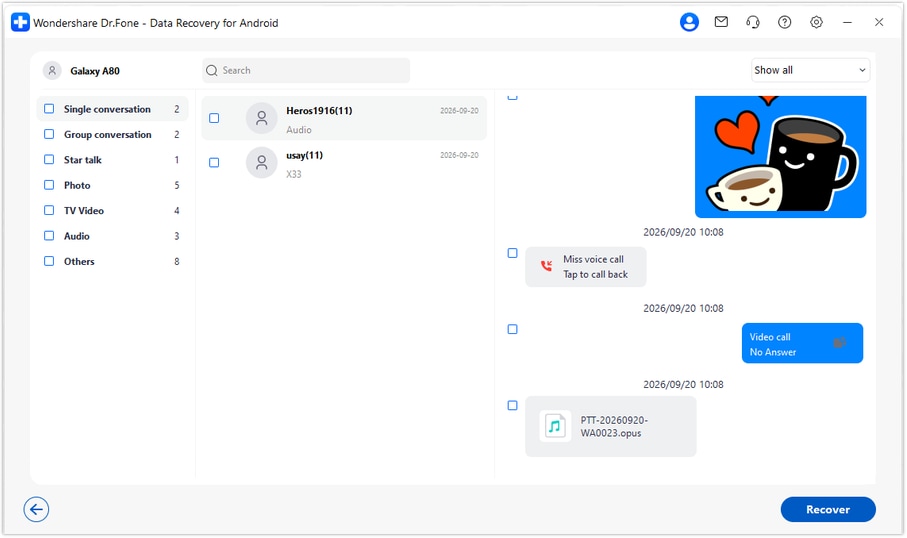
Step 5 Save the selected available records to a PC
Click Recover, choose your computer folder and complete the save prompts. Review the saved output there. This is a separate PC copy, not an import or synchronization back into the WhatsApp conversation.




Conclusion
For a supported OPPO Find X9 Ultra setup, Dr.Fone - Data Recovery (Android) is a practical choice for looking beyond a replacement attachment to the important WhatsApp records themselves. Its conversation previews, related media categories and selective PC saving help you keep useful context and files from the available results. Download Dr.Fone for Windows, confirm your exact configuration and begin the guided recovery workflow.
FAQ
1. How can I recover deleted WhatsApp messages on OPPO Find X9 Ultra without a backup?
Confirm the exact configuration first, then use Dr.Fone - Data Recovery (Android) if that setup is supported. Advanced Recovery on Windows scans personal WhatsApp separately, displays the available conversations and attachments, and saves your selections to a PC without requiring an existing backup.2. Which Android version does the Find X9 Ultra recovery reference confirm?
None. The supplied record leaves Android unspecified and lists only kernel 6.12.58, with no model code or build. Read the installed version on your device and have its complete configuration checked. The public guide's Android 9-13 range is not evidence that an unspecified newer configuration is supported.3. Is asking someone to resend a document the same as recovering my deleted WhatsApp messages?
No. A resend can replace useful information from another person's retained copy, but it does not recover the deleted local message. Use the supported scan when you want to look for available records from the phone itself.4. Can Dr.Fone find deleted WhatsApp photos, videos and attachments too?
The personal WhatsApp results include conversation and attachment categories when relevant data is found. Review the available photos, videos and other files individually; finding an attachment does not guarantee that its original message context is recoverable.5. Will the recovered exchange be restored to the app?
No. Advanced Recovery saves the selected available records to your chosen PC folder. The workflow does not write them into WhatsApp, merge them with current chats or synchronize them back to the phone.
 Add Wondershare Dr.Fone as a preferred source on Google





