 Recover photos, messages, WhatsApp, and more — no backup
needed.


 100% Security Verified | No Subscription Required | No Malware


 :

 ChatGPT
 Perplexity
 Gemini
 Claude
 Grok
The hotel address was in a WhatsApp chat, the revised pickup time arrived as a voice message, and the reservation was a shared document. Accidentally deleting that conversation on your Samsung W25 can remove several parts of the same travel plan at once. With no usable backup, a restore tutorial alone will not bring those details within reach.
Dr.Fone - Data Recovery (Android) helps you look for the missing WhatsApp information on a supported W25 and review the results before choosing what to save. You can concentrate on the message with the address, the confirmation image or the attachment you actually need, rather than recovering a large collection of unrelated files. The Windows workflow below keeps those selections together as a separate PC copy.
In this article
Before you start
Confirm Samsung W25 rather than a similar Samsung model
Open Settings > About phone and Software information to note the model, Android version, build and kernel. The supplied W25 reference names SM-W9025 and lists builds W9025ZCS4DZF2 and W9025ZCS4DZG3, with kernel 6.1.145. Its Android field is blank. Keep your actual values together when asking Dr.Fone support about eligibility; the listed identifiers are not proof for every combination or for Samsung W26.
Confirm the Windows recovery route and access conditions
Advanced Recovery is Windows-only, and its public guide documents Android 9-13. The additional Root reference requires separate configuration confirmation; it does not extend that public range to every newer W25 installation. Ask about the access requirements for your exact phone without attempting a generic Root, bootloader-unlock or firmware-flashing procedure.
Preserve the current chat data and prepare your recovery targets
Keep WhatsApp installed, avoid clearing its storage or resetting the W25, and prepare a reliable USB data cable and PC folder. Note the contact, travel date, reservation name and the type of missing item. Do not reinstall the app expecting a backup restore to solve a case where no usable backup exists.
Check for the travel details in retained WhatsApp chats
You remember the information but are unsure whether the whole conversation was deleted or simply moved out of sight.
Step 1 Search by the person and a distinctive detail
Search WhatsApp for the contact or group, then try a memorable place name or reservation phrase. Open a matching conversation and inspect the relevant exchange; another retained chat may also contain a copy that was forwarded earlier.
Step 2 Inspect Archived before moving to deleted-data recovery
Look for the conversation in Archived. If it is there, you can read the address or booking details immediately. If it was genuinely deleted and no readable copy is present, move to the supported-device scan below.
- Search and Archived locate messages still present in WhatsApp; neither reconstructs deleted content.
- This preliminary check and the device-scan route do not depend on a Google Drive backup.
What to prioritize when reviewing Samsung W25 recovery results
| Missing travel detail | Where to look in the preview | What to confirm before saving |
|---|---|---|
| An address or revised meeting time | The relevant WhatsApp conversation | The wording and the surrounding exchange, where available. |
| A reservation screenshot or shared photo | Photo attachments | The image itself contains the confirmation you need. |
| Spoken pickup instructions | Audio attachments | The available item is the one associated with your travel arrangement. |
| A booking document or explanatory clip | Other attachments or video results | The document or clip is useful independently of the full chat. |
Common problems and fixes
A confirmation photo appears, but you cannot find the revised time
Review the conversation and audio categories as separate targets. A booking image may show an original time rather than a later change in a message. Preserve the useful result you found, but do not assume an attachment reconstructs every part of the conversation.
Advanced Recovery does not appear for the W25
Confirm you are using Windows and record the product's exact compatibility message. Share your SM-W9025 model details, current Android, full build and app version with support. A model-name match in a reference list is not a reason to bypass the displayed eligibility result.
How to use Dr.Fone - Data Recovery (Android)
Dr.Fone - Data Recovery (Android) is useful when your goal is to retrieve a particular exchange and its supporting files, not simply collect every item found on the phone. On an eligible Samsung W25, its Windows-only Advanced Recovery mode searches WhatsApp app data, presents available conversations and media for review, and saves your chosen records to a PC. That gives you a practical way to keep the address, instructions and booking attachment you can recover in an accessible location outside the app.
- App-focused scanning looks for available WhatsApp records without requiring an existing chat backup.
- Separate conversation and media views help you distinguish the written arrangement from a photo, video or audio attachment.
- Preview and selective saving let you prioritize the records needed for your trip instead of exporting every result.
 Scan Android phones and tablets directly.
- Preview and recover only what you want.
- Supports WhatsApp, photos, videos, contacts, and more.
- Works with 6000+ Android devices.

Follow the official Advanced Recovery workflow
Step 1 Start Advanced Recovery and connect your W25
Launch Dr.Fone on Windows. Open Toolbox > Data Recovery, choose Android > Recover Android Data, then select Advanced Recovery and click Start Scan. Connect your compatible Samsung W25 by USB when prompted and follow the device-detection instructions.

Step 2 Scan WhatsApp as its own selection
Select WhatsApp and click Start Scan. Keep personal WhatsApp separate from WhatsApp Business and the other data categories; the official workflow does not scan all these selections together.

Step 3 Allow the app-data scan to complete
Keep the W25 connected while scanning progresses. To stop the scan, click Cancel before disconnecting the USB cable. Follow the product's displayed restart guidance if the phone becomes temporarily unresponsive afterward.

Step 4 Review the conversation and its available attachments
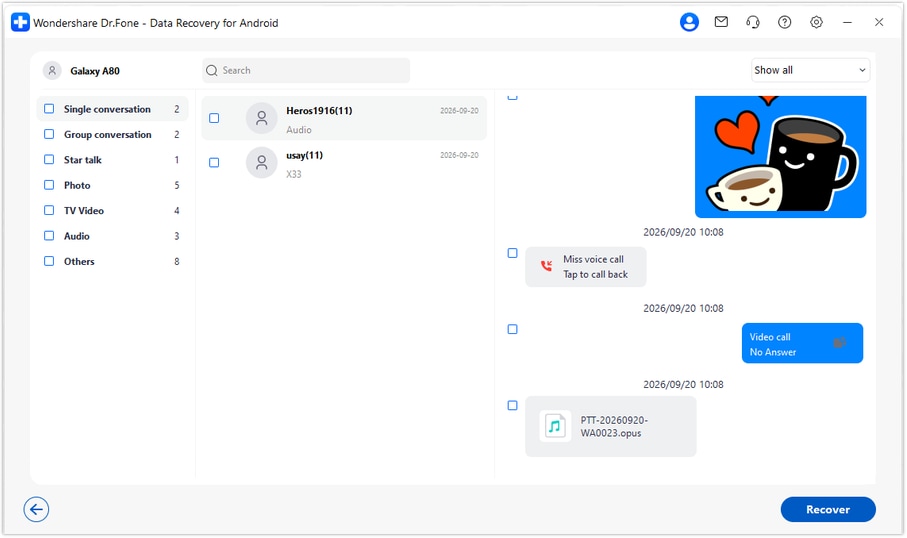
Open the WhatsApp results and inspect the relevant conversation. Use available search and filtering options, then browse photo, video, audio and other attachment categories. Select the records that contain the travel information you want to keep.
Step 5 Recover your selections to a computer folder
Click Recover and follow the prompts to choose a folder on your PC. Save the selected available records, then open the output to review them. Advanced Recovery stores this copy on the PC rather than reinserting the chat into WhatsApp on the W25.




Conclusion
For a compatible Samsung W25, Dr.Fone - Data Recovery (Android) brings a missing conversation, shared media and important attachments into one focused recovery workflow. Preview the available results, choose the details that matter and keep a separate copy on your PC. Download Dr.Fone for Windows to start recovering the WhatsApp information your plans depend on.
FAQ
1. How can I recover deleted WhatsApp messages on Samsung W25 without a backup?
After confirming your W25 configuration, use Dr.Fone - Data Recovery (Android) on Windows to run Advanced Recovery for WhatsApp. Preview the conversations and attachment results found by the scan and save your chosen items to a PC. An existing backup is not required for this device-scan route.2. Does the Samsung W25 reference also confirm Samsung W26 support?
No. The W25 reference names SM-W9025, while the W26 has its own record. Even for a W25, the listed builds and kernel are not a guarantee for every Android version or regional firmware. Check the actual configuration rather than substituting a similar model's details.3. Can I recover a deleted WhatsApp document if the whole chat is not found?
If that attachment appears as an available result, you can select and save it to the PC. Review documents and other attachments separately from message text. Their availability can differ, so a useful booking document may still be worth saving even when the discussion is incomplete.4. Should I uninstall WhatsApp to recover a missing chat on Samsung W25?
Not as a step in this no-backup workflow. Preserve the current app data and follow the supported scan instructions. A reinstall-and-restore method requires an appropriate existing backup and is not the method described here.5. Can the recovered address or conversation be put back into WhatsApp automatically?
No. Advanced Recovery saves selected records to a Windows PC. You can consult the saved information there, but this workflow does not restore the conversation to the W25's WhatsApp chat list.
 Add Wondershare Dr.Fone as a preferred source on Google





