 Recover photos, messages, WhatsApp, and more — no backup
needed.


 100% Security Verified | No Subscription Required | No Malware


 :

 ChatGPT
 Perplexity
 Gemini
 Claude
 Grok
A family WhatsApp thread can hold a birthday video, a voice message and the words that made a photo meaningful. Deleting it on your Google Pixel 10 Pro XL can leave you with scattered images but no conversation, or with neither. If there is no usable backup, the next useful step is to look for recoverable WhatsApp records rather than repeatedly reinstall the app.
Dr.Fone - Data Recovery (Android) offers that focused scan for eligible device configurations. You can preview available messages and media, decide which memories you want to keep and save those selections to your PC. This guide helps you separate existing photo copies from deleted chat data, check the exact XL setup and follow the Windows recovery procedure.
In this article
Before you start
Verify the Pixel 10 Pro XL's actual Android and build
Record the full device name, Android version, build number and kernel from Settings > About phone and Android version. The supplied XL reference labels Android 15, lists CP2A.260705.006 and gives kernel references 6.6 and 6.6.118, but no model code. The same build is associated with different Android labels elsewhere in the supplied records, so this pairing remains unverified. Use your actual on-device values rather than that reference to request a compatibility check.
Obtain XL-specific eligibility for Advanced Recovery
The public guide documents a Windows-only Advanced Recovery route for Android 9-13. A newer Pixel setup is not covered merely because a device-specific Root reference exists. Confirm your complete Pixel 10 Pro XL configuration and WhatsApp version with Dr.Fone support before using the scan. A Pixel 10 or Pixel 10 Pro answer is not automatically an XL answer, even when a build string looks similar.
Protect the remaining memories
Keep WhatsApp and its app storage intact, and avoid unnecessary new downloads while preparing. Do not unlock the bootloader, downgrade Android, flash an image or reset the phone to match a reference entry. The supported access mechanism and any Root requirements need confirmation for this exact setup. Prepare a Windows PC, USB data cable and a folder for the selected recovery output.
Check for existing photos without confusing them with recovered chats
You mainly need a shared family photo or video and want to identify any copy that is still available before scanning.
Step 1 Look for a local copy you previously saved
Open the phone's photo app or file browser and inspect the relevant local images and videos. If a shared item was already saved outside WhatsApp and is still present, you can consult that existing copy. A matching image does not mean the deleted message text has also survived.
Step 2 Check the family conversation in WhatsApp
Search for the family group or contact and inspect Archived if the conversation is missing from the main list. If the thread is present, look for the particular exchange and its shared items. If the needed messages or attachments were actually deleted, continue to the eligible WhatsApp scan.
- These checks locate retained information, not deleted records.
- A general collection of phone photos is not the same as a WhatsApp conversation. No cloud-backup restore is required by the device-scan route below.
Match your Pixel 10 Pro XL recovery goal to what is missing
| What you still have | What you need back | What to inspect in Dr.Fone |
|---|---|---|
| A saved photo outside WhatsApp | The accompanying exchange or explanation | Available conversation results for that family contact or group. |
| Part of the conversation | A deleted birthday video or voice message | Video and audio attachment categories. |
| Neither the thread nor the shared media | Messages and the available memories together | Conversation results and each relevant attachment category. |
| Several similar image copies | The particular photo worth preserving | The content of each available image preview before selecting. |
Common problems and fixes
A general phone-photo search found images, but not the missing WhatsApp conversation
Treat the existing images as useful copies, not a reconstruction of message history. On a confirmed eligible setup, choose the WhatsApp app-data scan and review the conversation category as well as media results.
The phone reports an Android version different from the reference
Use the version and full build actually displayed on the XL. Give those details and the product's compatibility message to support. Do not change Android to fit the unverified CP2A pairing or substitute another Pixel model's support information.
You found family photos but not a voice message
Open the audio attachment category separately and review any relevant available results. Text, photos, videos and audio can have different recovery outcomes; select the useful items found rather than assuming one category guarantees the rest.
How to use Dr.Fone - Data Recovery (Android)
Dr.Fone - Data Recovery (Android) helps you search for more than a loose collection of pictures when the missing memories were part of a WhatsApp conversation. On a confirmed eligible Google Pixel 10 Pro XL setup, its Windows-only Advanced Recovery mode organizes available conversations and attachments for preview, so you can choose meaningful messages, images, clips or audio and save them to a PC. The benefit is a deliberate selection of the information you want to keep, without relying on an existing WhatsApp backup.
- A WhatsApp-focused app-data scan looks for available records associated with the missing conversation.
- Conversation and media views let you inspect message content separately from photos, videos and audio.
- Selective PC recovery helps you keep the family records you recognize rather than save every available item.
 Scan Android phones and tablets directly.
- Preview and recover only what you want.
- Supports WhatsApp, photos, videos, contacts, and more.
- Works with 6000+ Android devices.

Follow the official Advanced Recovery workflow
Step 1 Open Advanced Recovery for the eligible Pixel 10 Pro XL
Start Dr.Fone on Windows and open Toolbox > Data Recovery. Choose Android > Recover Android Data, select Advanced Recovery and click Start Scan. When prompted, connect the configuration-confirmed Pixel 10 Pro XL by USB and follow the on-screen device instructions.

Step 2 Select WhatsApp to search its app data
Choose WhatsApp and click Start Scan. Run personal WhatsApp separately from WhatsApp Business and the other app or browsing-data categories, rather than selecting all of them together.

Step 3 Leave the Pixel connected while the scan runs
Keep the USB connection stable until scanning finishes. If you need to stop, click Cancel before unplugging the phone. Follow the product's on-screen restart instructions if the device is temporarily unresponsive after scanning or recovery.

Step 4 Preview the family thread and available media
Open the WhatsApp results, review the available conversations and use search or filters where offered. Inspect photo, video, audio and other attachment categories in the sidebar. Select the records that match the messages or memories you want back.
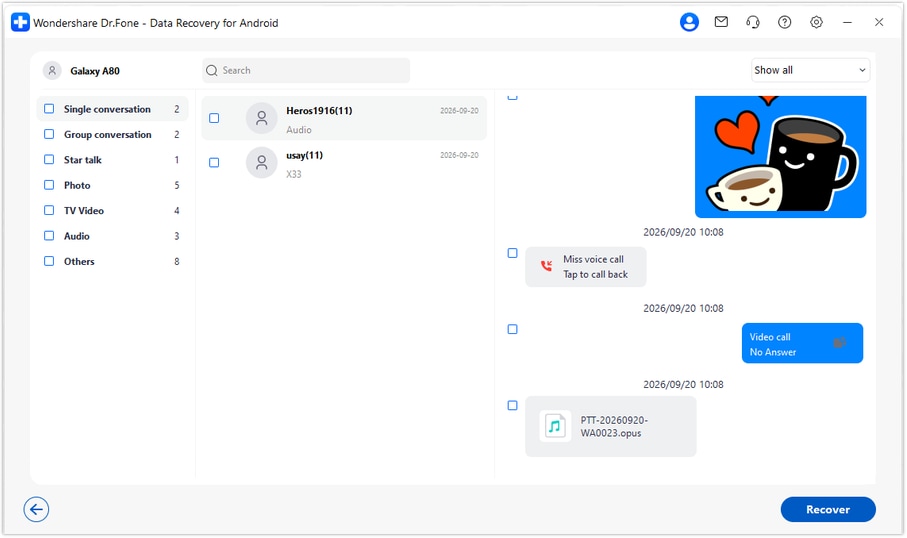
Step 5 Recover the selected memories to a PC folder
Click Recover and follow the prompts to choose a destination folder on your computer. Save the selected available records and open the output to review them. Advanced Recovery keeps this copy on the PC; it does not restore the conversation to WhatsApp on the Pixel.




Conclusion
For a confirmed compatible Google Pixel 10 Pro XL, Dr.Fone - Data Recovery (Android) is a focused choice for finding available WhatsApp messages, previewing family photos and other attachments, and preserving your selections on a PC. Download Dr.Fone for Windows and begin the guided recovery workflow to keep the conversations and memories that matter.
FAQ
1. Can I recover deleted WhatsApp messages on Google Pixel 10 Pro XL without a backup?
Dr.Fone - Data Recovery (Android) offers a device-scan route without an existing backup for eligible configurations. First confirm your exact XL setup; then use Windows Advanced Recovery to scan WhatsApp, preview available records and save selected results to a PC. This is not a blanket compatibility claim for every Pixel 10 Pro XL.2. Does CP2A.260705.006 prove that my Pixel 10 Pro XL runs Android 15?
No. The supplied records contain inconsistent Android labels for that build, so the XL pairing is not verified here. Check Android and the full build in the phone's Settings and use both for the compatibility inquiry. The public Advanced Recovery guide covers Android 9-13, not an automatically validated Android 15 route.3. Why can I see a WhatsApp photo in the photo app but not the deleted message?
A photo previously saved outside WhatsApp can remain available independently of the chat. Seeing it does not reconstruct the message text or prove that text is recoverable. A WhatsApp app-data scan on an eligible setup is a separate attempt to find available conversation records.4. Can I recover deleted WhatsApp videos and audio on the XL?
If those items appear in the supported scan's attachment results, you can review and select them for PC recovery. Check video and audio categories as well as photos and messages. The available results can differ between categories.5. Will the saved family chat return to WhatsApp automatically?
No. The selected available results are saved to the folder you choose on the Windows PC. This workflow gives you a separate copy to review and does not import it into the Pixel's WhatsApp chat list.
 Add Wondershare Dr.Fone as a preferred source on Google





