 Recover photos, messages, WhatsApp, and more — no backup
needed.


 100% Security Verified | No Subscription Required | No Malware


 :

 ChatGPT
 Perplexity
 Gemini
 Claude
 Grok
A deleted WhatsApp conversation can take the feedback with it: which design was approved, what needed changing and which attachment was the final version. If that exchange was on your Google Pixel 11 Pro and no usable backup exists, the missing context may cost more time than recreating the file itself.
Dr.Fone - Data Recovery (Android) gives users with compatible configurations a way to look for both deleted messages and related attachments. The Windows preview helps you compare what was said with the files the scan finds, then save a useful selection to your PC. This guide focuses on work shared through personal WhatsApp, so you can target the correct app and avoid mistaking an isolated file for the complete discussion.
In this article
Before you start
Check the precise Pixel 11 Pro and software identifiers
Use Settings > About phone > Android version to read the installed Android and build information. The supplied Pixel 11 Pro Root reference names Android 16, build CD1A.260618.001.C2 and kernel text 6.12 / 6.12.69, with no model code provided. Treat those as reference labels, not an independently established Android/build mapping or proof of recovery support. Advanced Recovery's public guide covers Android 9-13. Confirm your exact Pixel 11 Pro, firmware and app version with Dr.Fone support; neither the base Pixel 11 nor the Pro XL substitutes for this model.
Identify which WhatsApp app held the feedback
This article uses personal WhatsApp, even when the conversation concerns work. If the exchange was in WhatsApp Business, it requires that app's separate scan selection rather than the personal WhatsApp procedure here. Note the contact, project name, approximate dates and the document or media you need.
Prepare a private PC folder without changing the phone
Use a Windows computer, a reliable USB data cable and a destination folder accessible only to the appropriate people if the files contain confidential work. Keep WhatsApp and its data intact. Do not clear storage, reset, unlock the bootloader or flash firmware to try to enable recovery; confirm any Root/access requirements and data-wipe risks for the exact setup first. Selected recovered records will be saved to the PC, not inserted into the live chat.
Separate a missing attachment from a deleted WhatsApp discussion
You already kept a work file somewhere else but need to know whether the feedback or a different version is missing.
Step 1 Check the conversation and Archived
Search WhatsApp for the contact or project and inspect Archived if the conversation is absent from the main list. If the discussion remains, keep the relevant feedback and identify exactly which file is missing.
Step 2 Inspect work copies you deliberately saved elsewhere
Look in the computer folder or other location where you previously saved the attachment. Open the copy and check its contents. A file you already retained may meet part of the need, but its filename alone does not establish that it was the approved version.
- Checking an existing work copy is not a WhatsApp backup restore and does not recreate deleted chat messages.
- If the missing feedback or file is not retained, use the app-data scan below on a confirmed compatible configuration.
Review WhatsApp results for useful project context
| Missing information | Where to look | What to verify before selecting |
|---|---|---|
| A requested revision or approval | Available conversation results | The actual wording and relevant contact, not just a matching project name. |
| A design photo or reference clip | Available photo and video attachment results | That the visible content belongs to the project you are reconstructing. |
| A spoken explanation | Available audio results | Whether the item you can review supplies the detail missing from the text. |
| A document sent with the feedback | Available document or other attachment results | The file's contents and version where identifiable; a recovered file alone does not prove approval. |
Common problems and fixes
Several similar files appear, and you cannot identify the final version
Compare the available file previews or contents with the conversation results. Keep potentially relevant versions separately in the PC output rather than declaring one final from its name alone. If the deciding feedback is missing, verify the version with the sender.
You scanned WhatsApp but the work conversation was in WhatsApp Business
Return to the app selection for a separate WhatsApp Business scan if your configuration supports it. Personal and Business results are distinct; a missing result in one selection says nothing about the other app's contents.
Advanced Recovery is unavailable for this Pixel 11 Pro
Request a configuration check using the exact Pro device name, installed Android version, full build and app version. A C2 reference shared with another model is not a substitute for checking your device. Preserve the current app data instead of changing firmware.
How to use Dr.Fone - Data Recovery (Android)
Dr.Fone - Data Recovery (Android) helps you look for the context behind a lost work attachment on a supported Pixel 11 Pro. Its Windows-only Advanced Recovery mode scans WhatsApp app data and separates available conversation and attachment results for review. That gives you a practical way to find an instruction, compare related files and save the records worth keeping to your PC without depending on an existing backup.
- A focused personal WhatsApp scan keeps this recovery task tied to the app where the exchange happened.
- Conversation and media review helps you assess both the feedback and the supporting photos, clips, audio or documents found.
- Selective PC saving lets you retain project-related records without taking every unrelated conversation from the scan.
 Scan Android phones and tablets directly.
- Preview and recover only what you want.
- Supports WhatsApp, photos, videos, contacts, and more.
- Works with 6000+ Android devices.

Follow the official Advanced Recovery workflow
Step 1 Open the Android Advanced Recovery workflow
Start Dr.Fone on your Windows computer and choose Toolbox > Data Recovery. Open Android > Recover Android Data, choose Advanced Recovery and click Start Scan. Connect the supported Pixel 11 Pro by USB when prompted and follow the device-detection instructions.

Step 2 Select the WhatsApp app that contains the exchange
For this personal WhatsApp workflow, choose WhatsApp and click Start Scan. Do not select WhatsApp Business or other data categories alongside it; the guide requires those scans to be run separately.

Step 3 Maintain the connection while scanning
Leave the Pixel 11 Pro connected during the scan. If you need to stop, click Cancel before disconnecting the cable. Should the phone become temporarily unresponsive after scanning or recovery, follow the product's on-screen restart instructions.

Step 4 Preview feedback and available project attachments
Choose the WhatsApp results in the sidebar and open the relevant conversation. Narrow the results with search or filters where available, then examine the photo, video, audio and other attachment categories. Select the records that help recover the missing project information.
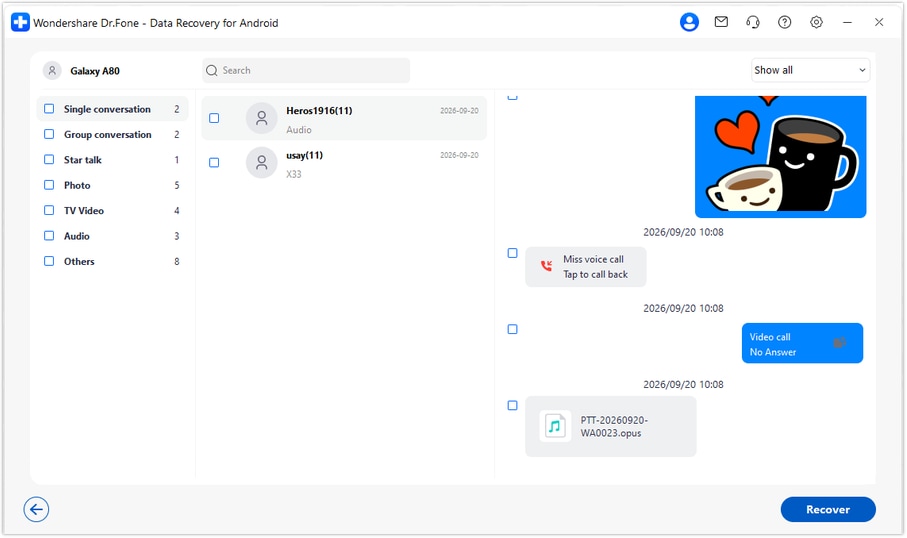
Step 5 Recover the selected records to a computer folder
Click Recover and follow the prompts to select a PC destination and save the data. Open the saved output to check the records and files you chose. They remain a separate PC copy rather than being written into WhatsApp on the phone.




Conclusion
For a confirmed compatible Google Pixel 11 Pro, Dr.Fone - Data Recovery (Android) is a practical choice when deleted WhatsApp feedback and attachments have no usable backup. Its targeted scan, conversation-and-file review and selective PC saving help you keep useful project information together. Download Dr.Fone for Windows and begin the guided recovery workflow to look for the records your work depends on.
FAQ
1. Can I recover deleted WhatsApp messages on Google Pixel 11 Pro without a backup?
Dr.Fone - Data Recovery (Android) offers a device-based scan without an existing backup for supported configurations. Confirm your exact Pixel 11 Pro setup first, then scan personal WhatsApp through Advanced Recovery on Windows and save available selected records to a PC.2. Can I recover an attachment and the message approving it?
Review the conversation results and the relevant attachment category separately. If the scan finds both, select both for PC recovery. An attachment result alone does not establish that the approval message is available or that this was the approved file.3. Does a work-related chat require the WhatsApp Business selection?
The app matters, not the subject of the discussion. Work messages sent in personal WhatsApp use the WhatsApp selection. Messages stored in WhatsApp Business need that app's separate supported scan.4. Does the Pixel 11 Pro Android 16 entry confirm every firmware is supported?
No. The supplied entry is a configuration reference with no model code, not a test result or a universal support statement. The public Advanced Recovery guide covers Android 9-13. Have the precise Pro model, installed build and app version checked before proceeding.5. Will the PC copy restore my original work conversation inside WhatsApp?
No. Advanced Recovery saves the selected available records to a Windows computer. It does not merge them into the existing chat history or certify that a recovered document was a final approved version.
 Add Wondershare Dr.Fone as a preferred source on Google





