 Recover photos, messages, WhatsApp, and more — no backup
needed.


 100% Security Verified | No Subscription Required | No Malware


 :

 ChatGPT
 Perplexity
 Gemini
 Claude
 Grok
You clear an old WhatsApp group on your Vivo T4, then realize it contained tomorrow's submission deadline, a tutor's voice note and the reference video. With no usable backup, the missing instructions can be more disruptive than losing the chat itself.
To recover deleted WhatsApp messages on Vivo T4, Dr.Fone - Data Recovery (Android) gives supported configurations a focused device-scan option. Its preview helps you identify the useful group exchange and available attachments, then save what you need to a PC. If time is tight, first try the short information-retrieval check below while keeping the original phone data intact.
In this article
Before you start
Check the exact Vivo T4 software
Open the phone's About phone and software-information screens to record the full model, installed Android version and build. The supplied T4 Root reference contains kernel 6.1.145 only; Android, build and model code are not listed. Do not substitute specifications from a different T-series phone. The public Advanced Recovery guide covers Android 9-13; confirm eligibility with Dr.Fone support when your complete configuration is not established by that guidance.
Set up the Windows recovery route
Use a Windows PC, a USB data cable and a destination folder that you can locate afterward. Advanced Recovery is Windows-only, and the product's actual device and access prompts apply. Avoid uninstalling WhatsApp, clearing app storage or resetting the T4. Do not attempt bootloader unlocking, flashing or generic Root instructions; the reference does not confirm how access would work or whether it could affect data.
Write down what would solve the immediate problem
List the group name, sender and approximate date, then distinguish a deadline in text from an audio explanation or shared file. This makes preview selection more purposeful. Available recovered records are saved to the PC, not synchronized into the group on your phone.
Get urgent group information from a retained participant copy
You need a date, instruction or file quickly and another participant may still have the exchange.
Step 1 Request the specific missing item
Ask a trusted group member or the original sender for the deadline, voice note or attachment, giving the approximate date and topic. Request the relevant item rather than an entire private conversation.
Step 2 Check the context of what is resent
Confirm whether the reply includes any later correction to the deadline or instructions. Save the new copy if it meets your immediate need; if you need your own deleted message history as well, continue with the device scan.
- A participant can only provide content they still possess and choose to share. Resending creates a new copy; it does not restore your deleted local WhatsApp records.
- If the group is merely absent from the main list, check Archived before treating the whole conversation as deleted.
Recover the group information you actually need
| Your priority | Useful immediate check | What to inspect in the scan |
|---|---|---|
| A submission date or changed instruction | Ask a participant for the relevant message and any correction | Available conversation text with the surrounding exchange. |
| A spoken explanation | Ask the sender whether they still have the voice note | Available audio attachments, not only the conversation list. |
| A reference photo, video or document | Request the specific retained file | The matching media or attachment category. |
| Your own deleted conversation history | A resent item supplies information, not the original local history | Available WhatsApp conversation results for selective PC recovery. |
Common problems and fixes
A group member resent the file, but the original discussion is still missing
That is expected: a new message does not recreate deleted history. Keep the resent file if useful, then inspect the WhatsApp conversation results for the earlier exchange. Treat the two copies as different sources.
You can see messages but cannot find the voice note
Open the audio attachment category where available and review its results separately. Save text that provides useful instructions, but do not assume the audio can be recovered merely because the conversation appears.
The T4 is detected but the required recovery option is unavailable
Confirm Windows use and send support the full Vivo T4 model, Android version, build and WhatsApp version. Kernel 6.1.145 is a reference detail, not sufficient proof that the current configuration supports Advanced Recovery.
How to use Dr.Fone - Data Recovery (Android)
Dr.Fone - Data Recovery (Android) helps you search for more than a replacement attachment when an important group discussion has been deleted. On a supported Vivo T4, its Windows-only Advanced Recovery mode scans WhatsApp data without requiring a backup and lets you preview the available conversation and media results. Selective saving to a PC helps you keep the instructions, voice notes or reference files that matter without collecting every unrelated item.
- A separate personal WhatsApp scan concentrates the recovery attempt on the app containing the missing group discussion.
- Conversation and attachment views let you check written instructions and available audio or video independently.
- Preview and selective PC saving help you keep the relevant records for later reference.
 Scan Android phones and tablets directly.
- Preview and recover only what you want.
- Supports WhatsApp, photos, videos, contacts, and more.
- Works with 6000+ Android devices.

Follow the official Advanced Recovery workflow
Step 1 Start Advanced Recovery for the T4
In Dr.Fone on Windows, open Toolbox > Data Recovery, then Android > Recover Android Data. Choose Advanced Recovery and click Start Scan. Connect the supported Vivo T4 with a USB cable when prompted and complete the displayed device-detection instructions.

Step 2 Choose WhatsApp on its own
Select personal WhatsApp and click Start Scan. WhatsApp must be scanned separately from WhatsApp Business and the other categories, not as one combined selection.

Step 3 Allow the app-data scan to run
Keep the phone connected during scanning. If you must interrupt the scan, click Cancel before removing the USB cable. Follow the on-screen restart guidance if the phone becomes temporarily unresponsive after scanning or recovery.

Step 4 Review group messages and available media
Open the WhatsApp conversation results and inspect the relevant group. Use available search and filters to narrow the results, then check photos, video, audio and other attachment categories. Select the records that answer your missing-information list.
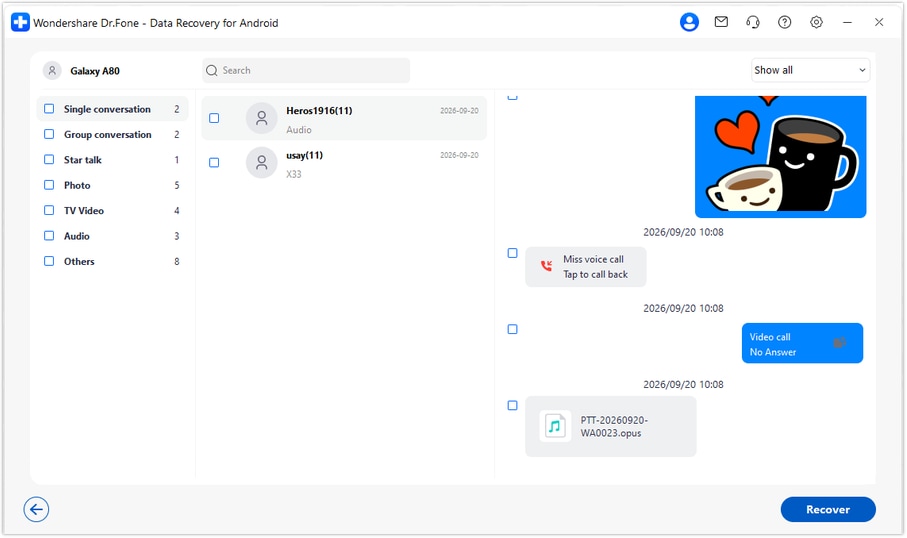
Step 5 Recover the selected items to the PC
Click Recover, choose a computer folder through the save prompts and complete recovery. Open the saved output to review what is available. These PC copies are not imported into WhatsApp on the Vivo T4.




Conclusion
A deleted group chat does not have to leave you without a recovery plan. Dr.Fone - Data Recovery (Android) helps supported Vivo T4 users search WhatsApp without a backup, preview the useful discussion and attachments, and save selected results to a PC. Download Dr.Fone for Windows and begin the guided scan to look for the instructions and files you need.
FAQ
1. Can I recover deleted WhatsApp messages on Vivo T4 without a backup?
The device-scan route in Dr.Fone - Data Recovery (Android) does not require an existing backup. For a supported T4 configuration, use Advanced Recovery on Windows, scan WhatsApp separately and save selected available results to your PC. Only data found by the scan can be recovered.2. Will asking a group member restore my deleted chat?
No. A member may be able to resend an instruction or file they still retain, which can resolve an urgent information need. It creates a new copy and does not restore the deleted history on your T4.3. Can I look for deleted WhatsApp voice notes, photos and videos?
Yes, on a supported configuration you can inspect the available audio, photo, video and other attachment results alongside conversations. Check each relevant category; finding a message does not guarantee every attached file is available.4. Should I reinstall WhatsApp first if I have no usable backup?
No reinstall is required by this workflow. Reinstalling is not a substitute for a missing backup. Keep the app and phone data intact while you check configuration support and follow the product's device-scan instructions.5. Does kernel 6.1.145 establish Android support on Vivo T4?
No. The supplied record leaves Android and build unknown. The public guide covers Android 9-13; neither the kernel nor the T4 name proves support for every newer Android version. Confirm the full installed configuration and access requirements with Dr.Fone support.
 Add Wondershare Dr.Fone as a preferred source on Google





