 Recover photos, messages, WhatsApp, and more — no backup
needed.


 100% Security Verified | No Subscription Required | No Malware


 :

 ChatGPT
 Perplexity
 Gemini
 Claude
 Grok
The chat with a seller contained the agreed price, a delivery promise and a photo of what you were buying. After an accidental deletion on your Honor 80 GT, a receipt alone may not answer what was actually agreed. When there is no usable backup, you need to search for the conversation and its supporting attachments rather than reinstall WhatsApp and hope they return.
To recover deleted WhatsApp messages on Honor 80 GT, Dr.Fone - Data Recovery (Android) provides supported configurations with a Windows device-scan workflow. Preview helps you identify the relevant exchange and shared files before you save a separate copy to your computer.
In this article
Before you start
Check the Honor 80 GT identity and current software
The supplied device reference names Honor 80 GT (AGT-AN00) and lists several kernels, but does not state Android or build. Find your actual model, Android version and full build in settings. The public Advanced Recovery range is Android 9-13; confirm eligibility for the complete configuration and app version instead of deriving it from a kernel entry. The guide's Huawei-specific exclusion is not itself a compatibility ruling for this Honor model.
Use a Windows PC and protect the remaining records
Prepare a reliable USB data cable and a folder on your PC. Advanced Recovery is Windows-only. Keep WhatsApp and any surviving documents in place; do not clear app storage or reset the phone to troubleshoot a deleted conversation. Root access requirements and possible data effects need configuration-specific confirmation, not an assumed lossless process or generic unlock-and-flash instructions.
Identify the personal WhatsApp exchange you need
Note the seller's contact, a remembered phrase and whether the missing evidence is text, a photo, a video or another attachment. This guide scans personal WhatsApp, not WhatsApp Business. Treat a separately saved receipt as useful information, but not a replacement for the missing surrounding conversation.
Look for a surviving copy of the purchase details
You need a price, reference or shared file quickly, while deciding whether the original deleted chat also needs a scan.
Step 1 Search WhatsApp for the contact and key wording
Search the seller's name or a distinctive phrase from the agreement, and inspect Archived if the conversation disappeared from the main list. If the exchange is still there, read the surrounding messages to establish what the price or delivery statement refers to.
Step 2 Check documents you previously saved
Look in the file manager and gallery for any receipt, document or image you had already saved outside the chat. Open the actual file and check that it contains the detail you need. A surviving attachment can answer a practical question even when the deleted message history is still missing.
- These checks locate existing content. They do not reconstruct deleted chat records or prove that a saved receipt included the full agreement.
- If the information is absent, scan the supported phone below; no backup restore is presented as a no-backup method.
Which result helps reconstruct the purchase information?
| Information needed | Useful result | How to assess it |
|---|---|---|
| The agreed amount or delivery promise | Available WhatsApp conversation text | Read the surrounding exchange, not just an isolated number. |
| What the seller showed you | Available photo or video attachment | Check the item pictured and whether it is the file you remember. |
| A receipt or specification document | A surviving saved file or a found WhatsApp attachment | Inspect the content; the file alone may not include later changes discussed in messages. |
| A record to review on your computer | Selected Dr.Fone results saved to PC | Keep the relevant available messages and files without expecting an in-app chat restoration. |
Common problems and fixes
A receipt appears in the preview, but the agreed-price message does not
Inspect the conversation results separately and use available search or filters to find the seller or relevant wording. Save the receipt if useful, but do not assume that attachment recovery also recovered the missing agreement. Ask the other person to confirm the terms if the exchange is not found.
Your Honor 80 GT software does not match a confirmed configuration
Give Dr.Fone support the actual model, Android version, build and installed WhatsApp version. AGT-AN00 and the supplied kernel list are reference details, not a way to infer an unlisted build. Do not change firmware merely to resemble one entry.
How to use Dr.Fone - Data Recovery (Android)
Dr.Fone - Data Recovery (Android) helps you look beyond a missing chat-list entry to the purchase messages and attachments that may still be recoverable on a supported Honor 80 GT. Windows-only Advanced Recovery scans the connected phone without an existing backup, lets you review the available WhatsApp results and saves selected records to your PC. The benefit is a more focused search for the agreement and supporting files, rather than a collection of unrelated phone data.
- WhatsApp-specific scanning targets the app that held the deleted personal conversation.
- Separate conversation and attachment views help you check both the written terms and the shared media.
- Preview and selective saving let you collect the useful available records in a PC destination you choose.
 Scan Android phones and tablets directly.
- Preview and recover only what you want.
- Supports WhatsApp, photos, videos, contacts, and more.
- Works with 6000+ Android devices.

Follow the official Advanced Recovery workflow
Step 1 Start Advanced Recovery for the connected Honor 80 GT
Launch Dr.Fone on Windows and open Toolbox > Data Recovery. Select Android > Recover Android Data, choose Advanced Recovery and click Start Scan. When prompted, connect the supported Honor 80 GT with a USB cable and follow the device-detection instructions.

Step 2 Scan personal WhatsApp on its own
Select WhatsApp and click Start Scan. WhatsApp Business and the other categories cannot be selected at the same time as personal WhatsApp; use the separate personal-app selection for this exchange.

Step 3 Wait with the USB connection intact
Keep the phone connected while Advanced Recovery scans. If you need to end the scan, click Cancel before removing the cable. Follow the product's displayed restart directions if the phone is temporarily unresponsive after scanning or recovery.

Step 4 Inspect the agreement and supporting files
In the WhatsApp results, open the relevant conversation and review the available messages. Use search and filters where offered. Inspect photo, video, audio and other attachment categories, then select the exchange and files you want to keep.
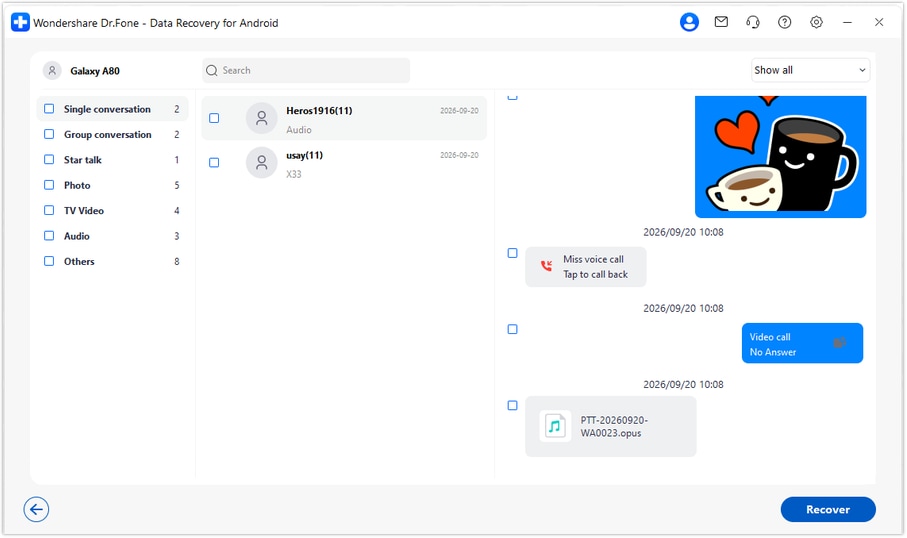
Step 5 Recover selected results to a computer folder
Click Recover, choose a folder on the PC and complete the save prompts. Check the saved records there. This recovery destination is the computer, not the Honor 80 GT's WhatsApp message database.




Conclusion
A deleted purchase conversation deserves a search that includes both the agreement and the files around it. For supported Honor 80 GT configurations, Dr.Fone - Data Recovery (Android) combines a no-backup WhatsApp scan, useful result previews and selective saving to your PC. Download Dr.Fone for Windows and begin the guided workflow to look for the messages, photos and attachments that clarify what was agreed.
FAQ
1. How can I recover deleted WhatsApp messages on Honor 80 GT without a backup?
Use the Windows Advanced Recovery workflow in Dr.Fone - Data Recovery (Android) if your exact configuration is supported. Select personal WhatsApp, scan the device, preview the available records and save selected items to your PC. A Google Drive backup is not required for this device-scan route.2. Does the AGT-AN00 reference confirm every Honor 80 GT firmware?
No. The supplied reference names Honor 80 GT (AGT-AN00), but Android and build are unspecified. Its multiple kernel entries do not establish supported Android/build pairings. Check the actual software and applicable recovery support before proceeding.3. Can I recover deleted WhatsApp photos, videos and receipt attachments?
Advanced Recovery provides WhatsApp conversation and attachment results for supported configurations. Inspect the available photo, video and other relevant categories, then save the items actually found. A recovered file does not establish that the surrounding deleted messages were also found.4. Should I uninstall WhatsApp to bring back the deleted chat?
Not as a step in this no-backup workflow. Reinstallation is not a substitute for missing backup data and is not part of the five-step device scan. Keep the existing app data in place and follow the supported connection instructions.5. Does PC recovery restore the conversation to WhatsApp?
No. You receive selected available records in the computer folder you choose. This mode does not write them back into WhatsApp, synchronize the chat or establish the authenticity of a purchase agreement.
 Add Wondershare Dr.Fone as a preferred source on Google





